Dolphin Anty Review 2026: Pricing, Fingerprint Tests and the Best Alternative
Try Gologin for free
Dolphin Anty is a browser for running many accounts, made in 2021 by marketer Denis Zhitnyakov for media buyers and affiliate teams. In our October 2026 test it passed Pixelscan and CreepJS but failed Iphey, which rated its profile Unreliable with a score of 50. It was also one of only two browsers already on the latest Chrome 154.
Dolphin’s new Starter plan is the cheapest way to get 20 or 30 profiles. From 100 profiles up, Gologin costs less on both monthly and yearly billing, and it passed all three fingerprint checkers.
Prices below were checked on both vendors’ sites on October 23, 2026. The fingerprint tests come from our test of 12 browsers, run on October 2, 2026.
Switching from Dolphin Anty? Gologin has a free plan with 3 profiles and a 7-day trial of every paid feature, no card required. See how switching to Gologin works →
Summary Table: Dolphin Anty vs Gologin
| Dolphin Anty | Gologin | |
|---|---|---|
| Pixelscan | ✅ Consistent, no proxy detected | ✅ Consistent, no proxy detected |
| Iphey | ❌ Unreliable (MX 50), 2 inconsistent fingerprint signals | ✅ Trustworthy (MX 100) |
| CreepJS: headless / tampering / “like headless” | 0% / 0% / 25% | 0% / 0% / 31% |
| Chrome engine on test day (latest: 154) | 154; a Firefox engine is also available | 152 (Orbita) |
| Median launch of a new profile | 5.6 s | 4.0 s |
| Free plan | Up to 5 profiles in the plan table (the sign-up banner says 3) | 3 profiles, forever |
| Free trial | No | 7 days of all features, no card required |
| Cheapest paid plan | Starter: $10/mo, $6/mo yearly (20 profiles) | Professional 10: $9/mo, $4.50/mo yearly |
| 100 profiles | Base: $89/mo, $53/mo yearly | $39/mo, $19.50/mo yearly |
| 1,000 profiles | Enterprise: $299/mo, $179/mo yearly | $179/mo, $89.50/mo yearly |
| Long-term discounts | 20% for 6–11 months, 40% for 12 months | 50% yearly |
| Team members | From Base; +$10, $20 or $25 per user a month | Profile and folder sharing from Professional 25 |
| API | From Starter, 1,500 requests/min | REST API, SDKs and MCP server from Professional 100 |
| Proxy traffic in paid plans | No; partner proxy providers built in | 2 GB residential from Professional 25 |
| Mobile | Mobile fingerprints on desktop; no mobile app | Native Android and iOS apps; cloud Android minutes in every plan |
| Support hours | 10:00–22:00 GMT+3 | 24/7 |
| Reviews | Trustpilot 2.5 (42), G2 4.7 (15) | G2 4.7, Capterra 4.6 |
| Company | Zhitnyakov Software Solutions Ltd, Cyprus | Gologin |
Choose Dolphin Anty if you run paid traffic with a team that already knows it, and you need 20 or 30 profiles on the cheapest plan, or a Firefox engine.
Choose Gologin if you need 100 profiles or more, a free plan and a real trial, proxy traffic in the plan, or a phone app.
Dolphin Anty: What’s Changed in 2026
Dolphin became popular among media buyers because it was made by one of them. Its tools follow their work: ad accounts, teams with roles, and fast routine actions. This year Dolphin changed in several ways:
- A cheap Starter plan. 20 to 60 profiles for $10 to $50 a month, now with the API, the scenario builder, the synchronizer and cloud sync.
- Chrome or Firefox. Every plan, the free one too, can run profiles on either engine.
- The latest Chrome. On our test day Dolphin was already on Chrome 154.
- New products around the browser. Dolphin{cloud} and Dolphin{parser} are integrated, and Dolphin{agent} is listed as “coming soon”.
- A Custom plan with no limit on profiles or users, priced per 100 or 1,000 profiles.
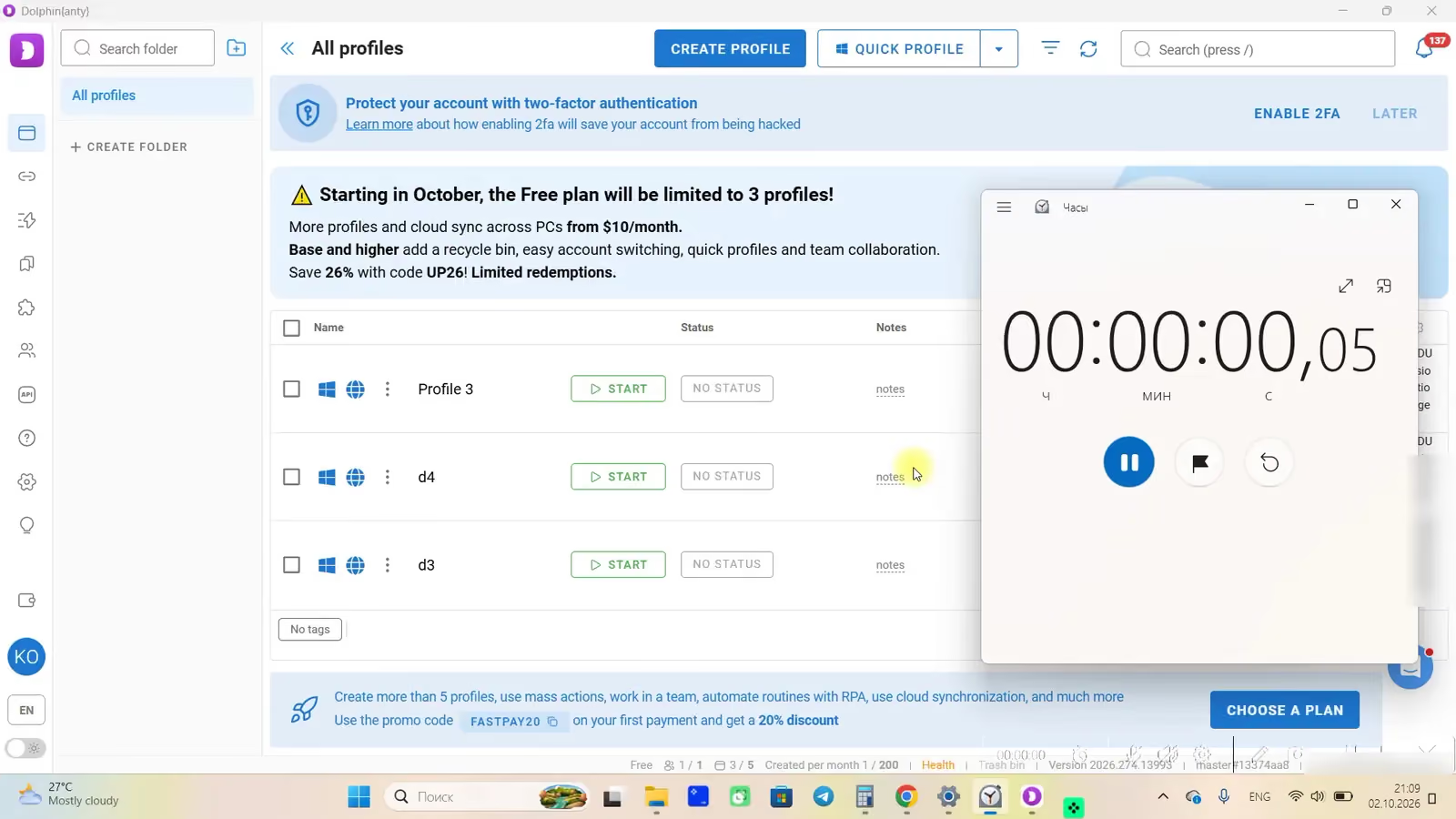
- A smaller free plan. It used to give 10 profiles. The plan table now says up to 5, and the sign-up banner says 3.
Dolphin Anty Key Features
Dolphin is built for one niche, paid traffic, and its best features serve it. Here are the ones that stand out next to Gologin.
Automation Scenarios and the Synchronizer
Dolphin used to have a special tool for running Facebook ad campaigns. It’s gone. In its place is a no-code scenario builder: you build automation from blocks, then copy it or pass it to teammates. A scenario store is listed as “coming soon”.
The synchronizer repeats your actions in one window across many profiles. Both tools are on every paid plan, Starter included, along with Selenium, Puppeteer and Playwright support and a local and remote API at 1,500 requests a minute.
UI and Bulk Actions
The interface hasn’t changed much: profiles in the center, many icons on the left bar and in the bulk actions bar. It’s logical once you learn it, but it can overwhelm a new user. Statuses, colors, notes, tags and folders help organize large lists, though most actions take several clicks and there is no drag and drop.
Bulk tools are strong. Every plan can import profiles in bulk, copy profiles with or without new fingerprints, and set tags, statuses, extensions, bookmarks and start pages for many profiles at once. Bulk launch and bulk proxy assignment start on Starter; bulk fingerprint change starts on Base. Bulk creation from a template is “coming soon”.
Many settings stay manual. In our earlier review, Dolphin didn’t pick the operating system from your computer when it created a profile; it showed a warning instead. Check the OS and time zone of each new profile.
Proxies
Dolphin supports HTTP, SOCKS4, SOCKS5 and SSH proxies, IP change by link, and a check against spam databases from Starter up. Partner proxy providers are built into the app, but no plan includes proxy traffic. Adding proxies is still less smooth than in Gologin, where one click creates a proxy for a profile.
Dual Browser Engine Support
Dolphin runs profiles on Chrome or Firefox on every plan. Gologin runs only on its own Chromium-based Orbita. A Firefox profile is useful on sites where a different engine helps, but most platforms see far more Chrome traffic, so Chrome stays the safer default.
Teamwork
Team tools are good but cost extra. Free and Starter have one user and can’t add more. From Base up you get user roles (Admin, Team Lead and User), shared profiles with permissions, and shared folders, proxies, scenarios, bookmarks and extensions. Each extra user costs $10 a month on Base, $20 on Team and $25 on Enterprise. Base also lets you switch between 2 Dolphin accounts, Team between 3 and Enterprise between 10.
Dolphin Anty: Comfort of Use
Dolphin expects you to know what you’re doing. The profile creation screen shows many settings at once, and much of the setup is manual. Affiliates who use it every day like exactly that: it is “as it is, clear and obvious”. For a newcomer, the learning curve is close to AdsPower’s.
If you know your workflow and are ready to pay for team seats, Dolphin is a solid choice for paid traffic. If you’re new to browsers for multiple accounts, Gologin is easier to start with.
Dolphin Anty: Updates Frequency
Dolphin updates often, and new versions show up in the app’s top right corner. It keeps its engine current: on our test day it was one of only two browsers on Chrome 154.
Stability is the common complaint. Recent Trustpilot reviews mention sessions that don’t keep cookies and API calls that failed after payment. Check long sessions on your own accounts before you rely on Dolphin for 24/7 work.
Dolphin Anty: Support Quality
Dolphin started in the Russian-speaking community, but today it has many users in Europe, Brazil and elsewhere. Support works from 10:00 to 22:00 GMT+3 in Russian, Ukrainian, English and Portuguese, mostly through the live chat, which also holds guides and docs. Outside those hours you wait. Personal managers are available from the Base plan up.
Reviews are mixed. Dolphin has a 2.5 TrustScore from 42 reviews on Trustpilot, where recent reviews complain about refunds, lost sessions and the API. On G2 it is rated 4.7 out of 5, but from only 15 reviews.
The 2022 data leak. In July 2022 Dolphin had a major leak of user data: about 15% of user profiles were stolen, and many users lost money from crypto wallets. Dolphin’s team compensated many of the affected users. We still believe users shouldn’t have to weigh the risk of leaks when they choose work software.
Fingerprint Test Results: Dolphin Anty vs Gologin
We tested Dolphin Anty together with 11 other browsers on the same Windows 11 laptop, on the same day, with a fresh residential US proxy from FloppyData for each browser. We made a new profile with default settings, added only the proxy, and opened Pixelscan, Iphey and CreepJS in that order. The full method is in our test of 12 browsers.
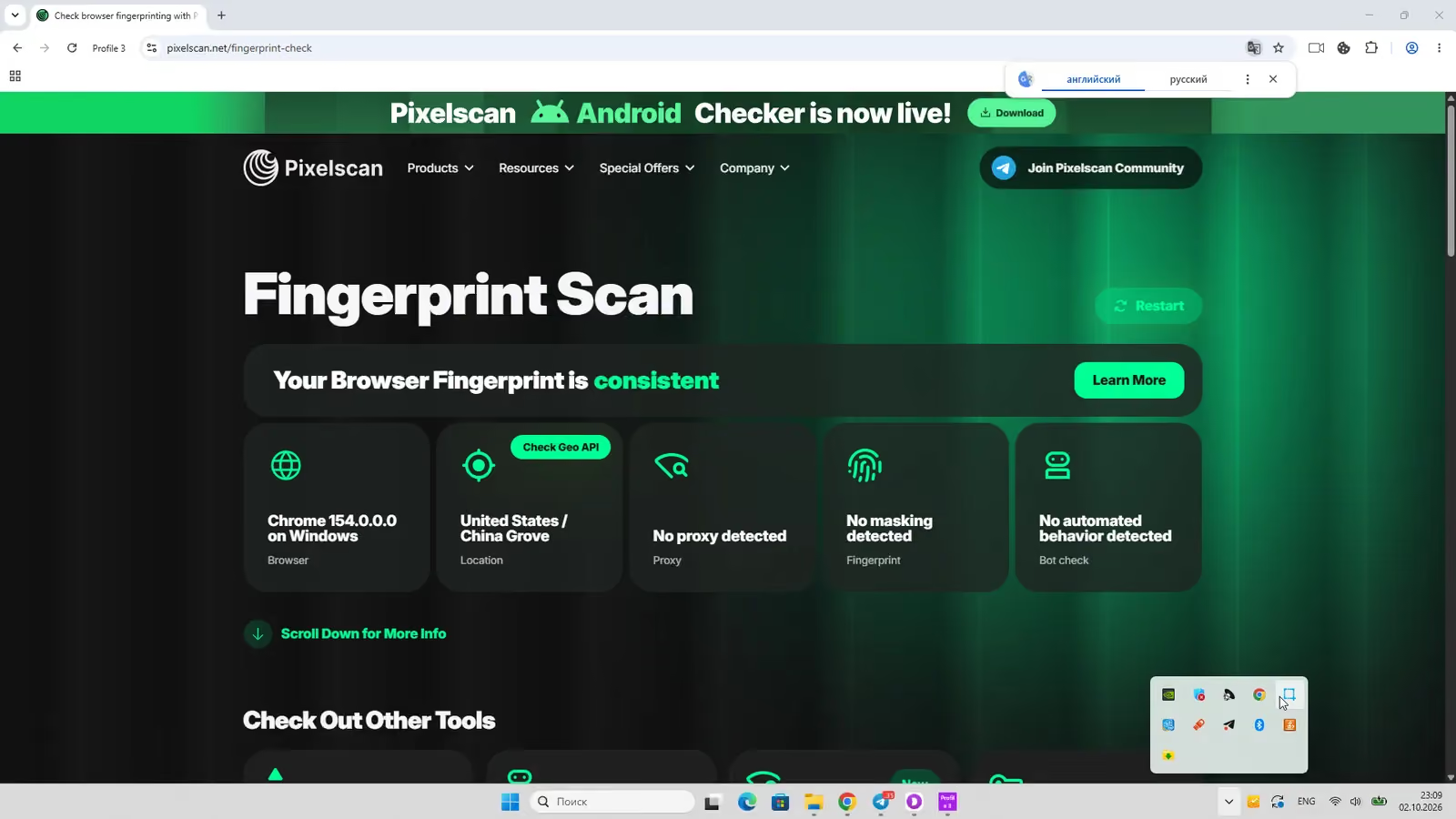
Pixelscan: consistent
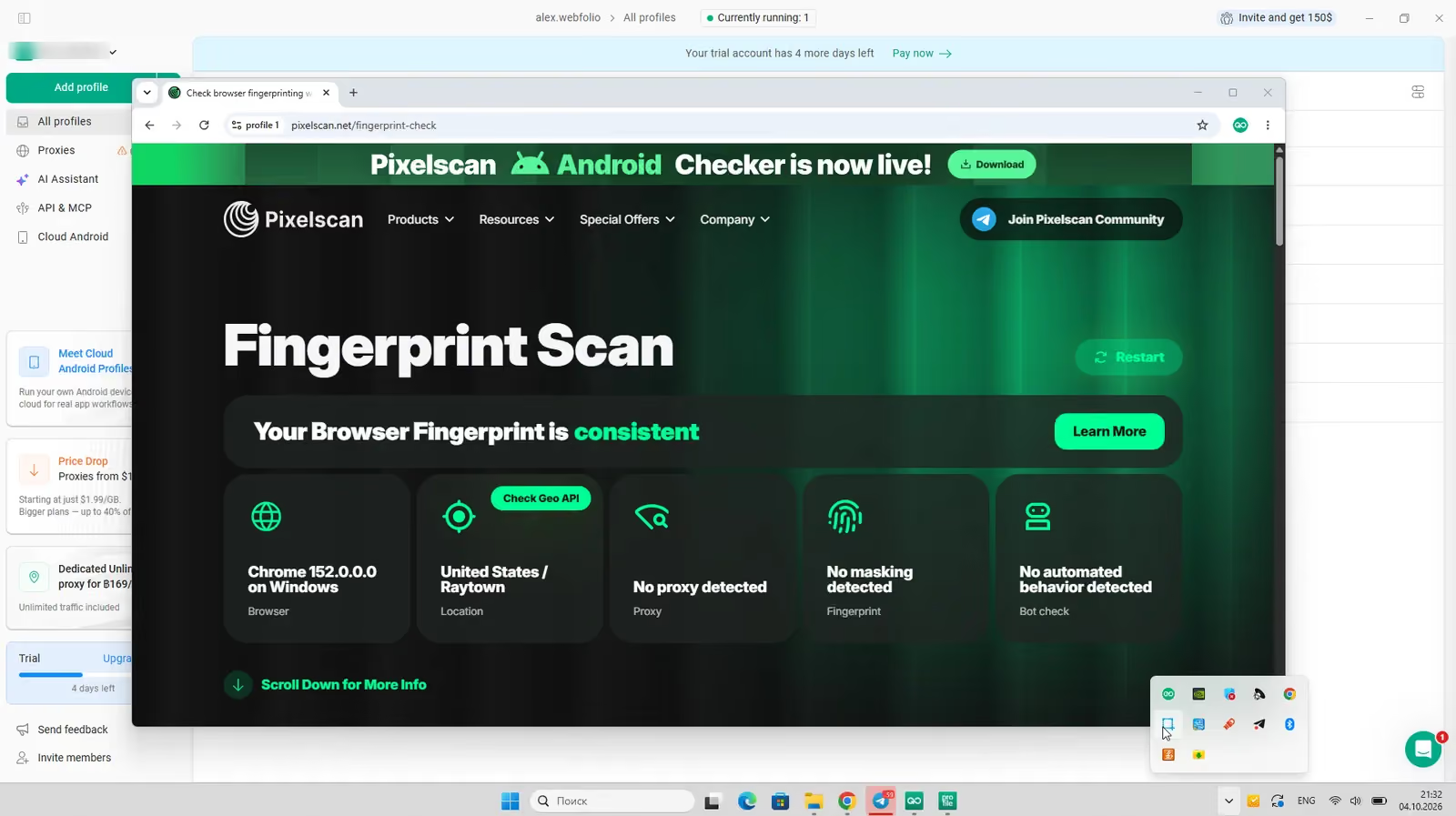
Pixelscan rated Dolphin’s fingerprint consistent and found no proxy. This fixed the problem from our previous test.
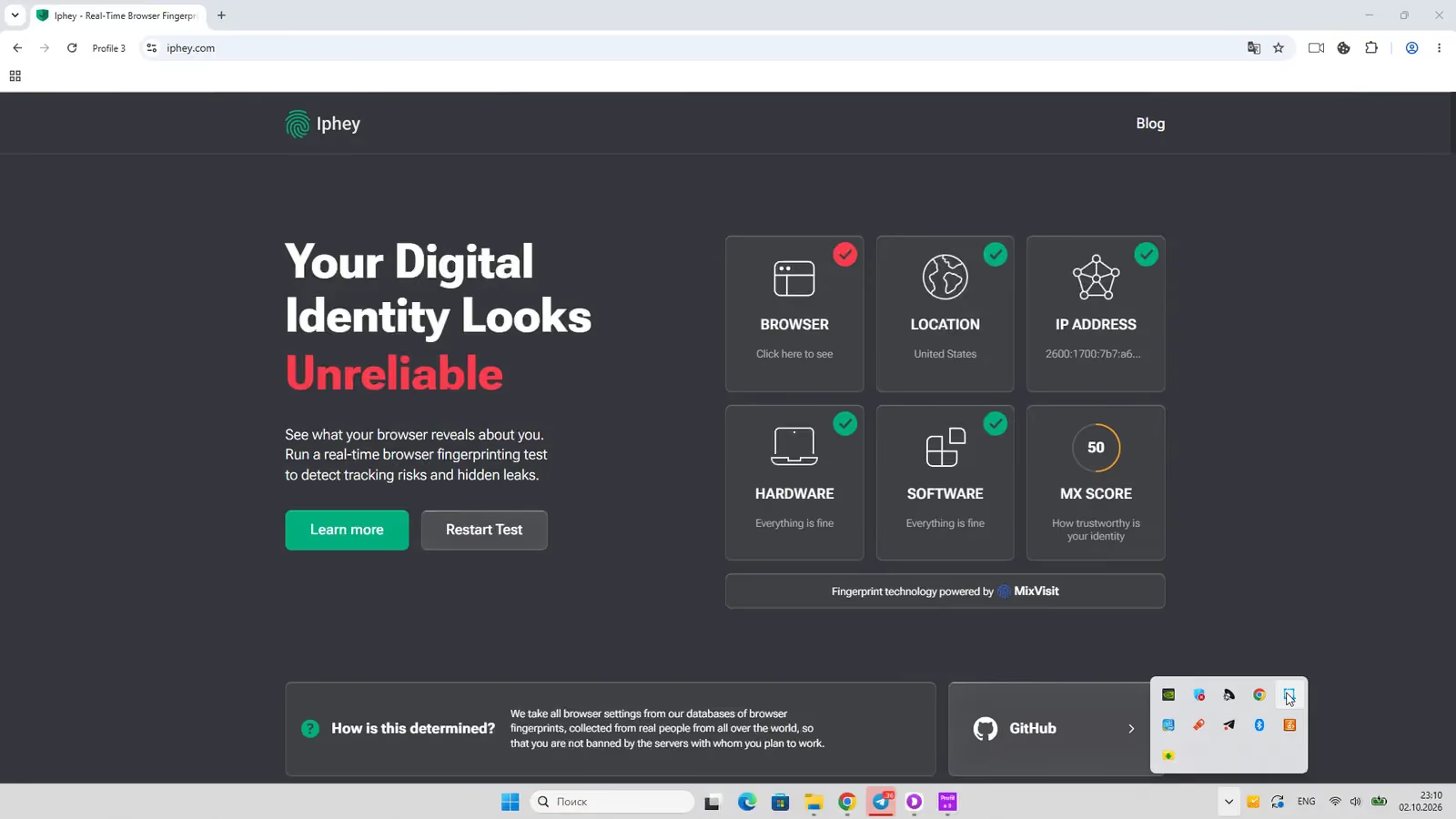
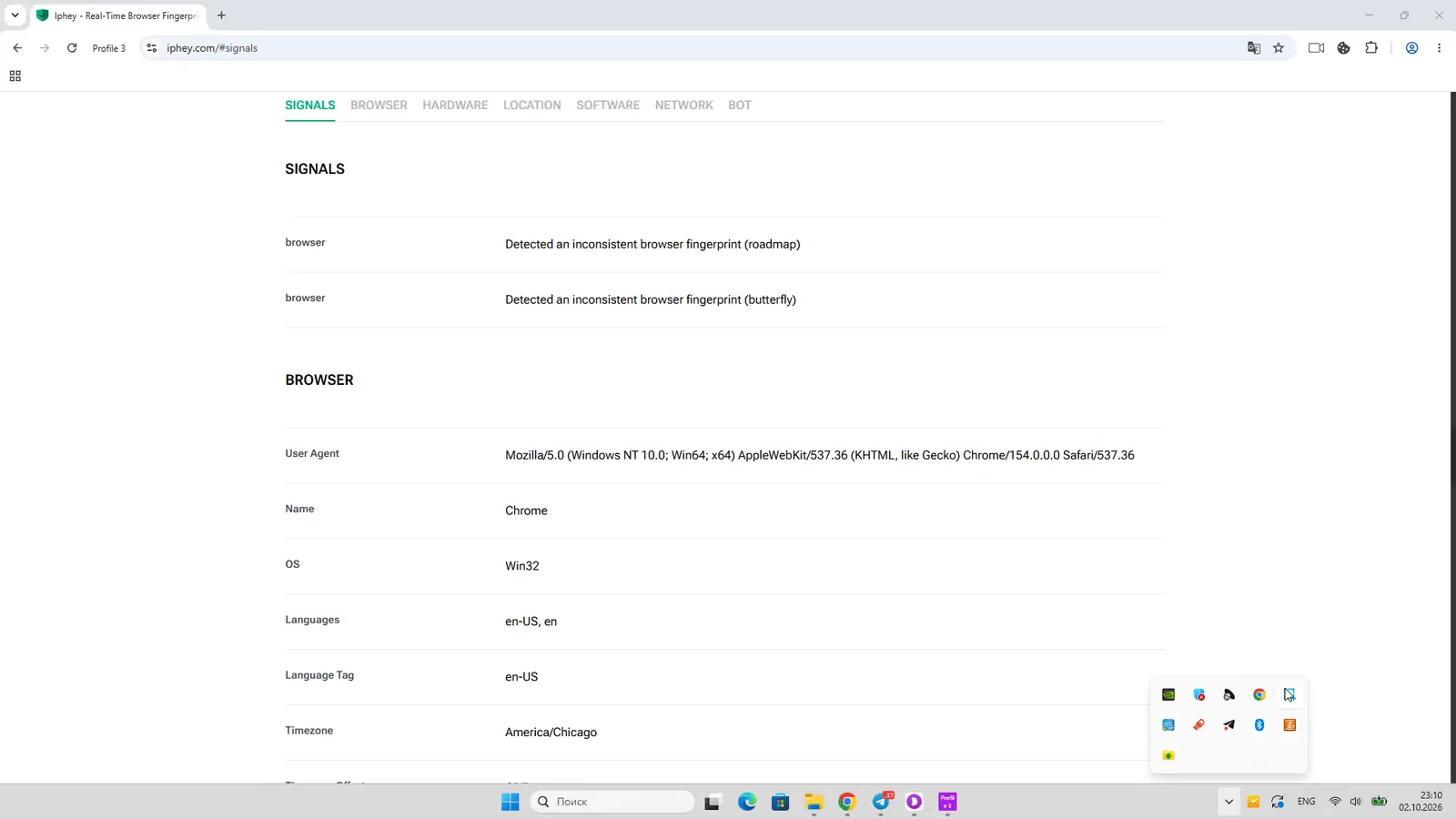
Iphey: Unreliable, MX score 50
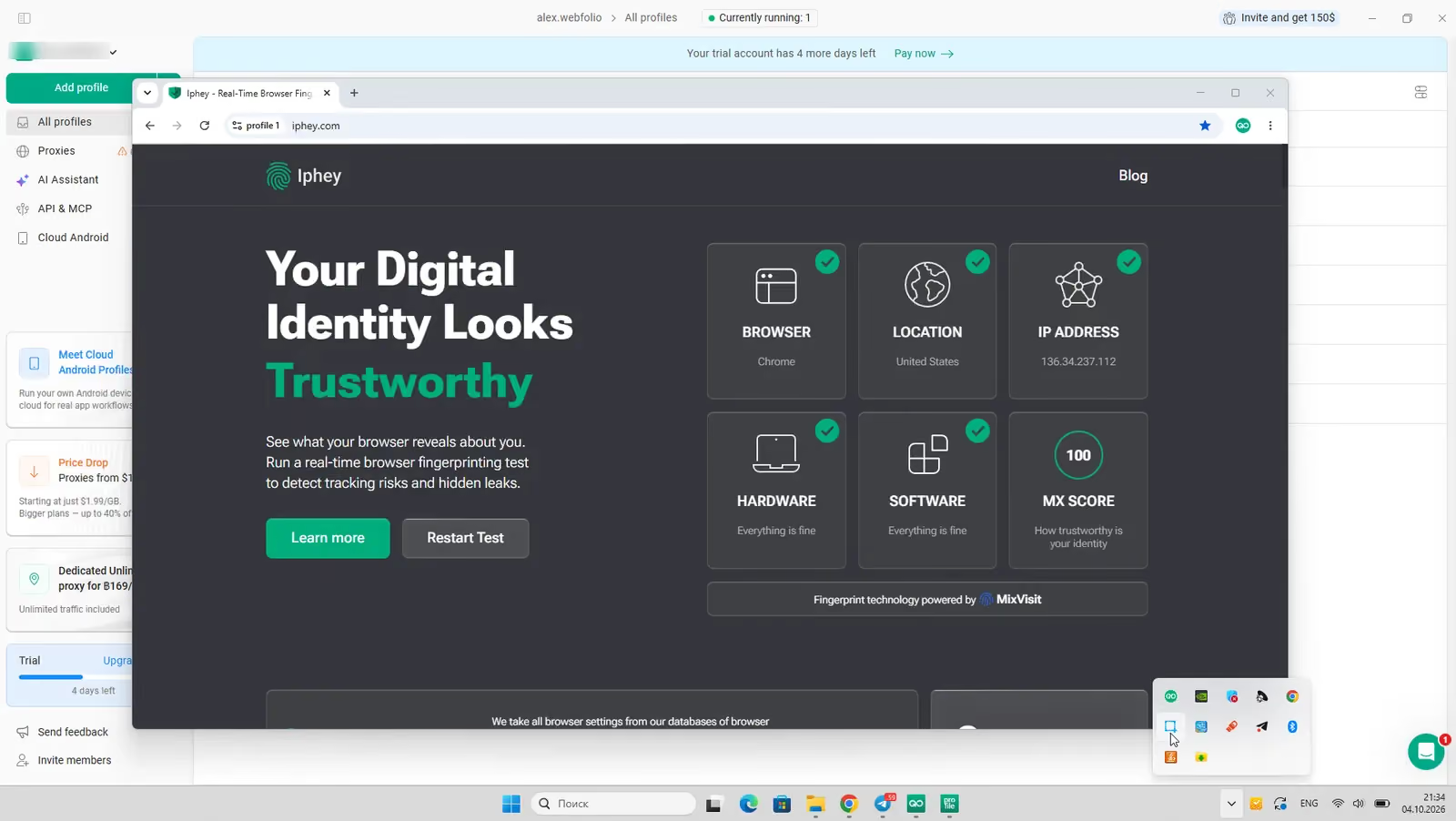
Iphey found two inconsistent browser fingerprint signals and rated the profile Unreliable with a score of 50 out of 100. That is the kind of mismatch a platform’s anti-fraud system can see.
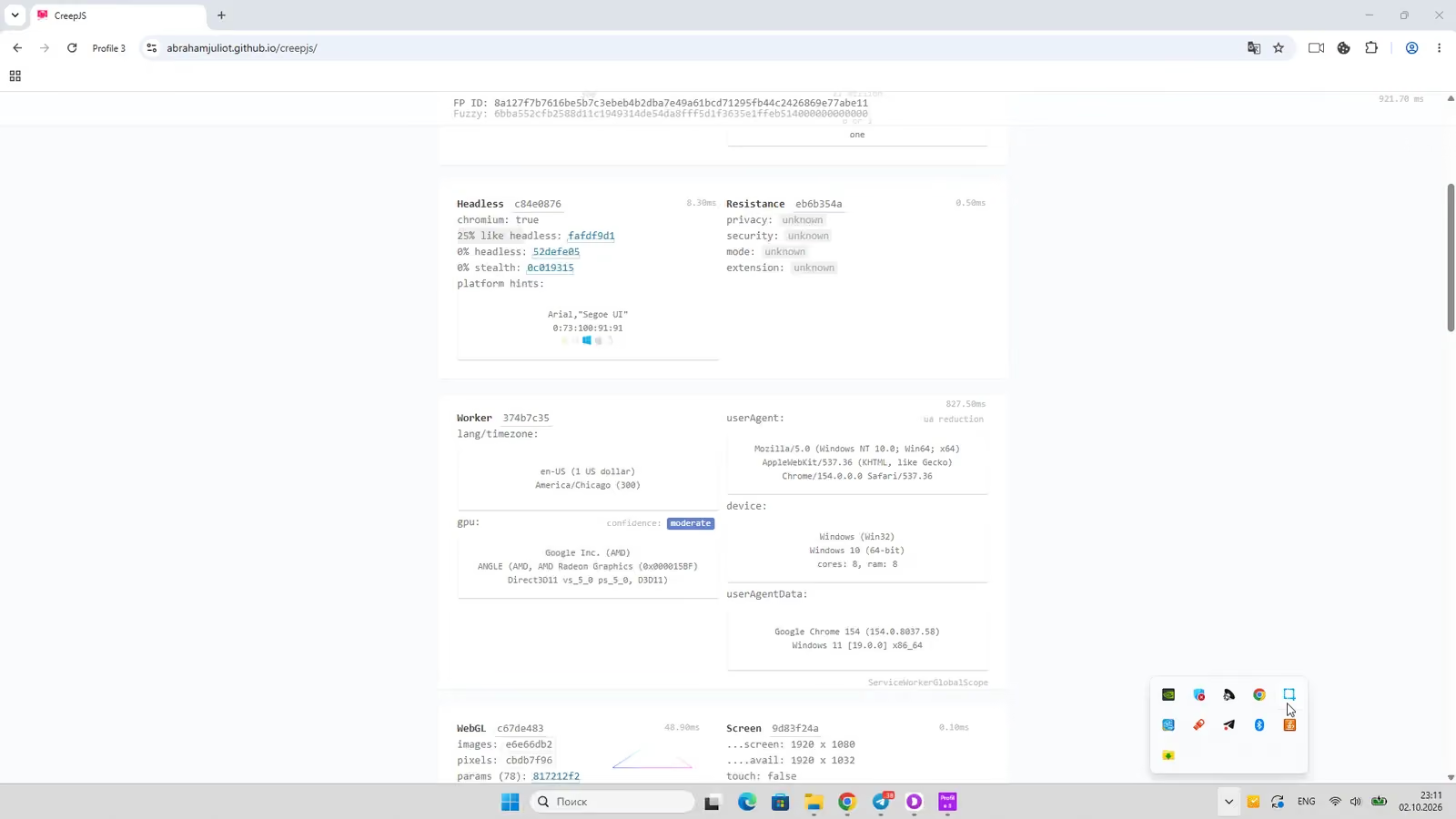
CreepJS: clean
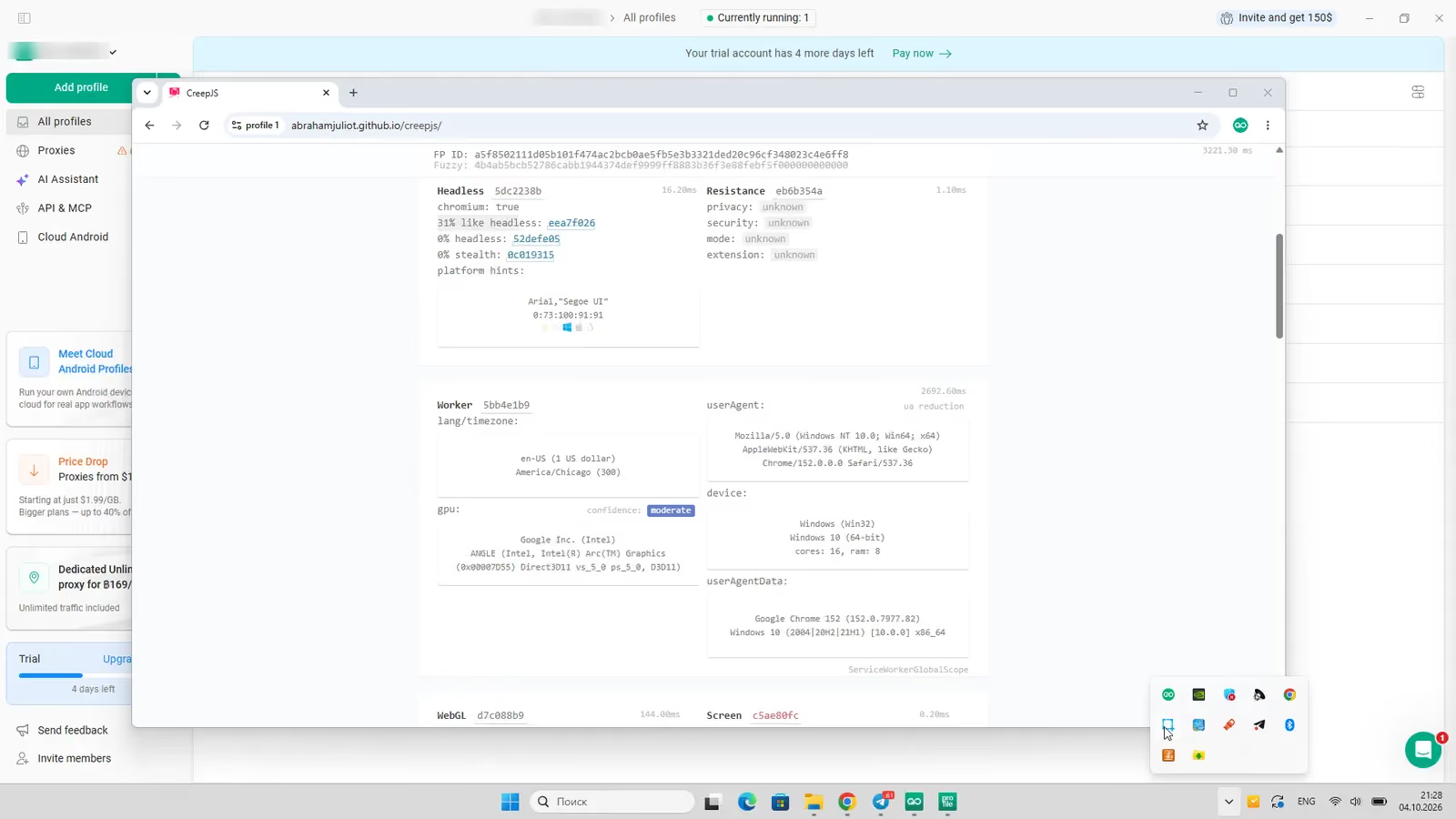
CreepJS, the strictest of the three, found no headless or tampering signals (0% and 0%) and caught no lies. The softer “like headless” score was 25%, the same as most browsers in the test.
Engine and launch speed
Dolphin reported Chrome 154, the latest stable version on the test day. Three launches took 6.6, 4.6 and 5.6 seconds, slower than the 3 to 4 seconds in our previous test.
How Gologin did in the same test
Gologin passed all three checkers. Pixelscan rated the profile consistent with no proxy detected, Iphey gave it Trustworthy with a score of 100, and CreepJS found no headless, tampering or lie signals. Time zone, language and location matched the proxy IP with no manual setup. Its median launch was 4.0 seconds.
To be fair about our own weak spots: Gologin’s “like headless” score was 31%, higher than Dolphin’s 25%, and its Orbita engine was on Chrome 152, two versions behind Dolphin.
A clean result doesn’t make a browser invisible. It means no checker found a problem with these settings on that day. Run your own profiles through the checkers with the proxy you will actually use.
Gologin Browser as the Best Dolphin Anty Alternative
Gologin is more universal than Dolphin. It’s simple enough for a new user and strong enough for large teams. Here is a quick tour, then the prices.
Gologin Features and Comfort of Use
Gologin’s strong side is a clean interface. Creating a profile or adding a proxy takes one click each, and bulk proxy import is just as quick. Most settings are automatic, so a new user can’t break a fingerprint by accident, while experienced users still get full control.
Beyond the browser, Gologin includes:
- Built-in residential, mobile and datacenter proxies in 195 countries, with 2 GB of residential traffic a month from Professional 25
- Native apps for Android and iPhone that sync with desktop profiles, and cloud Android minutes on every plan
- A cloud browser you can open from any device, from Professional 50
- Profile and folder sharing for teams, with no password sharing
- A synchronizer, Cookie Bot, a REST API, SDKs and an MCP server for AI agents from Professional 100, plus Puppeteer, Playwright and Selenium support
Gologin Support Quality
Support works 24/7 through live chat, email, Messenger, WhatsApp and Telegram, and chat replies usually come within 5 minutes. A dedicated API developer answers technical questions. Gologin is rated 4.7 on G2 and 4.6 on Capterra.
Gologin Updates Frequency
Gologin updates the app and its Orbita engine often, and updates install automatically. Users often name stable 24/7 work, not only the price, as their reason to move from Dolphin to Gologin.
Dolphin Anty vs Gologin: Pricing
Free Plans and Trials
Dolphin has a free plan but no trial of paid features. Its plan table says the free plan includes up to 5 profiles; the sign-up banner on the same page says 3. The free plan has no API, scenario builder, synchronizer or cloud sync.
Gologin has a free plan with 3 profiles that never expires and a 7-day trial of every paid feature, no card required.
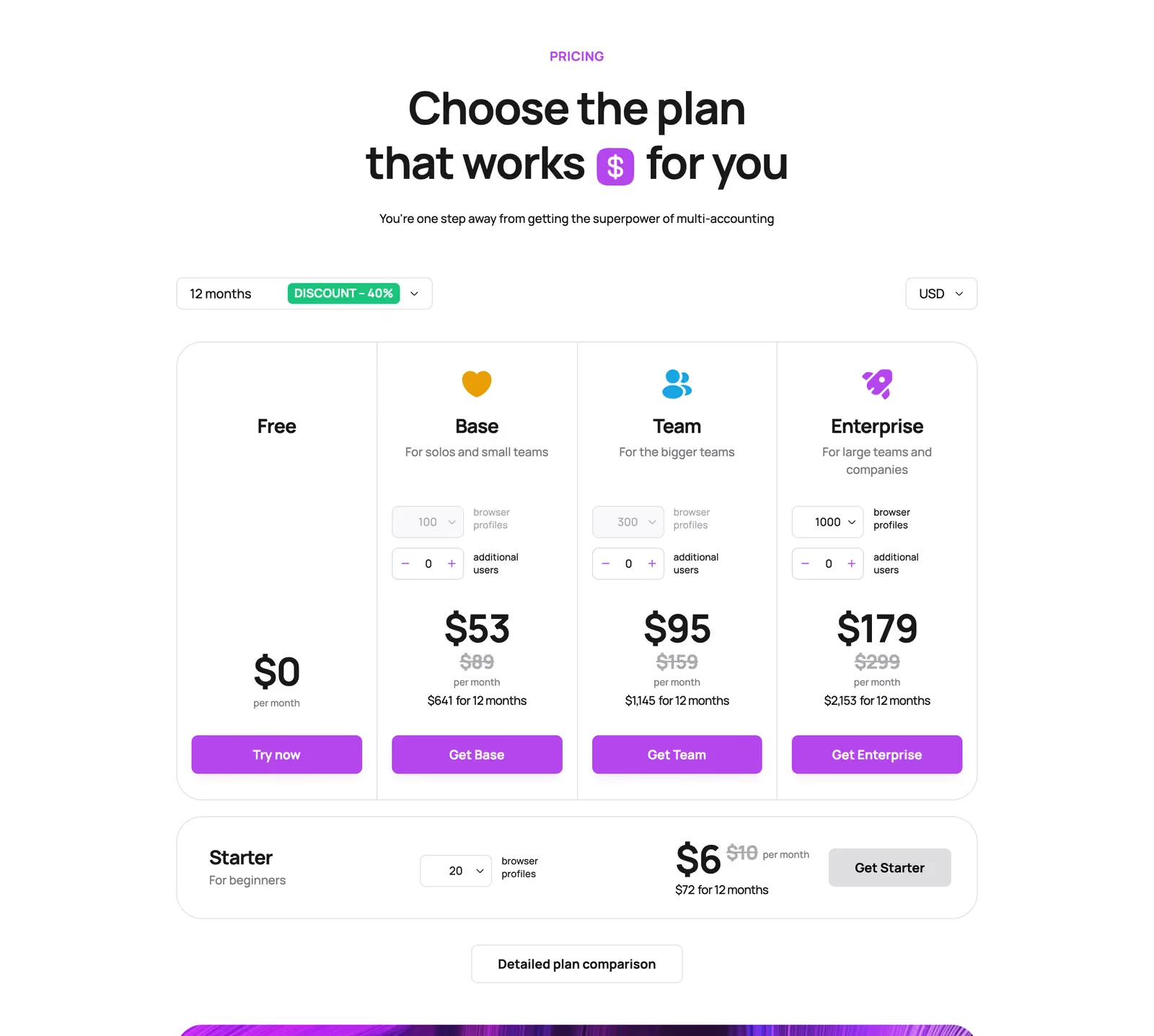
Dolphin Anty Prices in 2026
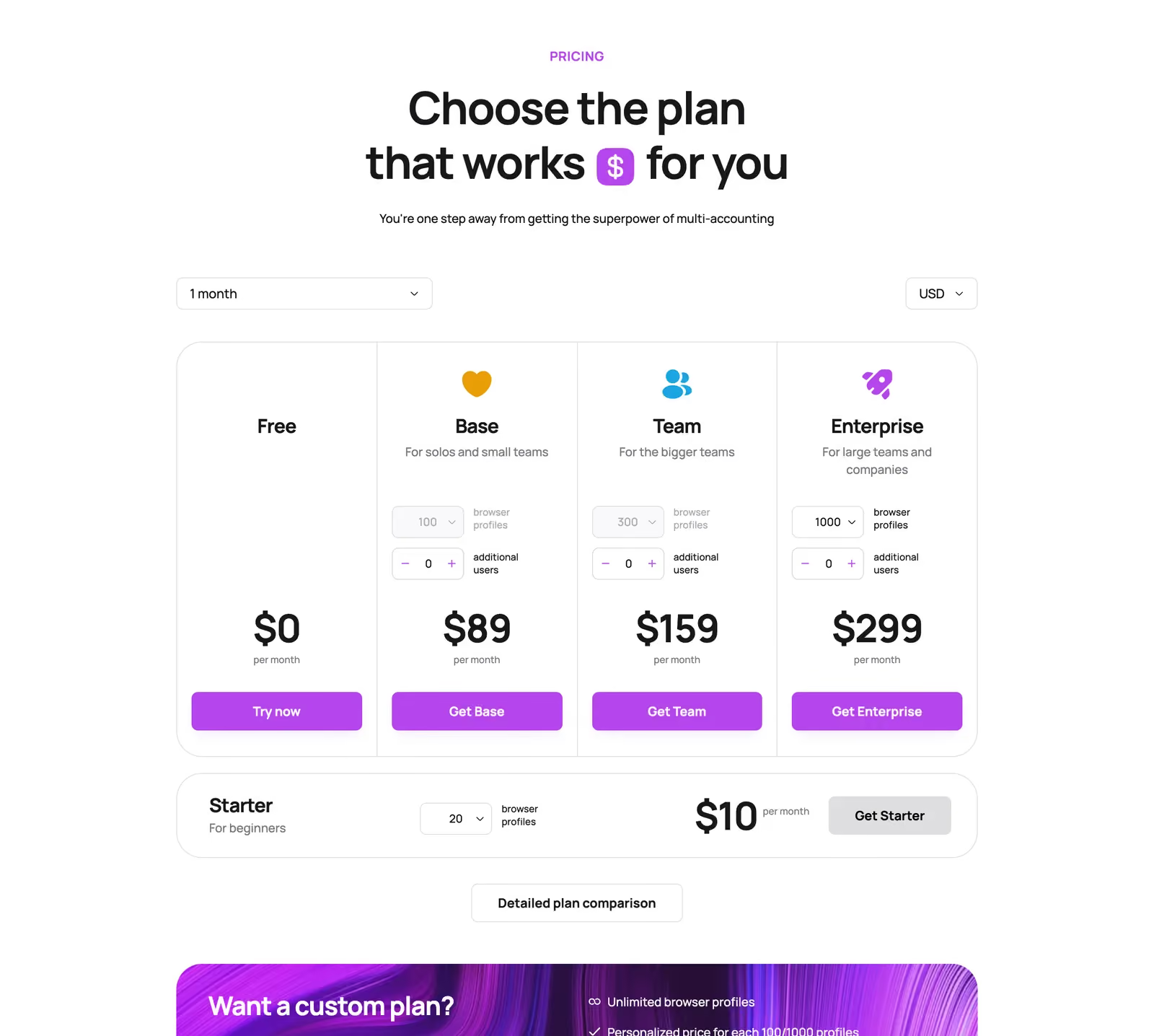
Prices from Dolphin’s pricing page on October 23, 2026. Paying for 6 to 11 months saves 20%, and 12 months saves 40%.
| Dolphin plan | Profiles | Monthly | 12 months (per month) | Extra user | API |
|---|---|---|---|---|---|
| Free | Up to 5 | $0 | $0 | Not available | No |
| Starter | 20 | $10 | $6 | Not available | 1,500 RPM |
| Starter | 60 (max) | $50 | $30 | Not available | 1,500 RPM |
| Base | 100 | $89 | $53 | +$10/mo | 1,500 RPM |
| Team | 300 | $159 | $95 | +$20/mo | 1,500 RPM |
| Enterprise | 1,000 | $299 | $179 | +$25/mo | 1,500 RPM |
| Enterprise | 2,000 | $508 | $305 | +$25/mo | 1,500 RPM |
| Custom | No limit | Personal price | Personal price | No limit | — |
Starter adds 10 profiles for each $10. Base and Team can’t buy extra profiles; Enterprise grows in steps of 1,000, up to 50,000.
Gologin Prices in 2026
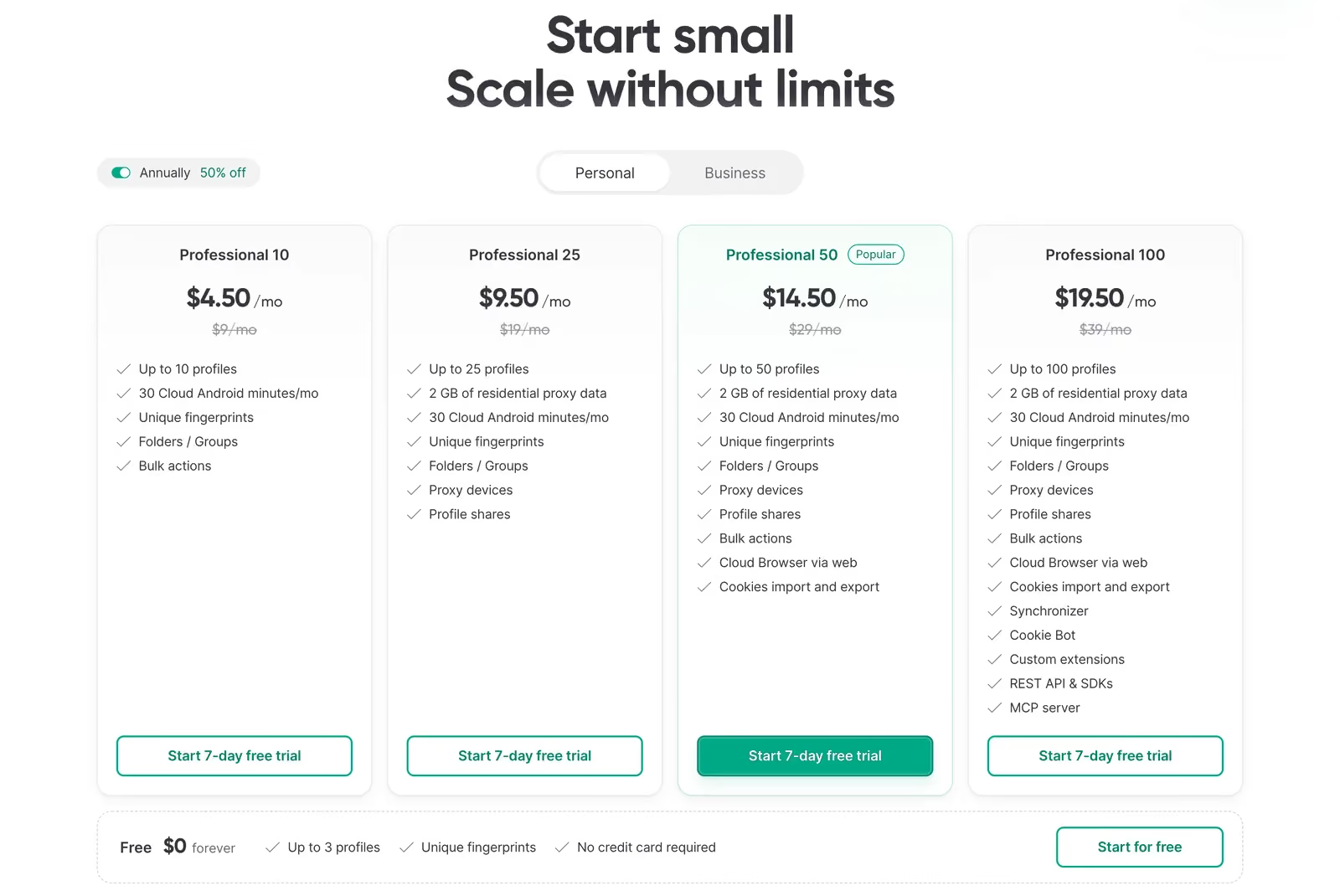
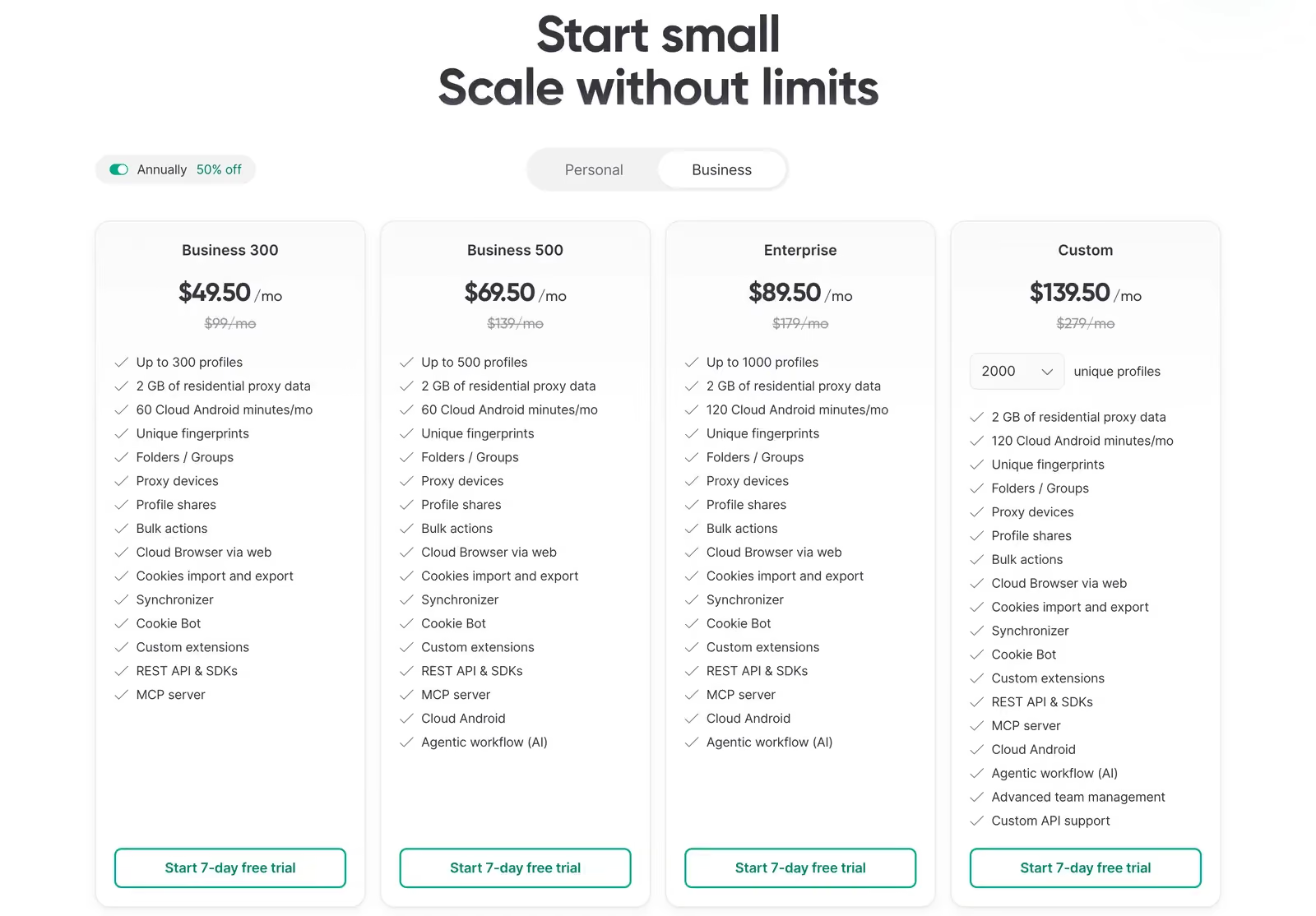
Prices from Gologin’s pricing page on October 23, 2026:
| Gologin plan | Profiles | Monthly | Yearly (per month) | Proxy traffic | Cloud Android min/mo |
|---|---|---|---|---|---|
| Free | 3 | $0 | $0 | — | — |
| Professional 10 | 10 | $9 | $4.50 | — | 30 |
| Professional 25 | 25 | $19 | $9.50 | 2 GB | 30 |
| Professional 50 | 50 | $29 | $14.50 | 2 GB | 30 |
| Professional 100 | 100 | $39 | $19.50 | 2 GB | 30 |
| Business 300 | 300 | $99 | $49.50 | 2 GB | 60 |
| Business 500 | 500 | $139 | $69.50 | 2 GB | 60 |
| Enterprise | 1,000 | $179 | $89.50 | 2 GB | 120 |
| Custom | 2,000+ | from $279 | from $139.50 | 2 GB | 120 |
Profile shares start on Professional 25. The cloud browser and cookie import and export start on Professional 50. The synchronizer, Cookie Bot, REST API and MCP server start on Professional 100.
Personal Use
For 20 or 30 profiles, Dolphin’s Starter plan is the cheapest: 20 profiles cost $10 a month, and Gologin’s nearest plan, 25 profiles, costs $19. From 40 profiles Gologin catches up: 50 profiles cost $40 on Dolphin Starter and $29 on Gologin.
At 100 profiles the picture flips. Dolphin Base costs $89 a month, and Gologin Professional 100 costs $39 with 2 GB of proxy traffic. On yearly plans it’s $53 against $19.50.
Team Use
Dolphin Team costs $159 a month for 300 profiles, and each user beyond the first adds $20. Gologin Business 300 costs $99. At 1,000 profiles, Dolphin Enterprise costs $299 plus $25 per extra user, and Gologin Enterprise costs $179.
Price for the Same Number of Profiles
| Profiles | Dolphin plan | Dolphin monthly | Dolphin 12 months (per month) | Gologin monthly | Gologin yearly (per month) |
|---|---|---|---|---|---|
| 10 | Starter (20) | $10 | $6 | $9 | $4.50 |
| 20 / 25 | Starter (20) | $10 | $6 | $19 (25) | $9.50 (25) |
| 50 | Starter (50) | $40 | $24 | $29 | $14.50 |
| 100 | Base | $89 | $53 | $39 | $19.50 |
| 300 | Team | $159 | $95 | $99 | $49.50 |
| 500 | Enterprise (1,000) | $299 | $179 | $139 | $69.50 |
| 1,000 | Enterprise | $299 | $179 | $179 | $89.50 |
| 2,000 | Enterprise | $508 | $305 | $279 | $139.50 |
The short version: Dolphin is cheaper for 20 profiles. Gologin is cheaper for 10, 50 and every size from 100 up, on both monthly and yearly billing. Dolphin’s extra users add $10 to $25 a month each on top.
Dolphin Anty Pros and Cons
Pros
- Passed Pixelscan and CreepJS; on the latest Chrome 154
- Chrome or Firefox engine on every plan
- Cheap Starter plan with the API, scenario builder and synchronizer
- Strong bulk actions and team roles
- Built-in partner proxy providers
Cons
- Failed Iphey: Unreliable, score 50
- No trial; the free plan got smaller
- From 100 profiles up, more expensive than Gologin, and extra users cost $10 to $25 a month each
- No proxy traffic in plans, no mobile app
- Support only from 10:00 to 22:00 GMT+3
- A 2.5 TrustScore on Trustpilot and a major data leak in 2022
Dolphin Anty Alternatives in 2026
All of these took part in our October 2026 test:
| Alternative | Pixelscan / Iphey / CreepJS | Paid from | Best for |
|---|---|---|---|
| Gologin | Passed all three | $9/mo, $4.50/mo yearly | Clean fingerprints at a low price, free plan, Android and iOS apps |
| Octo Browser | Passed all three | €10/mo, €7/mo yearly (3 profiles) | Teams that want the newest Chrome engine |
| AdsPower | Failed Pixelscan and Iphey | $9/mo, $5.40/mo yearly | No-code RPA |
| Multilogin | Failed Iphey (90) | $149/year | Larger teams with enterprise needs |
| MoreLogin | Failed Iphey (90) | $9/mo, $5.40/mo yearly | Small budgets with cloud phones |
| GeeLark | Failed Iphey (90) | $9.75/mo yearly | Cloud Android phones for TikTok |
How to Switch from Dolphin Anty to Gologin
- Export cookies from the Dolphin profiles you want to keep, and save your proxy list.
- Download Gologin and create an account. The 7-day trial unlocks every feature, no card required.
- Create profiles in bulk and import the cookies. Cookie import and export is available from Professional 50.
- Paste your proxy list into the Location column, or use Gologin’s built-in proxies. Time zone, language and location are set from each proxy IP.
- Open Pixelscan in one profile to check that the IP and fingerprint match before you log in to your accounts.
Dolphin Anty Browser vs Gologin: Recap
In the end the choice comes down to what you need. These questions help:
- How many browser profiles do you need now and in six months?
- Will you share work with a team or partners, and how many seats will that take?
- How much are you ready to pay for the browser, seats and proxies together?
- What do reviews and forums say about each tool?
- Can you test it for free with the proxies you will actually use?
Gologin has a free plan and a 7-day trial for that last step.
FAQ
What is Dolphin Anty?
Dolphin Anty is a browser for running many accounts from one computer, each in its own profile with its own fingerprint and proxy. It was made in 2021 by Denis Zhitnyakov for media buyers and affiliate teams. The company, Zhitnyakov Software Solutions Ltd, is registered in Cyprus.
How much does Dolphin Anty cost in 2026?
Starter costs $10 a month for 20 profiles and up to $50 for 60. Base costs $89 a month for 100 profiles, Team $159 for 300 and Enterprise $299 for 1,000. Paying for 12 months saves 40%. Each extra user costs $10 to $25 a month.
Is Dolphin Anty free?
Dolphin has a free plan: up to 5 profiles in its plan table, 3 in its sign-up banner. It has no API, scenario builder or synchronizer, and Dolphin has no trial of paid features. Gologin’s free plan has 3 profiles forever, plus a 7-day trial of everything.
Is Dolphin Anty detectable?
In our October 2026 test Dolphin passed Pixelscan and CreepJS but failed Iphey, which found two inconsistent fingerprint signals and rated the profile Unreliable with a score of 50. Gologin passed all three checkers in the same test.
Can I find a Dolphin Anty promo code?
Dolphin runs promotions on its social media and Telegram channel, and its support can tell you about current deals. If you’re considering Gologin instead, start with its free plan or 7-day trial.
Is there a Dolphin Anty Android app?
No. Dolphin is available for Windows, macOS and Linux, and desktop profiles can use mobile fingerprints. Gologin has native apps for Android and iPhone that sync with desktop profiles, plus a cloud browser you can open from any device.
Can I automate Dolphin Anty with Selenium?
Yes. From the Starter plan, Dolphin supports Selenium, Puppeteer and Playwright through its local and remote API, at 1,500 requests a minute. Gologin supports the same tools, with a REST API, SDKs and an MCP server from Professional 100.
Is Dolphin Anty safe?
Dolphin is a legitimate tool, but it had a major user data leak in July 2022, when about 15% of user profiles were stolen and many users lost money from crypto wallets. Dolphin compensated many of them. Keep wallets in separate profiles and use two-factor login whatever browser you choose.