Best Proxy Browsers: The Ultimate Top 14 Rating Free & Paid

Are you seeking the optimal way to bypass organization/school or regional restrictions and access certain websites and apps?

In this list, we compare 14 simple proxy browser tools so you can choose the right fit for your use case. You don’t need deep technical knowledge or any budget to get started with these options.

TL;DR: Scroll to the end of the article for the brief comparison table.
How To Choose A Proxy Browser

When checking out a proxy service on our list or elsewhere, keep these considerations in mind:

  • Reliability. If you plan to use a proxy browser regularly, avoid proxy sites. They often go down due to lack of proper maintenance and overloaded servers (because they are free). You will have to constantly look for new proxy websites.
  • Privacy level. If you’re worried about the risks of being discovered, select a proxy browser that hides your digital fingerprint, not just your location. Or at least use paid proxies to avoid looking suspicious.
  • Platform support. On some devices and local networks, you cannot download applications or extensions. In this case, go with a proxy web browser that you can use inside your default browser.

Pro tip: check your protection level with such free tools as Cover Your Tracks. Paste the link in a proxy browser of choice and run the test.

14 Best Proxy Browsers In 2025

All these proxy browsers will help you unblock the necessary websites. However they have different privacy levels and some of them can be used for multiple use cases aside from accessing websites.

1. GoLogin

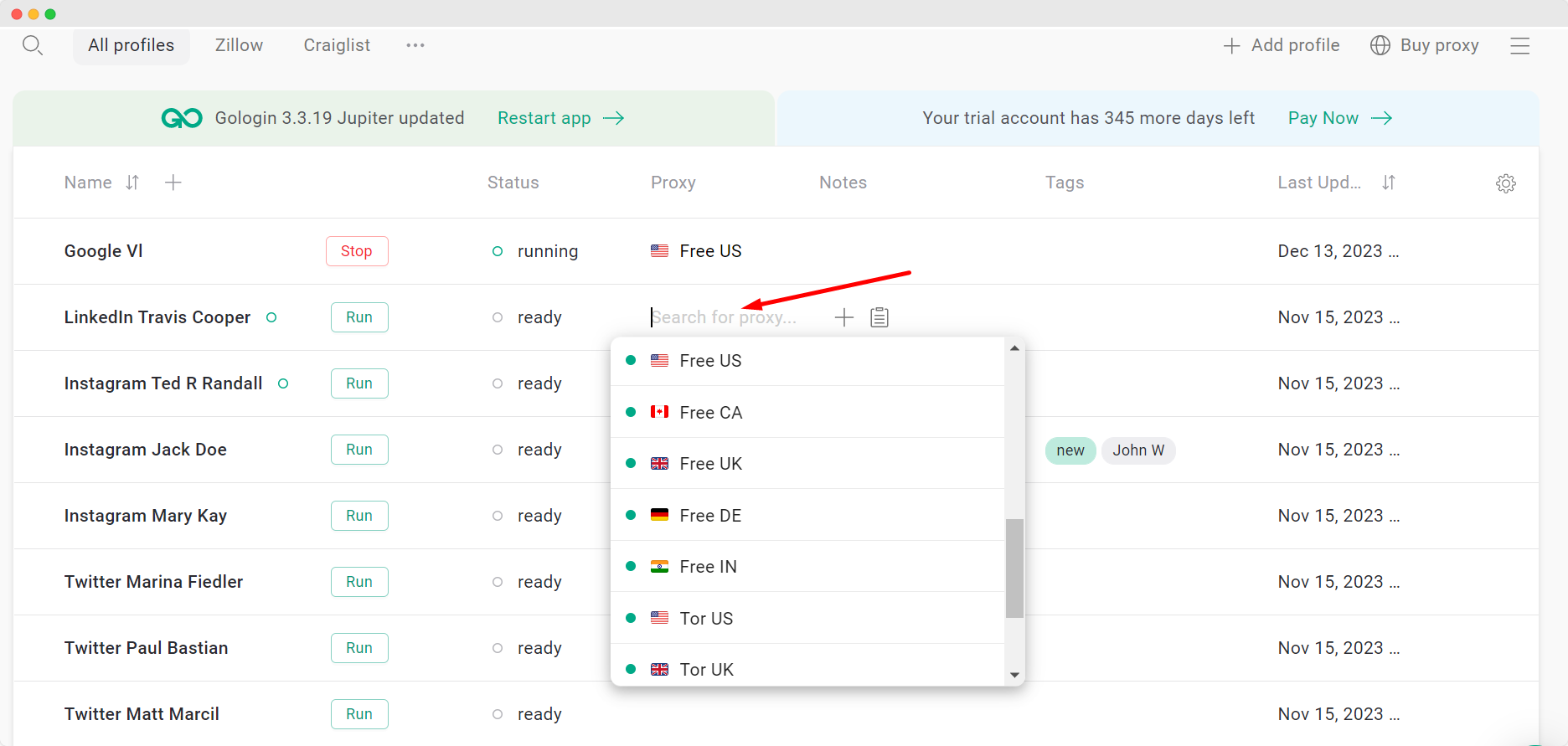
GoLogin is one of the best proxy browser with anti-detection features. It not only grants access to desired websites but also ensures privacy. This includes encrypting your online traffic and disguising your digital fingerprint, making you appear not suspicious to systems.
proxy browser

This distinguishes it from the Tor browser and standalone shared proxies that may be treated as a red flag.

Encrypted traffic is necessary if you want to avoid network administrators being able to check what URLs you have visited.

While antidetection technology not only protects your IP address (as most other proxy browsers for free do), but also your other browser characteristics too. It means without the technology systems and websites can track who browses such websites.

Unlike other browsers, including Tor, GoLogin offers a web version that lets you use the app in any browser without a download.

Features:

  • 10 free built-in proxies
  • 3 free browser profiles with unique digital fingerprints and easy switching
  • The opportunity to buy more reliable proxies right in the app
  • One-click mass proxy import

Use cases:

  • You need to unblock websites regularly
  • You don’t want somebody to know what websites you visit when bypassing restrictions
  • You struggle to bypass restrictions with other proxy browsers
  • You need multiple profiles on a certain website, e.g. for eCommerce, social media.


Platform support:
Windows, Mac, Android, Linux, web app.
Free plan: Free forever plan with no ads. You can use free proxies or buy more reliable ones – prices start at $5-10.

Download Gologin for free and manage multiple accounts without bans!

2. 1Browser

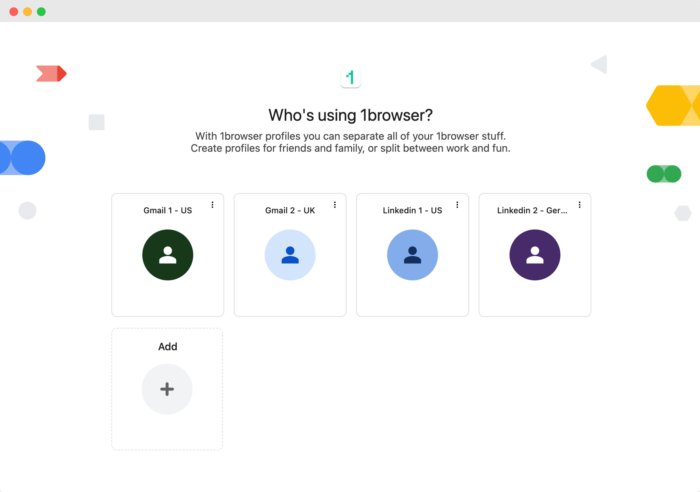
1Browser is a powerful proxy browser tailored for users seeking maximum privacy, security, and flexibility. One of its standout features is the ability to create fully isolated browsing profiles. Each profile operates independently, with no data, cookies, or browsing history shared between them. This makes it ideal for managing multiple accounts across platforms, as if each session is running on a separate machine.
1browser

In addition, 1Browser offers seamless integration with proxies and VPNs, allowing users to easily change their IP address and simulate being in different locations around the world. This is especially useful for bypassing geo-restrictions, accessing region-specific content, or conducting research in different markets.

Key features include:

  • Complete profile isolation: Each profile behaves as if it’s on a separate device, preventing data cross-leakage.
  • Proxy and VPN compatibility: Quickly switch between locations and IP addresses for enhanced anonymity.
  • Customizable browsing experience: Add extensions and tailor the interface for personalized usage.
  • Enhanced data security: Built-in features to safeguard your browsing activity from prying eyes.
  • Multi-tasking efficiency: Ideal for users who manage several accounts or require different browsing sessions simultaneously.

Whether for marketing professionals, social media managers, or privacy-conscious users, 1Browser offers a comprehensive solution for secure, versatile, and anonymous browsing.

3. Smartproxy X Browser

Smartproxy X Browser is also a browser with anti-detect features including unique fingerprints for a browser profile and traffic encryption. It is a side product from Smartproxy, which has a good reputation in the proxy world.

Compared to GoLogin you have to set up proxy settings for each browser profile manually. This process is not only tricky for non-technical individuals but also poses a risk if not done correctly, potentially compromising your privacy and security.

Features:

  • Unlimited browser profiles with unique digital fingerprints
  • One-click mass proxy import
  • Specifically designed to fit Smartproxy proxies.

Use cases:

  • You need to unblock websites regularly
  • You don’t want somebody to know what websites you visit when trying to bypass restrictions
  • You need multiple profiles on a certain website, e.g. for eCommerce, social media.
  • You need extra layer of safety or easier switching on your Smartproxy use

Platform support: Windows, Mac.
Free plan: Free if you have a Smartproxy subscription (starts at $7).

Read more: X Browser VS GoLogin: Antidetect Browser Review And Comparison

4. Tor Browser

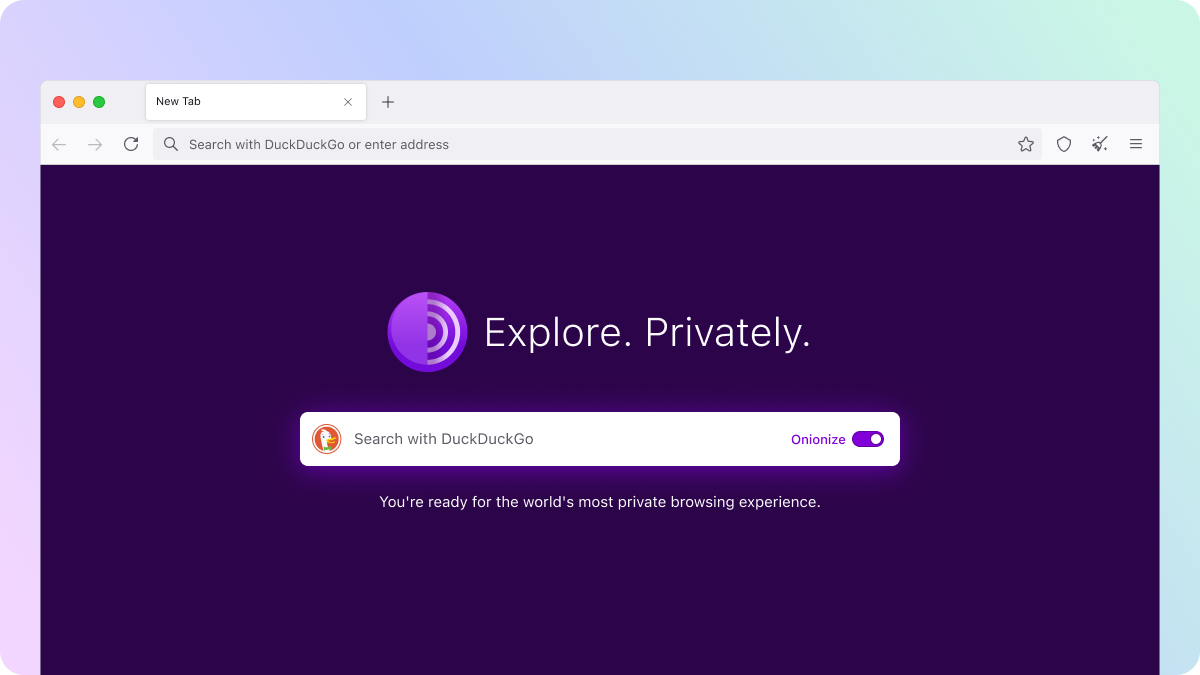
Tor is a free proxy browser with built-in privacy features. So you don’t need to set up proxies.
proxy browser unblocked

However, when you utilize Tor, it becomes evident to network administrators that you are concealing something. Tor gives away its browser core to network admin. Furthermore, some countries ban and prohibit Tor browsers. So, in the end you would need a GoLogin proxy browser to even use Tor 🙂

Features:

  • Multi-layered encryption ー your browsing data is encrypted several times, giving more security
  • Cookies, cache, and browsing history are not shared between websites
  • It clears cookies and browsing history after each session, and discourages the use of tracking cookies.

Use cases:

  • Regional restrictions if Tor is available in your country
  • Access .onion websites, available only in Tor
  • Dark web use.

Platform support: Windows, Linux, macOS, and Android.
Free plan: Tor is free.

5. Hide.me Proxy Browser

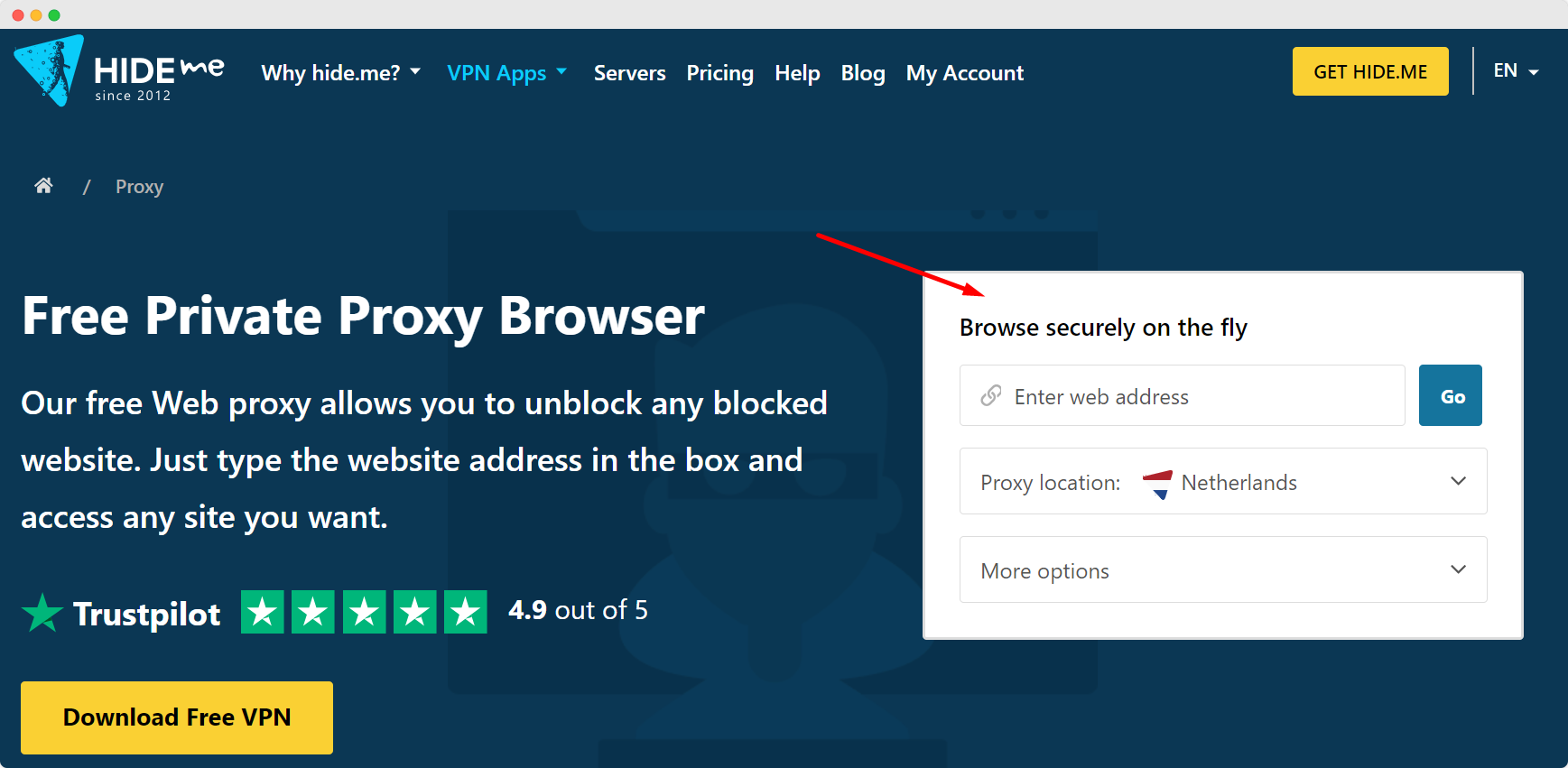
Hide.me proxy browser is a proxy website browser from a VPN provider. You just head over to their website and paste the link you need to unblock.
proxy browser

Features:

  • 3 free proxies
  • Page encryption
  • URL encryption
  • Not sharing cookies.

Use cases: A simple way to sometimes use blocked websites with a moderate level of privacy.
Platform support: Web app.
Free options: Fully free.

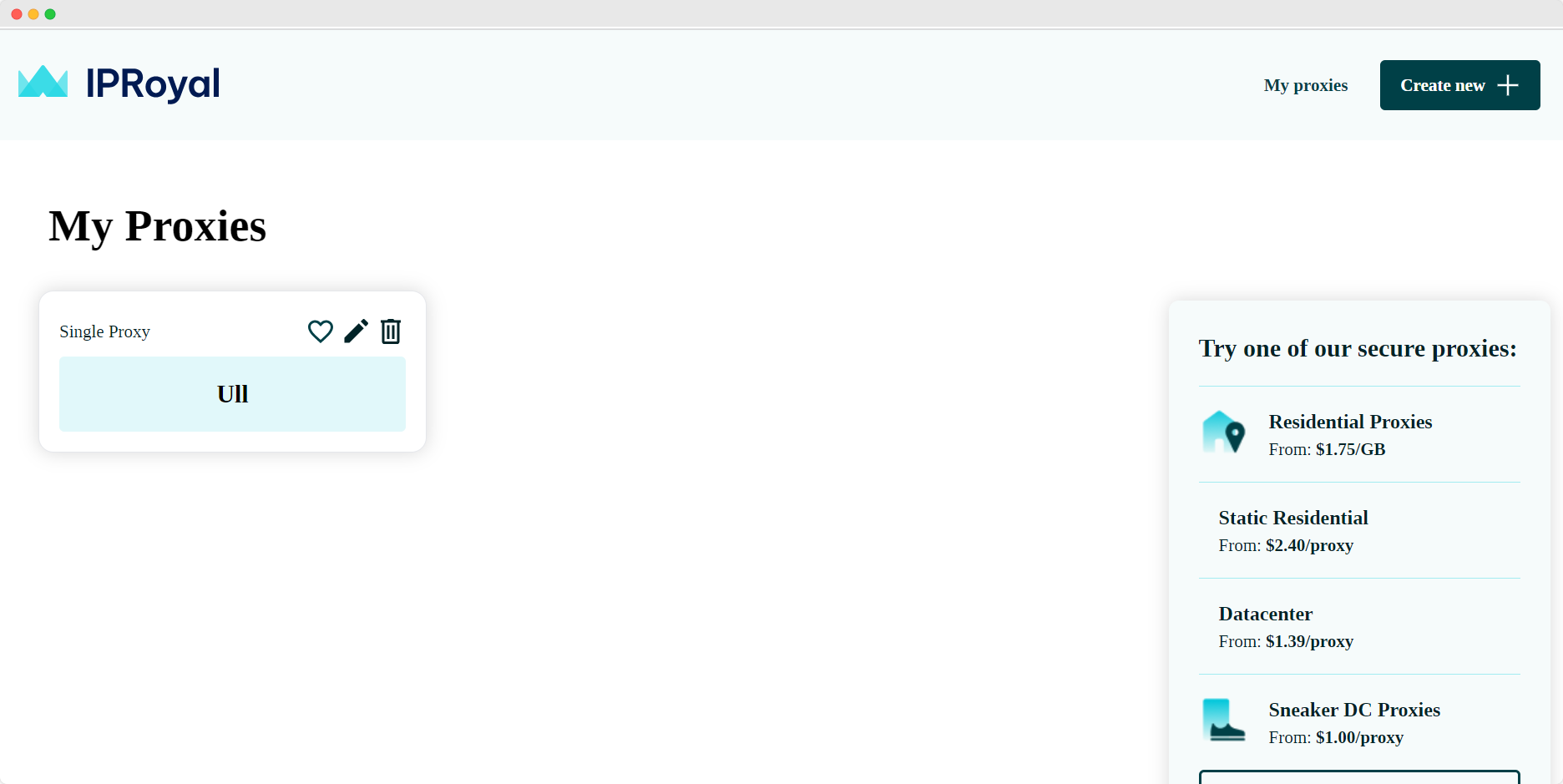
6. IPRoyal Proxy Browser Extension

proxy browser

IPRoyal is a browser web proxy extension that turns your default browser into a proxy browser. It is a proxy manager that enables you to easily use and switch between different proxies from IPRoyal and other sources.

Features:

  • Multiple proxy profiles and easy switching
  • Supports any proxy provider
  • Proxy settings
  • No need to change OS settings.

Use cases:

  • Switching between multiple profiles
  • Regional restrictions
  • Secure browsing on public Wi-Fi.

Platform support: Firefox and Chrome extensions.
Free plan: Free to use, but you need to buy their proxies or paste proxy free from third-party sources.

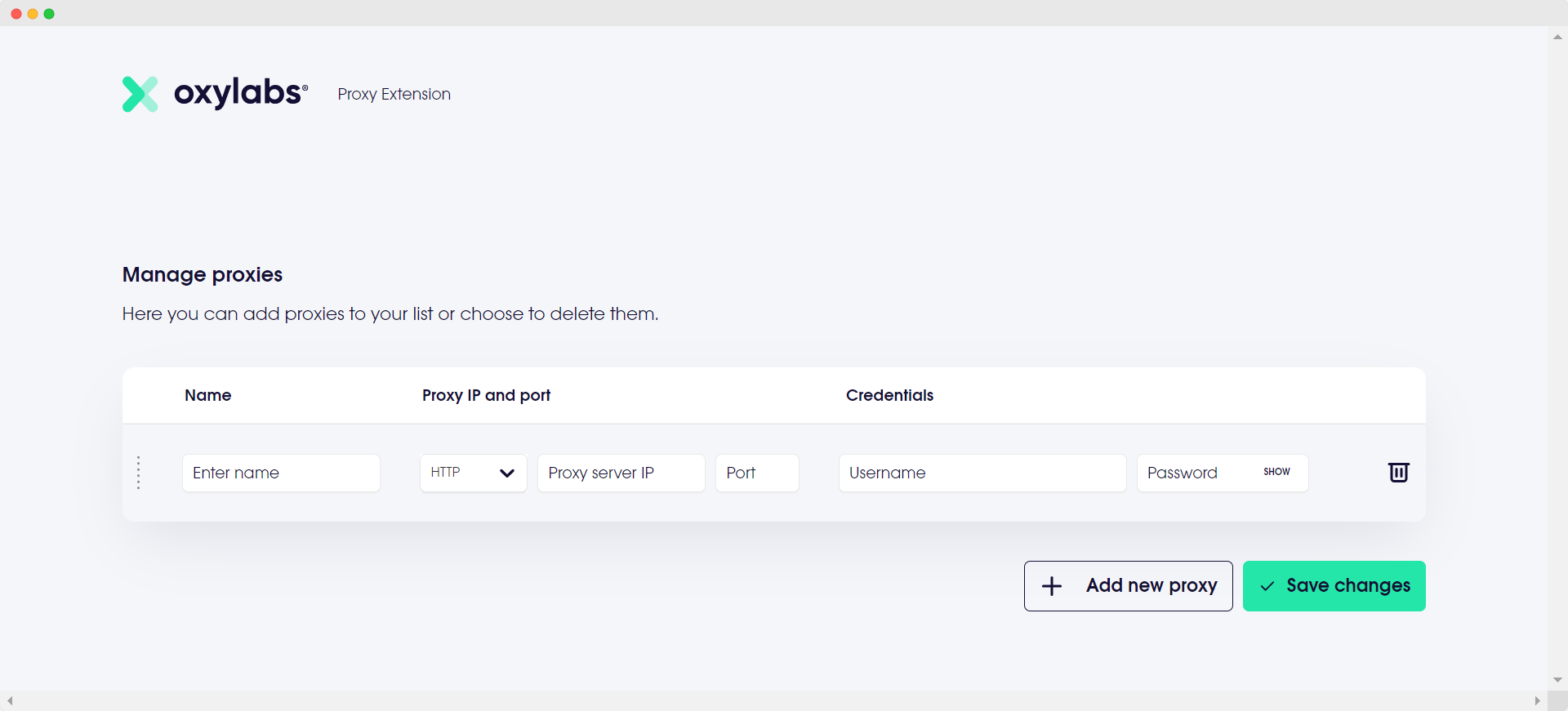
7. Oxy Proxy Browser Extension

proxy browser

Oxy Proxy is a browser proxy manager similar to the previous option that comes with an Android app.

Features:

  • Multiple proxy profiles and easy switching
  • Supports any proxy server provider
  • Proxy settings
  • No need to change OS settings
  • For users of Oxylabs Residential Proxies, easy changes to Oxylabs Residential Proxy sessions are possible without editing usernames.

Use cases:

  • Switching between multiple profiles
  • Frequent proxy changes
  • Regional restrictions
  • Avoiding IP bans and blacklisting.

Platform support: Android app and Chrome extension.
Free options: Free to use, but you need to buy their proxies or paste free proxies from third-party sources.


8. Epic Privacy Browser

Epic browser

A Chromium-based, privacy-first browser that ships with a one-click encrypted proxy and aggressive anti-tracking defenses.

Features:

  • Encrypted proxy (7 global exits) built in—toggle per-tab or browser-wide.
  • Blocks ads, third-party cookies, myriad fingerprinting vectors and cryptomining scripts out of the box.
  • Always-on private mode: history, cache and cookies are wiped on exit; HTTPS preferred by default.

Use cases:

  • Quick paywall/geo-restriction bypass without a separate VPN.
  • Everyday browsing for users who want Chromium speed minus Google tracking.

Platform support:
Windows, macOS, Android, iOS/iPadOS.

Pricing:
100 % free (proxy included).

9. Aloha Browser

Aloha Browser

Mobile-first browser that layers an unlimited VPN/proxy, ad-blocker and file-manager onto a privacy-centric core—now in public desktop beta.

Features

  • One-tap free VPN; Premium unlocks 80 + exit locations, device-wide mode and always-on protection.
  • Built-in ad blocker, HTTPS-only switch, passcode/Face ID tab lock and VR/360° media player.
  • Zero-log policy independently audited by Leviathan Security.

Use cases

  • Secure browsing on public Wi-Fi or school networks.
  • Streaming/P2P downloads on phones thanks to background download manager.
  • Lightweight desktop “second browser” for instant region switching.

Platform support
Android, iOS/iPadOS, Windows & macOS (desktop beta).

Pricing
Free tier with unlimited VPN; Premium $7.99 / month or $69.99 / year.

10. Opera (desktop & Android)

opera browser

A mainstream browser that bakes in a no-log, unlimited VPN alongside ad-blocking and an AI assistant—no account required.

Features

  • Free, unlimited in-browser VPN (three regions, >100 servers).
  • Tracker- & ad-blocker, sidebar messengers and “Aria” AI chatbot on desktop.

Use cases

  • Casual unblocking of news or socials where full anti-fingerprint tech isn’t needed.
  • Travelers who want an all-in-one browser with privacy extras on hotel Wi-Fi.

Platform support
Windows, macOS, Linux, Android (iOS build lacks VPN).

Pricing
Browser VPN is free; optional VPN Pro (device-wide, up to 6 devices) $4 / month, 7-day trial.

11. Brave Browser + Firewall & VPN

The open-source Brave browser adds an audited, system-level VPN/firewall that protects up to 10 devices under one subscription.

Features

  • 300 + servers in 40 + regions, strict no-logs, Guardian-backed firewall, and integrated ad-/tracker-blocking “Shields.”

Use cases

  • Power users who already rely on Brave’s Shields but need full-device tunnelling.
  • Remote teams juggling multiple devices and regions.

Platform support
Windows, macOS, Android, iOS (Linux “coming soon”).

Pricing
7-day trial, then $9.99 / month or $99.99 / year.

12. Proxyium

proxyium

A slick, browser-based proxy with four free exit nodes—and an optional paid network boasting 10 M + IPs in 150 + countries.

Features

  • SSL-encrypted web proxy (Poland/France, US, Singapore, Germany) with permalink sharing and no download caps.
  • Paid tiers add residential/datacenter/mobile IPs, browser extension and API.

Use cases

  • One-off site unblocking without installing software.
  • Marketers/scrapers who may scale up to a large proxy pool under the same dashboard.

Platform support
Runs in any modern desktop/mobile browser; Chrome extension available.

Pricing
Web proxy: Free | Advanced proxies: from $1 / month (datacenter) or pay-as-you-go $3.50 / GB (residential) with 3-day 200 MB trial.

13. CroxyProxy

An online “proxy-browser” engineered to render modern sites—including YouTube—inside an encrypted session.

Features

  • Full HTML5/JS support, YouTube & streaming capable, shareable proxy links and Chrome/Chromium extension for 1-click access.

Use cases

  • Watching videos or socials on locked networks (schools, offices).
  • Sharing an instant unblocked URL with friends or colleagues.
  • Chromebook or Android users who can’t run a full VPN client.

Platform support
Any browser/OS; official Chrome extension.

Pricing
Free service (ad-supported) | Premium $3.50 / month for ad-free faster servers and extra regions.

14. ProxySite

ProxySite

A long-running free web proxy offering 30 + US/EU servers on a gigabit backbone—plus an optional device-wide VPN.

Features

  • Quick-select server list, SSL for any site, presets for YouTube/Facebook and a no-signup Chrome extension using AES-256.

Use cases

  • Bypassing corporate or government filters for casual browsing or streaming.
  • Instant IP masking inside Chrome without a desktop VPN install.
  • Location-specific content testing from multiple US/EU endpoints.

Platform support
Web-based (all browsers) + free Chrome extension; no standalone mobile apps.

Pricing
Web proxy & Chrome extension: Free | Premium VPN $9.99 / month or $5.99 / month (annual).

Proxy Browser Comparison Summary


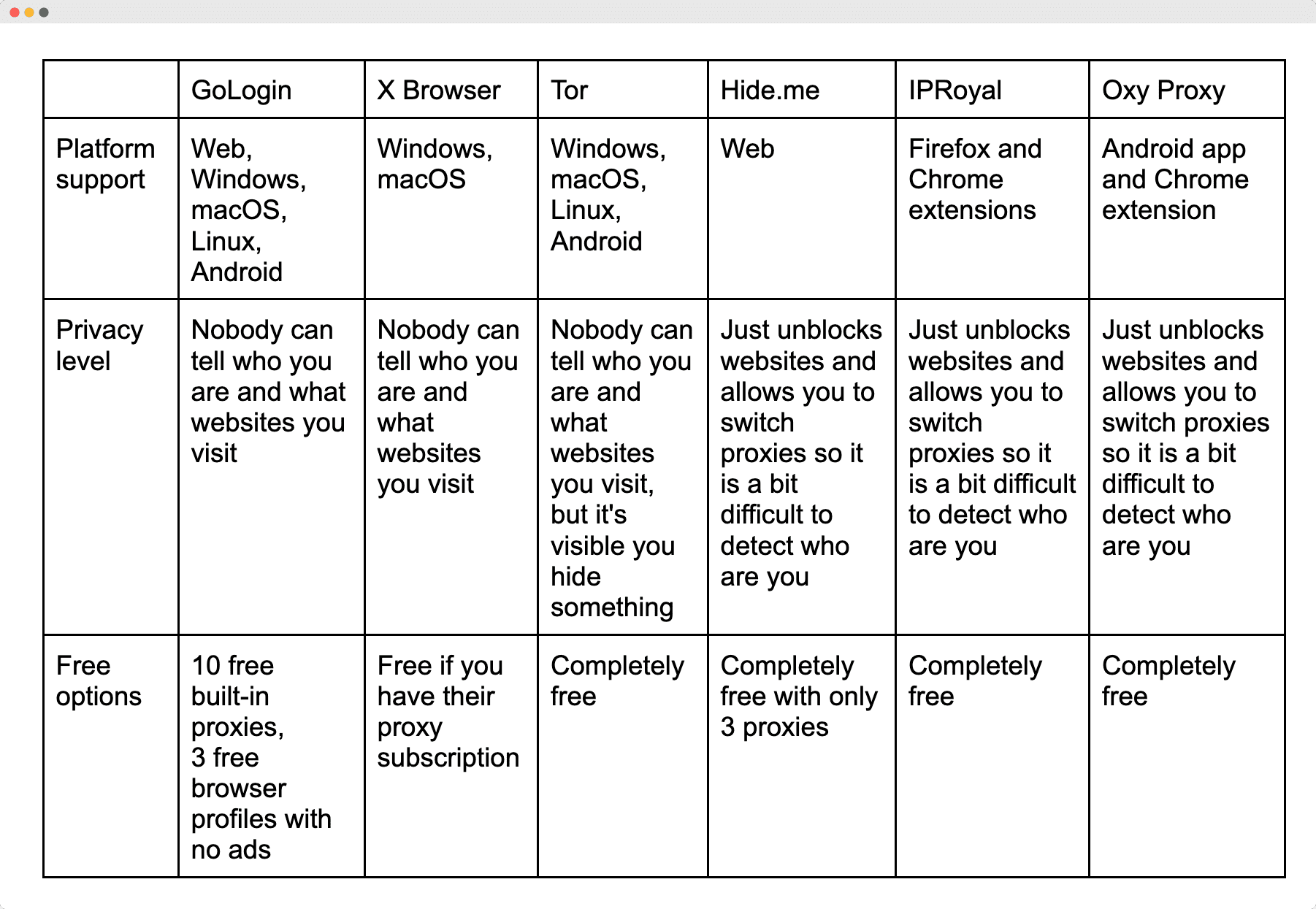
Browser Platform support Privacy level Free options
GoLogin Web, Windows, macOS, Linux, Android Nobody can tell who you are and what websites you visit 10 free built-in proxies, 3 free profiles
1Browser Windows, macOS Nobody can tell who you are and what websites you visit Free trial; paid afterward
X Browser Windows, macOS Nobody can tell who you are and what websites you visit Free if you have Smartproxy subscription
Tor Windows, macOS, Linux, Android Nobody can tell who you are and what websites you visit, but it’s visible you hide something Completely free
Hide.me Web Just unblocks websites and allows you to switch proxies so it is a bit difficult to detect who are you Completely free with only 3 proxies
IPRoyal Firefox & Chrome extensions Just unblocks websites and allows you to switch proxies so it is a bit difficult to detect who are you Completely free
Oxy Proxy Android app & Chrome extension Just unblocks websites and allows you to switch proxies so it is a bit difficult to detect who are you Completely free
Epic Windows, macOS, Android, iOS Blocks tracking & hides IP; difficult to identify you Completely free
Aloha Android, iOS/iPadOS, Windows, macOS VPN hides IP & blocks ads; difficult to detect who are you Free tier; Premium paid
Opera Windows, macOS, Linux, Android VPN hides location; medium privacy Completely free
Brave Windows, macOS, Android, iOS Firewall & VPN hide all traffic; hard to track 7-day free trial
Proxyium Web (any browser) + extension Just unblocks websites and allows you to switch proxies so it is a bit difficult to detect who are you Web proxy free; paid upgrades
CroxyProxy Web (any browser) + Chrome extension Just unblocks websites and allows you to switch proxies so it is a bit difficult to detect who are you Completely free
ProxySite Web + Chrome extension Just unblocks websites and allows you to switch proxies so it is a bit difficult to detect who are you Completely free

Note: “Web” in the Platform support section means you don’t require downloading a proxy browser.
How To Choose A Proxy In A Proxy Browser

You probably already know there are different paid proxy types to choose from. The main difference is in the safety level. The safer the proxy, the more difficult it is for network admins to detect that you’re trying to conceal your activity.

There are three main types:

  1. Residential proxy mimics a regular desktop computer. It’s a crowd favorite because it balances cost and safety pretty well. It’s a good place to start.
  2. Mobile proxy type is a bit sneakier and harder to detect since you use a mobile IP. It seems more natural to websites and systems if you access apps and websites typically accessed from smartphones. But it’ll cost you more.
  3. Data center proxy is cheaper than the previous two types but less secure.

Some providers also offer ISP proxies, which stands for Internet Service Provider. These are static residential proxies naturally coming from internet providers, meaning to be more real and authentic. You can even find Dedicated ISP proxies, getting a static IP that’s never been used by anyone else.

Such options can be quite expensive, but they are worth it in some use cases.

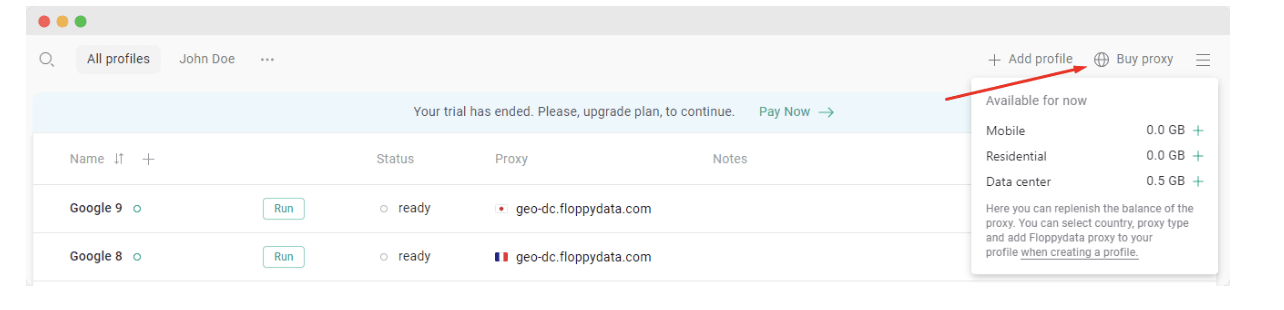
Here is how to buy proxies directly in the GoLogin proxy browser:
usa proxy browser

Below are seven ready-to-paste blocks—now with a one-sentence intro in front of the familiar Features / Use cases / Platform support / Pricing sub-sections.


Download Gologin for free and manage multiple accounts without bans!

Frequently Asked Questions

1. What Is A Proxy Browser?

A proxy browser is an application or website that comes with built-in proxies or an easy way to add them. Choosing a proxy browser instead of a regular one lets you hide your location, giving you access to websites that are usually restricted.

Some proxy browsers can even fully safeguard your online identity and encrypt your web proxy work activity.

2. Are proxy browsers legal?

Yes, using a proxy (or a browser with a built-in proxy/VPN) is perfectly legal in most countries. The activity that passes through the proxy still has to follow local laws and the terms of any website or service you access. Illicit acts (e.g., copyright infringement, fraud) remain illegal even if you hide your IP, and certain regions restrict or regulate proxy/VPN use – so always check your local rules.

3. Can I use a proxy browser for free?

Absolutely. Many options in the roundup—such as CroxyProxy, ProxySite, Epic, Opera and Tor – offer permanent free tiers. Expect trade-offs: fewer server locations, slower speeds, data caps or in-browser ads. Paid plans remove those limits and add extras like more exit nodes, device-wide protection or higher speeds.

4. Where Are Proxy Settings In Chrome?

For Windows users:

  1. Head to Chrome Settings
  2. Scroll down and click on System to expand more options
  3. Under the System section, find and click on Open your computer’s proxy settings. This will open the proxy settings in the Windows Settings app
  4. In the Proxy settings, you can configure your proxy setup as required.

For macOS users:

  1. Open System Preferences from the Apple menu
  2. Click on Network
  3. Select the network service you use from the list (e.g., Ethernet or Wi-Fi) and click on Advanced
  4. Go to the Proxies tab. Here, you can configure your proxy settings as needed.

Download Gologin for free and manage multiple accounts without bans!
Read other posts about Reviews of browsers:

  1. Kameleo browser review
  2. Best virtual browser
  3. Multilogin chrome browser
  4. Adspower browser vs gologin
  5. Morelogin browser alternative
  6. Incogniton vs gologin
  7. Browserjet review
  8. Roxybrowser review
  9. Gologin vs hidemium
  10. Xlogin review
  11. Insomniac browser review
  12. Swspybrowser review
  13. Yunlark review
  14. Loginways review
  15. Nstbrowser review
  16. Hydraheaders browser review
  17. Gologin-vs-maskfog review
  18. Vision-browser review
  19. Ultimate orb review
  20. AntBrowser-browser-review
  21. Vmlogin browser review
  22. Gologin-vs-identory
  23. Gologin-vs-switch antidetect
  24. Antikbrowser review
  25. Camoufox review
  26. Geelark review
  27. Dicloak online browser
  28. Vmmask antidetect browser
  29. Hidemyacc browser review
  30. Rebrowser review
  31. Session-box-vs gologin
  32. Multibrowser-review
  33. Accovod-vs-gologin
  34. Xbrowser review
  35. Undetectable browser-vs-gologin
  36. Bitbrowser-review
  37. Fingerprintswitcher
  38. Aezakmi browser review
  39. Marketerbrowser review
  40. Genlogin browser review
  41. Linken-sphere review
  42. Indigo-browser
  43. Xpass browser alternative
  44. Wade browser review
  45. Surfinite review
  46. Lalicat-browser review
  47. Masq-antidetect review
  48. Octo-browser vs gologin
  49. Dolphin-anty vs gologin
  50. Mulogin review
  51. Aqum-browser review
  52. Lauth review
  53. Che browser vs gologin
  54. Logii review
Also Read

Benchmarking The Rising Costs of Data Scraping

There’s no doubt in stating that cloud computing enabled a wide range of new opportunities in the tech space, and this is true also for data scraping. Cheap virtual machines and storage enabled to scale the of activities to a new level, allowing companies to crawl a larger number of websites at a fraction of the traditional cost. This doesn’t mean that large-scale web scraping projects are cheap, but also because things are getting harder, as I wrote in my previous post here. In this post I’ll benchmark the costs of the services of the top 3 cloud providers by market share (according to Statista), simulating different web scraping scenarios and architectures and choosing the cheapest availability zone for each

Top 10 Best Residential Proxy Providers: Tested & Ranked 2025

In today’s world of automation and multi-channel promotion, residential proxies are the main supporting tool. And no matter what anyone says or tries to pull the blanket over themselves, having a proxy greatly simplifies the work many times over. The residential proxy market is huge, with new players emerging every week hoping to grab a piece of the pie, which raises a reasonable question – who should you choose? The more important question is not “who”, but “how”? How to understand that this gentleman with great marketing is not just a puffed up empty shell, but a really high-quality provider providing residential proxies? And how not to pass by an unsightly player with a terrific content, but absolutely no skill