XLogin Review 2026: Pricing, Tests & Best Alternative
Try Gologin for free
XLogin is a Windows privacy browser for keeping multiple account sessions in separate profiles. It offers detailed fingerprint settings, proxy connections and team tools, but a feature-rich editor is only useful if I can turn it into a working profile without too much effort.
If you regularly read our browser comparisons, XLogin’s interface may look familiar. Its dashboard, profile editor and proxy dialogs looked identical to VMLogin in my side-by-side review. The similarities run through the layout and workflow, so I wanted to see whether XLogin offers anything VMLogin does not.
For this update, I used XLogin 2.1.0.5 and compared it with Gologin on November 18, 2026. I focused on profile setup, everyday controls, the checker results and the complete subscription cost.
Xlogin passed Pixelscan and Iphey but had a Canvas 2D issue in CreepJS. That matters, but my preference for Gologin is broader: built-in proxies, API access, cloud browsing and apps across devices make it a more complete daily workspace at a substantially lower starting price.
TL;DR
Gologin starts at USD 9/month against Xlogin’s USD 99, while bringing built-in proxies, REST API access and cloud browsing into the same platform. Its wider device support, established team and accessible support make the overall package more compelling to me; Canvas 2D is one test difference, not the whole verdict.
XLogin’s paid plans match VMLogin’s prices and included capacities, but its support left my trial request unanswered for five days.
Launch times below are approximate observations, not medians of three cold starts.
| At a glance | XLogin | Gologin |
|---|---|---|
| Paid entry | USD 99/month; 200 profiles; 5 subaccounts | USD 9/month; 10 profiles; no extra member |
| Free access | 3-day trial; 5 profiles; support approval | 7-day trial; 3 ongoing free profiles |
| Native apps | Windows | Windows, macOS, Linux, Android, iOS |
| Profile launch | About 5–6 seconds | About 2–3 seconds |
| Tested Windows browser | Chrome 156; 2 versions behind stable 158 | Chrome 156; 2 versions behind stable 158 |
| Pixelscan | Consistent | Consistent |
| Iphey | Trustworthy; 100/100 | Trustworthy; 100/100 |
| CreepJS: like-headless / headless / stealth | 19% / 0% / 0%; Canvas 2D marked as a lie | 25% / 0% / 0%; Canvas 2D passed |
| Proxy service | External provider required | Built-in and external options |
First Impressions
XLogin’s website makes pricing and the download link easy to find. After creating an account on the website, I signed into the separate desktop app. Creating the account was straightforward; getting a reply about the trial was less convenient.
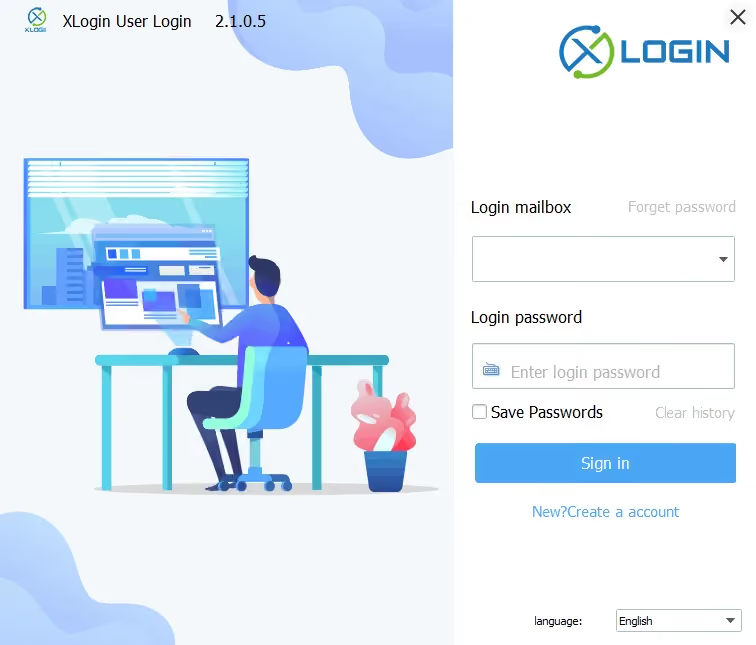
The earlier version of this review documented a Windows security warning during installation. However, during my recent test, I encountered no Windows security warning.
In that earlier review, support attributed the warning to the software packer and called it a false positive so I then installed an older build without the same warning. In the latest version I tested, the installation went smoothly.
The more immediate onboarding problem was support: I waited five days for a reply to my trial request and received none. VMLogin’s support replied and activated my trial, so the near-identical interfaces came with a different first-contact experience.
Dashboard & Customization
The XLogin dashboard looks dated and lacks customization. Users accustomed to shaping their profile overview will be disappointed, as creation, launch, and edit dates take up most of the real estate.
I could not maximize or stretch the XLogin management window on my PC. That makes the dense settings harder to work through, especially when several dialogs are open.
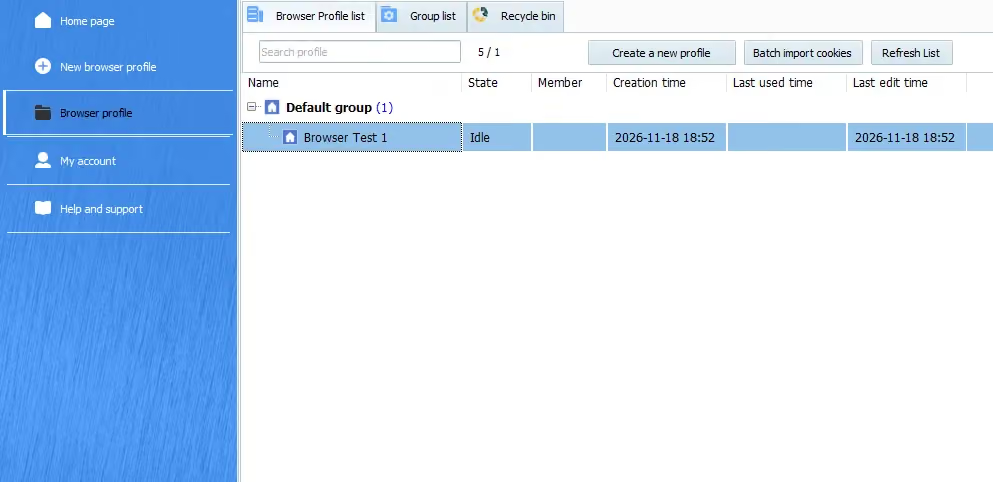
XLogin partially redeems itself with a comprehensive right-click menu. The options focus on profile editing and exporting, cookie settings, and group management. Group overview and creation are available on the second tab.
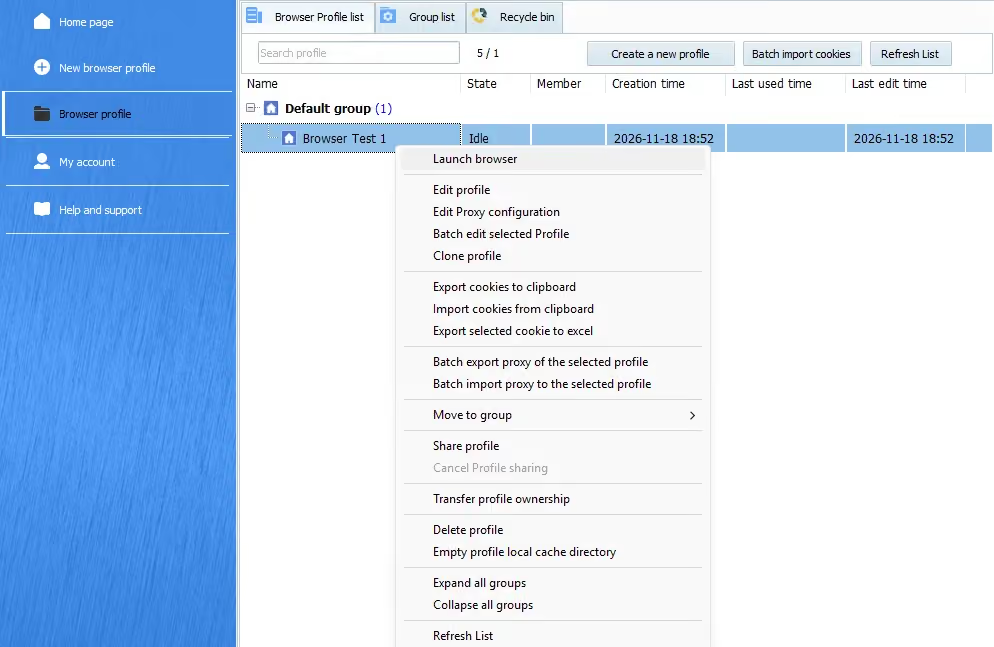
The third tab, Recycle Bin, is a neat feature. Deleted profiles go into the bin rather than being removed completely. You have seven days to restore any you deleted accidentally.
Profile Creation and Fingerprints
XLogin has one of the more detailed profile editors I have used. The amount of customization can overwhelm a beginner: basic browser settings sit alongside WebRTC, hardware, time-zone and media-device controls.
The Get random profile control can populate a configuration, and the documentation explains the individual settings. I still had to work through the editor and proxy dialog before the profile was ready.
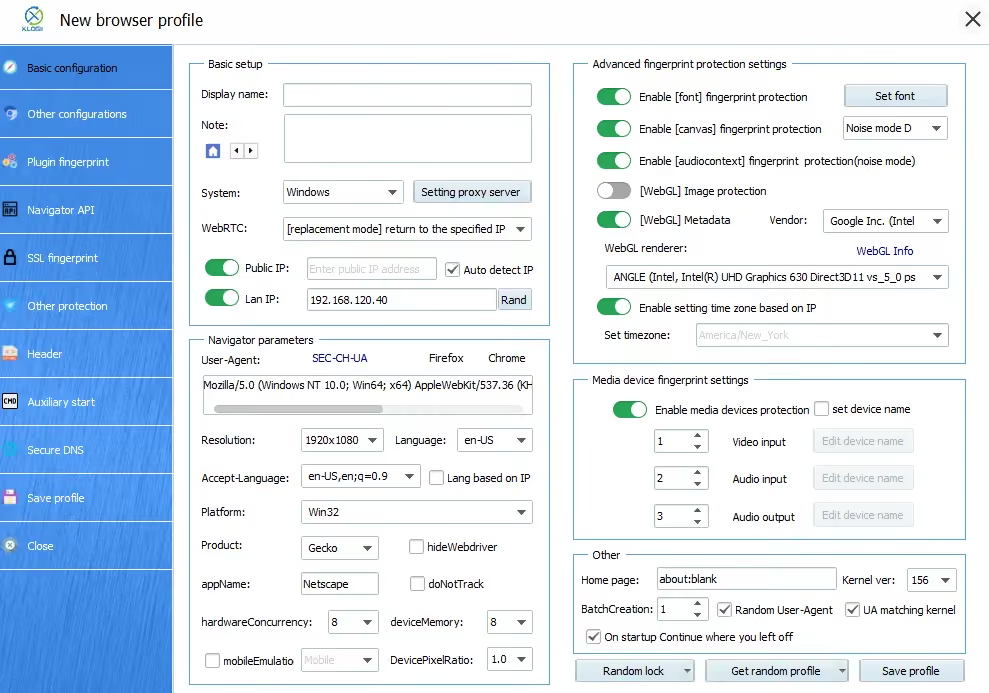
The fingerprint settings cover the user agent, canvas, fonts and media devices, with more controls under Other configurations and Navigator API. In my test profile, the browser reported Chrome 156. Chrome 158 was the current stable milestone on November 18, putting that profile two major versions behind.
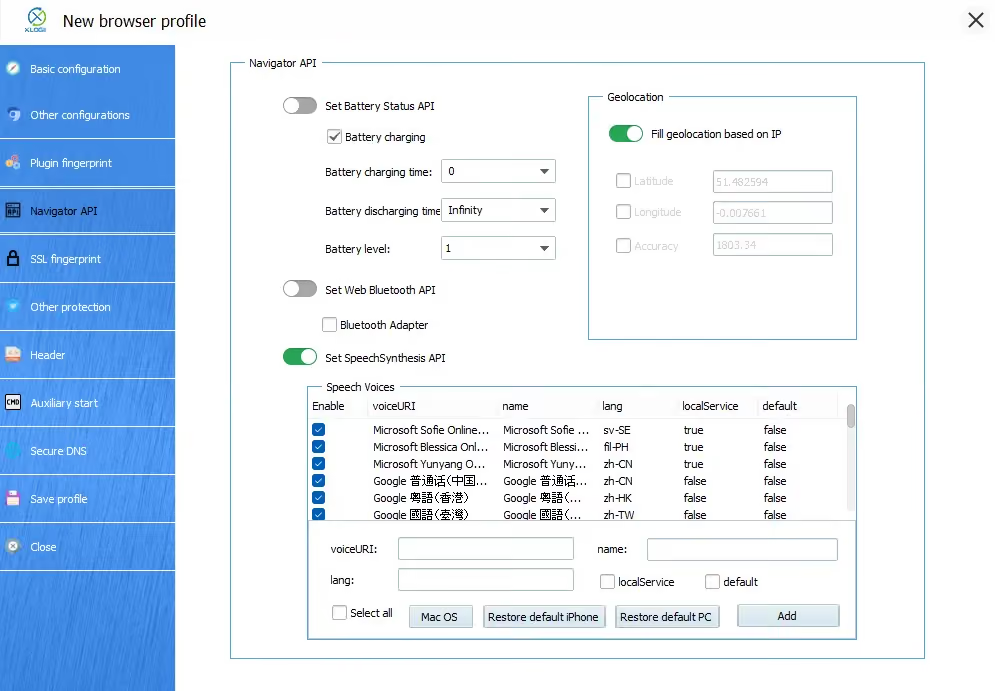
Batch profile creation is supported too, though the control sits near the bottom of an already cluttered form. XLogin also warns that using the same account on different computers requires matching app and Chromium versions, so version consistency matters when moving profiles between machines.
Proxies and Profile Viability
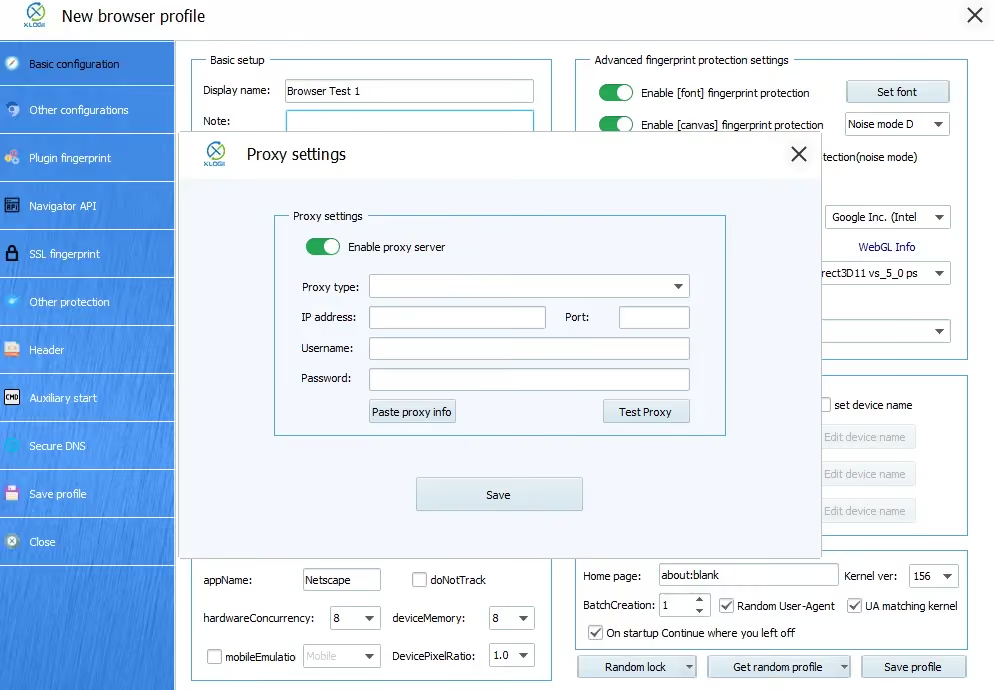
XLogin supports HTTP, HTTPS, SOCKS4 and SOCKS5 proxies, including IPv6, but does not provide its own proxy traffic. I need an external provider. To connect one, I open a profile’s Setting proxy server dialog, enable the proxy, select the protocol, enter the host, port and credentials, then use Test Proxy before saving.
There is no dedicated proxy-management section in the app. Proxy setup is buried inside the profile editor or right-click menus, although batch import/export is available. The Paste proxy info control did not correctly populate my supplied connection, so I entered the fields manually. Its documentation supports two connection-string formats; my difficulty was with the setup I used, rather than every possible import route.
XLogin Fingerprint Test Results
| Recorded check | XLogin result |
|---|---|
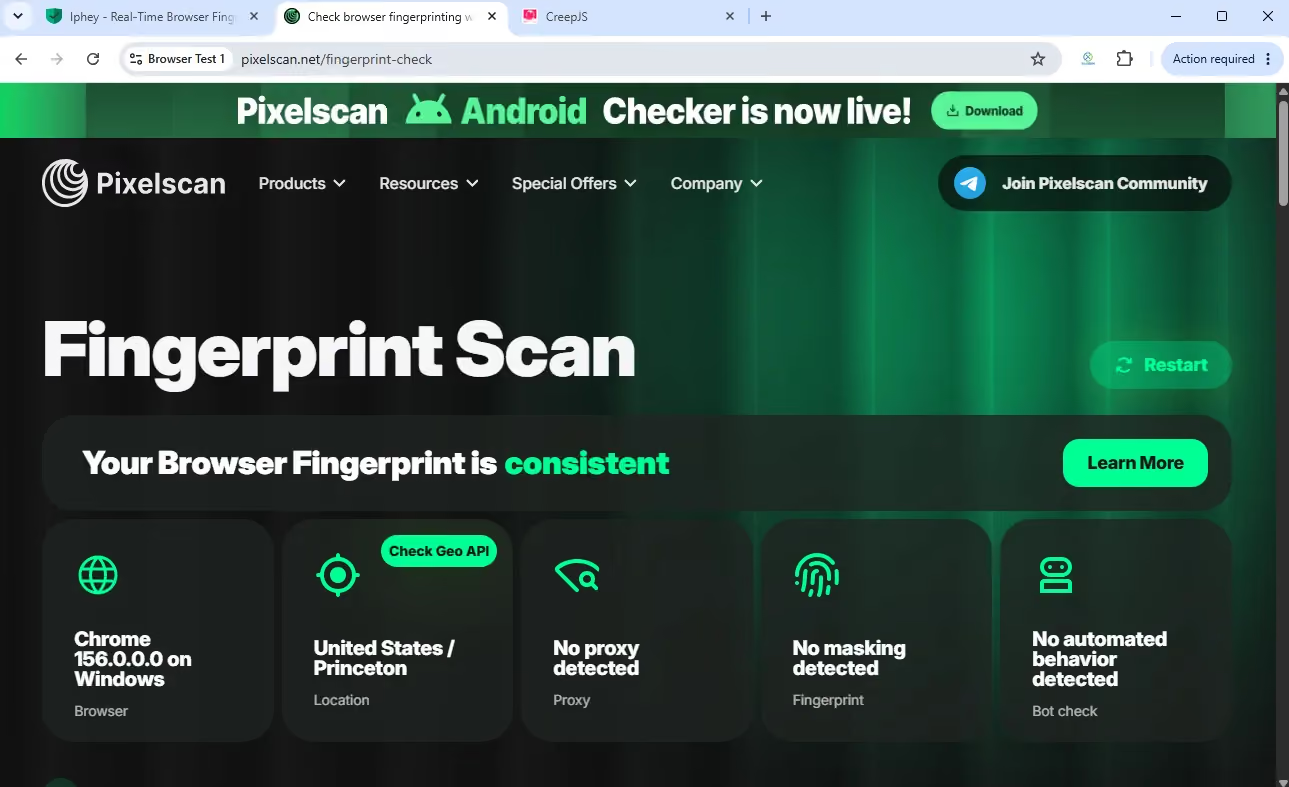
| Pixelscan | Consistent |
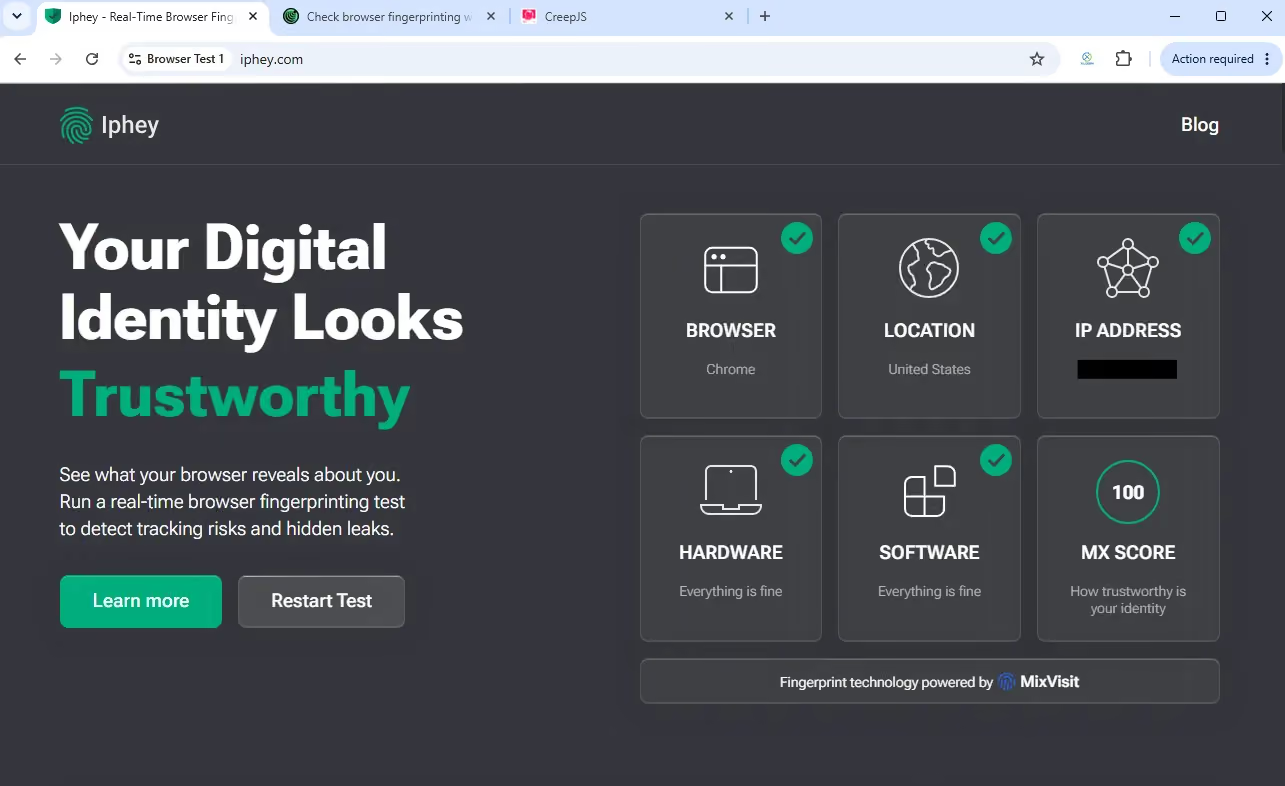
| Iphey | Trustworthy; MX 100/100; all 5 categories green |
| CreepJS | 19% like-headless; 0% headless; 0% stealth; Canvas 2D marked as a lie |
| Windows browser reported | Chrome 156 |
| Profile launch | About 5–6 seconds |
I tested XLogin and Gologin on Windows on November 18, 2026 using the same Floppydata residential proxy endpoint. Time-zone or city-level targeting can differ due to proxy rotation.
Pixelscan returned Consistent for XLogin. It identified Chrome 156 on Windows and showed no fingerprint or automated-behavior warning. This is a clear improvement over the mixed results in the earlier review.
Iphey returned Trustworthy with an MX score of 100/100. All five displayed categories were green, matching Gologin’s result in this comparison.
CreepJS showed 19% like-headless, 0% headless and 0% stealth. However, CreepJS showed that Canvas 2D was masked. This can happen when the browser blocks certain signals or isn’t properly able to add noise to the signal.
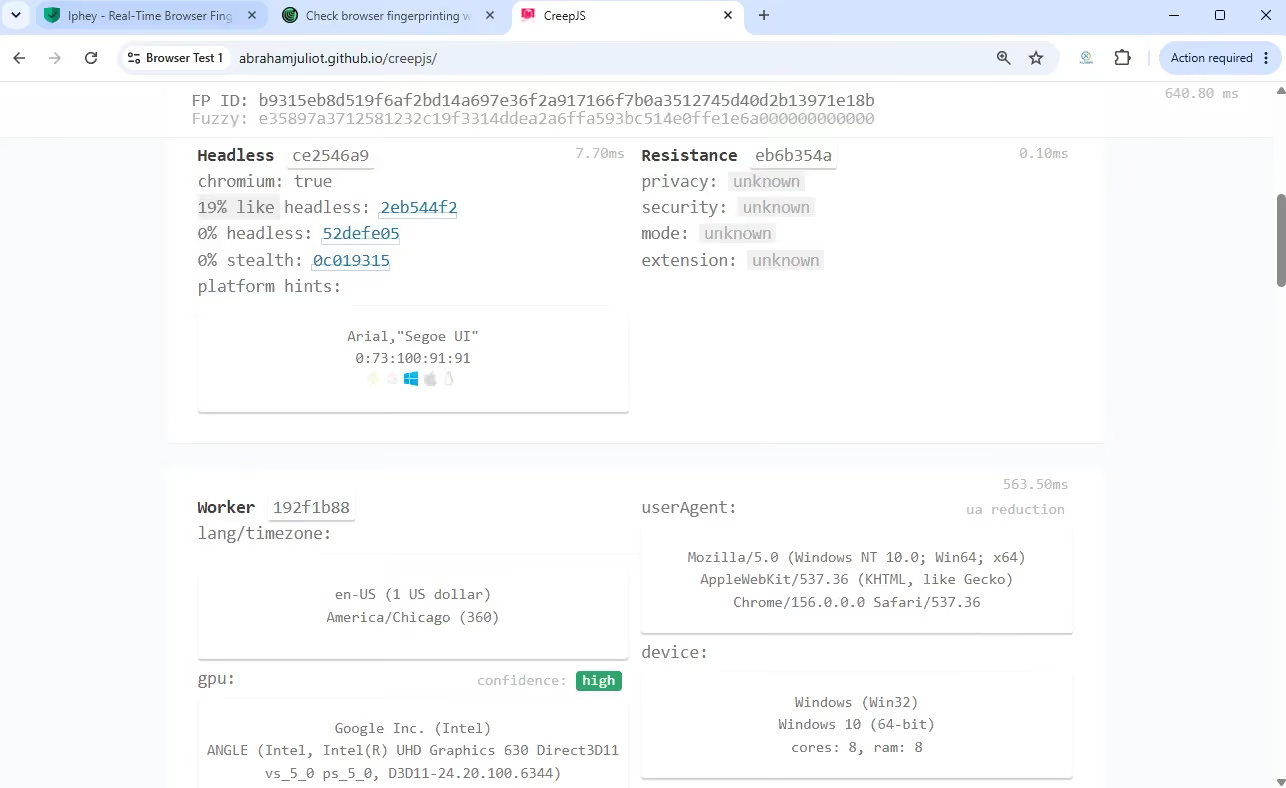
My configured XLogin profile passed Pixelscan and Iphey, but the Canvas 2D result in CreepJS prevents me from calling the entire fingerprint clean. Gologin passed that check as well as the other two checkers.
XLogin’s profile took about 5–6 seconds to launch, compared with about 2–3 seconds for Gologin. These are approximate observations rather than medians of three cold starts. The extra time spent navigating XLogin’s editor mattered more to my daily workflow than a few seconds at launch.
Reputation and Customer Support
XLogin’s public review record is small, so I put more weight on the current app and my support experience than on broad claims about its popularity.
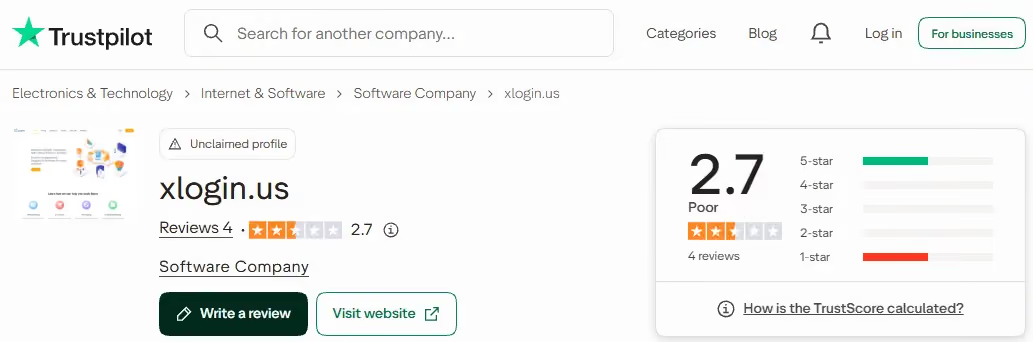
On November 18, 2026, XLogin’s Trustpilot listing showed 2.7/5 from four reviews, with none in the last 12 months. Two of those four reviews were extremely negative.
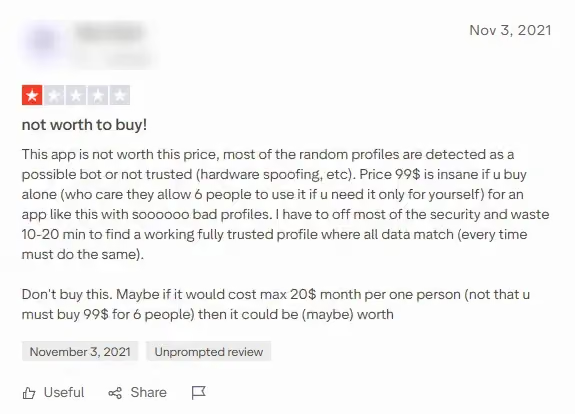
An older review criticized the price and the work needed to obtain a consistent profile. The current test results above show how the November build performed in my setup.
On the bright side, Xlogin has exceptionally thorough documentation and it reads almost the same as VMLogin’s. I found no public information that links the two companies.
XLogin lists email and messaging support, but my trial request remained unanswered after five days. VMLogin replied and provided trial access when I was writing that review. Given the matching prices and nearly identical workflow, that difference gives me little reason to pick XLogin over VMLogin.
Gologin as an Alternative to XLogin
Gologin’s advantage is the complete working environment around the browser. Profiles, built-in proxies, automation, cloud access and team controls sit within one platform, reducing the separate services and manual setup I need with Xlogin.
I also put weight on Gologin’s established market presence, public team and company history dating to 2019. Its broader public customer-feedback record gives me more to assess than Xlogin’s small review sample. That background adds to my confidence alongside the product’s practical value.
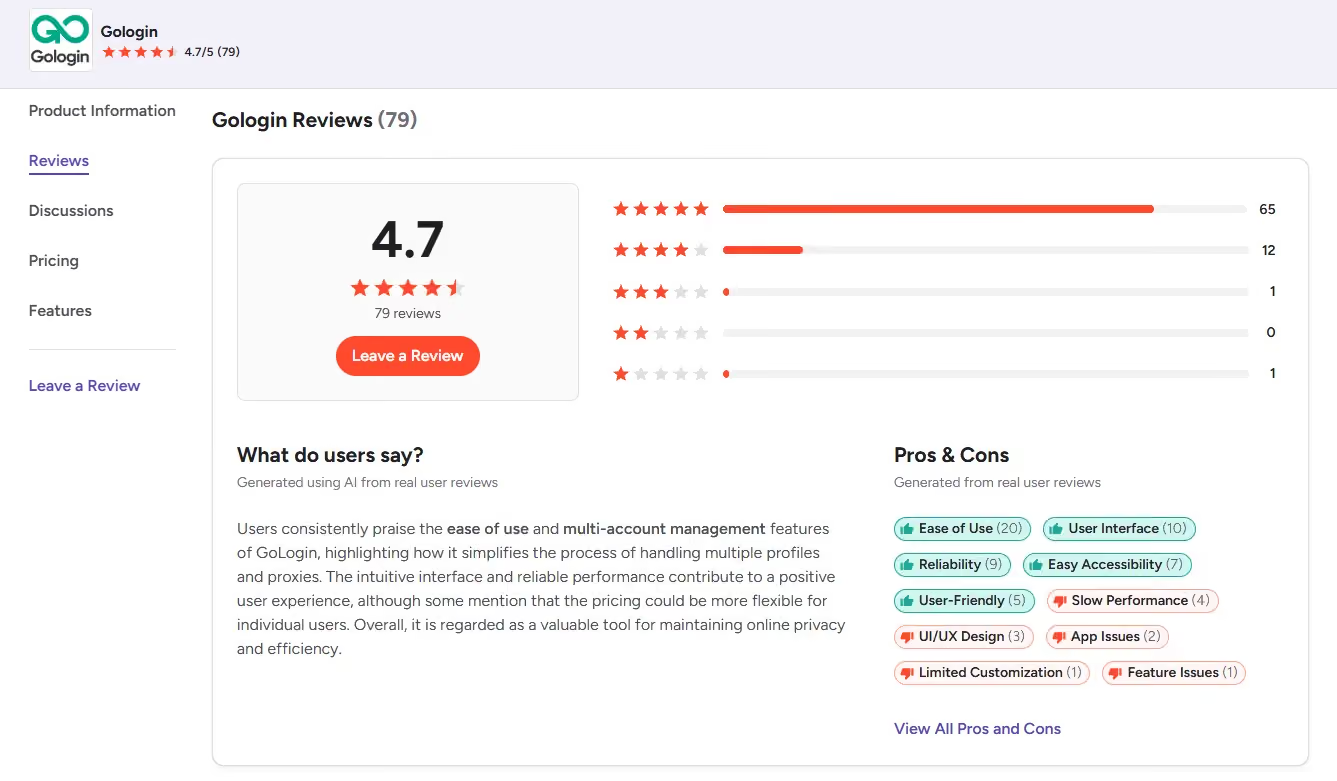
The G2 snapshot below shows 4.7/5 from 79 reviews, with ease of use and the interface among the recurring positives. That gives me a more substantial customer-feedback record to consider alongside the team’s public history.
User Experience & Customization
Gologin was designed with a broad audience in mind. First-time users with little general technical experience can start using it as intended after the introductory tour acquaints them with the basics.
Built-in proxies are a major part of that value. I can select a location and connect a profile inside Gologin, use the residential traffic allowance included in the plan, or bring an external provider. Xlogin requires a separate proxy purchase and puts connection settings inside its crowded profile editor. Gologin saves me both setup work and the need for another service when the included allowance covers my usage.
Advanced users can take advantage of the modern, highly adjustable UI while exploring a depth of profile configuration options similar to XLogin’s. Specifically, Gologin’s dashboard is much more suitable for monitoring, sorting, and managing hundreds of profiles as well as performing mass actions on them.
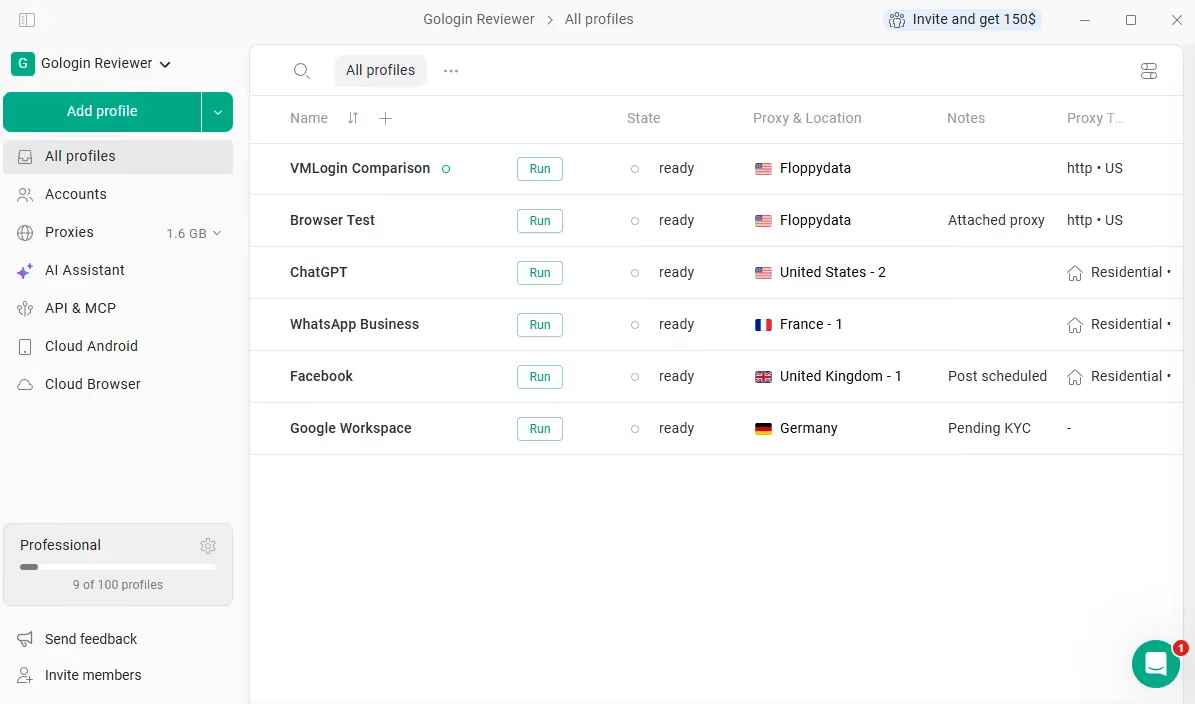
Thanks to this flexibility, you can turn Gologin into a minimalistic control panel that displays only a few pertinent bits of information for many profiles or track more than a dozen parameters.
Collaboration Features
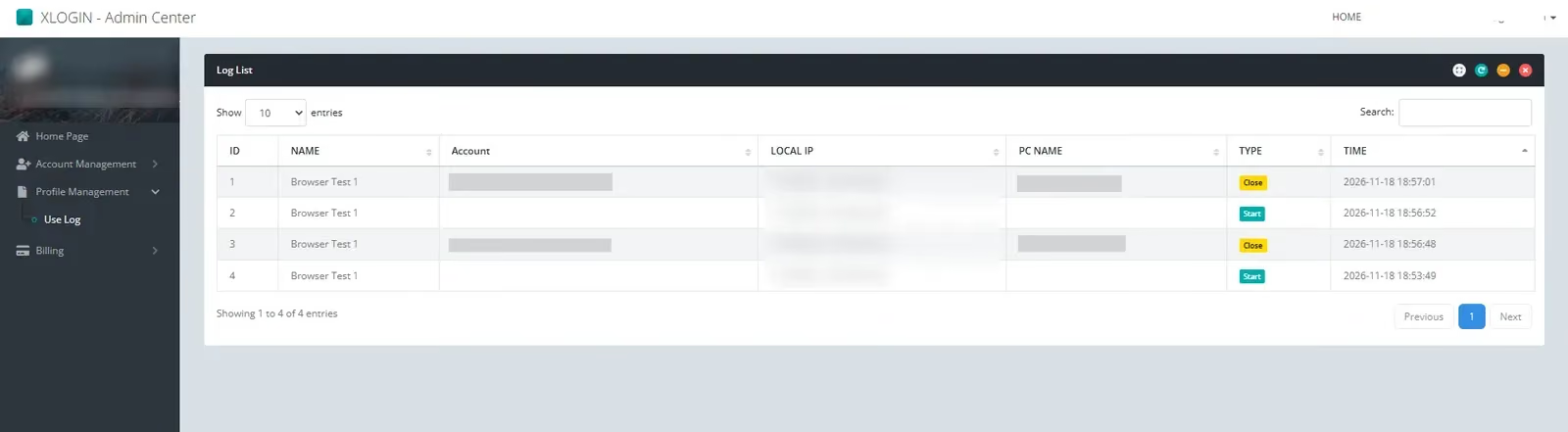
XLogin offers subaccounts with permissions for profile creation, access and proxy settings. Its paid plans include five, ten or twenty subaccounts. The web portal handles billing and account administration, while profile work stays in the Windows app.
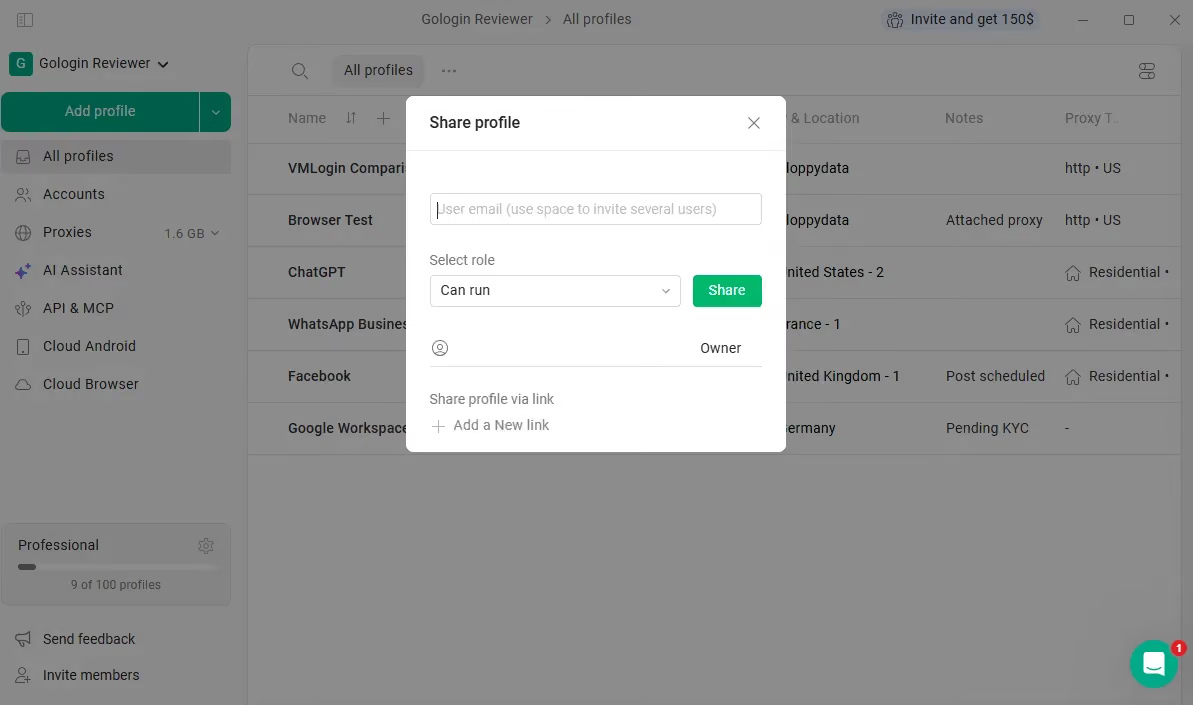
I find Gologin’s workspace easier to organize for team use. I can share profiles with selected roles, put them into folders and control access without moving between as many dialogs.
However, you can isolate profile groups and assign them to specific team members if you don’t wish others to interact with them.
Multi-Platform Support
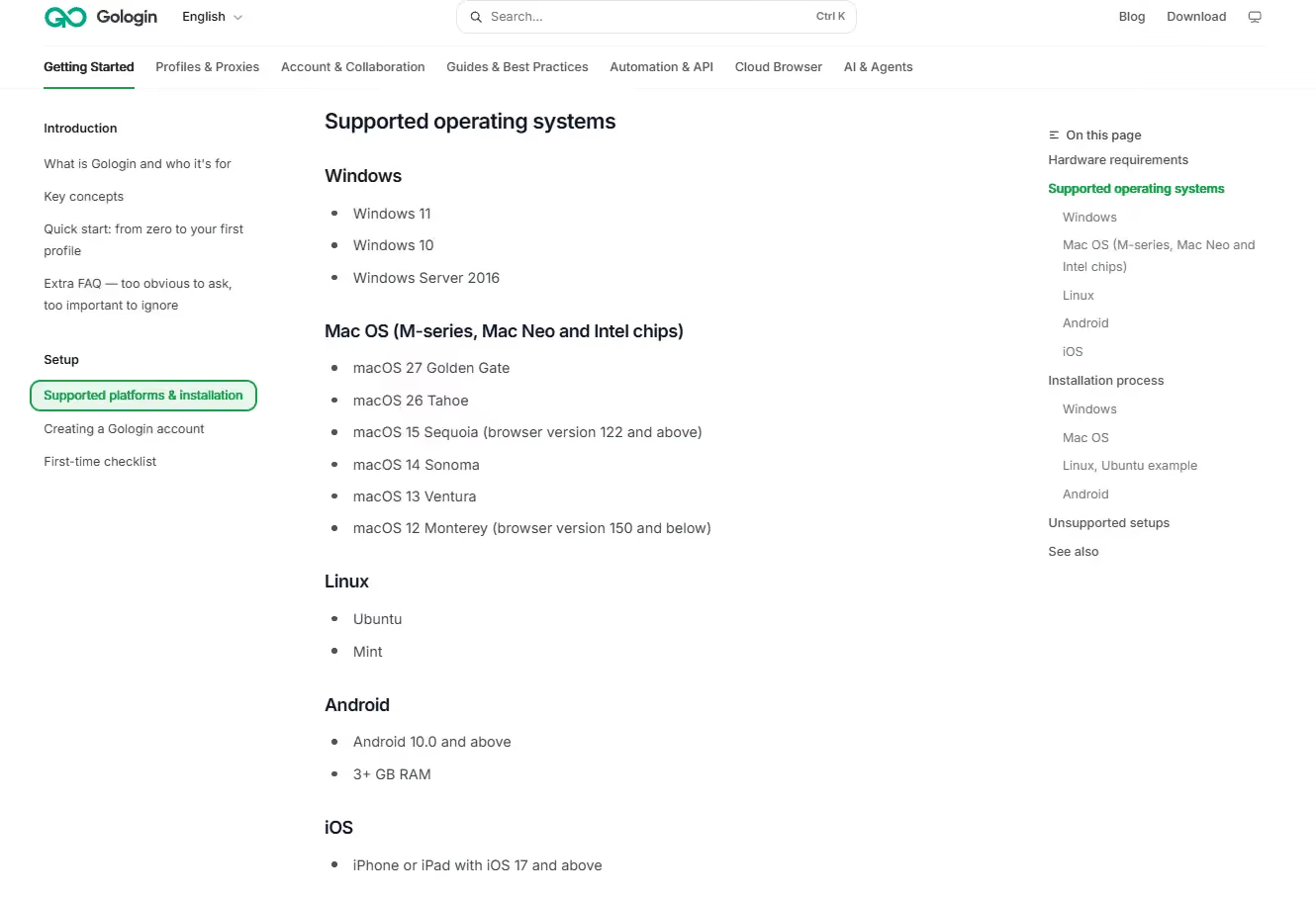
XLogin’s desktop app is Windows only. Gologin offers native apps for Windows, macOS, Linux, Android and iOS, plus cloud browser launch through a regular browser. Paid tiers list one to four concurrent cloud launches. Gologin also offers Cloud Android phone profiles, which are different from selecting a mobile browser identity inside a Windows profile.
Gologin Fingerprint Test Results
| Recorded check | Gologin result |
|---|---|
| Pixelscan | Consistent |
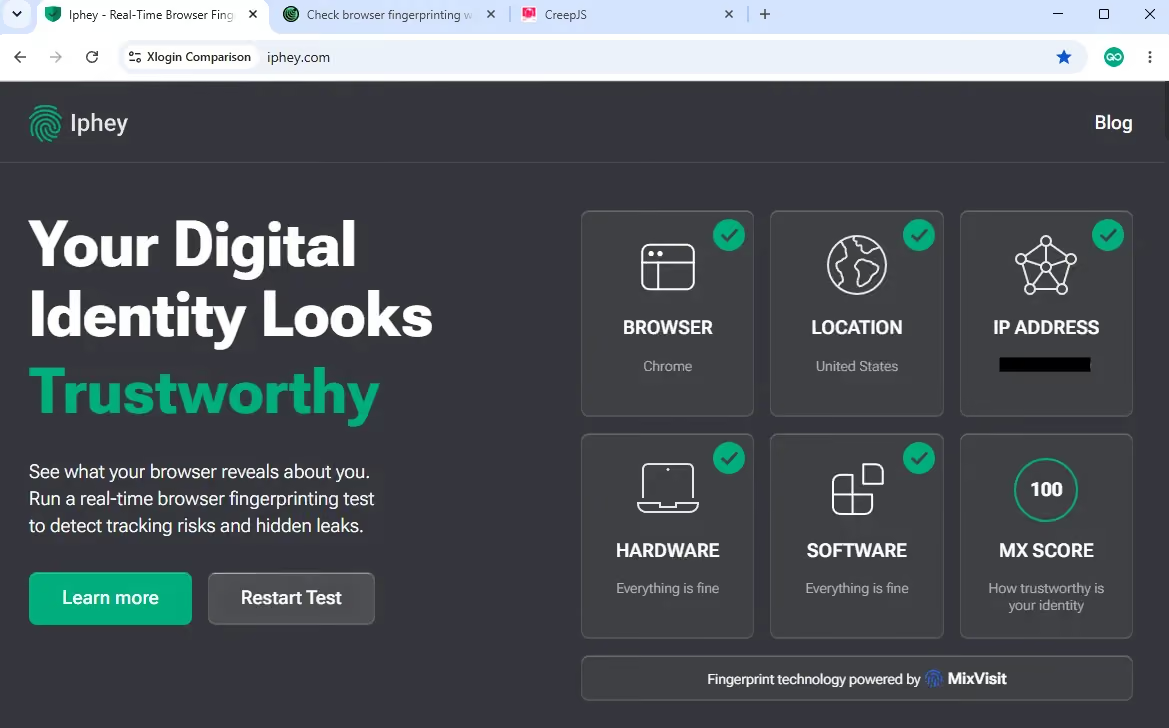
| Iphey | Trustworthy; MX 100/100; all 5 categories green |
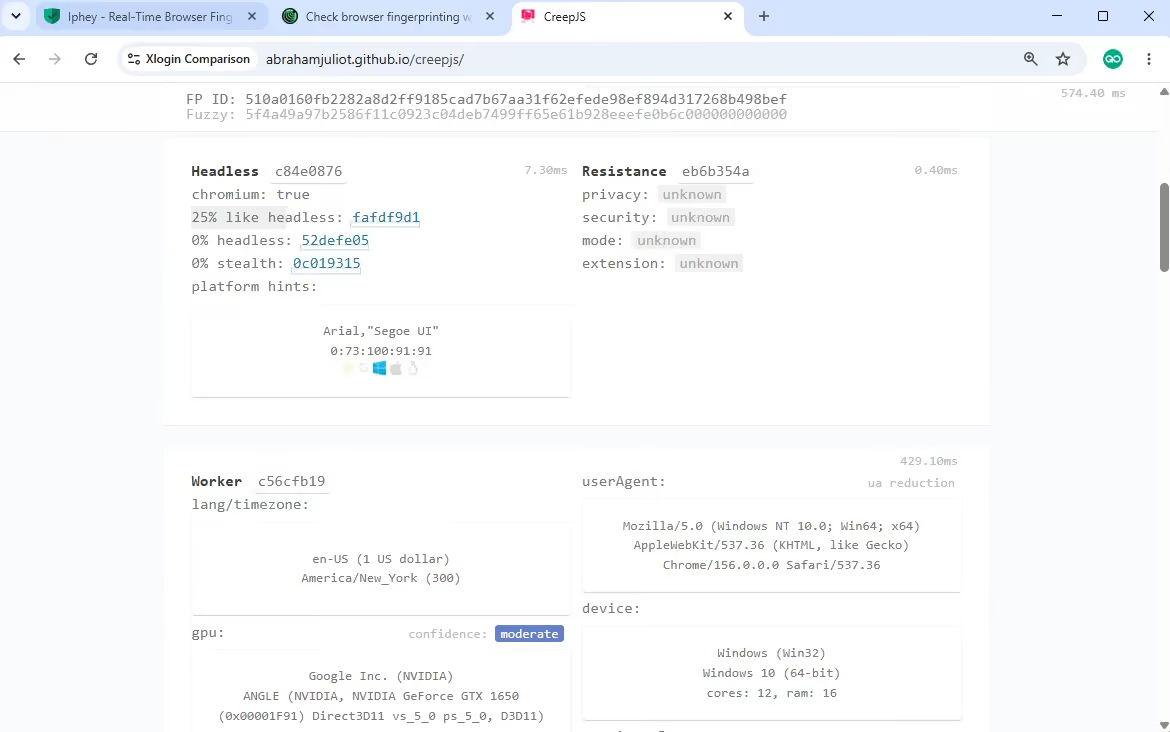
| CreepJS | 25% like-headless; 0% headless; 0% stealth; Canvas 2D passed |
| Windows browser reported | Chrome 156; stable milestone: Chrome 158 |
| Profile launch | About 2–3 seconds |
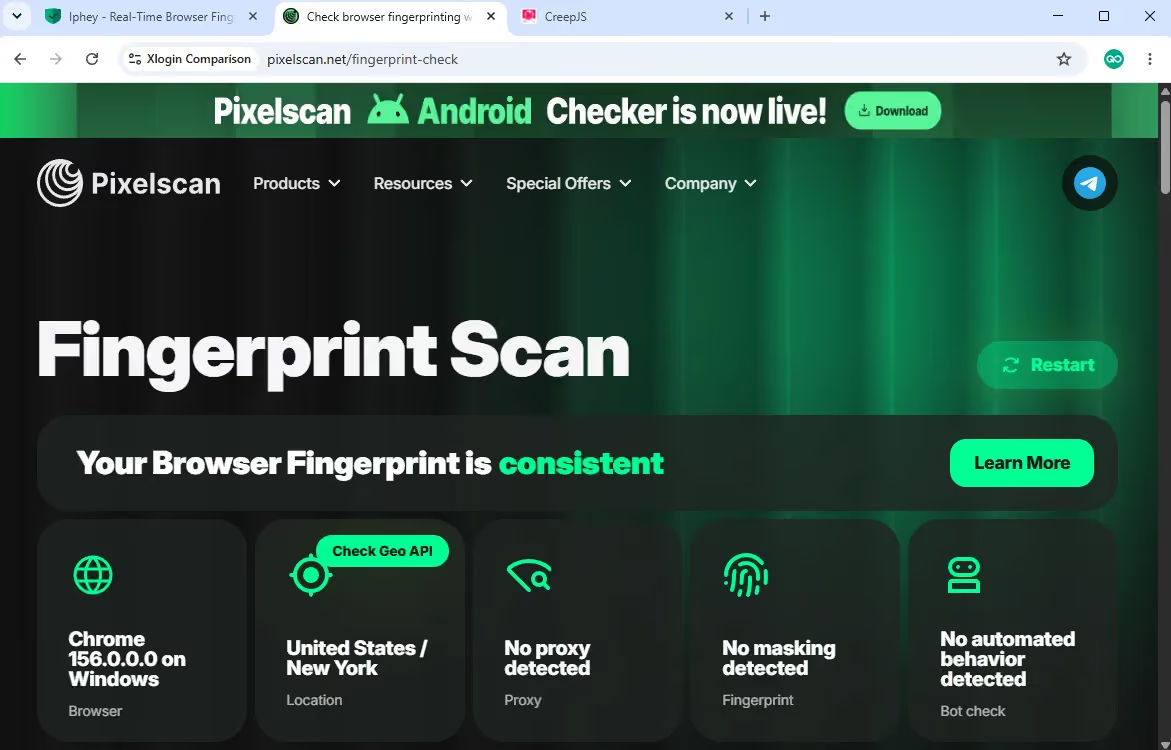
I tested the Gologin Windows profile with the same Floppydata residential proxy setup on November 18, 2026. It reported Chrome 156, two major versions behind Chrome 158, the current stable milestone on that date.
Pixelscan returned Consistent, matching XLogin. The screenshot shows aligned browser and location signals without a fingerprint or automated-behavior warning.
Iphey returned Trustworthy with an MX score of 100/100 and all five displayed categories green. Both browsers reached the same result, so there is no Iphey advantage for either one here.
CreepJS showed 25% like-headless, 0% headless and 0% stealth for Gologin, and Canvas 2D passed. XLogin showed 19% like-headless and the same zero headline readings, but Canvas 2D was marked as a lie. That specific check gives Gologin the stronger CreepJS result here; the like-headless percentages alone do not rank overall profile quality.
Support is another practical advantage. Gologin provides 24/7 in-app live chat and publicly advertises a three-minute response commitment. That is the company’s service claim rather than a guaranteed response to every request, but the direct chat access is far more convenient than my five-day wait without a trial reply from Xlogin.
XLogin Browser vs Gologin - Pricing
Trials & Free Plans
XLogin offers a three-day trial with five saved profiles, Basic REST API access, batch creation and cookie import/export. The plan excludes subaccounts, sharing and transfers. Activation requires support approval; my request had no reply after five days. There is no continuing free plan.
Gologin starts a seven-day trial automatically and also offers a continuing free plan with three profiles. The free plan excludes profile sharing and team members.
Paid Plans
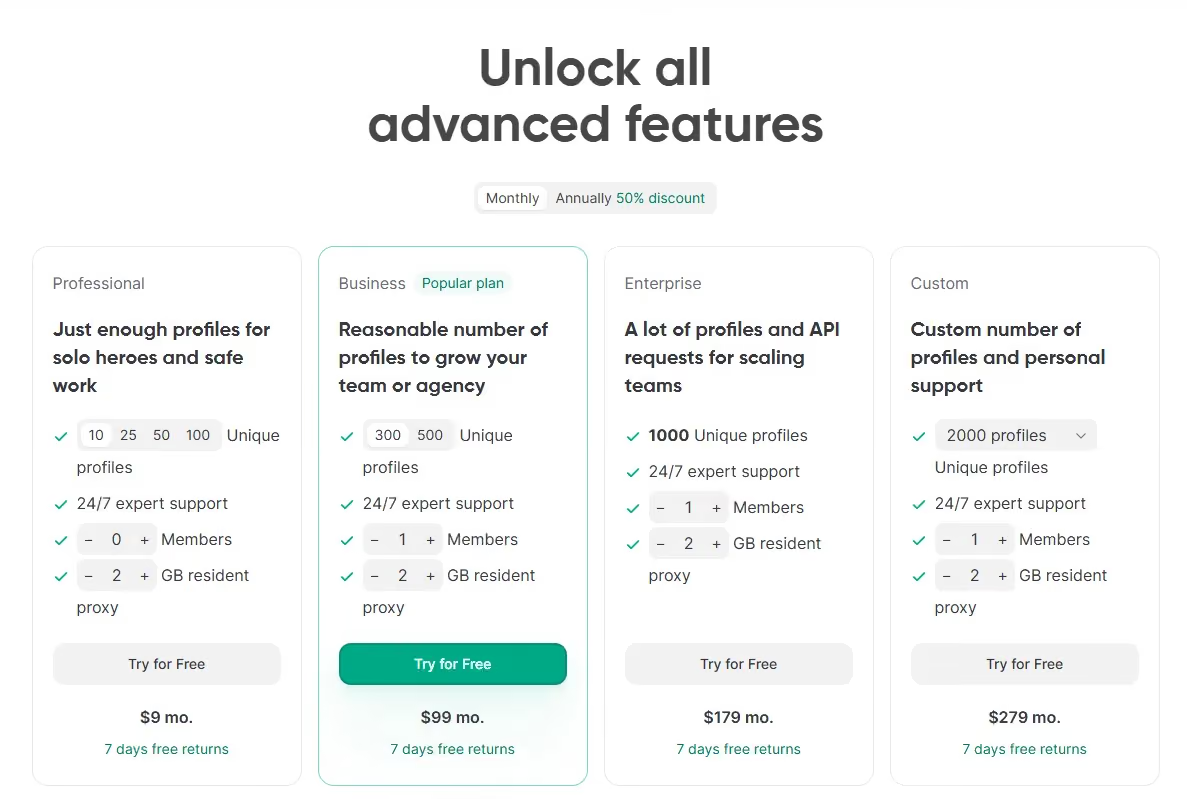
Gologin Professional starts at USD 9/month, or USD 4.50/month billed annually. That entry plan brings built-in residential proxy traffic, REST API access and cloud browsing alongside the browser. It starts with 10 profiles, with higher-capacity 25-, 50- and 100-profile options costing more; no additional team member is included. For me, the important difference is access to that integrated toolset for USD 90 less per month than Xlogin’s entry.
XLogin Solo starts at USD 99/month for 200 profiles and five subaccounts, with Basic REST API, batch creation, sharing and transfers. The larger capacity may suit a team, but it is a costly starting point for a solo user with only a few accounts.
Gologin Business costs USD 99/month for 300 profiles, or USD 139/month for 500, and includes one additional member. Xlogin Solo includes five subaccounts at USD 99. Those allowances matter for budgeting, but Gologin also combines built-in proxy traffic, API access, remote cloud browsing and multi-platform apps. I would compare the whole workflow and total service bill rather than count profiles or seats alone.
Xlogin Team costs USD 209/month for 500 profiles and ten subaccounts. Gologin Enterprise costs USD 179/month for 1,000 profiles and one included member. Beyond the USD 30 lower base price, Gologin provides its integrated proxy, API and cloud tools. Xlogin’s extra subaccounts are useful to some teams, but they do not replace those capabilities.
Xlogin Scale costs USD 499/month for 3,000 profiles and twenty subaccounts, with Advanced REST API. Gologin Custom starts at USD 279/month for 2,000 profiles and one included member, alongside built-in proxy traffic, API and cloud browsing. The capacities differ, but I would still assess that USD 220 base-price gap against the complete platform and any member or usage add-ons, not profile numbers alone.
XLogin and VMLogin list the same paid tiers: Solo at USD 99 for 200 profiles and five subaccounts, Team at USD 209 for 500 and ten, and Scale at USD 499 for 3,000 and twenty. Both advertise 25% off annual billing. XLogin has no price advantage to offset my slower support experience.
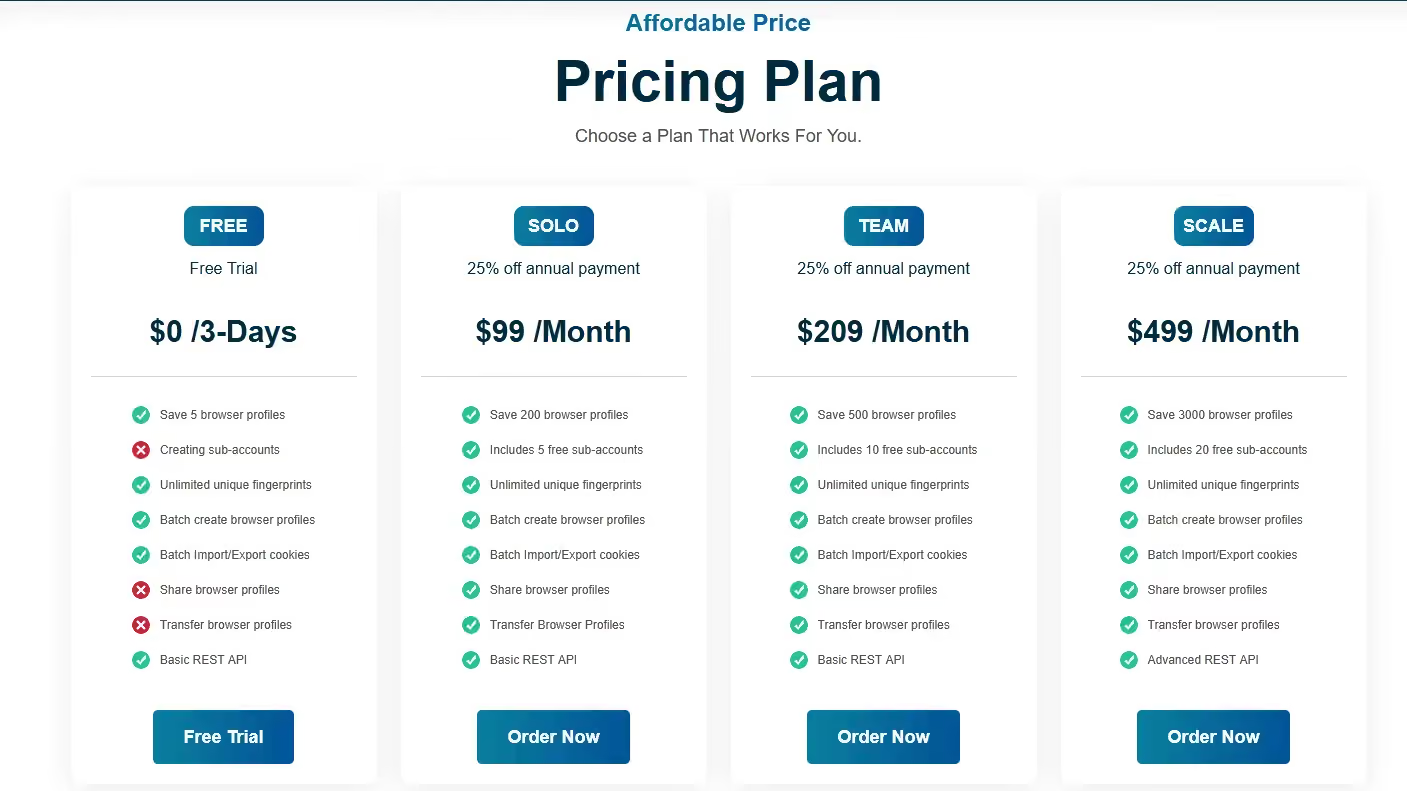
Prices checked November 18, 2026, in USD. XLogin’s advertised 25% annual discount calculates to USD 891/year for Solo, USD 1,881 for Team and USD 4,491 for Scale, equivalent to USD 74.25, USD 156.75 and USD 374.25 per month.
| Plan / allowance | XLogin | Gologin |
|---|---|---|
| Free access | 3-day trial; 5 profiles; no continuing free plan | 3 free profiles; 7-day paid-plan trial |
| Paid entry | Solo: USD 99/mo; 200 profiles; 5 subaccounts | Professional: USD 9/mo; 10 profiles. 25/50/100-profile options cost more; no extra member |
| Team / business | Team: USD 209/mo; 500 profiles; 10 subaccounts | Business: USD 99/mo; 300 profiles, or USD 139 for 500; 1 member |
| Larger capacity | Scale: USD 499/mo; 3,000 profiles; 20 subaccounts | Enterprise: USD 179/mo; 1,000 profiles; 1 member |
| Custom | Profile and subaccount allowance by quote | From USD 279/mo; 2,000 profiles; larger capacities cost more; 1 member |
| Annual billing | 25% discount; yearly payment upfront | 50% discount; yearly payment upfront |
Gologin’s annual billing halves the base monthly prices: Professional starts at USD 54/year, Business at USD 594, Enterprise at USD 1,074 and Custom at USD 1,674. Higher profile capacities, extra members and additional proxy traffic increase the bill.
Gologin includes REST API access and cloud browsing across paid tiers, with plan-specific limits, as well as built-in residential proxy traffic. Its broader ecosystem also offers Cloud Android phone profiles and native desktop and mobile apps. Xlogin has API and team tools, but needs external proxies and keeps browser execution in the Windows app. That leaves more of the workflow for me to assemble.
For my daily work, Gologin delivers more useful capability at a much lower entry price. I get the browser, proxy integration, API and cloud access together, backed by a visible team and direct support. Xlogin’s larger starting profile allowance does not compensate for the extra setup and separate proxy requirement. Teams should still include member and usage add-ons in the final bill.
XLogin vs Gologin – The Verdict
My recommendation rests on the complete package: Gologin combines built-in proxies, API and cloud tools, multi-platform access and direct support at a lower entry price. The checker results support that choice, including its Canvas 2D pass, but they are only one part of the comparison:
| Comparison | XLogin | Gologin |
|---|---|---|
| Free plan | None | 3 profiles |
| Trial | 3 days; 5 profiles; support approval | 7 days; starts automatically |
| Paid entry | USD 99/month; 200 profiles; 5 subaccounts | USD 9/month; 10 profiles; no extra member |
| Daily workflow | Dense local editor; external proxy setup | Profiles, built-in proxies and cloud tools in one workspace |
| Tested Windows browser | Chrome 156; two versions behind stable 158 | Chrome 156; two versions behind stable 158 |
| Pixelscan / Iphey | Consistent / Trustworthy, 100/100 | Consistent / Trustworthy, 100/100 |
| CreepJS: like-headless / headless / stealth | 19% / 0% / 0%; Canvas 2D marked as a lie | 25% / 0% / 0%; Canvas 2D passed |
| Native apps | Windows | Windows, macOS, Linux, Android, iOS |
| Cloud access | Data sync; local Windows browser | Remote cloud browsing; Cloud Android also available |
| Proxy service | External provider required | Built-in traffic allowance; external proxies also supported |
| Profile launch | About 5–6 seconds | About 2–3 seconds |
| Support access | Trial request unanswered after 5 days | 24/7 chat; advertised 3-minute response commitment |
Gologin is my stronger-value choice because its USD 9/month entry brings together built-in proxy traffic, API access and cloud browsing. Xlogin starts at USD 99/month and still needs a separate proxy provider. The difference is the amount of useful work I can do within one platform, not just how many profiles each plan stores.
That value carries through to everyday use. Gologin gives me a clearer workspace, native apps across desktop and mobile devices, remote cloud access and an established, publicly visible team. Xlogin’s dense editor, separate proxy dialog and reliance on right-click menus add work without offering a price advantage over the similar VMLogin.
Support strengthens Gologin’s case: its 24/7 in-app chat and advertised three-minute response commitment offer a clear route to help. My Xlogin trial request received no reply after five days. Alongside Gologin’s established presence and broader customer-feedback record, that makes me more comfortable choosing it for ongoing account management.
I would choose Gologin for the whole ecosystem: built-in proxies, automation through the API, cloud browsing, multi-platform apps and accessible support at a significantly lower entry price. Its Canvas 2D pass is an additional technical advantage, while Xlogin still deserves credit for passing Pixelscan and Iphey. The larger reason for my recommendation is better everyday value, not a single checker result.