Websites are getting better at detecting bot visitors, but bots are also getting better at bypassing these systems.
In this review, I tested Browserbase’s speed, concurrency, anti-bot performance, login persistence, and some other capabilities hands-on.
Let’s start with a brief overview of Browserbase before getting into the detailed review.
TL;DR
Browserbase gives developers headless Chrome in the cloud through an API, and no doubt it is well built for that particular job. Browserbase’s live view and automatic session recording are genuinely good, and you can access them on the free plan as well.
But I noticed during my test that the startup is slower than the Browserbase marketing suggests. Also, the free plan gets blocked by serious anti-bot systems because it runs on data center IPs, and the Context feature did not keep me logged in when I tested it.
If your work is stateless, so scraping public pages or agents that start clean each time, it is a good choice. If your browser has to stay logged in between runs, it is the wrong tool.
| What I measured | Result |
| Startup latency (median, Singapore region) | 2527 ms |
| Startup latency (median, Oregon region) | 2876 ms |
| Provisioning vs connect | 493 ms to provision, 2452 ms to connect |
| Antibot access | 4 out of 5 sites, free plan, datacenter IP |
| Cold start | First run 2 to 4x slower than subsequent runs |
| Concurrent sessions | 3 free, 25 Developer, 100 Startup, 250+ Scale |
| Session persistence | Failed in my test |
| Proxy targeting | Country, city, US state. No ZIP |
| Proxy cost | 1 GB included on Developer, then $12/GB |
| CAPTCHA solving | Paid plans only |
| Cheapest paid plan | $20/month |
All Browserbase benchmarks in this review were run between 9 and 14 September 2026 on the free plan, from Pakistan. The Gologin comparison tests at the end were run on 17 September 2026 on a Professional plan. Startup latency was measured with playwright-core connecting over CDP, with no SDK in the path. Test scripts are included below so you can run them yourself.
What is Browserbase?
Browserbase is a cloud infrastructure platform that provides serverless headless browsers as a backend service for AI agents and automated web workflows.
Headless browsers are the ones that you can control by code. You can use web drivers such as Playwright, Puppeteer, and Selenium to automate almost every action, including clicking, typing, scrolling, reading rendered pages, etc. But you’ll still need a place to host, scale, secure, and keep that browser fleet alive.
Browserbase offers a place to operate that fleet through a simple API.

The platform falls under the developer-infrastructure category that allows developers to run Chrome/Chromium browsers at scale in production. Previously, companies had to build and maintain this layer themselves.
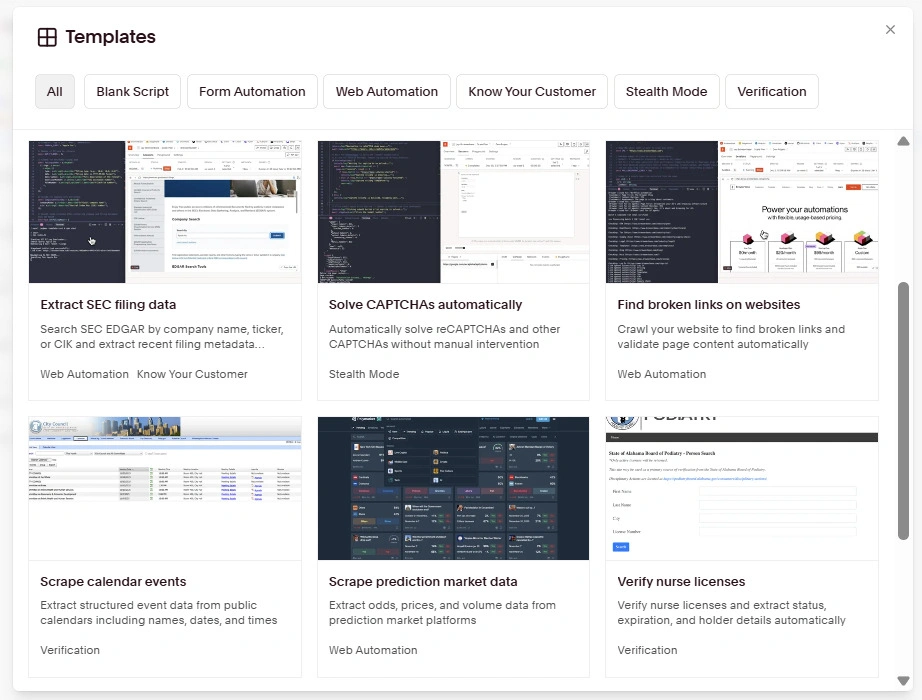
Browserbase offers ready-to-use and customizable templates for performing specific tasks. If you don’t find your desired template here, you can write your own automation in Playwright or Stagehand.
Stagehand is Browserbase’s open-source browser automation SDK that lets developers write browser automation using intent-based commands in natural language instead of DOM-selector-based scripts.
The platform displays a live view of the session next to the automation script. This live view allows you to monitor the session and, if needed, interact with the page in real-time too.
Once the session is over, developers can watch the full video playback of everything that happened during the session along with console logs and DevTools-level detail.
There is also built-in support for configuring proxies, solving CAPTCHAs, browser extensions, file management, login persistence, etc.
Here’s how I tested some key Browserbase capabilities and what I found.
How I Tested or Reviewed Browserbase Features
Here’s how I tested and reviewed various key features of Browserbase:
- I measured the time it took me to create an account on Browserbase and launch the first session.
- Then I ran 5 sessions in a row and recorded the median startup speed/latency of each session. I also connected plain Playwright to Browserbase over CDP for this, with no AI layer in the way, so the number reflects Browserbase itself and nothing else. I ran the same test twice, once against the Oregon region and once against Singapore, to see how much of the delay was just distance.
- I also loaded 5 sites (Zillow, G2, LinkedIn, Amazon, Hacker News) in 5 sessions to check whether the sites work normally or block me for running a script.
- I also tested the login retention feature that keeps you logged in to your accounts even when you close a session and start a new one.
- Browserbase also lets you watch the browser session in real time (a live iframe/VNC-style view). The session also gets recorded automatically for later playback/debugging. So I checked these two features too. You’ll get a walkthrough of what’s included.
- Browserbase also offers a template for CAPTCHA-solving. I have also reviewed how this works.
- Checked which granularity levels their proxy config supports (country/city/ZIP) and whether this targeting is included in the base price or billed separately.
- Checked their pricing page/docs for max concurrent sessions per plan.
- Calculated the $/hour and $/session cost of using Browserbase.
My scripts are in the article so you can check my numbers.
Browserbase Hands-on Testing Results
Onboarding & Startup Speed
The onboarding took more time compared to starting the first session.
That’s because Browserbase requires a phone number to sign up, but my country wasn’t supported. I created an account for myself using my US phone number, but you might be able to do so by contacting support as well.
Once I had the account, starting the first session didn’t take much time. I simply had to pick a ready-to-use template and run it.
The templates were a little too specific for what I needed. I just wanted to open a website and time how long it took to get there. So I wrote the test myself.
I used example.com because it is lightweight. I wanted to measure how long Browserbase takes to hand me a working browser, and not how long a heavy website takes to render.
One thing I did differently from most reviews you will read is that I split the timing into three parts instead of reporting one number.
- The first part is provisioning, which is Browserbase allocating a browser after I ask for one.
- The second is the CDP connect, which is my script actually attaching to that browser.
- The third is the page load. Bundling all three together hides where the time actually goes.
Here is what I got from the Oregon region, which is the default:
| Run | Provision | CDP connect | Startup total |
| 1 | 2326 ms | 3143 ms | 5469 ms |
| 2 | 493 ms | 2505 ms | 2998 ms |
| 3 | 424 ms | 2452 ms | 2876 ms |
| 4 | 435 ms | 2412 ms | 2847 ms |
| 5 | 547 ms | 2258 ms | 2805 ms |
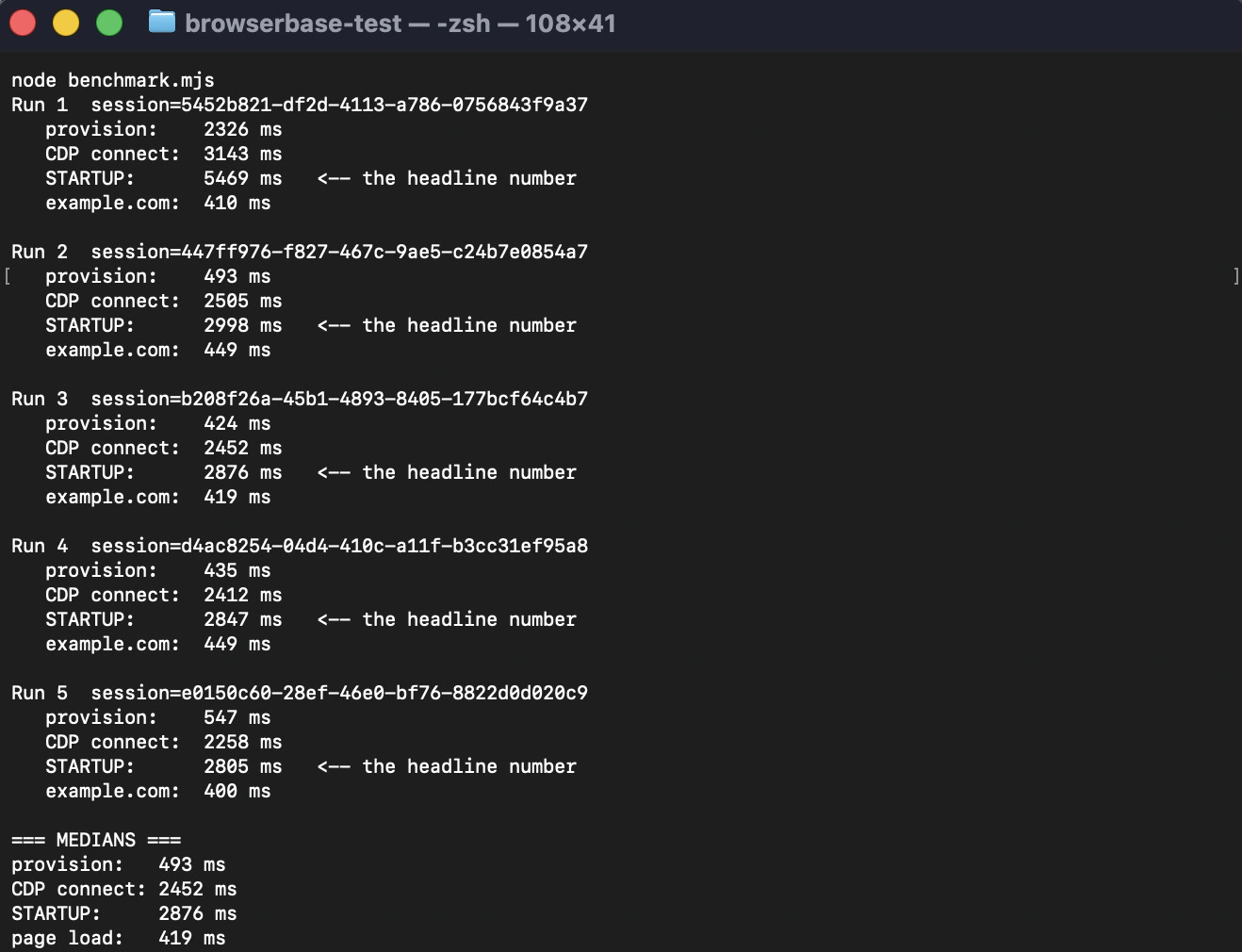
The median startup is 2876 ms.

I am in Pakistan, and Oregon is about 12,000 km away, so I wondered how much of that was just distance. Browserbase lets you pick a region, so I ran the whole test again against Singapore, which is roughly 4,000 km from me.
| Run | Provision | CDP connect | Startup total |
| 1 | 4505 ms | 2054 ms | 6559 ms |
| 2 | 436 ms | 1919 ms | 2355 ms |
| 3 | 443 ms | 1673 ms | 2116 ms |
| 4 | 460 ms | 2067 ms | 2527 ms |
| 5 | 855 ms | 1774 ms | 2629 ms |

The median came down to 2527 ms. That is only 349 ms faster, even though I cut the distance by two-thirds.

That tells you something useful. The slow part is not the network. Browserbase hands you a browser in about half a second, which is quick. It is the connection handshake that eats the time, and it stayed at 1919 ms even from the closest region available to me. That is about three-quarters of the total startup, and picking a nearer region barely dents it.
The other thing worth knowing is that the first run is always slower. Look at run 1 in both tables. Provisioning took 2326 ms in Oregon and 4505 ms in Singapore, against 424 to 855 ms for every run after that. I saw the same pattern in both regions, so it is not a fluke. If your automation runs on and off rather than constantly, expect the first session after a quiet spell to cost you a few extra seconds.
So is Browserbase fast? Provisioning is. Getting connected to what it provisions is not.
Here’s my benchmark script:
    import { chromium } from "playwright-core";

    const API_KEY = process.env.BB_KEY;
    const PROJECT_ID = process.env.BB_PROJECT;
    const REGION = process.env.BB_REGION; // optional: us-west-2, us-east-1, eu-central-1, ap-southeast-1
    const RUNS = 5;

    async function createSession() {
      const body = REGION
        ? { projectId: PROJECT_ID, region: REGION }
        : { projectId: PROJECT_ID };

      const res = await fetch("https://api.browserbase.com/v1/sessions", {
        method: "POST",
        headers: { "X-BB-API-Key": API_KEY, "Content-Type": "application/json" },
        body: JSON.stringify(body),
      });
      if (!res.ok) throw new Error(`Create failed ${res.status}: ${await res.text()}`);
      return res.json();
    }

    async function releaseSession(id) {
      await fetch(`https://api.browserbase.com/v1/sessions/${id}`, {
        method: "POST",
        headers: { "X-BB-API-Key": API_KEY, "Content-Type": "application/json" },
        body: JSON.stringify({ status: "REQUEST_RELEASE" }),
      });
    }

    const median = (a) => {
      const s = [...a].sort((x, y) => x - y);
      const m = Math.floor(s.length / 2);
      return s.length % 2 ? s[m] : (s[m - 1] + s[m]) / 2;
    };

    const provision = [], connect = [], startup = [], pageload = [];

    for (let i = 1; i <= RUNS; i++) {
      const t0 = Date.now();
      const session = await createSession();
      const t1 = Date.now();

      const browser = await chromium.connectOverCDP(session.connectUrl);
      const t2 = Date.now();

      const page = browser.contexts()[0].pages()[0];
      await page.goto("https://example.com", { waitUntil: "domcontentloaded" });
      const t3 = Date.now();

      provision.push(t1 - t0);
      connect.push(t2 - t1);
      startup.push(t2 - t0);
      pageload.push(t3 - t2);

      console.log(`Run ${i}  session=${session.id}`);
      console.log(`   provision:    ${t1 - t0} ms`);
      console.log(`   CDP connect:  ${t2 - t1} ms`);
      console.log(`   STARTUP:      ${t2 - t0} ms`);
      console.log(`   example.com:  ${t3 - t2} ms\n`);

      await browser.close();
      await releaseSession(session.id);
      await new Promise((r) => setTimeout(r, 3000));
    }

    console.log("=== MEDIANS ===");
    console.log(`provision:   ${median(provision)} ms`);
    console.log(`CDP connect: ${median(connect)} ms`);
    console.log(`STARTUP:     ${median(startup)} ms`);
    console.log(`page load:   ${median(pageload)} ms`);
If you want to check these numbers, run this yourself. You can save this script as benchmark.mjs. You need Node 18 or higher and playwright-core installed, which is npm install playwright-core. Then set your own key and project ID and run it:
    export BB_KEY="your_api_key"
    export BB_PROJECT="your_project_id"
    node benchmark.mjs
Leave BB_REGION unset for the Oregon default, or set it to ap-southeast-1 to test Singapore. Each run uses about a minute of billed browser time, so five runs cost you roughly 5 minutes of your monthly allowance.
Antibot Bypass Test
For this test, I wrote a script that opens 5 websites in separate tabs, one at a time.
Since opening 5 tabs back-to-back with no pause could cause sites to lag or time out, I introduced a 1.5-second wait before the next tab opens. This would prevent sites from fighting for resources simultaneously.
Each website also gets 45-seconds to fully load before the tab times out.
Here’s how the following 5 websites performed in my 5 sessions:
| Website | Session 1 | Session 2 | Session 3 | Session 4 | Session 5 |
|---|---|---|---|---|---|
| Zillow.com | ⚠️ (Human check) | ⚠️ (Human check) | ⚠️ (Human check) | ❌ Page would not load | ❌ Page would not load |
| G2.com | ✅ | ✅ | ✅ | ✅ | ✅ |
| Linkedin.com | ✅ | ✅ | ✅ | ✅ | ✅ |
| Amazon.com | ✅ | ❌ | ✅ | ✅ | ✅ |
| news.ycombinator.com (Hacker News) |
❌ | ✅ | ✅ | ✅ | ✅ |
✅ Page loaded normally · ⚠️ Blocked by a human check (CAPTCHA) · ❌ Blocked or page would not load
Antibot access score: 4 out of 5 (free plan, datacenter IP). Across all 25 individual attempts, 18 succeeded (without any human check).
The Zillow website loaded in the first three sessions but blocked actual access with a human check.

The human check wanted me to press and hold a button to confirm I was a human and not a bot. However, I couldn’t pass the human check even after pressing and holding the button. This shows that some websites can easily detect that a session is being run automatically through Browserbase.
So I scored Zillow as a failure in all five sessions. The page rendered in the first three, but a human check I could not pass is certainly a failure.

Here, you should know that I ran this test on the free plan, which doesn’t include Browserbase’s automatic CAPTCHA solving (although Browserbase states that CAPTCHA solving is enabled by default on all sessions) or residential proxies. Paid plans might handle checks like this better, although it’s unclear whether Browserbase’s solver supports press-and-hold challenges.
It is worth explaining why the free plan struggles here, because it is not really about the browser.
Free Browserbase sessions go out over AWS data center IPs. Cloudflare, Akamai, and PerimeterX all keep lists of data center IP ranges, and traffic from them gets flagged before anyone looks at your browser headers or your fingerprint. So no amount of stealth on the browser side fixes an IP that is obviously a server.
Paid plans route through residential proxies instead, which is a different situation entirely. So read this score as what the free plan does, not what Browserbase is capable of. If you are evaluating it seriously, you should budget for the $20 plan before you judge it on this.
In the last two sessions, Zillow blocked my access entirely. It wouldn’t load the page at all.

There were two more websites that failed to load, but in one session only. The Hacker News website failed to load in the first session, and Amazon failed to load in the second.
In other sessions, they loaded perfectly fine, along with LinkedIn and G2, which didn’t run into any issues in all 5 sessions.
So, the takeaway is that Browserbase is not readily trusted by some websites.
Login State Persistence Test
All Browserbase sessions start with fresh user data directly by default.
If you log in to an account in a Browserbase session and want to stay logged in even after the session ends, you have to use the Context feature.
You create a Context and get a context ID in return.
The context ID needs to be pasted into your session script. Next, run the session and type your email and password into that live browser view. Once login is successful, your login gets saved into the Context.
Then run another session with the same Context ID, and you should find the account logged in.
I was hoping for the same. I had chosen to log in to my Browserbase account in the session.

The login was successful, and I was launched into my Browserbase dashboard, as you can see in the screenshots below:

But when I started a new session with the same Context ID, the Browserbase website loaded, but the account was logged out.
I had followed all the instructions laid out in the Browserbase help article about using the Context feature. Either critical instructions were missing in the help article, or the feature doesn’t work for every website.

Why the Context Feature Did Not Keep Me Logged In
I wanted to understand this, so I dug a little deeper into why this happens, because it is a common complaint with cloud browsers, and the reason is very much structural.
When you log into a modern web app, your login is not one cookie. It is usually spread across HTTP-only cookies, localStorage, IndexedDB, and sometimes a token in session storage that dies the moment the browser closes.
The Context feature saves a snapshot of the browser’s user data directory. That catches some of this, but not reliably all of it, and Browserbase’s own docs tell you to wait a few seconds after closing a session so the data has time to sync.
There is a second problem that snapshotting cannot solve, which is that plenty of sites tie a session to the IP address and browser fingerprint it was created on.
Your cookie can survive perfectly and still be rejected, because the new session is coming from a different IP with a different fingerprint, and the site treats it as someone who stole your cookie.
That is the real limitation of an ephemeral browser. You can save the files, but you cannot save the identity.
Here is what the setup looks like in code, if you want to try it yourself:
    // Create a context once, save the ID
    const ctx = await fetch("https://api.browserbase.com/v1/contexts", {
      method: "POST",
      headers: { "X-BB-API-Key": API_KEY, "Content-Type": "application/json" },
      body: JSON.stringify({ projectId: PROJECT_ID }),
    }).then(r => r.json());


    // Then pass it into every session you want to share the login
    const session = await fetch("https://api.browserbase.com/v1/sessions", {
      method: "POST",
      headers: { "X-BB-API-Key": API_KEY, "Content-Type": "application/json" },
      body: JSON.stringify({
        projectId: PROJECT_ID,
        browserSettings: {
          context: { id: ctx.id, persist: true }
        }
      }),
    }).then(r => r.json());
The persist flag is the part people usually miss. And without it the context loads into your session, but nothing new gets written back to it, so you end up testing something that was never going to work in the first place.
Live View & Session Recording
You cannot fully automate all scenarios and actions. Even if you manage to do so, a site can change its structure, and your script can get outdated.
Browserbase lets you intervene and click, type, and scroll during sessions for these reasons.
For example, you might feel unsafe including your login credentials in a script. You can just load the website through the script and enter credentials yourself.
The Live View launches instantly when you start a session. All Live View actions are available on the free plan as well.
Once a session has ended, you can replay a recorded video of the session. If your session included multiple tabs, Browserbase generates a separate recording for each tab.

The recording lets you pause, rewind, increase playback speed, download the recording, and check console, network, and event logs.
The free and Developer plans keep this recording for 7 days. Higher plans retain the video for a month or more.
CAPTCHA Solving and Proxy Features
According to official help articles, CAPTCHA solving is enabled in all Browserbase sessions by default. But the CAPTCHA-solving feature is not available for free when you use a free account.
On a paid plan, when a CAPTCHA is detected, Browserbase starts solving it instantly. This native feature can handle typical CAPTCHAs. If you are encountering a non-standard or custom CAPTCHA, you’ll have to add a few custom lines to solve it in your script.
The proxy feature is also for paid users only.

Users can create sessions in the following regions only:
- us-west-2 (Oregon)
- us-east-1 (Virginia)
- eu-central-1 (Frankfurt)
- ap-southeast-1 (Singapore)
By default, all browser sessions are created in us-west-2. You can specify a different region in your script using the region parameter.
Paid plans unlock Browserbase’s entire built-in proxy pool that includes 200+ countries.
You can geotarget regions by country, city, and state. The state option only works within the US, though. Also, there’s no ZIP-level targeting, and geotargeting isn’t billed separately. You will only pay for the proxy bandwidth you use. Here’s what you get:
- 1 GB is included on the Developer plan ($12/GB after that)
- And 5 GB on the Startup plan ($10/GB after that)
Other than these, you can also bring in third-party proxies. There’s also the option to use multiple proxies in combination and route traffic through different proxies based on the website you’re visiting.
Browserbase Pricing
On the free Browserbase plan, you can run a total of 3 browser sessions simultaneously.
And you are given only 1 hour of browser usage for the entire month. Free sessions default to 5 minutes and can be extended to 15, which is the free plan ceiling. With 1 hour of browser time for the month, that is four sessions at the maximum length, or a bit more if you keep them short.
The three paid plans unlock higher limits and some more features.

Here’s a summary of the three paid plans and the key things they unlock:
| Plan | Starting price per month | Concurrent browser sessions | Browser usage hours/month | Session duration | Built-in proxy traffic |
| Developer | $20 | 25 | 100 | 6 hours | 1 GB |
| Startup | $99 | 100 | 500 | 6 hours | 5 GB |
| Scale | custom | 250+ | 500+ | 6+ hours | 5+ GB |
So what does Browserbase actually cost per hour and per session?
Provided you use all your included hours in Developer and Startup plans, the cost will then be around $0.2 per browser hour. $20 ÷ 100 hours and $99 ÷ 500 hours.
So if you run out of included hours on the Developer plan, you will have to pay $0.12 per hour, while if you exceed your hours limit on the Startup plan, you’ll pay $0.1 per hour.
Browser time is billed by the minute, with a one-minute minimum per session. So a usual 2-minute session costs roughly $0.003 to $0.007, depending on your plan and whether you’re still within your included hours.
But per-hour pricing is easy to quote and hard to plan with. Here is what two realistic setups actually cost.
Scenario 1: small automation project, 25 concurrent sessions, around 100 browser hours a month
The Developer plan at $20 covers this exactly. 25 concurrent sessions is the cap, and 100 hours is what is included. So $20, as long as you also stay inside 1 GB of proxy traffic.
That last bit is where it gets expensive. 1 GB does not go far if you are loading image-heavy pages. Say you use 5 GB in a month. The extra 4 GB costs $48 at $12/GB, so your $20 plan is now a $68 plan. The proxies cost more than triple the software.
Scenario 2: agency or agent fleet, 100 concurrent sessions, 500 browser hours, 20 GB of proxy traffic
The Startup plan at $99 covers the concurrency and the hours. It includes 5 GB of proxy traffic, so you are paying for 15 GB on top at $10/GB, which is $150.
Total: $249 a month, and $150 of that is bandwidth.
The lesson is the same in both cases, which is that the plan price is not the total price. On anything doing real scraping, proxy bandwidth is the line item that decides your bill, and it is the one the pricing page makes you calculate yourself.
Pros & Cons
Here are some advantages and disadvantages of Browserbase I found during my testing of Browserbase.
| Pros | Cons |
| Provisioning is fast, around half a second | Onboarding requires a phone number, and your country might not be supported |
| Live View is a crucial feature and is available even on the free plan | Browserbase cannot bypass the anti-bot system of websites on the free plan. |
| Sessions are recorded automatically. | The human-verification check presented by some websites can fail even if you manually attempt to solve it. |
| A separate recording is generated for each tab in a session | Login/session persistence via the “Context” feature did not keep my account logged in |
| CAPTCHA solving is enabled by default on all sessions of the paid plan | The free plan only allows 1 hour of browser usage for the entire month. |
| The built-in proxy pool covers 200+ countries across all continents. | Connecting to the browser takes roughly three-quarters of the total startup time, and it does not help much if you connect to a nearer region |
| Supports multiple proxies with domain-based routing |
Limitations and When NOT to Buy Browserbase
Browserbase is a good product, but it targets a specific kind of work. Here is who should not buy it.
1. You Manage Accounts Rather Than Run Scripts
Everything about Browserbase assumes the browser is disposable. My persistence test failed, and even when Contexts work, they are saving a folder rather than maintaining an identity.
If your job is keeping 40 accounts logged in across weeks, you are fighting the architecture every day.
2. You Need Zip-Level Geotargeting
Browserbase doesn’t offer ZIP-level geotargeting.
It only offers country, city, and US state.
3. Your Workload Moves A Lot Of Data
At $10 to $12 per GB, bandwidth will quietly become most of your bill.
So you should work out your monthly GB before you commit, and not after.
4. You Are Outside A Supported Region
Browserbase sessions run in Oregon, Virginia, Frankfurt, or Singapore.
If you are far from all four, you pay for that distance on every single session, and as my Singapore test showed, choosing the nearest one only recovers part of it.
5. You Want To Evaluate It Properly On The Free Plan
You cannot do that on the free plan. One hour of browser time a month, no proxies, and no CAPTCHA solving means the free plan tells you almost nothing about how the paid product performs. You should at least buy the starting developer plan of $20 to try it out seriously.
6. You Need A Phone Number The Signup Form Accepts
My phone number was not supported by Browserbase, and I had to use a US number.
Depending on where you are, this alone might stop you.
How Browserbase Compares to Other Cloud Browsers
| Cloud Browser | Entry price | Concurrent at entry | Included hours | Proxy model | Proxy per GB |
| Browserbase | $20 | 25 | 100 | Billed separately | $12 |
| Gologin | $4.50 | 1 | 100 | Residential and mobile proxies included in rate | Included ($1/GB extra) |
| Hyperbrowser | $30 (30,000 credits included in the plan) | 25 | Requires 100 credits per hr | Residential proxies included | Requires 10,000 credits per GB |
| Browserless | $25/mo (billed annually) | 10 | 20,000 units ≈ 167 hrs, shared with proxy and CAPTCHA | Metered in the same unit pool | Residential 6 units/MB ≈ $12.29/GB; datacenter 2 units/MB ≈ $4.10/GB |
| Steel | $0 + usage (Launch), $30 one-time credit | 10 | None. Credit model, $0.10/browser hour | Metered separately | $10/GB Launch, $6/GB Scale |
| Scrapfly | $30/mo (Discovery) | 5 | None. 200,000 credits, priced per request | Credits per request, not bandwidth | Not billed by GB. Residential = 25 credits/request vs 1 for datacenter |
What Persistent Profiles Do Differently
The Context test above is the most useful thing I found in this review, because it points to something structural rather than a bug.
Browserbase saves a snapshot of the browser’s user data directory. If you start a new session, the snapshot is restored inside the new browser. There will be a fresh fingerprint, a fresh IP, but old cookies.
Even when every cookie survives, there is a second problem. Sessions are being bound to a device and network. So the cookie comes from a different fingerprint with a different IP address. From the site’s perspective, it looks like a stolen cookie.
Gologin Cloud Browser works on a completely opposite principle. It does not restore the files in a new browser. It restores the very same profile that includes the cookie, fingerprint, and IP. The site recognizes the known device on the known network carrying the cookie it already issued.
Saving files is relatively easy, but keeping the identity attached to those files is the hard part.
So I have run the same tests for Gologin as I ran them for Browserbase using the same scripts on 17 September 2026.
The Best Browserbase Alternative: Gologin Cloud Browser (Tested Side by Side)
| Test | Browserbase | Gologin Cloud Browser |
| Plan tested | Free | Professional |
| Date tested | 14 September 2026 | 17 September 2026 |
| Median startup latency | 2876 ms (Oregon), 2527 ms (Singapore) | 1635 ms (see note) |
| example.com load | 419 ms | 297 ms |
| Anti-bot, datacenter IP | 4 of 5 sites (18 of 25 attempts) | 3 of 4 sites (15 of 25 attempts) |
| Anti-bot, residential IP | Not available on free plan | 5 of 5 sites (24 of 25 attempts) |
| Login persistence | Failed in my test | Passed |
| Concurrent sessions, entry paid plan | 25 | 1 |
| Entry paid price | $20/month | $4.50/month |
| Included browser hours | 100 | 100 |
| Browser hour overage | $0.12 | $0.09 |
| Proxy model | Billed separately by bandwidth | Residential IPs included in hourly rate |
| Proxy overage per GB | $12 Developer, $10 Startup | Included in hourly rate |
| Geo granularity | Country, city, US state. No ZIP | Not tested in this review |
| Live view with takeover | Yes | Yes |
Note on startup: For Browserbase, a separate API call starts the browser and a second call connects to it, so I could time both. For Gologin, one connectOverCDP call does both, so 1635 ms is the combined figure. The Gologin profile had also been used a few seconds earlier and had a US residential proxy attached, while the Browserbase sessions started cold with no proxy. Treat the two startup numbers as indicative.
Why Consider a Browserbase Alternative?
- Need long-term session persistence (staying logged in without re-auth).
- High proxy bandwidth costs ($10–$12/GB).
- Lack of ZIP-level geo-targeting.
- Need for real persistent browser fingerprints instead of disposable snapshots.
Gologin Wins with Residential Proxies and Browserbase with Datacenter IPs
I used the same Playwright script for Gologin (mentioned above) and ran the tests on the same 5 sites.

I used a US residential proxy, and Gologin scored 5 out of 5. In all five sessions that I ran, Gologin successfully opened 24 times out of 25.

It only failed to load the G2 page in the first session, but all the rest of the sessions went smoothly.

Gologin’s median startup was 1635 ms against Browserbase’s 2527 ms, though the two were not measured identically (see the note under the table above).

But Browserbase was tested on its free plan in this review, which has no proxy access at all, so that comparison was residential against datacenter.
So I built a second Gologin profile with no proxy attached. It exits over a Hetzner datacenter IP in Helsinki, which is the same class of IP Browserbase free uses on AWS. Then I ran the identical script against the same five sites.
Here are the results:
| Site | Browserbase (AWS datacenter) | Gologin (Hetzner datacenter) | Gologin (US residential) |
| Zillow | Human check, then blocked | Loaded 5 of 5 | Loaded 5 of 5 |
| G2 | Loaded 5 of 5 | 403 in all 5 sessions | Loaded 4 of 5 |
| Loaded 5 of 5 | Browser crashed in all 5 | Loaded 5 of 5 | |
| Amazon | Loaded 4 of 5 | Loaded 5 of 5 | Loaded 5 of 5 |
| Hacker News | Loaded 4 of 5 | Loaded 5 of 5 | Loaded 5 of 5 |
| Score | 4 of 5 | 3 of 4 | 5 of 5 |
On the no-proxy Gologin profile, the LinkedIn tab crashed in all five sessions. The page loaded, then the tab’s renderer process died within three seconds, which Playwright reports as “Page crashed”.
The browser stayed connected and the other sites loaded normally. It did not happen with a residential proxy, where LinkedIn loaded five times out of five.
A crash is not a block, though, so I have left LinkedIn out of the anti-bot score for this run and am reporting it here as a stability issue.
If we look at the results without any bias, Gologin clearly won over Browserbase when Gologin’s paid plan is active and with residential proxies.
But on the free plan without any proxy, Browserbase leads Gologin by a slight margin.
The other thing this table shows is what the proxy is worth. Gologin goes from 3 out of 5 to 5 out of 5 when you use a residential IP.
Residential IPs are included in Gologin’s hourly rate rather than billed at $10 to $12 per GB, so that column is what you get at the $4.50 price. But it is a pricing advantage, not a browser one, and I am not going to present it as the latter.
Neither product passed everything. Browserbase could not get past Zillow’s press-and-hold check. Gologin was blocked by G2 on a data center IP. G2 is a known problem site for cloud browsers in general, ours included.
Concurrency is something where Browserbase is far ahead. You can run up to 25 sessions at once on Browserbase’s $20 Developer plan. The scale goes to 250 and beyond.
However, Gologin’s Professional plan allows you to run 1 session in parallel. Paid plans go from 1 to 4 parallel sessions, and beyond that you will need a custom plan.
Which One You Should Choose
You should pick Browserbase if the work is stateless. Scraping public pages, agents that start clean every time, CI runs, anything where a fresh browser is fine or preferable. The concurrency is in a different league. It handled more sites than we did on equal IPs, the debugging tools are excellent, and Stagehand is a genuinely good SDK.
Pick Gologin if the browser has to remember who it is. Anything behind a login, any workflow where you authenticate once and come back tomorrow, anything managing more than one account. The profile keeps the cookies, the fingerprint, and the IP together, which is the combination that makes a site treat you as a returning user rather than a stranger holding someone else’s cookie. You give up concurrency to get it.
In short, if you would be happy throwing the browser away after every run, Browserbase is the better tool. If throwing it away is the problem you are trying to solve, it is the wrong tool.
Try Gologin Cloud Browser for free today.
FAQs
Is Browserbase free?
There is a free plan, but it is a demo rather than a usable tier. You get 3 concurrent browsers and 1 hour of browser time for the whole month, with no proxies and no CAPTCHA solving. Browserbase paid plans start at $20.
Does Browserbase support residential proxies?
Yes, Browserbase does support residential proxies, but on paid plans. The pool covers 200+ countries, and you can target by country, city, and US state. There is no ZIP-level targeting. You get 1 GB on the Developer plan and 5 GB on Startup, then $12 and $10 per GB, respectively.
How does Browserbase handle CAPTCHAs?
Solving is on by default on paid sessions and starts as soon as a CAPTCHA is detected. It handles standard CAPTCHAs. Custom or non-standard ones need extra code from you. In my free plan testing, Zillow’s press-and-hold check could not be passed even manually.
How fast is Browserbase?
It provisions a browser in around half a second. Connecting to it is the slow part, at roughly 1900 to 2500 ms. My median total startup was 2527 ms from Singapore and 2876 ms from Oregon, testing from Pakistan on 14 September 2026.
Is there a Browserbase alternative that keeps sessions logged in?
Gologin Cloud Browser is the Browserbase alternative that is built for this specific problem. Browserbase’s Context feature did not keep my account logged in when I tested it because it restores cookies into a browser with a new fingerprint and a new IP. Gologin restores the profile instead, so cookies come back attached to the same device and the same residential IP that created them.
Browserbase vs Gologin Cloud Browser: what is the difference?
Browserbase runs 25 concurrent sessions on its $20 plan against Gologin’s 1 on Professional. On matched datacenter IPs, Browserbase reached 4 of 5 test sites, while Gologin reached 3 of 5. However, Gologin reached all 5 sites when I turned on residential proxy. Gologin also started faster, 1635 ms against 2527 ms, and includes residential IPs in the hourly rate instead of billing bandwidth at $10 to $12 per GB, which took it to 5 of 5. The difference between Browserbase and Gologin is stateless versus stateful.