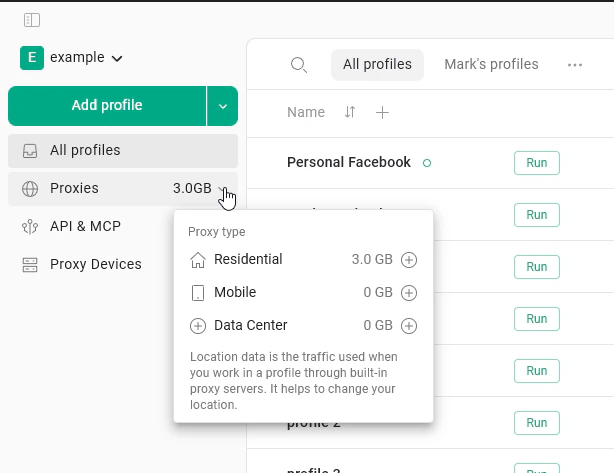
- Proxy traffic in gigabytes, used by our residential, mobile, and datacenter proxies. Every paid plan already includes some.
- Dedicated IP - a single static IP address reserved for you, sold as a $5/month subscription per address. This article covers both.
Default proxy traffic
All paid plans include 2 GB of residential proxy traffic per month, regardless of the plan tier or billing period (monthly or annual). This traffic refreshes at the start of each billing month. It does not carry over - any unused traffic from the previous month is replaced with a fresh 2 GB.Annual subscribers also receive 2 GB per month, not 2 GB per year. The refresh happens every month for the entire duration of the subscription.
Buying additional traffic
One-time top-up
A top-up is a one-time purchase of extra traffic. Use this if you have an occasional spike in usage and do not need more traffic every month. Steps:- On the main All profiles page, click the traffic amount next to the Proxies tab in the left side-menu.
- Select the proxy type you want to buy traffic for.
- Choose the amount of traffic you need.
- Click the + button next to your chosen amount and proceed to checkout.
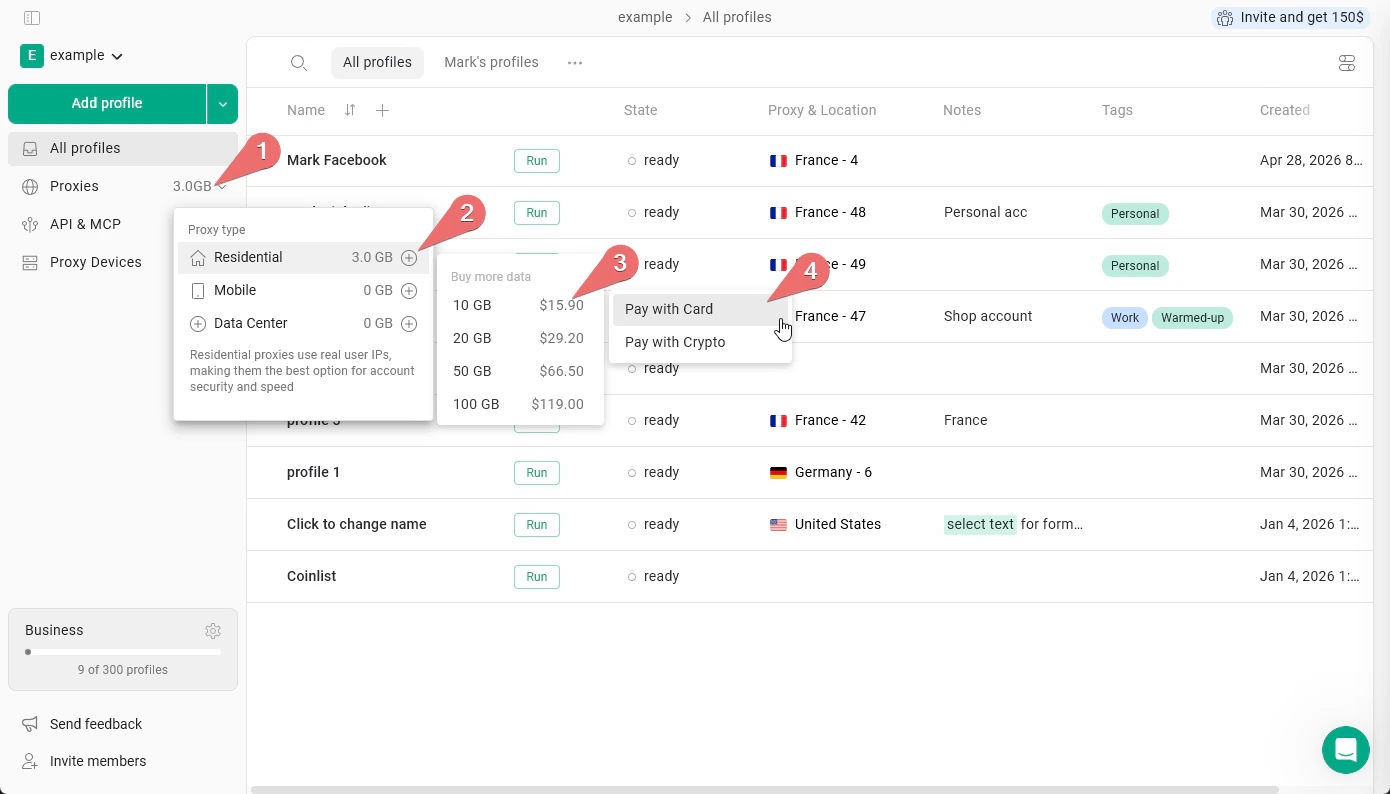
Prices shown in the app are the most up to date. Check them directly before purchasing.
Subscription add-on
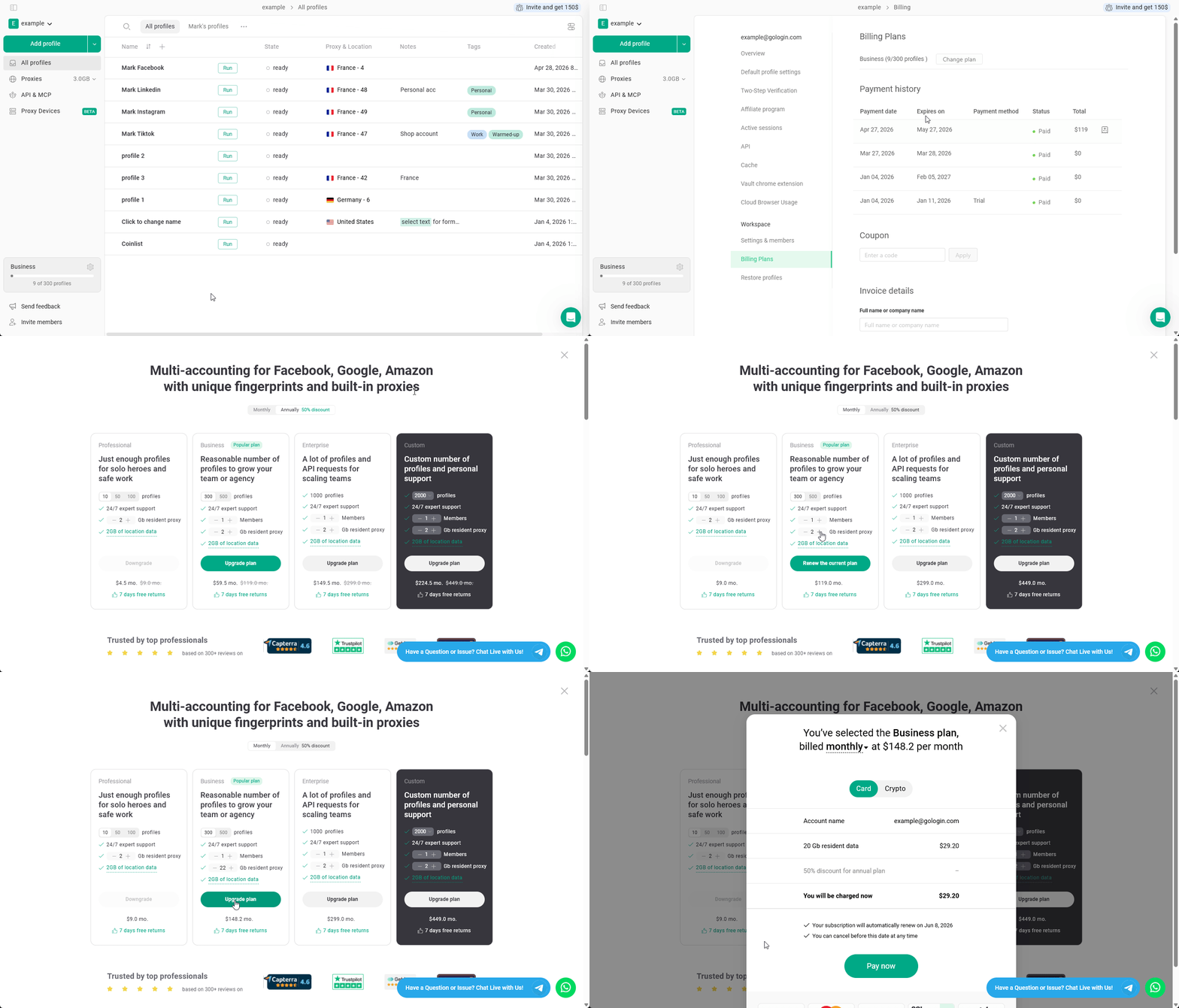
A subscription add-on adds a set amount of proxy traffic to your plan on a recurring basis. This means the traffic is added automatically every month. You can add traffic to your subscription during initial checkout or at any time by changing your current plan. How to add traffic to your current plan:- On the main All profiles page, click the cog icon next to your plan info at the bottom-left.
- Click Change plan.
- On the pricing page, confirm your plan - you should see the Renew the current plan button, which means you are adding to your current plan rather than changing it.
- Find the proxy traffic add-on and set the amount you want added each month.
- Click Upgrade now, choose the payment method and click Pay now to complete checkout.
- Monthly plan - the add-on amount is charged and added every month when your subscription renews.
- Annual plan - the add-on is paid once as part of your annual subscription and added to your account every month throughout the year.
Buying a Dedicated IP
A Dedicated IP is a single static address that belongs only to you. It never rotates, it has no traffic limit, and it is the right choice for any account that needs to keep the same IP over time - Amazon, eBay, LinkedIn, Meta Ads, PayPal, betting platforms.Dedicated IPs are available on paid plans only. They are not part of the free trial.
Steps
- Click Add profile.
- Open the Proxy tab and select Gologin proxy.
- Click Buy dedicated IP.
- Pick a country from the selector.
- Click Buy for $5/month.
- Complete checkout in the billing window that opens. You can pay by card through Stripe or with crypto through Cryptomus.
- When you return to Gologin, a confirmation window tells you the payment went through.
- Wait 5-7 minutes for the IP to be assigned to your account.
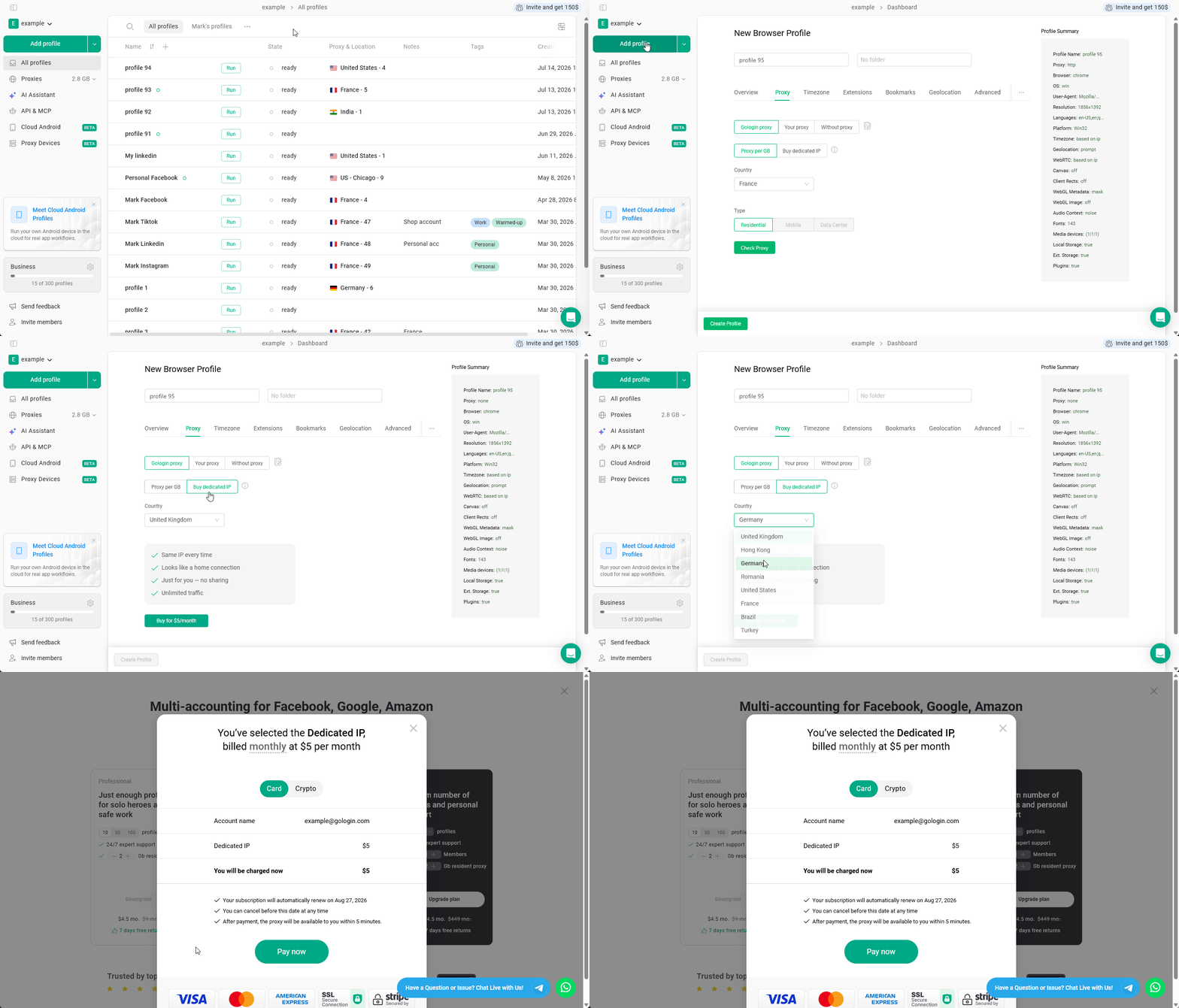
The price is always $5 - Gologin does not add any processing fees. If you pay with crypto, your own wallet or exchange may charge a network fee on top of the invoice. See Payment methods for details.
Finding your Dedicated IP after purchase
The IP is not attached to any profile automatically. After 5-7 minutes, refresh the page - you may need to reload for it to appear. Your Dedicated IP will then be available in three places:- The Proxies page, in the list of your own proxies
- The Your proxy tab on the New Browser Profile page
- The proxy manager on the All profiles page, when assigning a proxy to an existing profile
How Dedicated IP billing works
A Dedicated IP is tied to your main Gologin subscription, so it always ends when your subscription ends.
If your annual plan has an incomplete month left, it is billed as a full month.
While your subscription is active and renewing, the IP stays the same. You keep the same address until you cancel.
Cancelling and refunds
- A Dedicated IP is cancelled together with your Gologin subscription. There is no separate cancellation for a single IP at the moment.
- If you cancel, the IP keeps working until the end of the period you already paid for.
- A Dedicated IP cannot be swapped for a different address.
- Refunds are available within 14 days of purchase - contact support.
A Dedicated IP belongs to the account that bought it and is not shared with other workspace members. However, if you assign it to a profile and share that profile, anyone with access to the profile can use it.
Viewing available Gologin proxy traffic
To view how much traffic is left, just hover over the current available traffic in the left menu. You will see the breakdown of how much traffic is left for each of the proxy types.