

Changing your payment method
Currently, you cannot change the payment method without making a payment. Here’s what you can do:Change payment method by purchasing a plan
- Go to the main menu at the top-left > Settings & Members > Billing Plans > Payment Methods > Change payment method.
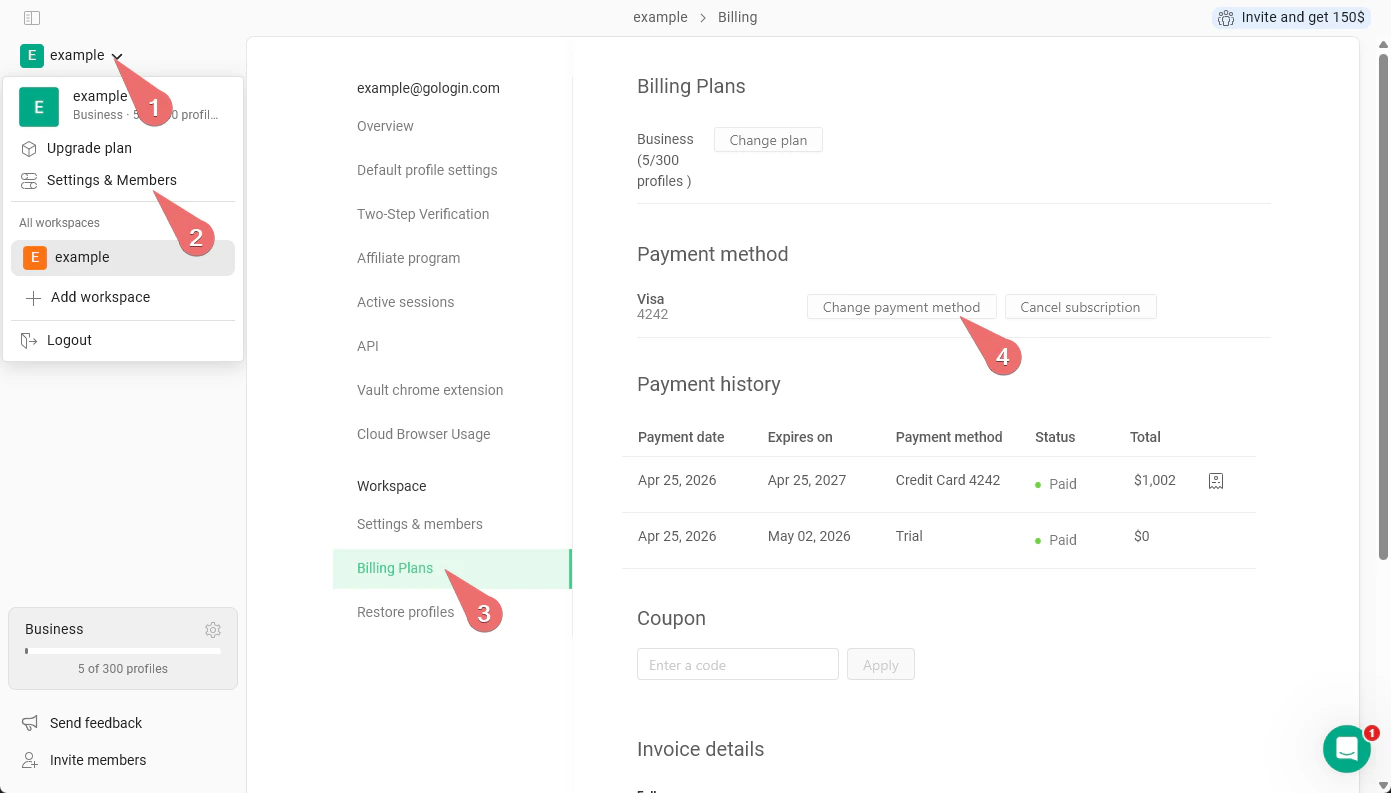
- Renew the current plan or upgrade it. The payment method will get updated.
- your current plan will be counted in during the plan upgrade
Change payment method by removing the current one
- Remove the current payment method in the main menu at the top-left > Settings & Members > Billing Plans > Payment Methods > Cancel subscription.
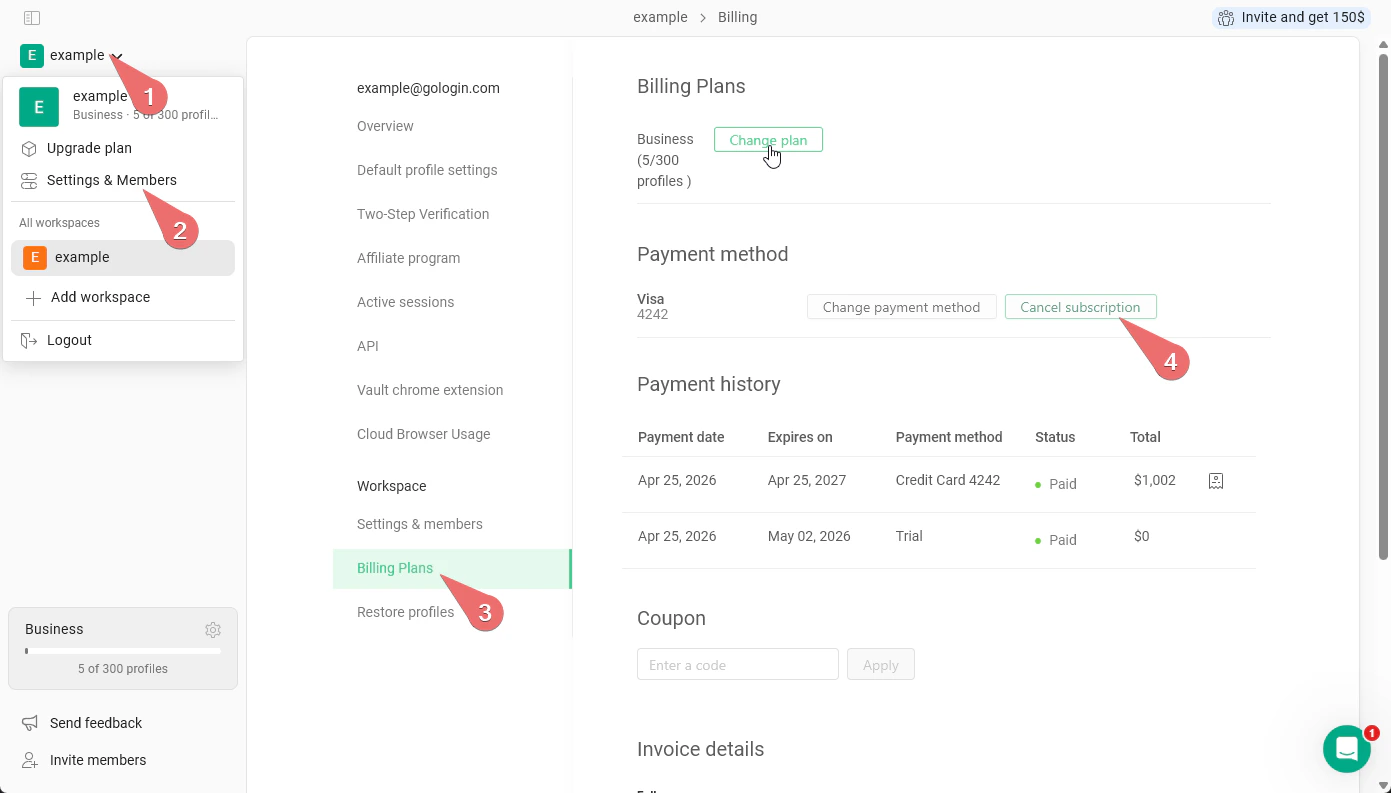
- Wait for the current plan to elapse and purchase a new one with the new card or PayPal.
Cancelling the subscription
If you want to cancel the current subscription, you just need to remove your payment method from your account. Go to the main menu at the top-left > Settings & Members > Billing Plans > Payment Methods > Cancel subscription.Available payment methods
Gologin supports multiple payment methods for subscription and proxy traffic top-up.Subscription
Subscription payments can include add-ons for team members and proxy traffic. There are two types of subscription payments: recurring and one-time. Recurring payments are charged automatically before each new billing period starts. The following methods support recurring payments:- Stripe - credit and debit cards, Google Pay, Apple Pay
- PayPal - payments from PayPal balance or via the connected card
- Stripe - WeChat Pay, Pix, Cash App, Amazon Pay, US or SEPA bank account
- Cryptomus - cryptocurrency payments
Proxy traffic top-up
- Paddle - credit and debit cards only
- Cryptomus - cryptocurrency payments
Additional payment methods info
Cryptocurrency payments
Gologin accepts cryptocurrency payments in the following coins:- BTC (Bitcoin)
- LTC (Litecoin)
- BCH (Bitcoin Cash)
- DOGE (Dogecoin)
- ETH (Ethereum — ERC-20 network only)
Cryptomus, our crypto payments provider, might not work in all countries. It is currently do not provide services for users from Canada. If the crypto payment page does not open for you - use another payment method.
Network fees for crypto payments
When you pay with cryptocurrency, you may see a “You pay network fee” note on the payment screen. This simply means that you cover the blockchain network fee (also called the gas fee) for your transaction. Gologin and Cryptomus (our payment provider) do not add any extra charges to your payment. The network fee is not ours - it is charged by the blockchain itself and paid through the wallet or exchange you send the funds from. The exact amount depends on the coin and network you choose, and on how busy that network is at the moment. We recommend using TRON (TRC-20) network for payments, as the cheapest and fastest option.If you send from an exchange rather than a personal wallet, the exchange may also apply its own withdrawal fee on top of the network fee. Check the total before confirming.
Regional payment methods
Some payment methods are only available in specific countries. For example:- WeChat Pay is available for users in China
- Pix is available for users in Brazil
- Yookassa is available for users in Russia
US and SEPA Bank account payments
Gologin accepts US and SEPA bank account payments via Stripe. This method works differently from cards - the payment is not instant. After completing your payment, expect a delay of 3–5 business days before it is credited to your account. Your Gologin subscription or plan will not activate until the funds are confirmed. Keep this in mind if you’re on a deadline - for immediate access, use a card or another instant payment method instead.Corporate card issues
Some corporate or business credit cards may be declined by our payment processor. If your corporate card is not accepted:- Try using a personal credit or debit card instead
- Use PayPal as an alternative payment method
- Pay with cryptocurrency (see above)