• share individual profiles
• share entire folders with multiple profiles Each option provides different levels of access depending on how your team works. If you need to share just one or a couple of profiles, you don’t have to use Workspaces for that: you can use the Share profile feature directly from your profile list!
Inviting Workspace Team Members
Note: if you choose to share the workspace access, the team member will have access to all the included profiles and folders.
- Navigate to the main menu at the top-right > Invite members
- Enter the teammate’s email address
- Select the access type: Workspace or Selected Folders
- Choose the role: Run, Edit or Full access
- Click Send invite

How to share a profile
- Hover over the three dots on a profile > Share
- Enter the user email
-
Select a role:
Can run - can view and run the profiles you shared Can edit - can run, clone, and edit the settings of the profiles you shared Full access - the same as edit but also can share profiles - Click Share to apply changes
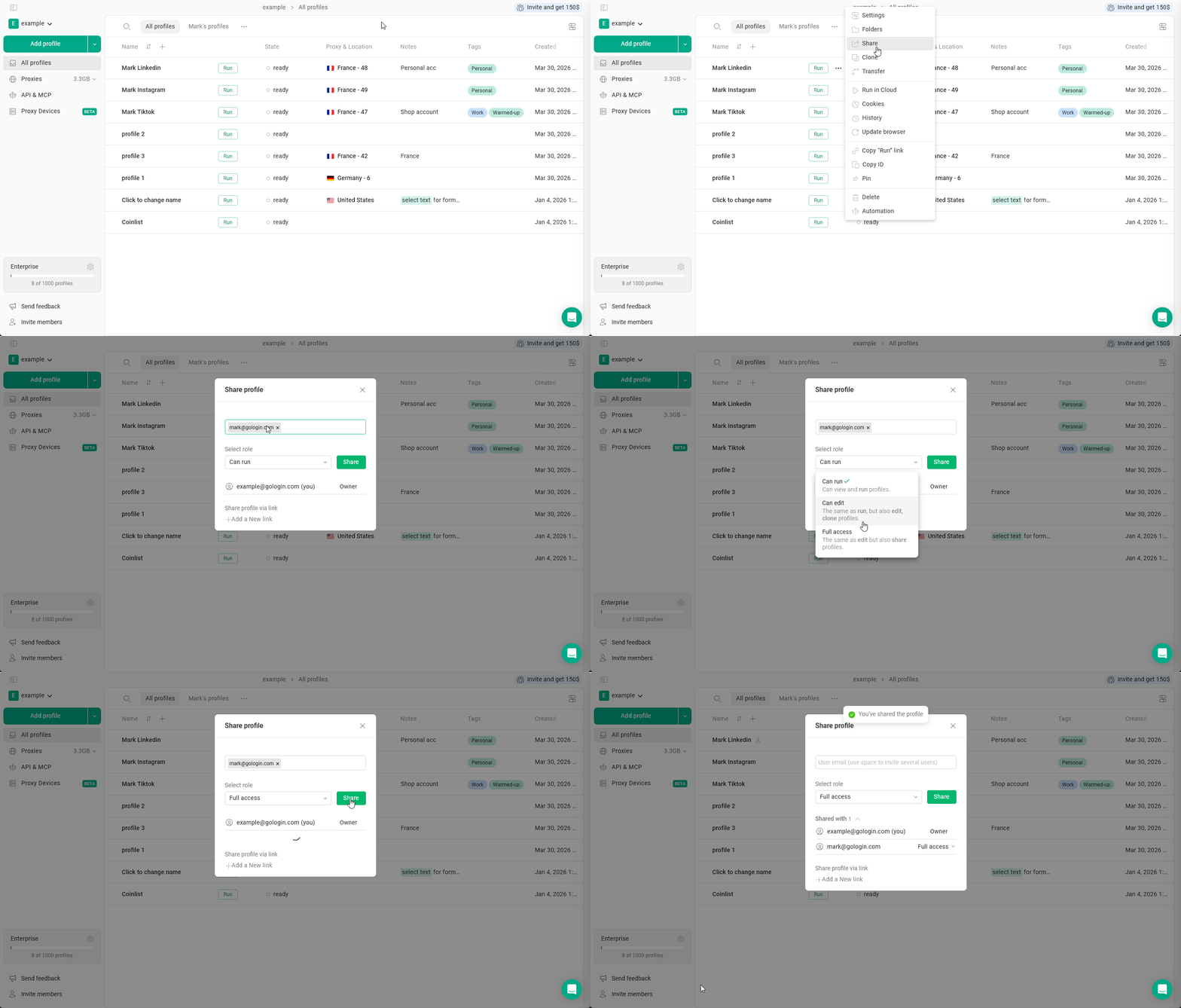
Note: you can share multiple profiles at once using the bulk actions.
How to share folder
You can share a folder with team members to give them access to all profiles inside it.Steps
- Open the main menu in the top-right corner.
- Click Invite members.
- Enter the user’s email address.
- Select Selected Folders.
- Choose the folder you want to share.
- Select the permission level:
- Can run
- Can edit
- Full access
- Click Send invite.
(1).gif?s=4813660e0c1c741cc5cc731bf01f4efe)
Changing or revoking access
To change or revoke the workspace access:- Navigate to the main menu at the top-right > Settings & Members
- Locate the member In the Settings & Members tab > click at their permission
- Change the permission as needed
- To revoke the workspace access click Remove member in the access menu.

What counts as a profile share
1 share = 1 instance of a shared profile.For example: if you share 2 profiles to 5 people or 10 profiles to a single colleague, in both cases it will use up 10 shares. Only the existing shares are counted towards the limit. If you remove some of the unnecessary shares, you will regain back the sharing slots.