Obscura Headless Browser Review: Speed, Concurrency, & Total Cost
Try Gologin for free
Obscura is an open-source headless browser for AI agents and web scraping. It’s written in Rust, runs JavaScript in V8, and exposes a Chrome DevTools Protocol (CDP) endpoint for Playwright and Puppeteer. In testing, version 0.2.6 used less memory than Chrome.
Two results matter more for agents that stay signed in. Obscura lost its cookies after a restart, and its browser fingerprint changed on every page load. FingerprintJS, an open-source fingerprinting library, saw a different device on each page.
This Obscura review measures speed, memory, concurrency, and cost against Chrome and Lightpanda, and persistent identity against a Gologin Cloud Browser profile.
TL;DR
- Obscura fits self-hosted work on public pages that need JavaScript, and a Gologin profile fits signed-in agents. A Gologin Cloud Browser profile kept its cookies and the same device ID across runs, and Obscura 0.2.6 kept neither.
- Speed depends on the build. On 30 public pages loaded one at a time, Obscura’s TLS build took a median 90 s, against 41 s for Chrome’s headless shell. With 25 concurrent sessions, the no-render TLS build, which skips rendering, was faster than the shell and used far less memory. At that load, Lightpanda was faster and lighter than both.
- Playwright mostly worked, with 3 failed calls. In Obscura 0.2.6, 18 of 21 common API calls worked. File uploads, iframe text reads, and
add_cookies()failed. - When you self-host, proxies are most of the bill. For 25 agents working 8 hours a day, 22 days a month, servers cost about $29 a month. The agents’ residential traffic, at 0.2 GB an hour each, needs a 1,000 GB plan from a third-party proxy provider. That plan cost $2,000 to $2,200 a month when tested. Gologin’s residential traffic costs $1 per GB beyond a plan’s allowance, on Gologin Cloud Browser or with your own browser.
| Obscura 0.2.6 key facts | Result |
|---|---|
| Version tested | 0.2.6 release archives on macOS, and the Docker image |
| Tested on | November 4 to 10, 2026 |
| Price | Free under Apache-2.0. You pay for your own servers and proxies. Obscura Cloud had no self-serve sign-up when tested |
| Cost per browser hour and per session | About $0.41 to $0.45 an hour at $2 to $2.20 per GB of residential traffic. A 30-page session costs $0.10 to $0.15, almost all of it traffic |
| Cold start to first page load | 0.42 s, against 0.43 s for Chrome’s headless shell and 0.38 s for Lightpanda, median of 5 runs |
| Wall time for 30 public pages, median of 3 runs | TLS build 90 s, no-render TLS build 52 s, Chrome’s headless shell 41 s, Lightpanda 36 s |
| Concurrent sessions | No plan limit when self-hosted. One worker allowed 128 CDP connections by default, and --workers adds worker processes |
| Peak memory, 25 concurrent sessions | 2.4 GB for the TLS build on 1 worker and 2.7 GB on 8 workers. The no-render TLS build peaked at 0.8 GB, the headless shell at 4.3 GB, and Lightpanda at 0.6 GB |
| Session persistence | After a restart, localStorage persisted in server mode. Cookies persisted only through a workaround in your own code |
| Anti-bot test, 5 sites, logged out | Passed 2 out of 5 sites from the home IP and 3 out of 5 through a US residential proxy. Chrome 156 with a desktop user agent passed 3 out of 5 on both. Obscura loaded 24 of 50 pages, against 32 for Chrome |
| Playwright compatibility | 18 of 21 common API calls worked. File uploads, iframe text reads, and add_cookies() failed |
| Proxies and geo-targeting | Bring your own. Country, city, and ZIP come from your provider, with one proxy per Obscura instance |
| CAPTCHA solving | Not built in. Obscura’s docs listed CAPTCHAs among the limits of its Chrome-TLS mode |
| Live view and session recording | Self-hosted and view-only. Recording isn’t built in |
| Time to first session (setup) | No sign-up or API key. Across 3 fresh downloads, the first obscura fetch after each unpack loaded a page in a median 0.9 s |
What Obscura is and who it’s for
Obscura parses HTML into its own DOM. Its rendering builds then compute the layout and paint pages on the CPU. A built-in Model Context Protocol (MCP) server exposes browser tools to AI agents.
Each release archive contains a different build, and the build decides what Obscura can capture and what a site sees.
| Release archive in 0.2.6 | Screenshots and PDFs | Chrome-style TLS and HTTP/2 fingerprint |
|---|---|---|
| Default archive | Yes | No |
| TLS archive | Yes | Yes |
-no-render archive |
No | No |
| No-render TLS archive | No | Yes |
| Docker image | Yes | No, built without Chrome-style TLS |
In this review, the TLS build is the archive with Chrome-style TLS and rendering, and the no-render TLS build is the one with Chrome-style TLS and no rendering. Pick one of these 2. Use the TLS build if you need screenshots, and the no-render TLS build for DOM and text extraction. Then start it with the flag from Obscura’s README that turns on its Chrome-TLS mode, the Chrome-style TLS and the tracker blocklist.
The tests below use these 2 archives unless a table says otherwise.
Obscura Cloud, the hosted browser as a service, had no self-serve sign-up during testing, so every test here used the open-source engine.
Obscura fits stateless pipelines that scrape public pages. Its homepage listed “zero state” as a feature, meaning every session is a new sandbox with nothing shared. An agent that works inside signed-in accounts needs the opposite, a persistent identity across runs.
The right browser depends on how much rendering a page needs, whether you run your own servers, and whether your agent signs in.
| Your workload | Use |
|---|---|
| Public pages whose data is in the server-rendered HTML | A plain HTTP client |
| Public pages that need JavaScript, on your own servers | Lightpanda, Chrome’s headless shell with resource blocking, or Obscura’s no-render TLS build if your selectors don’t depend on element visibility |
| Pages an agent clicks, types, or scrolls through, without running your own servers | Gologin Cloud Browser, a full Chromium browser in the cloud |
| Agents that return to many signed-in accounts | A Gologin Cloud Browser profile per account, which keeps cookies, device fingerprint, and proxy together |
Obscura review: test setup
We ran every test between November 4 and 10, 2026. Every local benchmark ran on the same Apple M3 Mac, with 8 cores and 16 GB of RAM, over the same home connection in India. Playwright 1.64.1 for Python controlled Obscura 0.2.6, Chrome 156, Chrome’s headless shell 156, and Lightpanda 1.0.2 through the same scripts.
Chrome 156 ran in new headless mode, which runs the full browser without a window. Chrome’s headless shell (chrome-headless-shell) is a separate, lightweight build of Chrome’s old headless mode, and Playwright 1.64.1 used it by default for headless runs.
The 30 public pages, such as Wikipedia, MDN, and BBC News, are the set from our Lightpanda review. FingerprintJS 5.3.0, an open-source library, converted each page’s fingerprint signals into a hashed device ID. The Gologin tests used Cloud Browser profiles, each with a Gologin residential proxy in the US.
Obscura session persistence and fingerprint consistency
Within a session, Obscura kept cookies across page loads. After Obscura restarted, though, sites no longer received the auth cookie that kept an agent signed in. Obscura’s docs said --storage-dir saves cookies and localStorage so later runs “start logged in”, but only localStorage persisted. In 0.2.6, server mode (obscura serve), which Playwright uses, lost even persistent cookies, such as a 7-day sign-in cookie. The MCP server and the obscura fetch CLI command lost them too.
In server mode, the 0.2.6 code shows the cause. Each browser context worked on its own copy of the cookie jar, while Obscura saved the original, which stayed empty. Check Obscura’s release notes for a fix before you rely on cookie persistence.
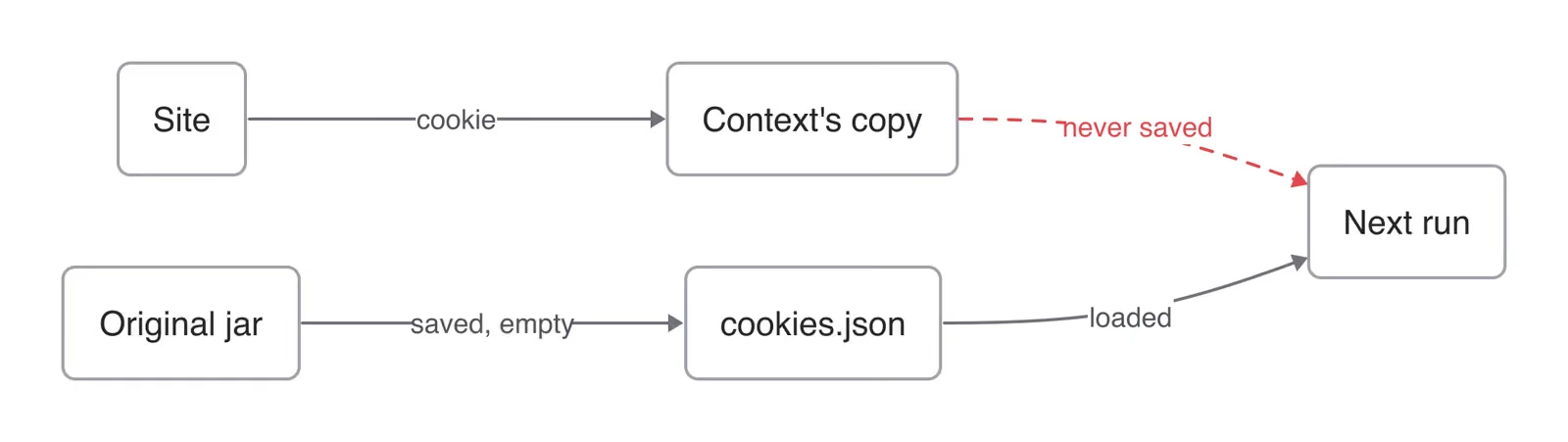
In Obscura 0.2.6 server mode, the saved cookie file stayed empty, so the agent was signed out after a restart.
Restoring cookies from code didn’t help either. Cookies set through Playwright’s add_cookies() or the CDP cookie commands weren’t sent to the site. The one workaround that worked reads the cookies with context.cookies() before closing. After a restart, open each cookie’s domain and restore the cookie with document.cookie. That method can’t set the HttpOnly flag, so any script on the page, including third-party scripts, can then read the auth cookie.
Fingerprint changes between page loads
Obscura’s page bootstrap script generated a new random fingerprint seed for each page, and the code had no setting to keep it fixed. Between loads, 3 or 4 of FingerprintJS’s 42 signals changed, such as audio, CPU core count, and screen size. A physical device keeps those values constant between page loads, so a site that compares loads inside one signed-in session can detect the change. On the Gologin profile, all 42 signals stayed the same, including audio, screen size, and CPU core count.
Consistency check results
Our script, consistency_check.py, tests both problems. It loads a page 3 times and checks whether the device ID stays the same, plus 4 other signals that sites compare. A second run reports what the first run persisted. Local Chrome 156 passed all 5 checks.
After a restart, the second Obscura run printed:
FAIL  same device on all 3 loads
PASS  fetch() requests send the page's user agent
FAIL  fetch() requests send Sec-Fetch-Mode: cors
FAIL  timezone matches the exit IP
FAIL  WebGL available
from an earlier run: localStorage 13:39:32, cookie none
device IDs: 44bf741b, a995ea21, fb4407b8
The second Gologin run printed:
PASS  same device on all 3 loads
PASS  fetch() requests send the page's user agent
PASS  fetch() requests send Sec-Fetch-Mode: cors
PASS  timezone matches the exit IP
PASS  WebGL available
from an earlier run: localStorage 13:43:59, cookie 13:43:59
device IDs: cf31d055, cf31d055, cf31d055
You can fix one of Obscura’s 4 failures with an environment variable. The timezone check failed because Obscura 0.2.6 used the Europe/Berlin timezone by default. OBSCURA_TIMEZONE sets a zone that matches your proxy’s location. The other 3 had no setting to fix them in 0.2.6. WebGL wasn’t available, the fingerprint changed on every page, and fetch() requests were sent with Sec-Fetch-Mode: navigate.
On its second run, the Gologin profile restored its cookie and localStorage and kept the same fingerprint. It also matched its timezone to the proxy’s exit IP automatically. Gologin keeps a profile until you delete it.
Obscura review: speed, concurrency, and Playwright compatibility
Obscura’s two TLS builds gave very different speed and memory results, and only the TLS build renders pages.
Obscura vs Chrome and Lightpanda on 30 public pages
Each browser loaded the same 30 pages sequentially, with a new browser context per page. From the home connection, 7 pages returned HTTP 403 on every Chrome setup in the table below, and 4 to 6 on Obscura and Lightpanda. They included Stack Overflow, eBay, and npm. The times include those pages. On the 23 pages every setup loaded, Chrome’s headless shell was still faster than both Obscura builds. On the pages that loaded, the TLS build returned about as much text as the headless shell.
| 30 pages, median of 3 runs | Wall time | CPU time | Peak memory (RSS) |
|---|---|---|---|
| Obscura 0.2.6, TLS build | 90 s | 21.0 s | 378 MB |
| Obscura 0.2.6, no-render TLS build | 52 s | 5.9 s | 137 MB |
| Chrome 156, new headless mode | 56 s | 33.5 s | 1,342 MB |
| Chrome’s headless shell 156 | 41 s | 12.3 s | 568 MB |
| Headless shell, images, fonts, and media blocked | 29 s | 11.6 s | 508 MB |
| Lightpanda 1.0.2 | 36 s | 5.0 s | 187 MB |
Obscura’s TLS build was the slowest setup in all 3 runs, and run-to-run variation across all setups was up to 16%. Wall times include network latency over the home connection, so CPU time shows engine cost more cleanly. The TLS build used more CPU time than the headless shell too.
Peak memory sums each process’s resident memory (RSS), which overstates Chrome’s memory use, because its processes share memory.
On Wikipedia, the TLS build’s render was close to Chrome’s. Its renders didn’t always match Chrome’s, though, which matters to an agent that reads screenshots. On MDN’s Fetch API page, Obscura rendered the search box unstyled and left the theme and language dropdown menus open over the page. It rendered the Chinese, Japanese, and Korean (CJK) language names as missing-glyph boxes, because its bundled fonts lacked those glyphs.
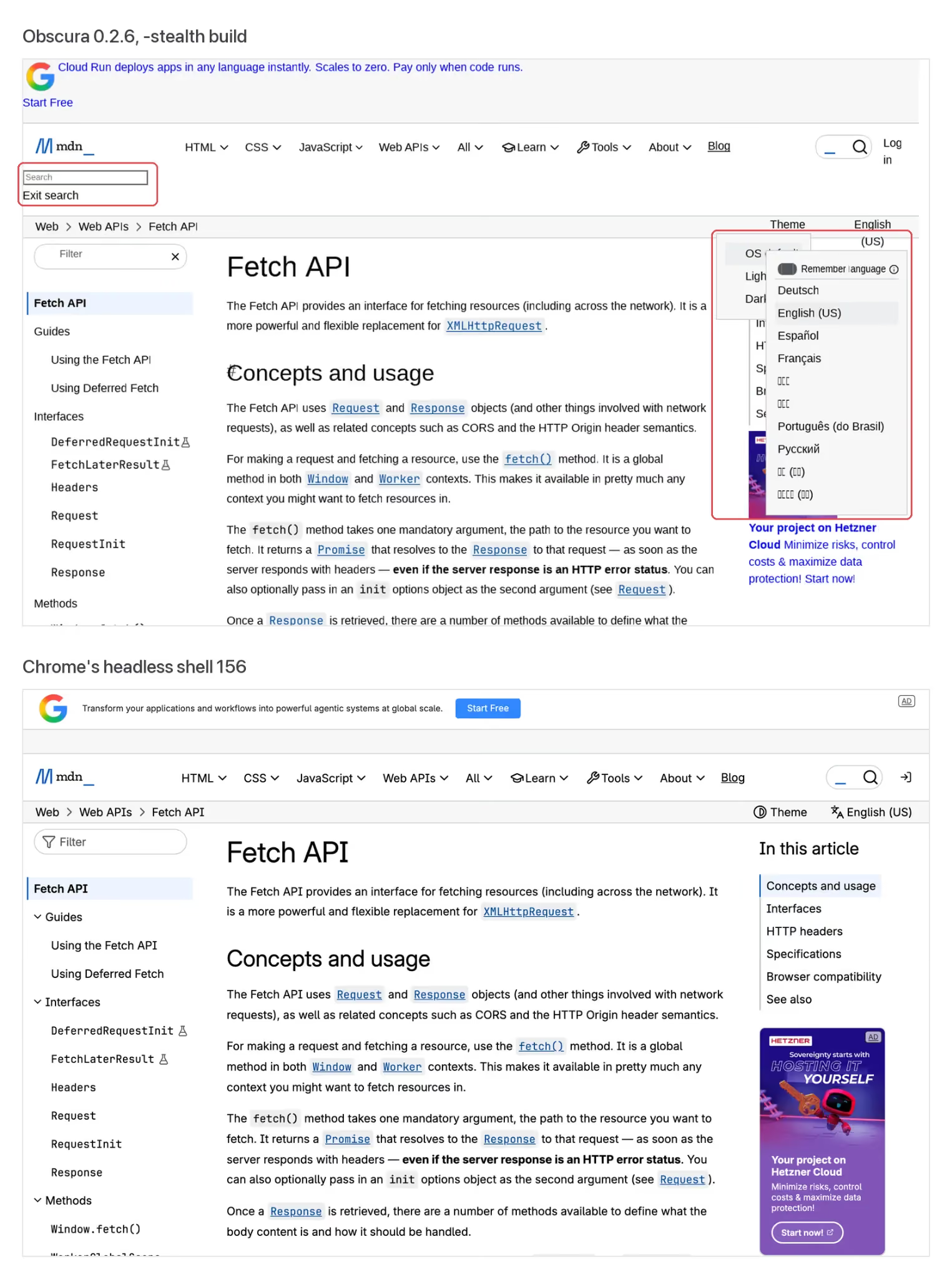
The same page at the same viewport. In Obscura’s screenshot, the open menus covered the table of contents that Chrome’s headless shell showed.
The no-render TLS build is the lightweight option. Obscura’s README listed 30 MB of memory and 85 ms page loads. Obscura’s benchmark repo showed similar figures on test pages, not live sites. On these 30 live pages, the no-render TLS build peaked at 137 MB, about a quarter of the headless shell’s memory. It used about half the shell’s CPU time.
Without layout, the no-render TLS build can’t compute what’s visible on screen. On a test page, it returned text hidden with CSS, and Playwright’s is_visible() reported a hidden element as visible.
Lightpanda 1.0.2, which also skips rendering, finished faster than both Obscura builds, in 36 s. It used 187 MB of peak memory, against 137 MB for the no-render TLS build.
Startup latency
Each setup ran 5 cold starts, launching the browser and loading example.com each time. Every column shows its own median, so the step times don’t sum exactly to the total. For Obscura and Lightpanda, the total also includes 23 to 25 ms for Playwright to connect over CDP.
| Setup, median of 5 runs | Browser launch | New context and page | First page load | Total |
|---|---|---|---|---|
| Obscura 0.2.6, TLS | 199 ms | 10 ms | 191 ms | 419 ms |
| Chrome’s headless shell 156 | 250 ms | 39 ms | 142 ms | 432 ms |
| Chrome 156, new headless mode | 388 ms | 200 ms | 141 ms | 728 ms |
| Lightpanda 1.0.2 | 234 ms | 3 ms | 119 ms | 379 ms |
From a cold start, Obscura was about as fast as Chrome’s headless shell. On an already running server, opening a new context and page took 10 ms.
Concurrency on one machine
Self-hosted Obscura has no plan limit on sessions. In 0.2.6, one obscura serve worker allowed 128 concurrent CDP connections by default, a limit set by --max-connections. With the limit set to 2, a third connection got HTTP 503 (Service Unavailable). To handle more connections, raise the limit or add worker processes with the --workers flag.
In the test below, each of 25 concurrent sessions loaded an article from a fixed list of 10 Wikipedia pages. The no-render TLS and headless-shell rows are medians of 4 runs, and the TLS rows are single runs. Lightpanda’s row is the median of 3 runs on November 10.
| 25 concurrent sessions, same Mac | Time until all 25 loaded | CPU time | Peak memory (RSS) |
|---|---|---|---|
| Obscura 0.2.6 TLS, 1 worker | 11.4 s | 48.9 s | 2,361 MB |
| Obscura 0.2.6 TLS, 8 workers | 9.2 s | 38.9 s | 2,743 MB |
| Obscura 0.2.6 no-render TLS, 1 worker | 2.6 s | 6.4 s | 802 MB |
| Chrome’s headless shell, 25 contexts | 3.6 s | 11.3 s | 4,255 MB |
| Lightpanda 1.0.2, 1 process | 2.1 s | 2.7 s | 554 MB |
The TLS build used 3.4 to 4.3 times the headless shell’s CPU time. The no-render TLS build used just over half the CPU time and under a fifth of the peak memory of the headless shell. In all 4 runs, the no-render TLS build was faster than the headless shell.
Lightpanda 1.0.2 loaded all 25 sessions fastest, with under half the CPU time and about 70% of the peak memory of the no-render TLS build. It allowed 16 CDP connections by default, so its run raised --cdp-max-connections to 32.
A 100-session run from the same home connection had network timeouts, so it doesn’t measure engine capacity.
Playwright compatibility
Of 21 common Playwright API calls, 18 worked on Obscura 0.2.6’s TLS build. All 21 passed on the headless shell and on a Gologin Cloud Browser session.
On Obscura, clicks, form filling, dialog handling, request interception, screenshots, and PDFs all worked. So did typing, select menus, checkboxes, hover, waiting for elements, role and shadow DOM locators, navigation, and a second page. File uploads failed, because set_input_files() threw DataTransfer is not defined. Reading text inside iframes timed out, and cookies injected with add_cookies() weren’t sent to the site. Outside those 21, set_extra_http_headers() sent no headers, and Obscura ignored per-context proxies, so each IP needed its own Obscura instance.
Obscura’s Chrome-TLS mode: what a website sees
Anti-bot systems check whether the TLS fingerprint, HTTP headers, and JavaScript fingerprint agree. We checked the default archive, the Docker image, and the TLS archive.
| What the site saw from Obscura 0.2.6 | Default archive and Docker image | TLS archive |
|---|---|---|
| HTTP version on navigation | HTTP/1.1 | HTTP/2 |
| TLS and HTTP/2 fingerprints | Not Chrome’s | Chrome’s cipher list, and the same HTTP/2 fingerprint as Chrome 156 |
| User-Agent on navigation | Chrome 143 on Windows | Chrome 145 on Windows |
User-Agent on the page’s own fetch() requests |
Chrome 145 on Linux, with no Sec-CH-UA client hints |
Chrome 145 on Windows |
Fetch metadata on fetch() requests |
None | Sec-Fetch-Mode: navigate, which marks fetch() requests as page navigations |
The TLS archive is the safer download, because its user agents matched. It still marked fetch() requests as page navigations, while Chrome 156 sent Sec-Fetch-Mode: cors for the same requests. No build returned a WebGL context. We checked fonts on the TLS archive and the Docker image. Both reported a font list that didn’t match Windows, because Obscura rendered text with its bundled fonts.
This mode can also cause problems at sign-in. It blocked thousands of tracker domains by default, including online-metrix.net, which hosts the ThreatMetrix fraud-detection script. That script loaded in Chrome and was blocked in Obscura, so if your sites run it at sign-in or checkout, set OBSCURA_BLOCK_TRACKERS=0. Obscura’s docs also listed the limits of this mode openly, including Cloudflare interactive challenges, DataDome and Akamai active challenges, CAPTCHAs, and passive TCP/IP fingerprints.
Obscura anti-bot results: 5 public sites
Obscura’s TLS build passed 2 out of 5 sites from the home IP and 3 out of 5 through a US residential proxy. A site passed when its target data loaded in at least 3 of its 5 runs.
Each run started a new Obscura 0.2.6 server from the TLS archive and loaded 1 public page per site, logged out. Chrome 156 ran the same loads as a baseline, in new headless mode. It used a regular desktop Chrome user agent, a common production setup. A load counted as a success when the target data was on the page 6 seconds after its HTML loaded. Each browser ran from the home connection in India and through a US residential proxy. The proxy runs set the browser’s timezone to America/New_York. On the home connection, Obscura kept its default Europe/Berlin timezone, and Chrome used the Mac’s.
| Public page, 5 runs each | Obscura, home IP | Obscura, US proxy | Chrome, home IP | Chrome, US proxy |
|---|---|---|---|---|
| Zillow search results | 0 | 3 | 0 | 2 |
| G2 product reviews | 0 | 0 | 0 | 0 |
| LinkedIn company page | 5 | 5 | 5 | 5 |
| Amazon product page | 1 | 0 | 5 | 5 |
| Hacker News front page | 5 | 5 | 5 | 5 |
| Sites passed, of 5 | 2 | 3 | 3 | 3 |
Chrome loaded 32 of its 50 pages, and Obscura’s TLS build loaded 24. On Zillow through the US proxy, Obscura loaded it 3 of 5 times and Chrome loaded it twice, so only Obscura passed it. Amazon’s challenge page stopped Obscura in 9 of 10 runs, and Chrome reached the product page in all 10. With Playwright’s default HeadlessChrome user agent, Chrome loaded only 18 of its 50 pages, mainly because LinkedIn blocked it. On G2, DataDome blocked both. Our Lightpanda review ran the same 5 sites on Lightpanda Cloud, from its own datacenter IP, and it passed 4 of 5.
These were low-volume, logged-out loads. Inside a signed-in account, sites can also compare the device fingerprint and IP with the account’s history.
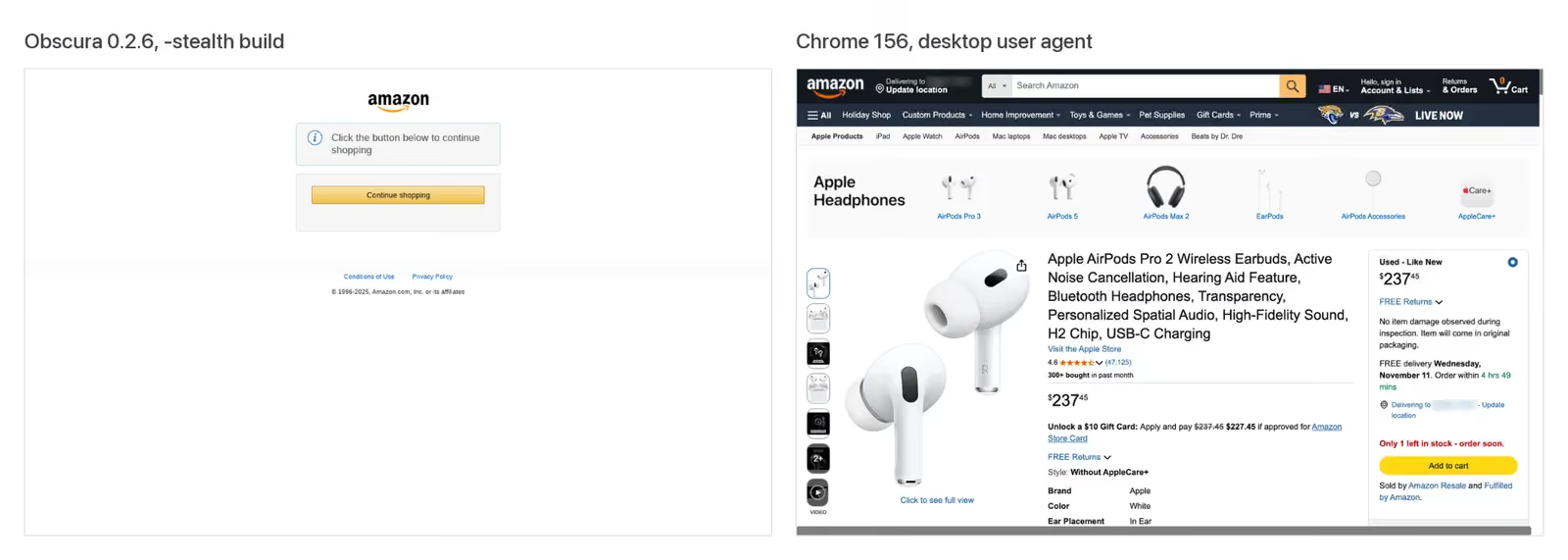
The same Amazon page through the same US proxy. In all 5 runs through that proxy, Obscura got this challenge page, and Chrome with a desktop user agent got the product page. The proxy’s delivery location is blurred.
Obscura pricing: the full cost of self-hosting
Obscura is free under Apache-2.0. You still pay for servers, proxies, and the engineering time to run both. The scenarios below use 3 assumptions.
- Workload. Agents work 8 hours a day, 22 days a month, at about 100 page loads an hour.
- Traffic. An agent uses roughly 0.2 GB of traffic an hour. On the 30 pages, Chrome and Obscura’s TLS build transferred 1.7 to 2.2 MB per page, counting the blocked pages. Those pages loaded with a cold cache, each in a new context, so an agent that revisits the same sites transfers less.
- Servers. One AWS m7g.xlarge, with 4 vCPUs and 16 GB of RAM, should handle 25 agents at this pace and runs only during their working hours. It’s an ARM (Graviton) instance, and Obscura 0.2.6 ships Linux ARM archives. AWS listed it at $0.1632 an hour on demand in us-east-1 when tested. From our CPU time per page, 25 agents at this pace average about 0.5 vCPU. All 25 loading at the same time briefly used about 4 cores and 2.4 to 2.7 GB of RAM on our Mac. Signed-in pages can need more, so test yours on Linux before you size a server.
The monthly totals below use list prices when tested and exclude the engineering time to run servers, proxies, and upgrades. Both columns assume the same hours and traffic.
| Monthly workload | Obscura, self-hosted | Gologin Cloud Browser |
|---|---|---|
| 25 agents, 4,400 browser hours, 1 static ISP IP each | About $96 for 1 server running 25 Obscura instances, plus 25 ISP IPs at $2.70 each for 30 days, traffic included | $1,232 on Enterprise with 22 extra parallel sessions, including $880 for 880 GB of static ISP traffic |
| 25 agents, 4,400 browser hours, 880 GB of residential traffic | $2,029 to $2,229 for 1 server at $29, plus the 1,000 GB proxy plan that covers 880 GB | $1,232 on Enterprise with 22 extra parallel sessions, including $880 for 880 GB of residential traffic |
| 100 agents, 17,600 browser hours, 3,520 GB of residential traffic | $7,155 to $7,859 for 4 servers costing $115 in total, plus traffic at $2 to $2.20 per GB | $4,946 on Enterprise with 97 extra parallel sessions, including $3,520 for 3,520 GB of residential traffic |
Each Gologin cell uses the Enterprise plan, the cheapest Gologin plan at these hours, because its extra hours cost the least. It costs $14 a month with 200 browser hours and 3 parallel sessions. The cells add extra hours at $0.07 and extra parallel sessions at $2 a month each. Any plan can add as many parallel sessions as a team needs. In the Gologin column, every GB is priced at $1, the rate beyond a plan’s allowance, as if the plan included no traffic. Gologin’s static ISP IPs use the same $1-per-GB rate, with no per-IP fee. Against residential traffic from another proxy provider, Gologin’s bill is lower at both 25 and 100 agents. Teams that want a dedicated account manager and a premium SLA can also choose a Custom plan, from 4 parallel sessions.
The per-GB range uses Decodo’s 1,000 GB plan at $2.00 and NodeMaven’s 1,000 GB plan at $2.20, as listed when tested. Both quote volume discounts on larger plans, so the 100-agent self-hosted total likely overstates the cost.
Agents that keep 1 IP per account can use static ISP proxies billed per IP instead. IPRoyal listed ISP proxies at $2.70 per IP for 30 days, with traffic included, when tested. Obscura 0.2.6 ignored per-context proxies, so the $96 row assumes 25 Obscura instances, one per IP. We ran 1 instance, not 25. An idle instance used about 20 MB, so 25 add roughly 0.5 GB. Each account then keeps a static IP, but its cookies still don’t persist across restarts, and its fingerprint still changes on every page. Self-hosted Chrome keeps cookies, but 2 profiles on one Mac shared one device ID, as the alternatives section shows.
Per browser hour, servers cost about $0.007 and residential traffic costs $0.40 to $0.44. A session that loads the benchmark’s 30 pages costs about $0.10 to $0.15 self-hosted, almost all of it traffic. That’s about $3.50 to $4.90 per 1,000 pages, or about half with resource blocking. For agents that only read public pages, Gologin’s Web Unlocker costs $0.98 per 1,000 rendered pages on its $49-a-month entry plan, with JavaScript rendering included. Blocked, challenged, and empty responses cost nothing.
The self-hosted totals also apply to Chrome’s headless shell, because its 4.3 GB peak for 25 sessions fits that server’s 16 GB. Playwright ships an ARM Linux build of the headless shell, which used less CPU per page than Obscura’s TLS build. Either browser can reduce the traffic. On the same 30 pages, blocking images, fonts, and media in Chrome halved the traffic, and so did Obscura’s no-render TLS build.
Gologin Cloud Browser puts browser hours and residential traffic on one bill, with no per-request fees. Its plans include both, with extra browser hours at $0.07 to $0.09 and traffic at $1 per GB beyond a plan’s allowance. The proxy providers above listed $2 to $2.20 per GB. Steel and Browserbase listed $10 to $12 per GB on their first paid plans when tested. A forgotten Gologin session stops billing automatically after 20 idle minutes, while an active one runs for as long as the job needs. Gologin sessions can reduce traffic the same way, by blocking images, fonts, and media through page.route() or the CDP command Network.setBlockedURLs.
Gologin’s proxies also work outside Gologin products at the same $1 per GB, so a self-hosted browser can use them too. With them, the self-hosted residential bill is about $909 at 25 agents and $3,635 at 100. Gologin Cloud Browser adds the managed browser and a profile that keeps cookies, fingerprint, and proxy together, for about $13 more per agent a month.
Obscura pros
Obscura is strongest for self-hosted work on public pages, in these 5 ways.
- Smaller memory footprint than Chrome. Both builds used less peak memory than any Chrome setup, and the no-render TLS build used the least of all setups on sequential loads.
- Fast startup and concurrency. Opening a new context and page on a running server took 10 ms. The no-render TLS build loaded 25 concurrent sessions faster than Chrome’s headless shell.
- Open source, single binary. The Apache-2.0 binary has no Chrome or Node.js dependency, and it includes an MCP server and a Markdown export.
- Secure defaults. In 0.2.6, Obscura blocked requests to private IP ranges (SSRF protection) and refused to expose the CDP endpoint beyond localhost without an auth token.
- Chrome-style TLS in the TLS build. Its user agent also matched across navigation and
fetch()requests.
Obscura limitations and when not to use it
The limits below apply to version 0.2.6, and the first two matter most for agents that return to the same accounts.
- No cookie persistence across restarts in 0.2.6. Server, MCP, and CLI mode all lost cookies, and the server-mode workaround can’t set the HttpOnly flag.
- A new fingerprint on every page load. In 0.2.6, Obscura’s code generated a random fingerprint seed for each page.
- Inconsistent user agents in some builds. The default archive and the Docker image sent Linux and Windows user agents on the same page.
- Slower than Chrome’s headless shell. The TLS build had longer wall times on live pages and used more CPU time with 25 concurrent sessions.
- Rendering that doesn’t always match Chrome. MDN’s Fetch API page was the clearest case.
- The no-render TLS build returns hidden text. Without layout, it can’t compute what’s visible on screen.
- Failed Playwright calls. In 0.2.6, file uploads, iframe text reads, and
add_cookies()failed, and per-context proxies were ignored. - No WebGL. No build returned a WebGL context, which sites can check.
- Self-managed. You run your own servers, proxies, and upgrades, and you build your own live view if a person needs to take control.
- Most commits from one account. On GitHub’s contributors page, one account had written most of the commits when tested, so the project depends heavily on one maintainer.
Choose Gologin Cloud Browser when your agent signs in to accounts or needs full Chromium in the cloud, with proxies and Live View built in.
Obscura alternatives: Gologin and other browsers for AI agents
The terms below come from each vendor’s pricing page and docs, as listed when tested.
| Obscura 0.2.6 | Lightpanda Cloud | Browserbase | Steel | Gologin Cloud Browser | |
|---|---|---|---|---|---|
| Browser engine | Obscura, Rust and V8 | Lightpanda, no rendering | Chromium | Chromium | Gologin’s own Chromium build |
| First paid plan | None. Free to self-host | Builder, $19 a month | Developer, $20 a month | Launch, pay as you go with no monthly fee | Professional, $4.50 a month, with browser hours and residential traffic included |
| Extra browser hour | Your server cost | $0.08 | $0.12 | $0.10 | $0.07 to $0.09, by plan |
| Residential traffic | Your provider, $2 to $2.20 per GB on 1,000 GB plans | Bring your own | 1 GB included, then $12 per GB | $10 per GB | $1 per GB beyond the plan’s allowance |
| What a saved profile restores | Only localStorage, unless your code restores cookies. The fingerprint changes on each page | No state persisted between sessions, per our Lightpanda review | Cookies, localStorage, IndexedDB, and other browser data, in contexts that don’t expire | Cookies, extensions, credentials, and settings, plus a proxy and user agent set through its API. Deleted after 30 days without use | Cookies, localStorage, IndexedDB, device fingerprint, and proxy, in a profile kept until you delete it |
| Longest session on the first paid plan | Set by your own setup | 15 minutes per CDP connection, per its docs. Sessions closed at about 6 minutes in our Lightpanda review | 6 hours | 15 minutes | No limit |
| Live view | View-only, self-hosted | None found | Yes | Yes | Yes |
Only the Gologin profile in this table restores the full device fingerprint, according to each vendor’s docs and our tests. A Gologin Cloud Browser profile is a persistent identity. It runs in a full Chromium browser and keeps its own device fingerprint, cookies, storage, and proxy between runs. To a site, each run looks like the same returning user, not a new device with the right password.
Gologin’s own Chromium build returns the profile’s values when a site asks about the device, while Obscura injects its values with JavaScript at page start. Sites look for values that disagree, such as the Windows user agent and non-Windows font list that Obscura’s TLS build reported. The Gologin profile reported Windows fonts, such as Calibri, with its Windows user agent, and it passed all 5 of the script’s checks.
Self-hosted Chrome with a persistent user data directory keeps cookies too. As expected, 2 such profiles on one Mac got the same device ID on FingerprintJS’s public demo page, because they run on the same hardware. To a site, those accounts look like one device. A Gologin profile gives each account its own fingerprint and proxy, and each profile kept its ID from one session to the next.
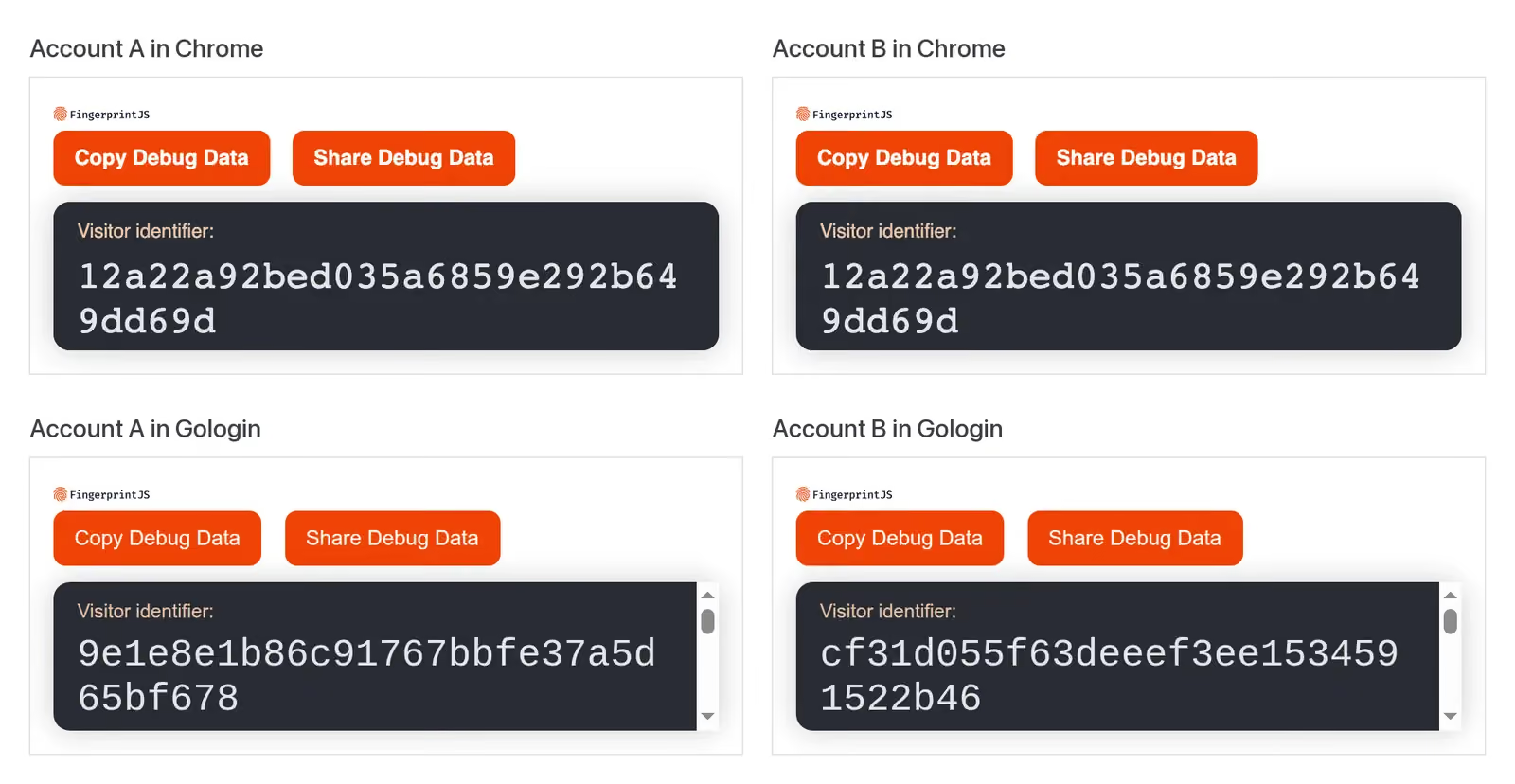
FingerprintJS saw one device for both Chrome accounts, and it saw a separate device for each Gologin account. Account B’s Gologin profile also reported cf31d055 in a separate session.
Each profile has its own proxy, either a Gologin residential, mobile, datacenter, or static ISP IP or your own proxy, attached in one API call. Gologin’s proxies cover 195+ countries, with city-level targeting.
Existing Playwright and Puppeteer code connects with one line changed, and selectors, waits, and assertions stay as they are. All 21 Playwright calls in our test passed on a Gologin session. Open pages in the browser’s existing context, as Gologin’s examples do, because that’s where the profile lives. Gologin’s MCP server lets Claude, Cursor, or another MCP client create a profile, add a proxy, and start a session without SDK code.
Obscura 0.2.6’s viewer was view-only, at 2 frames per second. In a Gologin session, a person can take control from the Live View link to sign in or enter a verification code. The script then continues in the same session. Your agent can request the Live View link through the API when a step needs a person. You can also embed Live View in your own app, so your users sign in inside your product.
Our Kernel.sh review and Cloudflare Browser Rendering review test 2 other cloud browsers.
Run the consistency check on Obscura and Gologin
The script below, consistency_check.py, runs the same check on Obscura, Chrome, or Gologin. For Gologin, copy your API token from the dashboard. Then create a profile with a Gologin proxy, in the dashboard or through the API, and pass its profile ID:
"""Check whether a browser keeps one consistent identity: 3 page loads per run, and what a second run gets back.

uv init && uv add playwright==1.64.1 httpx
Obscura:  download the Chrome-TLS archive for your OS from github.com/h4ckf0r0day/obscura/releases
          and unpack it with tar -xzf. Start it in server mode with the Chrome-TLS flag
          from its README, --port 9222 and --storage-dir ./identity-a
          uv run python consistency_check.py obscura
Gologin:  GL_API_TOKEN=... uv run python consistency_check.py gologin <profile_id>
Chrome:   uv run python consistency_check.py chrome      (a local baseline, needs Google Chrome)
Run it again a few minutes later, after restarting Obscura, to see what each identity kept.
"""
import json
import os
import sys
import time
from urllib.parse import quote

import httpx
from playwright.sync_api import sync_playwright

# Open-source FingerprintJS, added inline so no tracker blocklist can stop it
FPJS = httpx.get("https://cdn.jsdelivr.net/npm/@fingerprintjs/fingerprintjs@5.3.0/dist/fp.min.js").text
READ = """async () => {
  const api = await (await fetch('/headers')).json();  // the page's own fetch() request
  const ip = await (await fetch('https://get.geojs.io/v1/ip/geo.json')).json();
  return {
    device_id: (await (await FingerprintJS.load()).get()).visitorId,
    navigator_ua: navigator.userAgent,
    api_ua: api.headers['User-Agent'],
    api_fetch_mode: api.headers['Sec-Fetch-Mode'] || 'missing',
    // compare UTC offsets, because zone names have aliases, such as Asia/Calcutta and Asia/Kolkata
    tz_matches_ip: (now => now.toLocaleString('en-US', {timeZone: ip.timezone}) === now.toLocaleString('en-US'))(new Date()),
    webgl: !!document.createElement('canvas').getContext('webgl'),
    saved_storage: localStorage.getItem('first_seen'),
    saved_cookie: (await (await fetch('/cookies')).json()).cookies.first_seen || null,
  };
}"""

target, end_session = sys.argv[1], lambda: None
with sync_playwright() as pw:
    if target == "chrome":
        browser = pw.chromium.launch(channel="chrome", args=["--headless=new"], headless=False)
    elif target == "obscura":
        browser = pw.chromium.connect_over_cdp("http://127.0.0.1:9222")
    else:
        token, profile = os.environ["GL_API_TOKEN"], sys.argv[2]
        browser = pw.chromium.connect_over_cdp(
            f"wss://cloudbrowser.gologin.com/connect?token={token}&profile={profile}")
        end_session = lambda: httpx.delete(f"https://api.gologin.com/browser/{profile}/web",
                                           headers={"Authorization": f"Bearer {token}"}, timeout=60)
    try:
        context = browser.contexts[0] if browser.contexts else browser.new_context()
        page = context.pages[0] if context.pages else context.new_page()
        loads = []
        for _ in range(3):
            page.goto("https://httpbin.org/html")
            page.add_script_tag(content=FPJS)
            loads.append(page.evaluate(READ))
        page.goto("https://httpbin.org/headers")  # what the server saw on a page navigation
        nav_ua = json.loads(page.inner_text("body"))["headers"]["User-Agent"]
        if not loads[0]["saved_storage"]:  # first run: save a value and a server-set cookie
            stamp = time.strftime("%H:%M:%S")
            page.evaluate(f"localStorage.setItem('first_seen', '{stamp}')")
            # a cookie that lasts 7 days, like a "remember me" sign-in, so a restart shouldn't clear it
            cookie = f"first_seen={stamp}; Max-Age=604800; Path=/; Secure"
            page.goto("https://httpbin.org/response-headers?Set-Cookie=" + quote(cookie))
        browser.close()
    finally:
        end_session()  # Gologin: ends the cloud session, and the profile saves its state

first = loads[0]
checks = {
    "same device on all 3 loads": len({load["device_id"] for load in loads}) == 1,
    "fetch() requests send the page's user agent": first["api_ua"] == first["navigator_ua"] == nav_ua,
    "fetch() requests send Sec-Fetch-Mode: cors": first["api_fetch_mode"] == "cors",
    "timezone matches the exit IP": first["tz_matches_ip"],
    "WebGL available": first["webgl"],
}
for name, ok in checks.items():
    print(f"{'PASS' if ok else 'FAIL'}  {name}")
print(f"from an earlier run: localStorage {first['saved_storage'] or 'none'}, cookie {first['saved_cookie'] or 'none'}")
print(f"device IDs: {', '.join(load['device_id'][:8] for load in loads)}")
Run it twice, a few minutes apart, and restart Obscura between runs. The script ends the Gologin session itself, and the profile saves its cookies and storage. Chrome launches with a new, temporary profile on every run. It works as a baseline for the 5 checks only, and it doesn’t test session persistence.
Final thoughts
Obscura 0.2.6 is a lightweight, open-source engine for self-hosted work on public pages. Its no-render TLS build used the least memory of any setup on sequential loads. For agents that sign in, the main limit was identity, because cookies didn’t survive a restart and the fingerprint changed on every page. A Gologin profile keeps cookies, device fingerprint, and proxy together, which is what agents that return to the same accounts need.
Sign up for Gologin Cloud Browser free, with no card, and you get an API token right away. The free plan covers both runs of the script, with residential IPs included. Then run consistency_check.py on Obscura and, with the token, on a Gologin profile. Because these results apply to 0.2.6, run it again on each new Obscura release.
FAQ
What is the Obscura headless browser?
Obscura is an open-source headless browser written in Rust. Playwright and Puppeteer control it over CDP, and V8 runs page scripts. Its rendering builds draw pages with Obscura’s own engine. It includes an MCP server for AI agents, and its hosted Obscura Cloud had no self-serve sign-up during testing.
Can a website detect a headless browser?
Yes. Anti-bot systems check whether the TLS fingerprint, headers, and JavaScript fingerprint agree. In logged-out tests on 5 sites, Chrome with Playwright’s default HeadlessChrome user agent loaded 18 of 50 pages, against 32 with a desktop user agent. Signed-in sites can also compare the device fingerprint with the account’s history. A Gologin profile keeps that fingerprint the same across runs.
What is the best headless browser for AI agents?
It depends on the pages and whether the agent signs in. For self-hosted work on public pages that need JavaScript, use Lightpanda or Chrome’s headless shell. Obscura’s no-render TLS build also fits if your selectors don’t depend on element visibility. For agents that return to signed-in accounts, use a Gologin Cloud Browser profile, which keeps cookies, device fingerprint, and proxy together.
Is Obscura free and open source?
Yes, under Apache-2.0, so the engine itself costs nothing. For 25 agents working 8 hours a day, 22 days a month, servers cost about $29 a month. The agents’ residential traffic, at 0.2 GB an hour each, needs a 1,000 GB plan from a third-party proxy provider. That plan cost $2,000 to $2,200 a month when tested. Gologin’s residential traffic costs $1 per GB beyond a plan’s allowance, on Gologin Cloud Browser or with your own browser.
Is Obscura faster than Chrome?
Mostly not. On 30 public pages loaded one at a time, Chrome’s headless shell took a median 41 s, and Obscura 0.2.6’s TLS build took 90 s. Its no-render TLS build took 52 s. With 25 concurrent sessions, though, that build loaded all 25 faster than the headless shell and used less memory.
Does Obscura work with Playwright?
Mostly. Playwright connects with connect_over_cdp(), and 18 of 21 common API calls worked. All 21 worked on Chrome’s headless shell and on a Gologin Cloud Browser session. On Obscura, clicks, forms, screenshots, and PDFs worked. File uploads, iframe text reads, and add_cookies() failed in our test, so test those calls on your own pages before you rely on 0.2.6.
Can Obscura keep an agent signed in between runs?
Not without extra code. Obscura 0.2.6 didn’t persist cookies across restarts, though localStorage persisted in server mode. A workaround restores cookies with document.cookie, but it can’t set the HttpOnly flag. A Gologin Cloud Browser profile keeps its cookies, fingerprint, and proxy between runs.