What Is Browser Device Fingerprinting? The Definitive Technical Guide 2026
Try Gologin for free
What Is Browser Device Fingerprinting?
Device fingerprinting is the process of collecting and hashing a deterministic set of hardware and software attributes from a client endpoint, without relying on mutable, user-deletable storage such as HTTP cookies, to construct a quasi-unique, stateless identifier that persists across browser sessions, private/incognito modes, VPN rotations, and IP address changes.
Unlike a session token assigned by a server, a device fingerprint is reconstructed probabilistically on every request by measuring the entropy delta across dozens of environmental signals drawn from both the OS kernel layer and the browser’s exposed API surface. Modern anti-fraud infrastructure treats the device fingerprint not as a single hash, but as a multi-dimensional vector that can be compared, scored, and anomaly-detected against a baseline population of legitimate organic traffic.
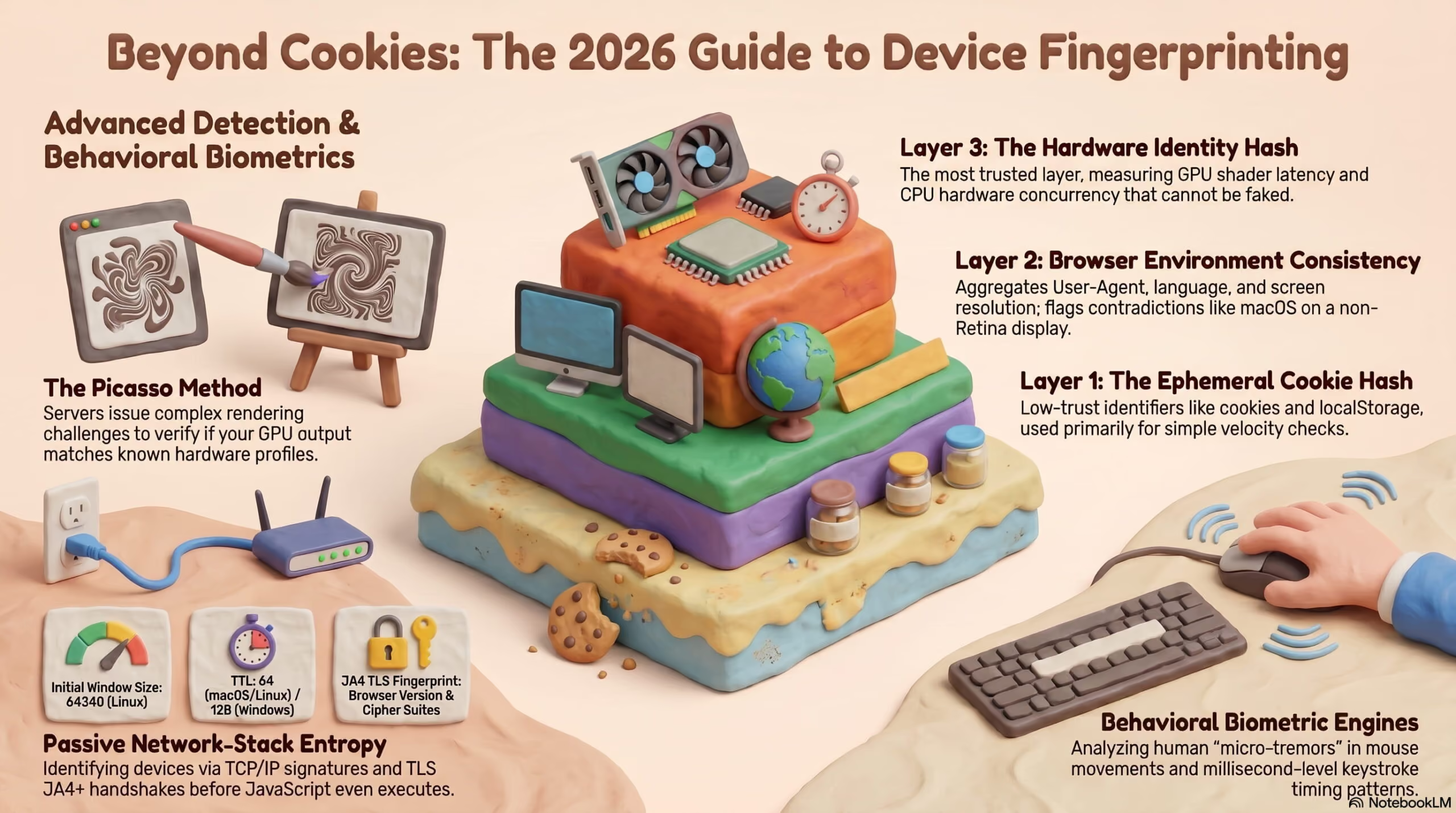
Passive Fingerprinting: Network-Stack Entropy
Passive fingerprinting operates entirely at the network and transport layers. No JavaScript is executed; no DOM is touched. The system intercepts metadata that the client device fundamentally cannot modify without breaking its own protocol compliance:
TCP/IP Stack Fingerprinting (p0f-style)Every operating system’s TCP/IP implementation exposes a distinct behavioral signature in the opening SYN packet of a connection:
| Signal | What It Reveals |
|---|---|
| Initial Window Size | OS networking stack identity (e.g., 64240 = Linux; 65535 = macOS) |
| TTL (Time-to-Live) | Hop-count baseline: 64 = Linux/macOS; 128 = Windows |
| DF Bit (Don’t Fragment) | OS-level MTU negotiation behavior |
| TCP Options Order | Specific kernel build and version fingerprint |
| Window Scale Factor | Memory allocation model of the TCP receive buffer |
Residential Chrome on Windows 11 produces a statistically distinct TCP SYN packet from a containerized Puppeteer instance on a Linux VPS, even if both present identical HTTP User-Agent strings.
TLS JA4+ Handshake FingerprintingJA4 (FoxIO, 2023) is the production-grade successor to JA3, and is now deployed by Cloudflare, Fastly, and Akamai at wire speed. It captures TLS 1.3 ClientHello parameters in their original, unordered transmission sequence:
JA4 = TLS_VERSION | CIPHER_COUNT | EXT_COUNT | ALPN_FIRST | CIPHER_HASH | EXT_HASH- Cipher suite list: Chrome 124 on Windows generates cipher suites in a fixed, Chrome-specific order. Firefox 126 generates a different ordered list. Spoofing
User-Agentto impersonate Chrome while using a Pythonrequestslibrary (which presents an OpenSSL-generated cipher list) creates an immediate cross-layer hash contradiction that JA4 surfaces in under 1 millisecond. - ALPN negotiation order: Chrome advertises
h2, http/1.1; curl advertiseshttp/1.1only. This difference alone flags thousands of automated scrapers daily on CDN-level WAFs. - Extension ordering: TLS extensions in a
ClientHelloare vendor-specific. A browser claiming to be Safari on iOS but presenting asupported_groupsextension in a non-WebKit order is flagged as a synthetic client.
HTTP/3 operates over UDP via the QUIC protocol, and the transport-layer behavior of a device’s UDP stack creates a measurable jitter fingerprint:
- Connection migration timing: How quickly a client responds to a
NEW_CONNECTION_IDframe is OS-scheduler dependent. - Packet loss recovery intervals: The QUIC congestion controller (Cubic vs. BBR) exposes whether the client is a real end-user device or a server-side automation framework.
- Initial RTT variance distribution: Real residential users show non-uniform microsecond-level jitter. Headless browsers running in data centers present suspiciously uniform RTT values.

Active Fingerprinting: Browser API Execution Layer
Active fingerprinting requires JavaScript execution and instruments standardized W3C browser APIs to extract hardware-specific rendering variance that the browser itself cannot suppress without breaking core web functionality:
Canvas API (2D Rasterization Entropy)When identical vector drawing instructions are sent to an off-screen <canvas> element, the resulting pixel buffer varies due to:
- Sub-pixel anti-aliasing algorithm (OS-level, not browser-level)
- GPU driver version and vendor-specific rounding behavior
- System font rendering engine (GDI+ on Windows vs. CoreText on macOS vs. FreeType on Linux)
- ICC color profile of the display hardware
These differences are deterministic per hardware/OS/driver combination, which is exactly why Canvas is best understood as a cohort signal rather than a per-device serial number: two machines sharing the same GPU model, OS build, driver version and font stack will typically render the identical canvas hash. Two brand-new iPhones of the same model, for example, would generally produce the same Canvas fingerprint out of the box the entropy comes from the combination diverging across different hardware/software stacks, not from every individual device being distinguishable. That’s still enough to make Canvas a useful high-entropy surface once combined with the rest of the fingerprint, but it clusters devices into shared-configuration groups rather than uniquely tagging each one on its own.
WebGL / WebGPU Shader ExecutionWEBGL_debug_renderer_info exposes the raw GPU vendor and renderer string (e.g., NVIDIA GeForce RTX 4090/PCIe/SSE2). More critically, shader program execution latency the time taken for a fragment shader to complete a defined compute task — is unique to the GPU microarchitecture. WebGPU (stable in Chromium 113+) extends this surface with adapter feature flags, compute pipeline timing, and texture format support matrices that are GPU-generation-specific.
The Web Audio API’s digital signal processing chain operates in a separate audio thread, and the floating-point arithmetic precision applied during oscillator rendering varies by CPU architecture, OS audio driver, and FPU implementation. This is not about sound quality the technique runs silently at gain=0 and captures the numerical signature of the audio processing graph itself.
The Three-Hash Architecture: How Enterprise Anti-Fraud Systems Layer Device Analysis
Modern commercial bot-detection platforms Cloudflare Bot Management, Akamai Bot Manager, HUMAN Security, and SEON do not rely on a single “device ID.” They construct a three-layer hash stack, where each layer has a different persistence duration, spoofability cost, and entropy contribution. Understanding this architecture is essential to understanding why naive concealment strategies always fail.
Layer 1 — The Cookie/Session Hash (Ephemeral, High Spoofability)
The first hash layer is the simplest and least trusted by anti-fraud engines:
- Standard HTTP cookies:
Set-Cookievalues tied to a session. - localStorage / sessionStorage / IndexedDB tokens: Persistent client-side storage fingerprint IDs.
- HSTS supercookies: Browser-cached HTTP Strict Transport Security entries that act as cross-origin tracking bits.
- ETag / Last-Modified cache fingerprinting: Server-controlled cache headers reused as identifiers.
Trust weight assigned by anti-fraud systems: LOW. This layer is trivially defeated by deleting cookies, using private mode, or clearing storage. Modern anti-fraud systems treat it primarily as a velocity check, a client that appears with a new cookie hash but a matching Hardware Hash (Layer 3) is immediately flagged as an account farm operator.
Layer 2 — The Browser Environment Hash (Semi-Persistent, Medium Spoofability)
Layer 2 aggregates the browser’s declared software environment. It is reconstructed identically on every page load without any persistent storage:
| Signal | Entropy Contribution |
|---|---|
navigator.userAgent |
Browser name, version, OS — low entropy alone, high in combination |
navigator.language + navigator.languages |
Locale stack; mismatch with OS timezone is a common bot signal |
navigator.plugins (PluginArray) |
Installed browser plugins; headless Chrome has 0 plugins by default |
| Installed font enumeration | Can be probed via Canvas width measurement on desktop Chromium/Firefox; contributes meaningfully to entropy there, but this isn’t a universal signal — mobile Safari and hardened/privacy-mode browsers expose a fixed, minimal font list, so the technique’s entropy varies a lot by platform rather than reliably fingerprinting every user |
| Screen resolution + color depth + devicePixelRatio | Viewport/hardware combination |
| Timezone offset + DST behavior | Must match navigator.language and Accept-Language header |
| WebGL renderer string | GPU identity (cross-checked against Layer 3) |
navigator.connection (NetworkInformation API) |
RTT, downlink, effectiveType — spoofed values create physical impossibilities |
The critical attack surface here is internal consistency. A Layer 2 hash is not suspicious because any single value is unusual it is suspicious when two values contradict each other. A User-Agent claiming macOS with a screen devicePixelRatio of 1.0 (no Retina display) is statistically anomalous for the Mac user population. Anti-fraud ML models score these contradictions continuously.
Layer 3 — The Hardware Identity Hash (Persistent, Extremely High Spoofability Cost)
Layer 3 is the deepest and most trusted layer in the stack. It captures signals that cannot be accurately faked by software alone only by modifying the Chromium source code itself or deploying purpose-built hardware:
GPU Shader Execution Latency (WebGL/WebGPU)A defined set of fragment shader programs are executed against the WebGL context, and their per-operation timing deltas are measured in microseconds. An NVIDIA GeForce RTX 4090 completes a specific matrix multiplication shader in a deterministic time range. A virtualized GPU on an AWS g4dn instance completes the same shader in a detectably different range. This is not about raw speed, it is about the timing distribution signature across multiple shader types.
navigator.hardwareConcurrency Cross-Validation
The number of logical CPU cores reported must be internally consistent with the User-Agent’s OS claim and the JavaScript execution thread timing. A headless browser claiming 4 cores but executing timers with server-grade sub-microsecond precision creates an impossible physics contradiction for a consumer laptop.
navigator.deviceMemory (Device Memory API)
Reports available RAM in GiB (quantized to prevent fingerprinting: 0.25, 0.5, 1, 2, 4, 8). Cross-validated against WebGL MAX_TEXTURE_SIZE (which scales with GPU VRAM) and MAX_VERTEX_UNIFORM_VECTORS. A device claiming 2 GiB RAM but reporting WebGL limits consistent with a workstation GPU is internally contradictory.
The precise pixel-level rendering of a Unicode string including emoji, right-to-left characters, and mathematical symbols creates a sub-pixel rasterization fingerprint that differs between Windows ClearType, macOS CoreText, Linux FreeType/HarfBuzz, and Android Skia rendering engines independent of the font itself.
Battery API Discharge Curve (Mobile)On devices and browsers that still expose it, navigator.getBattery() returns a charge level and discharge rate, and real battery hardware discharges with non-linear variance that’s difficult for an emulator to reproduce convincingly. This one is worth a direct caveat, though: it isn’t a universal signal. Firefox removed the Battery Status API in 2016 over privacy concerns, Safari never shipped it, and Chromium now gates it behind stricter conditions than when it first launched so in practice it’s available on a shrinking slice of browsers (mainly some Chromium builds), and desktop devices without a battery don’t produce this signal at all. Treat it as an opportunistic secondary signal on supported platforms, not a baseline component of every device fingerprint.
Enterprise Bot Detection & AI Agents in 2026: Behavioral Biometrics + Hardware Fusion
The emergence of autonomous AI scraping agents powered by frameworks like Browser-Use, Playwright AI, and Computer-Use models has forced anti-fraud platforms to move beyond static fingerprint scoring and into real-time behavioral entropy analysis.
The Behavioral Biometrics Engine
Modern enterprise WAFs (Cloudflare Enterprise, Akamai Bot Manager Premier) deploy client-side telemetry collectors that stream behavioral event data to server-side ML inference engines in near real-time. The signals analyzed include:
Mouse Movement DynamicsHuman mouse movement follows modified Fitts’s Law trajectories with measurable micro-tremor signatures (2–12 Hz oscillation from hand muscle noise), sub-pixel overshoot-and-correction patterns, and non-deterministic velocity curves. The movement path is analyzed as a time-series and scored using:
- Entropy of angular velocity changes: Humans produce high-entropy, non-uniform curves. Selenium/Playwright bots using
moveTo()produce low-entropy straight or Bézier paths. - Pause dwell distribution: Human hesitations before click events follow a log-normal distribution. Bots produce uniform or near-zero dwell times.
- Off-screen excursion frequency: Human users frequently move the cursor outside the viewport. Headless bots rarely do.
Anti-fraud systems capture two timing intervals at millisecond precision:
- Dwell Time (DT): Duration a key is held down. Unique per user and per key due to muscle memory patterns.
- Flight Time (FT): Inter-key interval between key-up and the next key-down. Contains latency signatures of the physical keyboard firmware, OS keyboard driver, and the user’s neuromotor patterns.
AI-driven form fillers (autofill bots, credential stuffers) produce keystroke flight times in the 0–5ms range, a physical impossibility for human motor control, which bottoms out at approximately 80–120ms between keystrokes.
Scroll Momentum & Viewport BehaviorHuman scroll behavior has momentum decay (smooth deceleration after a swipe gesture). It varies by device physics (touchpad vs. touch screen vs. scroll wheel) and follows a recognizable exponential decay model. Programmatic scroll via window.scrollTo() or element.scrollIntoView() produces zero-momentum, instantaneous jumps that are trivially classified.
The JavaScript event loop latency measured as the delta between requestAnimationFrame callback scheduling and actual execution reflects the system’s rendering pipeline and CPU scheduler. A high-performance server running a headless browser will produce event loop timings that are too consistent: real end-user devices show non-uniform frame rendering latency due to OS background process interrupts, thermal throttling, and rendering pipeline contention.
The Picasso Method: Hardware Render Verification Challenges
The “Picasso Method” refers to a class of challenge-based fingerprint verification deployed by Google (reCAPTCHA v3 internals), Cloudflare Managed Challenge, and DataDome. The technique works as follows:
Step 1 — Challenge IssuanceThe anti-fraud system issues a JavaScript challenge containing a precisely defined vector rendering instruction set, a complex multi-layered SVG or WebGL draw call with specific gradient stops, transform matrices, bezier curves, and text rendering at defined sub-pixel positions.
Step 2 — Client ExecutionThe client’s browser executes the rendering instructions and produces a pixel-buffer output (captured via toDataURL() or a typed array from a WebGL framebuffer).
The rendered output is hashed and compared against a population database of known hardware rendering signatures. Each GPU driver/version/OS combination produces a statistically distinct rendering artifact differences in sub-pixel anti-aliasing, floating-point rounding in shader math, and gamma curve application.
Step 4 — Consistency VerificationThe anti-fraud system cross-references the rendering hash against the device’s Layer 3 Hardware Hash:
- A device claiming to be Chrome on a MacBook Pro M3 must produce a rendering hash consistent with the Apple GPU / CoreGraphics rasterization profile.
- A Puppeteer instance running SwiftShader (Chrome’s software renderer fallback) produces a rendering hash that matches no known physical hardware profile it is instantly identifiable as a headless environment.
- A virtualized VM using a pass-through NVIDIA GPU produces shader timings that are 15–40% slower than the same physical GPU card measurable by the challenge’s embedded timing instrumentation.
Canvas-blocking browser extensions (CanvasBlocker, JShelter) inject random noise into toDataURL() output. Picasso-style challenges detect this because:
- The noise pattern introduced by extension injection is algorithmically generated and produces a non-physical pixel distribution that no real GPU could produce.
- The injected noise is inconsistent across multiple challenge renders, a real GPU produces identical output for identical inputs; a noise-injected output varies, triggering “unstable hardware” detection.
- The timing of the canvas operation itself is not affected by extension interception the render still takes the same time as the real GPU underneath, creating a timing/output hash mismatch.
From Detection to Decision
Everything above describes how a score gets calculated, it’s worth being just as clear about what actually happens once it is. A high anomaly score rarely triggers an instant, hard block on its own. In practice, anti-fraud platforms typically route a flagged session through one of several graduated responses:
- Silent score adjustment: the session is allowed to continue, but its risk weight is raised for downstream systems (checkout limits, rate limiting, account-linking graphs).
- Step-up challenge: a CAPTCHA, managed challenge, or additional authentication step is inserted before the session can proceed.
- Shadow restrictions: the session is allowed to browse normally but is quietly excluded from certain actions (posting, checkout, promotions) without an explicit block message.
- Hard block or ban: reserved for high-confidence, repeat, or high-value-target cases, and usually applied at the account/IP/hardware-hash level rather than per session.
Which response fires depends on the platform’s own risk thresholds, the account’s history, and the value at risk, not on any single fingerprint signal in isolation. This is also why an internally consistent, low-entropy profile matters more than trying to defeat any one detection technique: it’s the cumulative score across sessions, not one flagged signal, that usually decides the outcome.
Active Fingerprint Extraction: Annotated JavaScript Implementation
The following snippet demonstrates the active fingerprinting techniques used by commercial fraud-detection SDKs. This code is provided for security research, fraud prevention implementation, and academic study of browser entropy surfaces.
/**
 * ============================================================
 * Device Fingerprint Signal Extractor — Educational Reference
 * ============================================================
 *
 * PURPOSE: Demonstrates how active browser fingerprinting
 * extracts hardware-level entropy signals via standard W3C APIs.
 *
 * ⚠️  LEGAL & ETHICAL DISCLAIMER:
 * Deploying fingerprinting code in production without explicit
 * user consent and transparent disclosure may violate:
 *   — GDPR Article 5 (lawfulness, fairness, transparency)
 *   — CCPA / CPRA (California Consumer Privacy Act)
 *   — ePrivacy Directive (EU Cookie Law)
 *   — PIPL (China Personal Information Protection Law)
 *
 * Legitimate use cases: fraud prevention, bot detection,
 * account security, and device authentication WITH user notice.
 *
 * This code does NOT transmit any data. Review your jurisdiction's
 * privacy laws before deploying any fingerprinting system.
 * ============================================================
 */

const DeviceSignatureExtractor = (() => {

  // ─────────────────────────────────────────────────────────────
  // UTILITY: Non-cryptographic fast hash (FNV-1a 32-bit)
  // Used to collapse raw data into a short, comparable digest.
  // ─────────────────────────────────────────────────────────────
  const fnv1a = (str) => {
    let hash = 2166136261 >>> 0; // FNV offset basis (32-bit)
    for (let i = 0; i < str.length; i++) {
      hash ^= str.charCodeAt(i);
      // FNV prime multiplication (optimized for 32-bit overflow)
      hash = Math.imul(hash, 16777619) >>> 0;
    }
    return hash.toString(16).padStart(8, '0');
  };

  // ─────────────────────────────────────────────────────────────
  // SIGNAL 1: Canvas 2D Rasterization Fingerprint
  //
  // Identical draw instructions produce sub-pixel-level rendering
  // differences across GPU vendors, drivers, and OS font engines.
  // The resulting PNG data URI encodes these hardware-level deltas.
  //
  // Entropy source: GPU sub-pixel anti-aliasing + OS font hinting
  // ─────────────────────────────────────────────────────────────
  const getCanvasFingerprint = () => {
    try {
      const canvas = document.createElement('canvas');
      canvas.width = 320;
      canvas.height = 80;

      const ctx = canvas.getContext('2d');

      // Layer 1: Geometric fill exposes GPU gradient math precision
      const gradient = ctx.createLinearGradient(0, 0, canvas.width, 0);
      gradient.addColorStop(0, 'rgb(255, 99, 71)');    // Tomato
      gradient.addColorStop(0.5, 'rgb(100, 200, 140)'); // Mint
      gradient.addColorStop(1, 'rgb(72, 99, 230)');    // Indigo
      ctx.fillStyle = gradient;
      ctx.fillRect(0, 0, canvas.width, canvas.height);

      // Layer 2: Unicode + Emoji text exposes OS font renderer identity
      ctx.fillStyle = 'rgba(0, 0, 0, 0.85)';
      ctx.font = 'bold 14px "Arial", "Helvetica Neue", sans-serif';
      ctx.textBaseline = 'top';
      ctx.fillText('Device Entropy Test: \u2603\uFE0F \u{1F30D} \u2206\u03A9', 8, 8);

      // Layer 3: RTL text + mathematical symbols stresses font shaping engine
      ctx.font = '12px "Times New Roman", "Georgia", serif';
      ctx.fillStyle = 'rgba(255, 255, 255, 0.9)';
      ctx.fillText('\u0627\u0644\u0639\u0631\u0628\u064A\u0629 \u221E \u222B \u2207', 8, 36);

      // Layer 4: Bezier curve exposes sub-pixel path rasterization
      ctx.strokeStyle = 'rgba(255, 255, 255, 0.6)';
      ctx.lineWidth = 1.5;
      ctx.beginPath();
      ctx.moveTo(10, 65);
      ctx.bezierCurveTo(80, 10, 180, 75, 310, 55);
      ctx.stroke();

      // Capture the full rendered pixel buffer as a data URI.
      const rawData = canvas.toDataURL('image/png');

      return {
        hash: fnv1a(rawData),
        dataLength: rawData.length, // Length itself is a signal
      };
    } catch (e) {
      // Canvas blocked or unavailable this *itself* is a high-entropy signal
      return { hash: 'canvas_blocked', dataLength: 0 };
    }
  };

  // ─────────────────────────────────────────────────────────────
  // SIGNAL 2: AudioContext DSP Fingerprint (Silent Render)
  //
  // Uses OfflineAudioContext to render an audio graph without
  // producing any audible output. The floating-point arithmetic
  // precision of the DSP chain varies by CPU FPU implementation
  // and OS audio driver. The rendered sample buffer is unique
  // per hardware/OS/driver combination.
  //
  // ⚠️  NOTE: No sound is played. Audio permission is NOT required
  // for OfflineAudioContext. This runs silently in a background thread.
  //
  // Entropy source: CPU FPU precision + OS audio driver DSP pipeline
  // ─────────────────────────────────────────────────────────────
  const getAudioFingerprint = () => {
    return new Promise((resolve) => {
      try {
        const OAC = window.OfflineAudioContext || window.webkitOfflineAudioContext;
        if (!OAC) return resolve({ hash: 'api_unavailable', sum: null });

        const ctx = new OAC(1, 44100, 44100);

        const oscillator = ctx.createOscillator();
        oscillator.type = 'triangle';
        oscillator.frequency.value = 10000;

        const compressor = ctx.createDynamicsCompressor();
        compressor.threshold.value = -50;
        compressor.knee.value = 40;
        compressor.ratio.value = 12;
        compressor.attack.value = 0;
        compressor.release.value = 0.25;

        oscillator.connect(compressor);
        compressor.connect(ctx.destination);
        oscillator.start(0);

        ctx.startRendering().then((renderedBuffer) => {
          const samples = renderedBuffer.getChannelData(0);

          let sum = 0;
          for (let i = 4500; i < 5000; i++) {
            sum += Math.abs(samples[i]);
          }

          resolve({
            hash: fnv1a(sum.toString()),
            sum: sum,
            sampleRate: ctx.sampleRate,
          });
        }).catch(() => resolve({ hash: 'render_failed', sum: null }));

      } catch (e) {
        resolve({ hash: 'audio_blocked', sum: null });
      }
    });
  };

  // ─────────────────────────────────────────────────────────────
  // SIGNAL 3: Hardware Concurrency & Memory Profile
  // ─────────────────────────────────────────────────────────────
  const getHardwareConcurrency = () => ({
    logicalCores: navigator.hardwareConcurrency || 'not_reported',
    deviceMemoryGiB: navigator.deviceMemory || 'not_reported',
  });

  // ─────────────────────────────────────────────────────────────
  // SIGNAL 4: WebGL Hardware Renderer Identity
  // ─────────────────────────────────────────────────────────────
  const getWebGLSignature = () => {
    try {
      const canvas = document.createElement('canvas');
      const gl = canvas.getContext('webgl') || canvas.getContext('experimental-webgl');
      if (!gl) return { vendor: 'webgl_unavailable', renderer: 'webgl_unavailable' };

      const ext = gl.getExtension('WEBGL_debug_renderer_info');
      if (!ext) {
        return {
          vendor: gl.getParameter(gl.VENDOR),
          renderer: gl.getParameter(gl.RENDERER),
          debugBlocked: true,
        };
      }

      return {
        vendor: gl.getParameter(ext.UNMASKED_VENDOR_WEBGL),
        renderer: gl.getParameter(ext.UNMASKED_RENDERER_WEBGL),
        maxTextureSize: gl.getParameter(gl.MAX_TEXTURE_SIZE),
        debugBlocked: false,
      };
    } catch (e) {
      return { vendor: 'error', renderer: 'error' };
    }
  };

  // ─────────────────────────────────────────────────────────────
  // SIGNAL 5: JavaScript Timer Precision (CPU Scheduler Signature)
  // ─────────────────────────────────────────────────────────────
  const measureTimerPrecision = () => {
    const samples = [];
    for (let i = 0; i < 100; i++) {
      const t = performance.now();
      samples.push(t - Math.floor(t));
    }
    const deltas = samples
      .map((v, i) => (i > 0 ? Math.abs(v - samples[i - 1]) : 0))
      .filter(d => d > 0);
    const minDelta = deltas.length ? Math.min(...deltas) : 0;
    return {
      estimatedResolutionMs: minDelta.toFixed(6),
      precisionCategory: minDelta < 0.01 ? 'HIGH (possible server env)' :
                         minDelta < 0.2  ? 'NORMAL (standard browser)' :
                                           'REDUCED (privacy mode active)',
    };
  };

  // ─────────────────────────────────────────────────────────────
  // PRIMARY EXPORT: Assemble Full Device Signature
  // ─────────────────────────────────────────────────────────────
  const extract = async () => {
    const [audioSig] = await Promise.all([getAudioFingerprint()]);
    const canvasSig = getCanvasFingerprint();
    const hardwareSig = getHardwareConcurrency();
    const webglSig = getWebGLSignature();
    const timerSig = measureTimerPrecision();

    const signature = {
      canvas: canvasSig,
      audio: audioSig,
      hardware: hardwareSig,
      gpu: webglSig,
      timer: timerSig,

      compositeHash: fnv1a([
        canvasSig.hash,
        audioSig.hash,
        hardwareSig.logicalCores,
        hardwareSig.deviceMemoryGiB,
        webglSig.renderer,
        timerSig.estimatedResolutionMs,
      ].join('|')),

      extractedAt: new Date().toISOString(),
    };

    return signature;
  };

  return { extract };
})();
Why Standard Concealment Methods Fail And What Gologin Does Differently
This is the most consequential section for security practitioners and multi-account operators to understand. The intuitive approach to defeating device fingerprinting block the APIs, add noise, hide behind Tor is not merely ineffective; it is actively counterproductive. Each of these methods creates a high-entropy anomaly that is more uniquely identifiable than the fingerprint it attempts to conceal.
Why Every Common Defense Creates Its Own Fingerprint
Tor BrowserTor Browser deliberately normalizes all fingerprint surfaces: Canvas is blocked, WebGL returns generic strings, fonts are restricted to a whitelist, and screen resolution is fixed to a standard window size. The goal is to make every Tor user look identical.
The fatal flaw: the Tor Browser fingerprint is itself unique. Its combination of disabled APIs, generic WebGL strings, restricted font list, and modified screen resolution matches the Tor user population not the residential Chrome population. Anti-fraud systems do not need to identify you specifically; they need to classify your traffic as non-organic. Tor traffic is classified as non-organic in under 50 milliseconds by any enterprise WAF, and most B2B SaaS platforms block it at the reverse proxy level.
Brave Browser (Fingerprint Randomization Mode)Brave’s Shield system injects random noise into Canvas toDataURL() output and randomizes certain navigator properties on each page load. This is, in principle, the correct approach. In practice, it fails because:
- Session-internal consistency is destroyed. Real devices produce identical Canvas output on every call within the same session. Brave produces different hashes per call. Any anti-fraud system that calls Canvas twice and compares the results instantly flags the session as tampered.
- The noise distribution is non-physical. Brave’s random noise produces pixel-level deltas that no physical GPU could generate the noise vector is outside the convex hull of real hardware outputs in the population database.
- The other fingerprint layers are untouched. JA4 TLS fingerprint, TCP/IP stack signature, and HTTP/3 QUIC behavior are unaffected by Brave’s browser-level noise injection. Passive fingerprinting at the CDN edge sees a standard macOS Chrome client regardless of what Brave’s Canvas randomization is doing.
These browser extensions intercept canvas.toDataURL() at the JavaScript level and return a modified or nulled result. This approach fails for the same reason as Brave’s approach, with additional problems:
- The DOM-level Canvas API is intercepted, but the C++ rendering pipeline runs normally. The actual GPU renders the frame; only the readback is modified. Timing-based challenges (Picasso-style) still measure the real render duration, which corresponds to the real GPU producing a timing/output mismatch that flags the session.
- Extension presence is itself detectable. The
navigator.pluginsarray, extension-injected DOM mutations, andwindowobject property enumeration can reveal CanvasBlocker’s presence. - The extension creates a globally unique “always-returns-blank-canvas” fingerprint that is rarer in the population than any real device fingerprint.
Changing navigator.userAgent to impersonate Chrome 124 on Windows 11 while actually running Firefox on Linux creates a cascade of cross-layer contradictions:
- JA4 TLS hash matches Firefox, not Chrome
- TCP/IP window size matches Linux, not Windows
- Font availability list matches Linux system fonts, not Windows system fonts
- AudioContext sample rate returns Linux ALSA driver behavior, not Windows WASAPI behavior
The resulting cross-layer contradiction score is higher than any normal fingerprint, it is maximally suspicious rather than invisible.
VPN / Proxy / Residential IP RotationIP rotation addresses exactly one of the approximately 40–80 signals in a modern device fingerprint. The hardware hash, browser hash, and behavioral signature are completely unaffected by IP changes. An account that rotates through 50 IPs per day but presents the same Hardware Hash is trivially grouped as a single operator by graph-based anti-fraud clustering.
The Gologin Orbita Engine: Chromium-Level Entropy Architecture
Gologin Orbita browser engine takes a categorically different approach from every extension-based or network-level concealment method. Rather than intercepting browser API output after the fact, Orbita modifies the Chromium C++ source code before compilation, injecting controlled, realistic fingerprint values directly into the rendering and API layers.
Why Source-Level Modification MattersThe fundamental failure of all extension-based approaches is that they operate in JavaScript, a layer that sits above the actual hardware interfaces. A Canvas-blocking extension intercepts canvas.toDataURL() in JS but cannot affect the underlying Skia graphics library call. A timing attack can still measure the real GPU render duration because that happens in the C++ rendering thread, invisible to JavaScript interceptors.
Orbita modifies the source code at the layer where these values originate:
- Skia rendering output modification: The C++
toDataURL()implementation in Chromium calls Skia’sSkBitmap::readPixels()to produce the PNG output. Orbita patches this at the Skia layer to return a pixel buffer consistent with a specified real GPU profile, not random noise, but the actual pixel output that the target hardware would have produced. - AudioContext DSP pipeline injection: The Web Audio API’s audio rendering thread is patched to produce oscillator sample buffers that match the floating-point arithmetic profile of the target CPU/FPU combination.
navigatorproperty injection: Hardware concurrency, device memory, and related properties are set at the C++Navigatorobject constructor level, not overridden in JavaScript. JavaScript-level enumeration cannot detect the modification.- WebGL renderer string control: The
WEBGL_debug_renderer_infoextension returns values from Orbita’s GPU profile database rather than the host machine’s actual GPU. The values are internally consistent with the claimed hardware tier.
The critical differentiator of Orbita over all other tools is its internal consistency enforcement. A fingerprint is not suspicious because any one value is unusual, it is suspicious because values contradict each other. Orbita’s profile system maintains a relational database of real device profiles where every signal is validated for physical coherence:
- A claimed NVIDIA RTX 3070 profile includes Canvas hashes, WebGL renderer strings, shader timing distributions, and AudioContext DSP signatures that were collected from an actual RTX 3070 device.
- The
navigator.hardwareConcurrencyvalue is matched to the CPU model associated with a laptop that would plausibly contain that GPU. - The screen resolution, devicePixelRatio, and color gamut are matched to a monitor model in that laptop’s product line.
- The JA4 TLS fingerprint is generated by Orbita’s Chromium build (not a patched JS layer), so it correctly matches a real Chromium browser version.
The goal of Orbita is not to make the device fingerprint invisible, it is to make it indistinguishable from a real residential Chrome user in the anti-fraud system’s population model.
Real residential traffic has a low entropy score because it looks like millions of other real devices. Every concealment method described above creates a high entropy score because it produces combinations that appear rarely or never in the real population. Orbita achieves low entropy by anchoring every signal to a real device profile that actually exists in the wild population, not to randomized noise or blocked APIs.
Behavioral Layer ComplementOrbita alone addresses the hardware and browser hash layers. For the behavioral biometrics layer, GoLogin provides:
- Human-emulation cursor control: Built-in APIs that generate Bézier-curved mouse movements with micro-tremor noise injection matching human motor control models, rather than linear programmatic
moveTo()calls. - Realistic keystroke timing: Configurable inter-key timing distributions that match human WPM ranges (60–100 WPM) with realistic dwell and flight time variance.
- Scroll physics simulation: Momentum-based scroll event generation that matches the inertial physics of the claimed input device (touchpad vs. mouse wheel).
The combination of hardware-consistent fingerprinting at the Chromium source level with behavioral signal normalization produces a traffic signature that anti-fraud ML models classify as organic residential, not because the system is fooled, but because every signal in the vector is genuinely consistent with a real human user on a real device.
Summary: The Device Fingerprinting Signal Hierarchy
| Layer | Signals | Persistence | Spoofability (Naive) | Spoofability (Orbita) |
|---|---|---|---|---|
| Network Passive | TCP/IP stack, JA4 TLS, QUIC jitter | Session | Impossible without OS-level stack mod | ✅ JA4 matches real Chromium build |
| Cookie/Session | HTTP cookies, localStorage, ETag | Deletable | Trivial | ✅ Clean profile per session |
| Browser Environment | UA, plugins, fonts, timezone, screen | Per-session rebuild | Creates contradictions | ✅ Internally consistent profile |
| Hardware Identity | Canvas, WebGL, AudioContext, timers | Permanent | Creates high-entropy anomalies | ✅ Source-level C++ injection |
| Behavioral Biometrics | Mouse, keystroke, scroll dynamics | Per-session | Trivially detected programmatic patterns | ✅ Physics-based human emulation |
FAQ
What is the difference between browser fingerprinting and device fingerprinting?
Browser fingerprinting isolates attributes native to the web client application, such as user-agents, extensions, and canvas layers. Device fingerprinting expands this envelope to the host hardware layer, tracking parameters like OS kernel build versions, CPU hardware concurrency, battery health telemetry, and low-level GPU shader compilation speeds that persist even if you switch browsers.
Can device fingerprinting detect if I am using a VPN?
Yes. While a VPN successfully masks your external IP address, it does not alter your underlying system hardware configuration. Anti-fraud systems detect VPN usage by cross-referencing your VPN’s IP location with your device’s local system clock, language packs, WebRTC interface leaks, and network packet transmission latency (jitter).
Why do anti-fraud systems favor device fingerprints over cookies?
Traditional cookies are client-side variables that users can easily clear, block, or manipulate via standard browser privacy controls. Device fingerprints are server-side profiles constructed from immutable hardware characteristics, making them highly persistent and difficult to delete or alter from the user side without specialized anti-detect software.