

Kernel.sh is a cloud browser API that AI agents use to work on websites, including in users’ signed-in accounts. It starts Chromium in an isolated virtual machine and returns a Chrome DevTools Protocol (CDP) URL for Playwright or Puppeteer.
A site can ask for a code when a known account appears on a new device, and it can link accounts that share one device. In testing, an open-source fingerprinting library gave different Kernel accounts the same device ID by default.
This Kernel.sh review covers profiles, device IDs, proxies, speed, and cost, and compares Kernel with Gologin Cloud Browser.
TL;DR
- Tested Kernel accounts had identical default fingerprints. Profiles restored cookies and storage, and ISP proxies kept each account’s IP, but an open-source library gave all accounts 1 device ID.
- Gologin gives each profile its own fingerprint. Each of 4 tested profiles had its own device ID and a time zone matching its IP.
- Kernel is fast when your code runs on Kernel’s app platform. Startup to first page took 0.36 s in us-east and 3.9 s from India.
- With per-account proxies, 100 browser hours a month cost $68 on Kernel and $8 on Gologin. Kernel needs its $30 Hobbyist plan for those proxies.
| Kernel.sh key facts | Result |
|---|---|
| Product | Cloud browser API, with Chromium in an isolated VM |
| Plans | Developer $0, Hobbyist $30, Start-Up $200 a month, plus browser time |
| Browser time | $0.48 per hour headful, $0.06 headless |
| Concurrent browsers | 5, 10, or 150, by plan |
| Startup to first page | 0.36 s on Kernel’s app platform, 3.9 s from India |
| Saved profile | Cookies, storage, open tabs, and preferences |
| Default device ID | The same in every tested session |
| Proxies | Datacenter, ISP, residential, and mobile from Hobbyist, traffic not billed |
| Extras | Managed Auth, live view, MP4 replays, CAPTCHA solver in bot-detection mode |
How Kernel.sh works
Kernel, a Y Combinator company funded by Accel, sells browser as a service for AI agents. A call to browsers.create() returns a CDP URL for Chromium in its own virtual machine (VM). Kernel also sells profiles, Managed Auth, live view, session replays, browser pools, and an app platform that runs your code next to the browser.
Kernel fits engineering teams whose agents run many short sessions at once, with code in us-east or on Kernel’s app platform. Managed Auth and live view suit products where end users connect their own accounts for an agent to use.
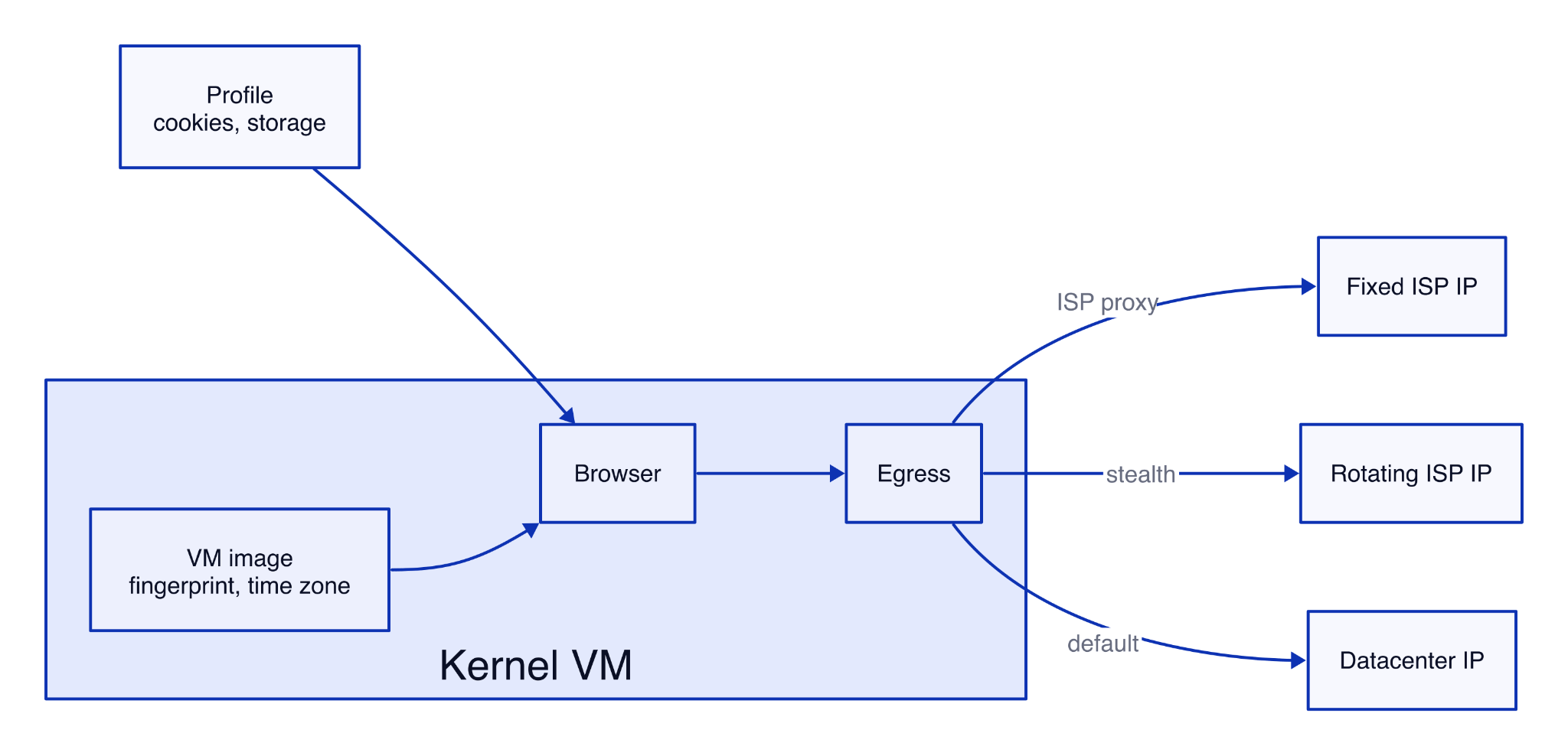
Kernel’s public kernel-images code shows that each browser starts from a pre-booted VM snapshot running Chrome for Testing with Patchright, which hides common automation signals. A VM with no client attached enters standby, where billing stops. A profile restores cookies and storage, while the fingerprint, time zone, and IP come from other parts of the session:
Kernel.sh review setup and test script
Sessions ran from a home internet connection in India and from Kernel’s app platform in us-east, its default region. They used the kernel Python SDK 0.125.0, Playwright 1.64.0, and Chrome 154 in Kernel’s browsers. Site and startup tests ran at least 5 times each, on the free Developer plan and the $30 Hobbyist plan.
The device ID comes from FingerprintJS 5.3.0, an open-source library that hashes 42 browser signals into 1 ID. This script runs the check on any Kernel plan, with an API key from the Kernel dashboard:
"""Print the device ID and exit IP that a website sees from one Kernel browser.

uv init && uv add kernel==0.125.0 playwright==1.64.0
KERNEL_API_KEY=... uv run python kernel_device_check.py
"""
import asyncio

from kernel import AsyncKernel
from playwright.async_api import async_playwright

FPJS = "https://cdn.jsdelivr.net/npm/@fingerprintjs/fingerprintjs@5.3.0/dist/fp.min.js"
DEVICE_ID = "FingerprintJS.load().then(a => a.get()).then(r => r.visitorId)"

async def main():
    client = AsyncKernel()  # reads KERNEL_API_KEY from the environment
    kb = await client.browsers.create(timeout_seconds=60)
    try:
        async with async_playwright() as pw:
            browser = await pw.chromium.connect_over_cdp(kb.cdp_ws_url)
            page = browser.contexts[0].pages[0]
            await page.goto("https://example.com/")
            await page.add_script_tag(url=FPJS)
            device_id = await page.evaluate(DEVICE_ID)
            ip = await page.evaluate("fetch('https://api.ipify.org').then(r => r.text())")
            print(f"device ID {device_id}, exit IP {ip}")
    finally:
        await client.browsers.delete_by_id(kb.session_id)  # stops billing

asyncio.run(main())
In testing, the step from API key to the first session took under 1 minute, including the package install. A default session printed:
device ID fbdccdccf0cb8798940007f7515784a8, exit IP 152.236.27.249Kernel profiles, fingerprint, and IP: what persists between runs
Kernel profiles restored cookies and storage in every session, and ISP proxies kept each account’s IP, but all 5 setups reported the same device ID. Each account had its own Kernel profile, with an ISP proxy passed as proxy_id:
| Account setup | Exit IP across sessions | Browser time zone | Device ID |
|---|---|---|---|
| Profile, no proxy | New IP every session | America/New_York | fbdccdcc… |
| US ISP proxy, account 1 | Same IP in all 5 sessions | America/New_York | fbdccdcc… |
| US ISP proxy, account 2 | Same IP in all 3 sessions | America/New_York | fbdccdcc… |
| UK ISP proxy | Same UK IP in both sessions | America/New_York | fbdccdcc… |
| US residential proxy | New IP every session | America/New_York | fbdccdcc… |
Every session reported the same NVIDIA L40S-2Q WebGL renderer, screen, CPU count, memory, and Linux platform. A site that links accounts by that device fingerprint hash alone would see 2 accounts on different ISP proxies as 1 machine. Commercial fingerprinting services also use the IP and server-side signals, so they can still separate those sessions.
The UK account reported New York time, and Pixelscan, a public fingerprint checker, flagged the time zone as not matching the IP. A CDP time zone override fixed it:
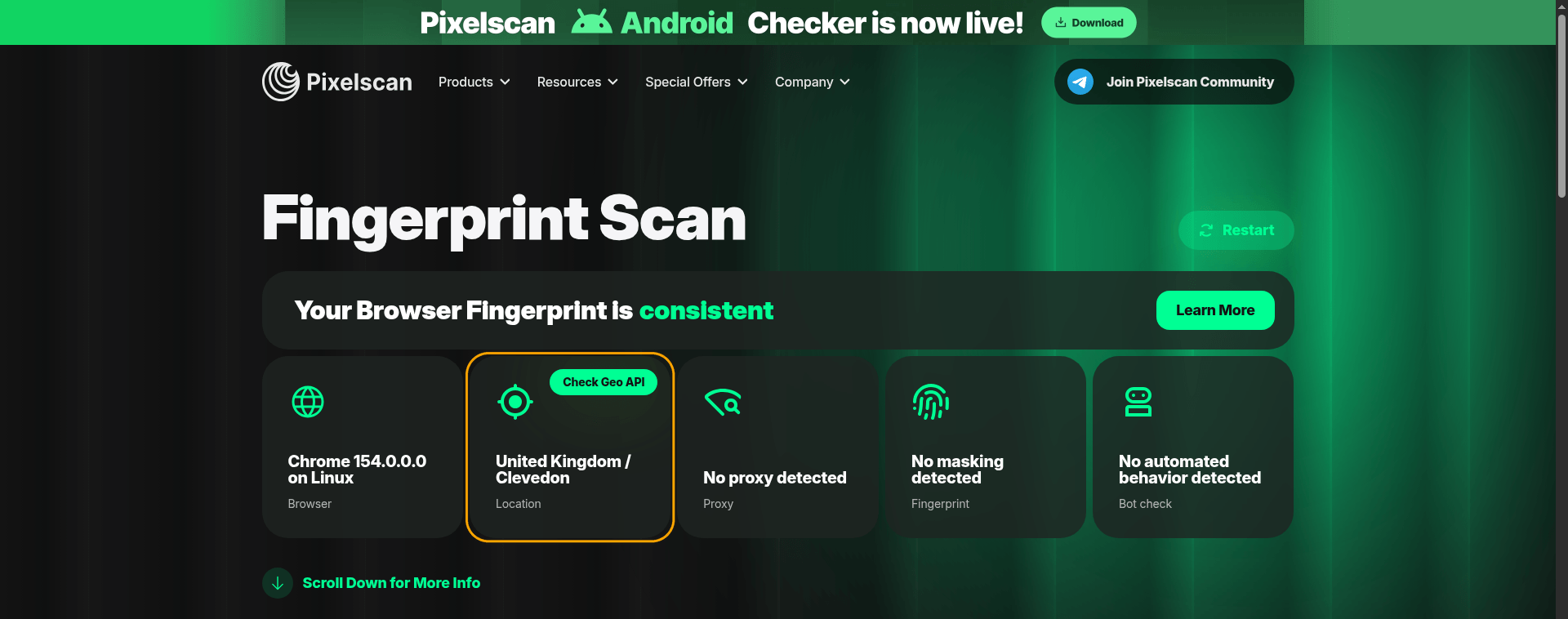
With the override, Pixelscan rated the session consistent and didn’t detect the UK ISP proxy as a proxy.
Within 1 session, Kernel’s residential proxy reached 4 IP lookup services through 4 different IPs, while an ISP proxy used 1 IP for all of them.
Proxy geo-targeting by country, city, and ZIP
Kernel’s residential proxies accept a country, state, city, ZIP code, or ASN, and its ISP proxies accept a country only. An IP lookup service placed each residential exit here:
| Target on a residential proxy | Exit location found |
|---|---|
| Country: US, UK, Germany | The requested country in all 3 |
| City: Chicago, Seattle | The requested city in both |
| ZIP 10001, New York | New York, ZIP 10004 |
| ZIP 94103, San Francisco | Fresno, ZIP 93737 |
Country and city targets matched, while ZIP targets were approximate.
Kernel anti-bot results: what passed and what was flagged
BrowserScan, a public bot-detection test, rated every check in Kernel’s default headful session Normal. Pixelscan flagged the IP as a proxy in a default and a bot-detection mode session, and a time zone that didn’t match the IP in the bot-detection mode one:
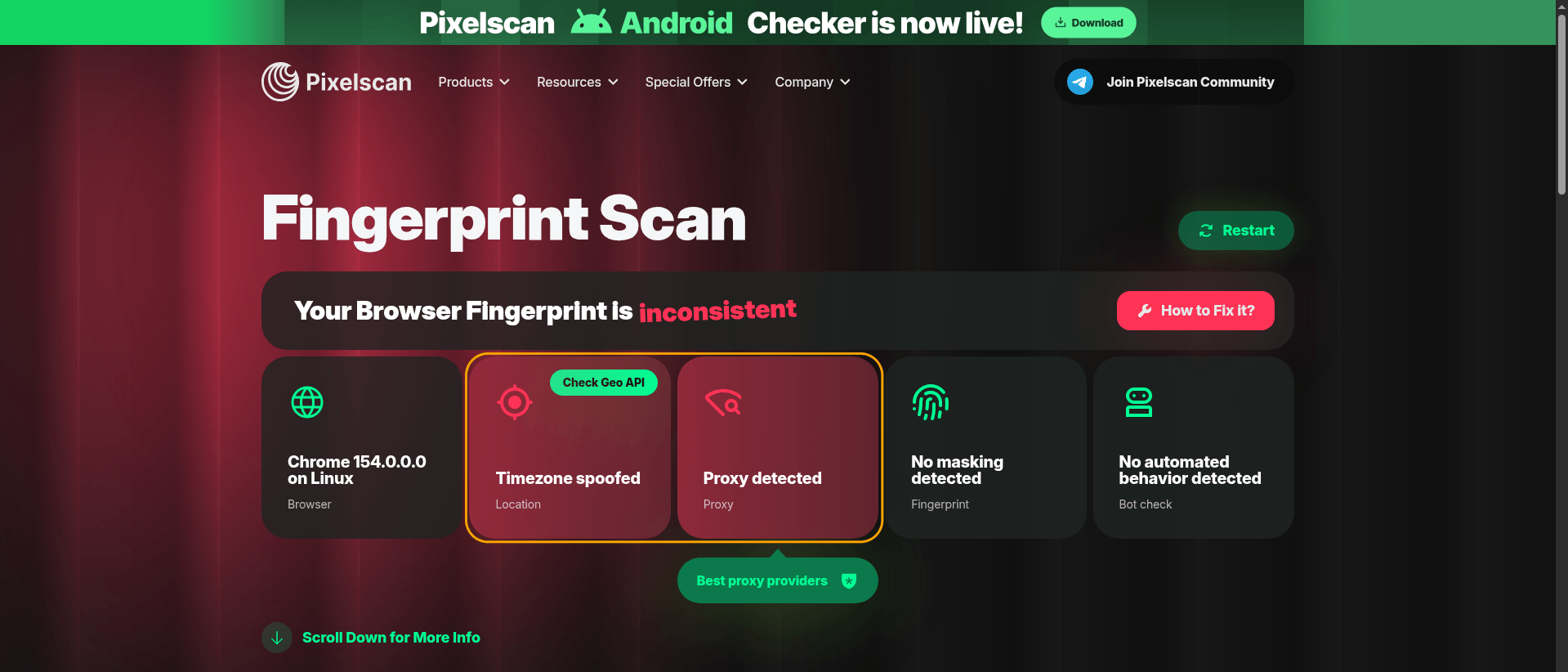
This was the only 1 of 12 bot-detection mode sessions whose exit IP didn’t match the browser’s New York time.
Bot-detection mode adds a managed proxy and a CAPTCHA solver, which Kernel’s bot detection docs say solves reCAPTCHAs and Cloudflare challenges automatically. Public test pages can’t see how a site’s risk system scores your IP or behavior, so treat a pass as a first check.
A second check loaded 1 public page on each of 5 sites, 5 times per mode, without a login. A 4xx status, a challenge page, or a login redirect counted as blocked:
| Target, 1 public page | Default headful | Bot-detection mode | ISP proxy |
|---|---|---|---|
| Zillow search results | Loaded 5 of 5 | Loaded 5 of 5 | Loaded 5 of 5 |
| G2 product reviews | 403 in 5 of 5 | 403 in 5 of 5 | 403 in 5 of 5 |
| LinkedIn company page | Loaded 5 of 5 | Loaded 5 of 5 | Loaded 5 of 5 |
| Amazon product page | Loaded 5 of 5 | Loaded 3 of 5, Robot Check in 2 | Loaded 5 of 5 |
| Hacker News front page | Loaded 5 of 5 | Loaded 5 of 5 | Loaded 5 of 5 |
In bot-detection mode, Amazon showed its Robot Check page in 2 of 5 runs, and the page was still there 6 seconds after it loaded. Robot Check is Amazon’s own image CAPTCHA, not one of the challenge types that Kernel’s docs name.
A desktop browser on a home connection loaded the same G2 page, so G2 blocked the cloud sessions, not every visitor.
Kernel.sh benchmarks: speed and standby
Startup to the first page took a median 0.36 s on Kernel’s app platform in us-east and 3.9 s from India. Medians per step, in seconds:
| Where the code ran | Runs | browsers.create() |
CDP connect | First page load | Total |
|---|---|---|---|---|---|
| India, headful | 5 | 1.06 | 2.40 | 0.44 | 3.90 |
| India, headful with a saved profile | 5 | 1.79 | 2.36 | 0.31 | 4.49 |
| Kernel app platform, us-east | 30 | 0.07 | 0.12 | 0.16 | 0.36 |
From India, a simple HTTPS request to Kernel’s API took 0.86 to 0.96 s, so network distance caused most of the create time. Headless and bot-detection mode startup times were within 0.15 s of headful. A browser entered standby 5 seconds after the last client disconnected, which stopped billing.
Kernel.sh pricing vs Gologin for the same workloads
Kernel charged a monthly fee plus browser time per second, with usage credits on each plan. When tested, headful time cost $0.48 per hour, headless time $0.06, and headful time with a GPU $2.88. These were the plans Kernel listed:
| Plan | Monthly fee | Credits | Concurrent browsers | Configurable proxies | GPU |
|---|---|---|---|---|---|
| Developer | $0 | $5 | 5 | No, bot-detection mode’s proxy only | No |
| Hobbyist | $30 | $10 | 10 | Yes | No |
| Start-Up | $200 | $50 | 150 | Yes, including your own | Yes |
On the Developer plan, the dashboard marked the features that needed a paid plan:
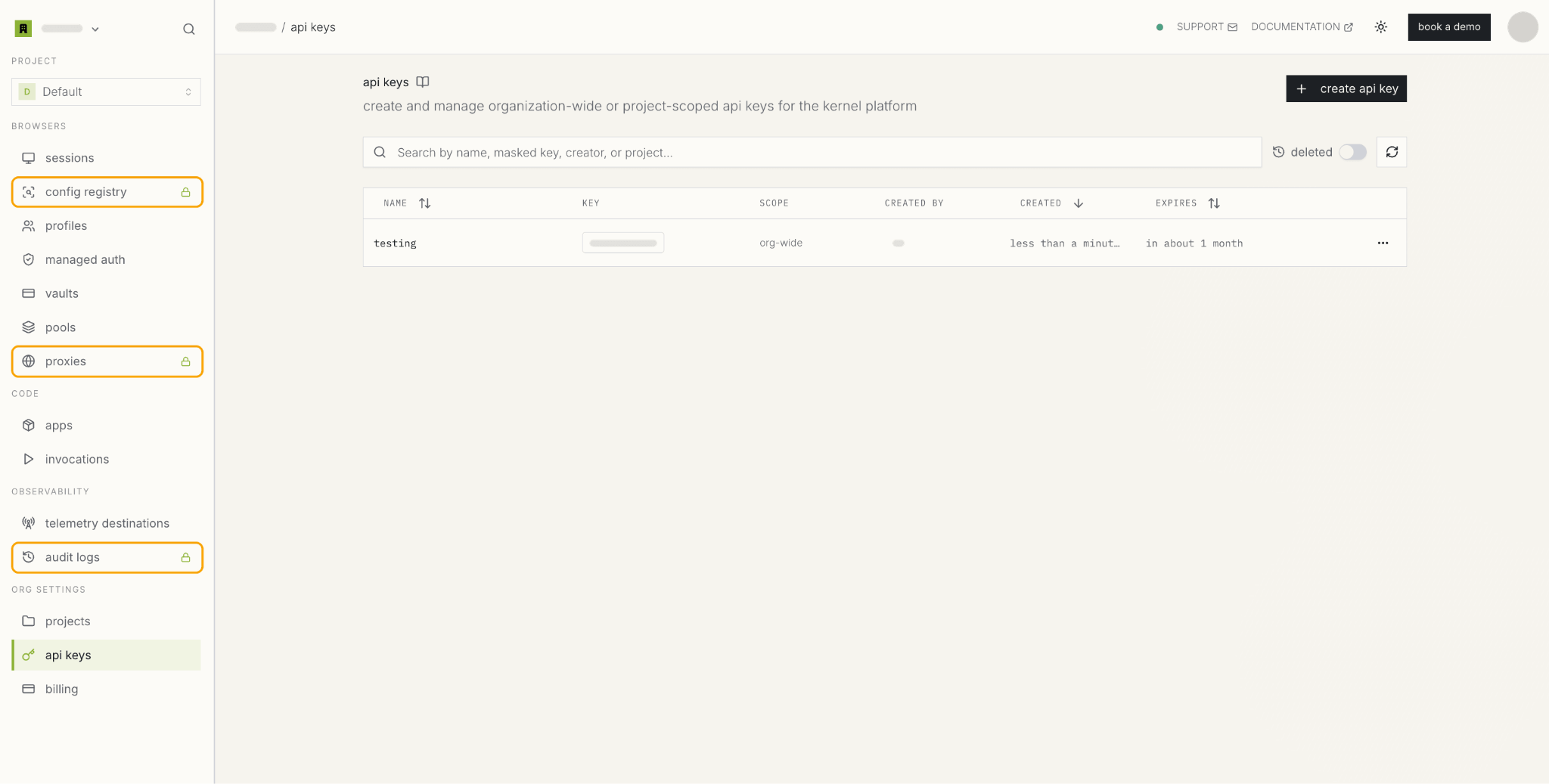
Per-account proxies start on Hobbyist, so Kernel’s totals use that plan. Gologin Cloud Browser plans include browser hours and residential traffic. Monthly totals for headful work with 1 proxy per account:
| Monthly workload | Kernel | Gologin Cloud Browser |
|---|---|---|
| 100 hours, 1 browser at a time | $68 on Hobbyist | $8 on Business |
| 500 hours, up to 5 at once | $260 on Hobbyist | $39 on Enterprise |
| 3,000 hours, up to 10 at once | $1,460 on Hobbyist | $224 on Enterprise |
Kernel’s totals are the $30 fee plus $0.48 per hour, less $10 of credits. Gologin’s totals are the plan fee, extra hours at the plan’s hourly rate, and $2 a month for each added parallel session. Kernel didn’t bill proxy traffic, and Gologin charges $1/GB past the plan’s residential allowance.
Kernel.sh pros
Kernel’s strengths showed in speed, proxies, and the tools around the browser:
- Fast startup next to the browser. On Kernel’s app platform in us-east, startup to the first page took a median 0.36 s.
- A clean default session on BrowserScan. BrowserScan rated every check Normal, and the TLS fingerprint (JA4) matched Chrome’s and stayed the same across sessions.
- Fixed IPs with ISP proxies. Each ISP proxy kept 1 exit IP across its sessions, 1 of them over 4 days of daily runs, and Pixelscan didn’t detect the UK ISP proxy as a proxy.
- Geo-targeting by country and city. Residential proxies exited in the requested country and city in every check, and Kernel didn’t bill proxy traffic.
- Managed Auth for supported logins. After a test profile was signed out, a health check signed in again in 28 seconds without a person.
- Session replays. A replay started and stopped through the API downloaded as a 1920x1080 MP4 video.
- A CAPTCHA solver in bot-detection mode, which Kernel’s docs say handles reCAPTCHAs and Cloudflare challenges.
- Open tooling. Kernel publishes its browser image, SDKs, and Model Context Protocol (MCP) server on GitHub, and Playwright and Puppeteer code connects over CDP.
Kernel.sh limitations
Most limits affect accounts that return to the same sites over many runs:
- The same default fingerprint for every account. Profiles didn’t store a fingerprint, and the create call had no fingerprint settings apart from the viewport and GPU options.
- A New York time zone by default. Accounts on non-US proxies needed a CDP override on every new tab, and the browser language stayed en-US.
- Residential IPs split by host. A site that serves pages and its API from different hostnames would see 1 session cookie arrive from 2 IPs, so signed-in accounts belong on ISP proxies.
- ISP proxies by country only, in the countries where Kernel offers them. Your own proxies need the $200 Start-Up plan.
- Plan-gated features. Configurable proxies started on Hobbyist, and GPU browsers on Start-Up and Enterprise. Web Bot Auth was available on request for Start-Up and Enterprise.
- Standby pauses the page. JavaScript timers stopped while no client was attached, so a page that sends keep-alive requests needs an open CDP connection.
- API and concurrency limits. Hobbyist allowed 25 create calls per minute and 10 browsers at once, with standby browsers counted. Above the limit, Kernel returned HTTP 429 with no Retry-After header.
- Headless browsers get 1 GB of memory by default. The tab stopped responding after the heavy Zillow page in 3 of 3 headless runs, and with 2 GB the next page loaded in 2 of 2.
- Login risk with Managed Auth. Kernel’s docs warn that an unneeded login can trigger a site’s risk checks or a device-verification email. Email and SMS codes usually still need a person.
- Live view links open without a login. A new browser with no Kernel login opened a live view link and saw the page, so add
readOnly=truefor a watch-only view, as Kernel’s docs advise.
Kernel vs Gologin Cloud Browser for accounts that stay signed in
Kernel handles sign-in with Managed Auth and credential vaults. Gologin Cloud Browser stores the fingerprint and proxy in the profile, together with cookies and storage, for automation in logged-in accounts.
2 ways to stay signed in
An agent can keep the same identity, so the site keeps seeing a device it already knows, or it can sign in again when the session expires. Kernel’s Managed Auth does the second, through a hosted page where end users connect an account:
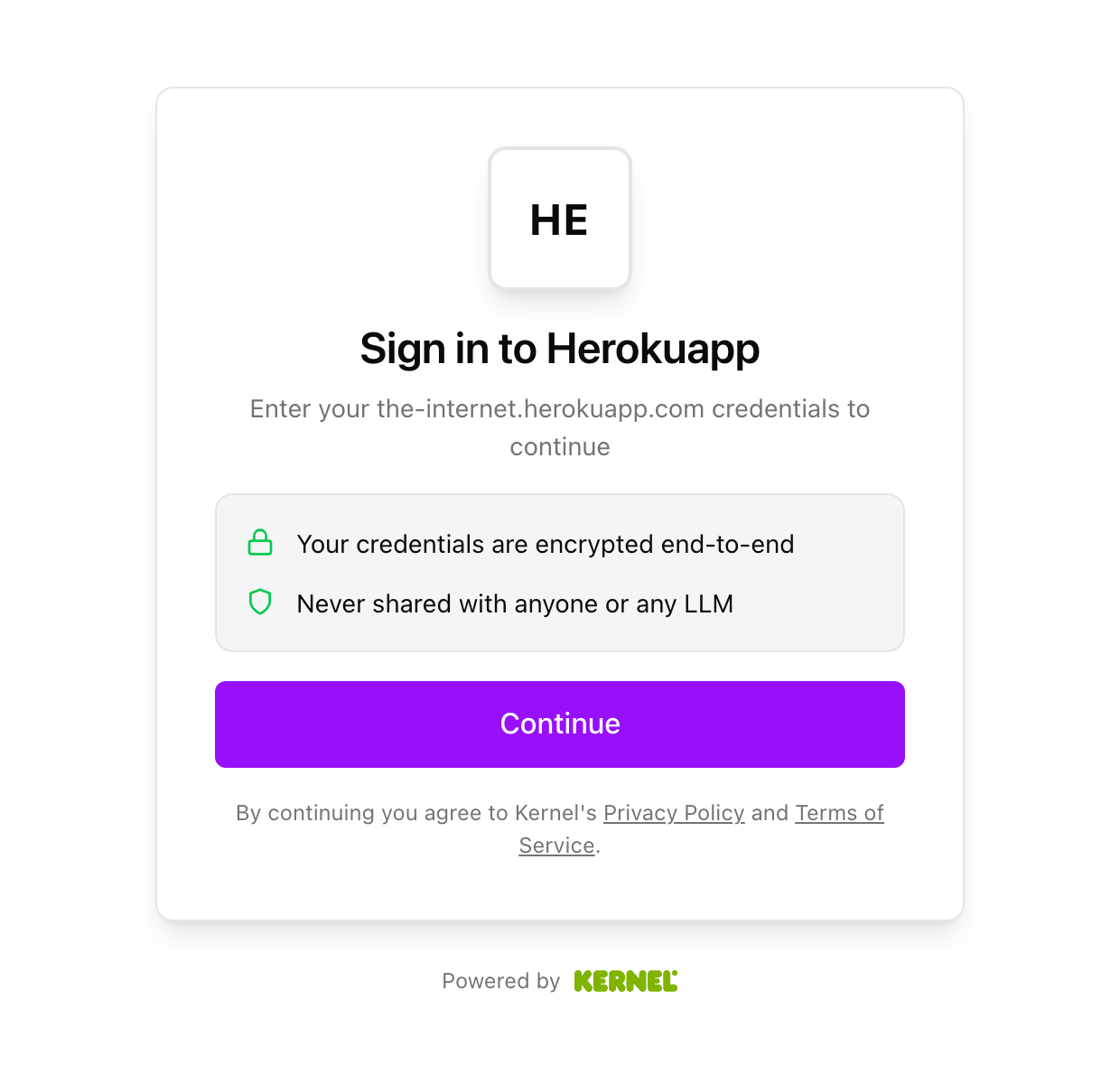
Kernel’s hosted page asks for the username and the password in separate steps after Continue.
On a practice login site, after the profile was signed out, the next hourly health check signed in again in 28 seconds through the same ISP proxy.
A Gologin profile does the first. It stores cookies, storage, fingerprint, and proxy together as a persistent digital identity, and Gologin’s own Chromium build applies the fingerprint inside the browser. Each of the 4 tested profiles reported its own device ID. One profile with a residential proxy kept the same device settings across 7 days of runs and still had a localStorage value saved on day 1.
Fingerprint, IP, and price side by side
Measured rows come from the same checks on both products, and the other rows show each vendor’s published terms:
| Kernel | Gologin Cloud Browser | |
|---|---|---|
| A saved profile restores | Cookies and storage | Cookies, storage, device fingerprint, and proxy |
| Device ID, measured | The same in every tested session without a time zone override | A separate ID for each of 4 profiles |
| Public pages, 5 runs each, measured | In default mode, Zillow, Amazon, and Hacker News loaded 5 of 5, and G2 returned 403 in 5 of 5 | With a residential proxy, Zillow, Amazon, and Hacker News loaded 5 of 5, and G2 returned 403 in 5 of 5 |
| Proxy per account | ISP proxy from Hobbyist, your own from Start-Up | Gologin residential, mobile, datacenter, or ISP proxy, or your own, on the profile |
| Exit IP within 1 session, measured | A different IP per website on residential, 1 for all on ISP | 1 for all websites on residential |
| Time zone | New York, or a CDP override per tab | Matched the exit IP |
| 100 headful hours a month | $68 on Hobbyist | $8 on Business |
On Gologin, the proxy belongs to the profile, so every session that opens the profile uses the same proxy without extra code.
Run the device ID check on Gologin in 2 changes
The connection call changes, and a stop call through Gologin’s API ends the session:
"""Print the device ID and exit IP that a website sees from one Gologin profile.

uv init && uv add playwright==1.64.0 httpx
GL_API_TOKEN=... uv run python gologin_device_check.py <profile_id>
"""
import asyncio
import os
import sys

import httpx
from playwright.async_api import async_playwright

FPJS = "https://cdn.jsdelivr.net/npm/@fingerprintjs/fingerprintjs@5.3.0/dist/fp.min.js"
DEVICE_ID = "FingerprintJS.load().then(a => a.get()).then(r => r.visitorId)"
CONNECT = "wss://cloudbrowser.gologin.com/connect?token={}&profile={}"

async def main(profile_id):
    token = os.environ["GL_API_TOKEN"]
    try:
        async with async_playwright() as pw:
            browser = await pw.chromium.connect_over_cdp(
                CONNECT.format(token, profile_id),
                no_defaults=True)  # keep the profile's own settings
            page = browser.contexts[0].pages[0]
            await page.goto("https://example.com/")
            await page.add_script_tag(url=FPJS)
            device_id = await page.evaluate(DEVICE_ID)
            ip = await page.evaluate("fetch('https://api.ipify.org').then(r => r.text())")
            print(f"device ID {device_id}, exit IP {ip}")
    finally:
        # Stop the cloud session so billing stops and the profile saves
        async with httpx.AsyncClient(timeout=60) as http:
            await http.delete(f"https://api.gologin.com/browser/{profile_id}/web",
                              headers={"Authorization": f"Bearer {token}"})

asyncio.run(main(sys.argv[1]))
Create a free Gologin account, with no card needed, to get an API token. In testing, the step from API token to the first session took about 1 minute, including the package install. Then create a profile with a proxy in the dashboard or through the API, and pass its ID to the script.
FAQ
What is Kernel.sh?
Kernel.sh is a cloud browser platform for AI agents. Its API starts Chromium in an isolated virtual machine and returns a Chrome DevTools Protocol (CDP) URL for Playwright, Puppeteer, or an agent framework. It adds profiles, Managed Auth, live view, replays, and a bot-detection mode with a managed proxy and CAPTCHA solver.
How much does Kernel.sh cost?
When tested, Kernel charged a monthly plan fee plus browser time per second. Headful time cost $0.48 per hour, and headless time cost $0.06. The Developer plan was free with $5 of credits, Hobbyist cost $30, and Start-Up cost $200. With an ISP proxy per account, 100 headful hours a month cost $68 on Hobbyist.
Is Kernel open source?
Partly. On GitHub, Kernel publishes its kernel-images browser image, Hypeman VM manager, SDKs, and Model Context Protocol (MCP) server. The hosted service, with its proxy network, CAPTCHA solver, and Managed Auth, is commercial. Hosted sessions ran a newer Chrome version than the public image.
What are the alternatives to Kernel.sh?
Gologin Cloud Browser is a Kernel.sh alternative for agents that return to the same signed-in accounts. Each profile keeps its own fingerprint, cookies, storage, and proxy between runs. Gologin Cloud Browser also uses the Chrome DevTools Protocol, so Playwright and Puppeteer code works with few changes.
What do Kernel profiles save?
A Kernel profile saves the browser’s user-data directory, including cookies, storage, open tabs, and preferences. In testing, a saved profile restored cookies and storage in every session. The device fingerprint stayed the same with or without a profile, and an ISP proxy on the Hobbyist plan kept 1 IP across runs.
What is a cloud browser?
A cloud browser runs on a provider’s servers while your code controls it remotely, for example over the Chrome DevTools Protocol. Many cloud browsers restore cookies and storage, and Gologin Cloud Browser also keeps each profile’s fingerprint settings and proxy between runs.
Final thoughts
Kernel.sh is fast when your code runs on its app platform, and it works well for agent tasks that finish in 1 session. A Kernel profile restored cookies and storage but not the device fingerprint, so every tested account had the same device ID by default. ISP proxies, a time zone override, and Managed Auth cover the IP, time zone, and sign-in for supported logins.
For agents that return to the same accounts, a Gologin Cloud Browser profile keeps cookies, fingerprint, and proxy together. On the Business plan, 100 browser hours a month cost $8. Get an API token and run the same device ID check on your own Gologin profiles.


