Anchor Browser Review 2026: Profiles, Anti-Bot Tests, Speed and Real Pricing
Try Gologin for free
An AI agent that signs in to the same accounts daily needs sites to recognize it. A login from a new device or network can trigger a verification code and pause the agent.
Anchor Browser, a cloud browser API for AI agents, launches Chromium on Anchor’s servers and returns a Chrome DevTools Protocol (CDP) URL for Playwright or Puppeteer. Its tested profiles restored cookies but didn’t keep their own device fingerprint or IP. Proxy traffic was most of the cost.
We tested Anchor’s fingerprints, IPs, anti-bot results, speed, and cost, then compared it with Gologin Cloud Browser for signed-in accounts.
TL;DR
- Anchor profiles restored cookies, but didn’t keep their own IP or device fingerprint. On the free plan, each tested session got a new exit IP, once moving from Fort Wayne, Indiana, to Orlando, Florida, in 35 seconds. Every session in the same browser mode also had the same FingerprintJS device fingerprint, so a site could see different accounts as one device. A Gologin Cloud Browser profile, measured with the same library, kept its own device fingerprint and used its saved proxy in all 5 tested runs.
- Proxy traffic was most of the estimated Anchor bill. For 25 agents working 8 hours a day through residential proxies, the estimate was $7,304 a month, and $7,040 of it was proxy traffic. The same workload would cost at most $1,232 on Gologin Cloud Browser, with all traffic priced at Gologin’s $1 per GB. With your own proxy, Anchor would still cost $2,500 or more for the same workload, against the same $1,232.
- Any page could detect Anchor’s built-in extension. In both modes, a page could read a file from the Anchor Agent extension. On Google domains, the extension also set the page’s WebAuthn sign-in APIs to undefined, which a normal Chrome never does and page scripts can detect.
- Extra fingerprint protection, included from the $2,000 Growth plan up, fixed the default browser’s version mismatch. In default sessions, the user agent reported Chrome 136 on macOS, while client hints, the version details Chrome sends to sites, reported Chromium 151. With a residential proxy, extra fingerprint protection also passed the anti-bot challenge on G2, a software review site, in 4 of 5 runs. Default sessions on a datacenter IP got an HTTP 403 in all 5.
| Anchor Browser key facts | As of November 2026 |
|---|---|
| Best for | Agents that finish their work in 1 session, and products where each end user signs in to their own account once, through Anchor’s managed authentication |
| Weaker for | Many accounts that must each keep one device fingerprint and one IP across runs, and bandwidth-heavy work through Anchor’s $8 per GB proxy |
| Tested on | Anchor’s free plan, October 29 to November 1, 2026 |
| Plans | Free, Starter $50, Team $500, Growth $2,000 a month, Enterprise custom |
| Usage prices | $0.01 per browser created, $0.05 per browser hour, $8 per GB through Anchor’s proxy |
| Concurrent browsers | 5, 25, 50, 200, or 500+, by plan |
| Separate fingerprint per profile | Listed on Enterprise only, at a custom price |
| Two sessions on one profile | The last to close overwrote the other’s changes |
| Bring-your-own proxy | Team ($500) on the pricing page, Growth ($2,000) on the rate card |
| Session startup latency | 6.44 s median to the first page, from India, 5 runs |
| Time to first session | 20 s from Anchor’s home page to an API key with Google sign-up, timed by hand. With the key, a first script loaded a page in a 12 s median |
| Anti-bot test on Zillow, G2, LinkedIn, Amazon, and Hacker News | Default sessions passed 2 out of 5 sites. Extra fingerprint protection with a residential proxy, included from Growth up, passed 4 out of 5, with 21 of 25 page loads |
| CAPTCHA solving | Listed from Starter up in Anchor’s docs. Not tested, since our tests ran on the free plan |
| Geo-targeting | Country, region, and city at no extra cost on Anchor’s $8 per GB proxy, with no ZIP-level targeting |
| Other features | Live view, MP4 recordings, console and network logs, Web Bot Auth request signing, which lets sites verify the agent |
How Anchor Browser works as a cloud browser for AI agents
A call to create_session() starts Chromium on Anchor’s servers and returns a CDP URL and a live view URL. Besides the browser, Anchor offers an AI agent and Tasks, saved automations billed per run. It also offers profiles, session recordings, a Model Context Protocol (MCP) server, and managed authentication, which handles multi-factor authentication (MFA) codes.
For agents that sign in to many accounts every day, each account’s own device fingerprint and IP matter most.
Anchor’s public SDK code and the extensions inside a running session showed how a default session was built:
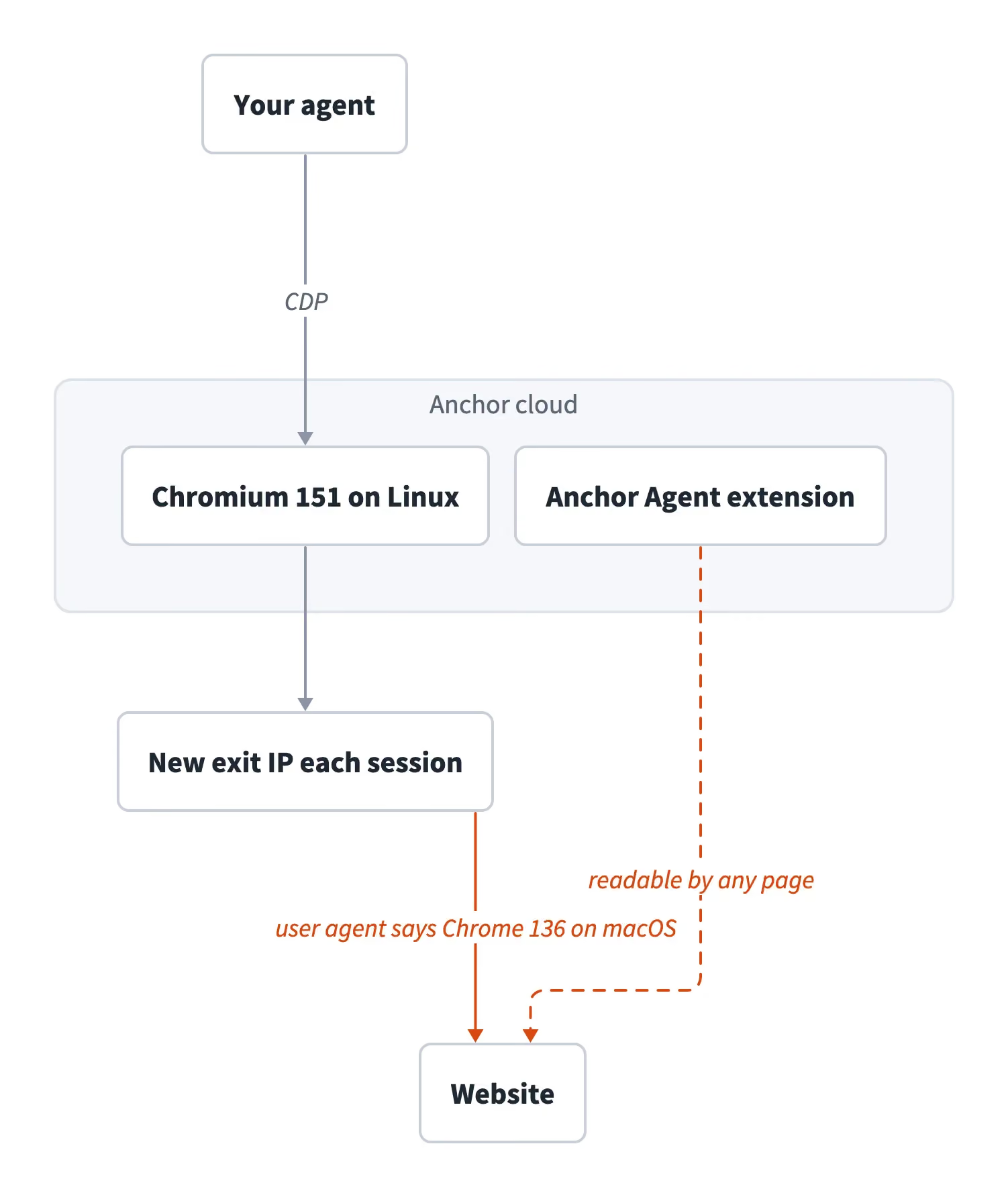
A default Anchor session as tested in October 2026. The website saw a Chrome 136 user agent that didn’t match the browser’s other signals, a new exit IP each session, and an extension any page could read.
How we tested Anchor Browser
We ran every test from October 29 to November 1, 2026, on Anchor’s free plan, where extra fingerprint protection also ran, from a home internet connection in India. The extension, Usage page, and Live View screenshots came from extra sessions on November 3. Sessions used the anchorbrowser Python SDK 1.0.1 and Playwright 1.64.1, which the SDK installed as a dependency. Time to first session came from a new account and 5 first-script runs on November 6.
The test script, site_view.py, prints what a website can read, and the same file ran on Gologin Cloud Browser. It includes device_id, a device fingerprint from FingerprintJS 5.3.0, an open-source library that hashes browser signals into one ID. We ran it at least twice with each profile, so the second run showed what the profile saved. The full script is under “Run the test script on Anchor and Gologin” below.
The second run of a default session printed:
user_agent         Mozilla/5.0 (Macintosh; Intel Mac OS X 10_15_7) AppleWebKit/537.36 (KHTML, like Gecko) Chrome/136.0.0.0 Safari/537.36
engine             Chromium 151.0.7922.34, Not=A?Brand 99.0.0.0
platform           Linux x86_64
anchor_agent_file  readable
device_id          68c3b620785485671c1845cac03e8270
saved_on_last_run  09:46:19
Anchor profiles, fingerprint, and IP: what persists between runs
An Anchor profile restored cookies and local storage in every test, but it didn’t keep its own device fingerprint or IP. Each profile ran 2 sessions, the first writing a test value and the second reading it:
| Setup | Cookies and storage on the next run | Device fingerprint | Exit IP across sessions |
|---|---|---|---|
| Default, 2 profiles | Restored | 68c3b620…, the same as sessions with no profile |
New Amazon Web Services (AWS) datacenter IP in Ohio every session |
| Extra fingerprint protection with US proxy, 2 profiles | Restored | 9c04e2bd…, the same as sessions with no profile |
New residential IP every session, for example Fort Wayne, then Orlando |
Profile created with dedicated_sticky_ip: true, free plan |
Restored | 68c3b620… |
New AWS datacenter IP every session |
Sites check the IP, cookies, and behavior as well as the device fingerprint, so the shared fingerprint is one signal among several. The shared fingerprint wasn’t a side effect of cloud machines, because Gologin profiles, also on cloud machines, got a different fingerprint per profile with the same library.
For signed-in accounts, the changing exit IP matters more than the shared fingerprint. One extra-protection profile’s exit IP was in Fort Wayne, Indiana, and 35 seconds later in Orlando, Florida, a pattern that risk-based authentication systems can flag as impossible travel. Set each account’s proxy to one location with country_code, region, and city, and match the browser time zone to that location. With New York City set, all 3 sessions stayed in the New York area.
Anchor lists three ways to keep one IP or one fingerprint per account:
| Option on Anchor | Where Anchor lists it | What we saw on the free plan |
|---|---|---|
| Dedicated sticky IP for a profile | Anchor’s docs | The API accepted the flag, but GET /v1/profiles showed has_sticky_ip: false, and the IP changed |
| Your own static proxy for each account | Team on the pricing page, Growth on the rate card | Not available to test |
| A separate fingerprint for each profile | Enterprise, at a custom price | Not available to test |
Check has_sticky_ip before you rely on a static IP.
When a profile’s IP changes, the site may not recognize the device and can ask for a verification code. When accounts share a device fingerprint, the site can link them. Anchor’s managed authentication handles the verification prompt by signing in again with stored credentials and MFA.
A profile that keeps its own device fingerprint and IP can make verification codes rarer, because the site sees a device and a network it already knows. These tests measured those signals, not verification prompts on real accounts.
Anchor profiles after a crash or in parallel sessions
In production, agents can crash, retry, or open the same profile in parallel. A crashed client left its session running until the idle timeout, 5 minutes by default, and the profile kept the test value written before the crash. When 2 sessions opened the same profile at once, the one that closed last overwrote the other’s changes, a last-write-wins conflict. Set session.timeout.idle_timeout close to your agent’s longest pause, and run 1 session per profile at a time.
On a Gologin profile, a second connection joined the browser that was already running, so both jobs shared one saved state instead of overwriting each other.
Proxy geo-targeting and browser time zone
Anchor’s residential proxy accepted a country, a region, and a city, but no ZIP code. The exit IPs matched those settings. The browser time zone followed the country, not the city, so a UK exit IP got London time and US exit IPs got New York time (America/New_York). That included all 5 sessions with Los Angeles exit IPs, plus extra-protection sessions in Arkansas and North Dakota, a mismatch that sites can check against IP geolocation.
For US locations outside Eastern time, run the CDP command Emulation.setTimezoneOverride on every page to match the browser time zone to the IP geolocation.
A Gologin profile’s time zone matched its IP geolocation in all 7 checks, including a Los Angeles IP, with no time zone code in the script.
Anchor Browser fingerprint: what a website sees
A default Anchor session reported its browser version and operating system in 3 inconsistent ways. User-Agent Client Hints are the version and platform details that Chrome sends to sites, some by default and some on request. Bot-detection scripts compare them with the user agent, because an unmodified Chrome reports the same version and operating system in all of them:
| Signal a page can read | Default session | Extra fingerprint protection session |
|---|---|---|
| User agent | Chrome 136 on macOS | Chrome 147 on macOS |
| Full version list in client hints | Chromium 151.0.7922.34 | Google Chrome and Chromium 147.0.7727.137 |
navigator.platform |
Linux x86_64 | MacIntel |
| Platform in client hints | MacOS, a spelling Chrome doesn’t use |
macOS, as Chrome reports it |
The Chrome 136 user agent didn’t come from a session setting. The session’s user-agent override was disabled, and the user agent inside Anchor’s built-in extensions showed the actual engine, Chromium 151 on Linux. The mismatch came from the default build itself, not from the test code.
Extra fingerprint protection, a separate Chromium build, reported the same version in every signal we checked. Enable it in create_session() with the browser option for this mode in Anchor’s docs and an active proxy. Anchor’s pricing listed extra fingerprint protection only on the Growth and Enterprise plans, so budget for one of those.
In both modes, any page could read inject.js from the Anchor Agent extension with a single fetch request, because the extension’s manifest exposes it to every website. The extension ID was the same in every tested session, so a site that checks for known extensions could detect an Anchor browser. On Google domains, the same script set navigator.credentials and PublicKeyCredential to undefined, which a normal Chrome never does and page scripts can detect.
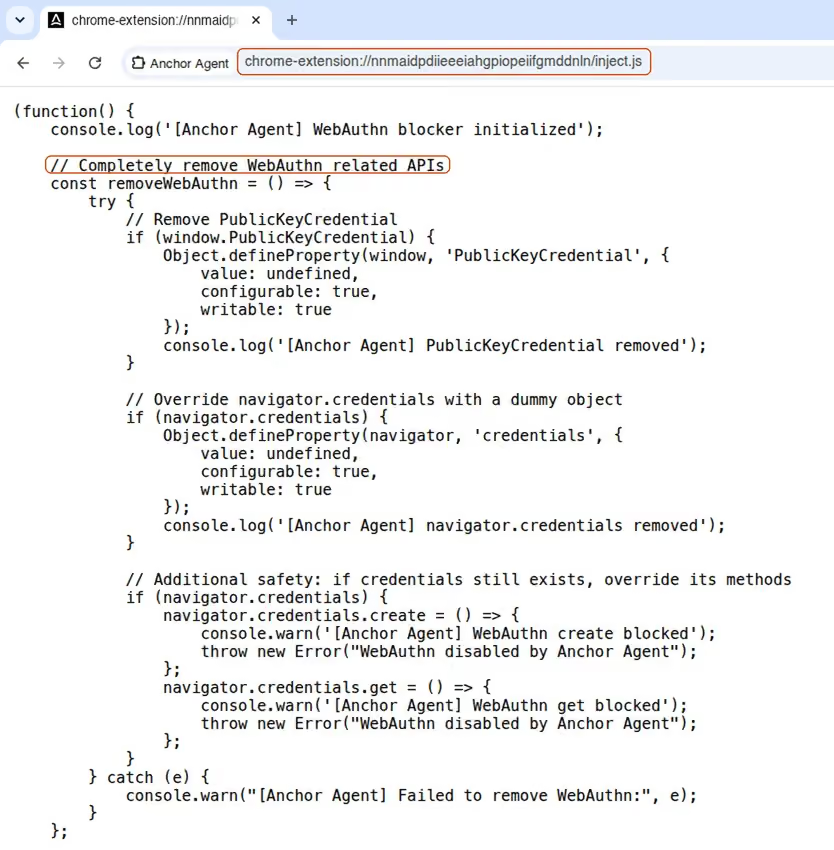
The script that Anchor’s extension injected on Google pages, opened as a normal tab in a default Anchor session. It removed the WebAuthn APIs that passkeys need.
Anchor vs Gologin Cloud Browser for accounts that stay signed in
We ran the same checks on a Gologin Cloud Browser profile and on both Anchor modes. Every Gologin plan runs the same browser, so the plan doesn’t change these results:
| Result when tested | Gologin Cloud Browser | Anchor, default | Anchor, extra fingerprint protection |
|---|---|---|---|
| User agent and engine version | Chrome 153 in both | Chrome 136 and Chromium 151 | Chrome 147 and Chromium 147 |
OS in navigator.platform, user agent, and client hints |
Windows in all three | Linux, macOS, and MacOS |
macOS in all three |
| Vendor extension readable by pages | None | Yes, Anchor Agent | Yes, Anchor Agent |
| Device fingerprint across 2 profiles | A different fingerprint per profile | The same fingerprint | The same fingerprint |
| Device fingerprint across runs of one profile | The same fingerprint in all 5 runs | The same fingerprint | The same fingerprint |
| Exit IP across runs of one profile | The same exit IP in all 5 runs, on one day | New AWS IP each run | New residential IP each run |
| Browser time zone with a Los Angeles IP | Los Angeles. All 7 checks, across several cities, matched the IP geolocation | New York in 3 of 3, through Anchor’s proxy | New York in 2 of 2 |
| Cookies and storage on the next run | Restored | Restored | Restored |
Anchor Browser pricing vs Gologin for the same workloads
On November 2, 2026, Anchor’s monthly plans were sold as credits worth $1 each, and overage cost $1 per credit. Anchor’s rate card priced usage at $0.01 per browser created, $0.05 per browser hour, and $8 per GB through Anchor’s proxy.
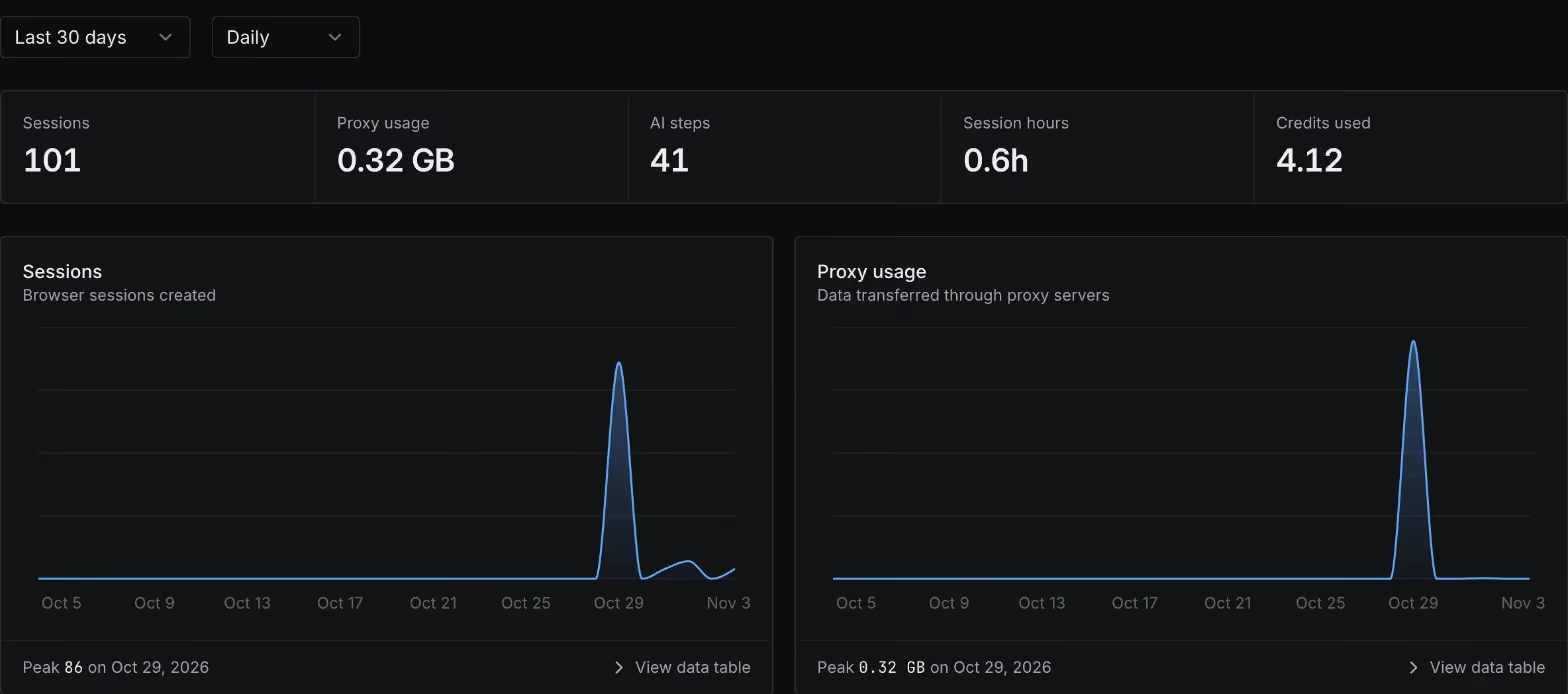
Anchor’s Usage page for this review’s account. The 0.6 browser hours cost about $0.03, while the 0.32 GB through Anchor’s proxy cost about $2.56 of the 4.12 credits used. The rest covered the 101 browsers created and other usage on the page.
Gologin Cloud Browser plans include browser hours, parallel sessions, and residential proxy traffic on one bill, with no per-request fees, even on a retry. Any plan can add parallel sessions at $2 a month each, as many as you need, and extra browser hours cost $0.07 to $0.09. Proxy traffic beyond the included allowance costs $1 per GB.
With Anchor’s proxy, Gologin’s bill is lower for any agent that loads more than one 10 MB page an hour. Most rows assume 0.2 GB of traffic per hour, about 20 page loads of 10 MB. We measured that page size on the five public sites in the anti-bot test. The table shows monthly costs for agents using residential proxies:
| Monthly workload | Anchor | Gologin Cloud Browser |
|---|---|---|
| 300 accounts, 10 min a day each for 30 days, up to 10 at once (1,500 h, 9,000 sessions, 300 GB) | $2,565 on Starter ($2,400 is traffic, about $0.29 per session) | $419 on the $14 a month plan, running 10 at once ($300 is traffic, about $0.05 per session) |
| 25 browsers at once, 8 h a day for 22 days (4,400 h, 880 GB) | $7,304 on Starter ($7,040 is traffic) | $1,232 on the $14 a month plan, running 25 at once ($880 is traffic) |
| The same 25 browsers at 0.02 GB per hour (4,400 h, 88 GB) | $968 on Starter ($704 is traffic) | $440 on the $14 a month plan, running 25 at once ($88 is traffic) |
| The same 25 browsers with your own proxy (Decodo residential) | $2,500 to 5,520 on Team or Growth, Decodo traffic included | $1,232 with Gologin’s own residential traffic |
| 100 browsers at once on the same schedule (17,600 h, 3,520 GB) | $29,216 on Growth ($28,160 is traffic) | $4,946 on the $14 a month plan, running 100 at once ($3,520 is traffic) |
Both columns price the same hours and traffic at each vendor’s list prices, on the plan that costs least at that concurrency. Anchor’s totals also include $0.01 per browser created, assuming one new browser per browser hour in the 25- and 100-browser rows. Apart from the own-proxy row, every Anchor total is more than its plan’s included credits, so you pay the full total. On Growth, which includes extra fingerprint protection, the 0.02 GB row would rise to the $2,000 plan minimum, while the other rows already cost more.
For Gologin, that is its $14 a month plan, the largest of its three listed plans, with 200 browser hours included. Added sessions cost $2 a month each, and added hours cost $0.07 each. The $14 plan’s included hours and lower hourly rate make it cheaper than the $4.50 plan for these workloads. To keep the comparison conservative, the Gologin column prices every GB at $1, the rate for traffic beyond the allowance, as if the plan included no traffic.
In the first 25-browser row, Anchor’s $7,304 is $220 of browser hours, $44 for browsers created, and $7,040 of traffic. Gologin’s $1,232 is the $14 plan, $44 to run 25 sessions at once, $294 for 4,200 added hours, and $880 of traffic.
Even at a tenth of the traffic, Gologin cost less than half as much ($440 against $968). At Gologin’s extra-hour rates, the break-even is about 1.4 to 4.3 MB of traffic per browser hour.
With your own proxy or no proxy, Anchor billed $0.20 per GB of egress, the traffic leaving its servers, instead of $8. Anchor’s pricing page listed bring-your-own proxy on the $500 Team plan, but its rate card listed it only on Growth, so budget for Growth unless Anchor confirms Team.
With your own proxy, the 25-browser workload uses $440 of credits, made up of $220 of browser hours, $44 for browsers created, and $176 of egress. That fits in Team at $500 or Growth at $2,000, plus your proxy provider’s bill. With Decodo’s 1 TB plan at $2,000, or $4 per GB pay-as-you-go, the total is $2,500 to $4,020 on Team and $4,000 to $5,520 on Growth. Gologin’s total for the same workload is $1,232.
Anchor anti-bot results: what loaded and what was blocked
Default sessions passed 2 out of 5 sites, and extra fingerprint protection with a residential proxy passed 4 out of 5. A site passed when its page loaded in most of the 5 runs. Zillow counts as not passed for extra fingerprint protection, because a recheck showed the challenge in 4 of 5 runs.
In each mode, we loaded one public page from each of 5 sites in 5 runs, while logged out and with the CAPTCHA solver off. Each mode ran on its own network, so the results reflect the build and the IP type together. A page counted as loaded when its content was on screen 6 seconds after the first HTTP response, with no block page or challenge at that point:
| Public page | Default session, AWS datacenter IP | Extra fingerprint protection, US residential proxy |
|---|---|---|
| Zillow search results | 403 from PerimeterX (HUMAN Security), Zillow’s bot-protection vendor, in 5 of 5 | Loaded 3 of 5, with the challenge in 2. A recheck showed the challenge in 4 of 5 |
| G2 product reviews | 403 in 5 of 5 | Challenge page with a 403, then the review page within 6 s in 4 of 5 |
| LinkedIn company page | Loaded 5 of 5 | Loaded 5 of 5 |
| Amazon product page | Loaded 5 of 5 | Loaded 4 of 5, Amazon’s checkpoint page in 1 |
| Hacker News front page | 503 in 3 of 5 | Loaded 5 of 5 |
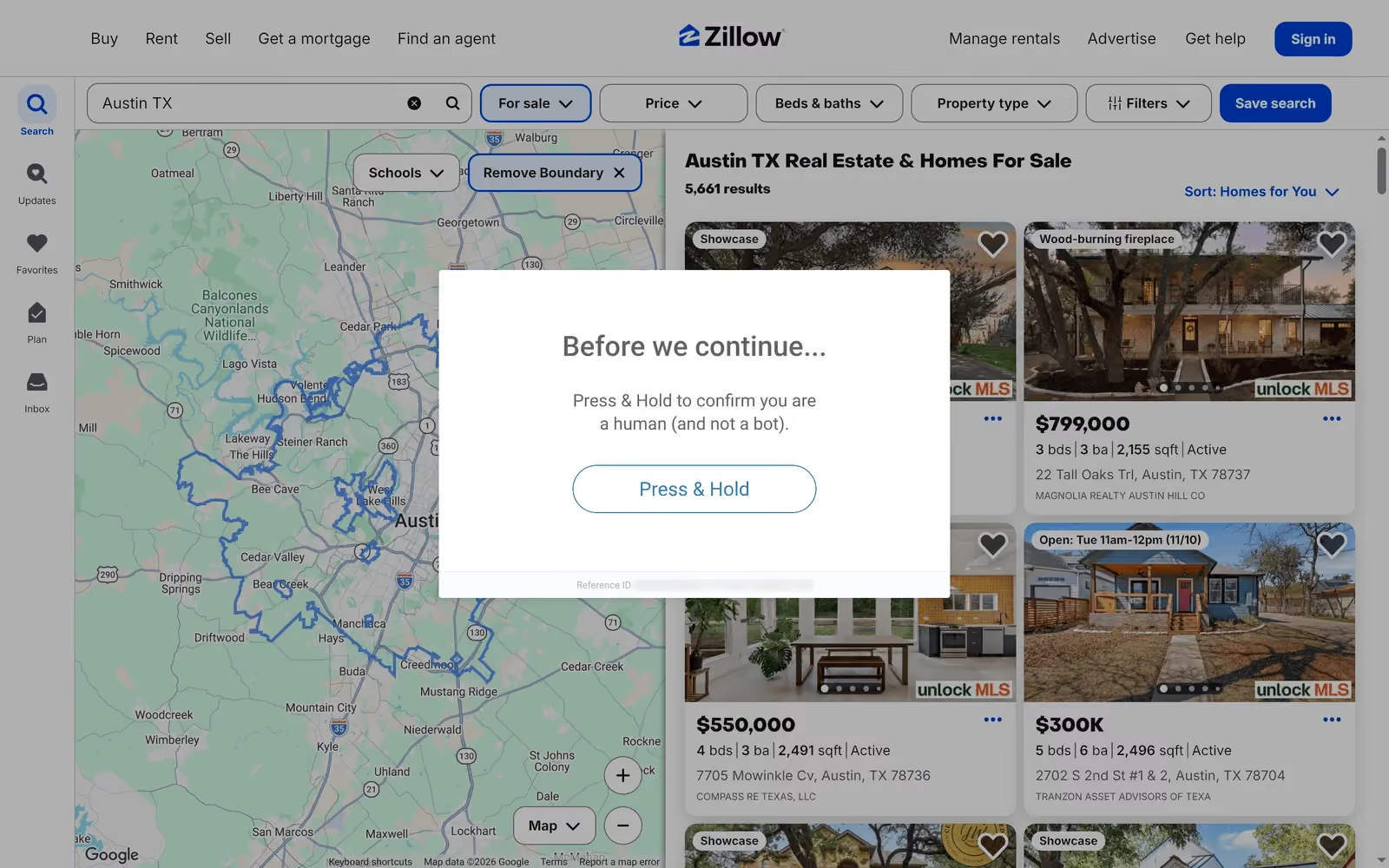
Zillow showed this Press & Hold challenge in 2 of the 5 runs in the table and in 4 of 5 extra runs with screenshots.
Zillow and G2 blocked default sessions in all 5 runs, and Hacker News returned a 503 in 3. Inside a signed-in account, a site also checks the account’s login history, including the device and IP it usually signs in from. Results there can differ from these logged-out tests.
Anchor Browser benchmarks: startup and concurrency
From India, a default session took a median of 6.44 s from creation to the first loaded page. The total was timed end to end, so it includes the gaps between steps and is more than their sum:
| Step, 5 runs | Median, s | Range, s |
|---|---|---|
create_session() |
3.03 | 2.93 to 3.43 |
| CDP connection | 2.52 | 2.32 to 2.82 |
| First page load | 0.44 | 0.42 to 0.61 |
| Total | 6.44 | 6.30 to 6.70 |
A single HTTPS request to Anchor’s API took 1.2 to 1.7 s from the same internet connection, so network latency accounted for part of the session creation time. Browsers on Free and Starter ran in US data centers, so a client in the US can expect a shorter session creation time.
Signing up with Google from Anchor’s home page and copying the API key took 20 s, timed by hand on a new account. With the key and the SDK installed, a first script loaded a page in a median of 12 s over 5 runs, from 11.6 to 13.0 s. That time includes starting Python, creating the session, and ending it, so it’s longer than the 6.44 s above.
The free plan allowed 5 concurrent browsers. A request for a sixth session returned HTTP 429 with Project ID exceeded browser quota and no Retry-After header, so retry it with exponential backoff. Session creation was also rate-limited to 5 requests per minute.
Anchor Browser pros
Anchor’s main strengths, from our tests and its docs:
- A consistent protected build on Growth. Extra fingerprint protection, included from the $2,000 Growth plan up, reported one Chrome version in every signal we checked. With a residential proxy, it passed G2’s anti-bot challenge in 4 of 5 runs without a CAPTCHA solver.
- Managed authentication. Anchor stores credentials and runs the sign-in flow before a session starts. It handles email one-time passwords and authenticator-app codes, and can use 1Password.
- Web Bot Auth request signing. With Web Bot Auth enabled, Anchor signs its requests, and Cloudflare named Anchor Browser in its first cohort of signed agents. Signed requests can pass on sites that allow verified agents.
- Built-in debugging. Anchor recorded each session as an MP4 by default, and its docs also list console and network logs.
- City geo-targeting and a low hourly rate. Exit IPs matched the locations set, and browser time cost $0.05 an hour, a small part of the bill once residential proxy traffic is added.
Anchor Browser limitations and when not to buy
Most limitations affect agents that return to the same accounts over many runs:
- An inconsistent fingerprint in the default browser. Sites that compare the user agent with client hints can detect the mismatch. Extra fingerprint protection, included from the Growth plan up, fixed it in testing.
- The same device fingerprint for every tested profile in each browser mode. A site that links accounts by fingerprint can treat them as one device. Anchor’s pricing listed a separate fingerprint for each profile on Enterprise only.
- A new exit IP every session by default. The exit IPs of both tested extra-protection profiles changed US state between sessions, which risk-based authentication can flag as impossible travel. Setting a city kept all 3 sessions in one area, though the IP still changed. On the free plan, Anchor didn’t apply the sticky IP flag. Its docs also cover using your own proxy for each account.
- An extension any page could detect. In both modes, any page could read a file from the Anchor Agent extension. On Google domains, the extension also set the page’s WebAuthn APIs to undefined, which a normal Chrome never does and page scripts can detect.
- A time zone mismatch outside Eastern time. Sessions with exit IPs in Los Angeles, Arkansas, and North Dakota used Eastern time, so set the browser time zone yourself for those locations.
- No profile locking. When 2 sessions opened the same profile at once, the last to close overwrote the other’s changes, so your job queue should allow only 1 session per profile.
Anchor is a weaker choice when your agents use many accounts on the same sites, or when each account must keep one device fingerprint and one IP. It also costs more than Gologin above about 1.4 to 4.3 MB of traffic per browser hour on Anchor’s proxy, less than one 10 MB page load.
Anchor Browser alternatives: Gologin and other cloud browsers
Like most cloud browsers, every product below restores cookies. They differ in what else a profile restores, according to each vendor’s pricing page and docs on November 2, 2026:
| Cloud browser | Price per browser hour | Residential proxy traffic | Entry paid plan, concurrent browsers | Longest session, paid plans | A saved profile restores |
|---|---|---|---|---|---|
| Anchor | $0.05 | $8 per GB | Starter $50, 25 | No upper limit, set by max_duration (3 h by default) |
Cookies, local storage, cache |
| Gologin Cloud Browser | Included browser hours, then $0.07 to $0.09 | Included, then $1 per GB | From $4.50 a month. 25 parallel sessions cost $52.50 on that plan, with more at $2 a month each | No limit | Cookies, local storage, IndexedDB, device fingerprint, and proxy |
| Browserbase | $0.10 to $0.12 | $10 to $12 per GB | Developer $20, 25 | 6 h | Cookies, local storage, IndexedDB |
| Kernel | $0.48 headful, $0.06 headless, from per-second rates | Included in the usage rate | Hobbyist $30, 10 | No overall cap published | Cookies, storage, tabs, preferences |
| Steel | $0.08 to $0.10 | $6 to $10 per GB | Scale $250, 100 | 1 h on Scale, 24 h on Enterprise | Cookies, extensions, credentials |
| Browser Use | $0.02 | $5 per GB | Pay as you go, 10 | 4 h | Cookies and local storage |
For agents that return to the same accounts, compare the last column, what a saved profile restores.
A Gologin Cloud Browser profile is a persistent digital identity. It opens in a full Chromium browser with its own device fingerprint, cookies, storage, and proxy, all kept between runs. Gologin’s own Chromium build applies the fingerprint inside the browser, and the version and OS signals we checked all agreed. It stays signed in as long as the site’s login session lasts.
The proxy can be a Gologin residential, mobile, datacenter, or ISP IP in 195+ countries, or your own. With the proxy stored in the profile, every session that opens the profile uses the same proxy without extra code.
Each session has a Live View link where a person can take control to enter a verification code, then return control to the script. Takeover is an API call, with no restart and no second login. The live session can also be embedded in your own dashboard, so your users sign in without leaving your product.
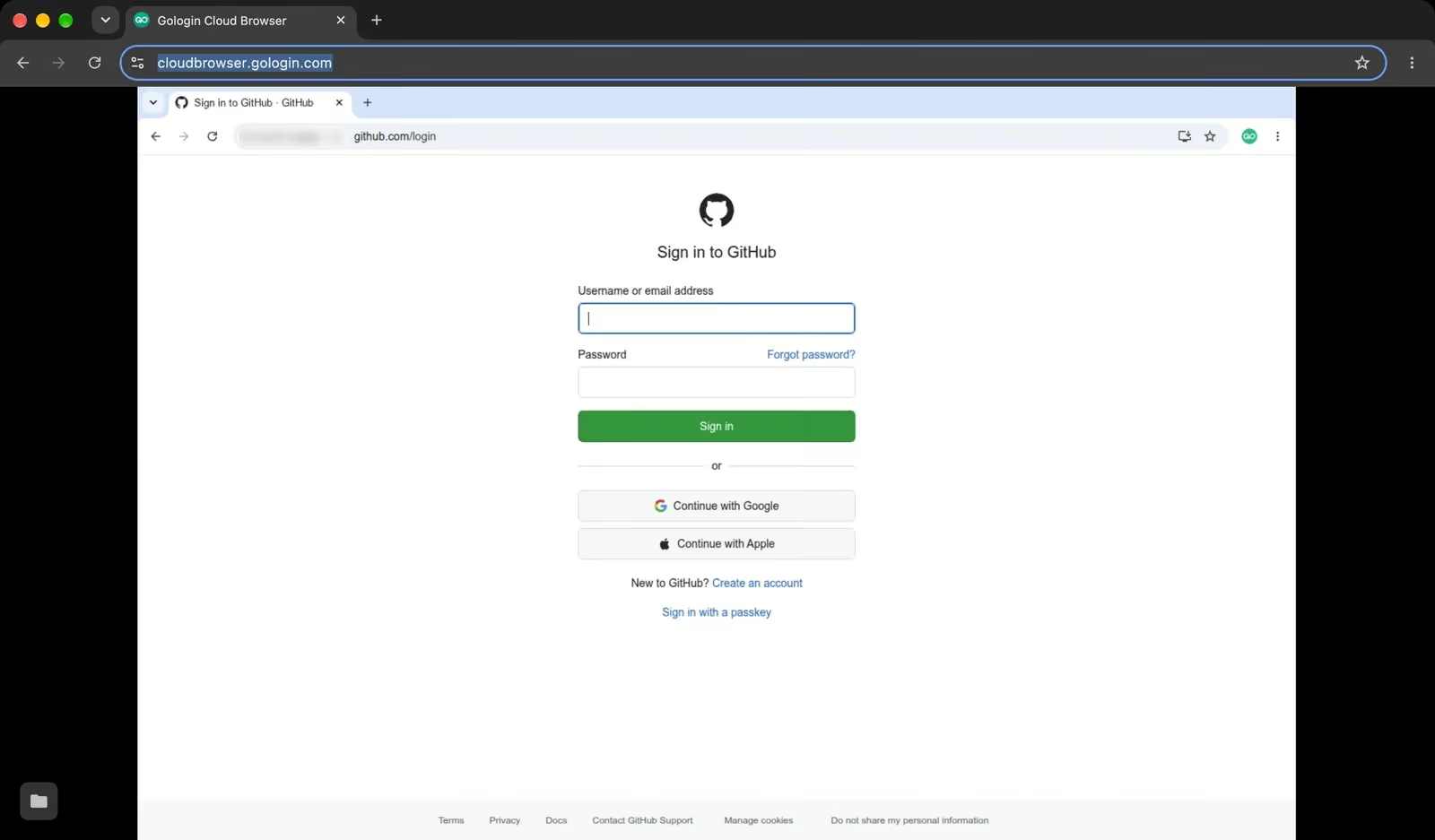
Gologin’s Live View in a normal browser tab, showing the profile’s remote browser on a sign-in page. If a site asks for a verification code, a person can enter it here.
Run the test script on Anchor and Gologin
site_view.py runs on both products. Only the connection URL and the call that ends the session differ, so the same Playwright code drives either one. It loads FingerprintJS inline, because Anchor’s default ad blocker, uBlock Origin Lite, replaced the CDN copy with a stub that returned a random ID. Run it twice with the same profile, so the second run shows what the profile saved:
"""Print what a website sees from an Anchor Browser session or a Gologin Cloud Browser profile.

uv init && uv add anchorbrowser==1.0.1
ANCHOR_API_KEY=... uv run python site_view.py anchor my-profile
GL_API_TOKEN=... uv run python site_view.py gologin <profile_id>
"""
import os
import sys
import time

import httpx
from anchorbrowser import Anchorbrowser
from playwright.sync_api import sync_playwright

# Inline copy of the open-source FingerprintJS library, so no ad blocker can swap the file
FPJS = httpx.get("https://cdn.jsdelivr.net/npm/@fingerprintjs/fingerprintjs@5.3.0/dist/fp.min.js").text
# Checks for the Anchor Agent extension by the ID seen in October 2026 sessions
SITE_VIEW = """async () => {
  const hi = await navigator.userAgentData.getHighEntropyValues(['fullVersionList']);
  let agentFile = 'not found';
  try { await fetch('chrome-extension://nnmaidpdiieeeiahgpiopeiifgmddnln/inject.js'); agentFile = 'readable'; } catch (e) {}
  const fp = await (await FingerprintJS.load()).get();
  return {
    user_agent: navigator.userAgent,
    engine: hi.fullVersionList.map(b => `${b.brand} ${b.version}`).join(', '),
    platform: navigator.platform,
    anchor_agent_file: agentFile,
    device_id: fp.visitorId,
    saved_on_last_run: localStorage.getItem('last_run'),
  };
}"""

vendor, profile = sys.argv[1], sys.argv[2]
if vendor == "anchor":
    anchor = Anchorbrowser(api_key=os.environ["ANCHOR_API_KEY"])
    session = anchor.sessions.create_session(
        browser={"profile": {"name": profile, "persist": True}})  # save cookies and storage on exit
    cdp_url = session.data.cdp_url
    end_session = lambda: anchor.sessions.delete_session(session.data.id)
else:
    token = os.environ["GL_API_TOKEN"]
    cdp_url = f"wss://cloudbrowser.gologin.com/connect?token={token}&profile={profile}"
    end_session = lambda: httpx.delete(f"https://api.gologin.com/browser/{profile}/web",
                                       headers={"Authorization": f"Bearer {token}"}, timeout=60)
try:
    with sync_playwright() as pw:
        browser = pw.chromium.connect_over_cdp(cdp_url, no_defaults=True)  # keep the profile's own settings
        page = browser.contexts[0].pages[0]
        page.goto("https://example.com/")
        page.add_script_tag(content=FPJS)
        for key, value in page.evaluate(SITE_VIEW).items():
            print(f"{key:18} {value}")
        page.evaluate(f"localStorage.setItem('last_run', '{time.strftime('%H:%M:%S')}')")
        browser.close()
finally:
    end_session()  # ends the session, and the profile saves its cookies and storage
For Gologin, sign up to get an API token, then create a profile and add a Gologin residential proxy, one API call each. Pass its profile ID to site_view.py:
GL_API_TOKEN=... uv run python site_view.py gologin <profile_id>The script’s second run on that profile printed:
user_agent         Mozilla/5.0 (Windows NT 10.0; Win64; x64) AppleWebKit/537.36 (KHTML, like Gecko) Chrome/153.0.0.0 Safari/537.36
engine             Google Chrome 153.0.8010.52, Not_A Brand 8.0.0.0, Chromium 153.0.8010.52
platform           Win32
anchor_agent_file  not found
device_id          9759d1604e321e5cb964c2c18b7c854c
saved_on_last_run  09:47:14
Migrate a signed-in Anchor profile to Gologin
A Gologin profile can import the sign-in cookies and local storage that an Anchor profile keeps. The script below exports cookies, including HttpOnly ones, and local storage from Anchor with Playwright. It then imports the cookies through Gologin’s API and writes local storage in a Gologin session.
Set APP_URLS to a static file, such as /robots.txt, on each app whose local storage you need. Exported sign-in cookies are credentials, like passwords, so don’t write them to logs, and migrate only accounts whose owners authorized your agent:
"""Move the sign-in cookies and local storage of an Anchor profile into a Gologin profile.

uv init && uv add anchorbrowser==1.0.1
ANCHOR_API_KEY=... GL_API_TOKEN=... uv run python move_anchor_profile_to_gologin.py <anchor_profile> <gologin_profile_id>
"""
import os
import sys

import httpx
from anchorbrowser import Anchorbrowser
from playwright.sync_api import sync_playwright

# A static file on each app whose local storage the agent needs. Loading /robots.txt opens
# the origin without running the app, so its scripts can't refresh or clear tokens mid-move
APP_URLS = ["https://example.com/robots.txt"]

anchor_profile, gologin_profile = sys.argv[1], sys.argv[2]
token = os.environ["GL_API_TOKEN"]
anchor = Anchorbrowser(api_key=os.environ["ANCHOR_API_KEY"])

with sync_playwright() as pw:
    # 1. Read cookies, including HttpOnly ones, and local storage from Anchor
    session = anchor.sessions.create_session(browser={"profile": {"name": anchor_profile}})
    try:
        browser = pw.chromium.connect_over_cdp(session.data.cdp_url)
        page = browser.contexts[0].pages[0]
        for url in APP_URLS:
            page.goto(url)
        state = browser.contexts[0].storage_state()
        browser.close()
    finally:
        anchor.sessions.delete_session(session.data.id)

    # 2. Import the cookies into the Gologin profile through Gologin's API
    auth = {"Authorization": f"Bearer {token}"}
    cookies = [{
        "url": f"https://{c['domain'].lstrip('.')}{c['path']}",
        "name": c["name"], "value": c["value"], "domain": c["domain"], "path": c["path"],
        "session": c["expires"] == -1, "hostOnly": not c["domain"].startswith("."),
        "secure": c["secure"], "httpOnly": c["httpOnly"],
        "sameSite": {"Lax": "lax", "Strict": "strict", "None": "no_restriction"}.get(c["sameSite"], "unspecified"),
        "expirationDate": c["expires"],
    } for c in state["cookies"]]
    httpx.post(f"https://api.gologin.com/browser/{gologin_profile}/cookies?fromUser=true",
               headers=auth, json=cookies, timeout=60).raise_for_status()

    # 3. Write local storage in a Gologin session. The profile keeps its own fingerprint and proxy
    try:
        browser = pw.chromium.connect_over_cdp(
            f"wss://cloudbrowser.gologin.com/connect?token={token}&profile={gologin_profile}",
            no_defaults=True)
        page = browser.contexts[0].pages[0]
        for origin in state["origins"]:
            page.goto(origin["origin"] + "/robots.txt")
            for item in origin["localStorage"]:
                page.evaluate("([k, v]) => localStorage.setItem(k, v)", [item["name"], item["value"]])
        page.wait_for_timeout(3000)
        browser.close()
    finally:
        # End the cloud session. The profile saves its cookies and storage
        httpx.delete(f"https://api.gologin.com/browser/{gologin_profile}/web", headers=auth, timeout=60)

print(f"moved {len(state['cookies'])} cookies and {len(state['origins'])} local storage origins")
After the migration, the next 2 Gologin sessions still had the local storage token and the HttpOnly sign-in cookie set by our test site. Both sessions used the profile’s own device fingerprint and residential proxy, and sent the sign-in cookie back to the test site.
Final thoughts
Anchor Browser fits apps where each end user connects their own account through managed authentication, and its session recordings help with debugging. Its extra fingerprint protection mode, included from the Growth plan up, fixed the default browser’s version mismatch and, with a residential proxy, passed G2’s anti-bot challenge in most runs. Its profiles restored cookies, but in each browser mode, every tested profile shared one device fingerprint and got a new IP each session.
For agents returning to the same accounts, a Gologin profile keeps its own device fingerprint, proxy, and cookies, and traffic beyond a plan’s allowance costs $1 per GB. Get a free Gologin Cloud Browser API token, no card needed, and run site_view.py twice on a profile, then move signed-in Anchor profiles with the migration script.
FAQ
What is Anchor Browser?
Anchor Browser is a cloud browser platform for AI agents. Its API launches Chromium on Anchor’s servers and returns a Chrome DevTools Protocol URL for Playwright or Puppeteer. It also offers an AI agent, Tasks (saved automations), managed authentication, profiles, live view, session recordings, and an extra fingerprint protection mode.
How much does Anchor Browser cost?
In November 2026, Anchor’s plans were Free, Starter $50, Team $500, and Growth $2,000 a month, paid as credits. Usage cost $0.01 per browser created, $0.05 per browser hour, and $8 per GB through Anchor’s proxy. At 0.2 GB per hour, 25 agents working a combined 4,400 hours a month cost $7,304, against at most $1,232 on Gologin Cloud Browser.
Is Anchor Browser free?
Yes. In November 2026, the free plan included $5 of credits a month, 5 concurrent browsers, and a rate limit of 5 new sessions per minute. Residential proxy traffic was billed per GB, so 5 extra-protection page loads used about $0.40 of the $5.
Do Anchor Browser profiles keep you signed in?
Through cookies, yes, but not with their own device fingerprint or a fixed IP. An Anchor profile restored cookies and local storage in every test. In each browser mode, default or extra fingerprint protection, all tested profiles had the same device fingerprint, and the exit IP changed between sessions. A site may still ask for a verification code.
Does Anchor Browser solve CAPTCHAs?
Yes, from the Starter plan up, according to Anchor’s docs. They listed a vision-based CAPTCHA solver with extension fallbacks, which required an active proxy or a profile. We didn’t test the solver, because our tests ran on the free plan. With it off, extra fingerprint protection mode with a residential proxy loaded 21 of 25 public pages across 5 runs.
What are the alternatives to Anchor Browser?
Gologin Cloud Browser is an Anchor Browser alternative for agents that return to the same signed-in accounts. Each profile keeps its own device fingerprint, cookies, storage, and proxy between runs. Playwright and Puppeteer code connects to it over the Chrome DevTools Protocol. For scripts that only need screenshots, PDFs, or HTML, see the headless browser API.
What is a cloud browser?
A cloud browser runs on a provider’s servers while your code controls it remotely, for example over the Chrome DevTools Protocol. Many cloud browsers restore cookies and storage between runs. A Gologin Cloud Browser profile also keeps its own device fingerprint and proxy, so each profile reports its own fingerprint on every run.