Notte.cc Review 2026: Speed, Concurrency and Real Pricing
Try Gologin for free
Notte is a cloud browser platform for AI agents, with a residential proxy and browser profiles built in. Playwright or Puppeteer code controls its Chromium sessions over the Chrome DevTools Protocol (CDP).
Agents that return to the same accounts work best with the same login session, device fingerprint, and exit IP in every session. In our tests, a Notte profile didn’t restore authentication state stored in IndexedDB, such as a Firebase Authentication session. Each session showed a new device fingerprint and, by default, a new exit IP.
This Notte.cc review covers profile persistence, public page access, speed, concurrency, and pricing. It compares persistence and cost with Gologin Cloud Browser and includes a script you can run on your own sites.
TL;DR
- Notte profiles restored cookies and web storage, but not IndexedDB or the device fingerprint. The Firebase Authentication session from Google’s FirebaseUI demo wasn’t restored in the next session. By default, the exit IP also rotated in each session.
- Residential proxy traffic, not the $0.01 browser hour, was most of this review’s Notte bill. Notte’s residential proxy is $10 per GB, and Gologin’s is $1 per GB beyond a plan’s allowance. With Notte’s proxy, Gologin costs less above about 8 MB of proxy traffic per browser hour. At this review’s measured 85 MB per browser hour, 25 agents on 8-hour workdays would cost about $3,784 a month on Notte and $726 on Gologin.
- Median startup latency was 3.81 s from India, and Free allows 5 concurrent sessions. Notte lists 25 concurrent sessions of up to 120 minutes on Developer, and 100 of up to 300 minutes on Startup.
- With Notte’s default settings, pages loaded on 3 of 5 public sites. LinkedIn and Amazon loaded in all 5 runs, and Zillow in 4. G2 returned HTTP 403 in every run, and Hacker News returned its rate-limit page in 3 of 5.
- Notte fits agents that finish their work in one session. For agents that return to the same accounts, a Gologin Cloud Browser profile kept the login session and device fingerprint in every later test session. It also reused its own saved proxy each time.
| Notte key facts | Result |
|---|---|
| Best for | Agents that finish their work in one session, especially on public pages with little proxy traffic |
| Tested on | Notte’s Free plan with the notte-sdk 1.10.11 Python SDK, from India, November 15 to 16, 2026 |
| Plans | Free, Developer $20, Startup $100 a month, Enterprise custom. Each paid plan includes usage credit equal to its fee, so Developer includes $20 of usage. Free includes a one-time $10 credit |
| Listed usage prices | $0.01 per browser hour, $10 per GB through Notte’s residential proxy, $0.20 per GB for bring-your-own-proxy traffic on Startup and Enterprise |
| Concurrent sessions | 5 on Free, confirmed when a 6th session returned HTTP 429. Notte’s pricing page lists 25 on Developer and 100 on Startup |
| Maximum session duration | 15 min on Free, confirmed when a request for a 30-minute session returned HTTP 422. Notte’s pricing page lists 120 min on Developer and 300 min on Startup |
| Cost per hour and per session | $2.01 per browser hour at an assumed 0.2 GB of proxy traffic per browser hour, or $0.86 at this review’s measured 85 MB. A 10-minute session at the 0.2 GB rate costs about $0.34, so Developer’s $20 of usage credit covers about 59 such sessions |
| Session startup latency | 3.81 s median from the session-create request to the first page load, 5 runs, from India |
| Time to first session | About 45 s from Notte’s home page to an API key with Google sign-up, timed by hand on a new account. With the key and the SDK installed, a script based on Notte’s README quickstart loaded a page in a median of 5.77 s over 5 runs, including Python startup and session teardown |
| Public page access test on Zillow, G2, LinkedIn, Amazon, and Hacker News | Loaded on 3 of 5 sites. The page loaded in 16 of 25 runs |
| CAPTCHA solving | Built in and on by default, per Notte’s docs |
| Profile persistence | Profiles restored cookies, local storage, and session storage. IndexedDB wasn’t restored. The device fingerprint changed between sessions, and by default the exit IP rotated |
| Geo-targeting | Country- and city-level geo-targeting both worked, at no extra cost on the $10 per GB residential proxy. Notte’s proxy docs list country and city fields, with no ZIP-level option |
| Live view and session replay | Both on by default. Sessions returned a live view link, and the replay API returned an MP4 video |
What Notte is and who it’s for
Notte sells cloud browser infrastructure for AI agents and web automation. Its API starts a Chromium session and returns a CDP WebSocket URL that Playwright or Puppeteer connects to, plus a live view link. A session replay is available after each session ends. A residential proxy and CAPTCHA solving are on by default. Profiles can persist cookies and web storage between sessions. Notte’s docs also list credential vaults, personas with their own email inbox and phone number, managed authentication, and Functions, which deploy browser automations as serverless API endpoints. The SDK’s source is on GitHub under the Server Side Public License (SSPL).
Notte fits agents and automations that finish their work in one session, especially on public pages with little proxy traffic. It also suits teams that want proxies and credential vaults from one vendor. Agents that return to the same accounts every day are a weaker fit, for the reasons in the profiles section below.
Notte.cc review: how we tested
All tests ran from November 15 to 16, 2026, from a residential broadband connection in India. The setup was Notte’s Free plan, Playwright 1.65.2, and two Notte Python packages at version 1.10.11. The notte-sdk package calls Notte’s cloud API, and the full notte package runs Notte’s browser actions locally. Prices, plan limits, and defaults are as Notte listed them during testing. Unless a test says otherwise, each session used Notte’s defaults, which include the built-in US residential proxy, CAPTCHA solving, and the chromium browser type. Notte also offers chrome and chrome-nitro browser types, and an advanced anti-bot mode that it enables for a workspace on request. This review didn’t test those options. Gologin Cloud Browser was compared on profile persistence and cost. The public page access and startup latency tests measure Notte. The tests covered only public pages and anonymous demo sign-ins. Run your own agents only in accounts whose owners authorized them.
The same test script, profile_check.py, ran from the same machine on Notte profiles and on Gologin Cloud Browser profiles with a Gologin residential proxy. It prints a device ID, which is the visitor ID that FingerprintJS 5.3.0 computes. FingerprintJS is an open-source library that hashes browser signals into one ID. It also prints the exit IP and the values the previous run saved in a cookie, local storage, and IndexedDB. A longer version of the same script also checked session storage, and the profiles table includes its results.
Notte profiles: what persists between sessions
Notte’s docs define a profile as a saved snapshot of cookies, local storage, and session storage. In the table below, the Notte results come from 10 sessions with the default proxy and 5 with sticky_session, a proxy parameter that keeps one exit IP across sessions.
| What a site saw in the next session | Notte profile, default proxy | Notte profile with sticky_session |
Gologin Cloud Browser profile |
|---|---|---|---|
| Cookies, local storage, session storage | Restored | Restored | Restored |
| IndexedDB | Not restored | Not restored | Restored |
| FingerprintJS device ID | New in every session | New in every session | The same in every session |
| Exit IP | Rotated to a new residential IP in every session | The same IP while the code reused the sticky session ID | The profile’s own Gologin proxy in every session, applied automatically |
| Time zone | Matched the exit IP’s geolocation | Matched the exit IP’s geolocation | Matched the exit IP’s geolocation |
Authentication state in IndexedDB didn’t persist
Some web apps store their authentication state, including the refresh token, in IndexedDB rather than in cookies. Apps built on Firebase Authentication are one example. In Google’s FirebaseUI demo, the Continue as guest button signs in an anonymous Firebase user. The demo saves that user only in an IndexedDB database named firebaseLocalStorageDb, with nothing in cookies or local storage.
After an anonymous sign-in on a Notte profile with persist=True, which saves the profile when the session ends, the next 2 sessions both showed “You are signed out”. With the same steps, a Gologin profile kept the same Firebase user ID (UID) in both later sessions.
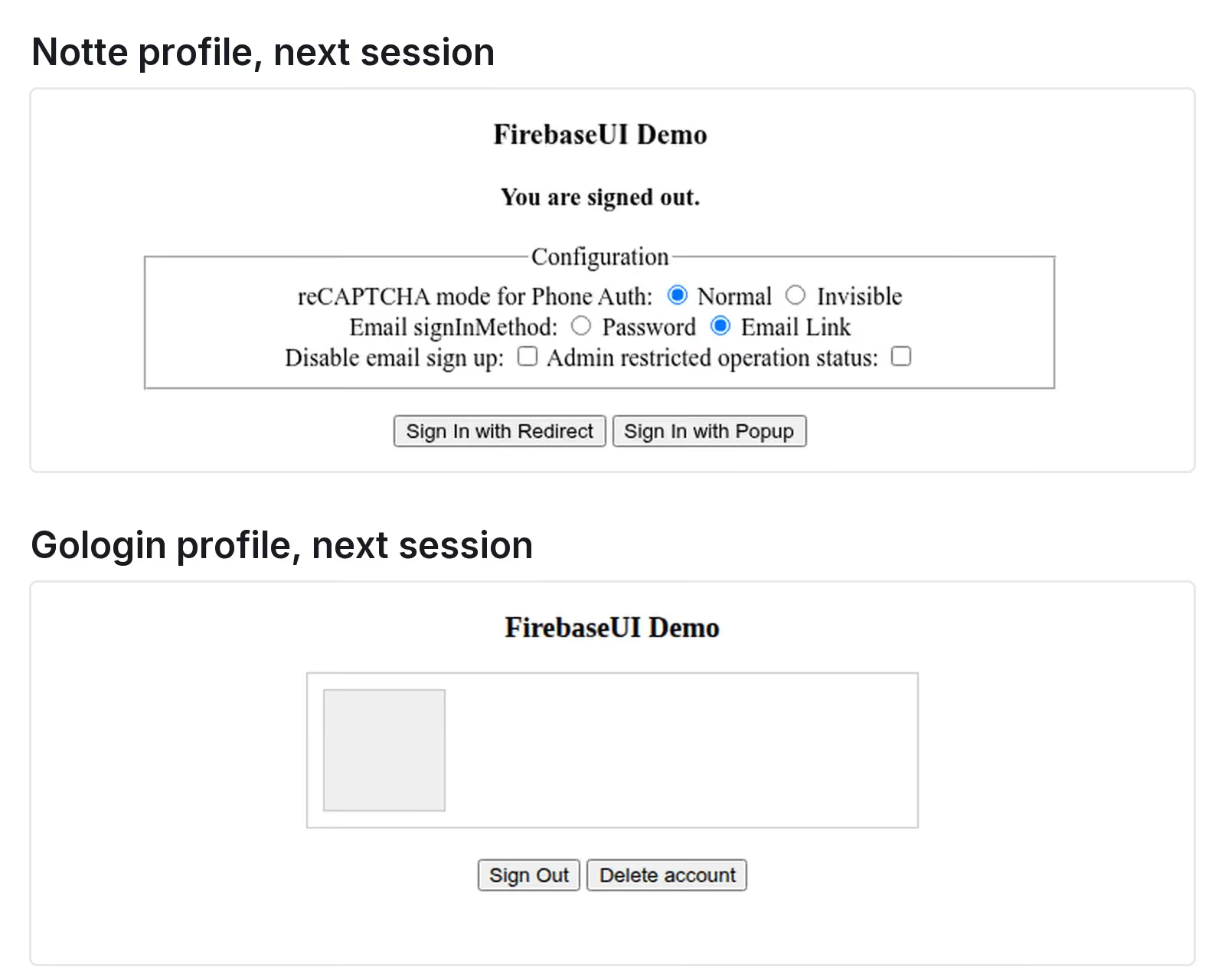
FirebaseUI demo in the session after an anonymous sign-in. The Notte profile was signed out. The Gologin profile still showed the signed-in user card, which is blank because an anonymous user has no name or photo.
Notte’s own profiles sync command also leaves IndexedDB out. It copies a local browser’s cookies and web storage into a Notte profile and prints “IndexedDB, partitioned storage and device-bound credentials are not transferred”.
A new device fingerprint in every session
Every tested Notte session, with or without a profile, reported the same platform and hardware values. Each one showed Windows, Chrome 155, an NVIDIA GeForce RTX 3060 as the WebGL renderer, 16 logical CPU cores, and a 1920x1080 screen resolution. Only the canvas fingerprint, the audio fingerprint, and font metrics changed, so FingerprintJS computed a new device ID in every session.
FingerprintJS reads 42 signals. Without the 3 changing signals and the time zone, which matches the exit IP’s geolocation, 38 stable signals remain.
| Computed from | Notte, 16 sessions with and without profiles | Gologin Cloud Browser, 16 sessions on 5 profiles |
|---|---|---|
| All 42 FingerprintJS signals, which give the device ID | 16 different device IDs | 5 device IDs, one per profile, the same in every session |
| 38 signals, without canvas, audio, font metrics, and time zone | The same hash for all 16 sessions | 5 hashes, one per profile, the same in every session |
In our account, all 16 sessions had the same 38-signal hash. So, to a site that ignores the 3 changing signals and the time zone, sessions on different Notte profiles look like the same device. Whether other Notte workspaces share these values wasn’t tested.
For a signed-in account, the site can see valid session cookies arrive from an unrecognized device in every session. Sites that check device fingerprints can require step-up authentication, such as a one-time code. Notte’s profile API has no setting that stores a fingerprint between sessions. A Gologin profile, by contrast, showed the same device ID in every tested session.
A new exit IP by default, and how to keep one
Notte’s default proxy is a rotating residential proxy. In 3 consecutive sessions about 10 seconds apart, one profile’s exit IP was geolocated to Connecticut, then Pennsylvania, then Florida. Risk-based authentication systems can flag that pattern as “impossible travel”, which means logins from places too far apart for the time between them.
Notte’s proxy accepts a sticky_session ID. Reusing one ID kept a single exit IP, geolocated to Philadelphia, for 47 minutes, across the 5 profile sessions and 1 more without a profile. Notte’s proxy docs say a proxy gateway credential stays valid for the plan’s maximum session duration, up to 24 hours, but they didn’t state how long a sticky IP lasts. Test it over the time between your agent’s runs. The profile doesn’t store the ID. To keep one exit IP per account, store one sticky session ID per account in your code and pass it in every session-create request.
Other profile behaviors to plan for
- A Notte key in the site’s localStorage. When a profile restored a site’s localStorage, Notte also wrote the key
__notte_profile_restored__with the value1. Any script on that origin can read it, so the site’s own scripts can tell that the session came from a restored Notte profile. The key doesn’t appear in Notte’s public SDK and CLI code, which suggests that Notte’s hosted service adds it. In the same check, a Gologin profile’s localStorage held only the site’s own keys. - Profile saves are last-write-wins. Two sessions loaded the same profile with
persist=True, and each wrote a different value. The next session saw only the value from the session that closed last. To avoid lost updates, run only 1 session that writes to a profile at a time, or give each worker its own profile. - Saving is opt-in. In Notte’s profile docs,
persistdefaults toFalse, so a session that loads a profile withoutpersist=Truesaves no changes to it.
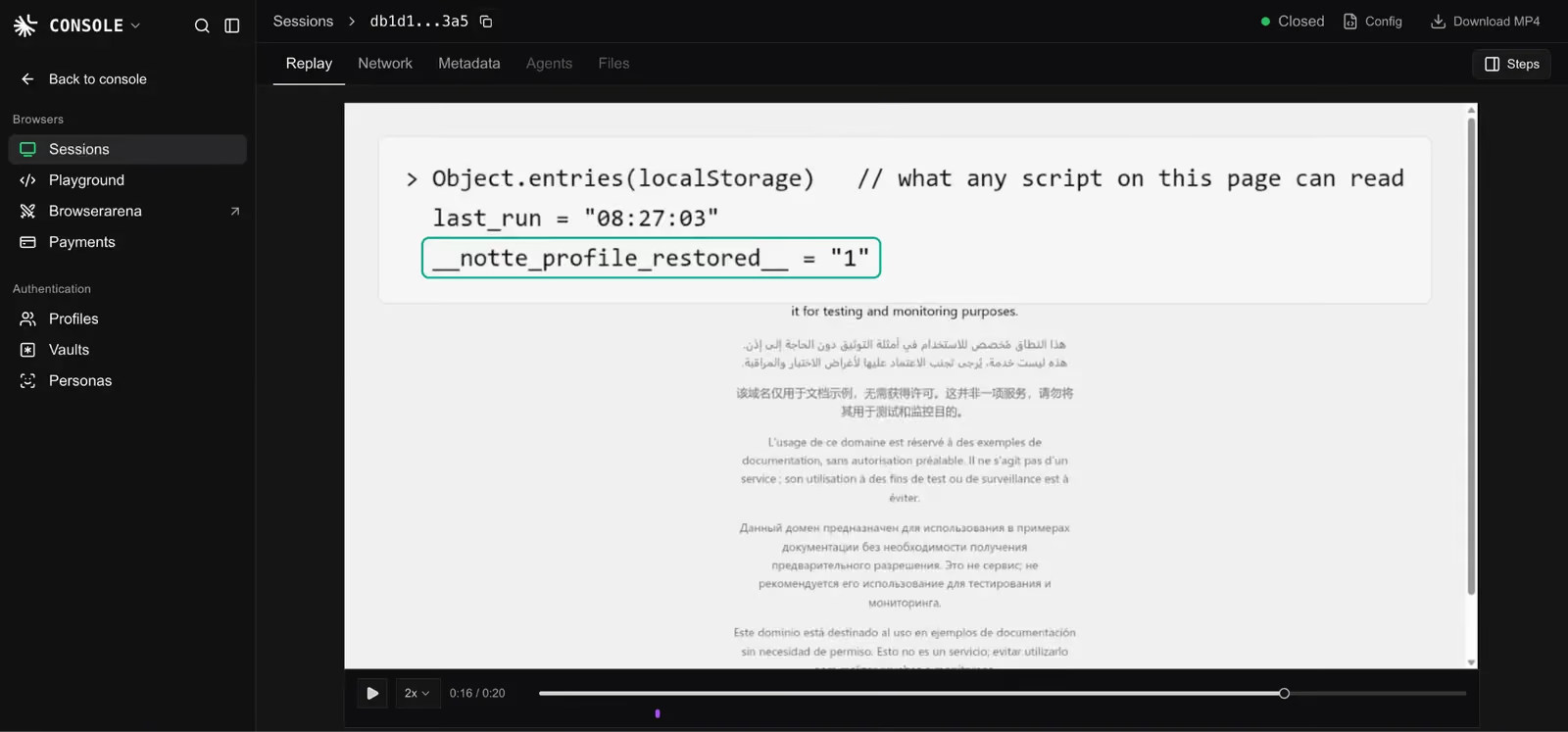
Notte’s session replay of a restored profile on example.com. The text box at the top was added by the test script to print the page’s localStorage.
Notte public page access test: 5 sites
With Notte’s default settings, pages loaded on 3 of 5 sites, and in 16 of 25 runs overall. A site counts as loaded when its page loaded in at least 3 of its 5 runs. Zillow loaded in 4 runs and Hacker News in 2.
In each run, the test script opened one public page per site in a new, logged-out session and waited up to about 60 seconds. Each run’s result was read from a screenshot of the final page.
| Public page | Result in 5 runs |
|---|---|
| Zillow search results | Loaded 4 of 5. The 5th run ended on a PerimeterX challenge page |
| G2 product reviews | Loaded 0 of 5. HTTP 403 “Access is temporarily restricted” in every run |
| LinkedIn company page | Loaded 5 of 5, with the company page’s content and no login wall |
| Amazon product page | Loaded 5 of 5 |
| Hacker News front page | Loaded 2 of 5. The other 3 received Hacker News’s HTTP 503 rate-limit page |
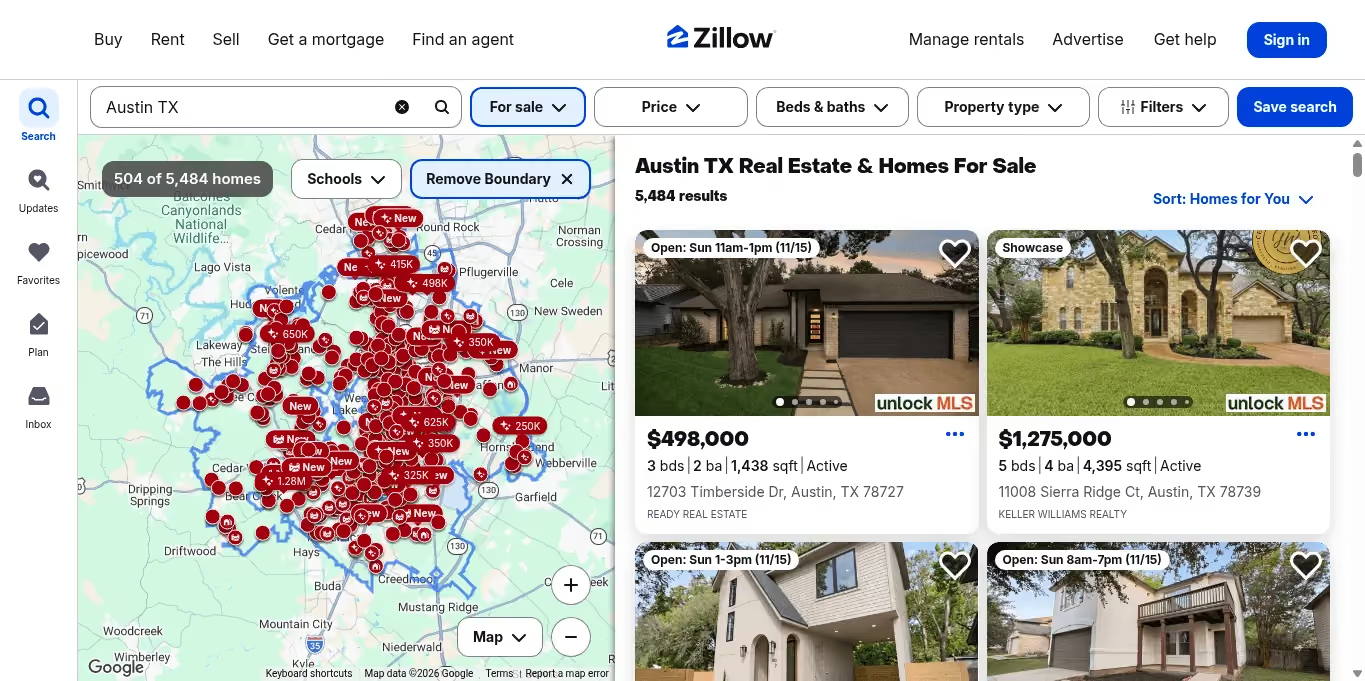
Zillow’s Austin search results at the end of a default Notte session. The page loaded in 4 of the 5 runs.
All the results in this section come from logged-out sessions on public pages. Sites use bot detection to stop fraud, fake sign-ups, account takeover, and traffic that overloads their servers, so a 403 or a rate-limit page is the site protecting itself. In a signed-in account, many sites also compare the device fingerprint and exit IP with the account’s login history.
If a site blocks your automation by mistake, use the site’s official API when it has one, or ask the site owner for permission. Otherwise, collect politely. Respect robots.txt, add delays between requests, and stay on public pages.
Notte benchmarks: startup latency, concurrency limits, and BrowserArena
From India, the median startup latency of a default session was 3.81 s over 5 runs, from the session-create request to the first page load of example.com.
Signing up with Google from Notte’s home page and copying the API key took about 45 s, timed by hand on a new account. With the key and the SDK installed, a script based on Notte’s README quickstart loaded a page in a 5.77 s median over 5 runs. That time includes Python interpreter startup and session teardown, so it’s longer than the 3.81 s startup median.
On the Free plan, a request for a 6th concurrent session returned HTTP 429 with “Max active headless sessions limit exceeded (limit: 5, current: 5)” and no Retry-After header. Without that header, the client has to choose its own retry delay, for example with exponential backoff. Notte’s pricing page lists 25 concurrent sessions on Developer and 100 on Startup.
Notte also publishes BrowserArena, its own speed benchmark for cloud browsers. Like the other providers’ adapters, BrowserArena’s Notte adapter starts sessions without a proxy, while a default Notte session uses Notte’s residential proxy. Without the proxy, the same startup test from India gave a 2.98 s median, against 3.81 s. So BrowserArena’s Notte numbers show sessions without Notte’s default proxy. Benchmark from your own region with the settings you’ll run in production.
Notte pricing vs Gologin for the same workloads
Notte’s pricing page lists browser time at $0.01 per browser hour and traffic through Notte’s residential proxy at $10 per GB. Notte’s spend docs say built-in proxies are on by default and that there’s no workspace-level monthly spending cap. The Limits page in Notte’s console offers email alerts on balance and monthly spend, and it notes that alerts never block usage. Bring-your-own-proxy traffic costs $0.20 per GB, on the $100 Startup plan and on Enterprise.
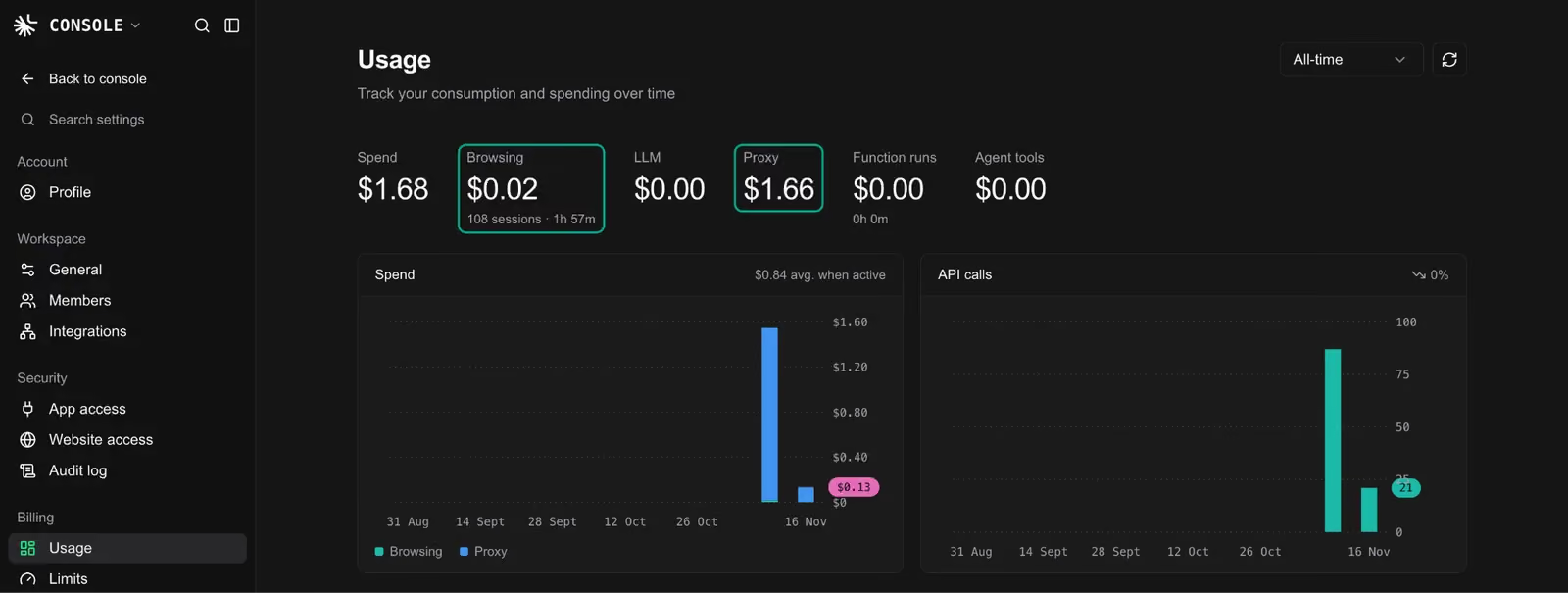
Notte’s Usage page for this review’s account, covering both test days. Residential proxy traffic was almost the whole bill, $1.66 of the $1.68 spent.
Most rows in the table below assume 0.2 GB of proxy traffic per browser hour. The Zillow, Amazon, and LinkedIn pages in the public page access test averaged 4.4 MB per page load, with Notte’s default ad blocking on. At that size, 0.2 GB is enough for about 45 page loads per browser hour, or one every 80 seconds. One row uses this review’s own measured rate, and the 0.02 GB row covers lighter work.
| Monthly workload | Notte | Gologin Cloud Browser |
|---|---|---|
| 300 accounts, 10 min a day each, 10 concurrent (1,500 h, 9,000 sessions, 300 GB) | $3,015 on Developer, about $0.34 per session | $419 on the $14 plan, about $0.05 per session |
| 25 concurrent browsers, 8 h a day, 22 days (4,400 h, 880 GB) | $8,844 on Developer ($8,800 is traffic) | $1,232 on the $14 plan ($880 is traffic) |
| The same 25 browsers at this review’s measured 0.085 GB per browser hour (374 GB) | $3,784 on Developer | $726 on the $14 plan |
| The same 25 browsers at 0.02 GB per browser hour (88 GB) | $924 on Developer | $440 on the $14 plan |
| The same 25 browsers, with your own residential proxy (Decodo) on Notte | $2,220 to $3,740 on Startup, Decodo traffic included | $1,232 with Gologin’s own residential proxy traffic |
| 100 concurrent browsers on the same schedule (17,600 h, 3,520 GB) | $35,376 on Startup ($35,200 is traffic) | $4,946 on the $14 plan |
How the table was priced:
- Both columns. Both are priced from the same hours and traffic at list prices, on the plan that costs least for that number of concurrent sessions.
- Notte. Each paid plan includes usage credit equal to its fee, so each total is the usage cost, or the plan fee if usage costs less.
- Gologin. Every row is priced on the $14 Enterprise plan, not the $4.50 Professional plan, because Enterprise has the lowest rate for extra hours. Each extra parallel session adds $2 a month, and each extra hour adds $0.07. Every GB is priced at $1, as if the plan included no traffic allowance. In the 25-browser row, the $1,232 is the $14 plan plus $44 for 22 extra sessions, $294 for 4,200 extra hours, and $880 of traffic.
- Your own proxy row. Decodo’s 1,000 GB plan, listed at $2,000, gives the low end, and its $4 per GB pay-as-you-go price gives the high end. Both ends add $220 of Notte usage on Startup, which is $44 of browser hours and $176 of traffic at $0.20 per GB.
Gologin Cloud Browser plans put browser hours, parallel sessions, and residential proxy traffic on one bill, with no per-request fees. An idle session closes itself, so a session left open by mistake stops billing. On any plan, you can add browser hours and parallel sessions as the work grows, at the rates on the pricing page. Residential proxy traffic beyond a plan’s allowance costs $1 per GB. Gologin’s residential proxies also work in any browser that takes a proxy, at the same $1 per GB. The residential proxy provider Decodo listed $2 to $4 per GB, and Bright Data listed $5 to $8 before a 50% coupon. Notte, Browserbase, Anchor, and Browser Use listed $5 to $12, as the comparison table below shows.
With Notte’s own proxy, Gologin costs less for agents that transfer more than about 8 MB of residential proxy traffic per browser hour. Below that, Notte costs less. On the 25-browser schedule, both bills are about $385 at 34 GB a month, which is about 8 MB per browser hour. The other two schedules in the table break even at about the same point. So an agent that loads about one Zillow page an hour, 6.8 MB in this test, is near the break-even point. Even this review’s own light test sessions used $1.66 of proxy traffic, about 166 MB, in 1 hour 57 minutes of browser time. That’s about 85 MB per browser hour, about 10 times the break-even.
For long-running agents, plan for Notte’s maximum session duration. On Developer it’s 120 minutes, so an 8-hour agent day needs 4 sessions per browser. Each new Notte session had a new device fingerprint and, without a sticky session ID, a new exit IP. A Gologin Cloud Browser session can run as long as the job needs, so an 8-hour agent day can be one session on one profile.
Notte pros
- A $0.01 browser hour, before proxy traffic. Without a proxy, 100 browser hours on public pages cost $1.
- Built-in agent tooling. Notte’s docs and SDK describe vaults that store credentials outside your code. They also list managed authentication, Tailscale routing to private services, and secret proxies, which swap stand-in values for real card numbers and passwords in your own proxy, so Notte doesn’t see the real values in requests.
- Debugging built in. Each session had a live view link and an MP4 session replay, and both were on by default.
- City-level geo-targeting at no extra cost. Proxies targeted at New York and Los Angeles exited through IPs geolocated to those cities, and the browser time zone matched each IP’s geolocation.
- A sticky IP when the code asks for one. One
sticky_sessionID kept a single exit IP, geolocated to Philadelphia, for 47 minutes, across 6 sessions with and without a profile.
Notte limitations and when not to buy
- Profiles don’t persist IndexedDB. Authentication state that an app stores only in IndexedDB, as Google’s FirebaseUI demo does, wasn’t restored in the next session. Notte’s docs describe vaults that store credentials for re-authentication, but each new login comes from a new device fingerprint and, by default, a new exit IP.
- A new device fingerprint in every session. Sites that hash the full fingerprint see a new device at each login.
- A rotating exit IP by default. A sticky session ID kept one exit IP for the 47 minutes tested, and Notte’s docs didn’t state how long it lasts.
- Residential proxy traffic at $10 per GB, on by default. Bring-your-own proxy requires the $100 Startup plan or Enterprise. Spending is managed with email alerts rather than a hard spending cap.
- Maximum session duration by plan. Sessions last at most 15 minutes on Free, 120 on Developer, and 300 on Startup.
- A Notte key in restored sites’ localStorage. Any script on a restored site can read it.
- A breaking change in SDK 1.10. Notte’s README says the agent loop (
notte.Agent), workflows, and local function execution were removed in 1.10, and the v1.10 release notes list the change as “agent-free, workflow-free, lean core”. Code written for Notte’s agent, including older tutorials, no longer runs on 1.10.
Notte is a weaker choice in these cases:
- Agents that return to the same accounts every day, especially on apps that store their authentication state in IndexedDB.
- Agents that run longer than one session allows, which is 120 minutes on Developer and 300 on Startup.
- Agents that transfer more than about 8 MB of residential proxy traffic per browser hour through Notte’s proxy, where Gologin Cloud Browser costs less.
Session persistence between runs: Notte vs Gologin
Run profile_check.py on both products. It’s the short version of the script behind the profile results shown earlier. To test your own site, change its page.goto URL. Only the lines that start and end the session differ between the two products.
Set up a project folder for both scripts with uv:
uv init && uv add httpx==0.28.1 playwright==1.65.21. Create a profile on each product. For Notte, sign up and copy an API key from the Notte console. Notte’s create-profile endpoint requires a JSON request body, even an empty one:
curl -X POST https://api.notte.cc/profiles/create \
  -H "Authorization: Bearer $NOTTE_API_KEY" \
  -H "Content-Type: application/json" -d '{}'
Save the profile_id it returns. For Gologin, sign up and copy a free API token from the dashboard, no card needed. The script below stores the storage and proxy settings in the profile, so every later session reuses them automatically. The proxy comes from Gologin’s Create Gologin high quality proxy API endpoint. The script prints the profile ID:
"""Create a Gologin profile with its own US residential proxy.

GL_API_TOKEN=... uv run python create_gologin_profile.py my-account-1
"""
import os
import sys

import httpx

gologin = httpx.Client(base_url="https://api.gologin.com", timeout=60,
                       headers={"Authorization": f"Bearer {os.environ['GL_API_TOKEN']}"})
profile_id = gologin.post("/browser/custom", json={
    "name": sys.argv[1], "os": "win",
}).json()["id"]

# The profile keeps cookies, web storage, and IndexedDB between sessions
gologin.put(f"/browser/{profile_id}/custom", json={"storage": {
    "local": True, "session": True, "indexedDb": True, "extensions": True,
    "bookmarks": True, "history": True, "passwords": True,
    "enableExternalExtensions": False,
}}).raise_for_status()

# Use the latest Chrome version in the profile's user agent
gologin.patch("/browser/update_ua_to_new_browser_v", json={
    "browserIds": [profile_id], "updateUaToNewBrowserV": True, "updateAllProfiles": False,
}).raise_for_status()

# Give the profile its own Gologin proxy, used in every session.
# Gologin's high quality proxy endpoint creates a residential proxy unless isMobile or isDC is set
gologin.post("/users-proxies/mobile-proxy", json={
    "countryCode": "us", "profileIdToLink": profile_id,
}).raise_for_status()
print(profile_id)
2. Run profile_check.py twice on each profile. Save this script in the same project folder:
"""Print what a Notte profile or a Gologin profile restores on the next run.

uv init && uv add httpx==0.28.1 playwright==1.65.2
NOTTE_API_KEY=... uv run python profile_check.py notte <notte_profile_id>
GL_API_TOKEN=...  uv run python profile_check.py gologin <gologin_profile_id>
Run it twice with the same profile. The second run shows what the profile saved.
"""
import os
import sys
import time

import httpx
from playwright.sync_api import sync_playwright

# Inline copy of open-source FingerprintJS, so an ad blocker can't block or replace the file
FPJS = httpx.get(
    "https://cdn.jsdelivr.net/npm/@fingerprintjs/fingerprintjs@5.3.0/dist/fp.min.js"
).text
READ = """async () => {
  const idb = await new Promise(done => {
    const req = indexedDB.open('check', 1);
    req.onupgradeneeded = () => req.result.createObjectStore('kv');
    req.onsuccess = () => {
      const get = req.result.transaction('kv').objectStore('kv').get('last_run');
      get.onsuccess = () => done(get.result || null);
    };
  });
  return {
    device_id: (await (await FingerprintJS.load()).get()).visitorId,
    exit_ip: (await (await fetch('https://api.ipify.org?format=json')).json()).ip,
    cookie: (document.cookie.match(/last_run=([^;]+)/) || [])[1] || null,
    local_storage: localStorage.getItem('last_run'),
    indexed_db: idb,
  };
}"""
WRITE = """async (value) => {
  document.cookie = `last_run=${value}; max-age=2592000; path=/; secure`;
  localStorage.setItem('last_run', value);
  await new Promise(done => {
    const req = indexedDB.open('check', 1);
    req.onupgradeneeded = () => req.result.createObjectStore('kv');
    req.onsuccess = () => {
      const tx = req.result.transaction('kv', 'readwrite');
      tx.objectStore('kv').put(value, 'last_run');
      tx.oncomplete = done;
    };
  });
}"""

vendor, profile = sys.argv[1], sys.argv[2]
if vendor == "notte":
    notte = httpx.Client(base_url="https://api.notte.cc", timeout=60,
                         headers={"Authorization": f"Bearer {os.environ['NOTTE_API_KEY']}"})
    session = notte.post("/sessions/start", json={
        # persist=True asks Notte to save the profile when the session ends
        "profile": {"id": profile, "persist": True},
    }).json()
    cdp_url = session["cdp_url"]
    end_session = lambda: notte.delete(f"/sessions/{session['session_id']}/stop")
else:
    token = os.environ["GL_API_TOKEN"]
    cdp_url = f"wss://cloudbrowser.gologin.com/connect?token={token}&profile={profile}"
    end_session = lambda: httpx.delete(f"https://api.gologin.com/browser/{profile}/web",
                                       headers={"Authorization": f"Bearer {token}"}, timeout=60)
try:
    with sync_playwright() as pw:
        # no_defaults=True keeps the profile's own settings
        browser = pw.chromium.connect_over_cdp(cdp_url, no_defaults=True)
        context = browser.contexts[0]
        page = context.pages[0] if context.pages else context.new_page()
        page.goto("https://example.com/")
        page.add_script_tag(content=FPJS)
        for key, value in page.evaluate(READ).items():
            print(f"{key:14} {value}")
        page.evaluate(WRITE, time.strftime("%H:%M:%S"))
        # Chromium flushes cookies to disk about every 30 seconds, so wait before closing
        page.wait_for_timeout(35000)
        browser.close()
finally:
    end_session()  # ends the session, and the profile saves its state
3. Compare the second runs. On a new Notte profile, the second run printed:
device_id      ba32b8fccee6bff5bc2b1cbfd48cbd35
exit_ip        70.107.77.9
cookie         05:56:33
local_storage  05:56:33
indexed_db     None
The device ID and exit IP differed from the first run, and indexed_db was empty. On a new Gologin profile, the second run printed:
device_id      61359c0ef9d95694ac6aa7b029b18537
exit_ip        76.112.185.254
cookie         05:58:16
local_storage  05:58:16
indexed_db     05:58:16
The device ID and exit IP matched the first run, and indexed_db held the saved timestamp.
Notte alternatives: Gologin and other cloud browsers
Every cloud browser below restores cookies. They differ in price and in what else a profile restores. Each competitor cell comes from that vendor’s pricing page or docs, as listed when tested.
| Cloud browser | Price per browser hour | Residential proxy traffic | Entry paid plan, concurrent sessions | Maximum session duration, entry paid plan | A saved profile restores |
|---|---|---|---|---|---|
| Notte | $0.01 | $10 per GB | Developer $20, 25 | 120 min | Cookies, local storage, session storage |
| Gologin Cloud Browser | Included, then $0.07 to $0.09 | Included, then $1 per GB | Professional $4.50, with parallel sessions added as needed | No cap on active session time | Cookies, local storage, session storage, IndexedDB, device fingerprint, and proxy |
| Browserbase | $0.10 to $0.12 | $10 to $12 per GB | Developer $20, 25 | 6 h | Cookies, local storage, session storage, IndexedDB |
| Anchor Browser | $0.05, plus $0.01 per browser created | $8 per GB | Starter $50, 25 | No upper limit, 3 h by default | Cookies, local storage, cache |
| Kernel | $0.06 headless, $0.48 headful, from per-second rates | Unlimited proxy usage on Hobbyist | Hobbyist $30, 10 | Standby timeout of up to 72 h | Cookies, local storage, open tabs, preferences |
| Browser Use | $0.06 | $5 per GB | Pay as you go, 10 | 4 h | Cookies and local storage |
In this table, only a Gologin profile also restores its own device fingerprint and proxy. This review’s tests confirmed that for Gologin. Our Browserbase, Anchor Browser, and Kernel.sh reviews test those products’ profiles in detail.
A Gologin Cloud Browser profile is a persistent digital identity. It opens in Orbita, Gologin’s own Chromium-based browser, which returns the profile’s fingerprint values when a site queries device properties. It can stay signed in as long as each site’s own login session lasts, and the next session starts from the state the last one saved.
The profile’s proxy can be your own or a Gologin residential, mobile, datacenter, or ISP IP with country- and city-level geo-targeting. Every session that opens the profile uses the proxy stored in the profile automatically.
Each session has a Live View link for human-in-the-loop takeover. A person can enter a one-time code, then return control to the script. Takeover is an API call, and the script continues in the same signed-in session. The live session can also be embedded in your own dashboard.
Keep Notte’s SDK and run it on a Gologin profile
notte.Session in the full notte package accepts a cdp_url, so Notte’s SDK actions can run on a Gologin profile instead of a Notte cloud session. It also needs headless=True, which Notte’s SDK requires with a cdp_url. The flag affects only local browsers, so it doesn’t change the Gologin Cloud Browser. Notte’s external providers docs say Notte can connect to any browser with a CDP endpoint, and a Gologin Cloud Browser profile has one. The same endpoint works with Playwright, Puppeteer, and the Playwright Model Context Protocol (MCP) server in Claude Code or Cursor.
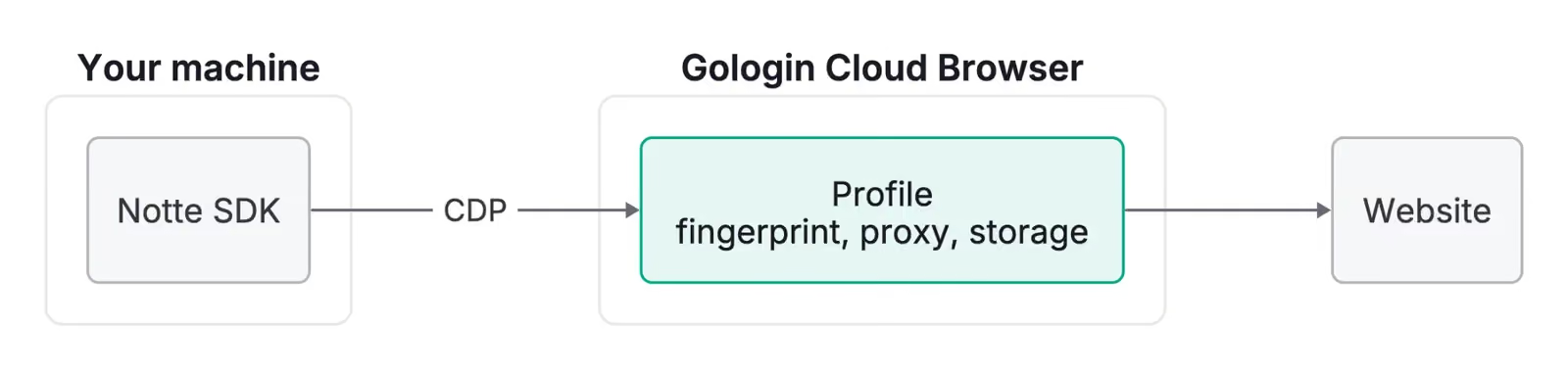
Notte’s SDK runs on your machine and drives a Gologin Cloud Browser profile over CDP. The profile supplies the fingerprint, proxy, and storage.
The script below runs Notte’s SDK locally. Its run command sets DISABLE_TELEMETRY=true, so the Gologin API token goes only to Gologin. It opens the FirebaseUI demo on a Gologin profile with Notte’s own goto, click, and scrape actions:
"""Run Notte's SDK on a Gologin Cloud Browser profile and check a Firebase sign-in stays.

uv init && uv add notte==1.10.11 httpx==0.28.1
GL_API_TOKEN=... DISABLE_TELEMETRY=true uv run python notte_on_gologin.py <gologin_profile_id>
Run it twice. The second run finds the profile still signed in.
"""
import os
import sys

import httpx
import notte

token, profile = os.environ["GL_API_TOKEN"], sys.argv[1]
cdp_url = f"wss://cloudbrowser.gologin.com/connect?token={token}&profile={profile}"
try:
    # Notte's SDK runs on your machine and drives the Gologin profile over CDP.
    # The SDK requires headless=True with cdp_url. The flag applies to local browsers only
    with notte.Session(cdp_url=cdp_url, headless=True) as session:
        session.execute(type="goto", url="https://fir-ui-demo-84a6c.firebaseapp.com/")
        page = ""
        # Wait up to 30 s for the demo to load and restore any saved user
        for _ in range(15):
            session.execute(type="wait", time_ms=2000)
            page = session.scrape(only_main_content=True)
            if "Sign Out" in page or "Continue as guest" in page:
                break
        if "Sign Out" in page:
            print("already signed in")
        else:
            # Notte's own click action
            session.execute(type="click", selector="text=Continue as guest")
            for _ in range(15):  # up to 30 s for the sign-in to finish
                session.execute(type="wait", time_ms=2000)
                if "Sign Out" in session.scrape(only_main_content=True):
                    print("signed in now")
                    break
            else:
                print("sign-in failed")
            # Give the browser time to write the authentication state to IndexedDB
            session.execute(type="wait", time_ms=10000)
finally:
    # End the Gologin session. The profile saves its cookies and storage
    httpx.delete(f"https://api.gologin.com/browser/{profile}/web",
                 headers={"Authorization": f"Bearer {token}"}, timeout=60)
On a new profile created with create_gologin_profile.py, 3 runs printed:
signed in now
already signed in
already signed in
No Notte cloud session started, so Notte’s Usage page showed no charge for these runs. Because the browser was running the Gologin profile, the fingerprint and proxy also came from that profile.
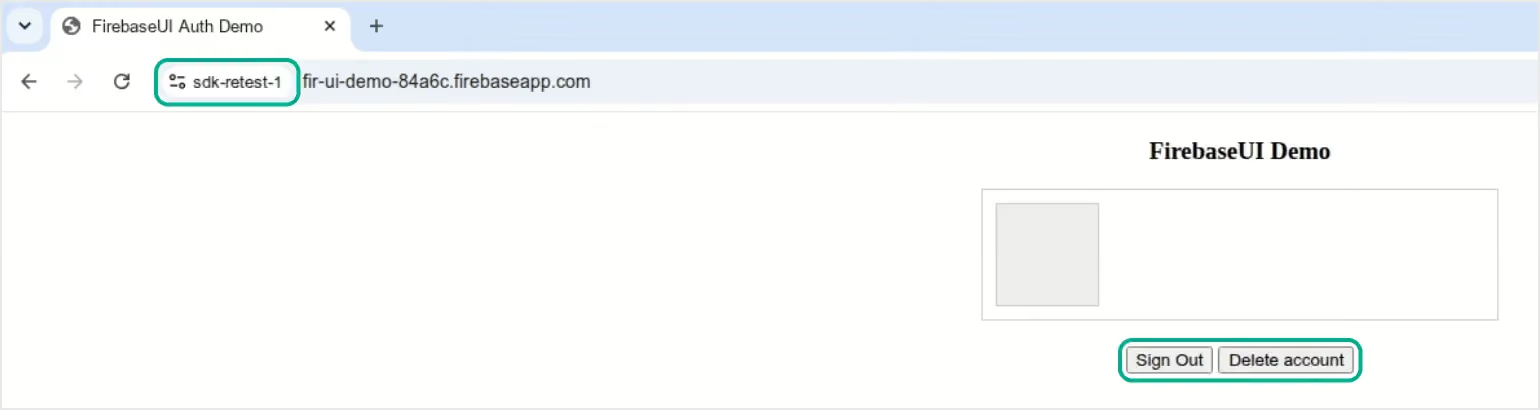
Later, the same profile, opened by hand in Gologin’s web app, reopened its last tab and was still signed in.
Notte.cc review: verdict
Notte fits agents that finish their work in one session, especially on public pages with little proxy traffic.
For agents that return to the same accounts, check three things before you choose:
- Where your site stores its authentication state. If Chrome DevTools lists it under Application > IndexedDB, a Notte profile doesn’t restore it.
- Proxy traffic per browser hour. Above about 8 MB through Notte’s residential proxy, Gologin costs less.
- Maximum session duration. Notte sessions can last up to 120 minutes on Developer, while a Gologin Cloud Browser session can run as long as the job needs.
Get a free Gologin Cloud Browser API token, no card needed. Then run profile_check.py twice on a profile from create_gologin_profile.py.
FAQ
Is Notte open source?
Partly. Notte’s SDK code is public on GitHub under the Server Side Public License (SSPL). The cloud browsers themselves run on Notte’s hosted service, which has a Free plan with a one-time $10 credit.
Is Notte any good?
For agents that finish their work in one session, yes. Notte lists its browser hour at $0.01, and sessions started in a 3.81 s median in testing. For agents that return to the same accounts, it’s a weaker fit. Its profiles didn’t restore IndexedDB authentication state, and each session showed a new device fingerprint.
How much does Notte cost?
When tested, Notte listed Free, Developer $20, Startup $100 a month, and Enterprise, plus $0.01 per browser hour and $10 per GB through its residential proxy. At this review’s measured 85 MB per browser hour, 25 agents on 8-hour workdays would cost about $3,784 a month on Notte and $726 on Gologin Cloud Browser.
Do Notte profiles keep you signed in?
Partly. Notte profiles can persist cookies and web storage, but not IndexedDB. In testing, the Firebase Authentication session in Google’s FirebaseUI demo wasn’t restored, while a Gologin Cloud Browser profile stayed signed in. Each Notte session also showed a new device fingerprint and, by default, a new exit IP.
How fast is Notte, and how many sessions can run at once?
In testing from India, a default Notte session took a median of 3.81 s from the session-create request to the first page load of example.com. The Free plan allows 5 concurrent sessions of up to 15 minutes. Notte lists 25 concurrent sessions of up to 120 minutes on Developer, and 100 of up to 300 minutes on Startup.
Does Notte load pages on sites with bot detection?
In testing with default settings, pages loaded on 3 of 5 public sites. LinkedIn and Amazon loaded in all 5 runs, and Zillow in 4. G2 returned HTTP 403 in every run, and Hacker News returned its rate-limit page in 3 of 5. If a site blocks you by mistake, use its official API or ask the owner for permission.
What is the best Notte alternative for AI agents that stay signed in?
A Gologin Cloud Browser profile can persist its device fingerprint, cookies, local storage, IndexedDB, and proxy, and it stayed signed in to Google’s FirebaseUI demo in testing. Playwright and Puppeteer code and Notte’s SDK connect with a new CDP URL. Proxy traffic beyond a plan’s allowance costs $1 per GB.