Best Headless Browsers in 2026: 10 Tested for Speed, Detection and Cost
Try Gologin for free
The best headless browsers in 2026 are Chrome’s new headless mode for testing, Lightpanda for cheap public-page crawls, and Gologin Cloud Browser for logged-in work on protected sites. On 10 November 2026 we ran the same scripts on 3 local headless browsers and Gologin Cloud Browser. We compared them with Lightpanda and 5 more cloud headless browsers from our reviews.
| Browser | Type | Best for | Median startup | Antibot | Entry price |
|---|---|---|---|---|---|
| Gologin Cloud Browser | Cloud | Logged-in sessions, long jobs, AI agents | 1,760 ms (review), 6,774 ms (our run from Poland) | 4/5 | $9/month ($4.50 billed annually) |
| Chrome headless (new mode) | Local | Testing, CI, screenshots | 445 ms | 3/5 | Free |
| chrome-headless-shell | Local | Fast, light automation on trusted sites | 124 ms | 2/5 | Free |
| Firefox headless | Local | Cross-browser tests | 757 ms | 3/5 | Free |
| Lightpanda | Local and cloud | Crawling public pages at scale | 2.97 s (cloud, EU) | 4/5 (cloud) | Free (open source), Builder $19/month |
| Scrapfly Cloud Browser | Cloud | Hard antibot pages on datacenter IPs | 2,324 ms | 5/5 | $30/month |
| Browserbase | Cloud | AI agents at high concurrency | 2,876 ms | 4/5 | $20/month |
| Browserless | Cloud | Many APIs, CAPTCHA solving, self-hosting | 2,485 ms | 3/5 | $35/month ($25 billed annually) |
| Steel | Cloud | Open-source browser API for agents | 3,687 ms | 3/5 | $0 + usage |
| Hyperbrowser | Cloud | Disposable sessions for agent fleets | 2,706 ms | 3/5 | $30/month |
Startup: for local browsers, the time from launch() to a usable page on our Mac; for cloud browsers, the time to connect and get a usable page. Antibot: sites out of 5 (Zillow, G2, LinkedIn, Amazon, Hacker News) that loaded in at least 3 of 5 sessions. Local results are from run A, our own connection without a proxy. Gologin results are from our 10 November run; the other cloud results are from each review.
What is a headless browser?
A headless browser is a web browser that runs without a window. Your code drives it through an API. It loads pages, runs JavaScript, builds the DOM, clicks and takes screenshots, but shows nothing on a screen.
That is the whole headless browser meaning: same engine, no visible interface. A headless web browser skips the work of drawing a window, so one server can run many of them at once. Chrome, Chromium and Firefox all run headless.
Headless vs headful
A headful browser is the normal browser with a window. Headless and headful Chrome share one engine, but headless mode skips the window and some GPU work. By default it also announces itself: in our tests, both headless Chrome builds sent HeadlessChrome/149.0.0.0 in the user agent.
Use headless mode for tests, CI and scraping on servers. Use headful mode to debug a script, because you can watch it.
Why sites detect headless mode
Sites detect headless browsers because most bot traffic comes from them. Antibot systems such as Cloudflare, DataDome and PerimeterX (now HUMAN) read the fingerprint, the user agent, the navigator.webdriver flag and the IP type. The detection section shows which checks each browser failed.
Headless browser vs automation framework
Playwright, Puppeteer and Selenium are not headless browsers. They are automation frameworks: libraries that start a browser and send it commands.
| Tool | What it is | Browsers it drives | Protocol |
|---|---|---|---|
| Playwright | Framework by Microsoft, for Node, Python, Java and .NET | Chromium, Firefox, WebKit | CDP for Chromium, its own protocol for Firefox and WebKit |
| Puppeteer | Framework by Google, for Node | Chrome, Chromium, Firefox | CDP and WebDriver BiDi |
| Selenium | Framework for most languages | Chrome, Firefox, Edge, Safari | WebDriver |
The browser does the work, and the framework tells it what to do. So you can keep one Playwright script and swap the browser: local Chrome, Firefox, or a cloud browser over the Chrome DevTools Protocol (CDP). Here is a minimal headless browser Python script with Playwright:
from playwright.sync_api import sync_playwright

with sync_playwright() as p:
    browser = p.chromium.launch(headless=True, channel="chromium")  # new headless mode
    page = browser.new_page()
    page.goto("https://example.com")
    print(page.title())
    browser.close()
In Node, chromium.launch({ channel: 'chromium' }) starts Chrome’s new headless mode. Without the channel, Playwright starts chrome-headless-shell. In Chrome itself, the flag is --headless=new, and since Chrome 132 plain --headless means the new mode too.
How we tested the headless browsers
We tested 3 local headless browsers and Gologin Cloud Browser on 10 November 2026, and reused published data for the other cloud browsers. Every number comes from a log, a screenshot or a review linked from its section.
| Setting | Value |
|---|---|
| Local browsers | Chrome for Testing 149.0.7827.55 in new headless mode, chrome-headless-shell 149.0.7827.55, Firefox 151.0 headless |
| Framework | Playwright 1.61.1 for Node, Node.js 24.22.1 |
| Machine | Apple M4 Pro, 14 cores, 24 GB RAM, macOS 15.6.1 |
| Run A | Our own connection: a consumer ISP IP in Warsaw, Poland, no proxy |
| Run B | A Gologin US residential proxy in Washington state, passed to launch({ proxy }) |
| Sites | Zillow, G2, LinkedIn, Amazon and Hacker News home pages |
| Gologin Cloud Browser | Tested on 10 November 2026 with the same scripts: a new profile with a Gologin US residential proxy, connected over CDP |
| Other cloud browsers | Data from our reviews, tested between 9 September and 28 October 2026 (dates in each section) |
The local protocol had 4 tests, each run in both run A and run B:
- Startup and page load. 5 runs. We timed
launch()to a usable page, thenpage.goto("https://example.com")untildomcontentloaded. We report the median and the range. - Resource use. Peak memory (RSS of all browser processes) and CPU time while loading Wikipedia, MDN, BBC News, example.com and Hacker News. We sampled every 200 ms, so very short-lived processes may be missing from the CPU total. 3 runs, median.
- Antibot. The 5 sites in 5 fresh sessions per browser and per run, 25 attempts in all. We scored each page from its screenshot, not the status code. A site counts as passed when it loads in at least 3 of 5 sessions.
- Detection check. One visit to bot.sannysoft.com and to CreepJS per browser, with a full-page screenshot.
Scoring from screenshots matters. Amazon sometimes returned 200 with a “Continue shopping” page instead of the store, and Zillow twice returned 200 under a “Press & Hold” check. Both count as failures. Our earlier cloud reviews used a stricter 4-of-5 rule, which changes no score here.
The 10 best headless browsers in 2026
1. Gologin Cloud Browser: best for logged-in work on protected sites
Gologin Cloud Browser loaded 4 of 5 sites on 10 November 2026, one more than any local browser in our test, and passed every bot.sannysoft.com check. It is real Chromium that runs in Gologin’s cloud, with a saved profile per session: its own cookies, device fingerprint and residential IP.
Best for: scraping behind a login, AI agents that act inside accounts, and jobs that run longer than 15 minutes.
Test results. We ran the same scripts as for the local browsers, on a new profile with a Gologin US residential proxy (New York), from our Mac in Warsaw.
| Test | Result | Date |
|---|---|---|
| Antibot | 4 of 5 sites (18 of 25). Amazon and HN 5 of 5, Zillow and LinkedIn 4 of 5 (1 timeout each), G2 0 of 5 | 10 Nov 2026 |
| Startup, connect to usable page | 6,774 ms median (5,521 to 7,332 ms), example.com in 501 ms | 10 Nov 2026 |
| Detection check | 0 failed rows on bot.sannysoft.com, CreepJS “0% headless”, navigator.webdriver false |
10 Nov 2026 |
| Startup in our review, US residential proxy | 1,760 ms median (1,651 to 2,226 ms), example.com in 360 ms | 28 Sep to 1 Oct 2026 |
| Startup in our review, no proxy | 3,177 ms median (1,988 to 9,351 ms), example.com in 483 ms | 28 Sep to 1 Oct 2026 |
| Long session | Still alive at 25.5 minutes, when the tester closed it. No session cap | 15 Oct 2026 |
| Persistence | A 10-month-old profile still had its cookies | Long-term profile check |
Gologin Cloud Browser was the slowest to start in our run: 6.8 s against 1.8 s in our review. Each start was a cold start of a stopped profile, from Poland to a US IP.
The profile matters too. The same day, an older profile we had used for months of scraping tests loaded only 2 of 5 sites. If a profile starts getting blocks, give it a new residential IP or start a new profile.
How to switch. Replace launch() with connectOverCDP() and keep the rest of your Playwright script. The code and the MCP setup for AI agents are in Local vs cloud headless browsers.
Pricing. Cloud Browser hours come with Gologin plans:
| Plan | Price | Browser hours | Parallel sessions | Extra hour |
|---|---|---|---|---|
| Professional | $9/month ($4.50 billed annually) | 100 | 1 | $0.09 |
| Business | $99/month ($49.50 annually) | 200 | 2 | $0.08 |
| Enterprise | $179/month ($89.50 annually) | 300 | 3 | $0.07 |
An extra parallel session costs $2/month, and residential traffic beyond the plan costs $1/GB. A free tier gives 3 runs of up to 15 minutes with no card.
Pros
- Profiles keep cookies, fingerprint and IP across runs, so logins survive.
- No session cap on paid plans.
- Residential and mobile proxies included, with no per-request fees.
- Lowest fixed monthly price among the paid cloud plans here.
Cons
- The Professional plan has 1 parallel session; more cost $2/month each.
- G2 returned 403 in all 5 sessions.
- The slowest start in our 10 November run: 6.8 s from a stopped profile.
Product page: Gologin Cloud Browser. How it compares with every vendor below: our guide to browser as a service.
2. Chrome headless (new mode): best for testing and CI
Chrome’s new headless mode launched in a median 445 ms on our Mac on 10 November 2026 and loaded 3 of 5 sites on our own IP. It is the same Chrome as the desktop browser, without the window, so pages render as they do for real users.
Best for: end-to-end tests, screenshots and PDFs, and scraping sites with little bot protection.
| Test, 10 Nov 2026 | Run A (own IP) | Run B (US residential) |
|---|---|---|
| Launch to usable page | 445 ms (345 to 2,871 ms) | 385 ms (364 to 690 ms) |
| example.com load | 622 ms (258 to 3,306 ms) | 1,637 ms (1,559 to 1,805 ms) |
| Peak memory, 5 pages | 975 MB | 799 MB |
| CPU time, 5 pages | 2.91 s | 4.81 s |
| Antibot | 3/5 (15/25) | 3/5 (15/25) |
Since Chrome 112, new headless mode runs the real Chrome browser code. The old headless mode now ships on its own as chrome-headless-shell.
Pricing: free and open source (Chromium is BSD-licensed). You pay for the servers and any proxies.
Pros
- The closest match to what users see.
- Free, with full support in Playwright, Puppeteer and Selenium.
Cons
- Sends
HeadlessChromein the user agent andnavigator.webdriver = trueby default. - About twice the memory of chrome-headless-shell in our test.
- No saved state unless you manage profiles yourself.
3. chrome-headless-shell: best for fast, light automation on trusted sites
chrome-headless-shell launched in a median 124 ms on 10 November 2026, the fastest in our test, and used the least memory. It also failed the most detection checks and loaded 2 of 5 sites on our own IP.
Best for: internal tools, your own sites, and test suites where speed and memory matter more than looking like a real user.
| Test, 10 Nov 2026 | Run A (own IP) | Run B (US residential) |
|---|---|---|
| Launch to usable page | 124 ms (115 to 252 ms) | 124 ms (107 to 298 ms) |
| example.com load | 1,765 ms (393 to 2,614 ms) | 1,705 ms (1,665 to 1,731 ms) |
| Peak memory, 5 pages | 477 MB | 417 MB |
| CPU time, 5 pages | 1.91 s | 2.50 s |
| Antibot | 2/5 (11/25) | 3/5 (15/25) |
chrome-headless-shell is the old headless Chrome, now a separate binary, and Playwright’s default for chromium.launch(). Its example.com times on run A ranged from 393 to 2,614 ms, which points to our network, not the browser.
Pricing: free.
Pros
- Fastest launch and lowest memory of the local browsers.
- The default in Playwright, so no extra setup.
Cons
- Failed 12 rows on bot.sannysoft.com, against 4 for new headless mode.
- CreepJS rated it “94% like headless”.
- Amazon showed a “Continue shopping” page in 4 of 5 sessions on run A, which left it at 2 of 5 sites.
4. Firefox headless: best for cross-browser testing
Firefox 151 headless launched in a median 757 ms on 10 November 2026 and loaded 3 of 5 sites on our own IP.
Best for: checking that your site works in Gecko, Firefox’s engine, and scraping where a non-Chrome fingerprint helps.
| Test, 10 Nov 2026 | Run A (own IP) | Run B (US residential) |
|---|---|---|
| Launch to usable page | 757 ms (731 to 866 ms) | 767 ms (762 to 880 ms) |
| example.com load | 200 ms (185 to 1,389 ms) | 1,866 ms (1,574 to 1,940 ms) |
| Peak memory, 5 pages | 1,237 MB | 1,187 MB |
| CPU time, 5 pages | 4.87 s | 5.40 s |
| Antibot | 3/5 (15/25) | 3/5 (15/25) |
Firefox headless sent a normal Firefox user agent, and CreepJS rated it “33% headless”, the lowest of the 3 local browsers. It still exposed navigator.webdriver = true.
Pricing: free and open source (MPL 2.0).
Pros
- Normal user agent in headless mode.
- The only local option here with a non-Chromium engine.
Cons
- The most memory of the 3 local browsers: 1,237 MB at peak on run A.
- No CDP, so cloud browsers and many scraping tools can’t drive it.
5. Lightpanda: best for crawling public pages at scale
Lightpanda is an open-source headless browser written in Zig that skips layout and painting. In our Lightpanda review, tested 26 to 28 October 2026, it used about a third of the CPU and memory of chrome-headless-shell on 30 public pages.
Best for: AI agents and crawlers that read public pages and need low server cost.
| Test | Result |
|---|---|
| Local, 30 pages, Apple Silicon Mac | 43 s wall time, 5.0 s CPU, 159 MB peak memory (chrome-headless-shell: 59 s, 14.8 s, 511 MB) |
| Cloud startup to loaded example.com | 2.97 s median (EU), 4.18 s (US), measured from India; CDP connect 1.63 s (EU) |
| Cloud session on 30 pages | 89 s median, against 194 s for Chrome on the same cloud |
| Antibot, cloud default IP, 5 runs | 4 of 5 sites. Zillow 5/5, G2 0/5 (403), LinkedIn 4/5, Amazon 5/5, HN 5/5 |
| Max session | 6 minutes on both plans (the docs said 15) |
| Persistence | None. Every session started empty and showed the same device fingerprint |
Pricing: the binary is free under AGPL-3.0. Lightpanda Cloud’s Explorer plan is free (10 hours, 5 sessions). Builder costs $19/month (300 hours, then $0.08/hour, 30 sessions). That is about $0.07 of browser time per 1,000 pages.
Pros
- Lowest CPU and memory in our tests.
- The same CDP code works on the binary and the cloud.
Cons
- No rendering, so screenshots show text only.
- A fixed fingerprint: every cloud session looked like the same device.
- 6-minute sessions in the cloud.
6. Scrapfly Cloud Browser: best for hard antibot pages on datacenter IPs
Scrapfly Cloud Browser was the only browser in this list to load all 5 sites, in a test on 15 October 2026. Its median startup was 2,324 ms (2,113 to 2,993 ms), and example.com loaded in 928 ms.
Best for: short jobs on protected public pages.
- Antibot: 5 of 5 sites (23 of 25). G2 returned 403 every time, but screenshots showed the real site in 4 of 5.
- Sessions: 15 minutes by default, 30 at most, and 5 at once on Free and Discovery.
- Pricing: Discovery costs $30/month with 200,000 credits. Browser time is about $0.018/hour. Residential traffic is $7.99/GB on Discovery.
Pros: best antibot score. Cons: 30-minute cap, no lasting profile. Full review: Scrapfly review.
7. Browserbase: best for AI agents at high concurrency
Browserbase loaded 4 of 5 sites in tests from 9 to 14 September 2026. Its median startup was 2,876 ms from Oregon, and example.com loaded in 419 ms.
Best for: stateless agents that need many browsers at once.
- Antibot: 4 of 5 sites (18 of 25). Zillow showed the human check.
- Persistence: failed. The saved Context was logged out in a new session.
- Limits: 3 sessions and 15 minutes on Free; 25 sessions on Developer, and up to 6 hours on paid plans.
- Pricing: Developer costs $20/month.
Pros: 25 sessions for $20. Cons: logins did not survive. Full review: Browserbase review.
8. Browserless: best for many APIs and CAPTCHA solving
Browserless loaded 3 of 5 sites on its free plan, tested 1 to 3 October 2026. Its median startup was 2,485 ms (2,359 to 2,772 ms), and example.com loaded in 508 ms.
Best for: teams that want REST endpoints, BrowserQL and the option to self-host.
- Antibot: 3 of 5 sites (15 of 25). Zillow and G2 returned 403 in all 5.
- CAPTCHA solver: solved reCAPTCHA v2 in 18.5 s. It failed PerimeterX on Zillow even with a residential proxy, and passed DataDome on G2 only with a residential proxy.
- Limits: 2 sessions on free, and a free session was cut at 130 s. Caps are 15 minutes on Prototyping, 30 on Starter and 60 on Scale.
- Pricing: Prototyping costs $35/month ($25 billed annually) for 20,000 units. 1 unit is 30 seconds. Residential traffic costs 6 units/MB, about $12.29/GB.
Pros: many APIs, working CAPTCHA solver. Cons: costly residential traffic. Full review: Browserless review.
9. Steel: best open-source browser API for agents
Steel loaded 3 of 5 sites on its free Launch plan, tested 6 to 9 October 2026. Its median startup was 3,687 ms (2,848 to 4,114 ms), the slowest of the cloud browsers here, and example.com loaded in 580 ms.
Best for: developers who want an open-source browser API they can also host.
- Antibot: 3 of 5 sites. Zillow showed PerimeterX and G2 returned 403, even with a residential proxy.
- CAPTCHA solver: needs a $10 paid balance, then solved 1 of 4 (reCAPTCHA v2 in 25.4 s).
- Persistence: a profile was still logged in 27 days later (re-checked 2 November 2026). Profiles are deleted after 30 days unused.
- Concurrency and sessions: 10 sessions and 15 minutes on Launch, 100 sessions and 1 hour on Scale.
- Pricing: Launch is $0 plus usage, with a $30 one-time credit. Scale costs $250/month. Browser time is $0.10/hour on Launch and $0.08 on Scale. Proxy traffic is $10/GB on Launch and $6/GB on Scale.
Pros: open source, lasting profiles. Cons: slowest start here. Full review: Steel review.
10. Hyperbrowser: best for disposable sessions in agent fleets
Hyperbrowser loaded 3 of 5 sites on its free plan, tested 28 September to 1 October 2026. Its median startup was 2,706 ms: 550 ms to provision a browser and 1,970 ms to connect over CDP.
Best for: agent platforms that open and close many short sessions.
- Antibot: 3 of 5 sites (17 of 25) on the default US datacenter IP. Zillow loaded 2 of 5, and G2 0 of 5.
- Persistence: passed, with
persistChanges: trueon a profile. - Concurrency: 1 on free, 25 on Startup, 100 on Scale, 1,000+ on Enterprise.
- Pricing: the cheapest paid plan costs $30/month. Proxy traffic costs $10/GB on paid plans.
Pros: high paid concurrency. Cons: 1 free session, $10/GB proxy. Full review: Hyperbrowser review.
Results side by side
The table puts all 10 headless browsers on the same rows. Local results are from 10 November 2026; cloud results are from the review dates above.
| Browser | Startup (median) | Antibot (sites / attempts) | Max session | Keeps logins | Detection check | Entry price |
|---|---|---|---|---|---|---|
| Gologin Cloud Browser | 6,774 ms (1,760 ms in review) | 4/5 (18/25) | No cap | Yes, 10-month-old profile | 0 failed rows, 0% headless | $4.50/month annually |
| Chrome new headless | 445 ms | 3/5 (15/25) | Your setup | Only if you save the profile | 4 failed rows, 100% headless | Free |
| chrome-headless-shell | 124 ms | 2/5 (11/25) | Your setup | Only if you save the profile | 12 failed rows, 100% headless | Free |
| Firefox headless | 757 ms | 3/5 (15/25) | Your setup | Only if you save the profile | 4 failed rows, 33% headless | Free |
| Lightpanda (cloud) | 2.97 s | 4/5 | 6 min | No | Fixed fingerprint | Free, $19/month |
| Scrapfly | 2,324 ms | 5/5 (23/25) | 30 min | Only while alive | Not tested | $30/month |
| Browserbase | 2,876 ms | 4/5 (18/25) | 6 h paid | Failed | Not tested | $20/month |
| Browserless | 2,485 ms | 3/5 (15/25) | 15 to 60 min | Not tested | Not tested | $25/month annually |
| Steel | 3,687 ms | 3/5 | 15 min to 1 h | Yes, 27 days | Not tested | $0 + usage |
| Hyperbrowser | 2,706 ms | 3/5 (17/25) | Not tested | Yes | Not tested | $30/month |
Compare startup only within a group: a cloud browser adds a network connection that a local one doesn’t have.
Can websites detect headless browsers?
Yes. In our test on 10 November 2026, both headless Chrome builds announced themselves in the user agent, and all 3 local browsers reported navigator.webdriver = true. Gologin Cloud Browser passed every row on bot.sannysoft.com.
| Signal | Chrome new headless | chrome-headless-shell | Firefox headless | Gologin Cloud Browser |
|---|---|---|---|---|
| User agent | HeadlessChrome/149 |
HeadlessChrome/149 |
Firefox 151 | Chrome 156 on macOS |
navigator.webdriver |
true | true | true | false |
| bot.sannysoft.com failed rows | 4 | 12 | 4 | 0 |
| CreepJS “headless” score | 100% | 100% | 33% | 0% |
| CreepJS “like headless” score | 44% | 94% | 13% | 44% |
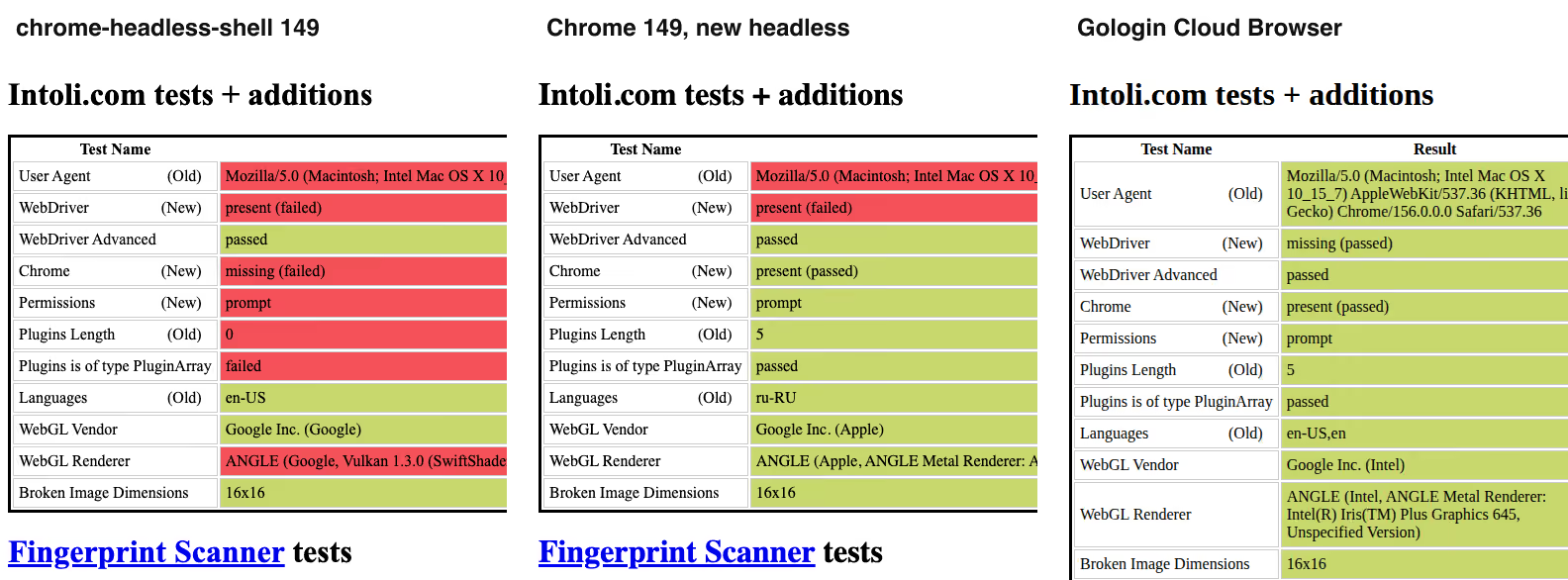
bot.sannysoft.com on 10 November 2026: red rows failed. Left to right: chrome-headless-shell 149, Chrome 149 in new headless mode, Gologin Cloud Browser.
chrome-headless-shell failed checks that new headless mode passed: the window.chrome object, permissions, plugins and the WebGL renderer. New headless mode fixed those, but still sent the headless user agent. Firefox’s 4 failed rows include 2 Chrome-only checks, which a real Firefox fails too.
The local browsers failed the same checks on both IPs, because a proxy changes nothing inside the browser. A residential IP still helped on Amazon. chrome-headless-shell got the “Continue shopping” page in 4 of 5 sessions on our own IP, and in none through the proxy.
A clean detection score did not guarantee access either. Firefox had the most normal fingerprint of the local browsers, but Zillow showed it the Press & Hold check in all 10 sessions.
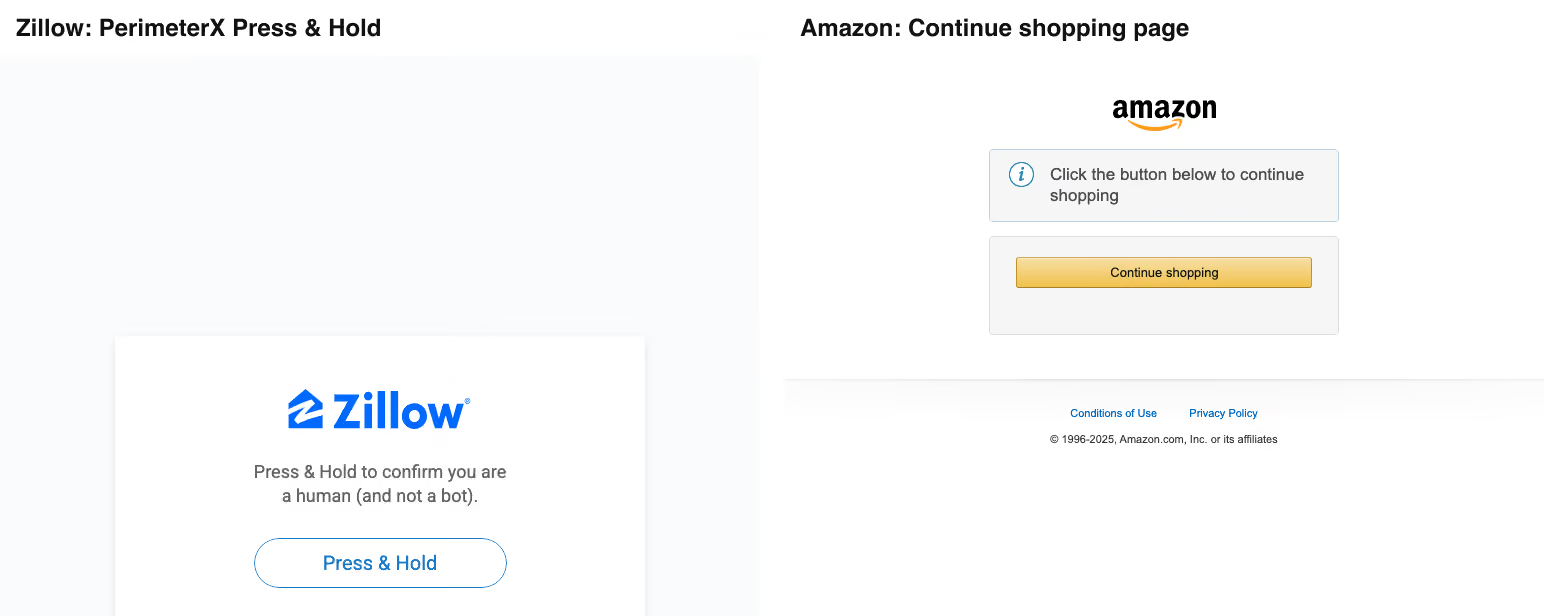
Two block pages that a status code alone would miss: Zillow’s Press & Hold check returned 403, Amazon’s Continue shopping page returned 200. Both from chrome-headless-shell, run A.
Headless browser detection also goes deeper than these pages. Sites read the TLS and HTTP/2 fingerprint before any JavaScript runs. Our Lightpanda review found its TLS fingerprint differed from Chrome’s in every region. Patching the user agent in a script does not change that.
Local vs cloud headless browsers
A local headless browser is free, but you run everything around it. A cloud headless browser, also called a headless browser service or headless browser API, runs on the provider’s servers. Here is what changes when you move one Playwright script from local Chrome to Gologin Cloud Browser:
| What you need | Local headless Chrome | Gologin Cloud Browser |
|---|---|---|
| IP address | Your server’s IP, or proxies you buy and rotate | Residential IP included with the plan |
| Fingerprint | HeadlessChrome user agent, navigator.webdriver = true |
Chrome 156 on macOS, navigator.webdriver = false in our test |
| Logins and cookies | Lost when the browser closes, unless you save the profile | Kept in the profile between runs |
| Session length | Your setup | No cap on paid plans |
| Scaling | Your servers, memory and crashes | Parallel sessions: 1 to 4 by plan, +$2/month each |
| Cost | Free software, plus servers and proxies | Browser hours from $4.50/month billed annually |
The switch is one line. Replace launch() with a CDP connection, and the rest of the script stays the same:
// before: const browser = await chromium.launch();
const browser = await chromium.connectOverCDP(
  `wss://cloudbrowser.gologin.com/connect?token=${process.env.GOLOGIN_TOKEN}&profile=${process.env.GOLOGIN_PROFILE_ID}`
);
const page = await browser.contexts()[0].newPage();
await page.goto('https://example.com');
For a headless browser for AI agents, add Gologin’s MCP server to Claude Code, and the agent drives the same cloud profile:
claude mcp add gologin -e API_TOKEN=YOUR_API_TOKEN -- npx gologin-mcpA cloud browser is not always the answer. For tests in CI and for your own sites, a local headless browser is faster to start and costs nothing.
How to choose a headless browser
Pick by the job, not by the benchmark. Here is what our tests point to, by use case:
- Headless browser testing. Use Chrome in new headless mode with Playwright, because it matches real Chrome. Add Firefox headless for cross-browser coverage.
- Headless browser automation of internal tools. chrome-headless-shell starts in 124 ms and needs the least memory.
- Headless browser scraping. Start with Lightpanda or chrome-headless-shell for unprotected sites. For protected sites, use a cloud browser with residential IPs. Scrapfly loaded 5 of 5 sites, and Gologin Cloud Browser loaded 4 of 5, including Zillow.
- Logged-in accounts. Use a cloud browser with persistent profiles. Gologin Cloud Browser kept cookies for 10 months; Browserbase’s Context was logged out in a new session.
- AI agents. Agents need long sessions and saved state. Gologin has no session cap and an MCP server; Browserbase and Hyperbrowser give more parallel sessions on their paid plans.
- Budget. Local browsers are free, but you pay for servers, proxies and upkeep. Lightpanda Builder costs $19/month; Gologin starts at $4.50/month billed annually with 100 browser hours and residential traffic included.
FAQ
What is the best headless browser?
The best headless browser depends on the job. In our tests on 10 November 2026, Chrome’s new headless mode was the best free option for testing, and chrome-headless-shell launched fastest at 124 ms. For protected sites behind a login, Gologin Cloud Browser loaded 4 of 5 sites, kept profiles for months and had no session cap.
What is a headless browser?
A headless browser is a web browser without a window. Code controls it through an API, so it loads pages, runs JavaScript, clicks and takes screenshots without showing anything on a screen. Chrome, Chromium and Firefox all have a headless mode. Developers use headless browsers for automated testing, web scraping and AI agents that browse websites.
Is Chrome a headless browser, and can you run Chrome headless?
Chrome is a normal browser, but it can run headless. Start it with --headless=new, or use Playwright or Puppeteer, which run it headless by default. Google also ships chrome-headless-shell, a separate lighter build of the old headless mode. In our test, Chrome 149 headless launched in 445 ms and the shell in 124 ms.
Can a website detect a headless browser?
Yes. In our 10 November 2026 test, both headless Chrome builds sent “HeadlessChrome” in the user agent, and all 3 local browsers set navigator.webdriver to true. Sites also read the browser fingerprint, the IP type and the TLS fingerprint. Zillow showed its PerimeterX block page to new headless Chrome in every session on both IPs.
Are Playwright, Puppeteer and Selenium headless browsers?
No. Playwright, Puppeteer and Selenium are automation frameworks. They start a browser, such as Chrome or Firefox, and send it commands, in headless or headful mode. The browser loads the pages. That is why one Playwright script can drive a local Chrome, Firefox, WebKit or a cloud browser by changing only the launch or connect line.
What is the difference between a headless browser and a cloud browser?
A headless browser runs on your own machine or server, and you manage its proxies, profiles and crashes. A cloud browser is a headless or headful browser that a provider hosts and you control over a WebSocket. Gologin Cloud Browser, for example, adds residential IPs, saved profiles and no session cap. You pay per browser hour.
What is the best headless browser for web scraping?
For unprotected public pages, Lightpanda and chrome-headless-shell are the cheapest to run. For protected sites, a local headless browser is not enough: in our tests none loaded Zillow or G2. A cloud browser with residential IPs works better. Gologin Cloud Browser loaded 4 of 5 sites on 10 November 2026, including Zillow, and keeps logins in saved profiles.
Conclusion
Local headless browsers are free and fast: chrome-headless-shell launched in 124 ms on our Mac. They are also easy to spot. All 3 set navigator.webdriver, and none loaded Zillow or G2 on either IP.
For tests and unprotected pages, use Chrome headless or Lightpanda. For protected sites and logged-in work, move the same script to a cloud browser. Gologin Cloud Browser loaded 4 of 5 sites the same day, keeps cookies in saved profiles and has no session cap.