VMOS Cloud is an Android cloud phone platform for social media growth, automations, multi-account operations, phone farms, testing and gaming. VMOS is an excellent tool built around multiple use cases and offers a huge range of phone options to choose from, depending on your requirement.
VMOS has multiple products like a local Android emulator, a standalone proxy service, and cloud phone service. In this blog, we will test and review VMOS Cloud which is an Android cloud phone platform.
What Is VMOS Cloud?
VMOS Cloud is an advanced cloud Android phone platform for social media operations, testing, gaming, and automations. You can launch one or more Android emulators in the cloud without putting load on your device, and operate multiple accounts simultaneously, warm up social media accounts, or run other automations.
VMOS Cloud has a wide range of mobile emulators to choose from. You can choose a high-end emulator with your choice of RAM and core size, or a vendor specific model like Samsung S25, Google Pixel 9 Pro, etc.
For all kinds of business operations which require multiple mobile devices, VMOS Cloud is a strong option with trust, reputation, and an excellent product.
Customers commonly use VMOS Cloud for:
- Automation engineers who need ADB, root access, APIs, or RPA.
- Social media teams handling multiple accounts.
- Gamers who want to play games on high-end devices in the cloud.
- Devs and QA teams testing apps on multiple models in the cloud instead of downloading each emulator one by one.
VMOS Ecosystem: VMOS Android vs VMOS Cloud vs VMOS Cast
VMOS is not just a cloud Android service. It is a complete ecosystem of multiple tools built around Android emulation use cases like VMOS Cast, VMOS Android, OWL Proxy etc. Each product is different, and has its own pricing structure. In this blog, we are reviewing VMOS Cloud but its important to know that VMOS has a huge infrastructure of other relevant services as well.
| Product | What it is | Where it runs | Best suited for |
| VMOS Android | A local Android virtual machine | Inside an existing Android phone or tablet | App cloning, root tools, isolated environments and app testing |
| VMOS Cloud | Remotely hosted virtual or physical Android devices | VMOS data centers | Social media operations, automation, gaming and remote testing |
| VMOS Cast | A desktop control and mirroring tool | Windows, macOS or Linux over a local network | Managing of physical Android phones by connecting them with cast |
| OwlProxy | VMOS-affiliated proxy infrastructure | Network layer | Assigning static or dynamic IPs to mobile devices |
| VMOS Edge | AI-oriented virtual-phone environment | Locally deployed infrastructure | AI agents, natural-language control and parallel automation |
VMOS Android emulates a separate Android environment inside your real phone, VMOS Cast connects multiple physical devices together for mass control, and OwlProxy is their own service to manage IPs.
Don’t accidentally subscribe to one of their other services by mistaking their name for VMOS Cloud. Specifically look for the VMOS Cloud website.
Core Features: How We Tested VMOS Cloud
VMOS Cloud has tons of useful features like RPA automation, AI agents, MCPs, device testing, cloud storage, etc. These features are built for marketers, sales and support teams, gamers, and app testers.
Whether you’re running multiple TikTok account warming operations, managing multiple customer support channels via Telegram or WhatsApp, or testing your app in different devices without downloading each emulator locally, VMOS cloud has a feature for everyone.
In my experience, this is by far the most useful Android cloud platform I have used other than Gologin Android. I signed up on VMOS Cloud, downloaded their desktop app, and started a few Android cloud devices to check performance, features and compare costs. Here is my breakdown.
User Experience
In my experience, VMOS Cloud has a decent user experience. I am not annoyed with unnecessary pop-ups offering discounts and bundles like some other platforms do. All the core features are accessible from the panel on the left.
I love their wide range of emulator options. If you want a standard virtual device, you can select RAM size and cores, and get a device. If you want a specific model, you can choose from a huge range of options froM Samsung, Google, Vivo, Oppo, etc.

However, what I did not like about their app is that some parts of the app were still in Chinese even when I had selected the English language. I understand that VMOS is a Chinese product created by Hunan XiaoSuan Technology Co. Ltd. but not properly testing your app or leaving some parts untranslated is a bad sign.

Device Launch Time, Specs & Performance
I bought a Samsung S24 Ultra device on Android 15. The payment process was smooth and I got my device initialized. The first launch after initialization took 3 minutes. Restart also takes about 2 minutes but if you just close the emulator window and relaunch it, it is up and running in 10 seconds.
The device’s startup and launch time did not disappoint me but its performance did. I selected the Samsung S24 Ultra emulator but the experience was very jittery. App launch, lag, and low refresh rate makes it look like I am running some low-end Chinese phone or a Samsung S10 series.
I had read some good reviews on Trustpilot where people claimed that they play high-end games on these cloud emulators since their own devices are not heavy enough to support them. I am confused how they play multiplayer games like PUBG, Free Fire, etc on such a laggy device.
Moreover, this device is not an S24 in my opinion. VMOS has masked the fingerprint and kernel to make it look like an 24 Ultra. 512 Gb memory is used up by 437GB of temporary files, and I can’t find any option in the settings to check RAM of the device because it is hidden in the installed Android software.

VMOS is legit and works but I got overexcited about trying the highest-end Android phones via a cloud environment and they did not perform even remotely close to the actual performance of those devices.
Proxies Support
VMOS is the only cloud phone platform other than Gologin that provides built-in proxies. Their OwlProxy integration lets you purchase proxies from within the app and connect them to your cloud phones.
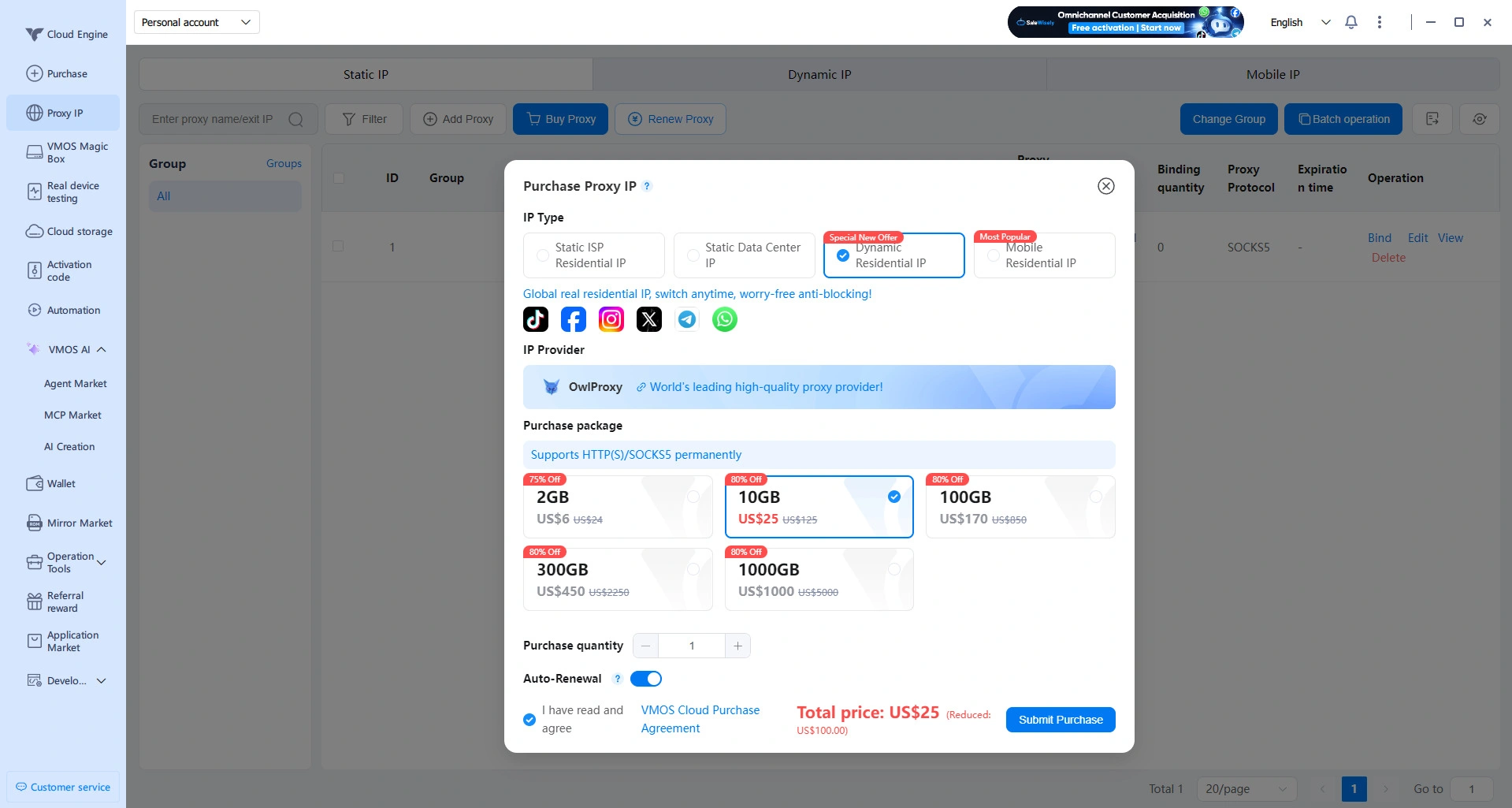
However, their proxies are too expensive. As seen in the image below, a normal quality IP in a cost effective zone costs $8.99. This is too expensive compared to most of the proxy providers. Gologin provides a high quality static IP for far less.

I used Floppydata proxies for my cloud phone since they’re cheaper but VMOS gave me a very hard time importing proxies. Bulk import was not working even after I imported them in the exact format suggested by VMOS. After several failed attempts, I was able to add a single SOCKS5 IP address that I used for my phone. The proxy import feature needs serious attention from developers.

The device I purchased was based in Hong Kong and my proxy was from the US. Pixelscan’s fingerprint test detected the mismatch instantly because my Hong Kong timezone did not match my US IP. Perhaps the app can let the user know that their proxy does not match the device location before they add one. If you’re not careful with your proxy and device location selection, your social media accounts can get banned for spoofing device fingerprints.

Automation Features
VMOS Cloud’s automation templates are solid. You can select from a directory of pre-built templates for account warmup, link clicks, and auto-likes/comments. Moreover, you can create your own automation template without needing coding knowledge. To start an automation, you choose a template, assign it a proxy pool and devices you own so it can start running the automation.

You can also get a custom AI agent made for your use case by VMOS customer support team. Other than that, you can control Google Play, YouTube, WhatsApp and Kling via VMOS MCP server to create automations via code.

My verdict on their AI agent is that it needs a lot of polishing before it becomes genuinely useful. Their automation templates are great for TikTok, Meta and Google but lack other major platforms.
High-End Real Machines & Google CTS Certification
VMOS devices have Google CTS certification. CTS stands for Compatibility Test Suite. It is Google’s list of tests to check whether an Android device follows compatibility requirements. VMOS standard devices don’t have a CTS certificate but their higher-end devices and specific models like Google Pixel, Samsung Galaxy, etc. have CTS certification.
CTS certificates improve the credibility of an Android device. Google lists TikTok as a Play Integrity API partner which determines if the app was installed through Playstore, and whether its running on a Google certified Android software. CTS certification means less risk of getting banned for using emulators since most emulators don’t have a CTS.
VMOS Cloud Pricing: Understanding the Complex Matrix
VMOS Cloud uses a modular usage based pricing model where you only pay for what you use. However, this is exactly the problem with this model. You can never calculate how much you will spend since usage based pricing is kept to confuse you. Their public pricing page looked very cost effective until I actually landed inside the app and tried using the devices and proxies.
VMOS offers three main ways to access a cloud Android device: Timing Devices, Standard Cloud Machines, and High-end Real Machines.
| VMOS product | Configuration | Displayed price | Best suited for |
| Timing Device | V06, 5.4GB RAM | $0.006/minute, capped at $1/day | Short tests and occasional sessions |
| Standard V08 | 4GB RAM | From $4.99/month | Lightweight Android workloads |
| Standard V06 | 5.4GB RAM | Approximately $0.16/day | Gaming and moderate multitasking |
| Standard V04 | 8GB RAM | Approximately $0.22/day | Heavier apps and smoother multitasking |
| Standard V03 | 10.7GB RAM | Approximately $0.28/day | Highest-performance Standard tier |
| High-end Real Machine | Model-dependent, often 12GB RAM | From approximately $0.30/day | TikTok, WhatsApp, social media, and demanding apps |
Timing devices are designed for short tasks. You rent a device for a few minutes or hours and pay for usage. However, the story is different. When I tried buying a device for 60 minutes, VMOS told me that the minimum credit for timing based phones is $10. I can’t just pay $0.72 for 60 mins of usage but need a $10 commitment first.
Similarly, the standard and high-end machines have an expiry time of 30, or 90 days. Depending on how long your commitment is, pricing can slightly reduce. However, the displayed price you see of $0.16/day or so is only put to confuse the visitor. The actual cost of a high-end machine is around $6-$12/month depending on device type and RAM.

After devices come the proxies. You can’t operate an emulator without a proxy because cloud proxies can’t use their datacenter IP and need an external identity to route traffic through. VMOS’s OwlProxy provides a way to purchase proxies from within the VMOS app, and connect to your Android devices. However, VMOS’s OwlProxy’s real pricing story is also different than advertised.
A regular quality IP in a cost effective zone costs $8.99 which is way higher than what I normally get via Gologin or Floppydata. Their dynamic residential and mobile IP prices start from $1/gb onwards depending on the zone and that is affordable but only if you buy 1000GBs. You’re actually paying $3/gb if you’re only buying 2gb usage. Their advertised prices are very cheeky because the real story is way different.
This is why I think usage based pricing is a trap because a user can never predict their spend when every factor is so unpredictable.
Customer Reviews on VMOS Cloud
VMOS Cloud has mixed public reviews with 3.1/5 stars on Google Play from 500k+ installs, and 3.2 /5 on Trustpilot from 60 reviews. Positive reviews talk about affordability and simple setup but while reviews raise concerns about loading, support quality, data handling, and automatic device region change issues.
Users report that VMOS’s performance is not as good as advertised for gaming.

The platform is legit, and servers thousands of users for their social media management, etc. However, the device performance issue is real for users who pay high prices for real high-end devices. One user even reports that devices are not properly reset before getting transferred to other users when the previous user’s access expires.
VMOS Cloud vs Gologin Cloud Android: Which Is Better for Marketing?
Both VMOS Cloud and Gologin Cloud Android are suited for different use cases and segments. For multi-accounting marketing operations, Gologin is better due to its simplicity, faster launch time, and better performance. You get built-in proxies that you can connect in one click to your device, and is much more affordable.
VMOS Cloud offers deep customization, software root, ADB support, and automations which makes it a better choice for developers, and automation experts. For purely marketing related purposes, paying higher prices for VMOS’s functionality you won’t use is an overkill.
Moreover, as a marketer, you don’t only get Gologin Cloud Android, you can also launch antidetect browser profiles in the same pricing plan. All your cloud Android devices have unique fingerprints which means you can run multiple Meta, TikTok accounts simultaneously without getting banned.
Gologin is way more affordable than VMOS if you don’t want advanced ADB functionality and automation templates. In a $9/mo plan, you can create up to 10 devices with free 2GB proxy bandwidth in your plan. This is easily 10-15x cheaper than VMOS if you purchase 10 devices with proxies.
Feature Comparison
| Feature | VMOS Cloud | GoLogin Cloud Android |
| Pricing model | Usage based pricing, separate prices for device models, and proxies | Bundled monthly subscription includes Android devices, proxy and antidetect browser |
| Profile billing | Each cloud machine is rented separately and connected to its own proxy | Android profiles use the subscription’s existing profile quota |
| Entry pricing | $4.99–$10.99/month for a standard device; $12.99/month for a high-end device | 10 phones bundled with paid Gologin plans starting from $9/month |
| Proxy pricing | OwlProxy IPs and traffic are purchased separately | Native proxy manager with bandwidth included in paid plans |
| Social media readiness | Standard devices can run social apps, but High-end Real Machines are better suited to risk-sensitive workflows | Cloud Android profiles are designed specifically for mobile-first social and marketing workflows |
| Root access | Available for advanced customization and testing | Not the main product focus |
| Best advantage | Deep Android control and technical flexibility | Bundled access, Gologin infrastructure and predictable costs |
Final Verdict: Should You Use VMOS Cloud?
VMOS Cloud is a great choice for automations, and app testing. I would not recommend putting your social media accounts on it since some users report that data can seep to other users as well who could have unauthorized access to your social media accounts.
VMOS is an advanced cloud phone platform that best fits app testers, QAs, and automation experts. A lightweight multi-account usage, or other mobile tasks are better suited for an affordable and faster alternative like Gologin Cloud Android.
Frequently Asked Questions
Is VMOS Cloud safe for TikTok?
If you use a CTS certified VMOS device (premium device or high-end real model), your TikTok browsing has lower chances of getting flagged. TikTok’s detection system doesn’t like emulators since they are used for account farming and bot activity. With CTS certification, your emulator is seen as a real device with an authentic fingerprint that passes Google’s tests.
What is the difference between VMOS Standard and High-end machines?
Standard machines are virtual Android devices which are usually hosted on high-end computers that are running multiple emulated softwares at once. VMOS Standard means an average performance and security but cheaper availability.
High-end machines are real, physical Android hardware that you connect to remotely via your app. High-end machines have CTS certification, have a better performance and are more real-looking..
Does Gologin charge separately for Cloud Android phones?
Gologin does not charge separately for Android profiles or additional cloud phones. In the $9/mo subscription, you can run up to 10 Android devices, or browser profiles with free 2GB proxy included.
What is the best VMOS Cloud alternative for marketers?
Gologin Cloud Android is a strong VMOS alternative for marketers who need mobile and desktop multi-account management in one platform.
Unlike VMOS’s separate device and proxy purchases, Gologin includes 10 Cloud Android phones, and 2GB proxy bandwidth for $9/mo with no hidden costs.