In October we updated the login and sign-up pages and the app menu, expanded profile settings, opened programmatic access to cloud profiles and taught AI Assistant to work with your accounts. There are also new ways to save proxy traffic. Here’s what changed.
Login and Sign-Up: New Design and More Security

We updated the design of the login and sign-up pages.
Changing your email is now more secure: the process includes additional checks.
Profiles: More Flexible Settings
October brought new options for configuring profiles:
- Proxy selection in default settings – you can set a proxy right in the default profile settings.
- Settings reset – restore the default profile settings with one button.

- Disable media loading – paid users can turn off media loading in the browser to save proxy traffic.
AI Assistant and Navigation: Quick Access to Features
The app menu now has a “Focus” state. It helps you move around the app faster and frees up more space on the screen.
You can also open the “Accounts” feature in AI Assistant straight from the menu. There you can connect your LinkedIn account and delegate account promotion and management to the assistant.
Cloud Browser: Programmatic Access to Profiles
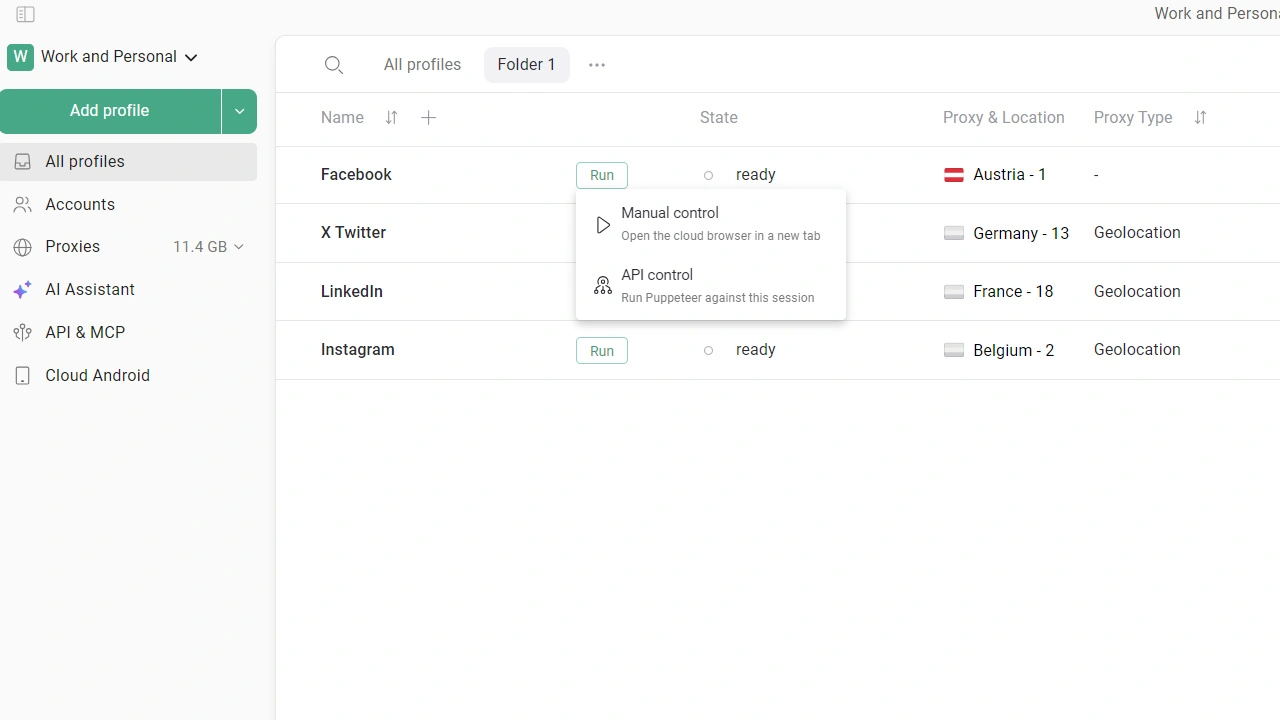
In October we added API access to Gologin profiles launched in the cloud via the web version of the app. This lets you automate your work with cloud profiles.
What to Improve Next – It’s Up to You
In October we kept developing Gologin: made profile settings more flexible, updated the login flow and made working with cloud profiles and subscriptions easier.
Have ideas or suggestions? Share them with us – your input helps us decide which features to build next.