


There’s no doubt that we are being tracked online for both good and bad reasons. According to a study by Ghostery, a renowned free software provider, over 79% of websites with unique domains have trackers that collect user data. One of the most popular fingerprinting techniques today is canvas fingerprinting. In this guide, find out what canvas fingerprinting is, how it works, and how it stacks up against other browser fingerprinting techniques.
Understanding Canvas Fingerprinting
There’s no doubt that we are being tracked online for both good and bad reasons. According to a study by Ghostery, a renowned free software provider, over 79% of websites with unique domains have trackers that collect user data. One of the most popular fingerprinting techniques today is canvas fingerprinting. In this guide, find out what canvas fingerprinting is, how it works, and how it stacks up against other browser fingerprinting techniques.

An Overview of Fingerprinting?
There are so many web tracking methods, for example, IP address tracking, using HTTP cookies, web beacons, browser fingerprinting, and the new sneaky canvas fingerprinting. So far, so good, cookies and the rest of the tracking methods are being substituted with canvas fingerprinting, a sophisticated and accurate browser fingerprinting technique. To understand better what canvas fingerprinting is, it’s important first to understand browser fingerprinting.
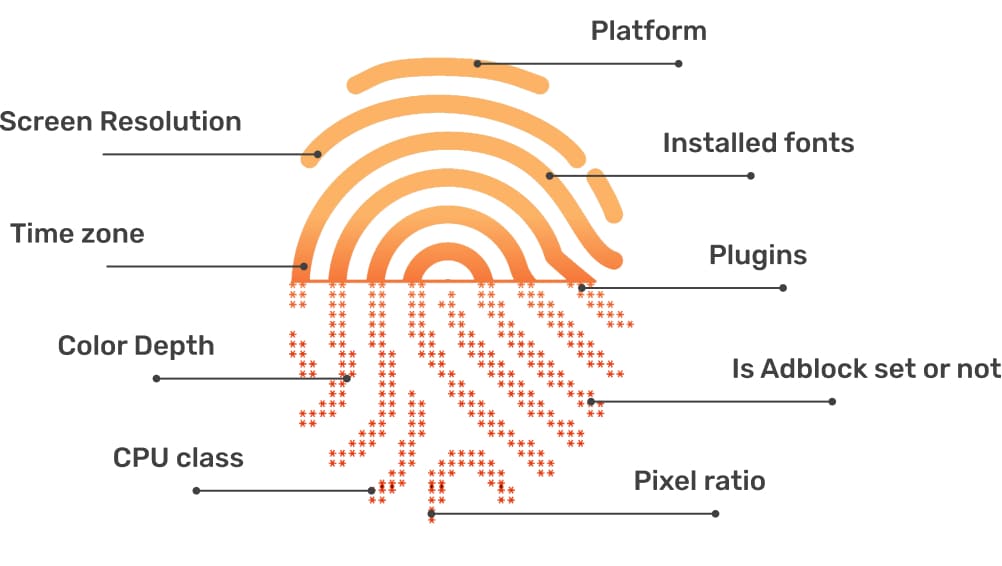
As the name suggests, browser fingerprinting allows website owners to create user profiles by collecting data from a set of parameters. The data collected in browser fingerprinting includes;
is, it’s important first to understand
- Device model
- Operating system (OS)
- Screen resolution
- Time zones
- File format identifiers
- Timestamp
- User-agent (UA) string
- Language settings
- Plugins
- Extensions
The data collected is then clustered together and referred to as a ‘fingerprint.’ Browser fingerprinting works on the basis that two users can’t have 100% matching browser data
What is Canvas Fingerprinting?
Canvas fingerprinting is a pretty new online tracking technology that has been labeled as ‘the true successor of cookies’ and ‘cookies on steroids.’ The distinction between canvas fingerprinting and other tracking methods is that it leverages HyperText Markup Language 5 (HTML5) Canvas feature to track web visitors’ digital footprint.
The history of canvas fingerprinting goes back to 2012 when two University of California researchers Hovav Shacham and Keaton Mowery, published a paper dubbed ‘Pixel Perfect: Fingerprinting Canvas in HTML5. In the paper, the researchers elaborated on how the HTML5 canvas could be exploited to create accurate digital fingerprints of internet users.
Almost immediately after the alarm was sounded, AdBlock Plus, a renowned software company, said that their product, AdBlock Plus could bypass canvas fingerprinting, and has been in use for some years. That tells you that even before the publication of University of California research, canvas fingerprinting was just here with us.
Canvas fingerprinting is sophisticated and very accurate. This is the reason why it is considered the number one browser fingerprinting technique. For the record, canvas fingerprinting can be used as the sole tracking method or, be combined with other browser fingerprinting techniques to enhance accuracy.
According to Tor Project canvas fingerprinting, courtesy of the HTML5 canvas, is the biggest fingerprinting threat that internet users face today, after plugins. In a crawl conducted in January 2016, several top websites, including Dropbox, BBC, Bleacher Report, Washington Post, NDTV, and The Verge, had canvas fingerprinting scripts.
How Does Canvas Fingerprinting Work?
The big question in this discussion is, how does canvas fingerprinting work? Well, it’s a simple concept, but broad as well.
One thing that distinguishes canvas fingerprinting is that it is based on manipulating the HTML5 Canvas feature. For starters, HTML5 is a coding language that is used to build most websites. On the other hand, the canvas is an HTML5 API used to draw text and graphics on a webpage via scripting in Javascript.
When you click on a website with a canvas fingerprinting script, the script draws text with random font and size and a random background. Then the result is canvas pixel data is converted to a Base64 encoded format before being hashed into the fingerprint.
Canvas fingerprinting works on the basis that different computers render the same canvas image differently based on reasons at the image format level or system level. At the image format level, the variations can be caused by image processing engines, image export options, and the browser-compression levels. When it comes to the system level, different computers may render the same image differently because the operating systems come in different fonts and use different algorithms and settings for sub-pixel rendering and anti-aliasing.
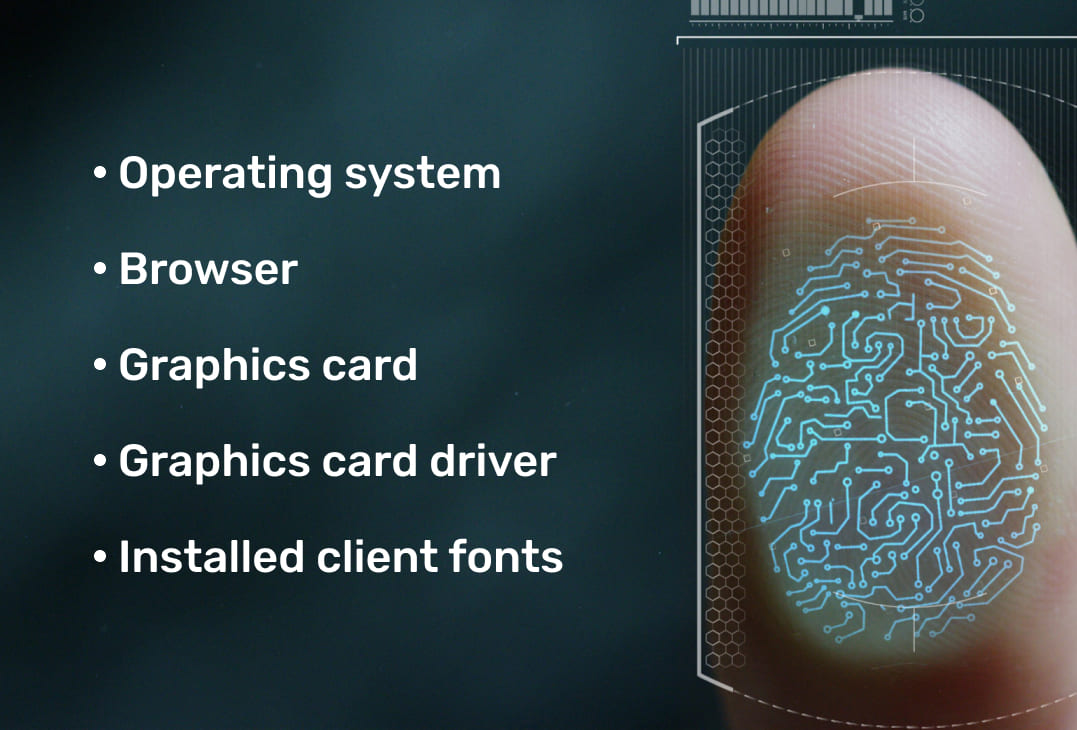
For the record, canvas fingerprinting focuses on the graphics aspects only. The data it relies on includes:
- Operating system
- Browser
- Graphics card
- Graphics card driver
- Installed client fonts
Where Does Hashing Come In?
Hashing is a process that maps data of arbitrary sizes into fixed-size values without altering the data’s uniqueness. Hashing is preferred in canvas fingerprinting because it produces the same results as long as the input is the same. That means, the hash of ‘Canvas,’ using SHA-256 online hash function, is:
3824a9f4dafe92c6f1b80b40656a59784c03a824c27d58125d7d0ace753e2df2
However, if we change the input to ‘Canvas ‘1 adding the space after the word, the hash is completely different despite the negligible changes. With space, the hash of ‘Canvas ‘ is;
90a297b736922fb50bb83eb58bdef9af7b1603aa1699b3fb6bee85ce638d6d54
Canvas Fingerprinting – The Necessary Evil
We must admit that we live in a world of utmost surveillance. In the digital space, companies, organizations, and even governments are keen on tracking online activity. That is the reason why state-of-the-art web tracking methods such as canvas fingerprinting have been deployed. In this section, find out some of the popular applications of canvas fingerprinting.
The Good Side of Canvas Fingerprinting
You will agree with me that in as much as canvas fingerprinting and other online tracking methods may infringe our online security and privacy, they are a necessary evil. Today, there are several ways through which canvas fingerprinting may benefit users, as discussed below.
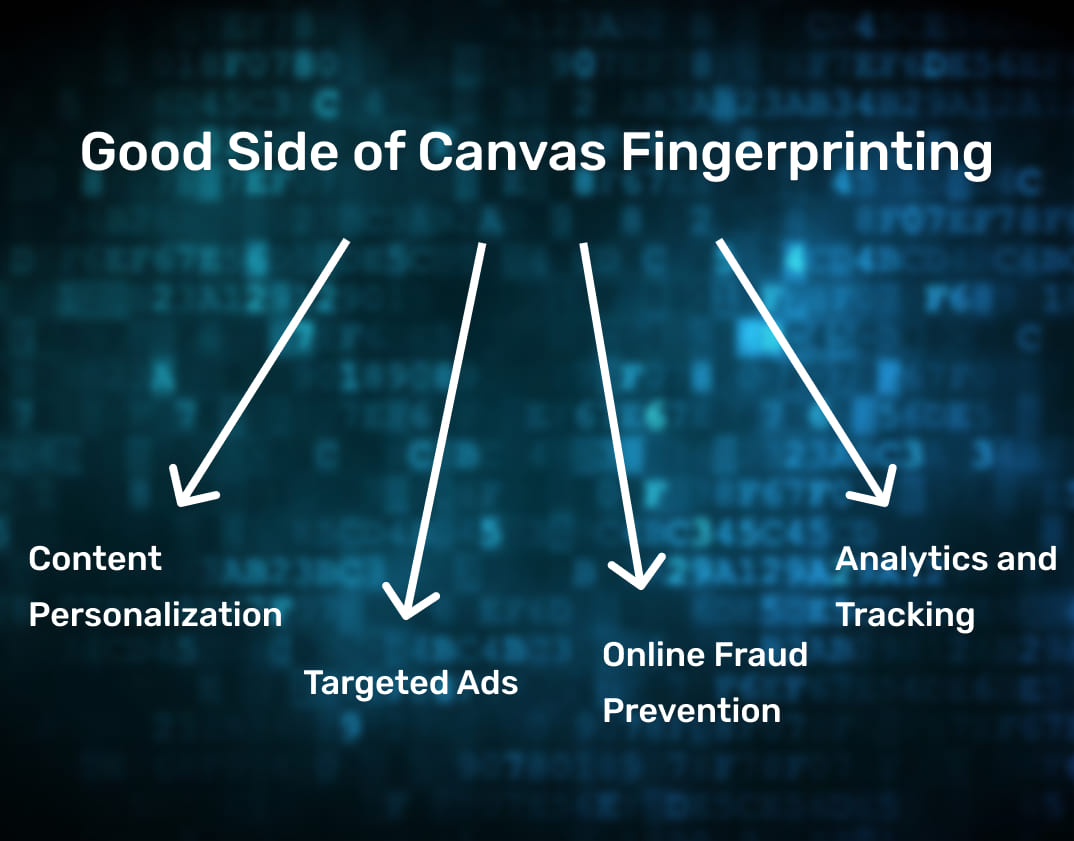
1. Content Personalization
Marketers understand just how important personalization is. That’s why all the big content hubs such as Netflix, Spotify, and even eCommerce sites rely on web tracking methods such as canvas fingerprinting. According to statistics, 91% of consumers say that they are more inclined to shop with brands that offer a personalized experience with product suggestions and recommendations. Content personalization translates to a better user experience for surfers and more revenue for brands.
To ensure that consumers get a personalized experience, brands leverage web tracking methods such as cookies and browser fingerprinting. Like mentioned earlier, cookies are becoming obsolete slowly, while the latest tracking methods such as canvas fingerprinting are taking center stage.
2. Targeted Ads
Today, online advertising is the best channel for many marketers and brands. But considering the wide audience, it’s imperative that marketers spend their budget wisely by targeting ads to potential consumers only, no need to target internet users who may not be interested in your product.
Today, advertisers rely heavily on canvas fingerprinting to customize ads for higher ROIs. While cookies were the best in the past, the accuracy of canvas fingerprinting makes it the best bang for the buck, at least to the advertisers. More so, cookies can be blocked today, leaving advertisers with no reliable tracking method.
to potential consumers only, no need to target internet users who may not be interested in your product.
3. Online Fraud Prevention
With the exponential growth in online banking comes an exponential risk of fraud. Online banking platforms are always on the lookout to ensure that only you are accessing your online banking account. Canvas fingerprinting, together with other online tracking methods, is making the digital space a safer place.
With canvas fingerprinting, for example, fintech can detect when an online banking session is a threat. As you may be aware, the devices you normally use to log in to eWallets and other online banking platforms have a specific footprint. Any log-in via a device with a new footprint indicates that the account may be under attack.
4. Analytics and Tracking
One of the crucial dynamics in business is analytics and tracking. Without hard data and analytics, marketers may not be able to report ROIs and optimize future campaigns. One advantage of canvas fingerprinting is that it can identify crucial data such as new users, returning visitors, etc.
The Ugly Side of Canvas Fingerprinting
Just like a two-sided coin, canvas fingerprinting has advantages as well as disadvantages. The biggest undoing with canvas fingerprinting, just like all other web tracking techniques, is that its deployment doesn’t guarantee 100% online security and privacy. Canvas fingerprinting is proving to be the best way that governments and other online spies can use to track all your digital footprint. That’s something very worrying in a digital age where 81% of Americans have concerns regarding collecting their private data.
Is Canvas Fingerprinting Legal?
One of the challenges that users face when it comes to browser fingerprinting is the subject’s legality. There are no clear laws and regulations that address browser fingerprinting, leave alone canvas fingerprinting.
According to the General Data Protection Regulation (GDPR) browser fingerprinting is legal in Europe as long as website owners comply with all the related rules and regulations. Even though the GDPR doesn’t specifically mention fingerprinting, the website must get consent from users before tracking them, as is the case with cookies tracking.
In the US, there are no laws that govern web tracking, but at least the California Consumer Privacy Act (CCPA) and Vermont’s Data Broker Lawtry to address online tracking and data collection but not specifically canvas fingerprinting or even device fingerprinting in general.
Lately, there has been much emphasis on online security and privacy, which have led to the new ePrivacy Directive and further enforcement of GDPR. But according to online security experts, the current trends show no hope for these laws to be followed to the latter. At the moment, the law on cookies is stringent, but still, many websites deploy cookies to track users without informing them first and having their consent, as stipulated by the law. From this trend, it is clear that browser fingerprinting and even canvas fingerprinting are here to stay. That is why internet users should be wary of their digital footprint.
At the moment, the bark rests with the individual browsers. For companies such as Mozilla Firefox and Google Chrome, canvas fingerprinting directly threatens the respective brands. That’s why the two companies have moved to curb canvas fingerprinting.
How to Avoid Canvas Fingerprinting
Canvas fingerprinting is real. One peculiar thing about it is that it’s hard to bypass it for one reason; it relies on an integral part of websites – the HTML5 canvas element. As you may be aware, the canvas has many legit purposes, so blocking it is not an option. You can block cookies that track your digital activity, but it’s not easy to block the HTML5 canvas element.
But that doesn’t mean there are no ways of avoiding canvas fingerprinting.
1. Blocking Canvas Fingerprinting
We have seen several extensions and add-ons that claim to block canvas fingerprinting entirely. After the release of the study on canvas fingerprinting, AdBlock Plus claimed that their product could block canvas fingerprinting, and it had been effective for years. It works by blocking scripts that set cookies, consequently blocking canvas fingerprinting. There are other browser-based canvas fingerprinting blockers, for example, Mozilla Firefox’s NoScript and Google Chrome’s ScriptSafe extensions that selectively block JavaScript.
Well, blocking canvas fingerprinting sounds like a plausible idea as users will not have sent their canvas fingerprint. The reality of the matter, however, is that blocking canvas fingerprinting identifies you outrightly. Remember, plugins and extensions that you are running are part of the key identifiers in browser fingerprinting. In a nutshell, blocking canvas fingerprinting is like wearing a mask in a crowd of people without masks, something that makes you more conspicuous.
Blocking canvas fingerprinting can only be effective if all internet users could block it; that means we all have masks. But then, the number of internet users who can block canvas fingerprinting is negligible, considering less than 10% of internet users know about ad blockers. Besides, there are not so many canvas fingerprint blockers out there.
2. Randomizing Canvas Fingerprints
Using blockers clearly identifies you. But what about submitting random canvas fingerprints? As the name suggests, this involves randomizing the core browser objects such as user agent, HTTP headers, plugins, platform, screen resolution, timezone, vendor, WebGL vendor, etc.
Randomizing canvas fingerprints is a practical way of avoiding being tracked via canvas fingerprinting, but it is not sufficient, just like blockers. It is not normal for users to change their footprint during a session. So, submitting randomized canvas footprints during a single session will automatically raise suspicion. It’s the same thing as changing your outfit in a crowd; every ten minutes – you will definitely get noticed.
The only way randomizing canvas fingerprints can effectively avoid canvas fingerprinting is if all internet users randomized their canvas fingerprints. That way, it’s hard to pinpoint a single user. In our example, it’s like everyone in the crowd changed their outfit every ten minutes – that would work.
Avoiding Canvas Fingerprinting: Is It Possible?
It’s clear that while the above methods can help users bypass canvas fingerprinting, they are not useful at all in the long run. You will still be tracked!
The only feasible solution is managing your footprint by customizing each parameter of your fingerprint. So, how do you do this?
The first thing is to ensure that you raise no eyebrows by making sure the canvas fingerprinting feature is active, so you don’t appear like you are masked already. Then, use the canvas identity consistently, so it doesn’t look like you are avoiding detection. Last, switch up the identity when necessary to erase the digital tracks. While it may look like an uphill battle, it’s the only way to avoid being tracked by canvas fingerprinting. The idea here is not to prevent the tracking but to control it.
Another way of averting canvas fingerprinting is by manually opting-out from interest-based advertising. It’s possible to opt-out of interest-based advertising by selecting companies that you don’t want targeted ads from on the Network Advertising Initiative Opt-Out page.
Well, this too sounds like a great idea, but then, it’s quite a tedious process considering companies are adding canvas fingerprinting scripts day and night. That means you will need to do the cleanup regularly to be on the safe side. Besides, targeted ads are not the only risks of canvas fingerprinting. While you may opt-out of the targeted ads, you can still be tracked for other reasons.
Wrapping Up
There you have it, folks, everything you need to know about canvas fingerprinting. Well, as witnessed, it is a necessary evil. Canvas fingerprinting has several benefits and downfalls as well. Another takeaway is that canvas fingerprinting has been here for a while, and even though it’s possible to block the process entirely, it’s hard to bypass canvas fingerprinting.
The only way out is managing our online footprint. With a robust digital footprint management approach, we can control how we are tracked, but we can’t prevent tracking.