Python Web Crawler: How to Build One That Scales With Asyncio
Try Gologin for free
A web crawler fetches pages, extracts data and links, and then fetches those links. Learning how to make a web crawler can take an afternoon. Keeping it fast when pages need a real browser takes longer.
A Playwright web crawler works on a laptop with a few tabs. Add tabs, and memory grows with each one. Each browser launch also looks like a first-time visitor, with no cookies or history.
This guide builds an asynchronous Python crawler and runs it on a real site. It then measures what each local browser tab costs in memory and moves browser work to cloud browser profiles that keep their identity between runs.
TL;DR
- Async speeds up browser crawling, but tabs add memory. From 16 to 32 local tabs, speed rose 26 to 28% while memory rose 46 to 51%.
- Give each host its own queue. On 5 sites, 100 URLs took about 20 seconds, versus 50 seconds with one shared queue.
- Recrawl only what changed. On this blog, sitemap
lastmoddates cut a 388-URL recrawl from 425 requests to 36. - Move browsers to the cloud, keep the identity. Cloud browser profiles kept fingerprint, cookies, and storage between runs. At 48 tabs, the crawler used under 450 MB, versus up to 6.2 GB locally, and a 1K-page cloud crawl cost under 1 cent.
| Minimal Playwright crawler, 100 pages | Pages/s | Peak memory | Idle time, waiting on pages |
|---|---|---|---|
| Synchronous, 1 tab | 1.3 to 1.4 | 511 to 598 MB | 99%, 1 page at a time |
| Asynchronous, 16 tabs | 9.8 to 10.5 | 2,485 to 2,747 MB | 96 to 97%, 16 pages at a time |
Web crawler architecture: the 5 parts that have to scale
Nearly every crawler, from a small script to a search engine, has the same 5 parts. The parts mostly differ in size:
- Frontier. The URLs to visit, one queue per host, plus the set of URLs already seen.
- Per-host rate limit. How long the crawler waits between requests to each host, and how many requests to that host may run at once.
- Workers. Coroutines that take a URL, fetch it, and send the result to the parser.
- Fetcher. The part that downloads a URL with an HTTP client, a local browser, or a cloud browser profile.
- Parse, classify, and store. Extract fields and links, check whether the page is real content or an error or block page, and write the record.
Here’s how a URL moves through those parts:
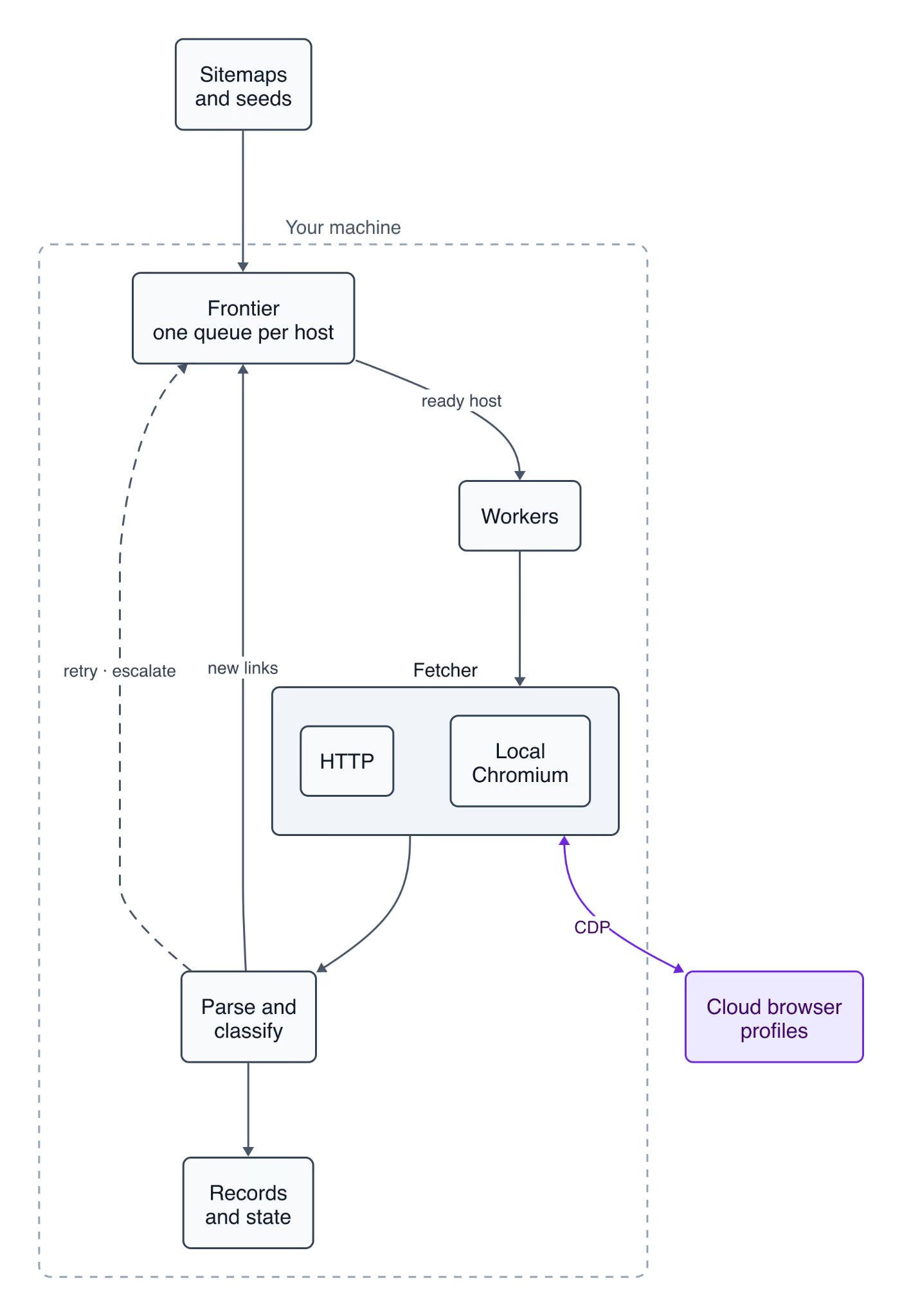
Keep the fetcher pluggable, because its cost varies the most. An HTTP client costs almost nothing per request, while every local browser tab costs memory.
Concurrency vs parallelism: threads, processes, or asyncio
Concurrency means many tasks are in progress and take turns. Parallelism means tasks run at the same moment on separate CPU cores. A crawler spends most of its time waiting for pages, so it needs concurrency first. Python offers 3 models for browser work:
| Model | What runs at the same time | Cost of one more task | Best use in a crawler |
|---|---|---|---|
| Threading | One thread runs Python, and the others continue while they wait on I/O | An OS thread, plus its own Playwright instance, because Playwright’s API isn’t thread-safe | A few blocking scripts |
| Multiprocessing | Processes run in parallel on separate cores | A Python interpreter, plus its own browser | CPU-heavy parsing, such as markdown extraction |
| asyncio | One thread switches between tasks while pages load | One coroutine and one browser tab | Many page loads at once |
A synchronous loop does blocking I/O on every page load, so the program sits idle while nothing else happens. With asyncio, one thread runs many requests at once and handles each response as it arrives.
In the TL;DR table, the synchronous crawler’s Python process was idle 99% of the time. The asynchronous one was idle 96 to 97% of the time too, but it waited on 16 pages at once. That’s why asynchronous web scraping in Python fits asyncio, with processes added only for CPU-heavy work.
How to make a web crawler with asyncio and Playwright
Building a web crawler in Python needs no framework. The full crawler is one file, crawler.py, in the async-web-crawler repository. You need:
- git, and uv, which installs Python 3.13 or newer for you. The debugging section uses Python 3.14 or newer.
- About 4 GB of available memory for the 16-tab local runs. The cloud runs need under 450 MB.
- A free API token for the cloud section.
- A Unix shell for the commands, on macOS, Linux, or WSL on Windows.
The numbers shown come from an Apple M3 laptop with 16 GB, Python 3.13 and 3.14, and Playwright 1.63. On Linux, the setup and the repo’s tests also pass on Python 3.13 to 3.15.
On Linux, --with-deps also installs the system libraries Chromium needs, and it may ask for your sudo password:
git clone https://github.com/GologinLabs/async-web-crawler
cd async-web-crawler
uv sync
uv run playwright install --with-deps chromium
Start with a minimal asyncio queue crawler
The smallest Python web crawler with asyncio fits in about 30 lines of code. Workers share one asyncio.Queue, and a seen set keeps each URL from being queued twice. asyncio.gather() collects the workers after the queue is empty. This is examples/minimal_async.py, which crawls books.toscrape.com, a sandbox store built for crawling practice:
import asyncio

from playwright.async_api import async_playwright

START, LIMIT, TABS = "https://books.toscrape.com/", 100, 16
LINKS = (f"els => els.map(e => e.href.split('#')[0])"
         f".filter(h => h.startsWith('{START}'))")  # same-site links only

async def worker(page, queue, seen):
    while True:
        url = await queue.get()
        try:
            await page.goto(url)
            for link in await page.eval_on_selector_all("a[href]", LINKS):
                if link not in seen and len(seen) < LIMIT:
                    seen.add(link)  # dedupe before enqueueing
                    queue.put_nowait(link)
        except Exception:
            pass  # one bad page must not stop the worker
        finally:
            queue.task_done()

async def main():
    queue, seen = asyncio.Queue(), {START}
    queue.put_nowait(START)
    async with async_playwright() as pw:
        browser = await pw.chromium.launch()
        tabs = [await browser.new_page() for _ in range(TABS)]
        workers = [asyncio.create_task(worker(t, queue, seen)) for t in tabs]
        await queue.join()  # every queued URL was handled
        for w in workers:
            w.cancel()
        await asyncio.gather(*workers, return_exceptions=True)
    print(len(seen), "pages")

asyncio.run(main())
Run it, then run the synchronous version, which crawls the same 100 pages with one tab:
uv run python examples/minimal_async.py
uv run python examples/minimal_sync.py
The TL;DR table compares the 2 runs, and benchmarks/sync_vs_async.py measures them on your machine. The minimal crawler waits for each page’s full load event, images included. The full crawler blocks images and stops at domcontentloaded, so each of its tabs is faster.
One shared queue works for one site. At scale, it has 3 problems:
- It has no per-host rate limit. A worker that must wait for a slow host holds its URL while it sleeps.
- It serves URLs in arrival order. Retries can’t wait their turn, and product pages can’t go first.
- One busy host fills it. Links on a page mostly point to the same site, so other sites wait behind it.
The full crawler replaces it with a frontier, which keeps one heapq priority queue per host and a schedule of when each host is ready.
The frontier decides which host goes next
get() returns a job only when its host is below its concurrency limit. The host must also have waited long enough for its interval, its robots.txt Crawl-delay, and any pause:
async def get(self) -> Job:
    while not self.closed:
        now = time.monotonic()
        if self.ready and self.ready[0][0] <= now:
            _, _, host = heapq.heappop(self.ready)
            self.scheduled.discard(host)
            if max(self.next_at.get(host, 0),
                   self.paused_until.get(host, 0)) > now:
                self._schedule(host)  # paused or slowed since scheduled
                continue
            queue = self.queues[host]
            if host in self.browser_hosts:
                queue[0].browser = True  # host moved to the browser later
            if queue[0].browser:
                if self.tabs == 0:
                    self.tab_waiting.add(host)  # waits for a tab
                    continue
                self.tabs -= 1
            job = heapq.heappop(queue)
            self.busy[host] += 1
            self.next_at[host] = now + self.intervals.get(host,
                                                          self.interval)
            self._schedule(host)  # its next job, if under its limit
            return job
        self.wake.clear()
        wait = self.ready[0][0] - now if self.ready else None
        try:
            await asyncio.wait_for(self.wake.wait(), wait)
        except TimeoutError:
            pass
    raise asyncio.QueueShutDown
A worker never holds a job while it waits for a host. A retry also waits for its backoff inside the frontier, not inside a worker. The tabs lines reserve a browser tab for each job that needs one, and a host waits in tab_waiting until a tab is released. They matter once --escalate sends pages to a browser.
The shared-queue design and the frontier crawled the same 100 URLs on 5 sites, with 16 workers and 1 request per second per site:
| Design | Time for 100 URLs | Pages/s | When each site finished |
|---|---|---|---|
| One shared queue | 49.9 and 50.5 s | 2.0 | One after another, from 20 to 50.5 s |
| Per-host frontier | 20.2 and 20.3 s | 4.9 in both runs | At nearly the same time, from 19 to 20 s |
At 1 request per second, 20 URLs on 1 site take at least 19 seconds. So the frontier ran close to the fastest speed the rate limit allows. benchmarks/frontier_ab.py in the repo runs both designs.
Run the crawler with 16 local tabs on the first 200 pages. With the local backend, each worker gets its own tab, and --per-host 16 lets all 16 tabs work on the one site. Because it’s a sandbox, this run uses --interval 0. Keep the default of 1 second for any site you don’t own:
uv run python crawler.py --backend local --workers 16 --per-host 16 \
  --interval 0 --max-pages 200
The first 5 seconds are mostly warm-up, so use longer runs, like the 1K-page runs below, to measure throughput. The 58 pages without a record are category and listing pages, which contain the links to product pages:
{"backend": "local", "workers": 16, "seconds": 11.3, "pages_per_s": 17.68, "ok": 200, "records": 142}parse() first reads JSON-LD, the schema.org data that sites embed for search engines, and uses CSS selectors when a page has none. The sandbox has no JSON-LD, so these records come from the selectors. content_signal holds any AI preference lines from the site’s robots.txt, covered in the robots.txt section.
To run the same crawl without local Chromium, switch to --backend gologin with a free token.
Run it on your own site
Pass your own seed URL and User-Agent. The crawl stays on the seed’s host, and --include limits it to URLs that match a regex. --pages writes a record with the URL, title, h1, and description for every page that has no structured data. --markdown adds the page’s main content as markdown, ready for a RAG index, an LLM, or an AI agent:
uv run python crawler.py --backend http --per-host 1 --interval 1 \
  --seed https://docs.astral.sh/uv/ --pages --markdown --max-pages 15 \
  --out uv-docs.jsonl \
  --user-agent "MyCrawler/1.0 (+https://example.com/about-my-crawler)"
By default, records come from JSON-LD articles and products, or from site-specific CSS selectors in parse(), like the sandbox’s. The uv docs have neither, so this crawl needs --pages. If a crawl fetches pages but stores no records, the crawler prints a message at the end. uv run python crawler.py --help lists every flag, and the repo’s README lists the main commands.
4 design decisions that matter at scale
Each is a few lines in crawler.py:
- The queue order favors records. Retries go last, and on the sandbox, product pages go first, so a crawl with a
--max-pageslimit reaches product records first. - Each tab handles one job at a time. One worker’s
goto()can’t change a page while another worker reads it withcontent(). - The connection pool is at least as large as the worker count. By default, aiohttp opens at most 100 connections. Above that limit, extra workers wait for a free connection, so the crawler sets the pool size from
--workers. - A bad page can’t crash a worker. A parse error counts as
parse_error, and the worker continues with the next job. Without thattry/except, a crashed worker never marks its job as done, sojoin()could wait forever.
What each local browser tab costs
With a local browser as the fetcher, memory grows faster than throughput. Each run of the full crawler fetched 1K sandbox pages with local Chromium tabs. Peak RSS (resident set size) is the memory used by the crawler and its browser processes:
| Tabs | Pages/s (2 runs) | Peak RSS (process tree) | Processes |
|---|---|---|---|
| 1 | 3.0 to 3.1 | 536 to 543 MB | 6 |
| 4 | 10.2 to 11.0 | 1,193 to 1,265 MB | 9 |
| 8 | 19.0 to 19.1 | 1,734 to 2,101 MB | 13 |
| 16 | 25.6 to 29.3 | 2,945 to 3,264 MB | 21 |
| 32 | 32.8 to 36.8 | 4,435 to 4,748 MB | 37 |
| 48 | 30.2 to 40.5 | 5,763 to 6,184 MB | 53 |
Going from 1 to 16 tabs made the crawler about 9 times faster on a 16 GB laptop. Going from 16 to 32 tabs added 26 to 28% throughput and used 46 to 51% more memory. From 32 to 48 tabs, memory rose another 30%, while throughput changed by -8% to +10%. How much each extra tab adds depends on your machine and the site.
Adding up RSS counts shared memory again in every process, so these totals run high. PSS (proportional set size), which counts each shared page once, came out about a third lower for 16 tabs in a Linux container.
The HTTP backend scales further. It crawled 3.4 pages per second with 1 worker, and 47.7 to 80.7 with 32 workers. If the HTML already contains the data, skip the browser and use it only for pages that need JavaScript, a login, or a consistent identity.
How to make a web crawler that handles errors and respects robots.txt
The crawler’s classify() function decides the outcome of every response:
| Outcome | Typical response | Action in the crawler |
|---|---|---|
ok |
2xx or 3xx with real content | Store the record, enqueue its links |
unchanged |
304 to a conditional request | Write nothing. The earlier record stays in the output file |
gone |
404, 410, or another 4xx | Drop the URL without a retry |
server_error |
5xx, a timeout, or a closed connection | Retry with exponential backoff and jitter |
blocked |
401, 403, 429, cf-mitigated: challenge, or a challenge page |
Pause the whole host, follow Retry-After up to 5 minutes, retry later |
payment_required |
402 with a crawler-price header |
Record the price and skip the URL, with no browser retry |
A 200 status doesn’t prove the page has real content. Cloudflare documents a cf-mitigated: challenge header on its challenge pages, so the classifier checks that first. Otherwise, a page with no record counts as blocked only when it matches a known challenge-page pattern, such as a Just a moment title.
A single word isn’t a reliable pattern. Matching “captcha” alone would mark this blog’s web scraping category page as blocked, because its meta description mentions captchas.
A crawler shouldn’t try to solve a challenge. Instead, increase the wait between requests to that host, and check how the crawler identifies itself.
Respect robots.txt and identify yourself
The crawler’s Robots class fetches each host’s robots.txt once a day and checks every URL before the request. RFC 9309 also covers failed fetches. A 4xx means there’s no file, so everything is allowed. A 5xx or a network error means the file is unreachable, so everything is disallowed:
async def allowed(self, url: str) -> bool:
    root = site_root(url)
    if (root not in self.fetched
            or time.monotonic() - self.fetched[root] >= 86_400):
        try:
            async with self.http.get(root + "/robots.txt",
                                     timeout=TEN_SECONDS) as r:
                status, text = r.status, await r.text(errors="replace")
            if 200 <= status < 300:
                # Parsers skip AI preference lines: keep them as written
                self.signals[root] = [
                    line.strip() for line in text.splitlines()
                    if line.lower().startswith(AI_PREFERENCE_LINES)]
            elif 400 <= status < 500:
                text = ""  # unavailable (4xx): RFC 9309 allows all
            else:
                text = DISALLOW_ALL  # unreachable (5xx): disallow all
        except (aiohttp.ClientError, TimeoutError):
            text = DISALLOW_ALL  # network error: also unreachable
        self.cache[root] = Protego.parse(text)
        self.fetched[root] = time.monotonic()
    return self.cache[root].can_fetch(url, self.agent)
It parses each file with Protego 0.7.0 or newer, the robots.txt parser that major Python crawling frameworks use. Protego handles wildcard rules, such as *utm= on this blog, that Python’s own urllib.robotparser failed to match in testing.
robots.txt can also contain AI preferences. Many popular sites name AI crawlers such as GPTBot there, and some add a Content-Signal line such as ai-train=no.
Standard parsers skip Content-Signal lines, so Robots keeps them and the crawler writes them into every record. The IETF’s AI Preferences working group has proposed a similar Content-Usage rule, so Robots keeps both kinds. Filter records on them before you use the data for model training.
When you crawl public pages, identify yourself with --user-agent, and include the URL of a page that says who runs the crawler. Setting a Chrome User-Agent on the HTTP backend doesn’t help. A site sees the client’s TLS handshake before it reads any header, and that handshake doesn’t match Chrome’s.
Even an honest User-Agent is only a claim, since any client can copy it. Cloudflare can verify crawlers that sign their requests with Web Bot Auth. Sites that use its Pay Per Crawl respond to other crawlers with 402 Payment Required and a crawler-price header. A browser retry would get the same 402.
Crawl a real site: sitemaps, structured data, and recrawls
The next target is this blog, crawled at 1 request per second over 1 connection.
Start from the sitemap, not the home page
This blog’s robots.txt listed a sitemap index of dozens of sitemaps and thousands of URLs, nearly all with a lastmod date. sitemap_urls() in crawler.py reads the index and stops at 50 MB per sitemap. That way, a small gzip file can’t expand into gigabytes (a gzip bomb).
--include keeps the 388 URLs under /blog/, and --max-depth 0 disables link following. --escalate local keeps 1 browser tab ready for any page that HTTP can’t read. To try it, replace the seed and the --include pattern with your own site’s:
uv run python crawler.py --backend http --escalate local --tabs 1 \
  --sitemap --max-depth 0 \
  --seed https://gologin.com/ --include '^https://gologin\.com/blog/[^/]+/$' \
  --workers 1 --per-host 1 --interval 1 --state state.json --out posts.jsonl
Every post had its content in the HTML, so the HTTP backend handled every page, in 6.5 minutes:
{"backend": "http", "workers": 1, "seconds": 388.0, "pages_per_s": 1.0, "sitemap_urls": 388, "ok": 388, "records": 372, "duplicate": 1}Sitemaps can list a URL that redirects to another listed URL. The crawler stores each record under its final URL, after redirects, and counts the second copy as a duplicate. Apart from 14 category pages, which contain links rather than articles, only 1 post produced no record, because its JSON-LD uses an unusual type.
On any site, the first crawl can be the slowest. Pages that aren’t in a CDN’s cache come from the origin server, which does more work for each one. Start with 1 connection per host, so the crawl doesn’t overload it.
Read structured data before CSS selectors
WordPress SEO plugins such as Yoast SEO and Rank Math add schema.org data as JSON-LD to the pages they manage. structured() reads it first, and every record from this blog came from it. Key fields from one record:
{"url": "https://gologin.com/blog/playwright-automation-tool-in-the-cloud/", "type": "BlogPosting", "name": "Playwright Automation Tool in the Cloud: Setup & Benchmarks", "author": "Satyam Tripathi"}Read the whole JSON-LD graph, not only the first node:
- Dates can be on another node. They may belong only to a page node such as
ItemPage, and the author is often a separatePersonnode. - Strings can be HTML-escaped. Some plugins write
&in the JSON where the page shows&. - One page can describe 2 things. A graph can contain both an article and a
Product, so check for article types first. - Match subtypes too. Article and Product types have subtypes. The BBC used
ReportageNewsArticlefor its articles, and a Shopify store usedProductGroupfor products with variants, with prices on each variant.
Use an LLM as the last step, after JSON-LD and CSS selectors. On this blog, an LLM fallback would have read only the 15 pages without a JSON-LD record. An LLM call costs money on every page, while a selector costs almost nothing to rerun.
When an LLM does read a page, send it markdown. Pages on this blog averaged 217 KB of HTML but 20.5 KB of markdown. Have an LLM write a selector once per page template, then test that selector on saved pages, like any other extractor.
Recrawl only what changed
--state stores each URL’s sitemap lastmod, plus its Last-Modified and ETag headers. The next run skips every URL whose lastmod hasn’t changed. Right after the 388-URL crawl, a second run found nothing to fetch:
{"backend": "http", "workers": 1, "seconds": 0.0, "pages_per_s": 0.0, "sitemap_urls": 388, "skipped_unchanged": 388, "records": 0}It sent 36 requests, for robots.txt and the sitemaps, while the full crawl sent 425, including 1 redirect. When a URL’s lastmod changes, the crawler sends a conditional GET. If the page itself hasn’t changed, the server responds with 304 Not Modified and no body, in about 0.04 seconds here.
Sitemap generators don’t always update lastmod when a page changes, so occasionally add --recheck to send a conditional GET for every URL.
The crawler saves the state file every 30 seconds. It writes the records first, then replaces the state file in one step (an atomic rename), so a crash can’t leave it half-written. After a crash, the next run resumes with at most 30 seconds of work to redo.
Send JavaScript pages to a browser only when needed
With --escalate, a blocked page is retried in a browser, and so is a page with no record and almost no visible text:
def looks_empty(html: str) -> bool:
    """An empty app shell: almost no visible text until JavaScript runs."""
    tree = LexborHTMLParser(html)
    for node in tree.css("script, style, noscript, template"):
        node.decompose()
    text = tree.body.text(separator=" ", strip=True) if tree.body else ""
    return len(text) < 500
The retried job goes back through the frontier, so robots.txt and the host’s interval still apply. Once the browser renders real content for 3 pages from a host, the crawler sends that host’s remaining pages directly to the browser.
The JavaScript version of quotes.toscrape.com, another crawling sandbox, renders every page with JavaScript in the browser. Over HTTP alone, its 11 pages produced no records. With --escalate local and 2 tabs:
uv run python crawler.py --backend http --escalate local --tabs 2 \
  --seed https://quotes.toscrape.com/js/ --include '/js/' --workers 4 \
  --per-host 1 --interval 1 --max-pages 50 --max-depth 20 --out quotes.jsonl
In the summary line, escalated counts the pages retried in a browser, and via_browser counts the pages the browser fetched:
{"backend": "http", "workers": 4, "seconds": 14.9, "pages_per_s": 0.74, "escalated": 3, "via_browser": 11, "ok": 11, "records": 11}Some apps load their data after the HTML arrives, so the browser backend waits up to 15 seconds for text to appear. On quotes.toscrape.com/js-delayed/, which renders its content after 10 seconds, the crawl stored nothing without that wait and all 11 records with it. A page that is still empty after rendering counts as empty_after_render in the summary, so you can check it.
Before you send a JavaScript app to a browser, check its HTML for hydration data. Frameworks such as Next.js often embed the page’s data in script tags, and parsing it needs no browser. Pages protected by fingerprint checks still need a browser.
Bottlenecks at scale: bandwidth, memory, CPU, and politeness
A crawl that runs well on 1K pages can become slower at larger scale for reasons outside the fetch logic. Each page also spends bytes, memory, CPU time, and a turn in its host’s rate limit. Find which one limits your crawl first.
Debug a slow crawl
In Python 3.14 and newer, python -m asyncio ps <PID> shows where every task is waiting, from outside the process. It can need extra permissions, such as sudo on macOS or a lower ptrace_scope setting on some Linux hosts. Run it from a second terminal while a longer crawl runs:
sudo .venv/bin/python -m asyncio ps "$(pgrep -n -f crawler.py)"From a 4-worker HTTP crawl of the sandbox with a 0.5-second interval, shortened to 2 columns:
task name  coroutine stack
Task-1     Event.wait -> Frontier.join -> Crawler.run -> main
worker-0   StreamReader._wait -> StreamReader.readany -> StreamReader.read -> ClientResponse.read -> ClientResponse.text -> HttpFetcher.fetch -> Crawler.fetch -> Crawler.handle -> Crawler.worker
worker-1   Event.wait -> wait_for -> Frontier.get -> Crawler.worker
worker-2   Event.wait -> wait_for -> Frontier.get -> Crawler.worker
worker-3   Event.wait -> wait_for -> Frontier.get -> Crawler.worker
Here, 3 of the 4 workers were waiting in Frontier.get() for the host’s interval to pass, and 1 was reading a response. When most workers wait in Frontier.get(), the bottleneck is your own --interval, not the site, and more workers won’t make the crawl faster.
Bandwidth depends on what the browser downloads
A browser downloads the images and fonts a page references, and a text crawler needs none of them. BrowserSlot.prepare() blocks them inside the browser through the Chrome DevTools Protocol (CDP), on both local and cloud tabs. On 11 sandbox listing pages, each loaded with and without blocking:
| Setting | Total transferred | Per page |
|---|---|---|
| Nothing blocked | 3,839 KB | 349.0 KB |
| Images, fonts, and media blocked | 1,675 KB | 152.3 KB |
Block by URL pattern with CDP’s Network.setBlockedURLs, not by resource type. Blocking by resource type with page.route("**/*") sends every request back to Python, and routing disables the HTTP cache. Write one pattern per extension, because setBlockedURLs accepts *://*/*.{png,jpg} without an error but blocks nothing.
Memory and CPU in a Linux container
Summed RSS counts a shared memory page once for every process that maps it. PSS (proportional set size) splits each shared page among those processes, so the parts add up to the real total. Linux reports it in /proc/<pid>/smaps_rollup. In a 4-CPU Linux container, 16 local tabs used 2,854 to 3,200 MB of PSS against 4,528 to 4,877 MB of summed RSS.
Chromium’s processes also share data through /dev/shm, and Docker’s documented default for it is 64 MB. Playwright launches Chromium with --disable-dev-shm-usage, which moves that data to /tmp, so a 64 MB limit didn’t slow the crawl. With the flag removed, the same 16-tab test crashed the browser. If you launch Chromium another way, start the container with --shm-size=1g or --ipc=host.
CPU spikes while pages render, because each renderer process parses HTML, runs scripts, and builds the DOM. The same runs peaked at 308 to 394% CPU across the process tree, nearly all 4 cores, and a single renderer reached 30 to 67%. Size a container’s CPUs to its tab count, not only its memory.
Markdown for LLMs, outside the event loop
The crawler’s --markdown flag extracts each page’s main content with trafilatura. Across the sandbox, this blog, and the uv docs, extraction took 6 to 16 ms of CPU per page. parse() took 0.2 to 1.2 ms.
When it runs inside the event loop, that CPU time limits the whole crawl. To remove the network from the test, 600 blog pages were served from localhost and crawled with 16 workers:
| Markdown extraction | Pages/s (3 runs) |
|---|---|
| Off | 735 to 800 |
| In the event loop | 54 to 55 |
| In a process pool | 143 to 160 |
So handle() sends the work to a ProcessPoolExecutor with run_in_executor(). In a separate test in a 4-CPU container, 4 worker processes ran 3.4 to 3.6 times faster than 1, while 4 threads ran no faster. The parser under trafilatura, lxml 6.1.3, re-enabled the GIL even in Python 3.14’s free-threaded build, and it wouldn’t load in a subinterpreter.
Some sites serve markdown themselves. On sites that turn on Cloudflare’s Markdown for Agents, Cloudflare converts a page when the request sends Accept: text/markdown. This crawler still needs the HTML for links and JSON-LD, so --markdown converts locally. For content-only fetches, ask for markdown first.
Hosted scraping APIs can return markdown too. Our ScrapeGraphAI review tests one of them on seven sites, with the success rate and cost per 1,000 pages for each, and our Olostep review does the same for an API that also runs batches of up to 100,000 URLs.
Retry with backoff and jitter
When a host blocks or fails a request, each retry waits longer than the last. Jitter, a random factor, keeps many workers from retrying at the same moment. A Retry-After header from the site replaces the computed delay:
def backoff_delay(attempt: int) -> float:
    """Exponential backoff with jitter, which spreads out retries over time.

    2 ** attempt seconds, capped at 60, times a random factor from 0.5 to 1.5.
    """
    return min(60, 2 ** attempt) * random.uniform(0.5, 1.5)
With the per-host rate limit in place, the browser backend is the last part to scale.
Run the crawler on Gologin Cloud Browser profiles
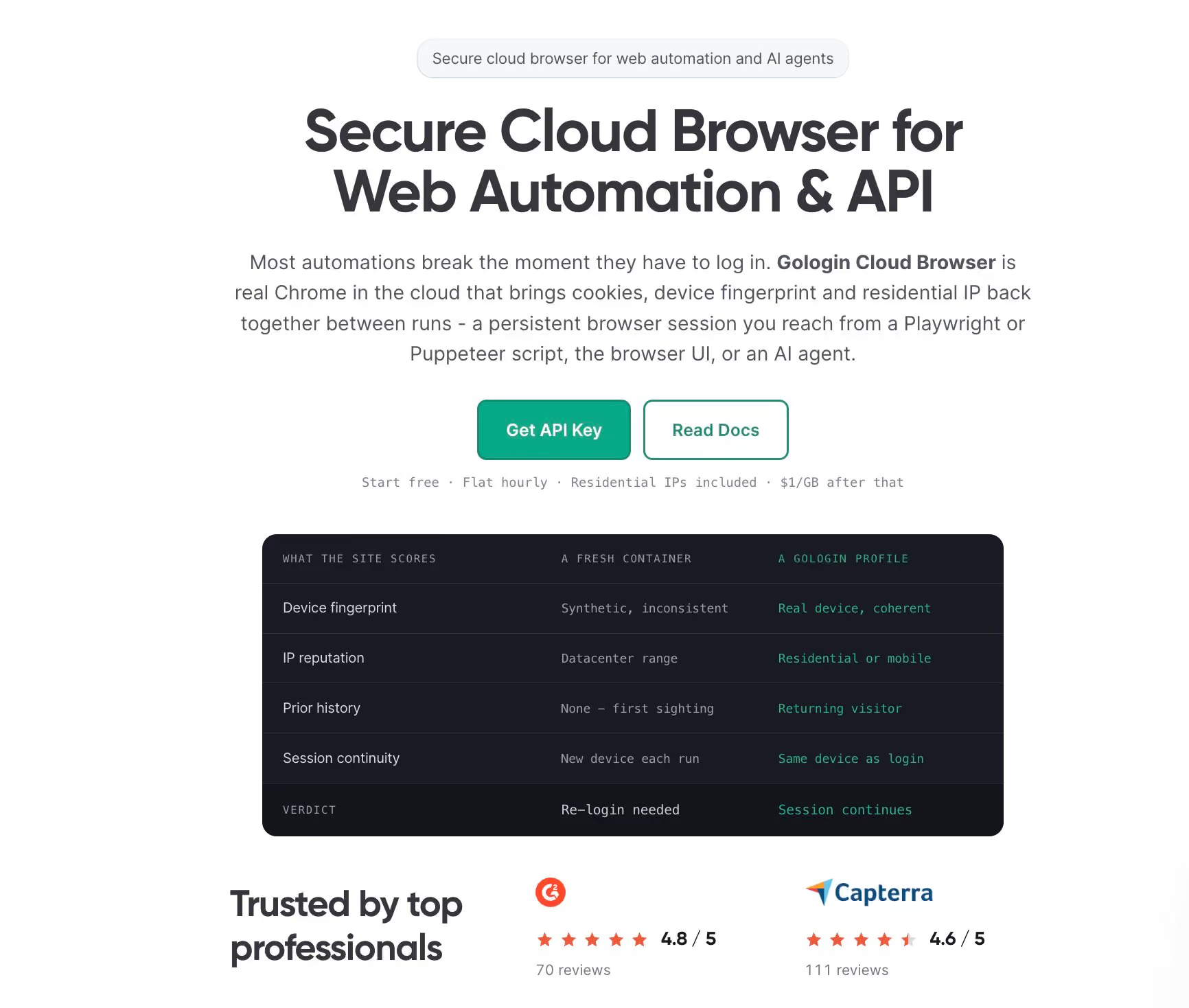
In Gologin Cloud Browser, the profile is the persistent digital identity, and the browser that runs it is disposable. Each profile keeps its device fingerprint, cookies, storage, and proxy between sessions, so the site can recognize the same returning user. For a crawl that needs a login, such as your own account’s dashboard, the session and its device stay the same between runs. An AI agent that controls a browser with Playwright connects to a profile the same way and keeps the same state.
That continuity matters because many website protection systems remember browsers. Cloudflare’s clearance cookie is “securely tied to the specific visitor and device it was issued to.” Use profiles for accounts and sessions that are yours, with robots.txt and the per-host rate limit still on.
Move browser work to the cloud when one of these is true:
- Your machine runs out of memory before it runs out of work for more tabs.
- A crawl needs the same identity or login on every run.
- The crawler should run on a small server.
Replace chromium.launch() with connect_over_cdp(), and your page-level Playwright code stays the same, while Chromium’s memory moves to the cloud.
Prerequisites
The cloud backend needs a Gologin account and its API token. After you sign up, the token is in the dashboard under API & MCP > API:
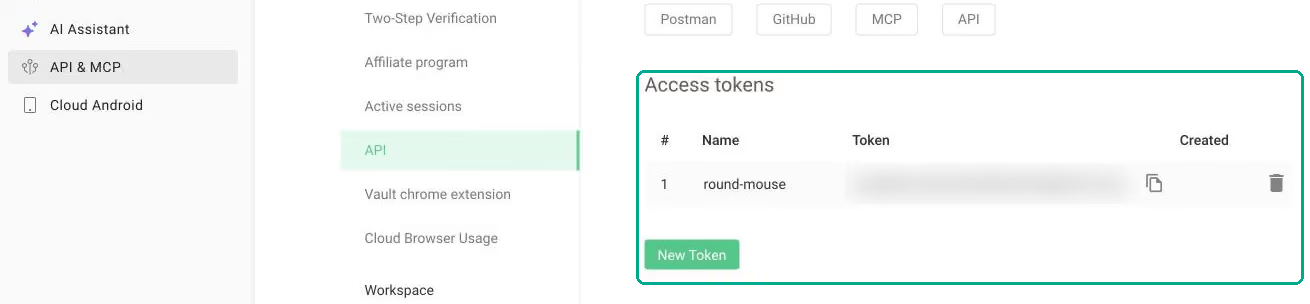
Export the token in the shell that runs the crawler:
export GL_API_TOKEN="your-dev-token"Connect Playwright to cloud browser profiles
gologin_pool.py adds the gologin backend. _open() connects to 1 profile and opens several tabs in it:
async def _open(self, profile_id: str) -> list[BrowserSlot]:
    url = CONNECT.format(self.token, profile_id)
    await self._preflight(url, profile_id)
    browser = await self.pw.chromium.connect_over_cdp(
        url.replace("https://", "wss://"), timeout=CONNECT_TIMEOUT_MS,
        no_defaults=True)  # keep the profile's own settings
    self.browsers.append((profile_id, browser))
    ctx = browser.contexts[0]  # the profile's own context and storage
    pages = list(ctx.pages)
    while len(pages) < self.tabs:
        pages.append(await ctx.new_page())
    slots = [BrowserSlot(p) for p in pages[: self.tabs]]
    for s in slots:
        await s.prepare()
    return slots
CONNECT holds the Cloud Browser endpoint as an https:// URL. _open() switches it to the WebSocket URL that Playwright connects to:
wss://cloudbrowser.gologin.com/connect?token=<GL_API_TOKEN>&profile=<PROFILE_ID>_preflight() first sends a plain GET to the same URL, so a wrong token or profile ID returns a clear message. Keep this URL out of logs, because it contains your token.
Create a profile once and reuse its ID, so sites see the same browser on every crawl. Then run the default crawl, 1K pages of the sandbox, with 16 tabs in that profile. --per-host limits how many requests to one host run at once, so set it to the tab count. The crawler sets the worker count to the same number:
uv run python gologin_pool.py 1 books-crawler > profiles.txt
uv run python crawler.py --backend gologin --profiles "$(cat profiles.txt)" \
  --tabs 16 --per-host 16 --interval 0
The last progress lines and the summary:
[  55.1s] active=16  queued=70    done=801   records=715   14.53 pages/s  RSS=234 MB in 2 procs
[  60.1s] active=16  queued=33    done=881   records=789   14.65 pages/s  RSS=227 MB in 2 procs
[  65.2s] active=16  queued=16    done=961   records=863   14.75 pages/s  RSS=187 MB in 2 procs
{"backend": "gologin", "workers": 16, "seconds": 69.6, "pages_per_s": 14.38, "ok": 1000, "records": 898}
The 2 processes are Python and the Playwright driver, while Chromium runs in the cloud.
Scale out with more profiles
Each profile runs as 1 cloud session, so 3 profiles need 3 parallel sessions. The free and Professional plans include 1, Business includes 2, and Enterprise includes 3. Paid plans can add more sessions for $2 a month each, so run this step on Enterprise or with added sessions. Create 3 profiles instead of 1, and set --per-host to 3 times the tabs:
uv run python gologin_pool.py 3 books-crawler > profiles.txt
uv run python crawler.py --backend gologin --profiles "$(cat profiles.txt)" \
  --tabs 16 --per-host 48 --interval 0
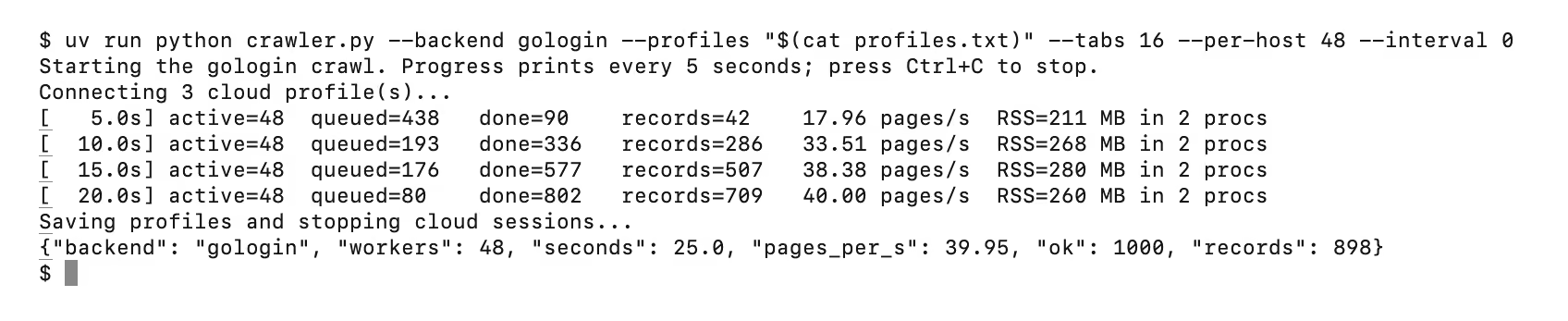
With 48 tabs, the same 1K pages took 25 seconds instead of 70:
[   5.0s] active=48  queued=438   done=90    records=42    17.96 pages/s  RSS=211 MB in 2 procs
[  10.0s] active=48  queued=193   done=336   records=286   33.51 pages/s  RSS=268 MB in 2 procs
[  15.0s] active=48  queued=176   done=577   records=507   38.38 pages/s  RSS=280 MB in 2 procs
[  20.0s] active=48  queued=80    done=802   records=709   40.00 pages/s  RSS=260 MB in 2 procs
{"backend": "gologin", "workers": 48, "seconds": 25.0, "pages_per_s": 39.95, "ok": 1000, "records": 898}
In a terminal, the same run also shows the status lines the crawler prints before and after the crawl:
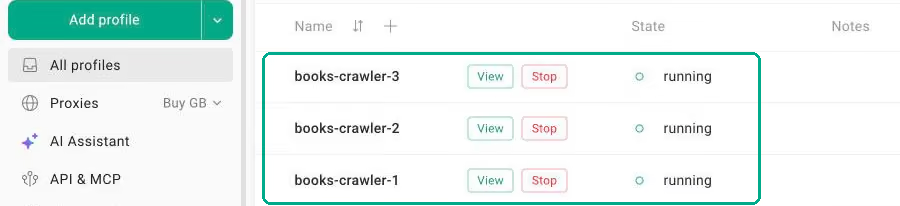
In the dashboard, the 3 profiles showed as running during the crawl:
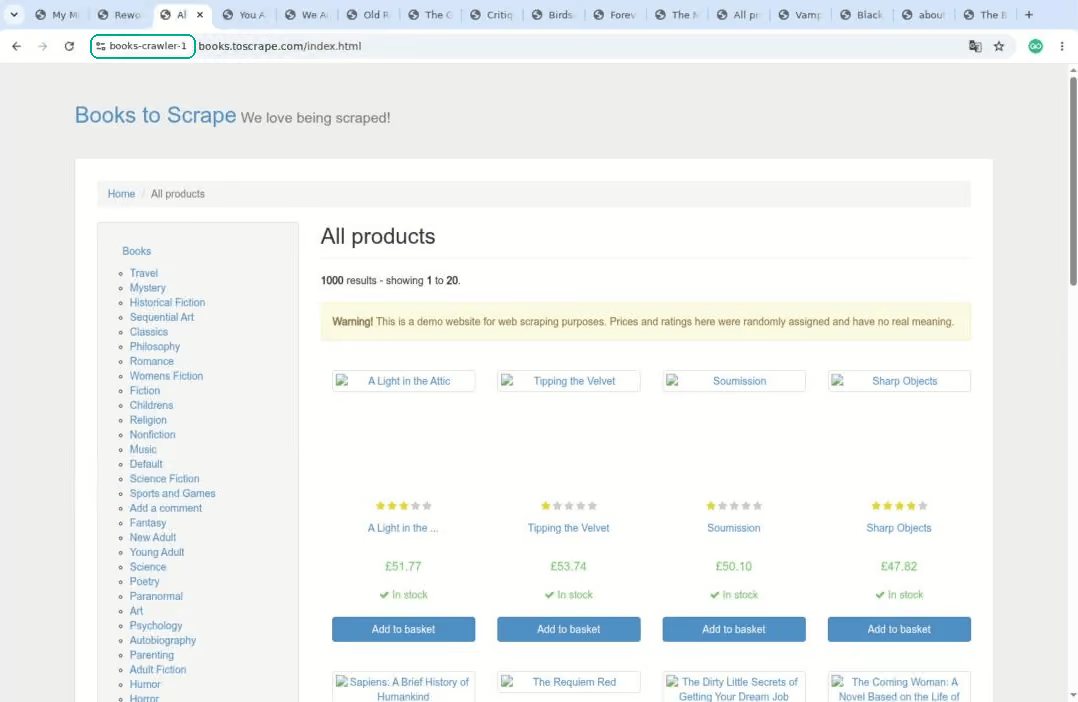
View shows the profile’s browser in the cloud during the crawl:
To combine backends, try HTTP first and let --escalate gologin send the pages HTTP can’t read to the cloud. On the JavaScript sandbox, 1 profile with 2 tabs returned the same 11 records as local tabs:
uv run python crawler.py --backend http --escalate gologin \
  --profiles "$(cut -d, -f1 profiles.txt)" --tabs 2 \
  --seed https://quotes.toscrape.com/js/ --include '/js/' --workers 4 \
  --per-host 1 --interval 1 --max-pages 50 --max-depth 20 --out quotes.jsonl
Stop every session, even after a failure
close() calls _stop() for every profile, so each cloud session stops when the crawl ends:
async def _stop(self, profile_id: str) -> int:
    async with self.http.delete(
            f"{API}/browser/{profile_id}/web",
            headers={"Authorization": f"Bearer {self.token}"}) as r:
        return r.status
run_and_close() in crawler.py wraps every crawl in try/finally, so the cleanup runs after a normal finish, an exception, or Ctrl+C:
async def run_and_close(crawler, args, fetcher, escalation, browsers,
                        markdown) -> float:
    """Run the crawl. Whatever happens, save state and close every browser."""
    try:
        if escalation:  # inside try: a half-open pool still closes
            for tab in await escalation.slots(args.tabs):
                browsers.put_nowait(tab)
        return await crawler.run(args.workers, args.sitemap)
    finally:  # a normal end, an exception, or Ctrl+C
        crawler.checkpoint()  # keep what was done
        if markdown:
            markdown.shutdown()
        for f in (fetcher, escalation):
            if hasattr(f, "close"):
                await f.close()  # GologinPool.close() stops each session
_stop() uses the REST API rather than the CDP connection, so it stops a session even after that connection has dropped. During the crawl, a navigation past its 45-second timeout or a dropped CDP connection raises an exception in the worker. handle() counts it, and the URL is retried with backoff, up to 3 times.
When a session drops, each of its tabs fails once and its worker stops, so the other tabs take over the remaining URLs. In a test that stopped 1 of 3 profiles mid-crawl, the other 32 tabs still fetched all 1K pages, and the summary counted "tabs_closed": 16.
Memory on your machine
At 48 tabs, the crawler’s memory stayed under 450 MB with Chromium in the cloud and peaked at up to 6,184 MB with local Chromium. Here are the 1K-page runs:
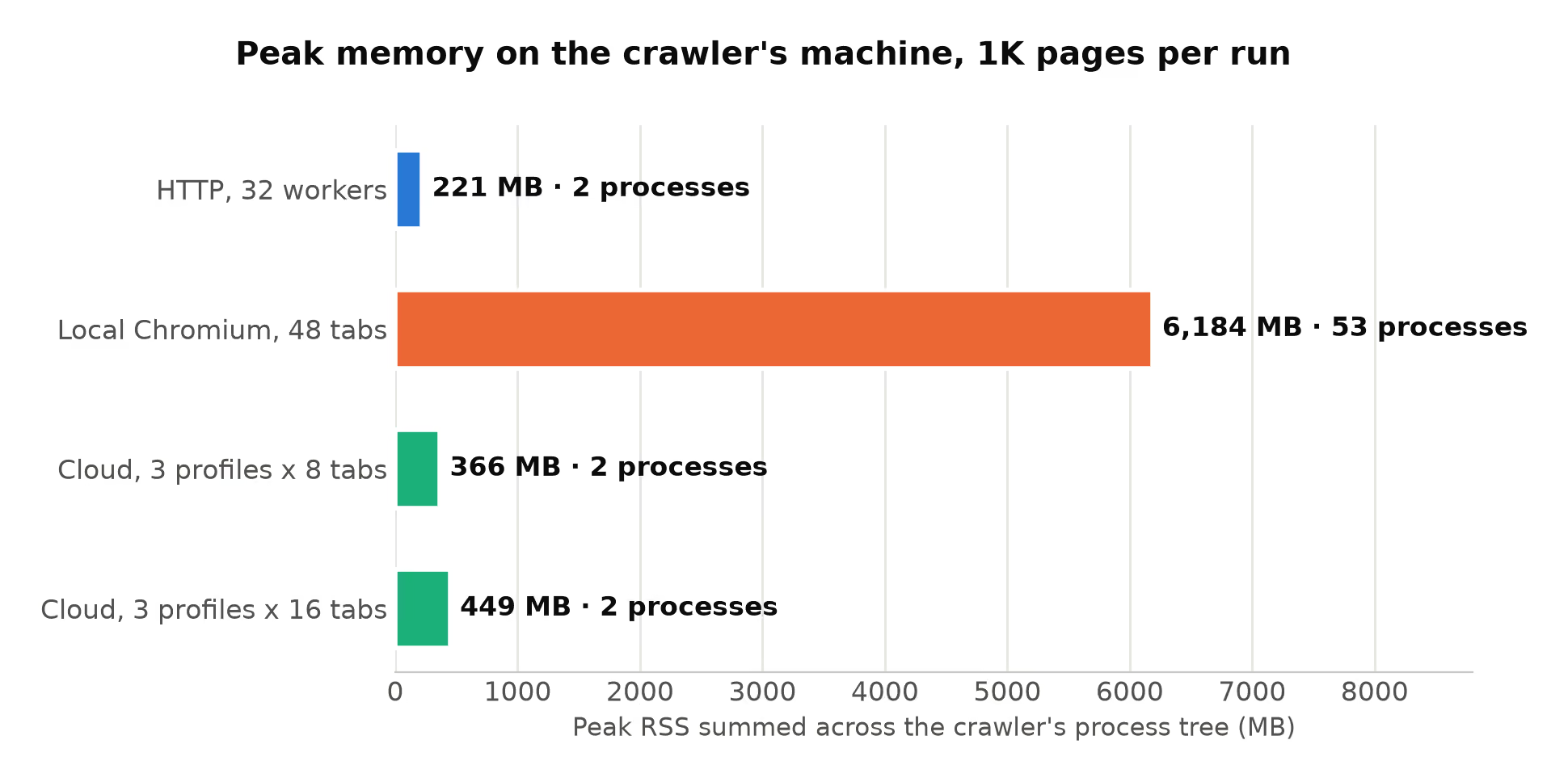
With under 450 MB on the client, a small VM can run the crawler, too. Extracting each page with one content() call keeps the work per page low, as measured in the Playwright cloud guide.
What a profile keeps between sessions
Each time a test profile was stopped and started again, it was the same browser:
- Same fingerprint. Canvas, WebGL, screen, and CPU values were identical on every start.
- Same storage. A cookie and a localStorage value written in one session were still present in the next session.
Connect like this to use that state:
- Use
browser.contexts[0]. It’s the profile’s own browser context, with its cookies and storage. - Pass
no_defaults=True(Playwright 1.60 or newer), so the profile keeps its own download, focus, and media settings.
Attach a proxy to the profile, and every session that uses the profile routes through it. Use a sticky proxy, which keeps the same exit IP for a session, so the IP matches the rest of the profile’s identity. A set of profiles, each with its own proxy, then works as a proxy rotation pool. The crawler spreads its tabs across every profile in --profiles, and each profile keeps its own IP for its own accounts and sessions.
Tabs add throughput, and profiles set how many distinct browsers a site sees. Every tab in a profile shows sites the same identity, with one fingerprint, cookie jar, and proxy. For more accounts or sessions in parallel, add profiles rather than tabs.
A profile also keeps its HTTP cache. prepare() makes the browser revalidate each cached page with the server, so an unchanged page transfers only about 0.1 KB.
Why a cloud profile has a consistent fingerprint
Many sites compare a browser’s signals with each other, so all of a browser’s signals need to agree. Changing the User-Agent changes one value, while other signals, such as the brand list in the client hints and navigator.platform, keep reporting the original browser.
consistency.py reads those signals and lists the mismatches it finds. Run it on a profile, then on local Chromium as it ships and with a changed User-Agent:
uv run python consistency.py gologin "$(cut -d, -f1 profiles.txt)"
uv run python consistency.py local
uv run python consistency.py local-override
On the cloud profile:
contradictions: noneA cloud profile sets these values inside a modified Chromium build that’s designed to keep them consistent. Stealth browser crawling often patches these values with scripts, and a value that a script changes can contradict the browser engine’s real values.
Local Chromium as it ships reported navigator.webdriver is true. With a Windows User-Agent on a Mac:
contradictions: ['navigator.webdriver is true', 'User-Agent says Chrome 155, client hints say Chromium/153, Not_A Brand/8', 'User-Agent says Windows, navigator.platform says MacIntel']That run used Chromium’s full headless mode, channel="chromium", which removes the HeadlessChrome brand and gives local Chromium the best conditions. The crawler’s own local backend uses the lighter headless shell, which keeps that brand. In a Linux container, the same local run also reported a software GPU and a time zone that didn’t match the IP address’s location.
Headful mode, with a visible window, changed nothing here. consistency.py local-headful reported the same navigator.webdriver is true, because the browser is under automation either way. In the headful vs headless crawler choice, full headless is the same browser without a window. Run headful to watch or debug a crawl, and on a Linux server, give it a virtual display such as Xvfb.
What it costs
The free plan includes 3 runs of up to 15 minutes each. Paid plans include 50 hours on Professional ($4.50 a month), 100 on Business ($8), and 200 on Enterprise ($14). That works out to $0.07 to $0.09 per browser hour, the same rate as extra hours. There are no per-request fees, and proxy traffic beyond a plan’s allowance costs $1/GB.
The single-profile crawl kept 1 session open for about 2 minutes, start to stop, so it fits in a single free run. On a paid plan, that’s $0.0024 to $0.0031 of browser time for 1K pages. The 3-profile run used 3 sessions for about 84 seconds each, or $0.0049 to $0.0063.
With images and fonts blocked and the profile’s HTTP cache in use, each run downloaded 3.9 MB. Through a paid proxy, that traffic would add about $0.004. So a 1K-page crawl costs under 1 cent of browser time, and about 1 cent at most with proxy traffic.
What changes at production scale
Crawling many sites continuously keeps the same frontier, workers, and fetchers, and adds a few parts around them:
- A durable frontier in Redis, a database, or Kafka, so the queue isn’t lost in a crash. Several machines can then share the work as a distributed web crawler.
- A size limit on each host’s queue, so one busy domain can’t fill a machine’s memory with its backlog.
- Deduplication that scales, with Bloom filters or a key-value store, plus near-duplicate detection.
- Raw HTML storage, often as WARC (Web ARChive) files, so an extractor bug means reparsing, not recrawling.
- Metrics and alerts on block rate, records per page, and
parse_errorfor each site. - A recrawl schedule per URL, based on how often each page changes.
- Tests for every extractor, run on saved pages, so a site’s markup change fails a test instead of a crawl.
- One persistent browser profile per identity, stored outside your machines, so logins and sessions are kept after restarts and redeployments.
Final thoughts
An asynchronous web crawler is a frontier with one queue per host, a worker pool, and a fetcher, and only the fetcher needs a browser. Async made the local browser crawler much faster, until adding tabs increased memory much more than speed. Cloud browser profiles keep each profile’s canvas, WebGL, screen, and cookie state between sessions, and the crawler’s memory stays small.
Concurrency then becomes a choice between more tabs for speed and more profiles for distinct identities. Start with the HTTP backend, and when pages need a browser or a login, run --escalate gologin on a free Gologin Cloud Browser account.
FAQ
How can I create my own web crawler?
Start with a frontier that keeps one URL queue per host and a set of URLs already seen. A few async workers fetch, parse, and enqueue new links. Add a per-host rate limit and a robots.txt check before the first real crawl. Python’s asyncio, aiohttp, and Playwright cover most needs without a framework.
How do I design a web crawler system?
Split it into a frontier with one queue per host, fetch workers, a parser, and storage. Fetch over HTTP first, and send only the pages that need JavaScript or a login to a browser. When one process or one machine isn’t enough, store the frontier, for example in Redis.
Is Playwright good for web scraping?
Yes, when pages need JavaScript or a real browser session. It renders client-side apps and automates login flows. Each tab uses a lot of memory, and 48 local tabs peaked at up to 6.2 GB in 1K-page tests on a 16 GB laptop. Gologin Cloud Browser profiles move that memory to the cloud and keep each profile’s identity between sessions.
What are the disadvantages of using Playwright?
It uses more memory, CPU, and bandwidth than an HTTP client, so use it only for pages that need a browser. Default local headless Chromium exposes automation signals, and changing the User-Agent adds contradictions. Cloud browser profiles run Chromium in the cloud, and their signals are built to stay consistent.
Is a web crawler the same as a web scraper?
Not exactly. A crawler discovers pages by following links and decides what to visit next. A scraper extracts structured data from the pages that it receives. Most production systems combine both, with the crawler adding URLs to a frontier and the parsing step extracting records from each fetched page.
Is asyncio faster than threading for web scraping?
For crawling, asyncio scales further, though threads also overlap network waits. Each thread is an OS thread, and with Playwright it also needs its own Playwright instance, because the API isn’t thread-safe. One asyncio event loop drives many tabs in a single thread. Use processes, not threads, for CPU-heavy parsing such as markdown extraction.
Should a web crawler run headless or headful?
Headless, in most cases. Chromium’s full headless mode is the same browser without a window, and headful mode reported the same automation signal when tested. Run headful when you want to watch or debug a crawl. On a Linux server, headful mode needs a virtual display such as Xvfb.