Twitter Automation in 2026: X API Rules, Costs and Multiple Accounts
Try Gologin for free
Twitter automation in 2026 comes down to one rule: X lets you automate your own accounts through its official API and bans scripting its website. So every post, mention check and status check in this guide goes through the API. The API can’t do everything, though: signing in to X, approving an app and answering X’s security prompts all happen in a browser, with a person at the keyboard.
That browser part is where a cloud browser comes in. With several accounts, each browser session needs its own cookies, fingerprint and IP, or the accounts end up sharing one device and one connection. So each account gets its own cloud browser profile with a dedicated proxy, and no script ever touches the website. This guide covers what you can automate on X (formerly Twitter), what each action costs on the pay-per-use API, how to keep accounts for separate brands or clients apart, and how to spot a restriction before it becomes a suspension. Every rule quoted below was checked on the official X pages on November 4, 2026.
TL;DR
- X’s Automation Rules allow posting, scheduling and auto-replies on an opt-in basis through the API. They prohibit automated likes, bulk follows and “scripting the X website”.
- The X API has no monthly plans anymore. It is pay-per-use: $0.015 per post, $0.20 per post with a link, $0.001 per read of your own data.
- You can run up to 10 accounts, as long as each one serves a “different, non-duplicative” purpose.
- Keeping accounts apart means one profile per account, each with its own proxy, cookies and fingerprint. Two profiles without proxies still share your IP.
- Our routine (status check + mentions + 1 post) costs up to $0.025 per run at list prices: about $0.75 per account per month on a daily run.
| Key fact | Value | Source |
|---|---|---|
| Automating the X website | Prohibited, risk of permanent suspension | Automation Rules (checked Nov 4, 2026) |
| API pricing model | Pay-per-use, no subscription | docs.x.com, Pricing |
| Creating a post via the API | $0.015 per request ($0.20 with a URL) | docs.x.com, Pricing |
| Reading your own data (Owned Reads, mentions included) | $0.001 per resource | docs.x.com, Pricing |
| Posts per user | 100 every 15 minutes | docs.x.com, Rate limits |
| Accounts per person | Up to 10, for non-duplicative purposes | Authenticity policy |
| robots.txt for generic bots | Disallow: / |
x.com/robots.txt |
| Cost of our routine (3 calls) | Up to $0.025 per run | Our test + list prices |
What You Can Automate on X, and Where It Starts Breaking the Rules
X’s Automation Rules page (checked on November 4, 2026) is aimed at developers, but it applies to any account: “You are ultimately responsible for the actions taken with your account.” Here is how each common action stands:
| Action | Allowed? | Condition in the rules |
|---|---|---|
| Scheduled posts from your account | Yes | No duplicate or near-duplicate posts, on one account or across several |
| Posts fed from an RSS feed or your own data | Yes | You must be authorized to publish that information |
| Automatic replies and mentions | Only on an opt-in basis | The user mentioned you or replied first; one reply per interaction; a way to opt out |
| Replies generated by AI | With prior approval | Requires “prior written and explicit approval from X” |
| Automatic Direct Messages | Only on an opt-in basis | The user requested it; a way to opt out |
| Automated reposts | Yes, in moderation | “bulk, aggressive, or spammy Reposting” is a violation |
| Automated likes | No | “You may not like posts or hide replies in an automated manner” |
| Following and unfollowing | Not in bulk | Not “in a bulk, aggressive, or indiscriminate manner” |
| Posting about trending topics | No | Automating posts about trends is prohibited |
| Scripting the X website | No | “may result in the permanent suspension of your account” |
Browser Automation on X: What It Prohibits and Why It’s Risky
Many searches for “twitter automation” end up at a Playwright, Selenium or Puppeteer script that logs in and clicks “Post”. X rules that route out in its own words. Under “Don’t”, the Automation Rules list “non-API-based forms of automation, such as scripting the X website”, and add: “The use of these techniques may result in the permanent suspension of your account.” The Terms of Service (effective October 9, 2026) say the same in legal language: you may not access the service “other than through our currently available, published interfaces”.
That covers your own account too. The rule applies to how you automate, not to whose account you automate. What’s at stake is the account itself: the penalty named on the page is permanent suspension, not a temporary rate limit. The alternative is the official API, and the rest of this guide follows that route.
Twitter Automation via the Official API: What It Costs in 2026
The pricing page on docs.x.com (prices checked on November 4, 2026) says the API “uses pay-per-usage pricing with no subscriptions”. You buy credits in advance from the Developer Console, and each request is charged against them. The prices that matter for a routine on your own account:
| Operation | Price | Unit |
|---|---|---|
| Create a post | $0.015 | per request |
| Create a post with a URL | $0.200 | per request |
| Create a post (summoned) | $0.010 | per request |
| Interaction (repost, follow) | $0.015 | per request |
| Delete an interaction | $0.010 | per request |
| Read other users’ posts | $0.005 | per resource |
| Read a user (includes GET /2/users/me) | $0.010 | per resource |
| Read your own data (Owned Reads: your posts, mentions, likes, followers…) | $0.001 | per resource |
Two details change the math. First, a post with a link costs 13 times more than one without ($0.20 vs $0.015), so a routine that shares 30 links a month costs $6.00 instead of $0.45. Second, X deduplicates resources within a 24-hour UTC window and caps pay-per-use plans at 3 million post reads per month. Rate limits are separate from billing: 100 posts every 15 minutes per user and 300 requests every 15 minutes for mentions. X notes that “Prices are subject to change”, so check the page before you budget.
What the API Covers, and What You Do by Hand in a Separate Profile
The API covers the routine itself, but some steps on X still need a person. Approving an app, X’s security prompts and a sign-in from a new device all happen in the browser, and X expects a human there. The split we used:
| Task | Where it runs | Done by | Details |
|---|---|---|---|
| Profile and proxy setup | Gologin API (setup_profiles.py) |
Script | One profile per account, each linked to its own residential proxy in the account’s country |
| Fingerprint per profile | Cloud browser profile | Automatic | Each profile gets its own resolution, graphics card (WebGL), language and user agent |
| First sign-in to X | Cloud browser profile | You, by hand | One-time sign-in from the account’s own IP and device |
| Security verification | Cloud browser profile | You, by hand | Answer X’s prompts: phone confirmation, email code |
| App authorization (OAuth PIN) | Cloud browser profile | You, by hand | Open the authorization URL in the profile, approve the app and copy the PIN |
| Session and cookies | Cloud browser profile | Automatic | The signed-in session stays in the profile between runs, separate from other accounts |
| Status check and mentions | X API v2 (x_routine.py) |
Script | GET /2/users/me ($0.010, User: Read) and GET /2/users/:id/mentions ($0.001 per mention, Owned Reads) |
| Publishing posts | X API v2 (x_routine.py) |
Script | POST /2/tweets: $0.015 per post, $0.20 with a link |
For the browser part we used Gologin Cloud Browser profiles: one profile per account, each with its own residential proxy, cookies and fingerprint. The profile only stores the session and gives each account a consistent IP and device. No script touches x.com inside it.
Working Scenario: Sign In Once, Then Run the Routine Through the API
We ran the whole flow on November 4, 2026 with a test account and an app in a pay-per-use project. It has three steps.
Step 1. One profile per account. setup_profiles.py creates the profiles with the Gologin API and attaches a residential proxy in the account’s country:
def create_profile(account):
    resp = requests.post(f"{GL}/browser/custom", headers=HEADERS, timeout=60,
                         json={"name": f"x-{account['key']}", "os": "win",
                               "notes": account["purpose"]})
    resp.raise_for_status()
    profile_id = resp.json()["id"]
    # residential proxy in the account's country, linked to the new profile
    proxy = requests.post(f"{GL}/users-proxies/mobile-proxy", headers=HEADERS, timeout=60,
                          json={"countryCode": account["country"], "isMobile": False,
                                "isDC": False, "profileIdToLink": profile_id})
    proxy.raise_for_status()   # a profile without its proxy must not go unnoticed
    return profile_id
The script prints what makes each profile distinct. Real output:
| Field | Profile x-brand_us (US proxy) | Profile x-support_uk (UK proxy) |
|---|---|---|
| Proxy | Residential, US | Residential, GB |
| Resolution | 2294×960 | 1920×1080 |
| WebGL | AMD Radeon 780M | Intel UHD Graphics 620 |
| Language | en-GB, en-US | en-GB |
| User agent | Chrome 141, Windows | Chrome 141, Windows |

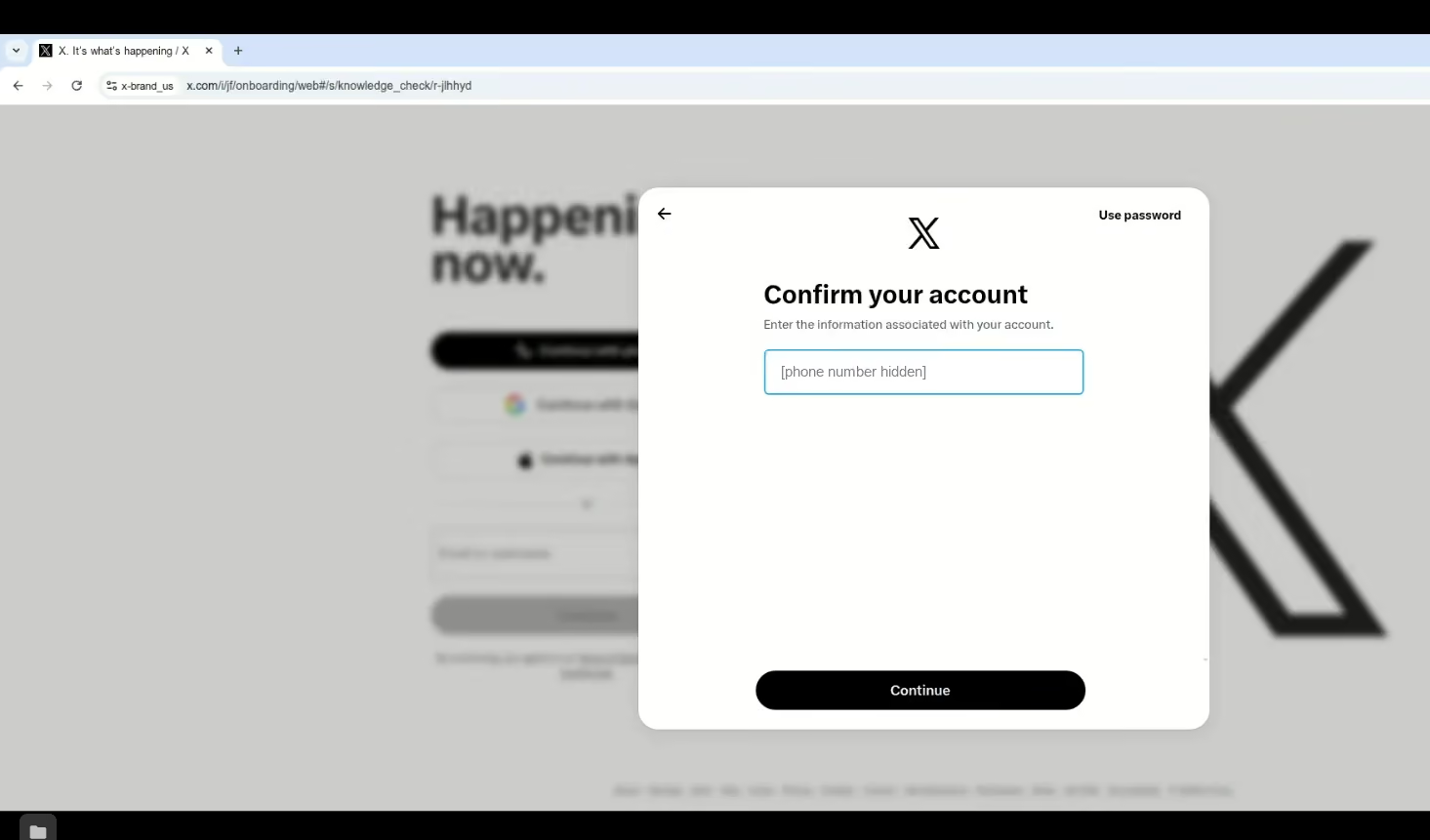
Step 2. Sign in once, by hand. We opened the US profile in manual mode and signed in to X. Because it was a new IP and device for that account, X asked to confirm the account’s phone number and then sent a code by email. The whole sign-in took about one minute. After that, the session stays in the profile.
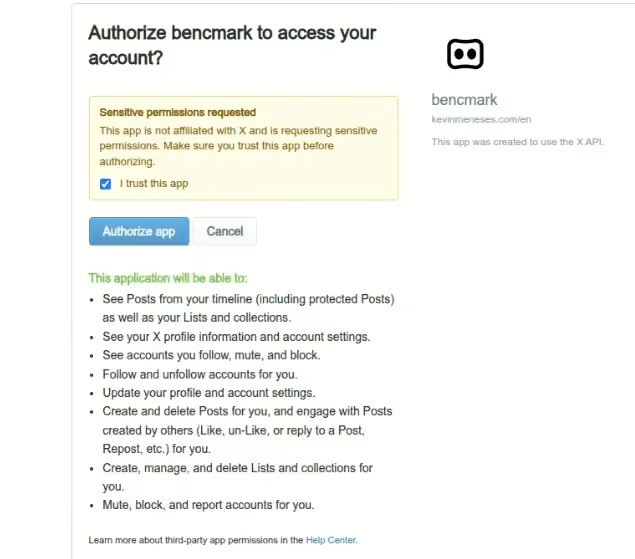
Then authorize.py runs the PIN-based OAuth flow. It prints an authorization URL, you open it in that account’s profile, approve the app and type the PIN in the terminal. The tokens are saved to a local file and never printed. Two details we hit: the URL expires within a few minutes, and the app has to be set to “Read and write” before you authorize. Otherwise the token only reads.
Step 3. The routine. x_routine.py uses only the official API. For each account it checks the status, reads new mentions since the last run and, with --post, publishes that account’s own text. It logs the HTTP status, the token’s access level, the remaining rate limit and the cost of each call:
def call(session, account, action, method, path, **kwargs):
    """One API call, logged with status, rate-limit headers and estimated cost."""
    resp = session.request(method, f"{API}{path}", timeout=30, **kwargs)
    body = resp.json() if resp.content else {}
    units = len(body.get("data") or []) if action == "mention" else 1
    cost = PRICES[action] * units if resp.ok else 0.0
    entry = {"time": datetime.now(timezone.utc).isoformat(timespec="seconds"),
             "account": account, "action": action, "status": resp.status_code,
             "access": resp.headers.get("x-access-level"),   # read / read-write
             "remaining": resp.headers.get("x-rate-limit-remaining"),
             "reset": resp.headers.get("x-rate-limit-reset"), "cost": round(cost, 4)}
    ...
Real log from the run with --post:
2026-11-04T15:54:00+00:00 brand_us    me       HTTP 200 access=read-write remaining=72 cost=$0.0010
2026-11-04T15:54:00+00:00 brand_us    mention  HTTP 200 access=read-write remaining=298 cost=$0.0000
2026-11-04T15:54:00+00:00 brand_us    post     HTTP 201 access=read-write remaining=99 cost=$0.0150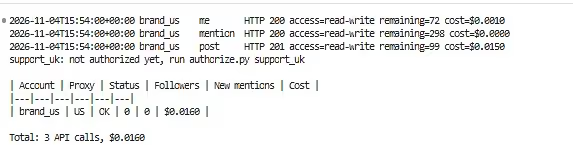
The cost column in that log comes from the first price table in our script, which counted the status call at $0.001. The table below uses X’s list prices.
What the routine costs, using the official prices:
| Call | Endpoint | Calls per run | Price | Cost per run |
|---|---|---|---|---|
| Account status | GET /2/users/me | 1 | $0.010 (User: Read) | $0.0100 |
| New mentions (0 found) | GET /2/users/:id/mentions | 1 | $0.001 per mention (Owned Reads) | $0.0000 |
| Publish a post without a link | POST /2/tweets | 1 | $0.015 | $0.0150 |
| Total | 3 | $0.0250 |
Run once a day for 30 days, that’s $0.75 per account per month. Each mention read adds $0.001, and a post with a link costs $0.20 instead of $0.015. The $0.001 mention price applies because mentions are an Owned Read: X charges it when the account is the owner of the developer app. Other accounts authorized through the same app are billed at the regular read prices.
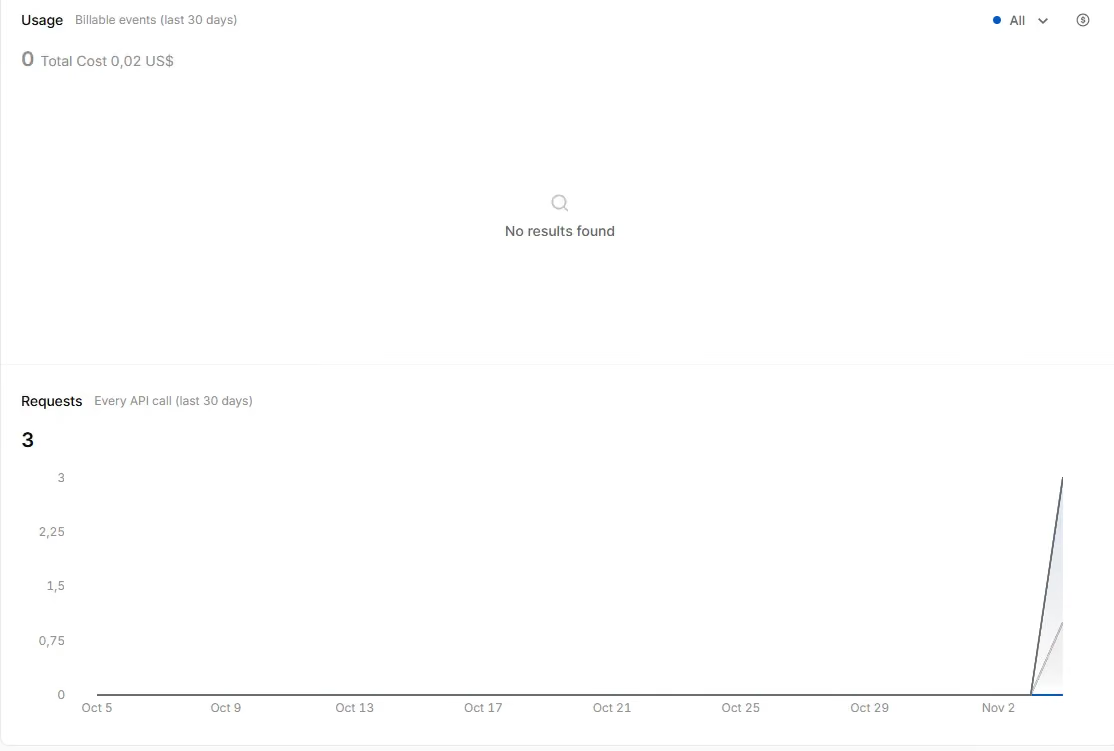
We checked the estimate against the Usage panel in the X Developer Console. For the day of the tests (3 status checks, 2 mention checks and 1 post) it showed a total cost of $0.02, rounded to the cent. That’s below the list price for the status calls: X doesn’t list GET /2/users/me among the Owned Reads, so we budget it at the User: Read price and treat $0.025 per run as the upper bound.
Running Multiple X Accounts Without Breaking the Rules
X allows more than one account, with limits. The Authenticity policy says X “allows users to create and/or operate up to ten (10) accounts for different, non-duplicative purposes.” The examples it gives as allowed:
- accounts for personal projects, hobbies or your business;
- brand accounts per location or language (English, Spanish, French);
- a social media manager running accounts on behalf of clients;
- separate chapters or branches of the same organization.
The same policy prohibits operating several accounts that engage with the same posts, accounts or polls, cross-posting identical content (localized translations are allowed), and “employing workarounds to exceed the technical limits of account creation”, such as phone number limits. Using a new account to get around an enforcement action counts as getting around a ban, which the policy also prohibits. When X finds a violation centered on multiple accounts, it may ask you to keep one and suspend the rest.
So the goal of separating accounts is not to hide them from X. It is to keep each brand or client in its own session, so that a login, a cookie or an action from one account doesn’t end up in another.
Why It Breaks on the Second Account
Most problems with a second account don’t come from the API. They come from the browser where you manage the accounts. If you open your brand account and your client’s account in the same browser, they share three things:
| Shared element | What happens in practice |
|---|---|
| Cookies and session | Both sessions live in the same cookie storage. Signing out of one, or a session expiring, affects how you work in the other, and it’s easy to post from the wrong account. |
| Fingerprint | Both accounts run on one device, with the same resolution, graphics card and language, so a security prompt or a lock on that device affects both. |
| IP | Both accounts sign in from the same address, even if one is for the US market and the other is for the UK. The same happens with two separate profiles if neither has its own proxy. |
None of this breaks X’s rules on its own: X allows several accounts with different purposes. The problem is operational. Account security follows the device and the IP. In our test, a single sign-in from a new IP was enough for X to ask for the phone number and an email code. If several accounts share a browser, a prompt or a lock on one interrupts your work on all of them. In an agency or a team, you also lose track of who signed in where.
How to Separate X Accounts: One Profile per Account
Separation is about each account having its own environment, the same way each client has its own folder:
- One browser profile per account. Each profile keeps its own cookies and session, and its own fingerprint. In our test, the US and UK profiles differed in resolution, graphics card and language (see the table above).
- A dedicated proxy for every profile. This part isn’t optional. A profile without a proxy signs in from your own IP, so two profiles without proxies are two accounts on the same connection, and separate fingerprints don’t change that. Pick the proxy in the account’s market: a US brand account signs in from a US IP and a UK support account from a UK one, so the location stays the same every time you sign in.
- Separate API tokens. Each account authorizes the app with its own PIN and gets its own tokens. The script never uses one account’s token for another.
- Different content per account. X prohibits posting “duplicative or substantially similar” content across your accounts. In our script, each account has its own text in
accounts.json. - Delays and limits. The routine waits a fixed 15 seconds between accounts and checks
x-rate-limit-remainingbefore the next call; if it has reached 0, it waits until x-rate-limit-reset. Per-user limits: 100 posts and 300 mention requests every 15 minutes, and our call to /2/users/me returned a limit of 75 per 15 minutes.
We ran the routine with one test account. The second profile is ready for another account: just sign in to it by hand and authorize it with its own PIN.
Monitoring: How to Tell an Account Is Restricted Before You Lose It
A failed call doesn’t always mean a restricted account. In our test, the first two errors were setup problems, not account problems. The script sorts every response into a status:
| Signal | What it means | What to do |
|---|---|---|
200 and x-access-level: read-write |
Account and token OK | Nothing |
200 but x-access-level: read |
The app was authorized before it had write access | Set “Read and write” and repeat the PIN |
| 403 “attached to a Project” | The app isn’t in a valid project (it happened to us with an app in a legacy project) | Move the app to a pay-per-use project |
| 401 | Token revoked or app disconnected from the account | Check Connected apps in the profile and authorize again |
| 403 for any other reason | Account locked or suspended | Open the profile by hand and read X’s notice |
| 429 | Rate limit reached | Wait until x-rate-limit-reset |
withheld in /2/users/me |
Account withheld in some countries | Check the notice in the profile |
| Verification prompt when signing in | New IP or device for that account | Answer it by hand in the profile; don’t automate it |
The first two rows were real errors from our setup. Without the 403 classification, the script would have reported a “restricted account” that was actually an app in the wrong project. The rest of the rows are the cases the routine is ready to tell apart. Some restrictions, such as reduced reach or posts being filtered from search, don’t return an error code. For those, the only check is opening the account by hand in its profile now and then.
ToS, robots.txt and Personal Data
Terms of Service. X’s ToS (effective October 9, 2026) prohibit accessing the service through anything other than its published interfaces, and add that “crawling or scraping the Services in any form, for any purpose without our prior written consent is expressly prohibited.” Automating your own account through the official API complies with this clause. Scraping other people’s profiles does not, even if it’s done from a logged-in browser.
robots.txt. x.com/robots.txt lets named search engines (Googlebot, Bingbot) crawl part of the site. For everyone else, the rule is User-agent: * followed by Disallow: /, with a 1-second crawl delay. AI crawlers such as Google-Extended and meta-externalagent are blocked explicitly. Any script that isn’t a search engine has no permission to crawl X.
Personal data. Reading your own mentions means processing the usernames and posts of people who mentioned you. Keep only what the routine needs (for example, the post ID and text, without building profiles of users), and set how long you store it. The Automation Rules also prohibit posting someone’s private information without their “prior express authorization” and sharing the content of a Direct Message without their consent. If you work with users in the EU or the UK, GDPR applies to that data even if the account is yours.
FAQ
How do I automate my Twitter account?
Through the official X API: create an app in the Developer Console, buy credits and use OAuth to post on your account. Scheduling tools that connect to the API do the same without code. X prohibits scripting the website.
What can be automated on Twitter?
Scheduled posts, posts based on outside data you’re authorized to publish, moderated reposts, and replies or DMs to users who opted in. Likes, bulk follows and posts about trending topics cannot be automated.
Why does Twitter think I’m automated?
X doesn’t publish its detection signals. Its rules list the behaviors it treats as spam: duplicate posts, aggressive following, unrequested mentions and coordinated activity across accounts. If your account does any of these at a regular pace, expect a restriction.
How much does the Twitter API cost?
It is pay-per-use, with no monthly plans: $0.015 per post and $0.20 if the post contains a link. Reading your own data, including your mentions, costs $0.001 per resource; reading other people’s posts costs $0.005 per post. You buy credits in advance in the Developer Console.
Can I have multiple Twitter accounts?
Yes, up to 10 per person, as long as each one has a different, non-duplicative purpose: personal, business, a brand per language, or client accounts if you’re a social media manager. They can’t engage with the same posts or publish identical content.
Is a Twitter bot allowed?
An automated account that posts through the API is allowed, provided it follows the Automation Rules and doesn’t spam. A bot that controls the website through a browser is prohibited and risks permanent suspension.
Conclusion
Automating X in 2026 comes down to the API: $0.015 per post, $0.001 per read of your own data, and a routine like ours costs up to $0.025 per run. The browser is still there for the steps X wants a person to do, such as the first sign-in, approving the app and answering verification prompts. With one profile and one proxy per account, those steps don’t mix accounts, and the script only sees API tokens.