DataForSEO Review 2026: SERP Data, Formats and Pricing for AI Agents
Try Gologin for free
Most SERP APIs sell convenience. DataForSEO sells volume: a Google results page for six hundredths of a cent if you can wait a few minutes, and an SEO data API that reaches far past search into keywords, backlinks, on-page audits and LLM answers.
For this DataForSEO review I ran the same 10 agent queries used in my Tavily, Exa and SerpApi tests on October 29, 2026, through all three delivery modes, checked the results against SerpApi on the same morning, and pointed the OnPage API at pages that need a login.
TL;DR and Fact Sheet
This DataForSEO review lands on a clear split. As a SERP API it has the lowest price I’ve measured, with structured JSON results that are compact enough to hand straight to a model, and its MCP server exposes 89 tools. The trade-offs are speed in Live mode, a minimum $50 top-up after the trial, and failed tasks that still cost money. Like every API in this series, it sees only what an anonymous crawler sees.
| DataForSEO (October 2026) | |
|---|---|
| What it is | Pay-as-you-go SERP and SEO data API |
| Delivery modes | Standard queue, Priority queue, Live |
| Google SERP price per 1,000 | $0.60 Standard, $1.20 Priority, $2.00 Live |
| Live latency (my test) | 4.9s p50 on successful requests |
| Output | Structured JSON (regular or advanced), HTML, Markdown fields for some elements |
| MCP | Official server, 89 tools across 10 modules |
| Trial and minimum | $1 free credit, then $50 minimum top-up; balance never expires |
| Main limitation | Public data only, no authenticated sessions |
What Is DataForSEO and Who Is It For?
DataForSEO is a data provider for SEO platforms, agencies and, increasingly, AI builders. Instead of one search endpoint, the DataForSEO API (often searched as the data for SEO API) is a catalog: the DataForSEO SERP API for Google, Bing, YouTube, Yahoo, Baidu and others, including Google AI Mode; the Keywords Data API, a keyword data API for search volumes; the Backlinks API; the OnPage API for crawling and parsing pages; DataForSEO Labs for pre-computed keyword and competitor datasets; and an AI Optimization API that tracks how brands show up in LLM answers (LLM Mentions, LLM Responses).
Everything runs on a single pay-as-you-go balance. There are no plans, and every response reports its own cost.
It suits teams that:
- Run SEO tools at scale, where a fraction of a cent per SERP decides the margin
- Feed agents and RAG pipelines with search results plus keyword or backlink context
- Track AI visibility, comparing Google AI Overviews, AI Mode and LLM answers
- Prefer raw data to a finished dashboard, and are happy to build on top of it
Testing Methodology
Most DataForSEO reviews describe the catalog; this one measures it. Every figure in this DataForSEO review comes from a script that calls the DataForSEO API, logs latency and the cost field DataForSEO returns with each task, and checks the account balance before and after each test.
- Queries: the same 10 prompts from the earlier reviews (4 time-sensitive, 4 technical, 2 niche), United States, English, desktop.
- Live mode: each query once through
live/advanced. - Queues: the same 10 queries posted with
task_postto the Standard and Priority queues, then collected withtask_get. - Same-day accuracy check: each query sent to SerpApi minutes after the Live run, comparing the top three organic URLs.
- Formats, AI features and MCP: regular vs advanced vs HTML on one query, Google AI Mode, AI Overview with and without async loading, and a direct MCP handshake.
- Boundaries: the OnPage API against 8 public, login-gated and protected URLs.
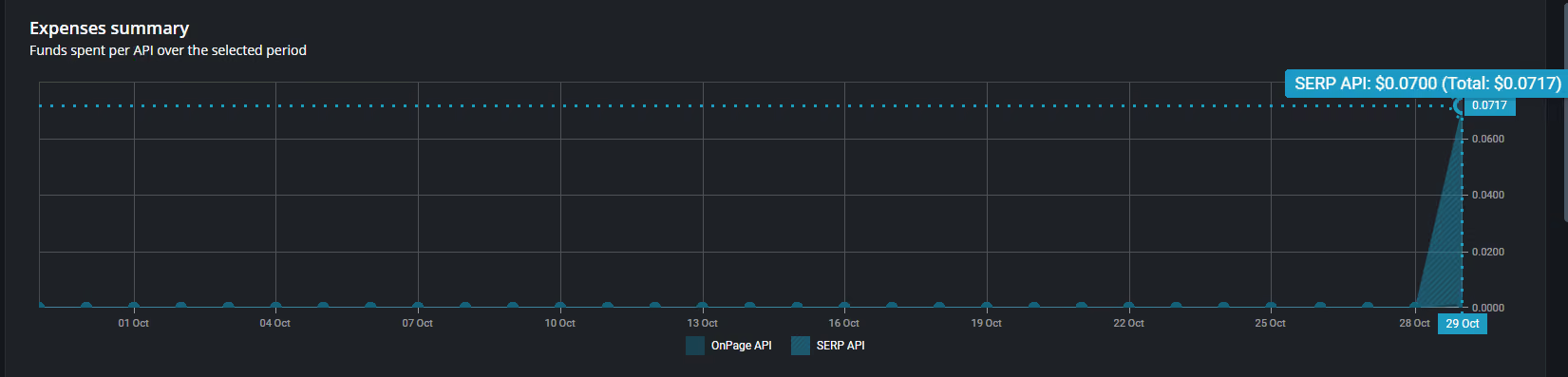
The full suite cost $0.0717 of the $1 trial credit across 55 API requests, as the dashboard confirms.

Benchmark Results: Formats, Queues, Accuracy and MCP
Live vs Standard vs Priority queue
| Mode | How it works | Turnaround (my test) | Price per SERP |
|---|---|---|---|
| Live | One POST, result in the response | 4.9s p50, 13.6s slowest success | $0.002 |
| Priority queue | task_post, poll tasks_ready, task_get |
All 10 back in under 2 minutes: 36s p50, 116s slowest | $0.0012 |
| Standard queue | Same flow, lower priority | 7 of 10 back within 38s (17s p50); 3 still queued after 10 minutes | $0.0006 |
Live mode is the only option for an agent waiting on an answer, and it is slow next to SerpApi, which answered the same queries in 1.5s p50 that morning. The queues suit batch work at a fraction of the Live price, but their order isn’t fixed: by DataForSEO’s own timestamps, most Standard tasks came back faster than Priority ones, while three were still queued after ten minutes, inside the documented 45-minute target. Use Priority when every result has to arrive within a couple of minutes. Rate limits are generous: the docs allow up to 10,000 API calls per minute.
Reliability needs a mention. Six of my 22 Live calls failed with “Internal SE Server Error” (status 40101), including two of the 10 benchmark queries and the HTML endpoint twice. Retries worked, but each failed task was still billed at the full price.
SERP accuracy vs SerpApi on the same day
Two APIs asking Google the same question minutes apart did not get the same page. Across the 8 queries both returned, the top three URLs overlapped by 0.75 on average, and the first result matched on 2.
The differences were not one-sided. The model-release query returned an identical top three. On the Playwright CDP question, DataForSEO led with playwright.dev and Stack Overflow while SerpApi returned a YouTube video and a vendor page; on aiohttp rate limiting, SerpApi’s top three were off-topic, and DataForSEO’s were a GitHub discussion and two relevant threads. Google results vary with time, data center and personalization signals, so treat “accuracy” as consistency with the live SERP rather than one fixed truth.
Parsing itself was solid: 8 to 9 organic results per query, AI Overview blocks on all 8 successful queries and People Also Ask on 4.
Output formats: JSON, HTML and Markdown
| Format | Result size for one SERP | Approx. tokens | Note |
|---|---|---|---|
| Regular JSON | 5,093 chars | ~1,300 | Organic results and core fields |
| Advanced JSON | 13,325 chars | ~3,300 | Every SERP feature, with type and position |
| HTML | Not returned | n/a | Failed twice with 40101, billed both times |
These are small payloads. The advanced result carried every SERP feature at roughly a sixth of the token count of SerpApi’s full JSON for a comparable page. There is no Markdown option for the whole SERP, but individual elements such as the AI Overview include a markdown field, and the OnPage API returns any page as Markdown with markdown_view.
Google AI Mode and AI Overview
The Google AI Mode endpoint answered in 8.2 seconds for $0.004 and returned the answer as an ai_overview item. On the standard organic endpoint, an AI Overview was already present without extra parameters; turning on load_async_ai_overview to force the asynchronous version doubled the cost to $0.004 and added about three seconds.
DataForSEO MCP server
DataForSEO hosts an official Model Context Protocol (MCP) server at mcp.dataforseo.com, authenticated with the API login and password. My handshake returned dataforseo-mcp-server version 2.9.14 in 0.6 seconds with 89 tools: 27 for DataForSEO Labs, 20 for backlinks, 13 for AI optimization, 7 each for SERP and Keywords Data, and the rest for OnPage, domain analytics, content analysis, Amazon and business listings. The DataForSEO MCP server can also be self-hosted, with modules switched on or off to keep the tool list manageable.
DataForSEO Pricing: Cost per 1,000 Requests
DataForSEO API pricing is pay as you go. New accounts get a $1 trial credit; after that the minimum top-up is $50, and the balance never expires.
| Endpoint | Standard queue | Priority queue | Live |
|---|---|---|---|
| Google Organic SERP (per 1,000 SERPs) | $0.60 | $1.20 | $2.00 |
| Google AI Mode (per 1,000 tasks) | $1.20 | $2.40 | $4.00 |
| OnPage content parsing (per 1,000 pages) | Live only | Live only | $0.15 (measured) |
| LLM Responses (per task) | $0.0002 + $0.01 advance | Not offered | $0.0006 + the LLM’s own price |
The DataForSEO SERP API pricing has multipliers worth knowing. Each search operator such as site: costs five times the base price, every extra 10 results beyond the first page adds a base price, and async AI Overview loading adds $0.002.
How that compares with the rest of this series, per 1,000 searches at entry level:
| API | Lowest-cost option | Fastest option |
|---|---|---|
| DataForSEO | $0.60 (Standard queue) | $2.00 (Live) |
| Exa | $4.00 (instant) | $4.00 (instant) |
| Tavily | $8.00 (basic, pay as you go) | $8.00 |
| SerpApi | $25.00 (Starter plan) | $25.00 |
Even DataForSEO’s Live price is half of Exa’s and about a twelfth of SerpApi’s Starter rate. The catch is the $50 entry ticket after the trial, which matters more to a solo developer than to a team.
Sources: DataForSEO pricing · Google Organic SERP API pricing · Google AI Mode pricing · LLM Responses pricing
DataForSEO Review: Pros and Cons
Pros
- Lowest price per SERP in this series: $0.60 per 1,000 in the Standard queue, $2.00 in Live.
- Compact structured JSON results: about 3,300 tokens for a full advanced SERP.
- Breadth beyond search: Keywords Data, Backlinks, OnPage, DataForSEO Labs and the AI Optimization API on one balance.
- The largest MCP toolset I’ve tested: 89 tools, hosted or self-hosted.
- Balance never expires, and every response states its own cost.
Cons
- Failed tasks are billed: 6 of 22 Live calls failed with “Internal SE Server Error” and each still cost $0.002.
- Live mode is slow: 4.9s p50 against 1.5s for SerpApi on the same morning.
- $50 minimum top-up once the $1 trial credit runs out.
- Cost multipliers add up: search operators cost five times the base price.
- No whole-SERP Markdown, and the HTML endpoint failed in my run.
Limitations: Public Data vs Authenticated Pages
DataForSEO collects what an anonymous crawler can reach. It doesn’t refuse URLs up front; it tries, and returns what the site gives an anonymous visitor. My OnPage content-parsing test, with Markdown output, made that visible:
| Page | OnPage API result |
|---|---|
| DataForSEO docs page | Full content as Markdown |
| Practice site (signed out) | Public page only, no member links |
| Amazon product page | Product title and specs, no price |
| LinkedIn feed | Sign-in wall |
| GitHub account settings | Login page |
| Reddit, Instagram, WSJ | Empty: “Page content is empty” |
Each of those requests cost $0.00015, including the empty ones. There is no way to pass a session, cookies or credentials, so a page that changes once you sign in will always come back in its signed-out form. For rank tracking and keyword research that’s irrelevant; for an agent working inside an account, it’s the wall.
The Gologin Bridge: DataForSEO for Discovery, Gologin for Logged-In Pages
| DataForSEO | Gologin Cloud Browser | |
|---|---|---|
| Role | Bulk public SERP and SEO data | Signed-in access to account pages |
| Identity | Anonymous crawler on every request | One persistent profile reused across runs |
| What persists | Nothing | Cookies, storage, device fingerprint and residential IP |
| Logged-in pages | Sign-in walls or empty results | Opened as your signed-in user |
| How you call it | REST, task queues, MCP server | CDP with Playwright or Puppeteer, MCP server |
| Billing | Per task from a prepaid balance | Browser time plus residential proxy traffic |
My OnPage run is the brief for this section. LinkedIn returned its sign-in wall, GitHub its login page, and Reddit, Instagram and WSJ came back empty. DataForSEO did its job; those pages simply have nothing to show an anonymous crawler.
Gologin Cloud Browser reaches them as a person would. Its persistent browser sessions keep the same device fingerprint, residential IP, cookies and storage on a profile across runs, so a site recognizes a returning, signed-in visitor rather than a fresh request. That is the missing half of authenticated web data extraction: DataForSEO finds and ranks the URLs in bulk, and Gologin opens the ones behind a login, using your own accounts and within each site’s terms.
DataForSEO Python Script: Discovered URLs to Signed-In Markdown
The demo runs on quotes.toscrape.com, a practice site where signed-in visitors see a “Goodreads page” link under each quote. Discovery uses the OnPage API: it parses the start page as Markdown, and the script pulls the tag links from it, drops duplicate variants and keeps three topics. That costs $0.00015, far less than a SERP request with a site: operator, which would be billed at five times the base price.
The profile signs in once before the first run, with first_login() or by hand in the session’s live view; after that the session stays on the profile.
import os
import re
import requests
from bs4 import BeautifulSoup
from markdownify import markdownify
from playwright.sync_api import sync_playwright

DFS_AUTH = (os.environ["DATAFORSEO_LOGIN"], os.environ["DATAFORSEO_PASSWORD"])
GL_TOKEN = os.environ["GL_API_TOKEN"]
PROFILE_ID = os.environ["GL_PROFILE_ID"]
CDP_URL = f"wss://cloudbrowser.gologin.com/connect?token={GL_TOKEN}&profile={PROFILE_ID}"
FALLBACK_URLS = ["https://quotes.toscrape.com/tag/inspirational/",
                 "https://quotes.toscrape.com/tag/life/"]

def discover(site, topics=("inspirational", "life", "humor")):
    """DataForSEO's OnPage API parses the start page as Markdown; pull the links we want."""
    resp = requests.post("https://api.dataforseo.com/v3/on_page/content_parsing/live",
                         auth=DFS_AUTH, json=[{"url": site, "markdown_view": True}], timeout=120)
    task = resp.json()["tasks"][0]
    items = (task.get("result") or [{}])[0].get("items") or [{}]
    md = items[0].get("page_as_markdown") or ""
    links = re.findall(r"\]\((https?://[^)\s]+/tag/[^)\s]+)\)", md)
    # tag/life/ and tag/life/page/1/ are the same page: normalize, then dedupe in order
    links = list(dict.fromkeys(u.replace("page/1/", "") for u in links))
    urls = [u for u in links if any(f"/tag/{t}/" in u for t in topics)]
    print(f"DataForSEO found {len(links)} tag pages (task cost ${task.get('cost')})")
    if not urls:
        print("No matching tag pages, using fallback URLs")
    return urls or FALLBACK_URLS

def first_login(page, username, password):
    """Run once per profile. Afterwards the session lives on the profile."""
    page.goto("https://quotes.toscrape.com/login")
    page.fill("#username", username)
    page.fill("#password", password)
    page.click("input[type='submit']")

def to_markdown(html):
    soup = BeautifulSoup(html, "html.parser")
    for tag in soup(["script", "style", "nav", "header", "footer", "form"]):
        tag.decompose()
    blocks = soup.select("main, article, .col-md-8") or [soup.body]
    main = max(blocks, key=lambda el: len(el.get_text()))  # largest content block
    return markdownify(str(main), heading_style="ATX", strip=["img"])

def stop_profile():
    """Stop the cloud browser itself; browser.close() only disconnects Playwright."""
    resp = requests.delete(f"https://api.gologin.com/browser/{PROFILE_ID}/web",
                           headers={"Authorization": f"Bearer {GL_TOKEN}"}, timeout=30)
    print(f"cloud session stopped: HTTP {resp.status_code}")

urls = discover("https://quotes.toscrape.com/")
with sync_playwright() as p:
    browser = page = None
    try:
        browser = p.chromium.connect_over_cdp(CDP_URL)
        page = browser.contexts[0].new_page()
        # first_login(page, os.environ["SITE_USER"], os.environ["SITE_PASS"])  # first run only
        for url in urls:
            page.goto(url, wait_until="domcontentloaded")
            signed_in = page.locator("a[href='/logout']").count() > 0
            md = to_markdown(page.content())
            print(f"{url} | signed in: {signed_in} | "
                  f"member links: {md.count('Goodreads page')} | ~{len(md) // 4} tokens")
    finally:
        if page:
            page.close()
        if browser:
            browser.close()
        stop_profile()
Log from my run on October 29, 2026:
DataForSEO found 26 tag pages (task cost $0.00015)
https://quotes.toscrape.com/tag/inspirational/ | signed in: True | member links: 10 | ~1148 tokens
https://quotes.toscrape.com/tag/life/ | signed in: True | member links: 10 | ~1128 tokens
https://quotes.toscrape.com/tag/humor/ | signed in: True | member links: 10 | ~776 tokens
cloud session stopped: HTTP 204
One OnPage call found 26 tag pages for $0.00015. All three chosen pages opened in the signed-in view with their 10 member-only links, more than two weeks after the profile’s only sign-in. If the log ever shows signed in as False, the site has ended the session, so sign in again on the same profile. And the finally block matters for the bill: browser.close() only drops the Playwright connection, while the DELETE call stops the cloud browser itself, confirmed by the 204.
FAQ
Is DataForSEO good for AI agents?
Yes, for bulk public data. It has the lowest price per SERP in this series and its MCP server gives an agent 89 tools, but Live mode averaged about five seconds, so agents that need instant answers may prefer a faster API.
How much does DataForSEO cost?
DataForSEO pricing for Google SERPs is $0.60 per 1,000 in the Standard queue, $1.20 in the Priority queue and $2.00 in Live mode. New accounts get $1 of free credit; after that the minimum top-up is $50, and the balance doesn’t expire.
DataForSEO vs SerpApi (or SerpApi vs DataForSEO): which should I choose?
Choose DataForSEO for cost and breadth: $0.60 to $2.00 per 1,000 SERPs plus keyword, backlink and LLM data. Choose SerpApi for speed and convenience: about 1.5 seconds per search, a free monthly tier and LLM-ready Markdown output, at $25 per 1,000 on its entry plan.
What are the best DataForSEO alternatives?
The main DataForSEO alternatives are SerpApi for fast, fully parsed Google results, Tavily and Exa for AI-native search with page content included, and Gologin Cloud Browser when the data sits behind a login. The right alternative to DataForSEO depends on whether you need price, speed, page content or authenticated access.
Does DataForSEO have an MCP server?
Yes. The DataForSEO MCP server is hosted at mcp.dataforseo.com and exposed 89 tools in my test, covering SERP, Keywords Data, Backlinks, OnPage, DataForSEO Labs and the AI Optimization API.
Can DataForSEO access pages behind a login?
No. It crawls as an anonymous visitor; in my test LinkedIn and GitHub returned sign-in pages and Reddit, Instagram and WSJ came back empty. For logged-in pages, use a persistent browser profile such as Gologin Cloud Browser with your own account.
Conclusion
DataForSEO is the budget engine of this series: the lowest price per SERP, compact JSON, and an MCP server with more tools than any rival I’ve tested. Use the queues for bulk work and Live mode when an agent can wait a few seconds.
For the pages that only exist behind a login, pair it with Gologin Cloud Browser, which opens them through a persistent profile as the same signed-in user every time.
Try Gologin Cloud Browser free →