SerpApi Review 2026: Search Quality, Formats and Pricing for AI Agents
Try Gologin for free
An agent that answers questions about the live web first needs the results page a person would see. SerpApi is a SERP API that sells exactly that page, parsed into JSON, for Google and more than a hundred other engines.
This SerpApi review uses the same 10 agent queries as my Tavily and Exa tests, plus every output format, a concurrency burst and a run against login-protected pages, all on October 23, 2026.
TL;DR and Fact Sheet
The verdict of this SerpApi review: it is the most faithful way to put a real Google results page in front of an AI agent. Fresh searches came back in about one second, parsed into clean JSON or LLM-ready Markdown, and a hosted MCP server makes it a one-line tool in Claude or Cursor. What it can’t do is act as a user: no logins, no sessions, no browsing behind a paywall.
| SerpApi (October 2026) | |
|---|---|
| Search accuracy | Mirrors the live Google SERP: organic results, People Also Ask, AI Overview token, dates |
| Response latency | 1.07s p50 fresh, 0.53s p50 cached (my test) |
| Output formats | JSON (default), Markdown (output=md), raw HTML |
| MCP support | Official hosted server at mcp.serpapi.com |
| Price per 1,000 searches | $25.00 (Starter) down to about $1.96 (Cloud 54M) |
| Free tier | 250 searches per month |
| Main limitation | Public web only, no authenticated sessions |
What Is SerpApi and Who Is It For?
SerpApi is a real-time web search API that fetches search engine results pages and returns them as structured data. The core product is its Google SERP API, documented as the SerpApi Google search API, but the catalog runs much wider: Bing, Baidu, Yahoo, DuckDuckGo, Naver and Yandex, plus vertical engines for Google Maps, News, Shopping, Scholar and Jobs, and e-commerce search on Amazon, Walmart and eBay.
Each response breaks the page into named blocks: organic_results, related_questions, ai_overview, knowledge_graph, ads and local packs. Proxies and HTML parsing are SerpApi’s job, not yours.
A newer Extract API extends the same model to ordinary URLs, with scrape, map and crawl modes and optional Markdown output.
Typical use cases:
- AI agents that need grounded, current answers with citations
- RAG data enrichment with fresh public sources
- SEO monitoring of rankings, snippets and AI Overviews
- Market intelligence across shopping, local and news results
Testing Methodology
Most SerpApi reviews stop at the feature list. Every number in this SerpApi review comes from a Python harness that checks the account endpoint before and after each test, so billed searches are counted, not estimated.
- Queries: the same 10 prompts used in my Tavily and Exa reviews (4 time-sensitive, 4 technical, 2 niche), sent to
engine=googlewithhl=enandgl=us. - Fresh vs cached: each query ran once with
no_cache=true, then again from SerpApi’s one-hour cache. - Formats: one query requested as JSON, Markdown and HTML.
- Load: 10 concurrent fresh searches.
- Coverage: one query on Google, Bing, Yahoo, Baidu and DuckDuckGo.
- Boundaries: the Extract API against 8 public, login-gated and protected URLs.
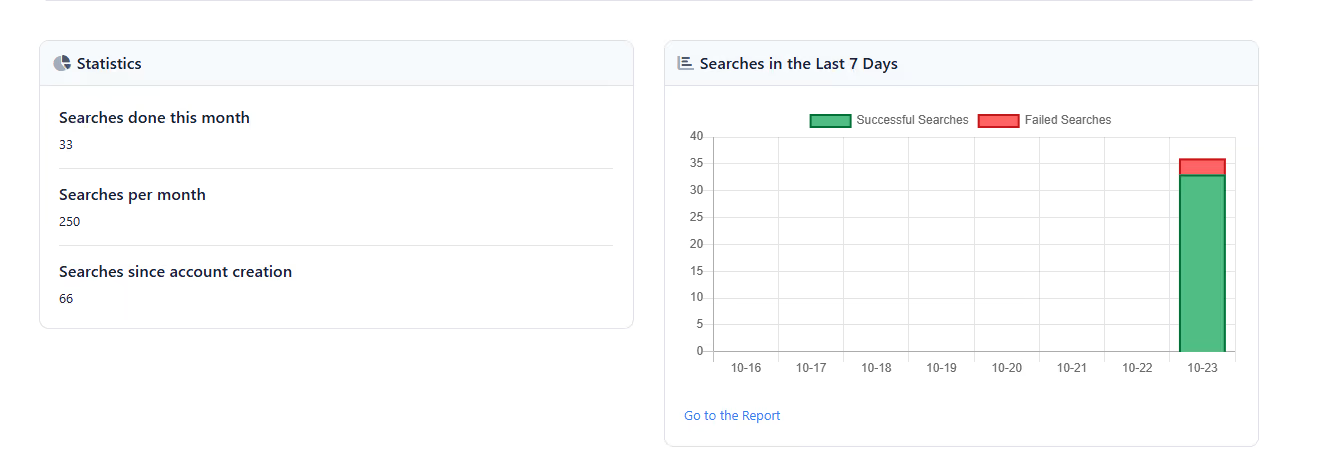
The whole suite used 33 of the 250 free monthly searches. The dashboard’s red segment shows the failed requests, which weren’t billed.
Benchmark Results: Relevance, Formats, Latency and MCP
Freshness and relevance
SerpApi returns Google’s own ranking, so relevance is as good as Google’s: playwright.dev for the CDP question, docs.python.org for the Python release, openai.com for the model release, and Reuters and CNBC stories from three and seven days earlier on the Fed decision.
Parsing was consistent across all 10 queries: 6 to 9 organic results each, People Also Ask boxes on 6 queries, and dates on 45% of organic results, taken from what Google displays. It inherits Google’s blind spots too: the MCP specification query returned a page about the 2024-11-05 spec in the top three.
One detail matters for agents. All 10 queries triggered an AI Overview, but SerpApi returned it only as a page_token. Getting the text takes a second request to SerpApi’s Google AI Overview API (engine=google_ai_overview), which counts as another search, and the token expires within a minute.
SerpApi output formats: Markdown, JSON and HTML
| Format | Size for one Google SERP | Approx. tokens | Latency |
|---|---|---|---|
| JSON (default) | 76,670 chars | ~19,200 | 1.15s |
Markdown (output=md) |
24,257 chars | ~6,100 | 1.14s |
Raw HTML (output=html) |
470,535 chars | ~117,600 | 12.85s |
The Markdown format is the one to use in prompts: a YAML header with search metadata, then each result block as headings and lists, at roughly a third of the JSON’s token cost. Raw HTML is there for debugging or custom parsing, but at 470KB and 12.9 seconds it doesn’t belong in an agent loop. To trim JSON instead, json_restrictor=organic_results returns only the blocks you name.
SerpApi latency test and rate limits
| Test | Result |
|---|---|
| Fresh search, 10 queries | 1.07s p50, 2.07s slowest typical, one 10.9s outlier |
| Cached search, same 10 queries | 0.53s p50, not billed |
| 10 concurrent fresh searches | All HTTP 200, 8.8s wall time, 1.52s p50 |
| Bing / Yahoo / DuckDuckGo / Baidu | 2.2s to 4.8s per search |
| Same-day comparison, same 10 queries | Exa instant 0.87s p50, Tavily basic 2.07s p50 |
The burst produced no throttling. The free plan’s published throughput is 50 searches per hour, although the account API reported 250 for my key, so check yours.
SerpApi MCP server
SerpApi runs an official MCP server at mcp.serpapi.com. Claude Desktop connects with the API key in the URL path; Claude Code and Codex can send it as a Bearer header instead, which keeps it out of URLs and logs. A local .mcpb bundle and a self-hosted version are also available.
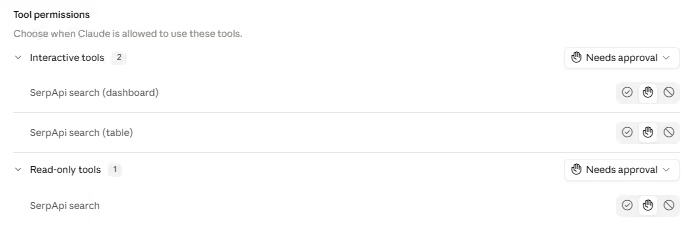
I connected over the protocol directly: the handshake returned “SerpApi MCP Server” version 2.0.0 in 0.66s, exposing three tools. search covers every engine; search_table and search_dashboard render results as interactive tables and charts in clients that support MCP Apps. Responses can come back as Markdown, which SerpApi says cuts token use by about half on average.
SerpApi Pricing per 1,000 Requests
SerpApi sells monthly subscriptions. Only successful searches count; cached, errored and failed ones are free, and a response with 100 results costs the same single search as one with 3. The SerpApi free tier gives you 250 searches a month at 50 per hour, enough to evaluate the API properly.
| Plan | Monthly price | Searches | Cost per 1,000 | Throughput per hour |
|---|---|---|---|---|
| Free | $0 | 250 | Free | 50 |
| Starter | $25 | 1,000 | $25.00 | 200 |
| Developer | $75 | 5,000 | $15.00 | 1,000 |
| Production | $150 | 15,000 | $10.00 | 3,000 |
| Big Data | $275 | 30,000 | $9.17 | 6,000 |
| Searcher | $725 | 100,000 | $7.25 | 20,000 |
| Volume | $1,475 | 250,000 | $5.90 | 50,000 |
| Infrastructure | $2,750 | 500,000 | $5.50 | 100,000 |
| Cloud 1M | $3,750 | 1,000,000 | $3.75 | 110,000 |
| Cloud 10M | $21,125 | 10,000,000 | $2.11 | 200,000 |
| Cloud 54M (largest listed) | $106,050 | 54,000,000 | $1.96 | 640,000 |
There is no per-search overage. When a plan runs out, you renew it early, manually or with Automatic Early Renewal, and the full quota resets. In practice that makes the overage price a whole plan: a Starter user who needs 1,200 searches in a month pays $50, an effective $41.67 per 1,000.
Compared with AI-native search APIs, a Google SERP through SerpApi costs more per call at low volume ($25 per 1,000 on Starter versus $8 for Tavily basic or $4 for Exa instant on pay-as-you-go). The gap closes at scale, and what you buy is the actual Google page, not a vendor’s own index.
Source: SerpApi pricing
SerpApi Review: Pros and Cons
Pros
- Faithful, well-structured JSON. Every SERP feature arrives as a named block with consistent fields, so an agent reads
organic_results[0].linkwithout guessing. - Native MCP server. Hosted and official, with three tools and Markdown responses that keep context windows small.
- Breadth. One key covers Google and its verticals, Bing, Baidu, Yahoo, DuckDuckGo, Amazon, Walmart and more, with location and language controls.
- Zero infrastructure. No proxies to rotate and no parsers to fix when Google changes its markup.
- Fair billing. Cached, failed and errored searches are free; my 10 cached repeats came back in half a second without touching the quota.
Cons
- AI Overview text costs a second search. The first response only carries a
page_token; the Google AI Overview API call that returns the text is billed separately, and the token expires within a minute. - Raw HTML is heavy and slow. One Google SERP came back as 470KB of HTML in 12.9 seconds, against 1.1 seconds for JSON or Markdown.
- No per-search overage. When the monthly quota runs out you renew the whole plan early, so a small overshoot costs a full month.
- Extract doesn’t run JavaScript. Client-rendered pages come back thin, and URLs disallowed by robots.txt or SerpApi’s content policy are refused.
SerpApi Limitations: Public Web Only
SerpApi is built for public data. Search endpoints return what an anonymous visitor sees, with no way to pass cookies, log in or keep a session between calls.
The Extract API shows the same boundary on ordinary pages. Of my 8 test URLs:
| Page | Extract API result |
|---|---|
| SerpApi docs page | Full content (Markdown capped at 50,000 chars) |
| Practice site, logged out | Public view only |
| Amazon product page | Full content, price included |
| LinkedIn feed, GitHub settings, Instagram profile | Refused: disallowed by the site’s robots.txt |
| Reddit, WSJ | Refused: not permitted by SerpApi’s content policy |
Refusals were not billed, but they make the scope clear. SerpApi honours robots.txt and its own content policy, and the Extract API does not run JavaScript, so pages that render content client-side come back thin.
Beyond that, login forms, multi-factor prompts and paywalls are out of scope, nothing persists between requests, and there is no way to click, scroll or fill a form.
For RAG over public sources, none of this matters. For an agent that has to work inside an account, it’s the whole problem.
The Gologin Bridge: SerpApi for Discovery, Gologin for Logged-In Pages
| SerpApi | Gologin Cloud Browser | |
|---|---|---|
| What it is | Public SERP and page API | Cloud browser with persistent profiles |
| Access model | Anonymous request per call | The same signed-in profile on every run |
| Logged-in pages | No | Yes, with your own accounts |
| State between runs | None | Cookies, storage, device fingerprint and residential IP stay with the profile |
| Interface | REST API, MCP server | CDP: Playwright, Puppeteer, MCP server |
| Output | JSON, Markdown, HTML | Whatever your script extracts from the page |
| Proxies | Handled internally for search engines | Built-in residential proxies attached to the profile |
SerpApi vs Gologin isn’t a head-to-head, and the public SERP scraper vs stateful browser choice is rarely either-or: the two answer different questions. SerpApi tells an agent where the information is; Gologin Cloud Browser gets it in when that information sits behind a login.
My Extract test drew that line for this article. LinkedIn, GitHub settings and Instagram were refused because their robots.txt disallows automated fetching, and Reddit and WSJ were refused under SerpApi’s own content policy. Those are exactly the pages an agent needs when it works on someone’s behalf: a feed, an account settings page, a members-only article. They are built for a signed-in person, not an anonymous API call.
Gologin comes at them from that side. Each profile is a persistent identity: the device fingerprint and residential IP stay fixed from session to session, alongside cookies and storage, so the site sees the same returning, signed-in visitor every time, using your own account.
A practical pipeline uses both: SerpApi to discover URLs, through a search or the Extract API’s map mode as in the script below, and Gologin to open the ones that need an account, with your own credentials and within each site’s terms.
Getting Started: SerpApi API Key, Rate Limits and Formats
- Get your SerpApi API key from the dashboard’s API Key page (serpapi.com/manage-api-key) and keep it in an environment variable.
- Watch your quota with the account endpoint, which doesn’t consume a search.
- Handle limits: a 429 means your hourly throughput is used up. Identical queries within an hour come from cache for free.
- Pick a format: JSON for code,
output=mdfor prompts,json_restrictorfor smaller payloads.
import os
import requests

API = "https://serpapi.com"
KEY = os.environ["SERPAPI_API_KEY"]  # copy it from serpapi.com/manage-api-key

def quota():
    """The account endpoint doesn't consume a search."""
    acc = requests.get(f"{API}/account.json", params={"api_key": KEY}, timeout=30).json()
    return acc["plan_searches_left"], acc["account_rate_limit_per_hour"], acc["last_hour_searches"]

def search(query, output="json", **params):
    resp = requests.get(f"{API}/search", timeout=60, params={
        "engine": "google", "q": query, "hl": "en", "gl": "us",
        "output": output, "api_key": KEY, **params})
    if resp.status_code == 429:
        raise RuntimeError("Hourly throughput used up: back off and retry later")
    resp.raise_for_status()
    return resp.json() if output == "json" else resp.text

left, per_hour, last_hour = quota()
print(f"searches left: {left} | hourly limit: {per_hour} | used in the last hour: {last_hour}")

query = "SerpApi MCP server setup"

# 1. Structured JSON, trimmed to the organic results with json_restrictor
data = search(query, json_restrictor="organic_results")
for r in data["organic_results"][:3]:
    print(f"{r['position']}. {r['title'][:55]} | {r.get('date', 'no date')} | {r['link']}")

# 2. The same SERP as Markdown, ready to drop into an LLM prompt
md = search(query, output="md")
print(f"markdown: {len(md):,} chars (~{len(md) // 4:,} tokens)")
print(f"searches left now: {quota()[0]}")
Output from my run on October 23, 2026:
searches left: 217 | hourly limit: 250 | used in the last hour: 0
1. SerpApi: MCP Integration | no date | https://serpapi.com/integrations/mcp
2. Integrating SerpApi MCP into Your Developer Workflow | Jan 2, 2026 | https://serpapi.com/blog/integrating-serpapi-mcp-into-your-developer-workflow/
3. Serpapi MCP Server | no date | https://composio.dev/toolkits/serpapi
markdown: 21,375 chars (~5,343 tokens)
searches left now: 217
The JSON call returned only organic_results, and the Markdown version of the same page came to about 5,300 tokens, small enough to pass straight into a model. Note the quota line: I had run the same two requests a few minutes earlier, so this run was served from cache and the balance stayed at 217. Same results, zero searches billed.
SerpApi Python Script: From Discovered URLs to Signed-In Markdown
The quickstart covers public SERPs. The script below covers the case this series is about: SerpApi finds the pages, a Gologin Cloud Browser profile opens them as a signed-in user, and each page leaves as Markdown for an LLM.
It runs against quotes.toscrape.com, a practice site where logged-in visitors see a “Goodreads page” link under every quote, so the member-only content is easy to count. Discovery uses SerpApi’s Extract API in map mode, which listed 47 URLs on the site in about five seconds; the script keeps the tag pages and drops duplicate variants.
The profile needs one sign-in before its first run: uncomment first_login() for that run, or log in by hand through the session’s live view. From then on the session stays on the profile.
import os
import requests
from bs4 import BeautifulSoup
from markdownify import markdownify
from playwright.sync_api import sync_playwright

SERPAPI_KEY = os.environ["SERPAPI_API_KEY"]
GL_TOKEN = os.environ["GL_API_TOKEN"]
PROFILE_ID = os.environ["GL_PROFILE_ID"]
CDP_URL = f"wss://cloudbrowser.gologin.com/connect?token={GL_TOKEN}&profile={PROFILE_ID}"
FALLBACK_URLS = ["https://quotes.toscrape.com/tag/love/",
                 "https://quotes.toscrape.com/tag/inspirational/"]

def discover(site, path_filter="/tag/", limit=3):
    """SerpApi's Extract API in map mode lists the site's URLs; keep the ones we want."""
    resp = requests.get("https://serpapi.com/search", timeout=120, params={
        "engine": "extract", "mode": "map", "url": site, "api_key": SERPAPI_KEY})
    found = [u["url"] for u in resp.json().get("urls", []) if path_filter in u["url"]]
    # tag/love/ and tag/love/page/1/ are the same page: normalize, then dedupe in order
    urls = list(dict.fromkeys(u.replace("page/1/", "") for u in found))[:limit]
    if not urls:
        print(f"SerpApi mapped no {path_filter} pages on {site}, using fallback URLs")
    return urls or FALLBACK_URLS

def first_login(page, username, password):
    """Run once per profile. Afterwards the session lives on the profile."""
    page.goto("https://quotes.toscrape.com/login")
    page.fill("#username", username)
    page.fill("#password", password)
    page.click("input[type='submit']")

def to_markdown(html):
    soup = BeautifulSoup(html, "html.parser")
    for tag in soup(["script", "style", "nav", "header", "footer", "form"]):
        tag.decompose()
    blocks = soup.select("main, article, .col-md-8") or [soup.body]
    main = max(blocks, key=lambda el: len(el.get_text()))  # largest content block
    return markdownify(str(main), heading_style="ATX", strip=["img"])

def stop_profile():
    """Stop the cloud browser itself; browser.close() only disconnects Playwright."""
    resp = requests.delete(f"https://api.gologin.com/browser/{PROFILE_ID}/web",
                           headers={"Authorization": f"Bearer {GL_TOKEN}"}, timeout=30)
    print(f"cloud session stopped: HTTP {resp.status_code}")

urls = discover("https://quotes.toscrape.com/")
with sync_playwright() as p:
    browser = page = None
    try:
        browser = p.chromium.connect_over_cdp(CDP_URL)
        page = browser.contexts[0].new_page()
        # first_login(page, os.environ["SITE_USER"], os.environ["SITE_PASS"])  # first run only
        for url in urls:
            page.goto(url, wait_until="domcontentloaded")
            signed_in = page.locator("a[href='/logout']").count() > 0
            md = to_markdown(page.content())
            print(f"{url} | signed in: {signed_in} | "
                  f"member links: {md.count('Goodreads page')} | ~{len(md) // 4} tokens")
    finally:
        if page:
            page.close()
        if browser:
            browser.close()
        stop_profile()
Log from my run on October 27, 2026, two weeks after the profile’s one-time sign-in:
https://quotes.toscrape.com/tag/change/ | signed in: True | member links: 1 | ~97 tokens
https://quotes.toscrape.com/tag/deep-thoughts/ | signed in: True | member links: 1 | ~97 tokens
https://quotes.toscrape.com/tag/thinking/ | signed in: True | member links: 2 | ~187 tokens
cloud session stopped: HTTP 204
SerpApi’s map call picked three tag pages from the 47 URLs it found, and the Gologin profile opened each one still signed in: the member-only links are there on every page, even though nobody logged in during this run. These tags hold one or two quotes each, which is why the token counts are small. If signed in ever reads False, the site has expired the session; sign in once more on the same profile.
The finally block is what keeps the bill honest. Closing the page and calling browser.close() only detach Playwright from the session; the DELETE request to Gologin’s API is what shuts the cloud browser down, and the HTTP 204 on the last line confirms it.
FAQ
What is SerpApi used for?
SerpApi is used to get search engine results as structured data: grounding AI agents and RAG pipelines in live results, tracking SEO rankings and AI Overviews, and collecting shopping, local and news data across Google, Bing, Baidu and other engines.
Is SerpApi good for AI agents?
Yes, as a SERP scraping API for AI agents that need the live public web. It returns Google results in about a second, offers LLM-friendly Markdown and ships an official MCP server.
Does SerpApi support MCP (Model Context Protocol)?
Yes. SerpApi offers an official hosted MCP server at mcp.serpapi.com with search, search_table and search_dashboard tools. It works with Claude Desktop, Claude Code, Cursor, VS Code and other MCP clients, and can also be self-hosted.
How much does SerpApi cost per 1,000 requests?
SerpApi costs between $25 and about $1.96 per 1,000 searches depending on the plan. Starter is $25 for 1,000 searches, Production is $10 per 1,000, Cloud 1M is $3.75 per 1,000, and the largest listed plan, Cloud 54M, works out to about $1.96 per 1,000. The free plan includes 250 searches a month.
SerpApi vs Tavily: which is better for AI agents?
It depends on what the agent needs back. In my same-day test SerpApi returned fresh Google results in 1.07s against 2.07s for Tavily basic, and it gives you the actual Google page with every SERP feature. Tavily is cheaper at entry level ($8 versus $25 per 1,000) and returns page content as Markdown in the same call, which saves a fetch step.
Can SerpApi scrape pages behind a login?
No. SerpApi only accesses public pages: it can’t log in, keep sessions or pass multi-factor prompts, and its Extract API refuses URLs blocked by robots.txt or its content policy.
What is the best SerpApi alternative for authenticated web scraping?
For pages behind a login, a stateful cloud browser such as Gologin Cloud Browser is the better fit. It keeps a persistent profile, with cookies, fingerprint and residential IP, signed in to your own account between runs, and you drive it with Playwright or Puppeteer.
Conclusion
SerpApi does one job very well: it turns live search results into data an agent can trust and parse. Use it when the answer is on the public web, and lean on its Markdown output and MCP server to keep agents fast and cheap.
When the data lives inside an account, a search API stops being the right tool. That is where Gologin Cloud Browser fits, opening authenticated pages through a persistent profile that comes back as the same signed-in user every time.
Try Gologin Cloud Browser free →