If you’re in the market for an enterprise-grade proxy service, you’ve likely heard of Oxylabs; often hailed as one of the biggest providers in the premium proxy market.
Oxylabs enables users to collect large-scale public data via a network of over 177 million IP addresses worldwide. These many IPs alone make the company a top-tier residential proxy provider, but the real question is whether Oxylabs performs as well as it looks on paper.
In this review, we’re going to answer all these questions and more. If you have been considering switching to Oxylabs for web scraping or other advanced use cases, this one’s for you.
General Overview of Oxylabs
Oxylabs is a leading tech company based in Lithuania, founded in 2015, that helps businesses collect public web data efficiently and ethically. The company provides large-scale proxy and scraping solutions and currently serves over 4000 clients globally across different sectors and use cases.
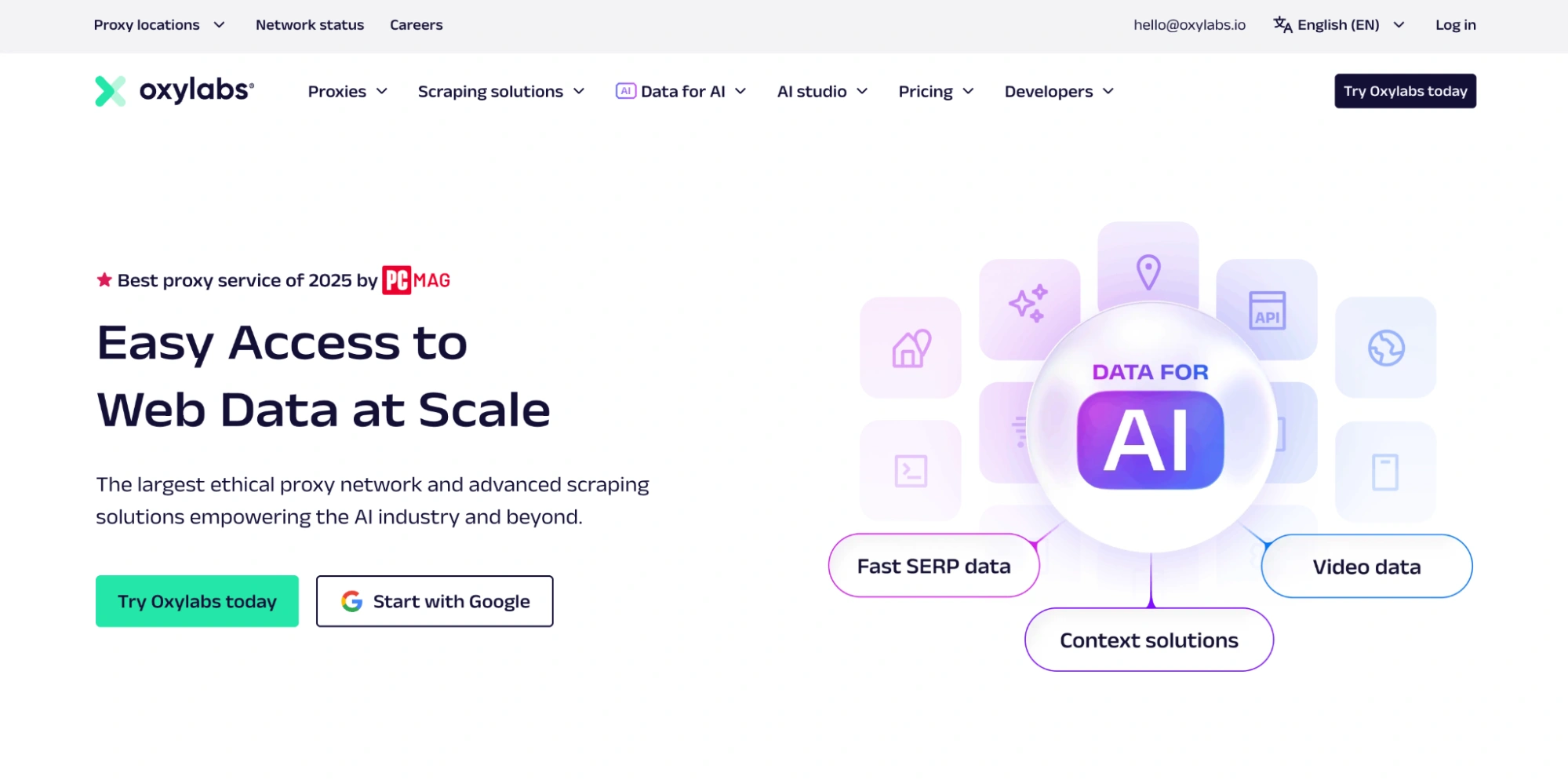
Oxylabs provides proxy services with access to over 177 million IP addresses across 195 countries, which allows users to mask their location, bypass restrictions, and browse securely with relative ease.
The company is also committed to ethical practices. It adheres to strict data protection requirements, such as GDPR, meaning it doesn’t collect or store any extra details about what you’re doing online. Oxylabs also avoids logging your activity, so there’s no record of your actions on their end.
That said, it is mainly targeted at businesses or enterprises that need to extract large amounts of structured or unstructured data from the web. It’s not typically aimed at individual users or hobbyists.
This is one of the reasons the company acquired Webshare (a sister company) to focus on the smaller consumer and freelancer market.
This strategic move gives Oxylabs the freedom to focus fully on its enterprise clients as it competes with services like Bright Data and NetNut in that category. At the same time, Webshare can cater to individuals who need more affordable proxy packages.
Oxylabs Specifications
With that in mind, here’s a quick snapshot of Oxylabs’ core specifications.
| Specification | Details |
| Proxy Type | Residential, Datacenter, Mobile, ISP |
| Location coverage | 195+ countries |
| IP Pool Size | 177M+ total IPs |
| Founded | 2015 |
| Jurisdiction | Lithuania |
| Geo-targeting | Country, state, city-level, ASN/ZIP |
| Response time (ms) | 420 ms |
| Success Rate (%) | 99% |
| Market Segment | Enterprise, large-scale operations |
| Scraping API’s | Yes (Web Unblocker, Scraper APIs) |
| Supporting tools | Extensions, dashboard tools, API integrations |
| Free Trial | Yes (only datacenter IPs) |
| Refund Policy | Yes (conditional) |
| Trustpilot score | 4.1 |
Oxylabs Pros and Cons
Just like any other proxy provider, Oxylabs has its advantages and shortcomings. When choosing a proxy provider, consider pricing, customer support, usability, and the size of the IP pool. That said, below are some of the pros and cons we found with Oxylabs.
| Pros | Cons |
| Huge IP pool (over 175 million residential IPs) | High pricing |
| Excellent geo-targeting coverage (195 countries) | Instant free trial is limited to 5 datacenter IPs |
| AI integration | Soft KYC may be required depending on use case |
| Multiple proxy types | Dashboard has a learning curve for complete beginners |
| Excellent documentation and resource center | |
| 24/7 live customer support | |
| Ethical data collection and sourcing practices | |
| Advanced session control and rotation options |
Oxylabs Proxy Services
Oxylabs initially started with datacenter proxies and gradually expanded into other proxy types, including residential proxies. Over time, the company even diversified further by introducing automated scraping solutions, such as Scraper APIs and its Web Unblocker.
This then allowed Oxylabs to transition from a proxy-only provider into a full data-gathering platform. Today, Oxylabs offers four main proxy categories: residential, datacenter, mobile, and ISP (static residential) proxies.
Residential Proxies
Residential proxies have basically been the company’s flagship service since its inception. These proxies route traffic through real IPs that are tied to real physical devices and home Wi-Fi in residential areas.
This simply means your browsing sessions tend to appear natural which greatly reduces the likelihood of detection or blocks.
Going over the numbers, Oxylabs advertises an eye-watering 175 million residential IPs in 195 countries globally. This easily makes it one of the largest active residential IP pools on the market.
You can precisely target IPs via multiple filtering methods ranging between country, state, city, ZIP code, ASN, and even coordinate-based targeting. The network also supports unlimited concurrent sessions, though usage is still governed by fair-use policies to maintain stable network performance.
The default session duration is 10 minutes, though sessions can end earlier if idle for more than 60 seconds.
You should note that the residential proxy free trial is no longer available for individuals. Also, Companies interested in testing the residential proxies will need to reach out to Oxylabs support directly.
However, the company does offer a paid trial option (which can only be activated once per account) and provides a generous 50% discount on its residential proxies for the first 6 months for new customers.
Residential Proxy Features
| Features | Details |
| IP count | 175+ million |
| Locations | 195 countries |
| Filtering | Country, state, city, ZIP |
| ASN Targeting | Available |
| Sticky sessions | Every request, up to 1440 mins |
| Concurrent sessions | Unlimited (fair usage policy applies) |
| Traffic | Plan-based, PAYG |
| Authentication | Credentials, IP Whitelisting, API access |
| Supported Protocols | HTTP, HTTPS and SOCKS5 |
| Free trial | No (paid trial available) |
Residential Proxy Pricing
Oxylabs offers both pay-as-you-go and monthly tiered plans for its residential proxies. At the moment, Oxylabs is running a 50% OFF promotion for 6 months with code OXYLABS50, which halves the entry cost.
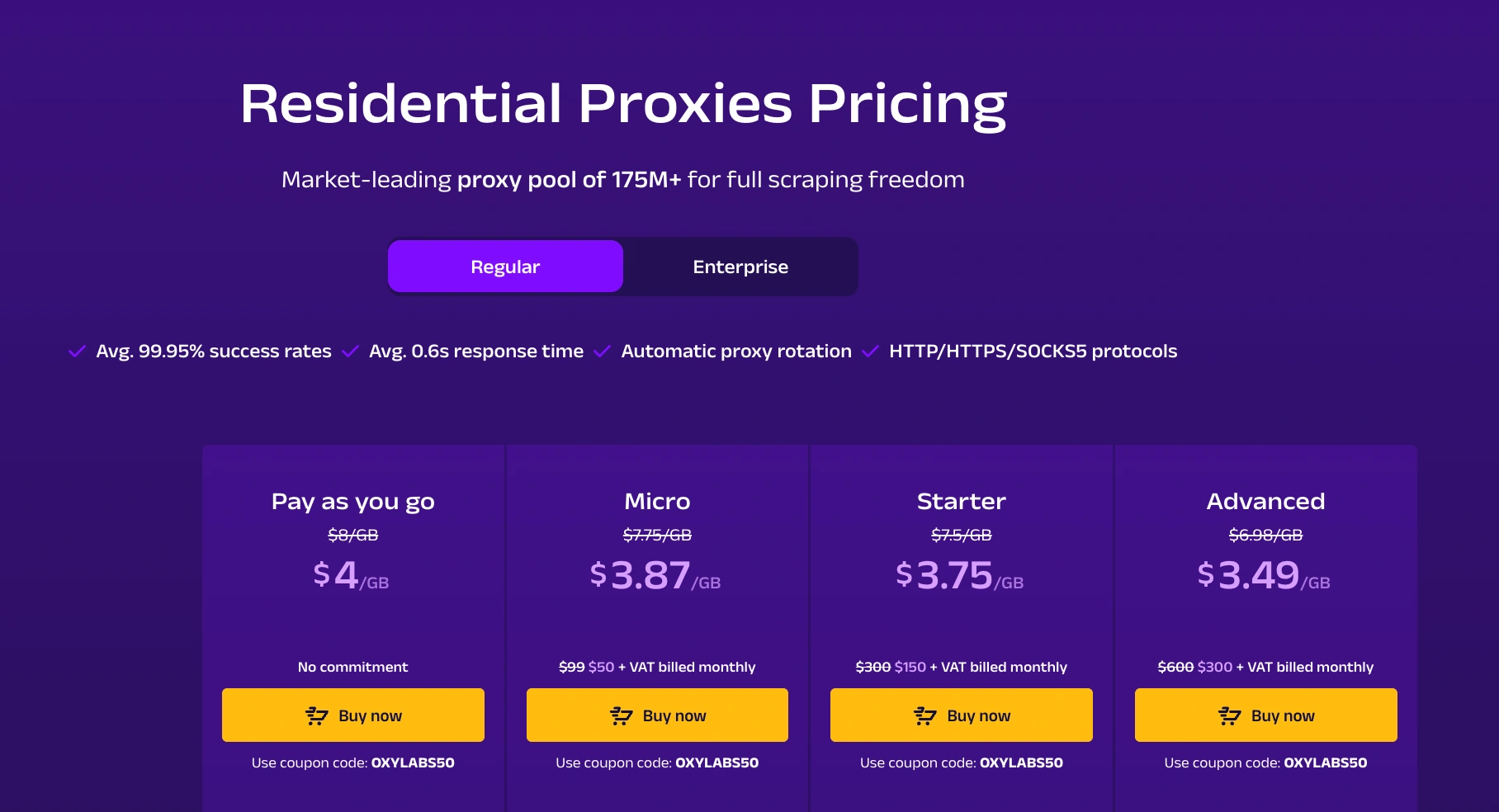
The PAYG plan usually starts at $8/GB, but the provider is running a promotion which drops it down to $4/GB (capped at 50 GB per month).
Monthly tiers also offer discounted rates, starting at $3.87/GB for the Micro plan and as low as $3.49/GB for the Advanced plan. Enterprise users can access even lower rates through larger custom traffic bundles.
| Pricing Type | Effective Price | Traffic Included |
| Pay-as-you-go | $4/GB (promo) | Up to 50 GB/month |
| Micro Plan | $3.87/GB | 13 GB |
| Starter Plan | $3.75/GB | 40 GB |
| Advanced Plan | $3.49/GB | 86 GB |
Datacenter Proxies
Datacenter proxies are known for their speed and affordability. This makes them one of the best options for large-scale data scraping. These proxies come from servers rather than household devices, so they’re slightly faster, easier to scale, and far more affordable than residential IPs.
Oxylabs offers a pool of over 42,000 datacenter IPs across 20 countries. These proxies are hosted on Oxylabs’ own servers which guarantees consistent performance and network reliability across all locations.

Oxylabs offers both shared and dedicated datacenter proxies. Shared IPs come with unlimited bandwidth and lower pricing, while dedicated IPs offer more exclusivity and better performance. Both types support HTTP, HTTPS, and SOCKS5 protocols for flexible integration with scraping tools, browsers, and automation frameworks.
That said, because datacenter IPs do not originate from real household devices, they are generally easier to detect than residential or ISP proxies. Websites with stricter anti-bot systems may challenge or block them more frequently, so they are best used for less sensitive or high-volume data collection tasks.
Datacenter Proxy Features
| Features | Details |
| IP Count | 42,000+ IPs |
| Locations | 20+ countries |
| Types | Shared and Dedicated |
| Bandwidth | Unlimited bandwidth with fair usage |
| Rotation | Configurable |
| Concurrency | Up to 10,000 sessions (dedicated) |
| Authentication | Username/password |
| Protocols | HTTP, HTTPS, SOCKS5 |
Datacenter Proxy Pricing
Oxylabs offers two billing models for datacenter proxies: pay per IP or pay per traffic. The pay-per-IP model is the simplest option, starting at just $1.20 per IP, with prices dropping to $0.90 per IP for larger bundles.
Oxylabs typically starts everybody with a free plan worth 5 IPs, but most users will find this very limiting as the IPs are locked down to US locations and there is no flexibility of any sort on the free IPs.

For users who prefer predictable data usage, Oxylabs’ traffic-based plans start at $0.59 per GB, scaling down to $0.49 per GB for higher volumes.
Pay-Per-IP Datacenter Plans
| Plan | Price per IP | Monthly Cost |
| 5 IPs | Free | Free |
| 10 IPs | $1.20/IP | $12 |
| 50 IPs | $1.10/IP | $55 |
| 100 IPs | $1.00/IP | $100 |
| 200 IPs | $0.90/IP | $180 |
Mobile Proxies
Oxylabs operates one of the largest mobile proxy networks we have tested. These proxies route your traffic through real 4G and 5G mobile network IPs, which makes them ideal for simulating genuine mobile users.

You can filter mobile IPs by country, state, city, ASN, and coordinates, giving you precise control over where your requests originate. Oxylabs boasts over 20 million mobile IPs in 140 countries, with the largest pools available in prime locations such as the United States, Germany, France, Canada, the United Kingdom, and Mexico.
Mobile proxies come with a choice of rotation patterns. By default, Oxylabs rotates the mobile IP on every request, but users can also opt for sticky mobile sessions of up to 30 minutes if they need a consistent IP for a longer period.
Oxylab’s mobile proxies also support SOCKS5, in addition to HTTP/HTTPS, offering greater flexibility for automation tools and mobile testing frameworks.
Mobile Proxy Features
| Features | Details |
| IP count | 20M+ mobile IPs |
| Locations | 140+ countries |
| Filtering | Country, state, city, coordinates, ASN (no ZIP support) |
| Sticky Session | Up to 30 minutes |
| Proxy Rotation | Automatic |
| Threads | Unlimited ( with fair usage) |
| SOCKS5 | SOCKS5, HTTP, HTTPS |
Mobile Proxy Pricing
Oxylabs’ mobile proxies are priced per GB and the company offers both PAYG and monthly plans. There is currently a 40% discount on their mobile proxies, so the pricing actually looks more affordable compared to competing providers.
However, you do want to keep in mind that this is promotional pricing and their mobile proxies actually start at $9/GB once the promo window ends.

Enterprise users receive even lower rates starting from $3.9/GB. However, these are offered only through custom quotes you need to refer to support.
| Plan Type | Price per GB (after 40% off) | Monthly Cost |
| Pay-as-you-go | $5.4/GB | varies |
| Micro | $4.92/GB | $59/month |
| Starter | $4.74/GB | $180/month |
| Advanced | $4.5/GB | $360/month |
ISP Proxies
Oxylabs also offers ISP proxies from trusted ISPs with complete transparency. ISP proxies basically combine the stability of residential IPs with the speed of datacenter infrastructure, which guarantees very high performance.

Oxylabs ISP proxies are well-suited for heavy traffic loads that require both speed and credibility. The only drawback is their higher price, but this is not specific to Oxylabs alone, as ISP proxies are naturally more expensive across the market due to sourcing and quality requirements.
ISP Proxy Features
| Features | Details |
| IP count | undisclosed |
| Locations | 20 countries |
| Filtering | Country, state, city |
| ASN Targeting | Available |
| Rotation | Sticky |
| Bandwidth | High-speed bandwidth (fair usage applies) |
| Traffic | Plan-based usage |
| Authentication | Username/Password, IP Whitelisting |
| Supported Protocols | HTTP, HTTPS, SOCKS5 (UDP and TCP supported) |
ISP Proxy Pricing
ISP pricing is based on the number of IPs you purchase. The entry price starts at $1.60 per IP, billed monthly. Dedicated ISP plans, which begin at 1,000+ IPs, use custom pricing and require contacting sales for a tailored quote.
| Package | Price per IP | Monthly Cost |
| 10 IPs | $1.60/IP | $16/month |
| 50+ IPs | Volume-based | Varies |
| Dedicated ISP (1,000+ IPs) | Custom | Custom |
Additional tools and services
Beyond proxies, Oxylabs also offers several tools that make large-scale data collection much easier.
ScraperAPI playground
This is one of our favourite features from Oxylabs. The ScraperAPI Playground gives you a clean, intuitive interface to test scraping parameters and instantly see a live preview of the scraped page in your dashboard.

You can:
- Enter a target URL
- Adjust parameters like location or device type
- Preview the final rendered page and response payload
This setup is perfect for quick experiments, debugging, and verifying that your setup works as intended without writing a single line of code.
Web Scraper API
The Web Scraper API is a ready-to-use data collection tool. Instead of building your own scraper, you simply specify the website you want data from and the API handles everything behind the scenes. This includes proxy rotation, block bypassing, request retries, and JavaScript rendering when needed.
It means you can gather structured data in just a few clicks, saving hours of development time and letting you focus on using the data rather than figuring out how to extract it.
Unblocking Browser
Unblocking Browser is designed for the toughest websites and automation scenarios. It can be used with AI agents such as Claude and Cursor, as well as other MCP-based tools, to automate browsing and data extraction. It works exceptionally well on websites with aggressive anti-bot systems.
Every plan includes advanced stealth capabilities, a simple plug-and-play setup, and simple integration. It is scalable, cost-effective, and uses dynamic CAPTCHA bypassing to keep sessions running without interruption.
OxyCopilot
OxyCopilot is Oxylabs’ AI-driven coding assistant for scraping. It helps you get started quickly by generating the code you need to pull data from a site. The tool scrapes the webpage, creates a parser schema, and delivers structured output.

Even if you are not a coding expert, OxyCopilot guides you through building a scraper step by step. It feels like having an expert assistant by your side, making it far easier to launch a new scraping project with confidence.
High Bandwidth proxies
Oxylabs also provides high bandwidth proxies for tasks that require both speed and large data throughput. These proxies are optimized for workflows such as downloading video or audio files, collecting AI training datasets, or handling continuous large file transfers.
They offer more capacity than regular proxy types and are designed to stay stable under heavy use. For teams working with high volume media extraction, these proxies offer far better performance and reliability compared to standard plans.
User Experience: Dashboard and Ease of Use
Creating an account with Oxylabs is less of a hassle. New users can sign up using an email address or an existing Google account. The process is straightforward and takes only a few moments.
Once your account is created, you’re redirected to the main dashboard, where you can quickly access all its proxy products and scraping tools.

The dashboard itself feels exactly like what you’d expect from a premium provider. Everything is laid out cleanly, with dedicated sections for residential proxies, mobile proxies, datacenter proxies, ISP proxies, and Scraper APIs.
Each product has its own settings page, usage overview, documentation links, and quick-start examples, so new users don’t feel lost or overwhelmed.

You also get assigned an account manager on sign up. However, this feature is reserved for only enterprise clients or premium-tier users. Standard users can still access round-the-clock support directly through the dashboard.

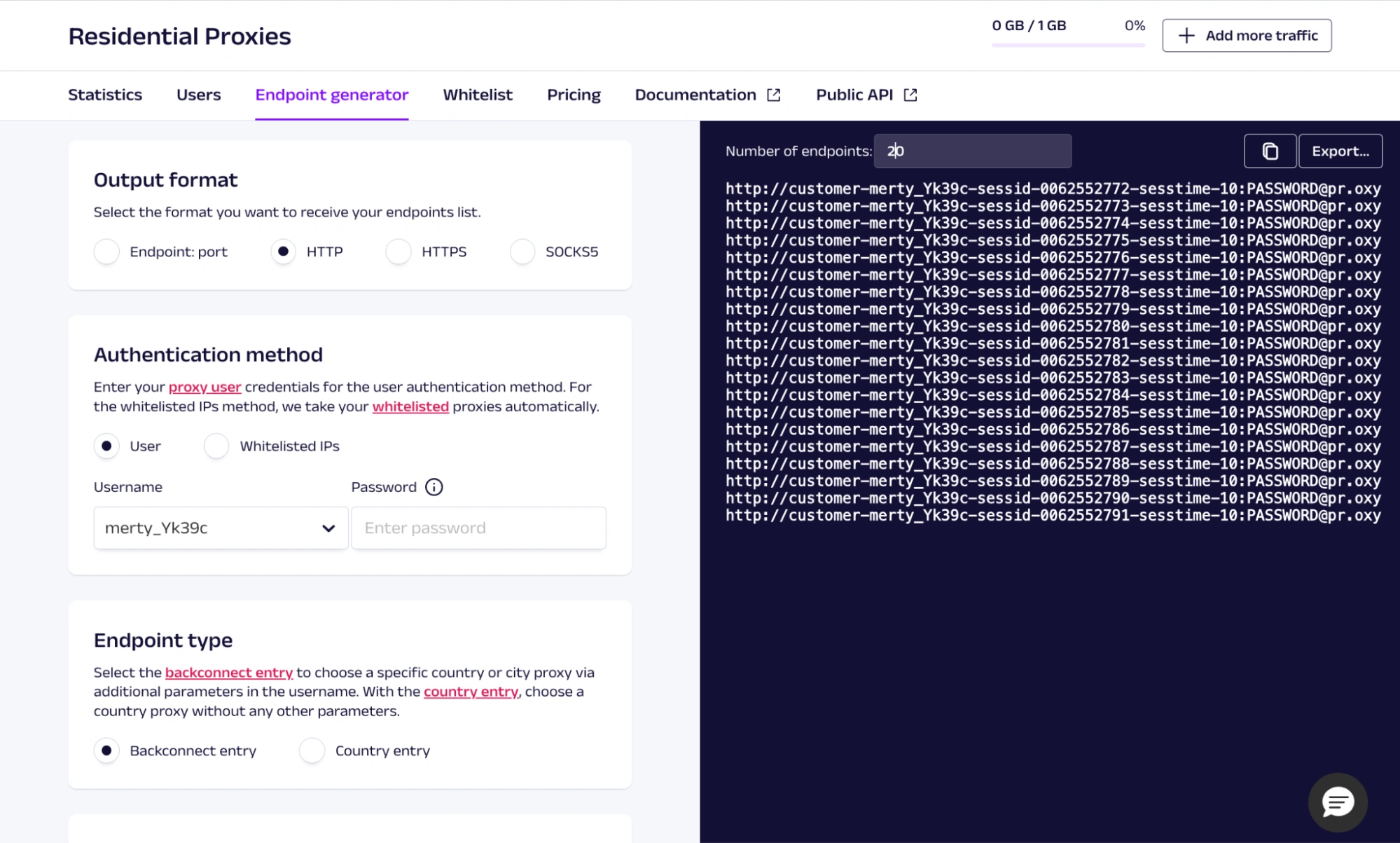
Before creating a proxy pool, you will need to set up a proxy user so you can configure authentication credentials and access rules. Once this is done, you can generate endpoints, manage sessions, and adjust rotation settings based on your use case.
Beyond proxy performance, Oxylabs also provides enterprise-level cost management and administration tools in the dashboard.
Some of these include:
- Usage statistics and spending analytics
- Managing subscriptions
- Inviting colleagues for collaboration
- Whitelisting IPs
Documentation and Support
Oxylabs provides detailed documentation for all its services, covering everything from proxy setup to integration guides for the Web Unblocker, Scraper API, and third-party tools. The documentation also includes clear explanations, code samples, and step-by-step guides.

In addition to the docs, Oxylabs provides users with access to additional resources, like the Developers Hub, release notes, SDKs, and blog posts
Support is also available 24/7 through live chat, and we typically got a response within 15 minutes. You can also reach out via email or any of their social media channels.
Enterprise users get assigned a dedicated account manager who helps with onboarding, setup, and any advanced technical questions.
KYC and Compliance Requirements
Oxylabs follows a strict compliance framework that involves verifying users’ identities and intentions before granting access to certain services. Their KYC process is generally considered soft, and they only require essential business details or personal information (this is usually completed automatically during signup).
The KYC becomes more thorough depending on the type of project, traffic volume, or the level of risk associated with your use case. This can include clarifying your company’s background or providing documentation confirming your business identity.
Oxylabs also adheres to GDPR and other data protection regulations, which means they do not track, log, or store unnecessary details about your activity.
Oxylabs Pricing
With everyone watching their budget these days, pricing now plays an even bigger part in deciding on a provider. It’s no secret that Oxylabs is a premium-priced provider, so they are not trying to compete for the title of the cheapest option in the market.
Oxylabs takes a quality-over-quantity approach to its pricing. Its pricing is flexible thanks to a mix of pay-as-you-go plans, monthly tiers, and enterprise-level volume discounts.

The payment experience is smooth as well, with support for multiple payment methods including credit cards, PayPal, Google Pay, Apple Pay, and AliPay.
Free Trial and Refund Policy
Oxylabs does not offer a full proxy trial for individuals, but they do provide a small entry point for testing. New users can access a 5-IP free trial for datacenter proxies, without adding a payment method.
For all other proxy types, Oxylabs reserves trial access for verified businesses. Companies that pass soft KYC requirements may request a short evaluation period or a paid trial, depending on their intended use case.
Everyone else will have to make do with alternatives such as limited paid trials, first-time discounts, and periodic promotions.
Refunds are handled on a case-by-case basis, with more flexibility offered to business teams depending on usage and circumstances.
Performance Testing
Merely introducing the service isn’t enough to write a helpful review, so we carried out a full performance test on Oxylabs’ proxies. As always, we evaluated at least 5 IPs per proxy type to build a consistent performance baseline.
While speed is one of the biggest indicators of proxy quality, it’s not the only one. Success rate, location accuracy, fraud scores, DNS leaks, and performance all contribute to how reliable a proxy network really is.
Response Times
Latency and response times directly affect how much data you can extract in a given window.

During our tests, residential and datacenter proxies consistently loaded within the 235-500 ms range. Most responses fell comfortably within the mid to high 300 ms range, which is a respectable result for US-based IPs under active load.
We found the mobile proxies to be slightly slower. They averaged around 1.1 seconds across the board, which isn’t the most splendid result, but it is decent enough as they remained stable during the tests.
Geolocation and ISP Accuracy
Oxylabs lists coverage in over 195 countries, and in our geolocation checks, all but one of the tested IPs returned accurate country-level and region-level results.

There was a single location mismatch during our testing, but it resolved on its own when we switched to a different IP. Given the size of the IP pool, this is however not unusual.
In all other cases, the IPs resolved cleanly to their predefined locations and ISPs.
Fraud Score Tests and DNS Leak Analysis
We ran all the proxies we tested through Scamalytics, and our resulting scores ranged between 4 and 21. This is well in the low-risk range which indicates a clean IP reputation with little abuse. For a large network, this outcome is good.

We also conducted DNS leak tests using browserleaks, and we didn’t detect any DNS leaks throughout the entire testing period.
Oxylabs Technical Performance at a Glance
| Parameter | Oxylabs Result |
| Total Geos Available | 195+ countries |
| Success Rate | High (with no failed requests) |
| Average Response Time | 420 ms |
| Fraud Score Range | 4 – 21 |
| DNS Leaks | None detected |
| Uptime | Stable throughout testing |
| Proxy Types Tested | Residential, Datacenter, Mobile |
| Rotation Support | Available across all products |
| Parallel Requests Support | Yes |
| Total IP Reputation | Low-risk |
| Geo Accuracy | 95% |
| Supported Protocols | HTTP, HTTPS, SOCKS5 |
How to Use Oxylabs Proxies in Gologin (Step-by-Step Guide)
Gologin is an anti-detect browser that lets you run multiple isolated browser profiles with different fingerprints. It is perfect for managing multiple accounts or avoiding detection while web scraping.
By combining Gologin with Oxylabs proxies, you get a more resilient setup for multi-accounting, automation, or scraping, while also reducing the risk of being flagged.
Let’s see how to quickly set up our Oxylabs proxies with Gologin:
1. Log in to your Oxylabs dashboard, generate some proxy endpoints. Copy or export those proxy strings and keep them handy as we will need them in a bit.

2. Download Gologin on your computer and create your account.

3. Launch the Gologin app and click on the “+” to add a quick profile. Give your profile a name, and Gologin will automatically configure most fingerprint settings, so you don’t need to adjust any technical parameters unless you want to.
 4. Select your new profile and click on “Proxy” to add proxies. Paste your proxies into the provided proxy field.
 5. After saving the configuration, launch the browser by clicking “Run.” Gologin will open a new fingerprint-isolated browser session using your Oxylabs proxy.

Gologin stores your proxy configuration inside the profile, so you only need to set it once. Any time you stop or restart the profile, it will automatically use the same Oxylabs IP.
Final Thoughts
Oxylabs is a strong choice for anyone who needs reliable, high-quality proxies at scale. The service is built with professionals, agencies, and larger companies in mind.
While Oxylabs is priced higher than many other providers, the cost makes sense if you’re running larger workloads or need consistent, enterprise-grade results. Smaller users can still benefit from this provider, only that the cost-benefit ratio might not be worth it.
If you plan to use Oxylabs with Gologin, keep in mind that Gologin offers a 7-day free trial for new users. It’s a great way to test both tools together before committing fully.