TL;DR
- Websites use browser fingerprints to track your identity and link accounts together.
- This technique helps websites prevent fraud, and block scrapers and spammers.
- If you try spoofing your fingerprint the wrong way, websites can detect and block your account.
- Some people want to mask their fingerprint for privacy reasons or business use cases.
- Masking your browser fingerprint manually is cumbersome and unnecessary.
- Using proven antidetect browsers like Gologin is the fastest, safest and the most efficient way to mask your browser fingerprint.
Browser fingerprints are the most reliable way for modern detection systems to track your device, link it with your account and prevent multi-accounting, scraping and spam. Individual signals like IP addresses, or cookies are often weak for tracking. A combination of browser identifiers that make up a complete browser fingerprint is powerful, harder to spoof and easier to track for websites.
However, there are many legal scenarios like browsing privacy, multi-accounting for business use cases and protecting your accounts from ban that require you to spoof your complete browser fingerprint end-to-end. This guide explores:
- what a browser fingerprint consists of,
- how platforms track it
- and how you can spoof your fingerprint to protect your real device identity, and run multiple accounts without getting banned by online platforms.
What is a Browser Fingerprint?

A browser fingerprint is a combination of data points like WebGL, WebRTC, resolution, OS, browser version, user agent, time zone, and other browser settings. Each device produces a unique fingerprint due to slight variations in each data point computed together to create a fingerprint. This is why it is called a browser fingerprint (because it’s unique).
In a 2020 study about browser fingerprints, researchers built more than 4 million fingerprints from 2 million browsers and found that 81.3% of fingerprints were unique even when 91% percent of attributes remained unchanged. This shows that even a slight variation in specs, versions, time zone or screen resolution can compute a completely different browser fingerprint.
Moreover, your browser fingerprint doesn’t change since most of the identifiers are stable and hard to spoof. This means that modern fingerprint stack can be distinctive and surprisingly stable.
Which Identifiers Make Up Your Browser Fingerprint
A typical browser fingerprint contains a ton of information about your device’s network, software and hardware. Platforms like Gologin mask over 50 browser fingerprint data points to protect your identity. Here is a quick table of what a browser fingerprint includes:
| Identifier | What it Reveals | Masking Difficulty |
| User-Agent | Browser, OS, version | Easy |
| Operating System | Windows, macOS, Linux, Android, iOS | Medium |
| Browser Version | Exact browser build | Easy |
| Screen Resolution | Screen size and color depth | Easy |
| Time Zone | Geographic region | Easy |
| Language & Locale | User language preferences | Easy |
| IP Address | Network location and ISP | Easy (with proxy/VPN) |
| Fonts | Installed system fonts | Medium |
| Canvas Fingerprint | Graphics rendering output | Hard |
| WebGL Fingerprint | GPU model and rendering traits | Hard |
| AudioContext | Audio processing signature | Hard |
| CPU Cores | Hardware concurrency | Medium |
| RAM / Device Memory | Available system memory | Medium |
| Media Devices | Cameras, microphones, speakers | Medium |
| Cookies & Storage | Persistent identifiers | Easy |
| Local Storage | Browser-stored data | Easy |
| Session Storage | Temporary browser data | Easy |
| WebRTC Data | Local/public IP leakage | Medium |
| Hardware Platform | CPU architecture (x86, ARM) | Hard |
| GPU Information | Graphics card model/vendor | Hard |
| TLS Fingerprint | SSL/TLS handshake signature | Hard |
| DNS Behavior | Resolver characteristics | Hard |
| Permissions State | Camera, mic, notification permissions | Medium |
| Sensor APIs | Motion/orientation sensors | Medium |
| Browser Automation Signals | Selenium, Playwright, Puppeteer traces | Hard |
Why Do Websites Collect Browser Fingerprints?

Aggressive web scraping, bot automations, impersonation and multi-accounting are a huge problem for many online platforms like Facebook, Instagram, Reddit, WhatsApp etc. Most of these actions are against the guidelines of many platforms.
Security and authentication is the most common reason why a collecting browser fingerprint can be useful. If someone tries logging into your account from an unregistered device fingerprint that looks completely different from what you generally use, or has an IP in a totally different location, websites can trigger multi-factor authentication or temporary block/warning to protect your account against ban.
Web scraping can scrape personal information and content of users from the platform. Instead of manually searching for profiles or trends, people write browser scripts that load pages in bulk, scrape content from them, and use it to power their third-party tools and machine learning models. This isn’t just a data privacy risk for platforms but also puts excessive load on their servers. Imagine your browsing experience being affected because someone is sending thousands of page requests per minute to scrape data for free. Platforms say ‘no thank you’.
Multi-account management is also another reason platforms collect browser fingerprints. Most platforms like Facebook, Instagram allow multiple accounts but they strictly block the ones that violate their terms and conditions like spamming messages, comments, sending bulk requests or trying to earn fake followers. To avoid scammers from evading the ban and creating new accounts, websites block the device fingerprint from registering a new account again. This helps websites prevent fraud and keep their platform safe for users.
Who Needs Browser Fingerprint Spoofing and Why?
Browser fingerprint spoofing was often associated with web scrapers trying to evade website rate limits and device bans. However, many legitimate use cases have emerged in recent times including multi-accounting, browser automations, marketing, SEO, web testing, etc.
E-commerce Sellers and Multi-Store Operators:
Many ecommerce sellers prefer creating separate stores and accounts for different product lineups. However, most ecommerce platforms like Amazon, eBay and Etsy don’t allow multiple accounts. Moreover, ecommerce VAs, and agencies manage multiple client accounts on the same devices which increase the chances of account ban. Fingerprint masking helps keep all the accounts secure and isolated.
Without browser fingerprint, ecommerce platforms can incorrectly link accounts together that don’t belong to the same client and a ban on one account can affect others too. This is why agencies and freelancers need fingerprint isolation more than anyone else.
Marketing Agencies & Freelancers
Marketers frequently manage multiple client accounts. Most of these accounts are based in different countries and have inconsistent login IPs due to geolocation differences. To avoid getting your client’s account banned, or to get search results specific to your client’s location, agencies use a combination of strong fingerprint spoofing and proxies.
Web Scraping and AI Data Collection
Collecting publicly available data for your model training is still a legal gray area. Whoever gets their hands on publicly available data uses it for their models. To protect user data, many platforms have implemented strong antibot systems. Fingerprint and IP masking helps web scrapers and ML engineers collect huge amounts of data without getting rate limited or banned.
Web Testing & Location Based Targeting
Developers use different fingerprints and IPs to test how their web apps are performing in different locations (different pricing, language, offers, etc). SEO experts and marketers also use different browser fingerprints and IPs to check search results for targeted locations. Different people see different search results based on their history and interests. A masked fingerprint with no cookies or local storage can show unbiased search results.
Privacy Conscious Users
Cybersecurity specialists, privacy conscious users, and businesses with sensitive information want to mask their real identity. Browser fingerprint masking through Gologin is the most reliable way to generate a consistent ID that looks real and protects your real device fingerprint.
Why Randomizing Browser Fingerprints Can Get You Banned?
If you don’t mask your browser fingerprint properly, you can get banned. Most anti-bot systems are good at flagging incomplete or spoofed fingerprints generated by virtual machines.
I tested my device fingerprint on a Ubuntu virtual machine and Pixelscan and Iphey both instantly detected fingerprint spoofing. That’s because virtual machines can only mask a handful of data points and still relies on your host’s drivers and hardware for some of its tasks. This inconsistency in its fingerprint is the reason why it gets caught more often. You can fix it if you’re technical enough but why spend hours to generate one unique fingerprint?
Even if you use an antidetect browser, your fingerprint might still get detected. The problem is that not all antidetect browsers are good at generating a consistent fingerprint. If I use a USA proxy while living in Germany, the antidetect browser is supposed to match my time zone, language and other geolocation fingerprint accordingly. If my time zone and language are still set for Germany while my IP is in the USA, it’s a clear indication of browser fingerprint masking.
An excellent antidetect browser must match all fingerprint data points properly so they look real, they stay consistent and are unique.
How to Avoid Detection Through Browser Fingerprint Masking?

To avoid getting detected by websites, your spoofed browser fingerprint must look realistic, consistent and unique. The goal is to look normal. You can’t insert Nvidia GPU noise with MacOS because this pattern is unrealistic. In fact, don’t stress about finding the right fingerprint combination, only focus on finding the right antidetect browser that matches all data points for you.
Here are a few things to check in your antidetect browser when creating a spoofed browser profile:
- Keep location signals aligned: Your browser must automatically match time zone and language to your proxy IP. If you have to do it manually every time you create a profile, it’s frustrating.
- Match software and hardware: Your antidetect browser must only create realistic software and hardware pairs. It can’t pair an AMD GPU with a MacOS because this combination doesn’t exist.
- Fingerprint stability: Once you create a browser profile, the fingerprint must stay consistent. No information should change during or after use unless you explicitly edit the settings.
You can ensure all these things by running a quick fingerprint test on Iphey or Pixelscan. These tests show you your location, timezone, webGL and Canvas hash, and other fingerprint settings. Make sure your time zone and fingerprint appears real in these tests. Run them from time to time to check if your fingerprint and webGL hash stays stable.
How Gologin Antidetect Flawlessly Masks Your Browser Identity
You can skip all the hassle of customizing and verifying your spoofed browser fingerprint and choose Gologin antidetect browser. Gologin automatically creates realistic fingerprints, matches the right identifiers, auto-match geolocation settings to your proxy, and maintains complete isolation and fingerprint consistency.
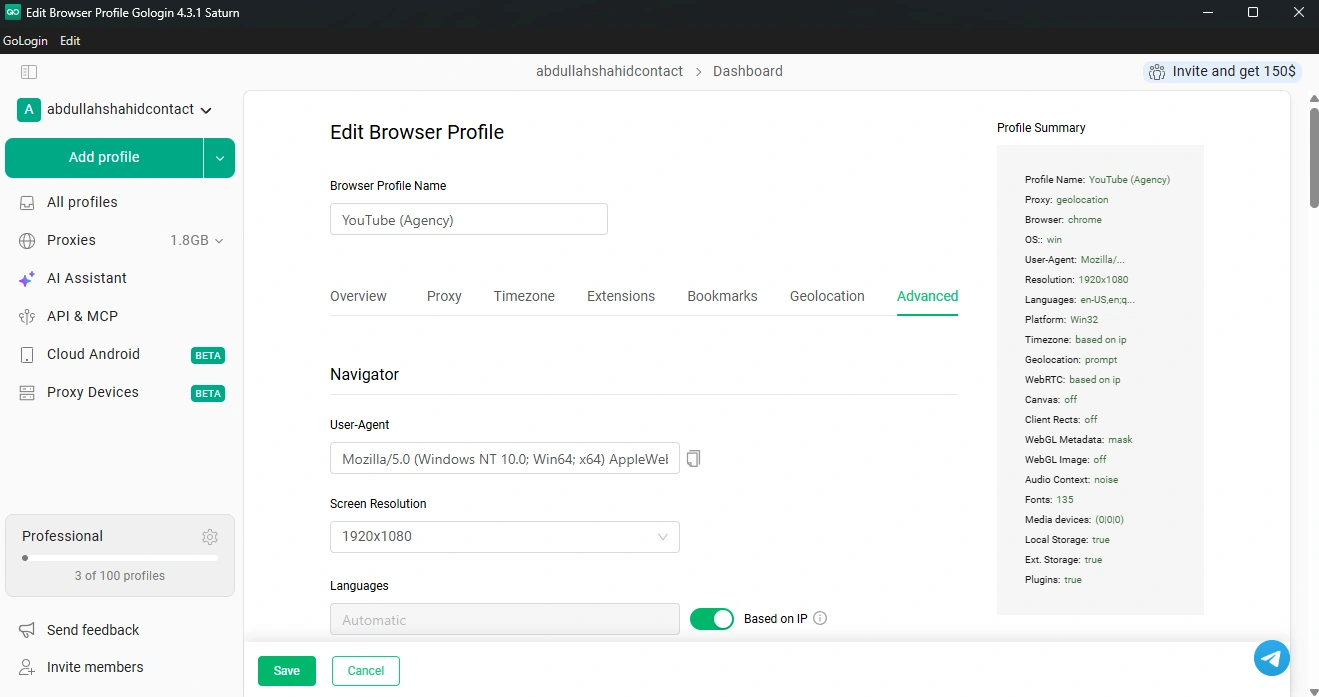
With Gologin’s quick profile creation, you can spin hundreds of unique browser profiles with their own unique fingerprints in a single tap. Each fingerprint is realistic and consistent.
Gologin randomizes browser headers and creates unique webGL hash, audio and canvas hash, screen resolution, fonts, time zone, webRTC, etc. so none of your actual device information is leaked to the platform. Every website will think that the traffic is coming from a unique device, not just another profile.

Apart from state of the art fingerprinting, you can also share access to your Gologin browser profiles with your team. Since the profile fingerprint, cookies and storage is synced to the cloud, all users sharing the same browser profile will get everything synced for them in real-time. You could have 5 teammates using the same profile simultaneously and the website will think it’s just one user multi-tasking.

Frequently Asked Questions
What is browser fingerprint spoofing?
Browser fingerprint spoofing is the process of masking your real browser identifiers and replacing them with spoofed information to protect your real device identity from tracking and account linking.
What is device fingerprint spoofing?
Device fingerprint spoofing is done by OS-level virtualization machines like emulators which change your hardware and software information on OS level. While browser virtualization tools like Gologin spoof fingerprint information by editing browser headers and API calls, device fingerprinting changes everything at core level. It is harder to set up, requires technical understanding and more time and resources.
Is changing my IP address enough?
Changing your IP address isn’t enough to protect your identity. Many credible websites now track complete browser fingerprints. It is recommended to change your browser fingerprint through tools like Gologin for maximum privacy.
Is browser fingerprint spoofing legal?
Browser fingerprint spoofing itself is legal. You are not legally required to share your browser fingerprint information if you don’t want to. The only problem you have to consider is violating a website’s terms and conditions that might discourage multiple accounts, scraping or identity spoofing.
What is the safest way to spoof a browser fingerprint?
The safest way to spoof a browser fingerprint is through Gologin antidetect browser. Trying to randomize fingerprints through Python scripts can be challenging. Gologin randomizes over 25 browser data points to generate realistic looking fingerprints. Doing this manually requires technical knowledge and time.
Can websites detect fingerprint spoofing?
If you don’t properly spoof your fingerprint, websites can instantly detect it and flag your browsing session. This might result in authentication, CAPTCHAs, forced reloads and temporary restrictions. The best way to avoid this is to use Gologin.