TL;DR
- Timezone spoofing is a practice to mask a device’s actual timezone to match your external proxy. This helps you safely browse the internet without platforms detecting that you’re using a proxy.
- However, most people ignore the timezone and only add a proxy to their browser. This results in a timezone mismatch with the proxy and raises flags.
- A safe practice for anonymous browsing is to match your timezone, language and DNS to the same proxy location.
- Many antidetect browsers don’t automatically match timezone with external IPs which defeats the purpose of using a masked fingerprint profile.
- Gologin antidetect browser automatically matches timezone with your set proxy to give you a consistent, real-looking and secure browser fingerprint.
You buy a clean proxy, set it up and your browsing session still gets flagged on first login. In many cases, the problem isn’t the proxy itself, it’s the mismatch with your device’s timezone. Your browser fetches its timezone from your device, not from your IP address. This might contradict the proxy setup you are using. When timezone, location, and IP address mismatch, they trigger website’s anti-fraud systems, and result in CAPTCHAs and verification checks.
Timezone spoofing is now a part of browser fingerprint hygiene because it is cheap and easy to read, a stable identifier of a user’s digital identity. This blog explores how to spoof your timezone, match it with your proxy and securely browse the internet without leaking your real geolocation.
What Is Timezone Spoofing?
Timezone spoofing is a practice to override your browser’s reported timezone so it can match your set proxy. Instead of the browser exposing your real timezone which can reveal your real location, it matches your proxy to trick websites into thinking that the traffic is actually coming from the proxy location.
Your device gets your timezone from your internet service provider(ISP) and matches your exact location. Browsers use this timezone by default. If you don’t hide your actual timezone, proxies are useless.
Why Browser Timezone Spoofing Matters in Browser Fingerprinting?
A few years back, it was easier to mask your location. All you needed was a proxy and you were good to go. Now, platforms like Meta, Reddit, TikTok, Google track multiple browser metrics and combine them to create a complete profile on user identity. They track for any inconsistencies in the browser fingerprint to check if the user is hiding their real identity.
If you use a proxy of another country to access restricted content, or operate your client’s account, websites can identify this because your browser timezone becomes inconsistent with your IP. For websites, timezone is one of the easiest signals to collect and match. All they need is one line of Javascript code to fetch your timezone, and match it with your IP address. Inconsistent timezone does not reveal your actual IP address. It just makes your device identity look artificial.
People use tools like antidetect browsers to create unique browser fingerprints, connect proxies and spoof every bit of their browsing identity but still get caught because some of these tools fail to automatically match timezone with your proxy. A small misalignment can get your account restricted or banned for spam behavior.
UTC vs DST
Coordinated Universal Time (UTC) is a fixed standard to assign timezones for each location. You set your timezone like UTC-5, or UTC-1, etc. which positions your location relative to UTC-0.
Daylight Savings Time (DST) is a seasonal clock adjustment used by some countries to adjust work hours with daylight. They do it by moving their clock 1 hour ahead in spring and 1 hour behind in Autumn. This is the part most people miss. Anyone can fake a flat UTC offset in their web scraping script or browser settings but they ignore the fact that DST can mismatch the time as well. For example, Europe and America do not just have different UTC offsets but also switch in and out of DST on their own schedules. This gives websites another way to verify if your timezone is spoofed or real.
Who Uses Timezone Spoofing and Why?
There are several valid use cases for spoofing your timezone. These include software testing, multi-account management, web scraping, browser automations, SEO research, and accessing restricted geolocation content.
- Multi-account management is the most common use case where timezone spoofing along with IP address is implemented. Ecommerce store owners, dropshippers, marketers, agencies and businesses manage accounts on one device. Most platforms don’t allow more than a set limit of accounts, and can track your logins through your IP address and browser fingerprint. Timezone spoofing with proxy helps users operate multiple accounts under different digital identities to avoid flags.
- Accessing restricted websites is another common use case. When you use a VPN, the VPN server automatically matches the timezone with your assigned IP address but their IPs have a lower trust rating and higher risk of bans. If you setup a manual proxy for better safety, you need to match the timezone so the restricted website does not catch your real location.
- Software testers use timezone spoofing to test their app’s behavior, guardrails, different pricing, etc. If someone wants different pricing for different geolocation, timezone spoofing along with proxies helps them test it.
- Web scrapers and automation engineers need to hide their real device fingerprint more than anyone else. Most platforms restrict use of browser automations or web scraping on their platforms. They aggressively crack down on bots and ban their IPs from accessing the website. Using a proxy with spoofed timezone helps people protect their real device IP while running automations.
Why Basic IP & Timezone Spoofing Isn’t Enough

If you use browser extensions or cheap tools to spoof your timezone, that won’t always work. For serious use cases like web scraping, multi-accounting and testing, you need a capable and consistent spoofing system that hides your IP via proxy, matches timezone and DST with the proxy, and spoofs the rest of the geolocation and browser fingerprint identifiers to match it.
Platforms like Facebook, Instagram, Reddit, Google Ads can compare the following to find any inconsistencies in timezone and geolocation:
- IANA timezone
- Local UTC offset
- Date sensitive SDT offset
- Language (eu-US, eu-UK, etc.)
- IP-based location
- DNS and WebRTC leak behavior
Many browser extensions are not great at handling all these identifiers. If you successfully match a timezone with an IP address, you can browse normal websites but platforms like Reddit, Google, Meta will still match it against your language stack and DST logic. What you need is a stronger and more proven spoofing system like an antidetect browser.
How to Spoof Browser Timezone with Antidetect Browsers
I’ve repeatedly emphasized above that leaving any part of the browser fingerprint will create inconsistencies in your digital identity. If you’re going to match your timezone with your IP address, you need to also ensure that your complete browser fingerprint consistently matches it. Some antidetect browsers do a solid job at generating consistent fingerprints.
The first thing I do whenever I test any antidetect browser is import my own proxy, and check if it matches the timezone and other geolocation metrics for me. A good antidetect browser must automatically match your timezone and DST based on your IP address. Many antidetect browsers fail here and a quick Iphey scan can detect it.
Most fingerprint identifiers are easy to mask. All you need to do is replace your browser headers with randomized values that look different from your real device specs. However, the critical job for an antidetect browser is to create a consistent fingerprint where all identifiers match with each other. This is where most browsers fail.
I recently reviewed 0Detect browser. When I added my own proxy from Floppydata and ran a quick Iphey scan, it quickly identified that my timezone was spoofed. This detection is purely due to mismatch in geolocation identifiers that did not automatically match my proxy.
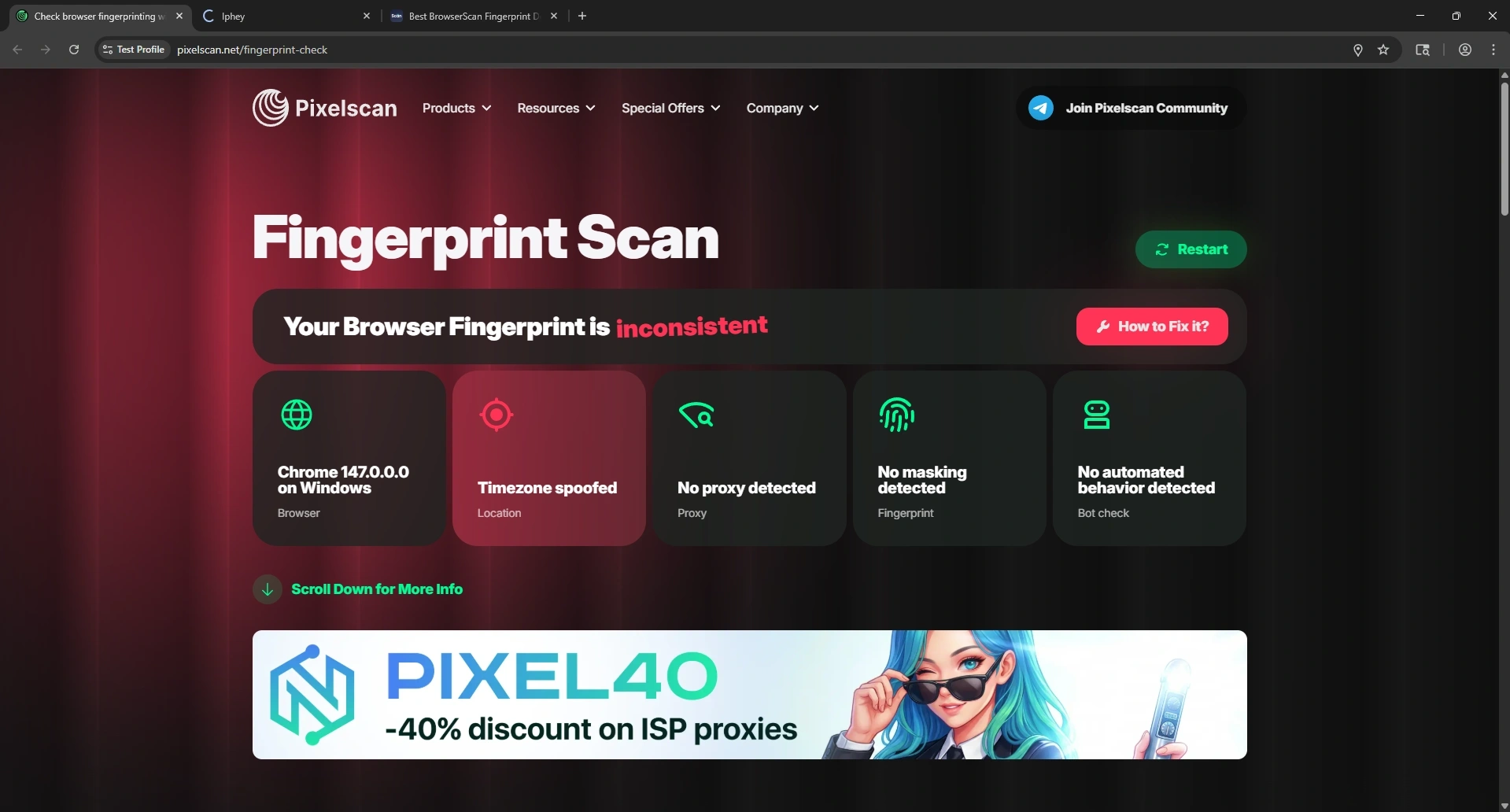
The safest way to spoof timezone and geolocation is by matching timezone (exact UTC/GMT offset) with your proxy location, match language with the IP location, and control geolocation permissions by disabling location collection by your browser. Some websites even check your GPS data to verify if you’re spoofing location so keeping it disabled or spoofed is a better choice.
WebRTC and DNS should not be ignored. WebRTC is a browser technology that enables cross-device communication via APIs. A webRTC leak can expose your real device IP via your camera, microphone, and other hardware devices. A solid antidetect browser must protect you across all areas simultaneously.
How Gologin Antidetect Browser Spoofs Your Timezone
Unlike many antidetect browsers that don’t match your timezone, Gologin identifies the proxy location and automatically changes your browser profile’s timezone data to match it. As one of the most secure and reliable antidetect browsers, it also controls webRTC leaks, spoofs webGL, user agent and other important metrics that make up a complete browser fingerprint.
When you create a Gologin profile, you can customize all parts of your browser fingerprint to your need (or the default settings work great). I used Gologin’s built-in proxy instead of importing my own since I get 2GB monthly bandwidth on all paid plans.
In the timezone section, you get the option to fill in the timezone based on the external IP. Toggle this on and your timezone problem will be resolved. It’s that simple with a solid antidetect browser.

I used a France IP and ran a quick scan through Pixelscan and Iphey. Both results showed no signs of proxy or timezone spoofing because all datapoints consistently matched one another.


Frequently Asked Questions
What is timezone spoofing?
Timezone spoofing is the practice of masking your device’s real time reported by the browser. When using an IP address, timezone must also be matched with your proxy to avoid getting caught.
Can a VPN alone fix a browser timezone leak?
Using a VPN does not fix timezone leaks. A VPN only reroutes your traffic through its server but does not match the timezone. Any website with a decent detection system can instantly identify the timezone inconsistency and raise flags.
Why is browser timezone spoofing important for anti-detect use?
Timezone is an integral part of browser fingerprint. A browser fingerprint without a proxy is useless. Similarly, a proxy without timezone match is also useless because they expose your real identity.
Does a timezone mismatch reveal my real IP address?
A timezone mismatch does not reveal your real IP address. It only reveals your location (country/city). In many cases, a timezone mismatch might not be a problem. Some streaming platforms just ignore that the user is using a proxy because they are less restrictive about it. Platforms like Reddit, TikTok, Google Ads etc. crack down on spoofed IPs more aggressively.
Should I spoof a UTC offset or a real IANA timezone?
You should spoof a real IANA timezone with proper date and time format, location, city, etc. A flat UTC offset is often too crude.
Is timezone spoofing enough on its own?
No, timezone spoofing is only a part of browser fingerprint. Your complete browser fingerprint should be spoofed with consistent and real-looking data points. This includes webRTC behavior, WebGL, user agent, geolocation and other identifiers.