ByBit is the second biggest crypto marketplace after byBit. It outgrew Coinbase in 2024 and has since defended the spot by rolling out attractive features, offers, and airdrops for retail traders, large investors, and institutions. As a leading crypto exchange, ByBit deploys strong measures to mitigate scams and misuse of the platform, such as banning accounts that violate the terms of use. This guide explores how you can create and safely manage multiple ByBit accounts for valid reasons, using official and unofficial methods.
TL;DR
- Bybit officially allows users to create up to 20 sub-accounts under one main account for trading strategy separation and higher limits. However, Bybit strictly prohibits a single person from having multiple main accounts (different KYC, email, or phone) to exploit bonuses or airdrops.
- To manage multiple main accounts safely without triggering automated bans for “device fingerprint linking,” the guide recommends using an antidetect browser like Gologin. This tool creates isolated browser profiles for each account, each with its own unique fingerprint and IP address, making every account appear to be running on a completely different device from a separate location.
Why Do You Need Multiple ByBit Accounts?
Individuals and institutions use ByBit for trading, treasury, and everyday business transactions. There are multiple reasons why an individual or institution needs to create and manage multiple ByBit accounts.
Get Higher Trading Limits
To avoid scams, fair use of the platform, and trading balance, platforms deploy trading limits on user accounts. This includes limits on daily withdrawal, deposit, and the size of futures trades you can take with a leverage cap. Most people create multiple accounts to be able to withdraw/deposit more money every day by splitting it among multiple accounts. This is not recommended, and the next section explains why.
Crypto Portfolio Managers
Crypto gurus, influencers, and famous traders offer 1:1 account management. They take trades from their clients’ accounts, using their funds, and take a cut from the profit. Since one trader handles multiple client accounts, they need to manage each account securely without getting them all banned.
Trading Strategy Separation
Traders deploy multiple trading strategies (spot, futures, day-trading, moving averages vs market structure breaks, etc.) and compare results and effectiveness. To separate funds and track progress, they need to isolate wallets. So, people create multiple accounts. This has now been replaced with ByBit’s subwallets, which we’ve covered in the next section.
Claim AirDrops & Rewards from Multiple Accounts
The most common scenario where people try creating multiple accounts on the same identity and fail: trying to claim crypto airdrops from multiple accounts. If you’re managing multiple verified ByBit accounts securely, you can claim airdrops and other rewards on every one of them by completing the required tasks.
ByBit’s Policy on Multiple Accounts Per User

ByBit’s guide strictly states that a user cannot have multiple accounts on the same govt ID, phone, or email address. The only way to create multiple ByBit accounts is through the ByBit sub-account feature.
ByBit’s guide on simultaneously managing multiple accounts suggests users use sub-accounts. If you try to log in to two unique ByBit accounts on the same device, ByBit can ban you since many people try to do this to claim bonuses and airdrops twice.
Ever since crypto has become mainstream and institutionalized, governments have enforced policies like mandatory KYC verification for customers when signing up. You can’t use even some basic services like claiming rewards and airdrops without verifying your account via your ID. ByBit treats non-KYC accounts harshly. Even the slightest mistake or attempt at spam, and your account gets banned.
Common Reasons Why KYC Verification Can Fail on ByBit
Bybit only allows one account to process verification for each person. KYC verification can fail due to a number of reasons including:
- The system detects other verified Bybit accounts with the same ID information.
- Submission denied due to excessive file uploads.
- The system detects that you are from a region or country that is not supported by Bybit. For more information, please refer to Service Restricted Countries.
- The system detects you do not meet the age requirements.
ByBit is restricted in several countries like mainland China, US, Canada etc due to regulatory conflicts with the governments. If you try creating an account in these countries, your KYC will get rejected.
ByBit Sub Account: Limits, Perks & Features

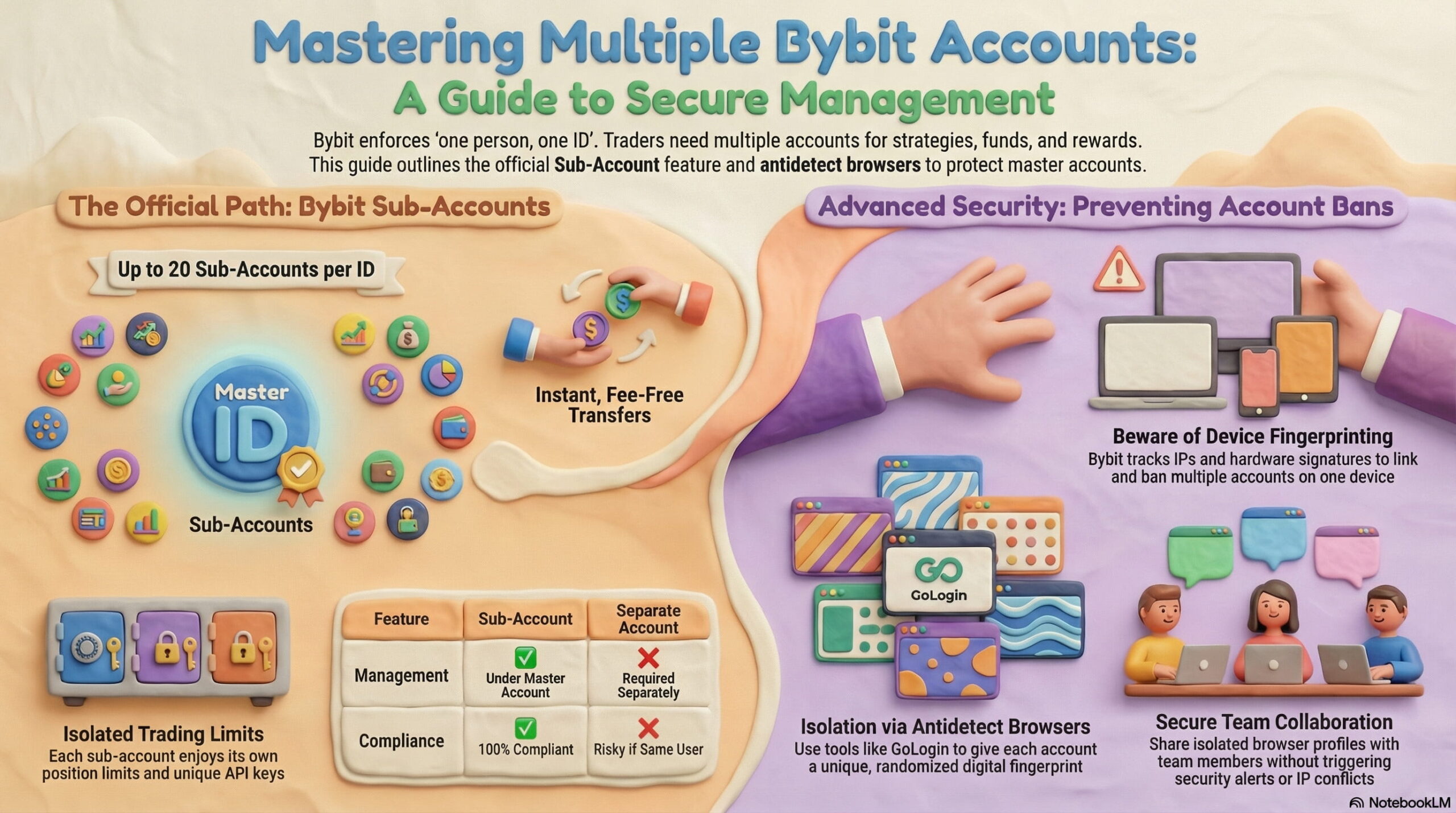
You can create up to 20 sub accounts using your main ByBit account. These sub-accounts have their own login credentials, wallets, balances, trade history and more. This is the most convenient and platform compliant way to operate multiple accounts.
If you want to operate accounts under different names, we will cover that in the next section.
You only perform KYC once on your master account. All your sub accounts will use the same identity. However, if one subaccount violates policies, ByBit reserves the right to block other sub-accounts or even the master account as well.
You can create up to 20 sub accounts on the basic individual tier with higher limits for high volume traders and institutions. Transferring funds between your sub account wallets is free with no fees charged. Each account has its own API keys, risk management and stats for strategy separation and API automations.
Do Sub Accounts Have Separate Limits?
Yes. Each sub account has its own position limits. For example, if you can take a trade worth $50k in futures, you can also open a second trade with the same position size in another sub account. So, traders who used to manage multiple ByBit accounts for higher trading limits can now do it using sub accounts. This makes sub accounts useful for strategy separation.
| Feature | Sub Account | Separate Account |
| KYC Required | Under master | Required separately |
| Risk Isolation | Yes | Yes |
| Withdrawal Control | Master controls | Independent |
| Policy Compliance | Fully compliant | Risky if same user |
| Recommended For | Strategy separation | Different legal identities |
Bybit Custodial and Islamic Subaccounts
ByBit offers Custodial Trading Subaccounts for investors who want other professionals or traders to manage their capital. If you’re a portfolio manager, ask your clients to create a custodial subaccount, and share credentials with you. This way, clients manage deposits and withdrawals while the trader manages trades.
Investors can create up to 10 custodial subaccounts, while trading teams can create up to 20 subaccounts. Both require KYC to unlock custodial subaccounts.
Bybit also provides an Islamic Subaccount which is a Shariah-compliant trading account that operates on interest-free principles and supports halal-only products that don’t have interest. This account also hides crypto projects that operate on interest based principles. Each main account can create one Islamic subaccount. Like other subaccounts, deposits and withdrawals go through the main account.
Creating Multiple Bybit Accounts On The Same Device
Although the official method is to use sub accounts, you can also safely create ByBit accounts using different identities. As long as you can perform KYC for each account with a unique ID, you can create them. The only drawback is that ByBit can detect that multiple accounts are being operated from the same device. If you try redeeming rewards from each account, ByBit bans all of them.
Let’s explore how you can create multiple ByBit Master Accounts and sub accounts.
Registering a Bybit Main Account (Official Method)
If you’re new to ByBit, create a new account. When creating a main account, you need a unique email, phone number and govt ID that has never been used on ByBit before.
- Head over to Bybit’s website of app and click Sign Up
- Select your country of residence
- Register using email or phone
- Verify your email/phone code
- Set a strong password
- Complete Identity Verification (KYC)
These steps follow Bybit’s official onboarding process. Always complete KYC if you plan to trade seriously or use higher limits.
Now repeat the same process for the second and third account with unique ID and email. Don’t create a second account on the same device. ByBit links accounts together if they are created or operated from the same device. You should use the safe antidetect browser method we’ve explained below.
How to Create a Standard Sub Account on Bybit

Once you’ve created your ByBit account, you can create subaccounts with their own balance, wallet keys, PnL, position size, API keys and login credentials. However, you can still retain withdrawal and deposit control via your master account and revoke access to a subaccount any time you need.
- Log into your main account.
- Go to Profile → Subaccount
- Click Create Subaccount.
- Choose Standard Subaccount.
- Assign a nickname.
- Enable password login if needed
- Save the username securely.
- Fund via internal transfer from main account.
Note that subaccounts cannot deposit or withdraw directly. Only the main account controls all kinds of crypto transfers.
How to Securely Manage Multiple ByBit Accounts on Same Device
Even if you follow the official ByBit guidelines, your subaccount and master account can still get banned. For example, if you provide access to your subaccount to a trader and they manage multiple sub accounts of different clients from the same device, they can still get linked together. If one of the sub accounts violates ByBit’s policies, others are also at risk of getting restricted.
So, even if you use subaccounts, always isolate your account activity. The same goes for master accounts. If you’re operating multiple master accounts from a device, ByBit links them together by IP address and device fingerprint. If one account gets banned, ByBit bans the other accounts that are also accessed via the same device.
The most secure method to operate multiple ByBit accounts simultaneously is antidetect browsers like Gologin. ByBit links accounts by checking which accounts are being accessed from the same IP, and share the same device fingerprint? When you log into ByBit, it stores your IP address and your browser’s fingerprint. Gologin helps you avoid this problem and safely use multiple ByBit accounts without the risk of being banned.
When you use Gologin antidetect browser, each browser profile gets its own IP address and randomized fingerprint. ByBit stores the random fingerprint that Gologin provides. If you login each ByBit account in a separate Gologin browser profile, you achieve the maximum security and isolation because each profile acts like a unique device. This way, ByBit cannot figure out that the traffic is coming from the same device, and hence can’t link them together.
If you’re signing up multiple accounts, do so in unique Gologin profiles so that they don’t get linked in sign-up.
Step-by-Step Guide: Manage Multiple ByBit Accounts With GoLogin
Here is a step-by-step guide to setting up multiple byBit accounts on Gologin.
1. Download and Install the Gologin App: Download the Gologin browser from their website and sign up. You can also install their mobile browser app to sync your browser profiles across web and mobile.

2. Create a New Browser Profile: Open the Gologin browser and log in. You can manage your browser profiles from the dashboard. Create a new profile from here. Give it a useful name and select your IP location (choose the same country as ByBit’s KYC ID). The rest of the settings can be left as they are because Gologin randomizes fingerprints by default.
3. Launch the Profile and Log in to byBit: Run the profile you created. It will act as a unique device with its own IP, MAC address, and location. Head over to byBit and log in or sign-up with your account. If you’re managing your client’s account, you can also share this Gologin profile with them and ask them to log in to their account (which will get synced for you as well).

4. Create More Gologin Browser Profiles: Repeat step #3. Create a new profile, assign it a different proxy this time to change the IP address. Go to byBit and log in with a different account. Repeat this step for as many byBit accounts as you want. Now, you’ve got multiple isolated browser profiles, each with a specific byBit account and unique fingerprint. Now, even if you run all these profiles at once, byBit will see them as unique devices. This eliminates all problems you can potentially face when running multiple accounts.
5. Sharing Gologin Profiles With Multiple People: We prefer you to use ByBit’s official sub-accounts and investor accounts option to provide limited access to someone else. However, if you need to provide temporary access to your main account, you can use Gologin’s profile sharing feature. When you share your Gologin profile, the cookies, and storage is also synced for them. So, ByBit thinks its the same device IP and fingerprint even when it’s being accessed from another device. You can now collaborate using this Gologin profile or even invite more people to use and manage accounts.
Managing Multiple Bybit Accounts With API Keys & Gologin Automation
ByBit provides API keys for each subaccount but what is the purpose of those keys? API keys are a way for you to manage basic account features without needing to access ByBit’s app. If an institution or trader wants to create their own dashboard, where they can take trades in bulk across multiple accounts, they use API keys.
Since AI agents like Claude are the best way to tinker around with development, traders create their own mini tools using their subaccount API keys. Make sure then you separate keys by function like trade-only keys for bots, read-only keys for reporting, and tightly restricted treasury keys for transfers.
Gologin enhances this setup by supporting Puppeteer and Selenium, allowing you to automate browser-based workflows alongside API execution. You can run multiple isolated browser profiles, connect API-driven bots, and maintain clean separation across accounts while avoiding session conflicts on a single device.
Conclusion
ByBit’s policies should not be taken lightly. Since crypto is a volatile asset, platforms like ByBit and Binance take strong measures to ensure a safe trading environment for everyone. If you violate terms, your funds could be confiscated depending on your country of residence. This is why, following safe practices like using Gologin for profile isolation and IP masking is a great way to be compliant and safe.

Frequently Asked Questions
Can I have two wallet addresses on Bybit?
Yes, for certain chains like ERC20, Bybit allows up to 20 deposit addresses.
What Proxy Location Should I Choose When Accessing ByBit?
ByBit and other crypto exchanges don’t allow you to use a VPN location of another country. US residents can’t use a Middle East location to access ByBit. The VPN location should always be from the same country as KYC registered govt ID. If the account is based in the UAE, use a UAE proxy.
Is Bybit legal in the US?
Bybit states it does not offer services to persons or entities in the United States. If someone from the United States tries creating an account, their KYC is rejected. See the complete list of countries where ByBit does not offer services.
How to create a sub account on Bybit?
- Log into your main account.
- Head over to your Profile and click the Sub account option.
- Create a Standard Subaccount with username & credentials
- Set its access level and activities It can perform
- Fund via internal transfer.
Can I create a new Bybit account?
Yes, with a new email or phone. However, Bybit’s agreement states one trading account per user. If you already have a verified ByBit account, you can’t create a new one, even if it was banned.
Does Bybit allow multiple accounts?
Bybit allows multiple sub accounts and investor accounts under one main account. It does not allow multiple personal trading accounts for one user. You can only verify one ByBit account.