

- Cookies
- Session storage
- Logged-in state
- Website tokens
- Browser data from that session
How to restore the profile session?
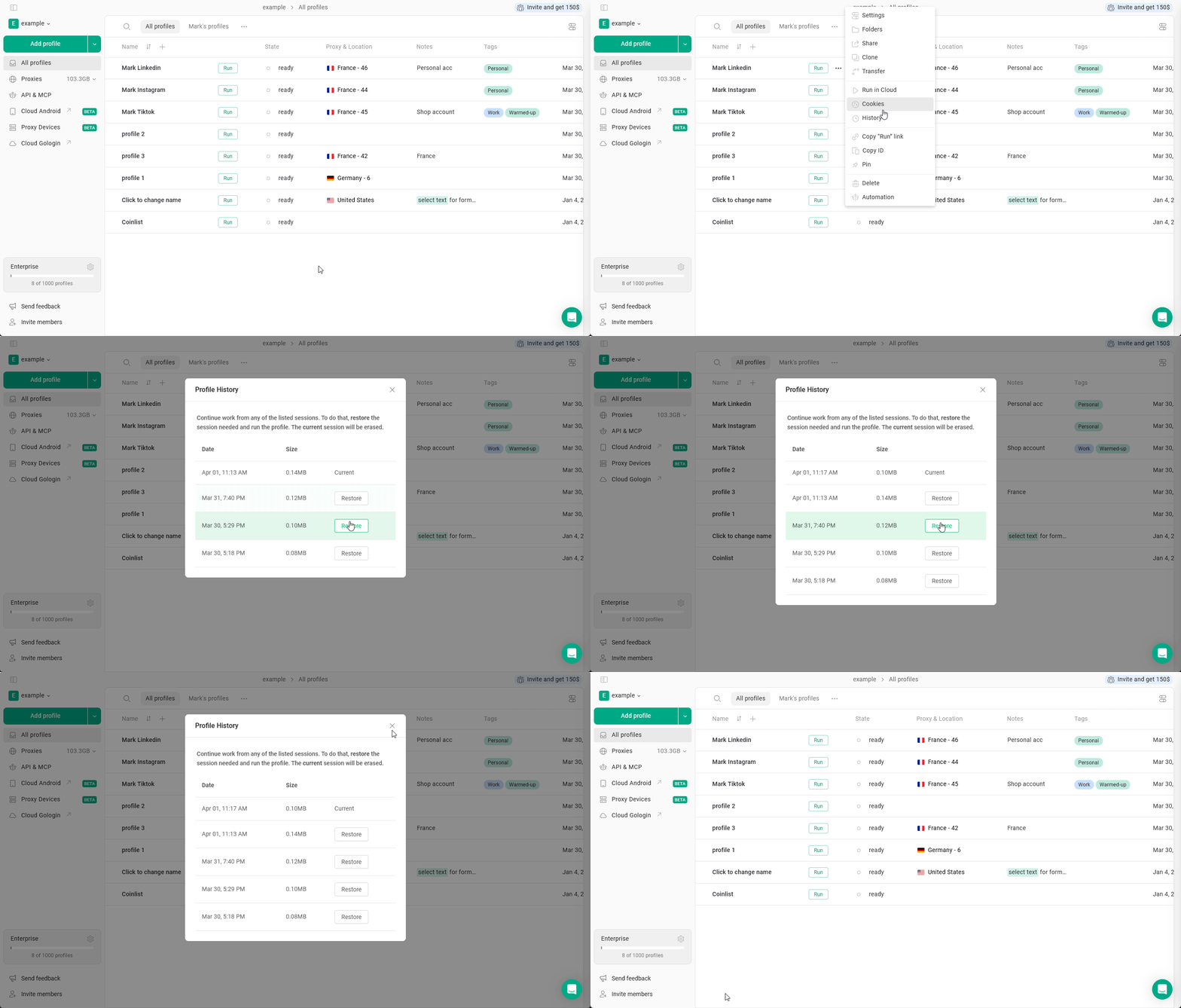
To restore your profile to one of the 5 latest sessions, just- Click 3 dots on the profile
- Select History
- Choose the desired session
- Click Restore
When to use profile history?
Restoring from snapshots could be useful when:- An account got logged out
If a website logs you out unexpectedly, you can restore a previous session where the account was still active. - Lost data
If you don’t see the recent opened tabs or suspect that the last profile sync wasn’t correct due to network connection issues. - Broken website state
If you see the website doesn’t behave like it’s supposed to due to cache changes or extension intervention. - Profile non-functional If you can’t launch a profile due to any non-proxy-related erros, for example, if the previous session didn’t sync correctly.
Best practices
- Always close profiles properly
Abrupt shutdowns may result in unstable snapshots. - Don’t abuse restores Constantly jumping between sessions can look unnatural.
- Keep proxy consistency Restoring a US session while using a new EU proxy may invalidate cookies.
- Use it as a recovery tool
It’s best for fixting mistakes or reverting instability.