
We’ve been selling for over 20 years on eBay and have multiple eBay accounts. We tried to do everything by the book. One of our smaller accounts recently received a restriction notice, so we provided the necessary documents.
However, we were shocked to find out that our account was permanently suspended. Two of our other accounts were restricted from selling. eBay’s trust and safety department did not provide any information on why we were suspended.
They only assured us it was not due to performance issues. – one of the E-commerce bytes users shared.
Searching for info on how to open multiple eBay accounts, you probably already checked their official guidelines. Yes, they allow you to sell from several accounts. However, there are hidden risks to know and avoid with special tools. For eBay sellers, understanding the policy consequences of managing multiple accounts is crucial, as improper handling can lead to serious penalties.
Despite the fact that bans related to multiple accounts aren’t so common, we don’t think you should always be nervous about being suspended at some point. If you do not follow eBay’s rules for multiple accounts, you may face policy consequences such as account restrictions or permanent suspension.
TL;DR
eBay officially allows users to operate multiple accounts for business diversification (e.g., separating product niches or locations). However, eBay uses advanced “Account Linking”—tracking IPs, browser fingerprints, and payment details, to connect these profiles.
If one account is suspended, all linked accounts are at high risk of a “chain-reaction” ban. To scale safely, sellers should use an antidetect browser like Gologin to create isolated digital identities for each account, making them appear as if they are running on completely separate devices.
We are here to share safe ways to create and run multiple eBay seller accounts.
Benefits of managing multiple eBay accounts
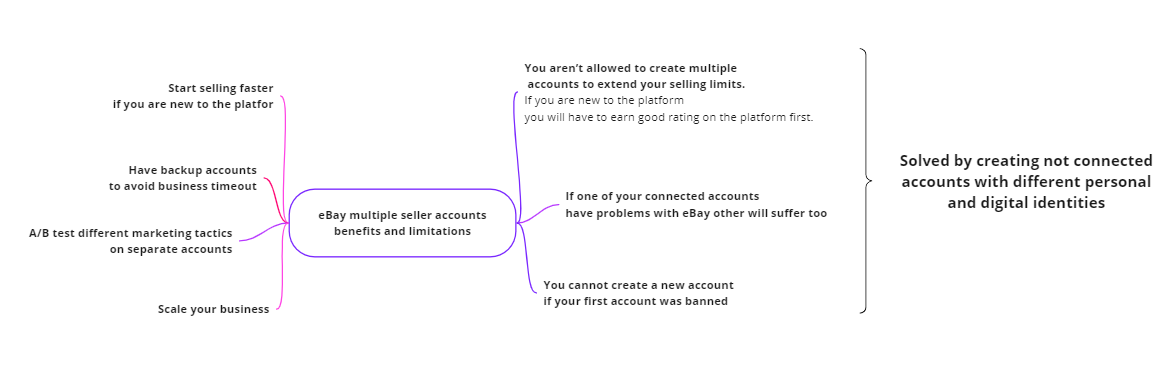
- Start selling faster. The first-time sellers are limited to how many listings they can post and of what value. During your first month, you are limited to 10 listings and $500 worth of products. However, you can create additional non linked accounts. Read on to learn how.
- Scale your business. At some point, you will face limitations in managing your online sales within one account. For example, you want to add unrelated product lines under other brands. Managing multiple stores allows you to target different categories and reach different audiences, enabling you to diversify your marketing strategies and optimize performance across separate niches. It’s not easier to track sales compared to running just one account, but scaling is faster that way.
- Backup accounts. You need them to keep your business running in case your main account is down or suspended. We will discuss safe ways to create them.
- Safely managing your business on multiple devices. There might be problems if you frequently log into your account from different locations and devices.
- A/B test different multi channel marketing tactics to reach different audiences.
- Using automation tools to manage multiple accounts can help save time by streamlining routine tasks and increasing productivity.
eBay rules for having multiple accounts
Disclaimer: eBay’s selling policies and security features aren’t related to the law and sometimes their algorithms make mistakes.
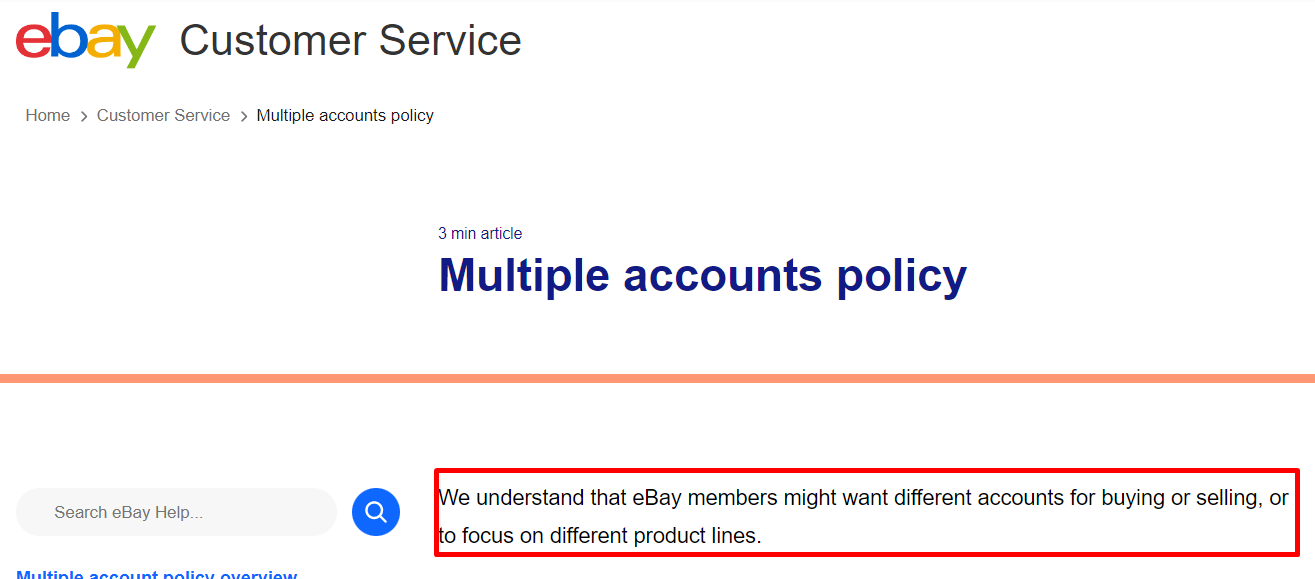
Here’s the answer to the question – how many eBay accounts can I have? eBay help center directly allows to open multiple eBay accounts.
However, eBay’s rules prohibit using existing accounts or other existing accounts to bypass selling restrictions or avoid buying limitations. Attempting to circumvent these policies can result in other policy consequences.
Can you have multiple eBay accounts?
Yes, you can have more than one account on eBay; restrictions and suspensions because of multiple account usage are rare, but there are significant limitations to consider:
- You aren’t allowed to create multiple eBay accounts to extend your selling limits. Your limits expand with your successful performance on the platform.
To have additional eBay accounts, you need a positive reputation (seller rating) on your first account. It means if you are new to eBay you cannot create more accounts until you warm up your initial account. It takes around 3 months.
- Linked (or connected/associated) accounts are multiple eBay store accounts that have connections between each other. These connections involve matching names, addresses, bank cards or PayPal accounts, IPs, device models, and digital identifiers like cookies. eBay links such accounts – you need to keep your accounts separate from each other.
eBay can detect multiple accounts by linking them through IP address, cookies, device usage, and personal details, so even attempts to hide connections may not be effective.
Once eBay restricts or suspends one of your accounts, other accounts are at risk of closure too. We recommend getting rid of ties between accounts as much as possible because:
- It is really challenging to manage multiple accounts. You might miss something.
- The system can make mistakes when it comes to restrictions.
- The health of one of your accounts influences others’ health. If eBay suspends your main account, you cannot create another one until you unban the initial one.

If any of your accounts has a low Seller rating, eBay will restrict your other accounts as well. So you have to keep track of rating and policy compliance on all your accounts. Having accounts not linked to each other can considerably mitigate the headache.
It is important to manage your accounts effectively, as eBay expects users to operate each account responsibly and maintain high standards of performance and compliance.
Can i have 2 eBay accounts with the same bank account?
Yes, you can have two eBay accounts with the same bank account connected to them. But you will have to use the same name for both accounts as it won’t be possible to verify your payment method otherwise. Luckily, several eBay accounts can have the same name; you just need different email addresses, as you cannot use the same email for multiple accounts.
eBay’s Updated Multiple Account Policy for 2026
While some sellers choose to operate with one eBay account, eBay still allows individuals to maintain several accounts as long as each account is used in accordance with the site’s policies. Each account has to have its own email address, and users must ensure that all accounts are in good standing. It is important to keep separate accounts for different sales channels or business needs, and to practice good account management to ensure compliance and efficiency. Importantly, creating additional accounts to avoid limitations placed on buying or selling activities is forbidden.
Most typical reasons for having several eBay accounts
- Personal and business account: It’s pretty inconvenient to use your business account for personal sales, so having a second eBay account for personal use is an obvious solution in such a case.
- A/B Testing: When you want to try out some different sales strategies, it’s quite handy to have a separate account for each strategy to conveniently track stats.
- Different niches: If you work in various niches, the only way to brand your listings properly is by having separate eBay accounts for each niche.
- Separate geolocations: If you operate across multiple GEOs, it makes perfect sense to have multiple accounts as you can use local languages and suitable selling strategies for each location this way.
Many sellers use multiple accounts to organize their eBay business more efficiently and to target specific audiences while staying compliant with eBay’s policies.
How many eBay accounts can I have?
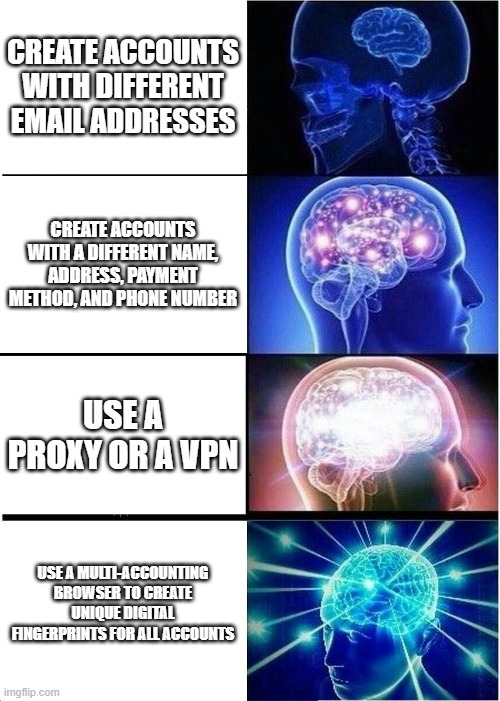
You can have any number of eBay accounts that aren’t linked to each other. It means you need to register each account with a different name, email address, phone number, physical address, and digital identity (e.g. IP, device model). Otherwise, if one of your accounts gets restricted, there is a high chance that the same will happen to all the other accounts too. Keeping different accounts unlinked is crucial to avoid eBay detecting connections and penalizing all your accounts.
Managing multiple eBay accounts is different from managing just one store or the same store, as each account or store functions as a separate profile for specific strategies, organization, and risk management.
eBay strictly prohibits cross promotion between different stores or accounts, and even within the same store, linking or promoting products is not allowed. Duplicate listings across different accounts can also lead to penalties.
Even though the platform formally allows users to have multiple accounts for buying and selling and for using various accounts for different product lines, you still may experience account restrictions and bans if you aren’t cautious enough.
How to use multiple eBay accounts safely
As we already mentioned, to keep your accounts safe you need as few associations between accounts as possible. Manual management of multiple eBay accounts can often lead to human errors, such as accidental cross-linking or missed updates, which can jeopardize account safety and efficiency.
So if you want to switch between accounts on the same device, you need to use some additional tools to make it safe. Using order management solutions or a one stop shop platform can help streamline processes, automate repetitive tasks, and reduce the risk of mistakes when handling multiple accounts.
Finally, always remember the importance of maintaining seller standards when managing multiple eBay accounts to ensure compliance with eBay policies and to provide a positive experience for your buyers.
Separate devices
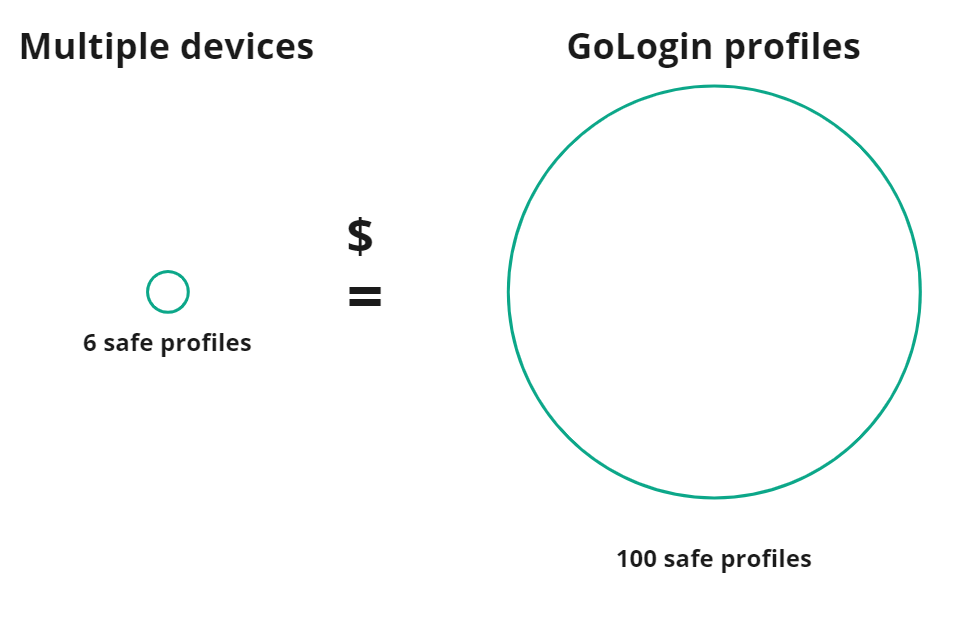
Buying several computers is the most effective method for avoiding account linking, as using different devices for each eBay account helps prevent accounts from being linked together. It is a cost-effective solution, unless you need more than five accounts (= five devices).
For example, 6 smartphones x $50 (the minimum for a working machine) = $300. Gologin’s cheapest plan with up to 100 browser profiles is $288 annually.
The downsides of this method are quite obvious:
- you still need to separate your IPs which is difficult with a home IP address
- work is limited to a specific machine, limiting the chance to travel
- work cannot be shared with VAs across the world
- other limitations of physical devices like Windows Update and system crashes.
Proxy and VPN
A proxy server acts as a middleman between your device and the web. A proxy server acts as a middleman between your device and the web. When you use a proxy server or VPN, all your device’s internet requests are routed through the private server – a proxy.
VPN service also encrypts your traffic, which alone is suspicious to modern websites. Another difference is that a proxy protects your traffic for only 1 app, while VPN covers your whole device.
It also means proxies are generally faster than VPNs: you can read a more in-depth comparison here.
For each of your eBay seller accounts, you need 1 proxy or separate IP in a VPN. To avoid confusion, you can set up separate user profiles in the browser. Make sure you clear your browser’s cookies and cache regularly.
Important: We don’t recommend a free proxy or VPN. They aren’t likely to make your multi-accounting safer but, on the contrary, they can increase the risk of restrictions. Free VPNs could compromise your data security more than no protection at all.
Using a high-quality proxy or VPN protects your IP and location. However, such a method only makes it more difficult to detect you and doesn’t fully protect you. Platforms such as eBay have more advanced tracking systems. They employ comprehensive browser identification techniques to determine identity. eBay can also link multiple eBay accounts through information such as the same address or tax ID, so it is important to keep these details separate where possible.
To ensure the highest level of security, it’s best to utilize a multi-accounting browser.
Multi-accounting browser
A multi-accounting browser enables users to have secure multiple digital identities that aren’t linked to each other. For each eBay account you can have different IP addresses, device models, operating systems and other browser fingerprint parameters. While the eBay app is commonly used for managing accounts, it has limitations when it comes to handling multiple eBay accounts efficiently. Multi-accounting browsers offer more flexibility and control for sellers managing several stores.
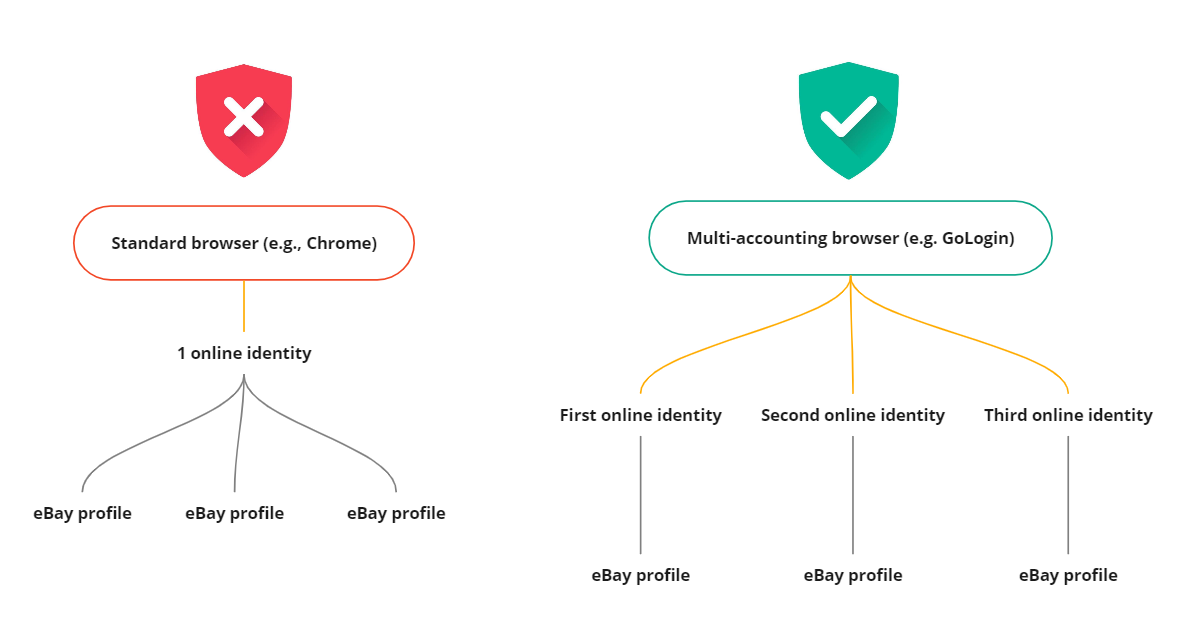
Secure web browsers function similarly to common browsers like Chrome or Firefox. The thing about the former is that they offer browser profiles for all multiple eBay stores. Thanks to advanced browser fingerprint technology, each profile is unique and has no connections to the others. Managing eBay listings across multiple accounts becomes much easier with these browsers, allowing you to save time and streamline your workflow.
For each profile, users can configure a personalized set of Google Chrome extensions, bookmarks, and other features. All of these will be saved for future use.
Websites such as eBay will see each of these profiles as different users, each from a distinct location and device. Managing multiple eBay stores with these tools is far more efficient than handling one eBay store manually, as you can automate tasks and oversee several accounts at once.
Disclaimer: Multi-account browsing tools are legal for ethical purposes, according to US/EU laws. Instead, they protect business data, and save resources and money.
You can check the list of the most popular multi-accounting browsers and their use cases here and here.
Note: To use a multi-accounting browser, you need a proxy. Gologin offers reliable proxies for free inside the app (they can be used everywhere), but you can connect your own too.
How to use Gologin to create and manage multiple eBay accounts
Downloading and registering
Head over to Gologin website and download Gologin on your device. The app is available for all major OS versions.
 Gologin website
After you install the app, register an account with Google or e-mail. The sign up process includes a short quiz for marketing research.
A free 7-day trial of all features is activated after you sign up.
Creating a browser profile with a proxy
Your default main screen will contain a few ready-made browser profiles. These are isolated browser sessions that will not let eBay link the accounts. Let’s create a new one, add a proxy and connect Ebay account to it.
First, click Add Profile on top right. You will get into profile creation screen. 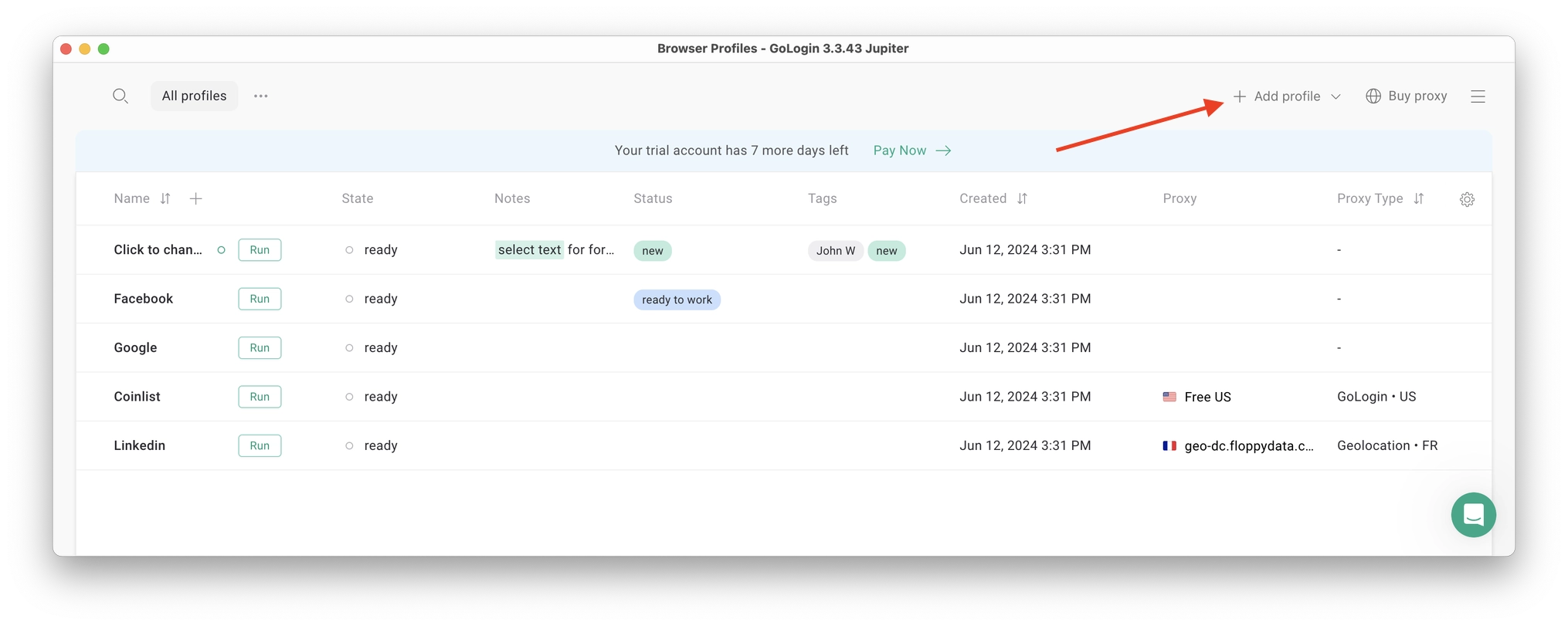
Here’s a visual guide on profile creation and choosing a proxy:
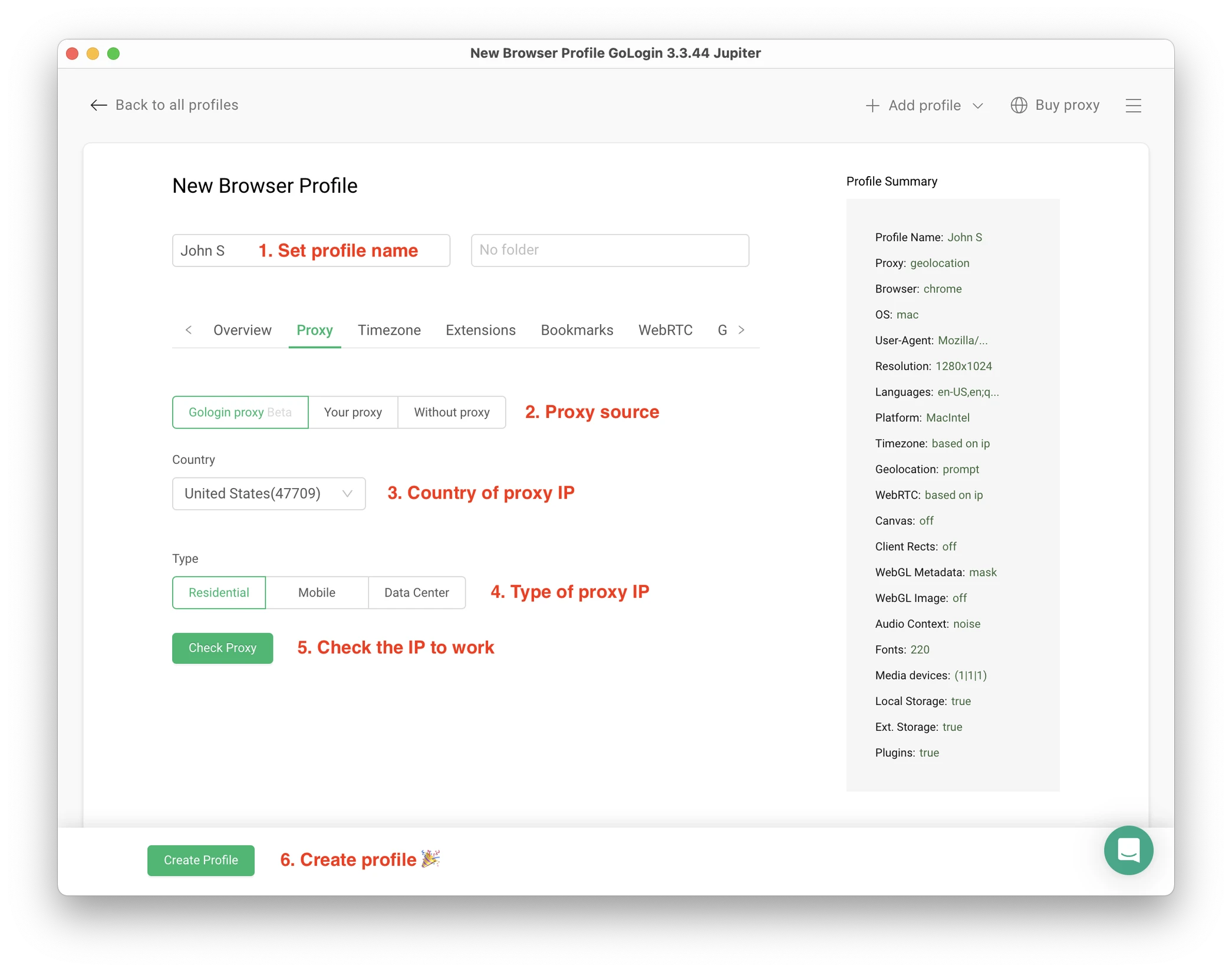
Notice that here you only need to set up the built-in proxy: all other profile settings are automatic. Let’s move!
1. Set your profile name. This can be done later as well.
2. Choose built-in Gologin proxy. Built-in proxies are paid per gigabyte, but you’ll get some free traffic to test them. Third party proxies can also be used here with no restrictions.
3. Pick country from the dropdown list.
4. Choose Residential proxy type. Residential IP address is a most common connection like you have at home or office.
5. Click Check Proxy to see your new IP details. Afterwards, click Create Profile. This will return you to the table of profiles. You’re good to go!
3 Top Tips On Using Proxies Safely
- It’s critical to give each of your browser profiles a separate IP address. Do not run several profiles on same IP address or without proxy: this will get them detected.
- If you are familiar with how proxies work, feel free to use third party proxies as well. Multiple IPs can be pasted in bulk into Gologin with just one click. Choose and buy proxies from our list of trusted providers.
- Free proxies you find at random websites can be dangerous. Being used and abused by infinite amount of users, free proxies often collect your data and tend to fail when you least expect it.
Running the profiles
Click on the Run button at your new browser profile.
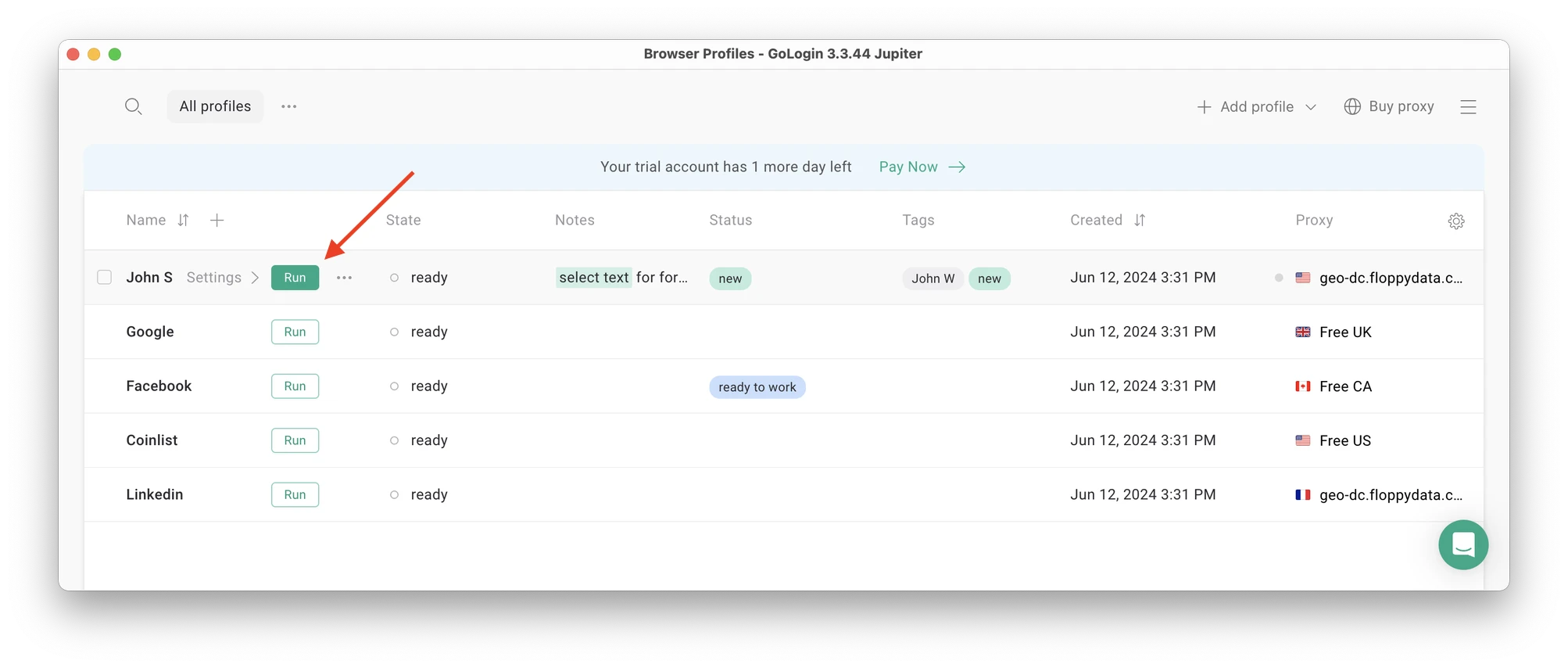 A new browser window will open, which is where you work with the accounts. You can use it like regular Chrome (i.e. tabs, bookmarks, extensions and history), but this session is completely isolated from your device and other profiles.
Connecting an eBay account to a Gologin profile
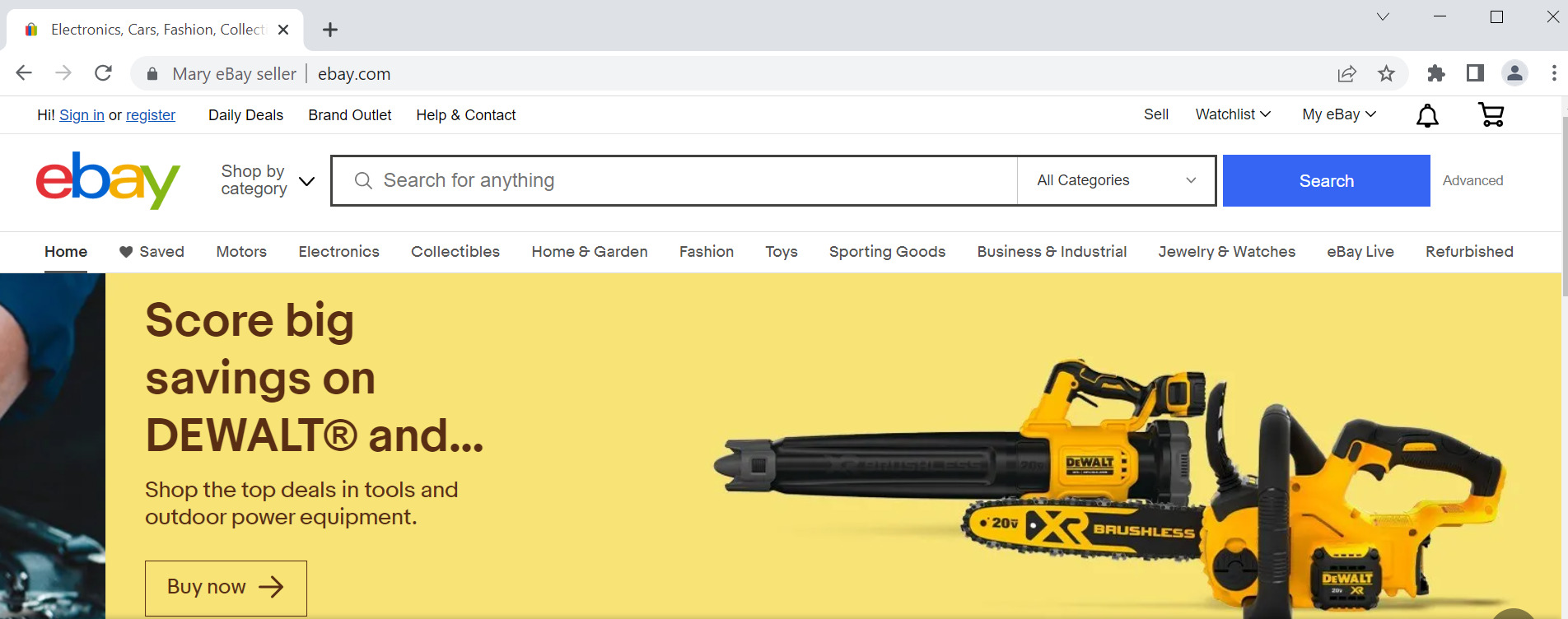
In the new window, simply login into your existing eBay account (or create a new one) – just like you would do in your regular browser. That’s it!
eBay will see this browser session as a different real device, hence not blocking you for multiple business accounts.
Running multiple eBay accounts
Next, create as many browser profiles as you need to operate multiple accounts on social media or marketplaces. Remember each profile IP needs to be different. Best advice here to not mix the proxy IPs is to rename them after your browser profile name.
You can freely run multiple Gologin profiles at the same time with no problem. The amount of windows open simultaneously is not limited, depending only on your hardware.
When you use a marketplace or social account in a Gologin profile, you won’t have to enter passwords or 2FA codes. That’s because the session will pause and continue from a safe cloud server. To Facebook, each profile is a separate authentic device.
Stopping the profiles
When you’re done working in accounts, click Stop on your profile in Gologin. The browser window will close, and your session will upload to the safe cloud server.
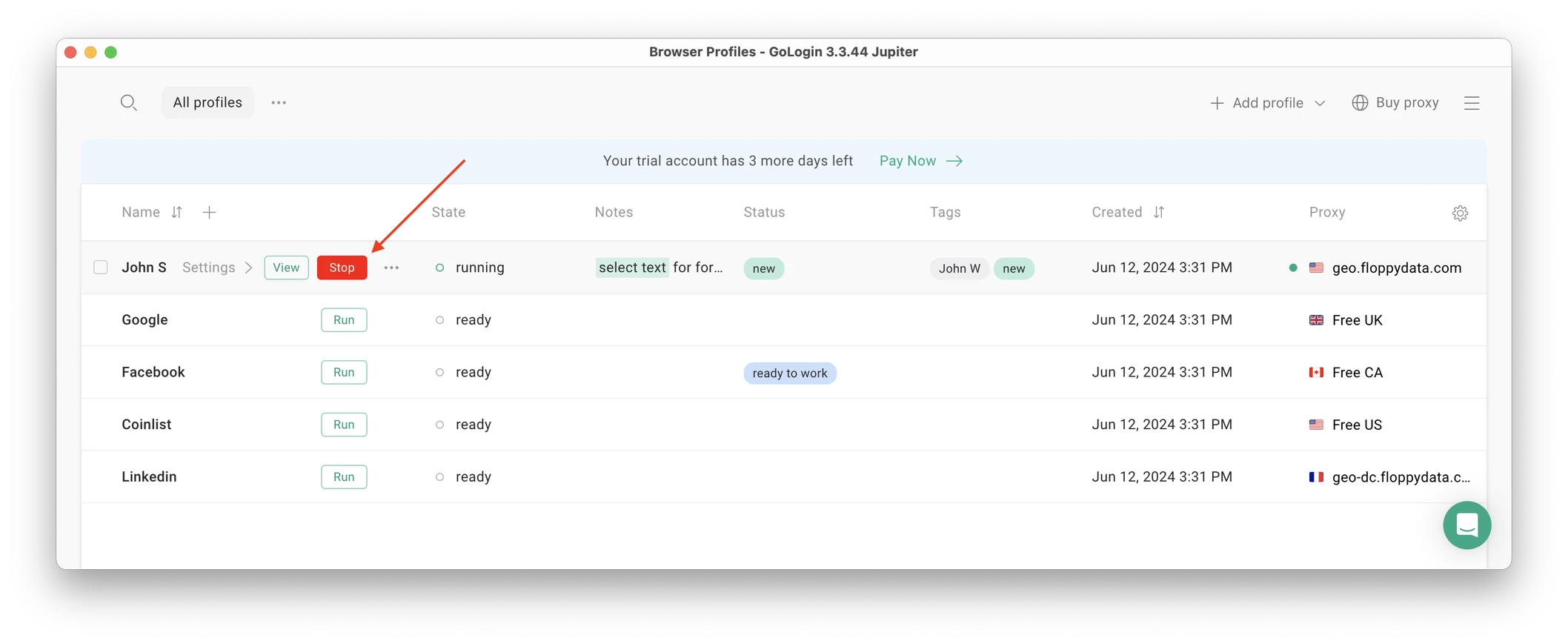
When you restart this profile next time you need to work, the browser session will continue exactly from where you left. This is extremely comfortable and saves tons of time for account managers, even on platforms with no account blocks such as Discord.
That’s it! Try using Gologin profiles for any social platform, marketplace or any other website. The profiles can be logged in from any location and device or shared with your partners. During the 7-day free trial, Gologin does not limit the use of paid features, so you can test the paid functionality.


First option: Purchase or rent already existing eBay accounts.
Important: at Gologin, we do not encourage using, as well as buying and selling stolen accounts in any way. Always review the stores you’re buying from on how ethical the listings look (accounts, emails, numbers, etc). You might notice there are many suspicious offers. Also, keep away from buying the cheapest alternative.
Second option: Register new accounts by yourself.
When creating multiple eBay accounts, make sure to use a different email address for each account. This is required by eBay and helps keep your accounts separate and compliant with platform rules.
How to set up an ebay account?
- Head to the eBay website and find the registration button on the top left corner of the screen
- Click “Register” and you will be redirected to the registration page where you need to enter your name, email address and a password that will be used to access your account
- Read the User Agreement and User Privacy Notice if needed, the links are provided on the registration form. Then click the “Create Account” button to proceed.
- Enter your contact address and phone number
You can also use your Google, Facebook and Apple accounts to complete registration. But keep in mind that even though when you register for the first time, the process isn’t complicated at all, if you want to create multiple accounts, you will run into some problems. Here is a quick guide on some of the things you need to pay attention.
Tips on protecting eBay accounts from being linked
- Use another name and physical address. You can use your friends’ and relatives’ data. You can also pay someone to open an eBay account with their identity. It is legal until the provider sells stolen accounts. So use only trusted sellers. Maintaining separate accounts with unique information is crucial to prevent cross-linking and keep your profiles distinct.
- Have different emails and phone numbers for each account. We don’t recommend using fresh or disposable email addresses. Each platform verifies the email address you register with. Checking if it is a one-off address is one of the verification steps. You need to either warm up new accounts yourself or buy them from trustworthy providers. Avoid using virtual phone numbers that can be obtained online for free. They are no longer secure due to their frequent usage for verifications. Better again ー purchase them from trusted suppliers or use multiple SIM cards.
- Use another payment option. Create a new card or PayPal account.
- Post duplicate listings. For scaling your business you might want to repost successful listings across multiple eBay accounts. And it is OK to do this but remember to change pictures, description, title, category, etc.
- For extra safety you can also have different account settings. For instance, in one account you use paid shipping and charge buyers, and in the other ー free shipping.
Summary
- eBay allows you to open multiple accounts. Yet, it is better to create accounts that aren’t linked to each other and employ accounts management tools to maintain good performance across all accounts, ensuring a safe and positive experience for both buyers and sellers by following these guidelines.
- Create distinct personal and digital identities for each new account to eliminate risks of suspensions and business downtime.
- Multi-accounting browser is the safest way to create new digital identities and run multiple accounts.
1. Use one proxy for each profile in Gologin. If two accounts have the same IP proxy, there is a high risk that the account will be banned.
2. For a cold start, it is usually best to use mobile proxies, but as soon as the account is “warmed up” and the card is linked, switch to a static residential proxy from the same city where the account is registered.
3. Warming up accounts before advertising:
New accounts must behave like real people for at least 7–14 days: likes, comments, adding friends (if personal), posts.
Running ads on a “cold” account = almost 100% ban.
4. Payment details:
One card/one bank = one account. Ideally, virtual cards from different banks.
5. Behavioral patterns:
Do not switch between profiles more than once every 15–20 minutes (especially when logging in for the first time). Avoid identical patterns of behavior (for example, all accounts log in at 9:00 a.m. and immediately like the same post).
6. Checking the Gologin profile before launch:
Before working with an account, run the profile through iphey.com. All parameters must be “green”: no real IP leaks, WebRTC, Canvas/WebGL are consistent.
Frequently asked questions
Does eBay allow to use multiple accounts?
Yes, you can use multiple eBay accounts. You won’t have problems with the platform until one of your accounts gets restricted. That’s why we recommend using distinct data to register these accounts as well as using safe multi-accounting browsers.
How many eBay seller accounts can I have?
As much as you want as long as you use different digital fingerprints and credentials for every account. That’s the only safe way to have more than one seller account.
Is running multiple eBay accounts legal?
Running multiple eBay accounts is legal. First, eBay explicitly states that they understand the potential need for multiple seller accounts. Second, if you get around eBay rules for ethical reasons, it is also legal. eBay rules don’t equal the law.
What happens if I transfer my eBay account to another person I know?
In most cases, it is advisable not to share an eBay account. This is due to the sensitive financial as well as other personal information available in the account. It is possible to, however, for a business purpose, delegate and assign control to another account at a more granular level without giving them full access to all parts of the account.
How can I manage multiple eBay accounts safely?
Use separate browser profiles or devices for each account. For example, anti‑detect browsers like Gologin let you create isolated profiles, each with its own digital fingerprint. Logging into each eBay account from a different Gologin profile makes them appear as completely separate users to eBay, so the platform can’t easily cross-link them. This approach – keeping each account in its own spoofed browser session – greatly reduces the chance that eBay will detect or penalize your multiple accounts.
Source references:
- Ayres I., Banaji M., Jolls C. Race effects on eBay //The RAND Journal of Economics. – 2015. – Т. 46. – №. 4. – С. 891-917.
- Greenstein-Messica A., Rokach L. Personal price aware multi-seller recommender system: Evidence from eBay //Knowledge-Based Systems. – 2018. – Т. 150. – С. 14-26.
- Minkus T., Ross K. W. I know what you’re buying: Privacy breaches on ebay //Privacy Enhancing Technologies: 14th International Symposium, PETS 2014, Amsterdam, The Netherlands, July 16-18, 2014. Proceedings 14. – Springer International Publishing, 2014. – С. 164-183.
- Karp D. A. eBay hacks. – ” O’Reilly Media, Inc.”, 2003.
- Haque S. M. T., Wright M., Scielzo S. A study of user password strategy for multiple accounts //Proceedings of the third ACM conference on Data and application security and privacy. – 2013. – С. 173-176.
Read other posts about multiple accounting:
Can You Have Multiple Snapchat Accounts?
Can You Have Multiple WhatsApp Accounts On One Device?
How to Run Multiple Coinbase Accounts?
Manage Multiple Gmail Accounts
How To Run Multiple Telegram Accounts?
Can I Have Multiple Bluesky Accounts?
How To Run Multiple Etsy Shops?
Can You Have Multiple Airbnb Accounts?
Can You Have Multiple PrizePicks Accounts?
Can You Have 2 FanDuel Accounts?
Multiple Zillow Agent Login
Can I Run Multiple Craigslist Login?
Multiple Google Ads Accounts
Manage Multiple Google Accounts
Can I Run Multiple TikTok Accounts?
How to Run Multiple Amazon Seller Accounts?
Can I Run Multiple Twitter X Accounts?
Managing multiple Reddit accounts
Best Way to Run Multiple Discord Accounts
Create and Manage Multiple Facebook Accounts
Manage Multiple Social Media Accounts
How to have multiple instagram accounts?
Can I Run LinkedIn Multiple Accounts?