If you’re here looking for how to unblock Instagram in a country where it’s restricted, then you’ve probably already restarted your Wi-Fi, switched to mobile data, changed your DNS, or even tried a VPN – but nothing worked.
The only way to bypass regional restrictions of Instagram is to change your IP and browser fingerprint (browser type, timezone, device details, etc.).
But this will only work if done right, and more importantly, using the right methods.
Since Instagram is a sensitive platform (and a smart one), only 3 bypassing methods work; everything else is a waste of time that usually brings more problems than it solves.
The 3 methods are: using a proxy IP, Gologin proxy browser, or buying foreign SIM cards.
Does this sound too technical for you? Not for so long, because this guide will explain everything in a very easy language that anyone can understand, even if you’re not a tech-savvy person!
Let’s get into it.
Ways To Unblocked Instagram From Anywhere
If you’re traveling to a country where Instagram is blocked, or if you’re currently living in one right now, you can solve the restriction problem using one of the following methods:
1. Using Gologin Proxy Browser
People love this method because Gologin is intuitive, changes your whole identity and location on the internet in one click, is relatively cheap, and most importantly, it actually works.
What is Gologin?
Gologin is an anti-detect browser that allows you to browse anonymously on the internet thanks to its powerful fingerprint masking capabilities. When you create a new “browser profile” inside Gologin, you get a new virtual browser instance with a new location, a unique IP address, digital fingerprint, cookies, browsing history, and settings – everything you need to appear as a completely different user to the internet who’s connecting from a country where IG is accessible. So, you get into Instagram without any restrictions!
How to download and use Gologin:
No method is simpler than using the Gologin proxy browser; you can get started in 5 minutes. Just follow these steps:
- Download and install the app through this link: https://gologin.com/download/
- Create a browser profile by clicking on the + sign, then add a proxy IP in Location column like shown below.
- Launch the profile and use all needed websites like in a regular browser – including Instagram.
- Create more browser profiles to run multiple accounts.
Gologin Use Cases (What People Use It For)
Gologin is the ideal method for unblocking Instagram in a country where it is banned, but it has many other uses that might interest you (especially if you’re in affiliate marketing, e-commerce, or you’re a digital agency):
- Managing multiple Instagram accounts safely: with Gologin, you can create multiple browser profiles, each will have its own unique fingerprint and IP, so when you switch between Instagram accounts, it doesn’t trigger verification loops or “suspicious login” warnings.
- Working on client accounts from different locations: with cloud launch and session sharing, teams can manage client Instagram pages without sharing passwords or causing location-based login flags.
- Growing or warming up IG accounts at scale: with tools like Cookie Bot and Mass Actions, you can warm up accounts gently while keeping each profile stable and consistent in its own isolated browser profile
2. Using a Proxy IP
This is also a popular method. A bit more complicated than the first one, though, but it does the job well.
What is a proxy?
When sending a request to a website, like trying to log into Instagram for example, Instagram can see a lot of information about you, including your IP address. If it sees that you’re connecting from a restricted region, it just blocks you from getting in.
A way to bypass this is to use a proxy as an intermediary between you and Instagram. The proxy will deliver the request for you to Instagram, and bring back the answer, all this without revealing anything about you, because instead of seeing your information, Instagram will see the proxy’s information.
Example: If you use a proxy from Spain, the whole internet will think you’re from Spain, including Instagram. Result: you get access to the platform freely!
What’s the difference between a Proxy and a VPN?
When you read about how the proxy works, it might remind you of the VPN due to how similar they are. But in reality, they have two main differences:
- A proxy’s IP only masks your app or browser traffic, while a VPN server IP masks your entire device’s connection. I.e., f you add a proxy inside your browser, only Instagram or the websites opened in that browser will use the new IP. But if you use a VPN, everything on your phone or laptop, like apps, background services, and browsers, will switch to that VPN IP.
- VPN traffic is fully encrypted (your data will look like a very complicated code that is not understandable). This might sound like an extra layer of protection that makes a VPN more effective than a proxy, but it’s actually not, because it can trigger security checks. Proxies keep things lighter and faster.
Another reason people use proxies is to manage multiple accounts. VPNs won’t work in this case as well.
For example, this Reddit user asked this question:

Here’s a reply he got:

For more info about proxies, read this article: What are proxies?
How to add a proxy?
We have a dedicated guide showing you how to add a proxy whether you’re using a Windows or a macOS. Check it out here: How to use a proxy.
If you’ve never used a proxy before, here’s an example of a proxy dashboard from Floppydata:

Pros and cons of proxies
The pros:
- It offers good browsing speed compared to VPNs, good for loading stories and reels faster
- Lower chances of restriction since proxies don’t encrypt your traffic
The cons:
- Free proxies are dangerous
- Good ones are expensive.
- A bit more complicated to set up than a proxy browser like Gologin
This might interest you: Explore the best residential proxies.
3. Buying Foreign SIM Cards
This method is not very common, but in places with strong internet restrictions, like China, it’s something users actually do, especially travelers, remote workers, and people who use IG for business.
The logic sounds simple: “If the SIM is from a country where Instagram works, then Instagram should load for me too!”
But here’s what really happens behind the scenes:
How a foreign SIM card actually works
When you turn on mobile data, your phone doesn’t rely on the internet in the country you’re physically in. Instead, it follows the rules of the SIM’s “home country.”
This can be helpful in certain cases:
- Example: If someone living in China buys a Singapore SIM card, when they turn on mobile data, the connection is routed through Singapore’s network, not China’s, so Instagram may load normally on mobile data because Singapore doesn’t block it.
- Another example: These Reddit users bypassed China’s Great Firewall using this method:
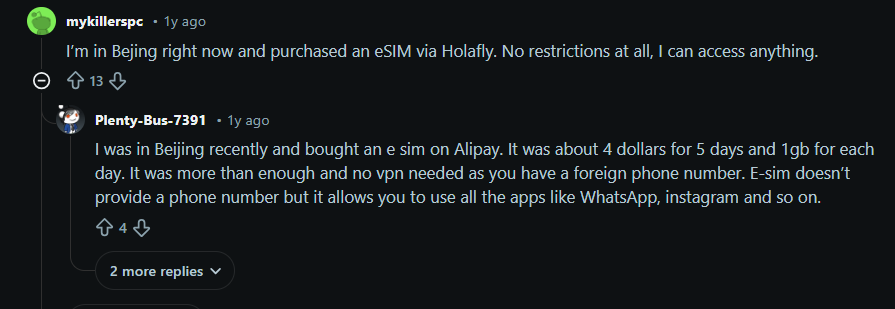
See? This method actually works. Especially for people who need to post, respond to clients, or manage Instagram Shops while traveling.
But here’s the part most people don’t know
This method is so inconsistent because Instagram doesn’t rely on just one signal, but it looks at a combination of:
- your IP address
- your mobile network code (SIM identity)
- your timezone
- your device fingerprint
- the Wi-Fi or network you’re physically near
And this is where problems start.
The major limitations of using a foreign SIM card:
- It only works on mobile data. If you switch to Wi-Fi (at home, a café, airport, hotel), you immediately fall back under local restrictions.
- You inherit the SIM’s country restrictions. If the SIM comes from a restricted country, you get their censorship. Example: An Iranian SIM won’t load Instagram even if you’re in Turkey, because Iran blocks it.
- Instagram can still detect your real location. This triggers: “Confirm it’s you”, “Suspicious login attempt”, or account checkpoints
- Roaming prices become unrealistic: International data packages get expensive very quickly, especially if you want to watch Reels or upload stories.
When should you use this method?
It has niche, real-life use cases:
- Completing Instagram identity verification
- Posting a quick update while traveling
- Managing client accounts in a restricted country (great for freelancers that are traveling)
But outside of these specific situations, the method is too unstable, especially for daily Instagram usage. So if you want consistent access, a predictable connection, a cheap method, and no technical headaches, then just skip this method and use the Gologin proxy browser instead.
Other Methods & Tricks We Don’t Recommend:
1. Using a VPN
This method can technically work, but it can be a red flag for Instagram’s security systems for two reasons:
- Shared IP addresses: people who are using the same VPN as you will all have the same IP address as you, if one user on that shared IP violates Instagram’s Terms of Service (TOS) and gets banned, Instagram will blacklist the entire IP address. When you connect using that same IP, your account will be instantly flagged as a red flag.
- The suspicion of encryption: as we explained before, VPNs encrypt your traffic. Yes, this is a privacy benefit, but for platforms like IG, if traffic is coming from a highly encrypted source, then it’s coming from a source that is known to be used to bypass restrictions.
2. Change DNS / Smart DNS (doesn’t work)
This method is the first people try because it’s the easiest, but changing DNS or using Smart DNS fails because it basically addresses the wrong problem. It only changes how your device finds the website, not where your device appears to be connecting from. We’ve explained before in this guide that you must change your IP address to bypass geo-restrictions, this method does not do that at all.
3. Tor (slow, encryption will trigger bans)
It is true that the Tor browser encrypts your traffic (by bouncing your connection through many servers), but this process is extremely slow it becomes almost impossible for you to load high-bandwidth content like reels and stories. More importantly, this heavy encryption and the use of Tor’s exit nodes are big security red flags for Instagram. So, don’t waste your time with this method.
Check out this Reddit user’s comment about Tor:

4. Browser Extensions (dangerous)
Browser extensions, especially free ones, are extremely dangerous and should never be used to unblock a platform where you have a valuable account like your Instagram account. These extensions frequently request weird permissions to “read and change all your data on all websites,”, and the moment you click “allow”, you basically give them permission to steal your Instagram credentials, session cookies, browsing history, and even financial details! This puts your entire digital life at risk. Also, their IP addresses are often blacklisted, so just avoid this method alltogether.
Where Is Instagram Blocked Right Now?
The following list provides information on which countries currently have Instagram banned. This way, you know you’re not alone, and it may also help you plan ahead if you are traveling to one of these countries.
The countries that have Instagram blocked as of November 2025 are:
- China
- Russia
- Iran
- North Korea
- Turkmenistan
- and Nepal
Let’s find out why:
Why Is Instagram Blocked In Some Locations?
There are many reasons Instagram gets restricted in some countries. For example:
- Political censorship and control of the flow of information. For example, the ban in China was directly correlated to the pro-democracy riots that took place in Hong Kong. Also, in Iran, the ban on IG has been imposed because of protesters using the app to organize and share information concerning the protests.
- Another reason is to maintain national security and stability, as has been the case in Russia.
- In addition, many countries block international social media platforms from their citizens to protect cultural, social, or religious morals (examples being Turkmenistan and North Korea).
- and of course, for economic reasons, to protect domestic industry, like in China, where a powerful domestic social media ecosystem (WeChat, Douyin) was developed, and the country’s restriction of foreign platforms like Instagram gave local companies a better chance to grow without international competition.
FAQs
How to unblock Instagram without a VPN?
The most secure and reliable way to unblock Instagram without using a risky VPN is by using the Gologin proxy browser. A VPN's heavy traffic encryption and shared IP addresses often lead to blocks, but Gologin solves this by creating a unique, isolated browser profile that looks like a new, legitimate device connecting from a non-restricted country. This safely changes both your IP address and your digital fingerprint so you bypass geo-blocks without triggering Instagram's security systems. You simply create a profile, set your desired location with a stable proxy, and log in normally.
Is Instagram available in Russia?
No, Instagram is currently not available in Russia as it has been officially banned by the government since March 2022. The platform was blocked as part of broader government actions, and Meta (Instagram's parent company) was designated an "extremist" organization.
Is Instagram blocked in China?
Yes, Instagram is completely blocked in mainland China, a restriction enforced by the country's strict internet censorship policy known as the Great Firewall. The ban covers both the mobile app and the website.
What do Chinese people use instead of Instagram?
Instead of Instagram, people in China primarily use several powerful domestic social media platforms. The most direct visual and lifestyle alternative is Xiaohongshu (Little Red Book), which combines elements of Instagram and Pinterest for sharing fashion, beauty, and product reviews. For short videos, they use Douyin (the original Chinese version of TikTok), and for general networking and daily life (which includes sharing photos and moments), they use the "super app" WeChat.