Online anonymity has become harder to maintain as platforms tighten identity checks and tracking technologies grow more advanced. Fingerprinting, behavioral analytics, and cross-session profiling now make it nearly impossible for users to move through the internet without leaving a trail. Mainstream browsers like Chrome browser and others often collect and share user data, making it difficult to stay private from third parties, including even your internet provider.
In response, a new generation of anonymous browsers has emerged, offering stronger protection against tracking and deeper control over digital identity.
TL;DR:
- In 2026, staying anonymous online requires more than just clearing cookies or using a VPN. Advanced tracking methods like browser fingerprinting (IP, hardware specs, OS, fonts, and WebGL signatures) now build a unique “digital identity” for every user.
- Anonymous browsers – specifically antidetect browsers bypass this by creating isolated browser profiles with unique, realistic fingerprints. While GoLogin is highlighted as the top choice for its balance of privacy and operational stability, other browsers like Tor, Brave, and Epic offer specialized protections depending on your speed and anonymity needs.
A couple years ago Elon Musk said a phrase that picked up quickly: people do not realize they have already become cyborgs. Mobile phone has literally become a vital part of the human hand: these days you just can’t function without stable internet access. Things like ChatGPT seem to help, but they only immerse us deeper into relying on technology in basic life and work needs.
You might never think about it, but on the internet you’re being tracked all the time. Whatever you do online leaves a certain mark called digital footprint. You exchange your personal information for free services and convenience: just login via Facebook and click “Accept all cookies” – bet you do that multiple times a day.
For users seeking to avoid tracking and maintain anonymity, the best private browsers offer optimal solutions by prioritizing privacy and protection against surveillance. In case you need even a basic level of anonymity, you need to know certain rules.
Your browser is watching you. Every tab you open, every search you type, every video you pause — it’s all being logged, profiled, and monetized. Chrome alone collects over 20 categories of personal data. Firefox, despite its privacy reputation, still phones home with telemetry by default. Safari looks clean but still feeds Apple’s ad ecosystem.
The result? A web where your “private” browsing is anything but.
This guide ranks the 10 best anonymous browsers in 2026, scored on real-world anonymity, fingerprint protection, speed, and resistance to modern tracking techniques, including canvas fingerprinting, WebRTC leaks, hardware concurrency exposure, and behavioral profiling. Whether you’re a researcher, marketer, journalist, or just someone who’s tired of being followed across the web, there’s a tool here for you.
Top 10 Best Anonymous Browsers in 2026 — Full Comparison
| Browser | Canvas Masking | WebRTC Leak Protection | Profile Isolation | Built-in Proxy | Telemetry Disabled |
|---|---|---|---|---|---|
| GoLogin | ✅ Full spoofing | ✅ Full | ✅ Per-profile | ✅ Per profile | ✅ Yes |
| Tor Browser | ✅ Blocked | ✅ Full | ❌ Single identity | ✅ Onion routing | ✅ Yes |
| Mullvad Browser | ✅ Blocked | ✅ Full | ❌ Single identity | ❌ Pairs w/ VPN | ✅ Yes |
| Brave Browser | ✅ Randomized | ✅ Configurable | ❌ Limited | ✅ Tor in Private Window | ⚠️ Partial |
| LibreWolf | ✅ Blocked | ✅ Full | ❌ Single identity | ❌ | ✅ Yes |
| Epic Privacy Browser | ✅ Blocked | ✅ Full | ❌ Limited | ✅ Built-in | ✅ Yes |
| DuckDuckGo Desktop | ⚠️ Partial | ⚠️ Partial | ❌ | ❌ | ⚠️ Partial |
| Iridium | ❌ None | ⚠️ Partial | ❌ | ❌ | ⚠️ Partial |
| Comodo Dragon | ⚠️ Partial | ⚠️ Partial | ❌ | ❌ | ⚠️ Partial |
| Firefox (Hardened) | ✅ Blocked | ✅ Full | ❌ | ❌ | ✅ Yes |
Why Standard Browsers Fail at Anonymity
Most browsers weren’t designed for anonymity they were designed for convenience. Even “privacy-focused” modes like Chrome’s Incognito or Firefox’s Private Window only clear local cookies after a session. They do nothing to stop:
- Canvas fingerprinting websites silently render hidden graphics to extract a unique device signature from your GPU
- WebRTC leak protection gaps real IP addresses leaking through peer-to-peer calls even behind a VPN
- Hardware concurrency fingerprinting — your CPU core count, memory, and GPU model combining into a nearly unique profile
- Behavioral analytics — mouse movement patterns, typing cadence, and scroll behavior used to re-identify users across sessions
- The fix isn’t just blocking cookies. It requires either randomizing or replacing your browser fingerprint entirely.
You’re Leaving a Browser Fingerprint
First of all, privacy is not anonymity. Cookies and IP address are well known, but they are only the tip of the global tracking iceberg. While cookies may be easily erased and IP address location hidden by a basic VPN service, there are other parts in your online data track. Your everyday browser tracks and stores your actions into a big profile on a more sophisticated level – and it can’t be easily seen or dealt with, like cleaning cookies.
When you surf through websites, your browser creates a unique canvas of your actions that later might be easily used as your authentic buyer behavior. Your physical location, operating system, software, device model, hardware parameters and even apps you use are also saved. These might seem unimportant to you, but they make a great difference when a unique picture of your identity is built. A complete set of these parameters is called browser fingerprint.
Just Business, But It’s Personal
So, why does someone need our data?
Browser fingerprints are widely used in various areas: for example, in online ads targeting. If you have ever set up Facebook Ads Manager or Instagram for a basic promotion, it’s no surprise for you that corporations know every single detail about their every user.
Larger players like Google and Meta may seem to have a great reputation, but in reality they’re far from being saints: it’s just business. Google Chrome and Instagram are forever-free, but they earn fortunes collecting and selling your personal data to anyone interested. In addition to browser fingerprinting, advertising and social media sites use third-party cookies to track your activity across different websites, allowing them to build detailed profiles and target you with personalized ads.
With digital data you leave behind, online marketers find out exactly what you wish to buy. That’s one of the reasons why user information databases are collected and sold for enormous money. Bank websites use browser fingerprinting for safety reasons to prevent fake identity logins. There’s not much that can be done: turns out being anonymous is not as easy as it might seem.
And while most people consider sharing personal data normal, for some it might be a serious issue. Anonymity is a choice that everyone has. This matter becomes critical if you live in a censored country, worry for your own personal data safety or simply run a business that needs multiple digital identities (we’ll cover it a bit later). Not all governments support freedom of speech (even those who declare it), and not all major corporations have clear intentions. It’s just how the world works.
Anonymous Web Browsers
Collecting and managing your personal data (browser fingerprinting) is widely used all over the Internet, and unfortunately sometimes our personal data is misused, sold to data brokers or even stolen in massive amounts, leading to unpredictable consequences. Data leaks can also occur when browsers or privacy solutions fail to adequately protect user information, exposing it to third parties such as advertisers or trackers. Even working with well-known internet giants is not completely safe.
So, how can you go completely anonymous? Fortunately, the answer is quite simple: use an anonymous web browser. They are quite simple, and there is a good choice of these for any occasion, both free and paid. We will talk about the best ones and how to use them later in a series of articles.
But how does it work? Is it safe and legal to use? And how do these differ from common browsers?
How It’s Made
Here’s a quick explainer on anti-detect technology. Your browser fingerprint, also known as a device fingerprint, consists of a whole lot of information, which could be separated into five classes:
- browser information
- physical location
- IP address
- hardware
- software.
It includes even the smallest details, like your graphic card model, your fonts and extensions and even your zip code.
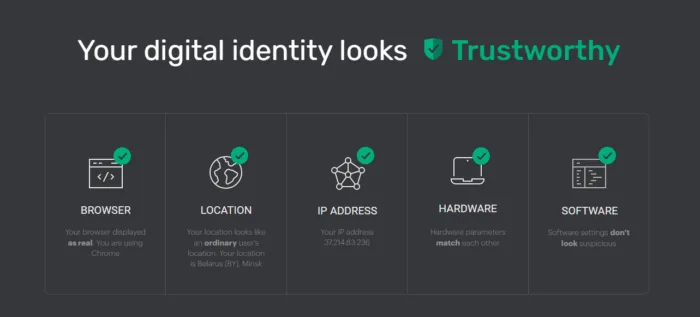
Curious about your own profile? Go and try out Iphey: a browser fingerprint checker. Other than checking your identity to be real, it demonstrates the sheer amount of various data about you that can be seen and collected by someone else.
You can also check your online anonymity using online services such as browserleaks.com or coveryourtracks.eff.org
Launching an anonymous web browser, you won’t even notice the difference at first: it looks just like the normal one. But before you start surfing, an anonymous web browser will let you set up or choose a completely new digital identity to continue with – so that websites naturally identify you as a different person.
It takes all of the parameters from your common device fingerprint and replaces them, creating a unique digital profile you can work with. Some privacy settings can even be accessed or modified directly through the browser’s address bar, allowing you to enhance your privacy configurations. An antidetect browser is a specialized type of anonymous browser designed to prevent digital fingerprinting and enable safe multi-account management by generating realistic and unique device fingerprints. Older anonymous web browsers used to simply erase your digital fingerprint before work, but that method is already ceasing to exist in today’s environment, as major website engines quickly evolve to stop suspicious activities.
Going With The Flow
“Blending in with the crowd” isn’t that easy technically. You can’t just shuffle your parameters and move on: they all have to be both unique and logically corresponding to each other at the same time.
Anonymous web browser creates a profile completely different from your own, yet as normal as possible to not stand out from the masses. In other words, it literally blends you in. Many users rely on these technologies to stay anonymous online and avoid tracking. Browsers carry this task out with various methods, which is good and bad simultaneously: even the best ultimately have flaws in them, and the most natural browser fingerprint can be finally identified at some point. Even advanced browsers must also guard against ip leaks, which can expose user information despite other protections.
Even the most famous confidential browser Tor is also not a perfect option: most governments and corporations have been well aware of it for years. Their systems simply recognize its users as Tor users, meaning they automatically draw attention to whatever they’re doing. Still, the anti-detect technology is growing fast and there are no signs for it to decline in the nearest future.
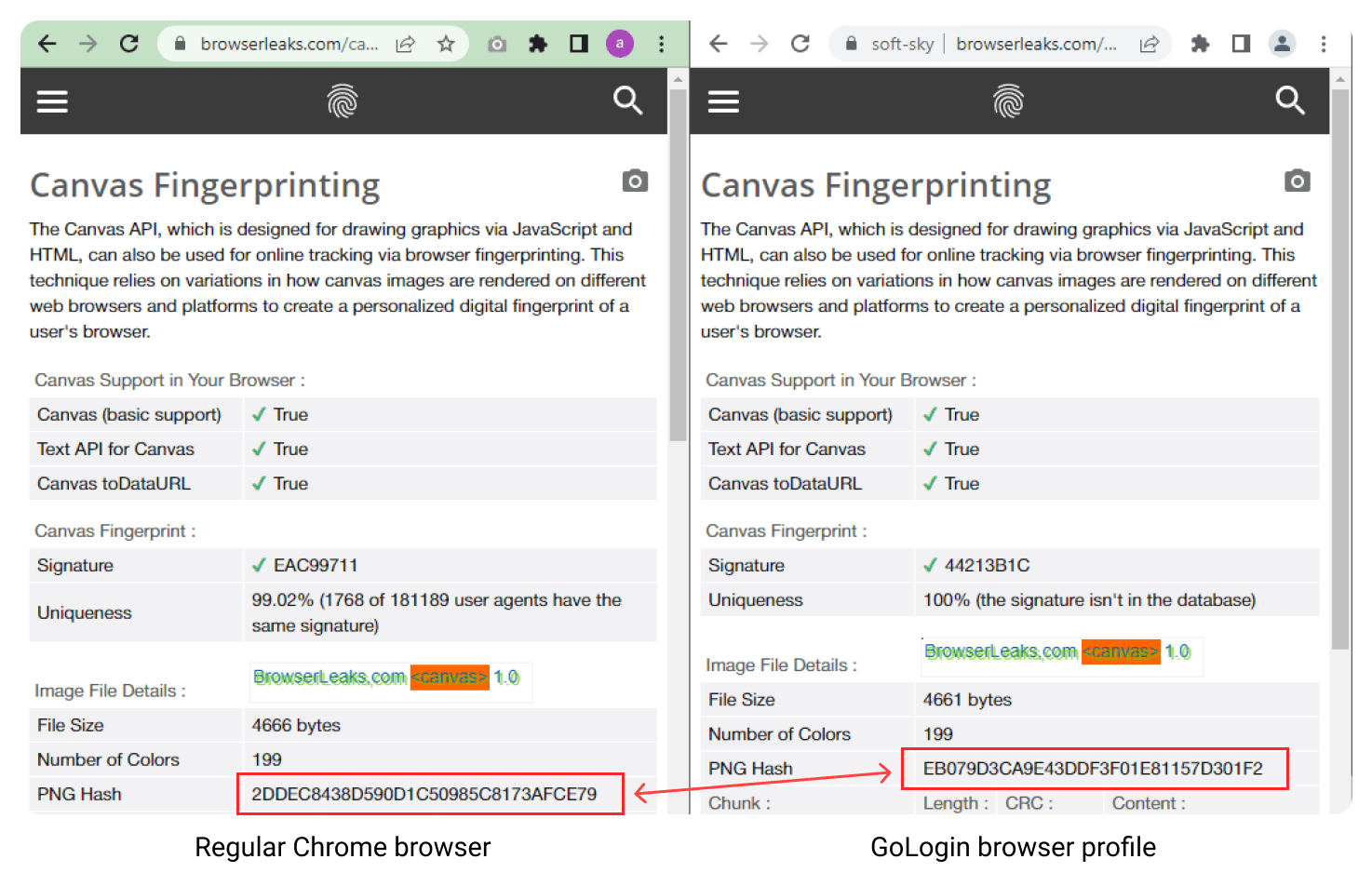
To find out more about uniqueness and normality, check out Browserleaks browser checker. See how GoLogin makes your device normal, yet unique in small technical details.
What Is Multiaccounting?
Here’s the main point: these new digital identities will not overlap or connect with each other in any way. Every new profile needs to be completely different from all previous ones, yet looking perfectly “normal”.
It’s the main and the trickiest task an anonymous web browser has to fulfill. It’s a kind of art. Good commercial browsers are able create thousands of these, and with each profile being absolutely authentic, market platforms and social networks will not ban them. It’s called multiaccounting. Anonymous browsers allow users to manage multiple accounts securely and anonymously, preventing linking or bans when switching between profiles. This feature is not just convenient – it’s the flesh and blood for a certain kind of businesses:
- social media marketing
- online advertising
- affiliate marketing
- traffic arbitrage
- dropshipping
- e-commerce merchants
- crypto enthusiasts
- web scraping
- software developing and testing
- online ticketing and betting
- personal accounts
- and many, many more.
There is one good, simple reason why anonymous web browsers are so widely used: they create digital identities that don’t get banned by websites, social media mechanisms and market platforms.
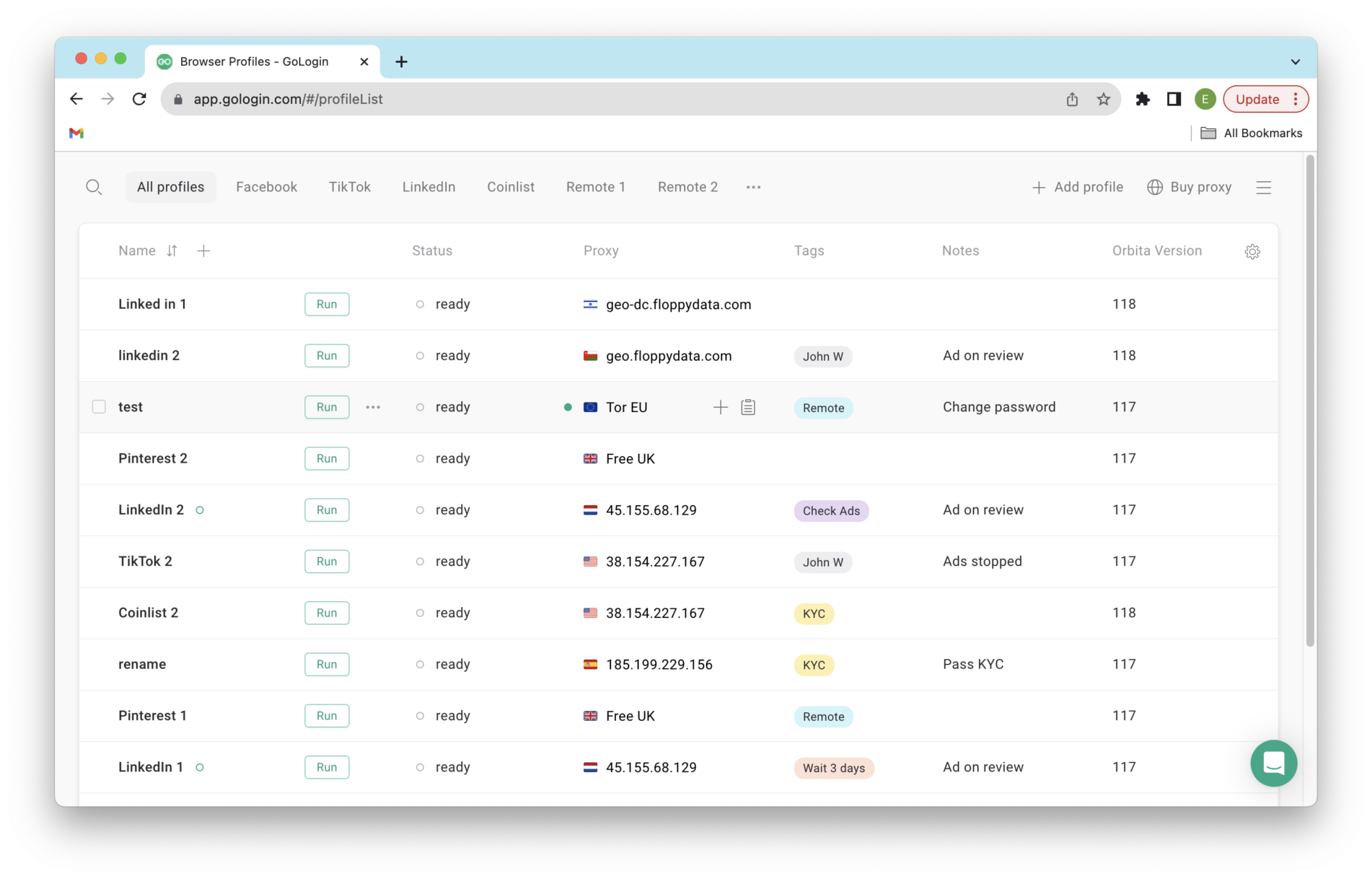
Main screen of GoLogin web app set up for multiple social media accounts. The web app is identical to the desktop one and can be accessed from any device for comfortable remote work.
Can I Use It?
The biggest use case for anonymous web browsers remains purely commercial. They give one person an ability to safely and easily multiaccount on platforms that do not allow it, like Amazon and Google.
Privacy-focused users are a key audience for anonymous browsers, as they prioritize online anonymity, secure account management, and protection from bans or data leaks. Some of their use cases are not always ethical (like arbitrage), yet anti-detect technology is completely legal. The EU and USA laws do not mention it as suspicious or dangerous. Anonymous web browsers help thousands of marketers and enthusiasts successfully maintain their regular businesses everyday. They also help to support basic anonymity – a critical life aspect we have almost lost with the appearance of the Internet.
If you feel concerned about your personal data, treat sensitive information or try to evolve your ads and social media, here’s a simple advice for you: try an anonymous browser. It’s a trusted, well-made tool for online privacy or for use in countries that have closed or censored the internet, as well as for commercial use. We will cover the topic of various anonymous web browser commercial use cases later in a series of blog articles.
YouTube and Online Privacy
YouTube is one of the most visited websites in the world, but it’s also a hotspot for data collection and online tracking. Every time you watch YouTube videos, your browsing history, search history, and even the time you spend on each video are logged—not just by YouTube itself, but also by a network of third party trackers. This data is used to build a detailed profile of your interests, which then powers targeted ads and influences the recommendations you see, both on YouTube and across other websites.
If you want to protect your online privacy while enjoying YouTube, start by switching to a private browser with enhanced tracking protection. Browsers like Tor Browser and Brave Browser are designed to block third party trackers and minimize the amount of data collected about your browsing habits. With features like private browsing mode and built-in ad blocking, these privacy focused browsers help you browse online with fewer invisible trackers following your every move.
Another smart step is to change your default search engine to a private search engine such as DuckDuckGo. Unlike Google, DuckDuckGo doesn’t store your search history or track your search engine queries, so you can look up YouTube videos without worrying about your search data being used for targeted ads or sold to data brokers.
Browser extensions can further boost your privacy. Tools like uBlock Origin and Privacy Badger block ads and tracking scripts on YouTube, making it harder for third party trackers to collect your browsing data. For even more protection, consider disabling JavaScript in your browser’s advanced settings—this can prevent many tracking scripts from running, though it may affect how some YouTube features work.
Masking your IP address with a trustworthy VPN adds another layer of privacy, making it harder for your internet provider or other websites to link your activity back to you. However, keep in mind that even with a VPN or private browser, some sites use fingerprint tracking to identify your device based on unique characteristics like installed fonts or browser profile. To counter this, try browsers with built-in fingerprint protection, such as Firefox Focus, or add browser extensions that block fingerprinting scripts.
Ultimately, staying anonymous online—especially on platforms like YouTube—requires a combination of tools and habits. By using a private browser, setting a private search engine as your default, and installing privacy-focused browser extensions, you can enjoy YouTube videos with greater confidence that your browsing history and personal data aren’t being used to fuel targeted ads or track your activity across the web. With just a few clicks, you can take control of your private browsing experience and keep your online privacy intact.
TOP-10 Best Anonymous Browsers in 2026
These browsers are designed to provide secure browsing for privacy-conscious users, with features like ad and tracker blocking, private mode, and enhanced access to sites with strong security measures.
1. Gologin: The Most Complete Anonymous Browser for 2026
Gologin.com takes the top spot because it offers anonymity without sacrificing usability. Its Orbita engine produces fingerprints that resemble real-world devices, reducing the risk of browser-based identification while preserving a natural browsing experience. Unlike traditional privacy tools that block trackers or randomize data, Gologin focuses on authenticity. Its profiles behave like stable, human-operated devices, which means fewer challenges on high-security platforms and less friction when switching identities.
Teams and individual users benefit from its collaborative workspace system, allowing multiple profiles to be shared securely without exposing passwords. This makes Gologin a practical solution not only for anonymity enthusiasts but also for researchers, journalists, and professionals who need consistent, isolated identities. The downside is cost. Gologin sits in a premium tier compared to general-purpose browsers, though the trade-off is justified by its stability and fingerprint precision.
Pros:
- Best-in-class fingerprint realism; profiles pass security checks on major platforms
- Full canvas fingerprint spoofing and WebRTC leak protection per profile
- Hardware concurrency, GPU, OS, timezone all independently customizable
- Team collaboration with credential-protected shared profiles
- Web app available — no installation required
- Built-in tracker blocking with per-page tracker count display
Cons:
- Premium pricing; overkill for casual private browsing
- Learning curve for new users unfamiliar with fingerprint concepts
2. Tor Browser: The Classic Option For Maximum Anonymity
Tor Browser remains the most recognized name in anonymous browsing. Developed by the Tor Project, an organization dedicated to online anonymity, Tor uses an onion-routing network that obscures user IP addresses through several encrypted layers, creating a high degree of privacy. Tor relies on a global network of volunteer relay servers to route traffic and enhance privacy.
In 2026, Tor is still unmatched for political activists, journalists in restrictive regions, and users who need to avoid surveillance entirely. However, Tor’s strength is also its weakness. Its multi-hop design leads to slow speeds, unpredictable page loading, and limited usability on modern platforms that expect stable device fingerprints. Tor is ideal for anonymity but not for complex interactions or long sessions.
Pros:
- Strongest available anonymity for high-risk use cases
- Full WebRTC leak protection and canvas fingerprinting blocking
- Onion routing hides traffic from ISPs and network-level surveillance
- Bypasses censorship; accesses .onion sites — completely free and open-source
Cons:
- Significantly slower than all alternatives due to onion routing
- Tor exit IPs are publicly listed and widely blocked by major platforms
- Being a Tor user is itself a detectable signal
3. Brave Browser: A Privacy-First Browser With Speed Advantages
Brave continues to grow in 2026 thanks to its built-in tracker blocking, fingerprint defenses, and fast Chromium-based performance. It blocks ads by default, which not only enhances privacy but also improves browsing speed. It strikes a middle ground by offering strong privacy features without the network slowdown associated with Tor. Brave’s Shields system blocks scripts and cross-site trackers by default, which limits data collection across the web.
The challenge is compatibility; sites that require persistent identity or rely on script-heavy designs sometimes break under Brave’s stricter protections. Still, it remains one of the most efficient ways to browse anonymously without sacrificing speed.
Pros:
- Fastest anonymous browser in this list; excellent daily usability
- Canvas fingerprint randomization and configurable WebRTC leak protection
- Shields system with visible per-page tracker counts
- Optional Tor routing in Private Window
Cons:
- Randomized fingerprinting is less robust than full spoofing or blocking
- Strict Shields settings break compatibility on some sites
- Not suitable for multi-account use
4. Epic Privacy Browser: Zero-Trace Browsing Made Simple
Epic Privacy Browser focuses on eliminating every possible trace of user behavior. It blocks trackers, strips metadata, routes traffic through encrypted proxies, and deletes all browsing data on exit. While Epic uses free proxies to route traffic, these may be slower or less reliable than paid options, which can impact both speed and trustworthiness.
This makes Epic a strong option for users who value simplicity over customization. However, its anonymity depends heavily on its default proxy network, which does not offer the same robustness as dedicated privacy-focused routing systems. Epic performs best for casual anonymous browsing rather than high-security use cases.
Pros:
- One-click encrypted proxy — no separate VPN needed for basic IP masking
- Canvas fingerprinting blocked and WebRTC leak protection enforced by default
- Zero-persistence: all data deleted on exit automatically
- Free with a clean, Chromium-based interface
Cons:
- Shared proxy infrastructure — slower and less reliable than dedicated VPNs
- No multi-profile isolation system; limited customization
5. Iridium Browser: Open-Source Privacy With Familiar Performance
Iridium takes the Chromium engine and strips away Google’s tracking components, offering a cleaner base for anonymous browsing. Unlike the Chrome browser, which includes various tracking features that can monitor user activity, Iridium removes these elements for enhanced privacy. It is open-source, transparent, and familiar in design, making it accessible to users who want privacy without switching to a more experimental platform.
It does not include built-in fingerprint spoofing or proxy systems, so users must pair it with external tools to achieve deeper anonymity. Iridium excels at reducing passive data leakage but is not a complete anonymity solution on its own.
Pros:
- Chromium-based with Google tracking components removed at source
- Familiar Chrome interface; full extension compatibility
- Open-source with transparent build process; fast and stable
Cons:
- No canvas fingerprinting protection or WebRTC leak protection built in
- Requires significant external tooling to achieve meaningful anonymity
- Smaller community than Firefox-based alternatives
6. Comodo Dragon Browser: Security-Focused Anonymous Browsing
Comodo Dragon focuses on secure, anonymous browsing by integrating certificate validation tools, malware scanning, and tracking defenses. Users can also disable JavaScript to further enhance privacy and reduce tracking, a useful feature for those seeking stronger protection against online threats. It appeals to users who care about both identity protection and security threats.
The browser delivers solid anonymity for everyday tasks, but its feature set feels dated compared to more modern privacy tools. Its fingerprinting protections are limited, making it less effective against advanced tracking techniques now common in 2026.
Pros:
- Enterprise-grade certificate validation and malware scanning
- JavaScript disable option reduces canvas fingerprinting and behavioral tracking exposure
- Solid tracker blocking for everyday browsing; free
Cons:
- Fingerprint protection outdated relative to 2026 tracking techniques
- No WebRTC leak protection enforcement by default
- Less active development than competing options
7. Mullvad Browser — Best Hardened Browser for Daily Use
Mullvad Browser is the most significant new entrant in the anonymous browser space in recent years. Developed in collaboration between the Tor Project and Mullvad VPN, it applies Tor Browser’s hardening philosophy to a conventional browsing context — without the anonymity network’s speed penalties. The result is the most privacy-hardened browser available for everyday use.
Out of the box, Mullvad Browser ships with telemetry disabling across all categories: no crash reports, no usage analytics, no phone-home behavior of any kind. The NoScript extension is pre-installed. Canvas fingerprinting protection is active by default, blocking canvas read APIs that websites use to extract GPU-based device signatures. WebRTC leak protection is enforced, with WebRTC disabled by default to prevent IP leakage. The browser is designed to make all its users look identical — the same window size, the same font set, the same fingerprint — to maximize crowd-blending.
Where Mullvad Browser differs from Tor is in its proxy model. Rather than building in its own routing network, Mullvad Browser is designed to pair with Mullvad VPN. This separation of concerns is intentional: the browser handles fingerprint anonymization, the VPN handles IP anonymization. Users who already subscribe to Mullvad VPN get an extremely coherent privacy stack at no additional cost for the browser itself.
Mullvad Browser’s weakness is multi-account use. Like Tor Browser, it operates as a single identity — there’s no profile system. It’s designed to make you look like everyone else, not like a different person each time. For professionals who need profile isolation across sessions, GoLogin remains the stronger choice.
Pros:
- Built by the Tor Project — Tor’s hardening without Tor’s speed penalty
- Full telemetry disabling; zero phone-home behavior
- Canvas fingerprinting and WebRTC leak protection active by default
- Free; pairs naturally with Mullvad VPN
Cons:
- No multi-profile or profile isolation system
- Best features only unlock fully with Mullvad VPN subscription
- Not suitable for multi-account workflows
8. LibreWolf — Best for Zero Telemetry and Firefox Users
LibreWolf is a hardened Firefox fork built around a single principle: telemetry disabling at every level. Where standard Firefox transmits usage data and crash reports by default, LibreWolf removes these entirely from the codebase — not just as toggleable settings, but as compiled-out features. This makes it the most transparency-trustworthy option for users who want to audit exactly what their browser is doing.
LibreWolf ships with uBlock Origin pre-installed and a hardened user.js configuration based on the arkenfox project — one of the most respected Firefox hardening frameworks in the privacy community. Canvas fingerprinting protection is active via Firefox’s built-in resist fingerprinting (RFP) flag. WebRTC leak protection is enforced through disabled non-proxy UDP. The browser strips referrers, blocks third-party cookies, and enforces HTTPS-only mode globally.
Because LibreWolf is a Firefox fork, it retains full compatibility with Firefox’s extension ecosystem while shedding Mozilla’s data practices. The limitation is update cadence: LibreWolf releases typically lag Firefox stable by a few days to a week, which means brief exposure windows when Firefox security patches are published.
Pros:
- Zero telemetry — removed at compile level, not just disabled via settings
- uBlock Origin pre-installed; hardened arkenfox-based configuration
- Full canvas fingerprinting protection and WebRTC leak protection by default
- Free and open-source; active community maintenance
Cons:
- Update cadence lags Firefox by several days — brief security patch windows
- No built-in proxy or multi-profile isolation system
- Some web app compatibility issues under strict RFP settings
9. DuckDuckGo Desktop Browser — Best for Casual Users Who Want Simplicity
DuckDuckGo’s desktop browser (available on macOS and Windows) is the most accessible entry point into private browsing for non-technical users. Its standout feature is the Fire Button — a one-click “burn” that instantly closes all tabs and deletes all browsing data, cookies, and cache in a single action. Combined with DuckDuckGo’s default search engine integration, it creates a zero-configuration private browsing experience that requires no setup.
The browser blocks canvas fingerprinting attempts and third-party trackers using DuckDuckGo’s own tracker protection list, maintained independently of any advertising incentives. It also integrates DuckDuckGo Email Protection, allowing users to generate private email aliases that strip tracking pixels from incoming emails — an unusually complete approach to cross-service privacy.
Where DuckDuckGo Desktop falls short is depth. Its fingerprint protection is less comprehensive than Mullvad Browser or LibreWolf, and it doesn’t support profile isolation, proxy integration, or the kind of fingerprint spoofing that GoLogin provides. It’s best understood as a significant upgrade over Chrome for everyday users, not a tool for high-stakes anonymity.
Pros:
- Fire Button for instant one-click data wipe — simplest UX in this list
- Canvas fingerprinting and tracker blocking active by default
- DuckDuckGo Email Protection strips email trackers
- Free with no configuration required
Cons:
- Fingerprint protection less comprehensive than hardened Firefox alternatives
- No proxy integration or multi-profile isolation
- Not suitable for multi-account workflows or high-risk anonymity needs
Firefox with Hardening — Best Free DIY Privacy Stack
Standard Firefox doesn’t belong on an anonymous browser list — but a properly hardened Firefox installation does. With the arkenfox user.js configuration applied, Firefox becomes one of the strongest fingerprinting-resistant browsers available: canvas fingerprinting is blocked via the privacy.resistFingerprinting flag, WebRTC leak protection is enforced, telemetry disabling covers all Mozilla reporting channels, and third-party cookies are blocked globally.
The caveat is effort. Achieving this level of protection requires manual installation of the arkenfox configuration, regular updates to keep pace with Firefox releases, and acceptance that some sites will break under strict resist fingerprinting settings. For technically confident users who want maximum control over a free, open-source stack, hardened Firefox is the most customizable option in this list.
Pros:
- Most customizable anonymous browsing stack available; free and open-source
- Full canvas fingerprinting and WebRTC leak protection with arkenfox
- Complete telemetry disabling across all channels
Cons:
- Requires manual configuration — not suitable for non-technical users
- Ongoing maintenance required as Firefox updates
- No built-in proxy or multi-profile system
How to Choose the Right Anonymous Browser
- For multi-account management, research, or professional identity isolation — Gologin is the only purpose-built solution. Its fingerprint realism, profile isolation, and team features have no equivalent in this list.
- For maximum anonymity in high-risk environments — Tor Browser remains the standard. Accept the speed penalty; the anonymity is worth it.
- For hardened daily browsing without Tor’s limitations — Mullvad Browser provides Tor-level hardening at normal browsing speeds, best combined with Mullvad VPN.
- For fast, private browsing with no configuration — Brave Browser gives the best usability-to-privacy ratio for everyday users.
- For zero telemetry and Firefox familiarity — LibreWolf is the most trustworthy Firefox fork with no data collection at any level.
- For the simplest possible private browsing experience — DuckDuckGo Desktop’s Fire Button makes privacy accessible to everyone.
FAQ
1. Which browser provides the highest level of anonymity?
Tor Browser still delivers the strongest anonymity thanks to its multi-layered onion routing system. For users who need both anonymity and stable session behavior, Gologin offers the most balanced high-security option.
2. Do anonymous browsers slow down internet speed?
Some do. Tor is the slowest because traffic travels through several encrypted relays. Gologin and Brave offer near-normal browsing speeds since they optimize fingerprint protection without overloading the network.
3. Are anonymous browsers legal to use?
Yes. Anonymous browsers are legal in most countries. They are widely used by researchers, journalists, and privacy-conscious users. Only the intent behind their usage could become problematic.
4. Can anonymous browsers block all trackers?
No browser can guarantee 100 percent tracker resistance, but tools like Brave, Epic, and Gologin significantly reduce fingerprint-based and behavioral tracking. Tor provides the strongest protection, but at the cost of speed and compatibility.
5. Can anonymous browsers be detected?
All anonymous browsers can theoretically be detected with enough effort. The difference is in how much effort detection requires. GoLogin’s realistic fingerprints make detection as difficult as identifying a real user. Tor Browser users are detectable as Tor users by IP reputation alone.
6. Does a VPN replace an anonymous browser?
No. A VPN masks your IP address but does nothing to prevent canvas fingerprinting, hardware concurrency fingerprinting, or behavioral tracking. Anonymous browsers address the fingerprint layer; VPNs address the IP layer. For meaningful anonymity, both are typically needed.
7. What is the difference between incognito mode and an anonymous browser?
Private/incognito mode only prevents local storage of browsing data after a session ends. It does not block trackers, prevent canvas fingerprinting, protect against WebRTC leaks, or hide your identity from websites or your ISP. Anonymous browsers address these issues at a fundamental level.
Interested in trying out yourself? Download GoLogin and discover our free plan here.