> ## Documentation Index
> Fetch the complete documentation index at: https://gologin.com/docs/llms.txt
> Use this file to discover all available pages before exploring further.
# Adding your first proxy
Adding your first proxy with the default settings is that simple!
On the **All profiles** page, click **Choose location or proxy** on a profile and **select the country**.
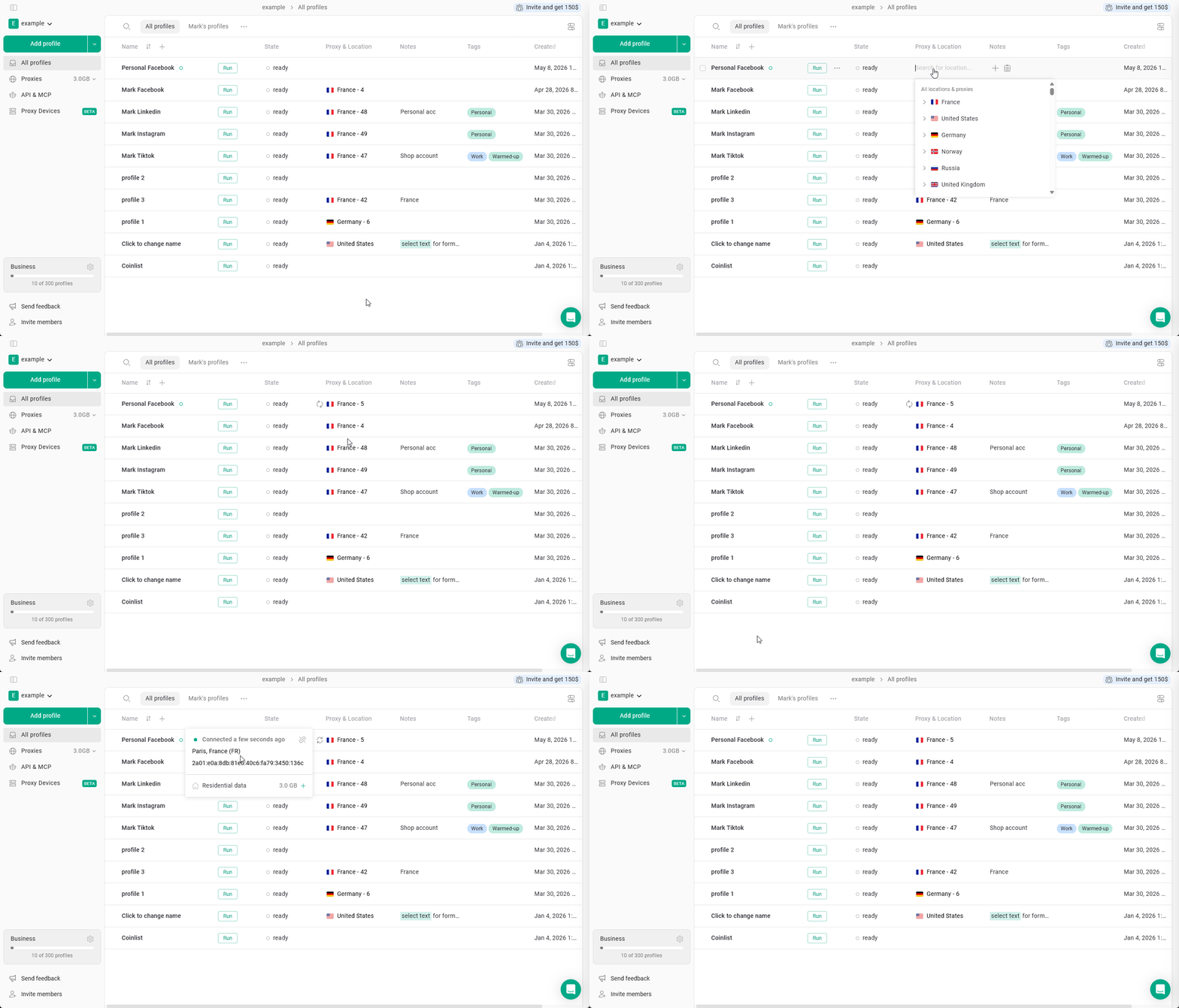 Gologin will automatically select the type of proxy based on your available traffic. If you have multiple types of proxies purchased, it will use the last selected proxy type.
See also
* [Gologin proxy settings and status](https://gologin.com/docs/proxy/gologin-proxies/gologin-proxy-management/gologin-proxy-settings)
* [View and top up proxy traffic](https://gologin.com/docs/proxy/gologin-proxies/gologin-proxy-management/view-and-top-up-proxy-traffic)
* [Website compatibility checker](https://gologin.com/docs/proxy/gologin-proxies/website-compatibility-checker)
* [Proxy Not Working](https://gologin.com/docs/general/troubleshooting/proxy-not-working)
Gologin will automatically select the type of proxy based on your available traffic. If you have multiple types of proxies purchased, it will use the last selected proxy type.
See also
* [Gologin proxy settings and status](https://gologin.com/docs/proxy/gologin-proxies/gologin-proxy-management/gologin-proxy-settings)
* [View and top up proxy traffic](https://gologin.com/docs/proxy/gologin-proxies/gologin-proxy-management/view-and-top-up-proxy-traffic)
* [Website compatibility checker](https://gologin.com/docs/proxy/gologin-proxies/website-compatibility-checker)
* [Proxy Not Working](https://gologin.com/docs/general/troubleshooting/proxy-not-working)