> ## Documentation Index
> Fetch the complete documentation index at: https://gologin.com/docs/llms.txt
> Use this file to discover all available pages before exploring further.
# Human Typing Simulation
Human Typing Simulation in Gologin makes text input inside browser profiles appear more natural.
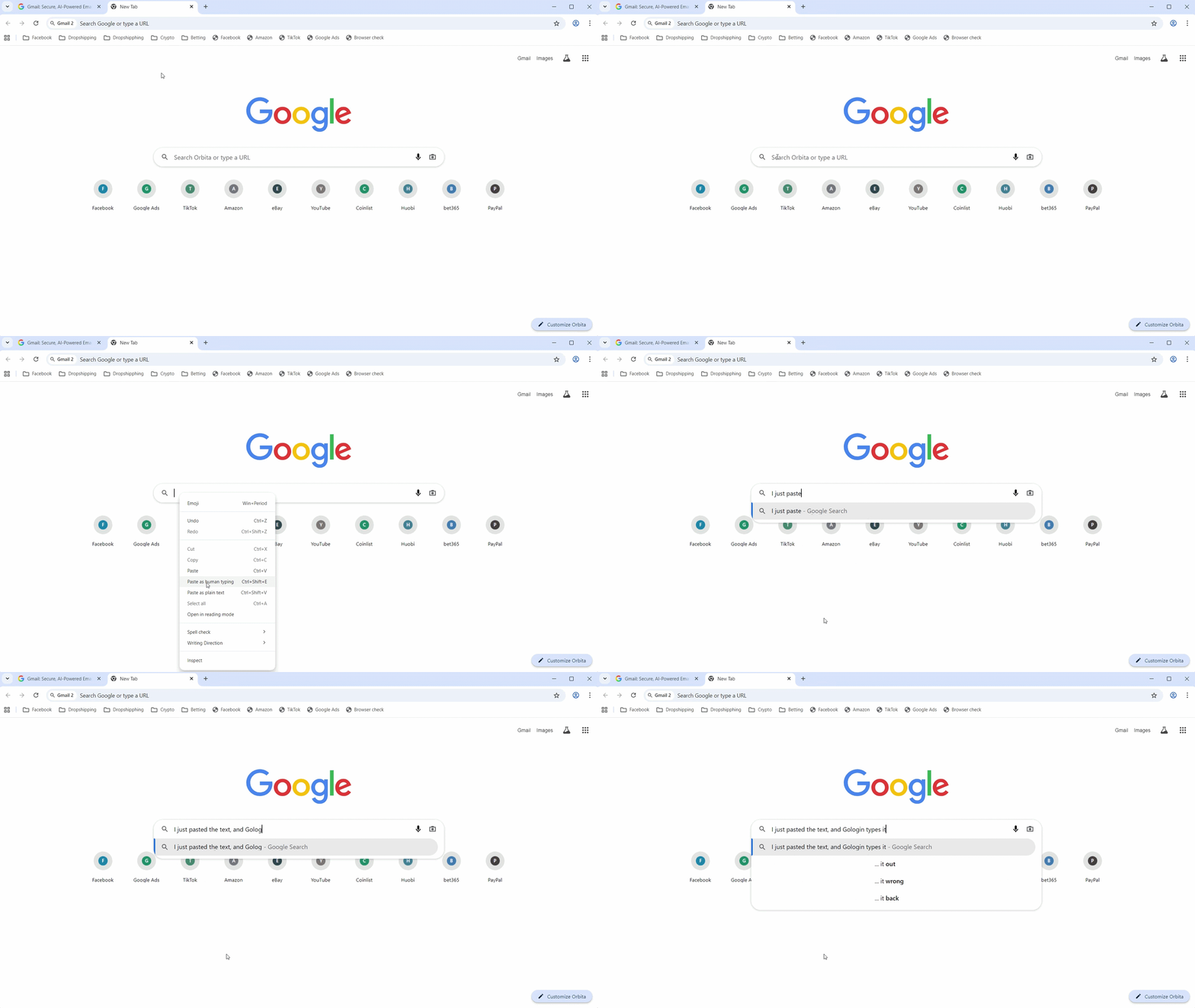
When text is pasted or entered into a field, Gologin simulates human typing behavior so that the input looks like it is being typed manually rather than inserted instantly.
This helps websites interpret the activity as coming from a real user.
## Why Human Typing is useful
Human typing simulation can help when interacting with websites that monitor user behavior, such as:
* social media platforms
* marketplaces
* advertising platforms
* services with anti-fraud systems
By making input actions look more natural, profiles may appear more trustworthy to website security systems.
## How it works in Gologin
When Human Typing Simulation is active:
* pasted text is entered gradually
* characters appear with small delays
* typing behavior looks closer to real user input
This allows automated workflows and profile actions to appear more similar to normal user activity.
### How to use Human Typing
1. Open a **browser profile**
2. **Copy text** from anywhere
3. In any text field inside a browser profile
* **right-click** on the text field and choose Paste as human typing
* or use the **Ctrl+Shift+E** hotkey combination
 ## See also
* [Run with Sync](https://gologin.com/docs/browser-profiles/profile-features/run-with-sync)
* [Common mistakes to avoid](https://gologin.com/docs/common-mistakes-to-avoid)
* [Maintaining trust score](https://gologin.com/docs/maintaining-trust-score)
## See also
* [Run with Sync](https://gologin.com/docs/browser-profiles/profile-features/run-with-sync)
* [Common mistakes to avoid](https://gologin.com/docs/common-mistakes-to-avoid)
* [Maintaining trust score](https://gologin.com/docs/maintaining-trust-score)