> ## Documentation Index
> Fetch the complete documentation index at: https://gologin.com/docs/llms.txt
> Use this file to discover all available pages before exploring further.
# Promo codes and discounts
## Activating a promo code
If you are not subscribed yet, you can use a coupon code before the first purchase.
To activate it:
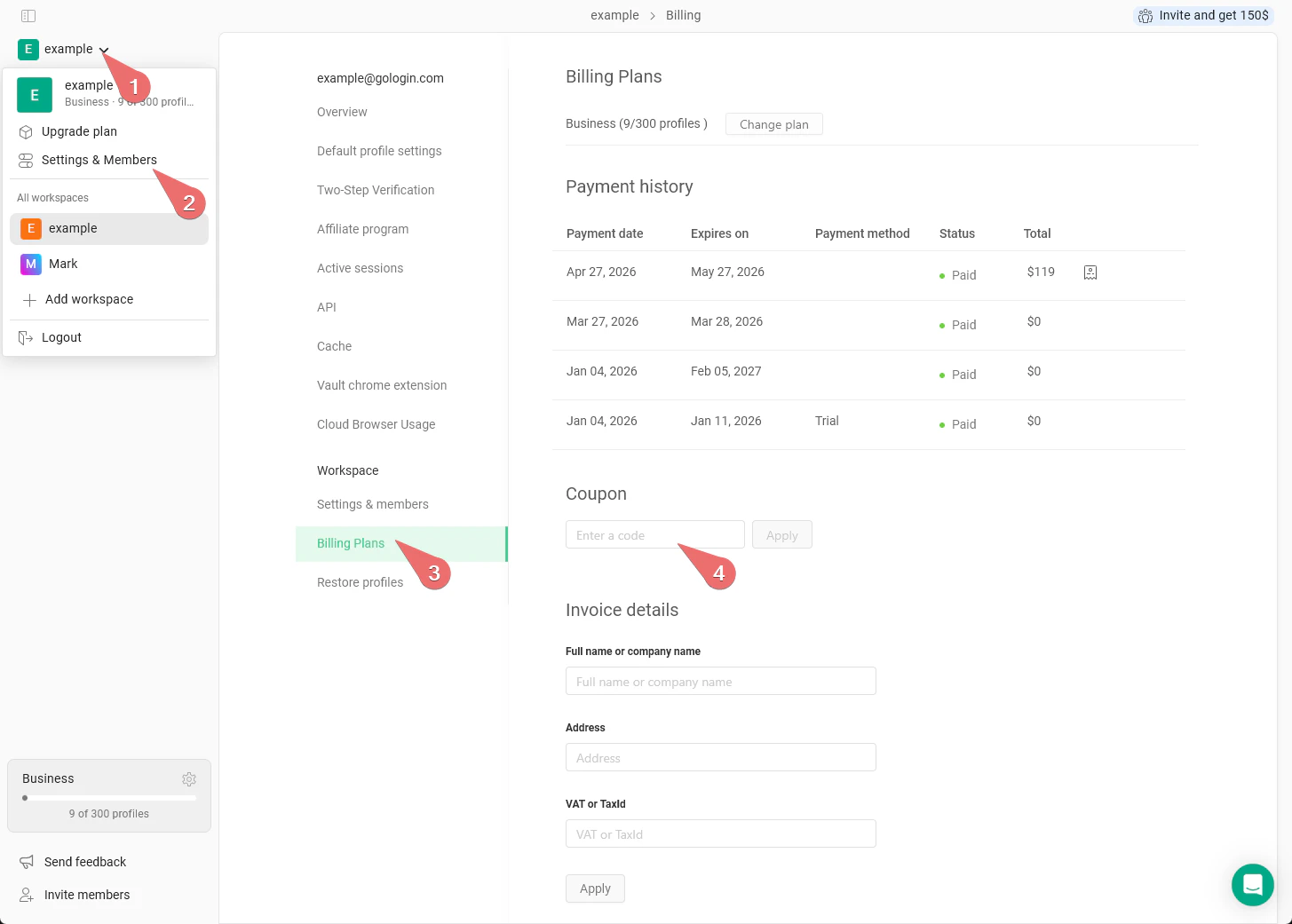
1. Go to **main settings on the top-left** > **Settings & Members**
2. Navigate to the **Billing plans** tab
3. Under the **Coupon** section, insert the promo code and hit **Apply**
4. Now you can choose your subscription plan by clicking **Change plan**, the promo code will be applied at checkout.
 ## When the promo code can be activated
The coupon code can be activated if you do not have prior purchased subscriptions in the account, it is available for the **first monthly subscription** only.
There are **no promo codes for the yearly subscription**, as it provides the 50% discount automatically.
Promo codes work for all the available [payment methods](/general/account-and-billing/payment-methods) **except for PayPal**.
Promo codes cannot be used in several cases:
* if promo code is invalid or expired
* if you have previously used a promo code
* if you've subscribed before
* if you're trying to buy annual subscription
* if you're trying to pay with PayPal
## Where to get a code
Promo codes can be found in various places online. We recommend searching on the internet. Please note that our support team does not have promo codes available, so there’s no need to pressure our agents for it :)
## When the promo code can be activated
The coupon code can be activated if you do not have prior purchased subscriptions in the account, it is available for the **first monthly subscription** only.
There are **no promo codes for the yearly subscription**, as it provides the 50% discount automatically.
Promo codes work for all the available [payment methods](/general/account-and-billing/payment-methods) **except for PayPal**.
Promo codes cannot be used in several cases:
* if promo code is invalid or expired
* if you have previously used a promo code
* if you've subscribed before
* if you're trying to buy annual subscription
* if you're trying to pay with PayPal
## Where to get a code
Promo codes can be found in various places online. We recommend searching on the internet. Please note that our support team does not have promo codes available, so there’s no need to pressure our agents for it :)