> ## Documentation Index
> Fetch the complete documentation index at: https://gologin.com/docs/llms.txt
> Use this file to discover all available pages before exploring further.
# Affiliate program
Gologin Affiliate Program lets you earn **10% of every payment** made by users you refer. There's no cap - every time a referred user renews or upgrades their subscription, you get a cut.
## How to get there
1. Click your **workspace name** in the top-left corner.
2. Select **Settings & Members**
3. In the left sidebar, click **Affiliate program**
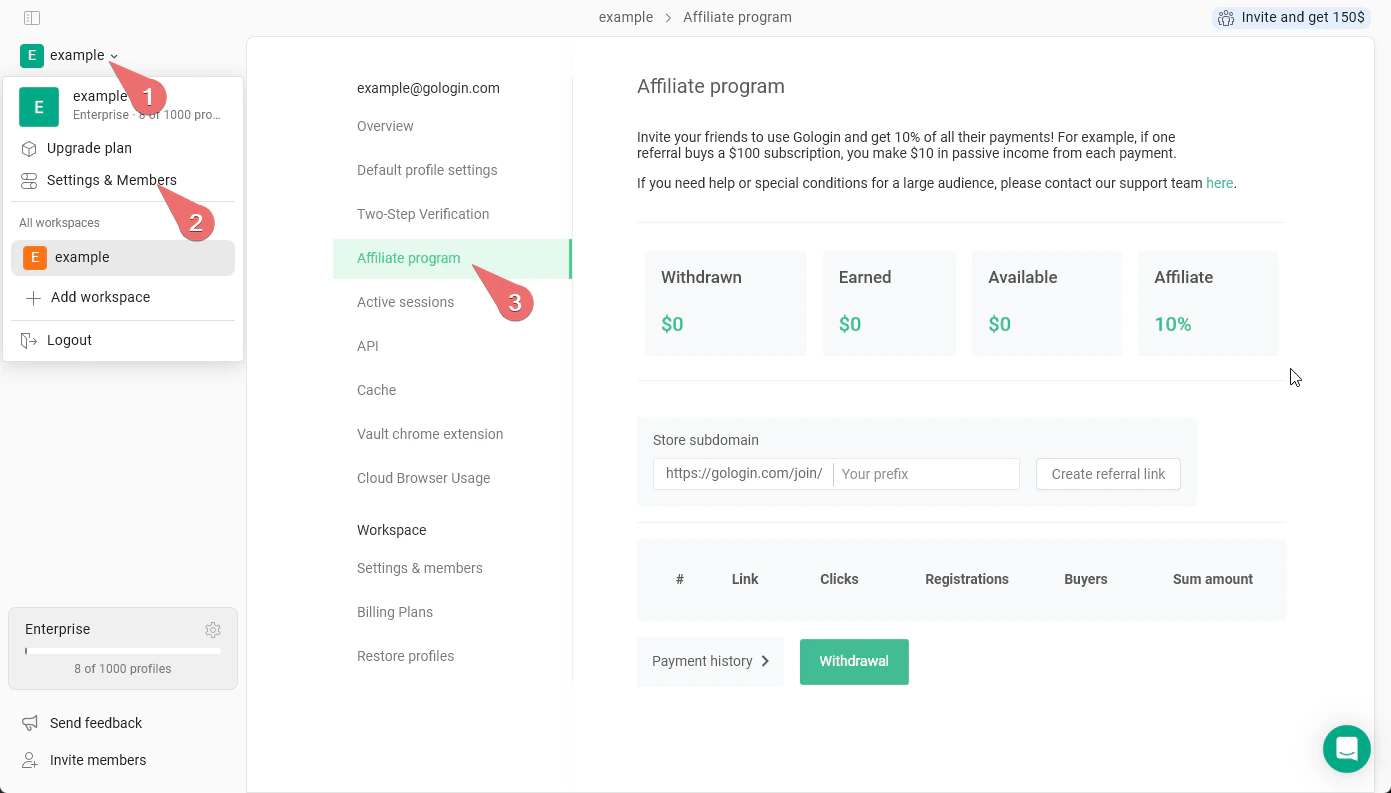 Dashboard explained:
| Metric | Description |
| :-------------- | :----------------------------------------------------- |
| **Withdrawn** | Total earnings already paid out to you. |
| **Earned** | Total commissions earned since you joined the program. |
| **Available** | Balance ready to withdraw right now. |
| **Affiliate %** | Your current commission rate (default: 10%). |
## Creating Your referral ink
Enter a custom prefix in the **Store subdomain** field and click **Create referral link**. Your link will follow the format: `https://gologin.com/join/your-prefix`
Share this link anywhere - social media, blogs, YouTube descriptions, or directly with potential users.
## Tracking performance
The table below the link builder tracks all your referral activity:
* **Link** - which referral link was used
* **Clicks** - how many times the link was clicked
* **Registrations** - how many clicks converted to signups
* **Buyers** - how many signups converted to paying customers
* **Sum amount** - total revenue generated from that link
## Withdrawing earnings
Click **Withdrawal** to request a payout of your available balance. You can also review past payouts under **Payment history**.
We may request your payment address and other details to provide the payment. Please reach out to the support team if your payment isn't credited for more than one week.
Dashboard explained:
| Metric | Description |
| :-------------- | :----------------------------------------------------- |
| **Withdrawn** | Total earnings already paid out to you. |
| **Earned** | Total commissions earned since you joined the program. |
| **Available** | Balance ready to withdraw right now. |
| **Affiliate %** | Your current commission rate (default: 10%). |
## Creating Your referral ink
Enter a custom prefix in the **Store subdomain** field and click **Create referral link**. Your link will follow the format: `https://gologin.com/join/your-prefix`
Share this link anywhere - social media, blogs, YouTube descriptions, or directly with potential users.
## Tracking performance
The table below the link builder tracks all your referral activity:
* **Link** - which referral link was used
* **Clicks** - how many times the link was clicked
* **Registrations** - how many clicks converted to signups
* **Buyers** - how many signups converted to paying customers
* **Sum amount** - total revenue generated from that link
## Withdrawing earnings
Click **Withdrawal** to request a payout of your available balance. You can also review past payouts under **Payment history**.
We may request your payment address and other details to provide the payment. Please reach out to the support team if your payment isn't credited for more than one week.