> ## Documentation Index
> Fetch the complete documentation index at: https://gologin.com/docs/llms.txt
> Use this file to discover all available pages before exploring further.
# Restore browser sessions
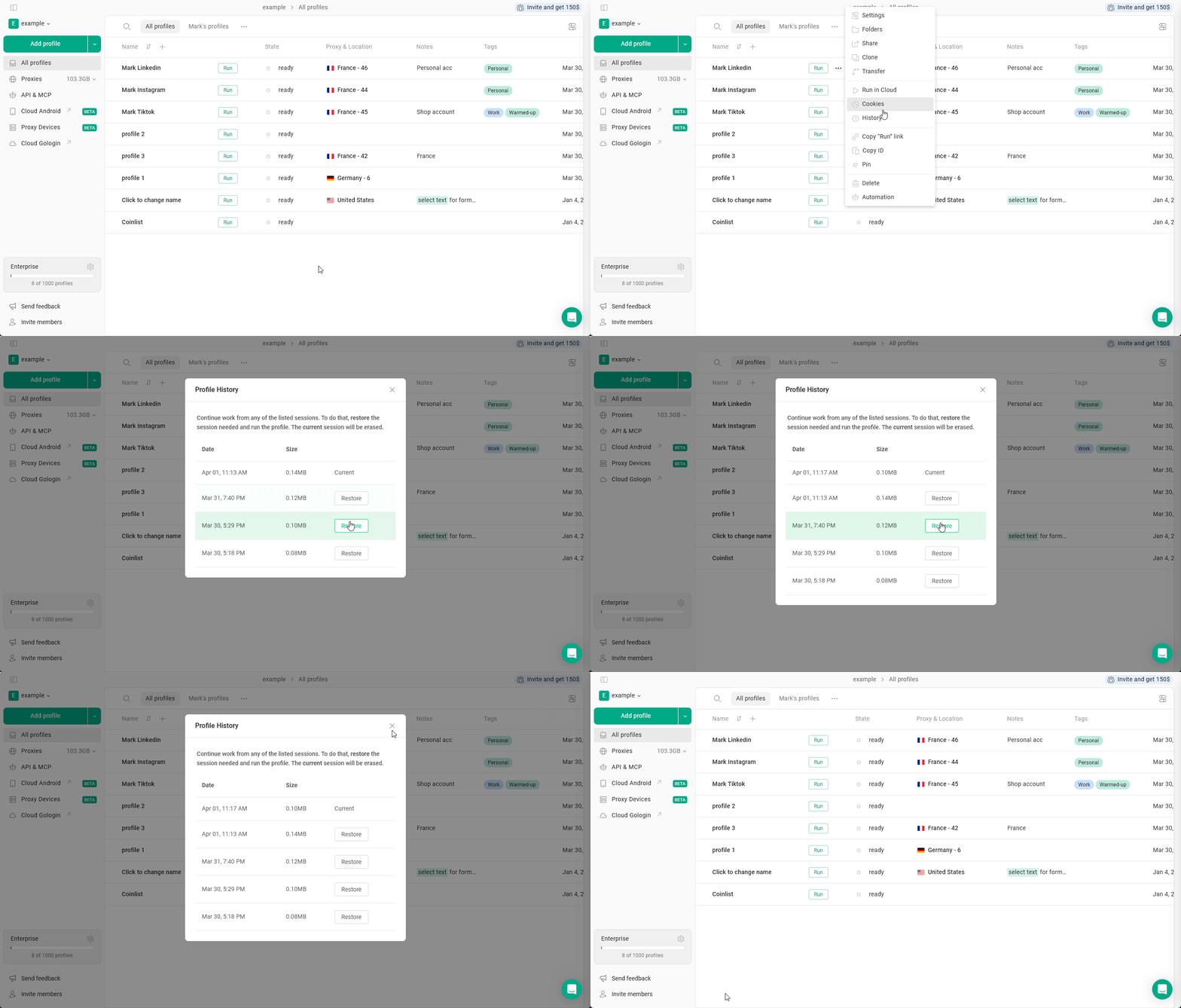
Every time you run and close a Gologin profile, the system automatically creates a **session snapshot**. **Profile history** in Gologin allows you to restore from up to **5 latest sessions**.
A session snapshot includes:
* Cookies
* Session storage
* Logged-in state
* Website tokens
* Browser data from that session
If needed, you can restore the profile to any of these previous session states.
## How to restore the profile session?
To restore your profile to one of the 5 latest sessions, just
1. Click **3 dots** on the profile
2. Select **History**
3. Choose the desired session
4. Click **Restore**
 ## When to use profile history?
Restoring from snapshots could be useful when:
1. **An account got logged out**\
If a website logs you out unexpectedly, you can restore a previous session where the account was still active.
2. **Lost data**\
If you don't see the recent opened tabs or suspect that the last profile sync wasn't correct due to network connection issues.
3. **Broken website state**\
If you see the website doesn't behave like it's supposed to due to cache changes or extension intervention.
4. **Profile non-functional** If you can't launch a profile due to any non-proxy-related erros, for example, if the previous session didn't sync correctly.
## Best practices
* **Always close profiles properly**\
Abrupt shutdowns may result in unstable snapshots.
* **Don't abuse restores**
Constantly jumping between sessions can look unnatural.
* **Keep proxy consistency**
Restoring a US session while using a new EU proxy may invalidate cookies.
* **Use it as a recovery tool**\
It's best for fixting mistakes or reverting instability.
## When to use profile history?
Restoring from snapshots could be useful when:
1. **An account got logged out**\
If a website logs you out unexpectedly, you can restore a previous session where the account was still active.
2. **Lost data**\
If you don't see the recent opened tabs or suspect that the last profile sync wasn't correct due to network connection issues.
3. **Broken website state**\
If you see the website doesn't behave like it's supposed to due to cache changes or extension intervention.
4. **Profile non-functional** If you can't launch a profile due to any non-proxy-related erros, for example, if the previous session didn't sync correctly.
## Best practices
* **Always close profiles properly**\
Abrupt shutdowns may result in unstable snapshots.
* **Don't abuse restores**
Constantly jumping between sessions can look unnatural.
* **Keep proxy consistency**
Restoring a US session while using a new EU proxy may invalidate cookies.
* **Use it as a recovery tool**\
It's best for fixting mistakes or reverting instability.