> ## Documentation Index
> Fetch the complete documentation index at: https://gologin.com/docs/llms.txt
> Use this file to discover all available pages before exploring further.
# Getting Started
Gologin Cloud Browser lets you run a browser session **in the cloud** and control it from your automation tool (Puppeteer / Playwright) using a single **connection URL**.
**Prefer a CLI?** Use the [Gologin Agent Browser CLI](/cli-tools/agent-browser) to control Cloud Browser from the shell without writing code — built for AI agents with snapshots, refs, and a persistent daemon.
## Connection URL
Use this URL in your automation library as a remote browser endpoint:
```text theme={null}
https://cloudbrowser.gologin.com/connect?token=${token}&profile=${profileId}
```
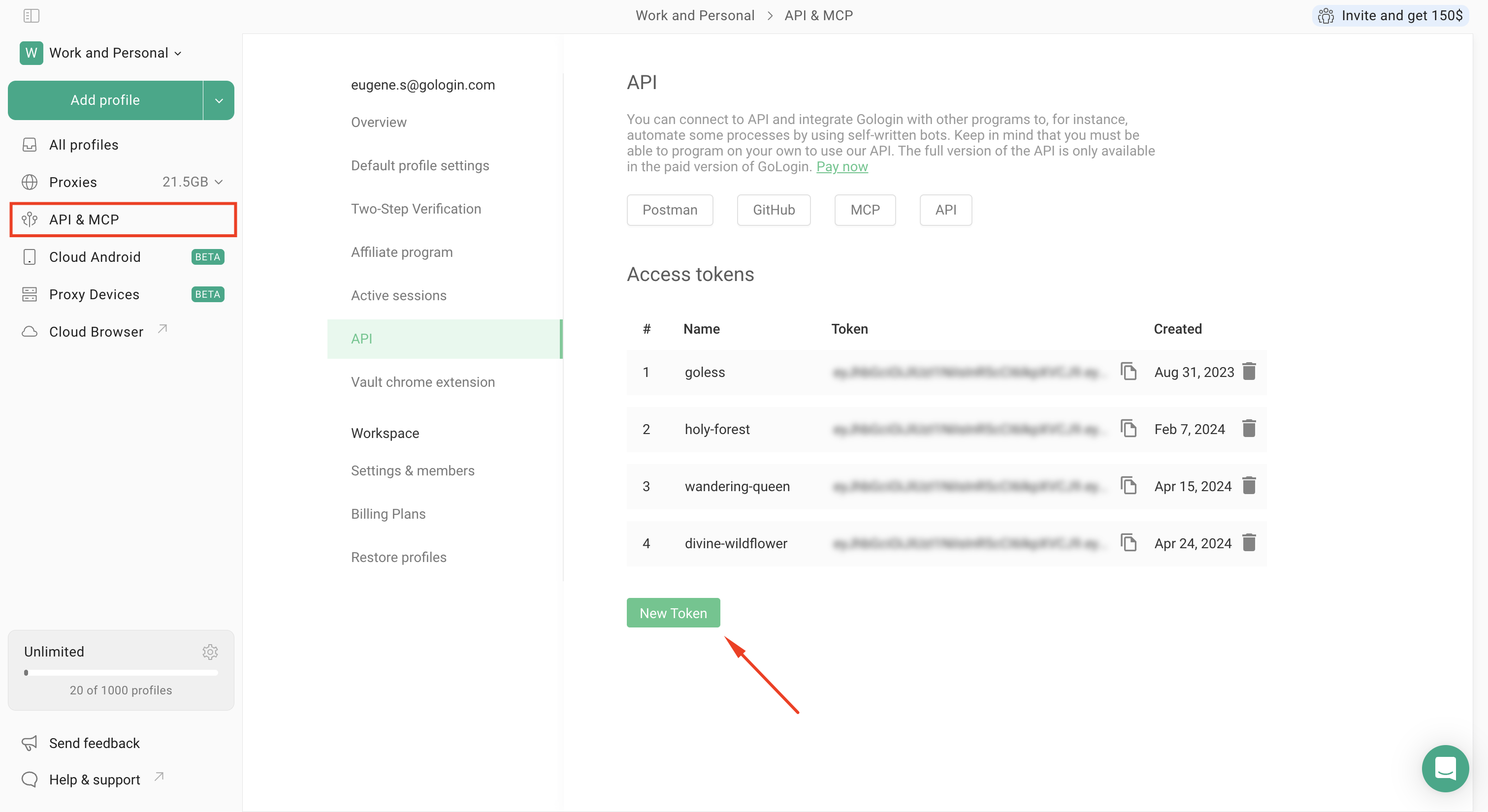
* `token` — your Gologin **dev token**.
* `profile` — **profile ID** (optional):
* if provided, Gologin will run this profile in the cloud;
* if omitted, Gologin will create a new profile for the session.
> Note: This URL is used as a **WebSocket connection endpoint** by automation libraries (for example `browserWSEndpoint` in Puppeteer).\
> Generate your token in the GoLogin dashboard: `Personal Area → API Token`.
 ## Managing profiles (proxy, fingerprint, etc.)
Cloud Browser is only the **connection layer** (remote browser session).\
To **create/update profiles**, attach **proxies**, configure **fingerprint**, tags, and other profile settings, use the Gologin **REST API**:
* Profiles API: [https://gologin.com/docs/api-reference/profile](https://gologin.com/docs/api-reference/profile)
* Proxies API: [https://gologin.com/docs/api-reference/proxy](https://gologin.com/docs/api-reference/proxy)
# Examples
```javascript Puppeteer theme={null}
import puppeteer from 'puppeteer-core';
const token = process.env.GL_API_TOKEN || 'your dev token here';
const profileId = 'profile ID';
const CLOUD_BROWSER_URL = `https://cloudbrowser.gologin.com/connect?token=${token}&profile=${profileId}`;
const STOP_PROFILE_URL = `https://api.gologin.com/browser/${profileId}/web`;
async function stopProfile() {
await fetch(STOP_PROFILE_URL, {
method: 'DELETE',
headers: { Authorization: `Bearer ${token}` },
});
}
async function main() {
const response = await fetch(CLOUD_BROWSER_URL);
if (!response.ok) {
const errorReason = response.headers.get('X-Error-Reason');
throw new Error(`Failed to start cloud browser: ${errorReason ?? response.statusText}`);
}
const browser = await puppeteer.connect({
browserWSEndpoint: CLOUD_BROWSER_URL,
ignoreHTTPSErrors: true,
});
const page = await browser.newPage();
await page.goto('https://iphey.com/', { waitUntil: 'networkidle2' });
const status = await page.$eval('.trustworthy:not(.hide)',
(elt) => elt?.innerText?.trim(),
);
return status;
}
main().catch(console.error).finally(stopProfile);
```
```python Playwright theme={null}
import asyncio
import os
import aiohttp
from playwright.async_api import async_playwright
token = os.environ.get('GL_API_TOKEN', 'your dev token here')
profile_id = 'profile ID'
CLOUD_BROWSER_URL = f'wss://cloudbrowser.gologin.com/connect?token={token}&profile={profile_id}'
STOP_PROFILE_URL = f'https://api.gologin.com/browser/{profile_id}/web'
async def stop_profile():
async with aiohttp.ClientSession() as session:
await session.delete(STOP_PROFILE_URL, headers={'Authorization': f'Bearer {token}'})
async def main():
async with aiohttp.ClientSession() as session:
response = await session.get(CLOUD_BROWSER_URL.replace('wss://', 'https://'))
if response.status >= 400:
error_reason = response.headers.get('X-Error-Reason', response.reason)
raise RuntimeError(f'Failed to start cloud browser: {error_reason}')
async with async_playwright() as p:
browser = await p.chromium.connect_over_cdp(CLOUD_BROWSER_URL)
page = await browser.new_page()
await page.goto('https://iphey.com/', wait_until='networkidle')
status = await page.eval_on_selector(
'.trustworthy:not(.hide)',
'(elt) => elt?.innerText?.trim()',
)
print('status', status)
await browser.close()
return status
if __name__ == '__main__':
try:
asyncio.run(main())
finally:
asyncio.run(stop_profile())
```
## Managing profiles (proxy, fingerprint, etc.)
Cloud Browser is only the **connection layer** (remote browser session).\
To **create/update profiles**, attach **proxies**, configure **fingerprint**, tags, and other profile settings, use the Gologin **REST API**:
* Profiles API: [https://gologin.com/docs/api-reference/profile](https://gologin.com/docs/api-reference/profile)
* Proxies API: [https://gologin.com/docs/api-reference/proxy](https://gologin.com/docs/api-reference/proxy)
# Examples
```javascript Puppeteer theme={null}
import puppeteer from 'puppeteer-core';
const token = process.env.GL_API_TOKEN || 'your dev token here';
const profileId = 'profile ID';
const CLOUD_BROWSER_URL = `https://cloudbrowser.gologin.com/connect?token=${token}&profile=${profileId}`;
const STOP_PROFILE_URL = `https://api.gologin.com/browser/${profileId}/web`;
async function stopProfile() {
await fetch(STOP_PROFILE_URL, {
method: 'DELETE',
headers: { Authorization: `Bearer ${token}` },
});
}
async function main() {
const response = await fetch(CLOUD_BROWSER_URL);
if (!response.ok) {
const errorReason = response.headers.get('X-Error-Reason');
throw new Error(`Failed to start cloud browser: ${errorReason ?? response.statusText}`);
}
const browser = await puppeteer.connect({
browserWSEndpoint: CLOUD_BROWSER_URL,
ignoreHTTPSErrors: true,
});
const page = await browser.newPage();
await page.goto('https://iphey.com/', { waitUntil: 'networkidle2' });
const status = await page.$eval('.trustworthy:not(.hide)',
(elt) => elt?.innerText?.trim(),
);
return status;
}
main().catch(console.error).finally(stopProfile);
```
```python Playwright theme={null}
import asyncio
import os
import aiohttp
from playwright.async_api import async_playwright
token = os.environ.get('GL_API_TOKEN', 'your dev token here')
profile_id = 'profile ID'
CLOUD_BROWSER_URL = f'wss://cloudbrowser.gologin.com/connect?token={token}&profile={profile_id}'
STOP_PROFILE_URL = f'https://api.gologin.com/browser/{profile_id}/web'
async def stop_profile():
async with aiohttp.ClientSession() as session:
await session.delete(STOP_PROFILE_URL, headers={'Authorization': f'Bearer {token}'})
async def main():
async with aiohttp.ClientSession() as session:
response = await session.get(CLOUD_BROWSER_URL.replace('wss://', 'https://'))
if response.status >= 400:
error_reason = response.headers.get('X-Error-Reason', response.reason)
raise RuntimeError(f'Failed to start cloud browser: {error_reason}')
async with async_playwright() as p:
browser = await p.chromium.connect_over_cdp(CLOUD_BROWSER_URL)
page = await browser.new_page()
await page.goto('https://iphey.com/', wait_until='networkidle')
status = await page.eval_on_selector(
'.trustworthy:not(.hide)',
'(elt) => elt?.innerText?.trim()',
)
print('status', status)
await browser.close()
return status
if __name__ == '__main__':
try:
asyncio.run(main())
finally:
asyncio.run(stop_profile())
```